Found Multiple Bugs :: XSS, MITM, Sec-MisConf :: In a GOVT Educational Site
The site ran an outdated CKEditor (version 4.3.3) vulnerable to several known cross-site scripting flaws, and an SSH service was exposed that was affected by the Terrapin downgrade issue. An attacker could inject script through the editor and, in principle, interfere with SSH connections, while a cookie lacked the Secure flag.
 Published on medium.com
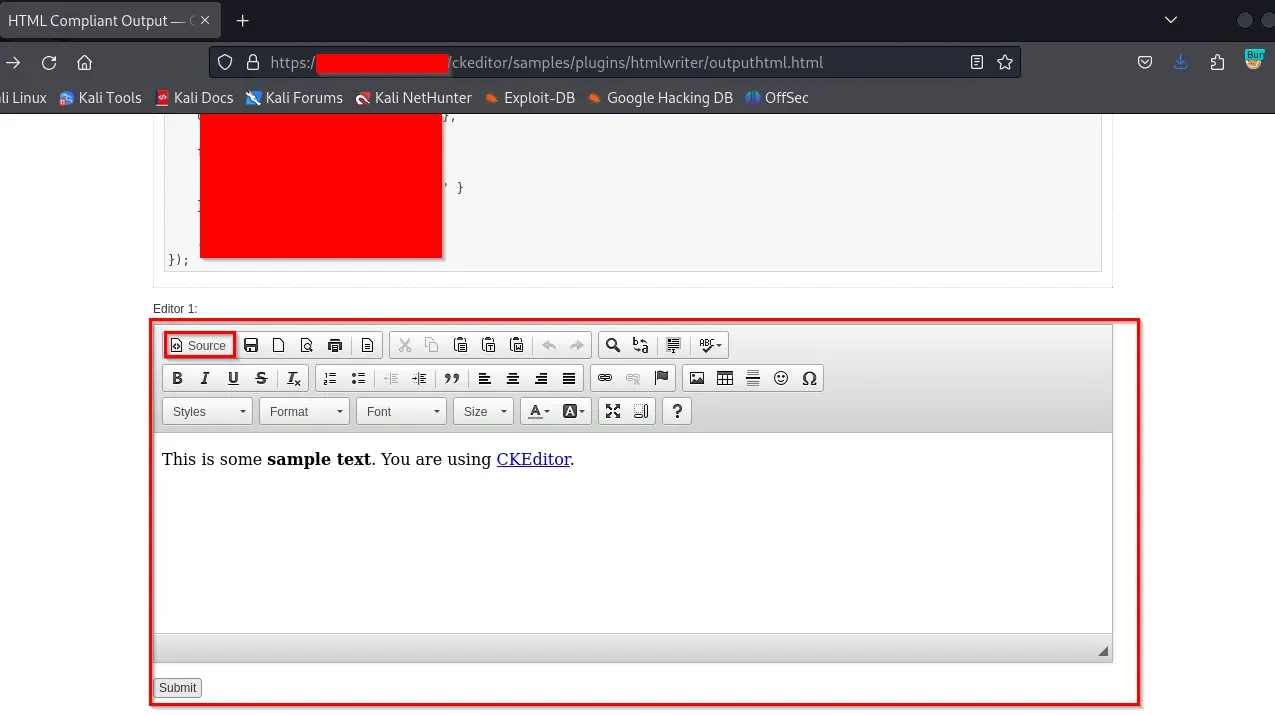
During the enumeration phrase, i have detected some open “CkeEditor” (webeditor).In this editor, a user can insert and run html codes into the browser according to their need.
The full write-up lives on its author's site
It belongs to its author, so we link to it rather than copy it. The other two tabs are our own rewrites, checked against it.
Context
This write-up covers a reconnaissance session against an educational (college) website, in which the author, known as Professor0xx01, reports three separate issues: a cross-site scripting problem in an exposed CKEditor instance, an SSH service vulnerable to the Terrapin attack, and a cookie missing the Secure flag. The target is described only as a government educational site; the report does not name the host, the institution or the application.
The feature at the centre of the first finding is a web editor. During enumeration the author found an openly reachable CKEditor instance, a what-you-see-is-what-you-get HTML editor in which a user can insert and run HTML code in the browser according to their needs. Because the editor accepts HTML from its users, the version in use determines whether malformed markup can escape sanitisation.
Setup
The report does not describe any accounts, roles or registration steps. The work was done with Burp as the intercepting proxy, and the author also used Google searches to map the detected editor version to known CVEs. No specific Burp version, browser version or operating system is given.
Finding it
While enumerating the site the author came across the open CKEditor page. A search for known issues with the product led to CVE-2022-24728, which the author quotes as follows:
CKEditor4 is an open source what-you-see-is-what-you-get HTML editor. A vulnerability has been discovered in the core HTML processing module and may affect all plugins used by CKEditor 4 prior to version 4.18.0. The vulnerability allows someone to inject malformed HTML bypassing content sanitisation, which could result in executing JavaScript code. This problem has been patched in version 4.18.0. There are currently no known workarounds.
The editor page as first seen is shown below.
With a candidate CVE in hand, the author moved to Burp to confirm the behaviour on the live page.

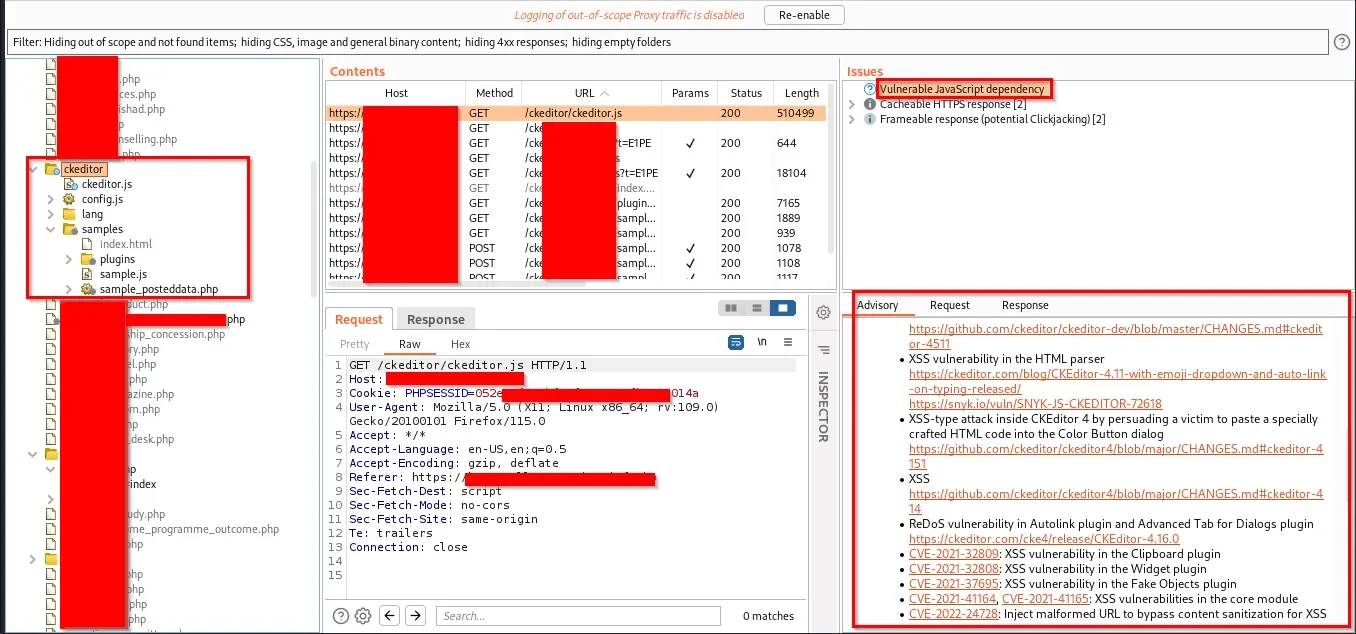
Intercepting the editor traffic showed multiple XSS issues on the CKEditor page. The author also identified the deployed version as CKEditor 4.3.3, a vulnerable JavaScript dependency, and treats that version as confirmation that the severity is serious.
Exploitation
Step 1: Confirm the editor version and the vulnerable dependency
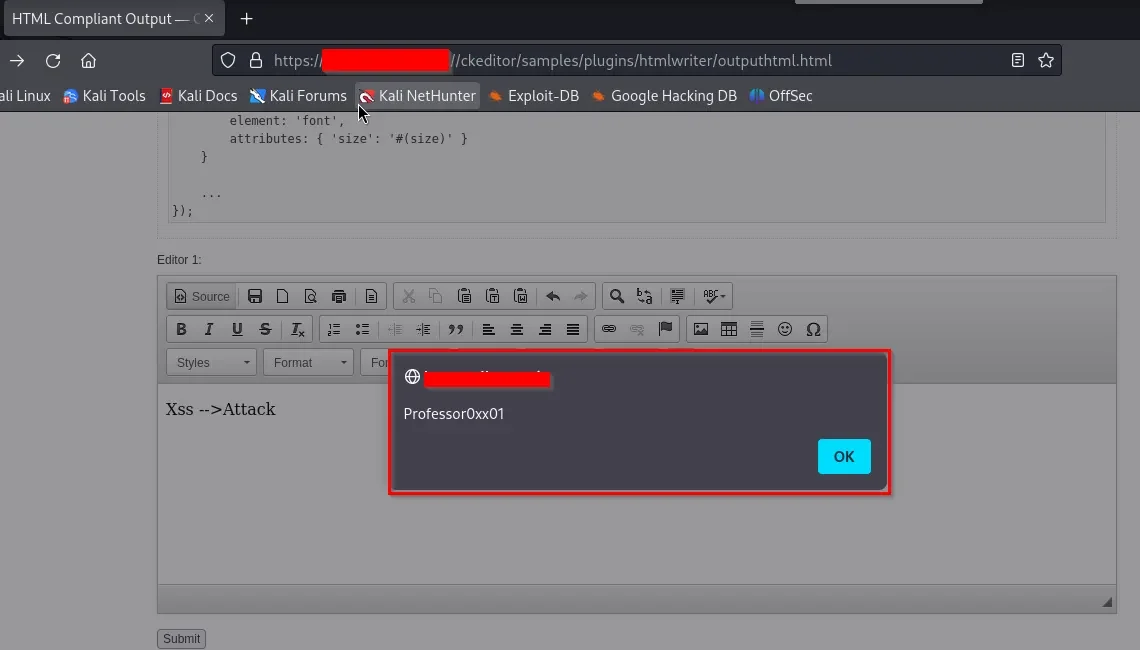
The author identified the deployed version as CKEditor 4.3.3, which predates the 4.18.0 fix line described in CVE-2022-24728. The author notes that all of the CVEs listed below are valid for this CKEditor 4.3.3 web editor, and that only one proof-of-concept image is attached to keep the article short.
Step 2: Inject the payload through the editor
The proof of concept is the following payload, submitted through the editor:
Xss<!--{cke_protected} --!><img src=x onerror=alert(`Professor0xx01`)> -->AttackXss<!--{cke{cke_protected}_protected} --!><img src=x onerror=alert(`Professor0xx01`)> Attack
The proof of concept is the following payload, submitted through the editor: The payload wraps image tags in CKEditor's cke_protected comment markers, with the sequence repeated using a different nesting. The exact response from the server is not reproduced in the report.
Step 3: Record the related CVEs
Beyond CVE-2022-24728, the author lists the following CVEs as applicable to the same editor:
- CVE-2021-33829
- CVE-2021-32809
- CVE-2021-32808
- CVE-2021-41164
- CVE-2021-41165
- CVE-2021-37695
Step 4: Note the exposed SSH service
During the same reconnaissance the author found TCP port 22 open and recorded the authentication methods and SSH version banner. The service is reported as vulnerable to CVE-2023-48795, which the author quotes:
The SSH transport protocol with certain OpenSSH extensions, found in OpenSSH before 9.6 and other products, allows remote attackers to bypass integrity checks such that some packets are omitted (from the extension negotiation message), and a client and server may consequently end up with a connection for which some security features have been downgraded or disabled, aka a Terrapin attack. This occurs because the SSH Binary Packet Protocol (BPP), implemented by these extensions, mishandles the handshake phase and mishandles use of sequence numbers.

The author explicitly stops there and does not attempt to break the integrity of the SSH session, stating that doing so would be illegal.
Step 5: Check cookie flags
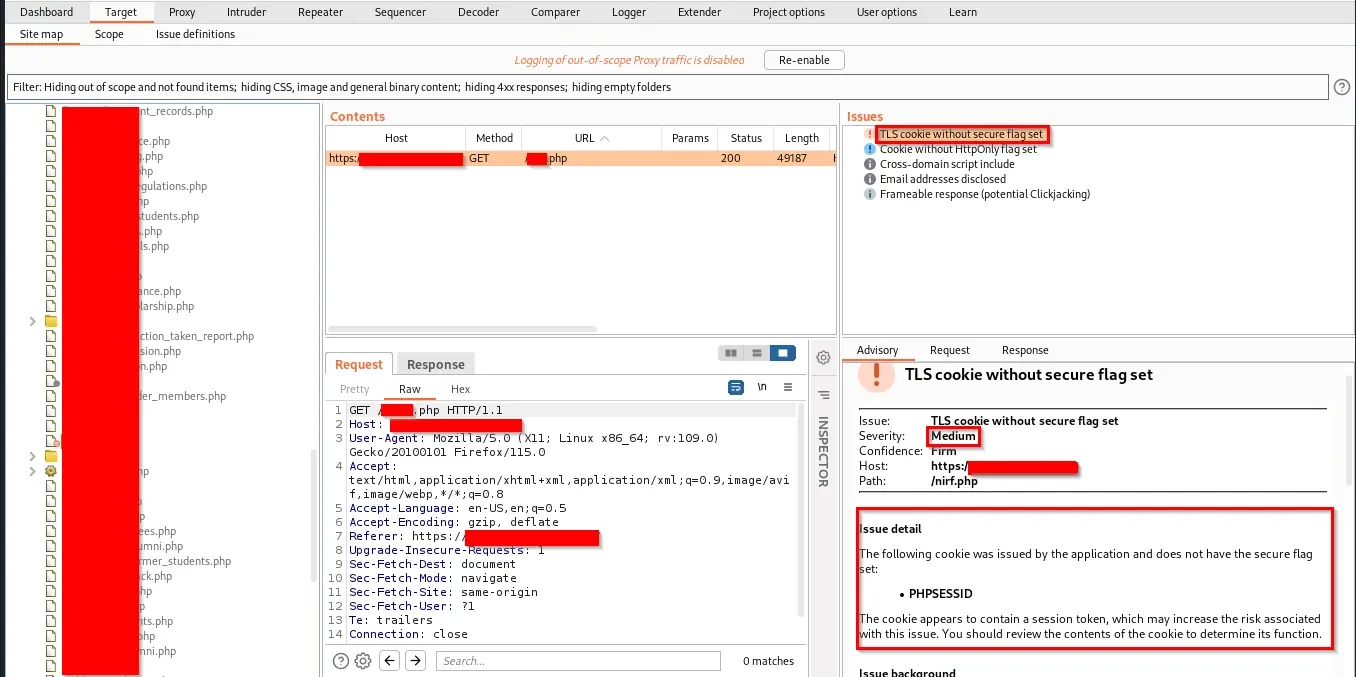
While reviewing endpoints the author found a cookie without the Secure flag. The reasoning given is that a cookie with the Secure flag set is never submitted over an unencrypted HTTP connection, which prevents trivial interception by an attacker monitoring network traffic. Without the flag, the cookie is transmitted in clear text whenever the user visits any HTTP URL within the cookie's scope. An attacker can try to induce that by feeding the user suitable links, directly or through another website. Even if the domain issuing the cookie hosts no content served over HTTP, the author notes that links of the form http://example.com:443/ can be used to perform the same attack.
Root cause
The XSS finding is rooted in an outdated CKEditor 4.3.3 deployment. The core HTML processing module in versions before 4.18.0 mishandles malformed HTML, so the sanitisation that should strip dangerous markup can be bypassed and JavaScript ends up executing in the browser.
The quoted advisory describes a protocol-level weakness in the handshake and sequence-number handling of the SSH Binary Packet Protocol as implemented by certain OpenSSH extensions, present in OpenSSH before 9.6.
The cookie finding is a configuration mistake: the Secure attribute is absent, so the browser will send the cookie over plain HTTP as well as HTTPS.
Impact
For the XSS, the author's demonstration is an alert() firing in the context of the editor page. The author treats the vulnerable dependency as serious on its own.
For the SSH issue, the theoretical impact is a Terrapin-style downgrade or disabling of security features through omission of packets during extension negotiation. The author did not attempt to exploit it.
For the cookie issue, the impact is exposure of the cookie to a network attacker who can get the victim to make an HTTP request within the cookie's scope, including via the http://example.com:443/ link trick. The report does not identify which cookie or what session it protects.
Fix
For CKEditor, the quoted advisory states the problem is patched in version 4.18.0 and that there are no known workarounds, so the fix is to upgrade the editor to 4.18.0 or later. For SSH, the quoted advisory places the flaw in OpenSSH before 9.6. For the cookie, the fix is to set the Secure flag on the cookie so browsers never submit it over unencrypted HTTP.
Variants to test
- Identify the CKEditor version in use on other sites, then compare against the 4.18.0 fix line. A positive result is a version below 4.18.0 on a page that accepts user HTML.
- Reuse the
cke_protectedcomment-wrapping payload against other CKEditor instances and watch for theonerrorhandler firing. A positive result is script execution in the editor context. - Check SSH banners for OpenSSH versions below 9.6 and record the supported extensions. A positive result is a version in the vulnerable range with the extensions the Terrapin attack relies on.
- Review every cookie set by an application for the Secure attribute, then test whether it is sent over an HTTP URL in the cookie's scope, including the
http://host:443/form. A positive result is the cookie appearing in a plain HTTP request.
What happened, in plain words
A security researcher who goes by the name Professor0xx01 spent some time looking around a college website run by a government education body. Looking around a website before attacking it is called reconnaissance, or recon for short: it is the same idea as walking around a building and noting which doors are unlocked before you try to open any of them. During that walk-around the researcher found three separate problems and wrote them up. This article retells that write-up for someone who has never done security testing before, so every term is explained as it comes up.
The three problems were:
- A web page editor called CKEditor was reachable by anyone, and the version installed was old enough to contain known security bugs. One of those bugs lets an attacker slip JavaScript into the page, a class of bug called cross-site scripting, or XSS.
- The server had a remote login service called SSH switched on, and the author reports that this SSH protocol is vulnerable to CVE-2023-48795, a flaw nicknamed the Terrapin attack, which is a kind of man-in-the-middle (MITM) attack.
- A cookie set by the site was missing a safety setting called the Secure flag, which means the browser could be tricked into sending it over an unencrypted connection where someone watching the network could read it.
The report does not name the website, the college or the organisation. It only says it is a government educational site.
Background you need first
A few ideas come up again and again below, so here they are from zero.
A web page and its HTML. Every page you see in a browser is built from a text file written in a language called HTML. HTML uses tags such as <img> (an image) or <a> (a link) to tell the browser what to draw. A browser reads the tags and turns them into the page you see.
JavaScript. JavaScript is a small programming language that browsers can run inside a page. It is what makes menus open, forms check your typing and pages update without reloading. It is also powerful: JavaScript running in a page can read what is on that page and act on your behalf on that site. That is why letting a stranger's JavaScript into a page is dangerous.
A web editor. Many websites let their staff type formatted text into a box, the way you would in a word processor: bold, italics, images, links. The software that provides that box is called a WYSIWYG editor, short for what-you-see-is-what-you-get. CKEditor is one such product. Because its whole job is to accept HTML from the person typing, it has to be careful about which HTML it lets through. That filtering is called sanitisation: stripping out anything dangerous before the text is saved or shown.
A version number and a CVE. Software is released in versions, numbered like 4.3.3 or 4.18.0, and each release fixes bugs found in earlier ones. When a security bug is made public it is given an identifier called a CVE, short for Common Vulnerabilities and Exposures, in the form CVE-YYYY-NNNNN. A CVE entry is a public record: it says which product and versions are affected and which version fixes it. Reading CVEs is how a tester turns "I see version X" into "I know this version has these known holes".
A dependency. A dependency is a piece of software that a website includes rather than writes itself, like a ready-made part in a machine. If the part is old, the whole machine inherits the old part's faults. The report calls CKEditor a vulnerable JavaScript dependency for exactly this reason.
Burp. Burp Suite is a tool that sits between your browser and a website. Normally your browser talks straight to the server; with Burp in the middle, every request your browser sends and every reply the server gives passes through Burp, where you can read it, pause it and change it before letting it continue. This is called an intercepting proxy. Testers use it because the browser hides most of what is really being sent.
A port. A server is one computer offering many services at once, and each service listens on a numbered port, like different doors into the same building. Port 22 is the standard door for SSH. Port 443 is the standard door for encrypted web traffic (HTTPS), and port 80 for unencrypted web traffic (HTTP).
SSH. SSH, the Secure Shell, is the protocol administrators use to log in to a server's command line remotely. The connection is encrypted, and before you log in the server announces itself with a short greeting called a banner, which usually includes the software name and version, for example OpenSSH. It also lists which ways of proving your identity it accepts, called authentication methods, such as a password or a key file.
A man-in-the-middle attack. If two people talk over a network, an attacker who can sit on the path between them may be able to listen in or quietly alter what is said. That is a man-in-the-middle attack, MITM. Encryption is supposed to prevent it, which is why a flaw that lets an attacker interfere with an encrypted connection matters.
A cookie. When you log in to a site, the server needs a way to recognise you on your next click. It sends your browser a small piece of text called a cookie, and the browser sends that cookie back with every later request to the same site. A cookie often acts like a wristband at an event: show it and you are let in without proving who you are again. If someone else copies the wristband, they get in too, which is why cookies must be protected.
HTTP versus HTTPS. HTTP is the plain, unencrypted way browsers and servers talk. HTTPS is the same conversation wrapped in encryption. On HTTP, anyone on the same network, such as the Wi-Fi operator, can read the traffic. On HTTPS they cannot.
The Secure flag. A cookie can carry settings called attributes. One of them, Secure, is an instruction to the browser: never send this cookie over plain HTTP, only over HTTPS. Without it, the browser will happily send the cookie over HTTP if a page asks for it, in clear text.
With those ideas in place, here is how each finding was made.
First bug: cross-site scripting in CKEditor
What was found
While looking around the site, the researcher came across an openly reachable CKEditor page. "Openly reachable" means the editor was there for anyone to load, not tucked behind a login. The report describes the editor as one in which a user can insert and run HTML code in the browser according to their need. That is the normal purpose of an editor, but it also means the editor is the place where HTML enters the site, and therefore the place where the filtering has to be right.
This is what the editor page looked like:
The web editor as first seen.
Why the researcher searched for a CVE
Seeing the product name is not enough to call it a bug. The next step was to find out whether this particular product, in the version installed, had known problems. The researcher searched Google for the editor's name and known issues and found CVE-2022-24728. The report quotes the advisory as follows:
CKEditor4 is an open source what-you-see-is-what-you-get HTML editor. A vulnerability has been discovered in the core HTML processing module and may affect all plugins used by CKEditor 4 prior to version 4.18.0. The vulnerability allows someone to inject malformed HTML bypassing content sanitisation, which could result in executing JavaScript code. This problem has been patched in version 4.18.0. There are currently no known workarounds.
In plain words: the part of CKEditor that reads and cleans HTML (the core HTML processing module) can be fooled by badly formed HTML. "Malformed" means HTML that is not written the tidy way the filter expects, for example tags nested or commented in unusual ways. In plain words: the part of CKEditor that reads and cleans HTML (the core HTML processing module) can be fooled by badly formed HTML, so the JavaScript inside can end up running. Every CKEditor 4 release before 4.18.0 is affected, and the fix is to install 4.18.0. "No known workarounds" means there is no setting you can flip to be safe; you have to upgrade.
Why Burp was used next
A CVE tells you a version is theoretically vulnerable. It does not prove that this particular site is exploitable, because the site might have added its own protections or might not expose the editor in a way that matters. So the researcher switched to Burp to test the live page and see the actual requests and responses. This is the difference between reading that a lock model has a flaw and actually trying the door.
Traffic from the editor page seen through Burp.
Looking at the traffic, the researcher found multiple XSS vulnerabilities on the CKEditor page. The researcher also identified the installed version as CKEditor 4.3.3. That number is the key fact: 4.3.3 is far below the 4.18.0 fix line quoted above, so the site is running a version that the advisory says is vulnerable. The report calls this a vulnerable JavaScript dependency and says the version confirms the severity is serious.
The proof of concept.
The payload and what each part does
The proof of concept is the following text, entered through the editor:
Xss<!--{cke_protected} --!><img src=x onerror=alert(`Professor0xx01`)> -->AttackXss<!--{cke{cke_protected}_protected} --!><img src=x onerror=alert(`Professor0xx01`)> Attack
Line by line, in plain words:
Xssis just text. It does nothing; it is there as a label so the tester can see where the payload begins.<!--opens an HTML comment. Everything between<!--and-->is normally ignored by the browser and not displayed.{cke_protected}is a marker CKEditor itself uses. When the editor saves content, it wraps parts it wants to protect in comment markers like this so that its own processing leaves them alone. The researcher is imitating the editor's own bookkeeping.<img src=x onerror=...>asks the browser to load an image.src=xpoints at a file calledxthat does not exist, so the load fails.onerror=alert(Professor0xx01)is an event handler: an instruction the browser runs when something happens. Here the something is the failed image load. When the image fails, the browser runs the JavaScriptalert(Professor0xx01), which pops up a small dialog box showing the text Professor0xx01. A pop-up is the harmless, standard way to prove that JavaScript ran, because only JavaScript can make that box appear.-->closes the comment in the normal way.Attackis more label text.- The whole sequence then repeats with a slightly different nesting of the
cke_protectedmarkers:<!--{cke{cke_protected}_protected} --!>. The whole sequence then repeats with a slightly different nesting of thecke_protectedmarkers.
The report does not reproduce the server's response, so what the server sent back is not shown.
The proof of concept captured by Professor0xx01.
Why the version matters so much
The researcher notes that only one proof-of-concept image is attached, to keep the article from getting too long, and that all of the CVEs listed next are valid for this CKEditor 4.3.3 editor. In other words, the single demonstrated payload stands in for a family of known issues that all apply to the same old version. The CVEs listed are:
- CVE-2021-33829
- CVE-2021-32809
- CVE-2021-32808
- CVE-2021-41164
- CVE-2021-41165
- CVE-2021-37695
Each of these is a public record of a security bug in CKEditor. The point of listing them is not that each was separately exploited, but that a version this old accumulates many known problems at once, which is why keeping dependencies up to date matters.
What the root cause is, and what the impact could be
The root cause is simple to state: the site runs CKEditor 4.3.3, and versions before 4.18.0 mishandle malformed HTML, so the sanitisation that should strip dangerous markup can be bypassed and JavaScript ends up running in the browser. The report does not show how the server handles the editor's output, so it does not establish whether the injected content is stored and later shown to other users, or only reflected back to the person who typed it. That distinction matters for impact: if other people, such as administrators, later view the injected content, their browsers would run the attacker's JavaScript in the context of the site. The researcher treats the outdated dependency as serious on its own.
The fix
The quoted advisory says the problem is patched in version 4.18.0 and that there are no known workarounds. The fix is therefore to upgrade CKEditor to 4.18.0 or later.
Second issue: an SSH service open to the Terrapin attack
What was found
During the same reconnaissance the researcher noticed that port 22 was open, meaning the server was offering SSH logins to the network. The researcher recorded the authentication methods the server advertised and the SSH version in its banner. The interesting part was that this SSH service is vulnerable to CVE-2023-48795. The report quotes the advisory:
The SSH transport protocol with certain OpenSSH extensions, found in OpenSSH before 9.6 and other products, allows remote attackers to bypass integrity checks such that some packets are omitted (from the extension negotiation message), and a client and server may consequently end up with a connection for which some security features have been downgraded or disabled, aka a Terrapin attack. This occurs because the SSH Binary Packet Protocol (BPP), implemented by these extensions, mishandles the handshake phase and mishandles use of sequence numbers.
The SSH service details observed during recon.
What that advisory means in plain words
When two computers set up an encrypted SSH connection, they first agree on the rules of the conversation. That agreement stage is called the handshake. During it, each side sends numbered packets, and the numbering (sequence numbers) is part of how each side checks that nothing has been removed or reordered. Integrity checks are the mechanism that detects tampering.
The Terrapin attack exploits a weakness in how certain optional OpenSSH extensions handle that handshake and those sequence numbers. An attacker positioned in the middle can cause some packets to be dropped from the negotiation message without the integrity check noticing. The two ends then finish connecting, but with some security features quietly downgraded or switched off. That is why it is classed as a man-in-the-middle attack: the attacker does not need to break the encryption, only to interfere with the setup so that the connection is weaker than it should be. The advisory places the flaw in OpenSSH before version 9.6.
Why the researcher stopped there
The researcher explicitly did not go further and did not try to break the integrity of the SSH session, stating that doing so would be illegal. This is an important habit in security work: proving that a service is the vulnerable version is enough to report it. Actually interfering with a live connection, or logging in without permission, crosses from testing into unauthorised access.
The fix
The quoted advisory places the flaw in OpenSSH before 9.6, so the remedy is to upgrade the SSH server.
Third issue: a cookie without the Secure flag
What was found
While reviewing the site's endpoints, the researcher noticed another security misconfiguration. A misconfiguration is not a bug in the software itself; it is a setting left in an unsafe state, like leaving a window unlocked in an otherwise solid house. Here the setting was a cookie missing the Secure flag. The report explains the issue as follows:
If the secure flag is set on a cookie, then browsers will not submit the cookie in any requests that use an unencrypted HTTP connection, thereby preventing the cookie from being trivially intercepted by an attacker monitoring network traffic. If the secure flag is not set, then the cookie will be transmitted in clear-text if the user visits any HTTP URLs within the cookie's scope. An attacker may be able to induce this event by feeding a user suitable links, either directly or via another web site. Even if the domain that issued the cookie does not host any content that is accessed over HTTP, an attacker may be able to use links of the form http://example.com:443/ to perform the same attack.
The misconfiguration captured as proof.
What that means in plain words
A cookie with the Secure flag set is never sent over plain HTTP. The browser simply refuses. That stops an attacker who is watching network traffic from casually reading the cookie, because on HTTPS the traffic is encrypted.
Without the flag, the browser will send the cookie in clear text whenever the user visits any HTTP address that falls within the cookie's scope. Scope means the set of addresses the cookie belongs to; a cookie set for a whole domain is sent to every page on that domain.
An attacker cannot force a browser to visit a page, but they can tempt it. Sending someone a link, directly or through another website, is enough: if the link is an HTTP address in the cookie's scope, the browser will attach the cookie to the request, and anyone on the network path can read it.
The last sentence covers a clever case. Suppose the site only ever serves pages over HTTPS, so there seems to be no HTTP address to trick anyone into visiting. The researcher notes that a link of the form http://example.com:443/ still works for the attack. The http:// part makes the browser treat the request as unencrypted, while :443 points at the port normally used for HTTPS. The report notes that an attacker may be able to use links of the form http://example.com:443/ to perform the same attack. The report does not identify which cookie this was or what session it protects.
The fix
The fix is to set the Secure flag on the cookie, so browsers never submit it over unencrypted HTTP.
Other places to look for the same problems
The three findings are not unique to this site. The same checks can be repeated elsewhere:
- Find out which version of CKEditor a site uses, then compare it with the 4.18.0 fix line. A version below 4.18.0 on a page that accepts user HTML is worth investigating.
- Try the same
cke_protectedcomment-wrapping payload against other CKEditor instances and watch whether theonerrorhandler fires. Script running in the editor page is the sign it worked. - Check SSH banners for OpenSSH versions below 9.6 and note which extensions the server supports. A version in the vulnerable range with the extensions the Terrapin attack relies on is the sign to look for.
- Review every cookie an application sets for the Secure attribute, then test whether it is sent over an HTTP address in the cookie's scope, including the
http://host:443/form. The cookie appearing in a plain HTTP request is the sign it worked.
That is the whole story: an old editor that let malformed HTML through, an SSH service running a version with a known handshake flaw, and a cookie that could travel unencrypted. None of the three required breaking into anything; each was found by looking carefully and comparing what was there against public records of known problems.

Glossary
- Authentication methods: the ways a server accepts proof of who you are, such as a password or a key file.
- Banner: the short greeting a service sends when you connect, often naming the software and its version.
- Burp Suite: a tool that sits between browser and website so you can read, pause and change the traffic; an intercepting proxy.
- CKEditor: a WYSIWYG HTML editor product used inside websites to let people type formatted text.
- Clear text: data sent without encryption, readable by anyone on the network path.
- Cookie: a small piece of text a site stores in your browser and your browser sends back with later requests, often used to recognise a logged-in user.
- Cross-site scripting (XSS): a bug where an attacker gets their own JavaScript to run inside someone else's web page.
- CVE: Common Vulnerabilities and Exposures, a public identifier and record for a known security bug, in the form CVE-YYYY-NNNNN.
- Dependency: software a site includes rather than writes itself; if it is outdated, the site inherits its known faults.
- Endpoint: a specific address or function on a website that a request can be sent to.
- Event handler: an instruction in HTML that runs when something happens, such as
onerrorwhen an image fails to load. - Handshake: the opening stage of a connection where the two sides agree on how they will talk.
- HTML: the language web pages are written in, made of tags such as
<img>and<a>. - HTTP: the plain, unencrypted protocol browsers and servers use to exchange web pages.
- HTTPS: HTTP wrapped in encryption.
- Integrity check: a mechanism that lets each side detect whether data was altered or removed in transit.
- JavaScript: the programming language browsers run inside pages; it can act on the page and on the user's behalf on that site.
- Malformed HTML: HTML written in an unusual or broken way that a strict filter may not recognise but a browser still understands.
- Man-in-the-middle (MITM): an attack where someone sits on the network path between two parties to listen in or interfere.
- Misconfiguration: an unsafe setting rather than a software bug, such as a missing cookie flag.
- OpenSSH: the most common implementation of the SSH protocol.
- Payload: the piece of text or code an attacker submits to try to trigger a bug.
- Port: a numbered door on a server through which a particular service is reached; 22 for SSH, 80 for HTTP, 443 for HTTPS.
- Reconnaissance (recon): the looking-around phase of a test, gathering facts about a target before trying anything.
- Sanitisation: filtering input to strip out anything dangerous before it is stored or displayed.
- Scope (of a cookie): the set of addresses a cookie belongs to and is sent to.
- Secure flag: a cookie attribute telling the browser never to send that cookie over plain HTTP.
- Sequence numbers: numbered packets used in a protocol so each side can tell whether anything was dropped or reordered.
- SSH: Secure Shell, the encrypted protocol used to log in to a server's command line remotely.
- Terrapin attack: a man-in-the-middle attack against SSH that abuses handshake and sequence-number handling to downgrade or disable security features.
- Version: the numbered release of a piece of software; newer versions usually fix bugs found in older ones.
- WYSIWYG: what-you-see-is-what-you-get, an editor that shows text formatted as it will appear.