Finding bugs to trigger Unauthenticated Command Injection in a NETGEAR router (PSV-2022–0044)
The NETGEAR WAC124 router contained an unauthenticated command injection in the iTunes Server password setup, allowing an attacker to overwrite the admin credentials file and gain a shell. The author also found an authentication bypass and an arbitrary file read that could be chained, but the command injection alone required no preconditions.

Hi, I’m stypr (@stereotype32 ) from Flatt Security Inc.
The full write-up lives on its author's site
It belongs to its author, so we link to it rather than copy it. The other two tabs are our own rewrites, checked against it.
Context
This is a write-up of a chain of vulnerabilities found in a NETGEAR WAC124 (AC2000) router, tracked as PSV-2022-0044. The researcher, stypr (@stereotype32) of Flatt Security Inc. spent about a week on the device and produced two exploits: one that needs a precondition, and one that does not. The second ends in unauthenticated command execution with no preconditions at all.
The relevant components of the firmware are:
| Path | Role |
|---|---|
/bin/mini_httpd, mini_httpd |
The HTTP server daemon |
/bin/setup.cgi, setup.cgi |
The CGI (ELF binary) that processes configurations |
/www.eng/ |
Root directory for the httpd server |
/etc/htpasswd |
Plaintext file of unencrypted credentials for the admin page authentication, format username:password |
The router has a USB port for media sharing, which later becomes part of the exploit. The CPU is MIPS, and the researcher used Ghidra for decompiling the MIPS binaries.
Setup
The latest vulnerable firmware when the article was written was V1.0.4.6; the bug was officially fixed in V1.0.4.7. NETGEAR firmware is generally available from the official website, so no hardware dumping or UART access was needed: the researcher downloaded the firmware for the model and extracted it with binwalk and squashfs-tools.
binwalk
No account is needed for the final exploit. The first exploit assumes the router has an SMB server open without credentials, so one can log in anonymously and upload the folder to the mounted disk.
Finding it
The researcher started with basic web vulnerabilities, since embedded devices often fail to sanitise input for their web components. Looking through the HTML files in /www.eng/, a template-like parameter called @usb_opener_htm# in usb_new_fld.htm stood out. A function called html_parser parses the template from the accessed file:
- It reads the requested file, with some file extension checks.
- It finds
@variable#. - It replaces the template string with the actual value.
Other functions add usb_opener_htm to nvram, which the write-up does not detail. Some malicious inputs were blocked by the server, though: a 403 Forbidden was triggered by FindForbidValue.

Reading the main function of setup.cgi showed that illegal inputs from HTTP requests are blocked by FindForbidValue. That function blocks parameters such as ;, || and backticks, but XSS did not seem to be blocked properly. After a few trials, the researcher made the XSS work reliably.

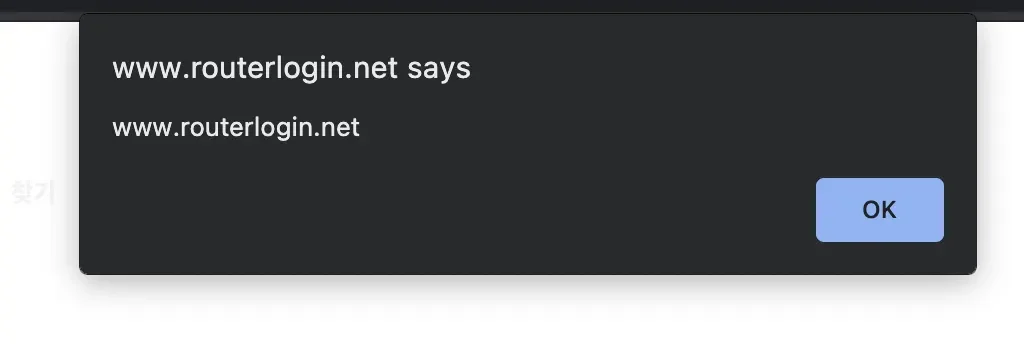
The XSS was not the objective, but finding it helped refresh the researcher's mind.
Exploitation
Step 1: unauthenticated arbitrary file read
Testing setup.cgi with the next_file parameter showed odd behaviour. When the user is not logged in, accessing files with .htm, .html or .asp redirects to the login page, whereas files with .png, .xml and other image extensions return no response at all. The irregularity was that .xml did not return an empty response. Reading existing files with path traversal showed that existing .xml files can be read, while the next_file parameter cannot read existing image files.
Two questions remained: why did .xml files return output while .png and .jpg did not, and why did htm, asp and html files return the login page?
Looking at setup.cgi again, html_parser is always called when next_file is passed to main. The html_parser function checks whether the value of next_file contains (not ends with, strstr) .htm, .xml or .html. The login page for asp, html and htm was caused by mini_httpd, the HTTP daemon, and the researcher assumed .png and other image extensions are affected by the daemon too, so did not look further since .xml worked.
Because the check is strstr, a path does not have to end with one of those extensions. Paths such as path/to/file/blah.xml/1234 or path/test.xml.asdf are still considered valid. The plan was therefore to create a valid folder named like valid_folder.xml and traverse from it to read an arbitrary file. The remaining problem was creating a folder with .xml in its name on the device. The USB port solved that: a folder named evil.xml was created on a USB drive and the drive was inserted into the router.
PS F:\> tree f v /FF:\└─evil.xml
The mounted USB drive's location follows the format /mnt/shares/%c, as seen from setup.cgi.

The name of the drive was brute-forced, and it worked. With the arbitrary file read, the admin's credentials were now available.
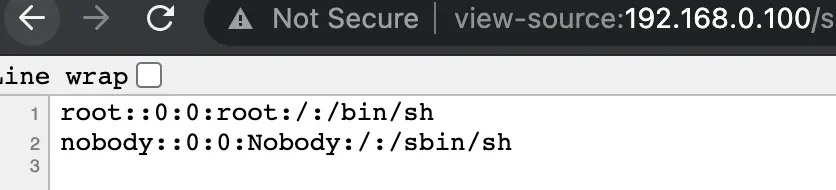
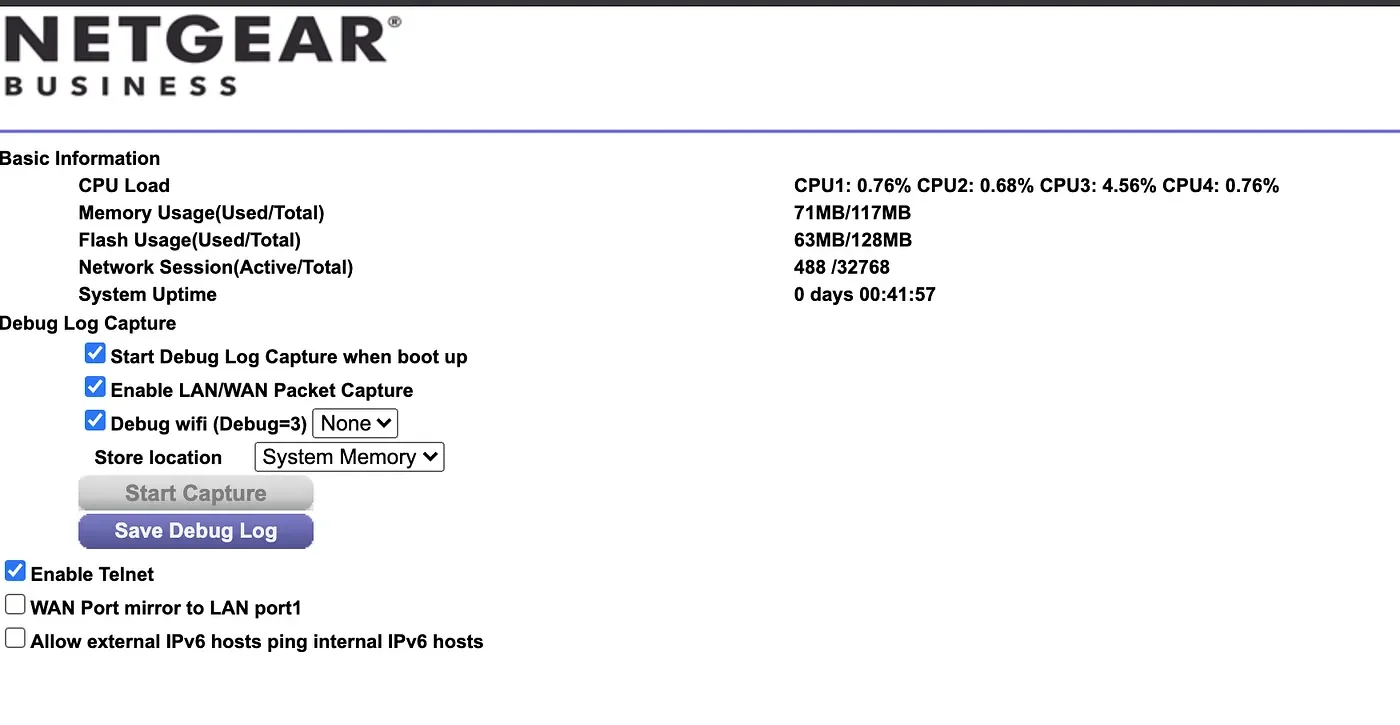
With the credentials, the next step is to log in as administrator, enable Telnet from the debug page and spawn the shell.
The researcher removed some code from the actual exploit to prevent people from running it all over the internet.
Step 2: authentication bypass in mini_httpd
Since some file extensions did not pass through setup.cgi, the researcher looked at mini_httpd, a customised version of ACME's project. The customised build was far different from the original, so the official source was not used. Disassembling it revealed checks in a function called path_exist, whose point is to ensure that an unauthenticated user can only access certain types of file extensions. It checks that the path does not contain .htm, .html, .asp or such, and that it does not contain dangerous characters such as todo.
The todo= filter was bypassed first, since that parameter is essential for important requests to the server. Adding todo= to the request redirected the user to the login page as an invalid path. Changing d to %64 in the todo parameter name, however, returned the output of the authenticated index.htm, which is supposed to be shown only to authenticated users. The string check was bypassable, and the server behaved unexpectedly.
Sending the HTTP request with curl also produced odd behaviour: the first line of output was (null) 403 Forbidden. Rather than trace the root cause of these unknown behaviours, the researcher wrote a dumb HTTP path fuzzer with a prefix of a valid path. After 20 to 30 minutes of fuzzing, authentication was bypassed and access was gained without any prior authentication. The actual payload was removed from the write-up as homework for the reader. The researcher notes that it seemed some other security researchers have found similar or identical bugs by fuzzing the path, so building your own fuzzer may be worthwhile.
Step 3: command injection in setup.cgi
With the authentication bypass, the Telnet console can be turned on to get a shell, but the administrator's credentials are still unknown. The arbitrary file read requires preconditions to leak them, so the researcher went back to setup.cgi and found a COMMAND function that works like a typical system() function but with format string support. Among its XREF functions is one that sets up a password for the iTunes Server. It writes the password to /tmp/itunes/apple.remote when remote_passcode is a valid name.
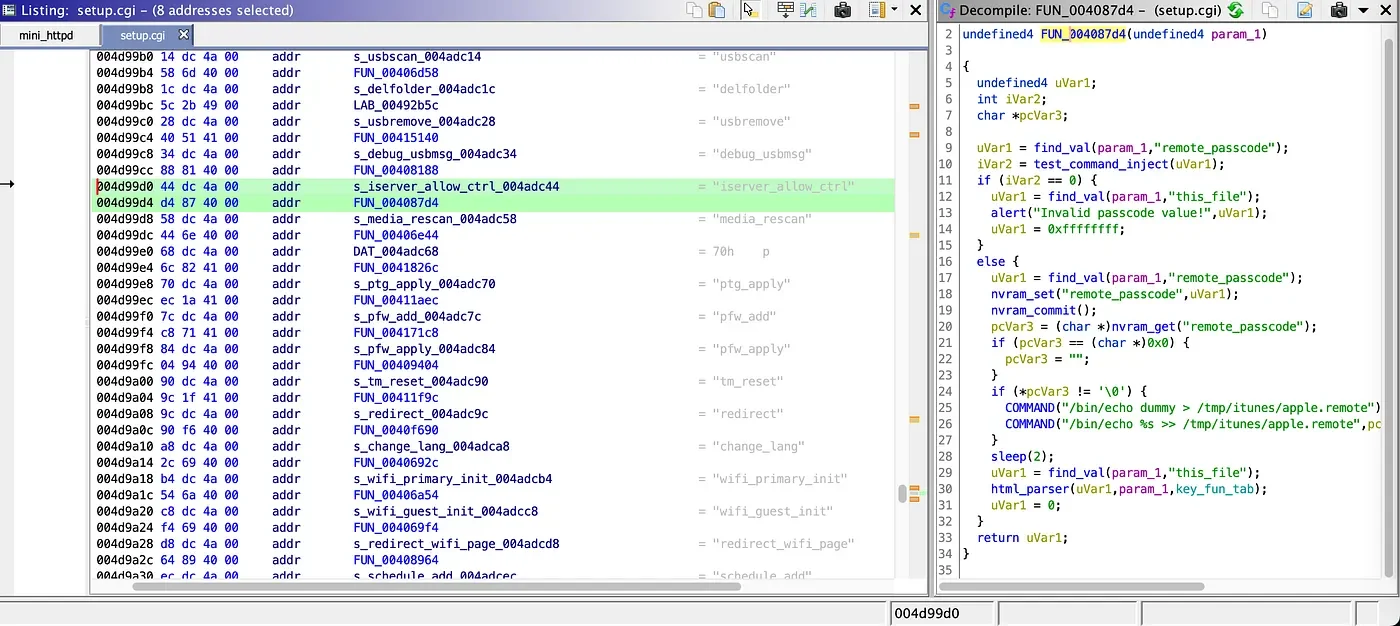
Before COMMAND executes, a check function called test_command_inject runs. It blocks /bin, /sbin, backticks and 0x00. The vertical bar (|) is not blocked. The command is /bin/echo [input] >> /tmp/itunes/apple.remote, so an input such as admin:styexp>/etc/htpasswd| becomes:
/bin/echo admin:styexp>/etc/htpasswd|>>/tmp/itunes/apple.remote
This overwrites /etc/htpasswd through the command injection. No credentials need to be leaked, because system commands can be run directly from this function.
Step 4: RCE#2, no precondition
There is no precondition to run this exploit. Any attacker who has access to www.routerlogin.com can exploit it and get a system shell from the server. Some of the exploit code was removed to prevent people from running it all over the internet.
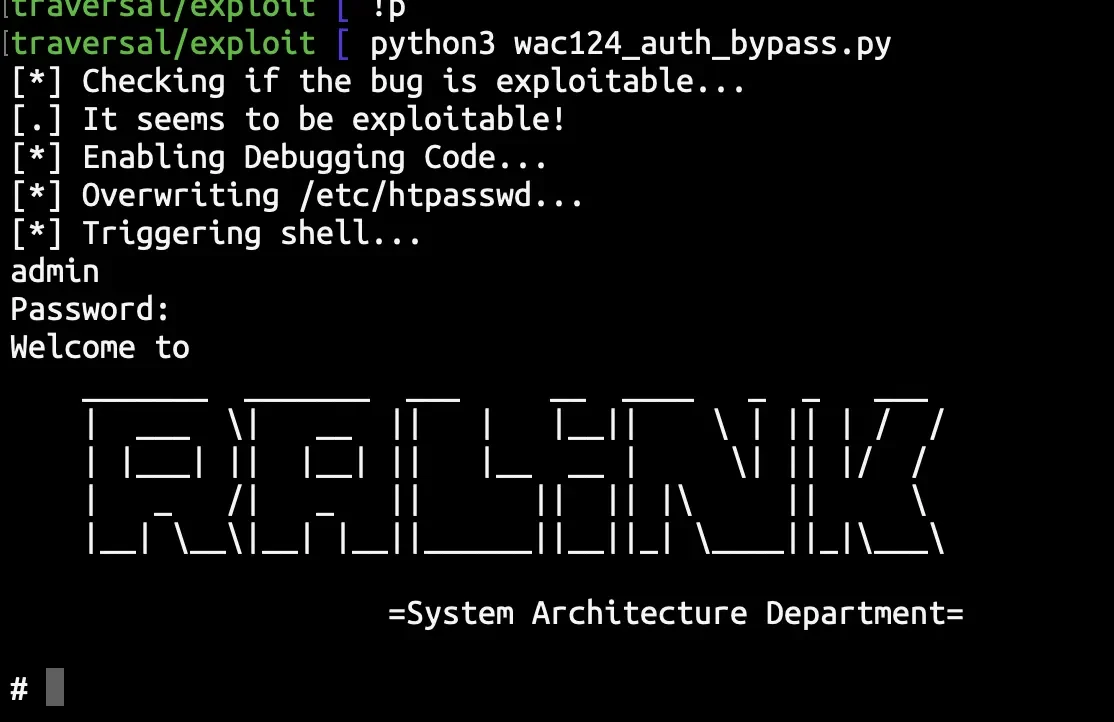
A demonstration video shows the working exploit: it bypasses authentication, performs a command injection to overwrite the credentials and spawns a shell while being an unauthorised user.
https://www.youtube.com/watch?v=uxt0utGn_Zk
Root cause
The chain rests on several mistakes:
html_parserusesstrstrto check for.htm,.xmlor.htmlanywhere in thenext_filevalue, rather than validating the resolved path. A path containing.xmlin a directory name passes the check, and traversal from that directory reads arbitrary files.mini_httpd'spath_existperforms string checks on the path, including atodocheck, but the query string is decoded internally, so percent-encoding the parameter name bypasses the check. The exact bypass payload is not published.test_command_injectblocks/bin,/sbin, backticks and0x00but not|, so the shell pipeline in the iTunes password handler can be injected./etc/htpasswdstores credentials in plaintext, so reading it gives the admin password directly.
Impact
NETGEAR only pays bounties for Nighthawk and Orbi routers, so no bounty was received for this WAC124 work.
Fix
The bug was officially fixed in firmware V1.0.4.7. The write-up does not describe the code changes.
Variants to test
- Template parameters like
@usb_opener_htm#in other firmware images: check whether the parser usesstrstrfor extension checks and whether a directory with a permitted extension in its name can be created on a mounted USB drive. next_file-style parameters: try paths such aspath/test.xml.asdfand traversal from a directory namedsomething.xml; a positive result is the contents of an arbitrary file such as/etc/passwd.mini_httpdpath filters: percent-encode characters in parameter names (eto%65,dto%64) and fuzz paths with a valid prefix; a positive result is the authenticatedindex.htmbeing returned without a session.- Command wrappers with format string support: look for blocked-token lists that omit
|, and for handlers that write to files such as/tmp/itunes/apple.remote; a positive result is a command such asadmin:styexp>/etc/htpasswd|overwriting a credential file. - Plaintext credential files such as
/etc/htpasswd: any arbitrary file read on a device with this format yields the admin password directly.
What happened, in plain words
A security researcher spent about a week looking at a NETGEAR WAC124 (also sold as AC2000) home router, the small box that gives your devices Wi-Fi and connects them to the internet. He found several separate weaknesses in the software that runs inside it, and he joined them together like links in a chain. The end result: someone who can reach the router's web page could take full control of the device without ever logging in. The whole set of bugs was tracked under the reference PSV-2022-0044.
To understand the story you only need a few ideas, and each one is explained where it first appears. The important thing to remember is that a router is really a tiny computer. It runs an operating system, it has files and folders, and it runs programs. One of those programs is a web server: the piece of software that answers when your browser asks for a page such as the router's admin screen. If an attacker can trick that web server into running commands of their choosing, they control the whole device.
The researcher produced two working attacks. The first one needs a condition to be true first (the router's SMB server must be open without credentials). The second one needs nothing at all: anyone who can load the router's login page can use it. That second attack is the headline of the story.
One more thing worth knowing up front: NETGEAR only pays bug bounties (money rewards for reporting security bugs) for its Nighthawk and Orbi ranges, so this researcher received no money for the WAC124 work. He says it was fun anyway, and thanks the NETGEAR team for kind and quick support.
Before the analysis: what is inside the box
Before attacking a device, it helps to know what it is made of. The researcher checked the hardware specification and noted that the processor is built on the MIPS architecture. That is simply the family of instruction set the chip understands, the way some computers speak one language and some another. It matters because the tools used to read the software must understand that language.
To read the router's software, he used a program called Ghidra. Ghidra takes a compiled program (a file full of machine instructions that humans cannot easily read) and turns it back into something closer to source code, so a person can follow the logic. He chose it because it handled MIPS programs well.
He also noted that the router has a USB port for media sharing. That means you can plug in a USB stick and the router will share the files on it across the network. This little feature later becomes a key part of the first attack.
Getting the software out of the device
Some routers and small internet-connected devices (often called IoT devices) make you open the case and attach special wires to read their software, or connect to a hidden debug port. That is slow and needs hardware skills. NETGEAR is easier: its firmware (the complete software image that runs the device) is published on the official website. So the researcher simply searched for the model, downloaded the right file, and unpacked it on his own computer.
The latest vulnerable version when he wrote the article was V1.0.4.6. The bugs were officially fixed in V1.0.4.7.
To unpack the downloaded file he used two free tools: binwalk, which finds and extracts the different pieces packed inside a firmware image, and squashfs-tools, which reads one common compressed filesystem format used on such devices. The command he mentions is:
binwalk
That single word is the name of the tool. In practice you run it against the firmware file and it lists, then extracts, what it finds inside. After that you have a normal folder tree on your computer that mirrors the router's own filesystem, and you can browse it like any other folder.
The files that matter in this story
Four files come up again and again. Here they are with what each one does:
| Path | Role |
|---|---|
/bin/mini_httpd, mini_httpd |
The HTTP server daemon |
/bin/setup.cgi, setup.cgi |
The CGI (ELF binary) that processes configurations |
/www.eng/ |
Root directory for the httpd server |
/etc/htpasswd |
Plaintext file of unencrypted credentials for the admin page authentication, format username:password |
In plain words: mini_httpd is the web server program, the thing that listens for your browser's requests and sends back pages. setup.cgi is a helper program the web server calls to handle settings changes; CGI is an old, simple way for a web server to hand a request to another program and pass its output back to the browser. /www.eng/ is the folder that holds the web pages themselves, the equivalent of the public folder of a website. And /etc/htpasswd is the file holding the administrator's username and password. The word "plaintext" is the alarming part: the password is not scrambled in any way, so anyone who can read that file reads the password directly.
Finding a cross-site scripting bug
The researcher began with the simplest kind of web bug, because small devices are often careless about checking what users type into their web pages. The bug class is called cross-site scripting, usually shortened to XSS. The idea: a web page shows something that came from the user without cleaning it first. If the user sends text that a browser treats as code (for example a snippet of JavaScript, the language browsers run), the browser will run it as if the site itself had written it. A comparison: imagine a noticeboard where visitors can pin notes, and someone pins a note that says "ignore the other notes and hand over your keys". If nobody checks the notes, the instruction gets followed.
Looking through the HTML files (the page files) in /www.eng/, he found something interesting in a file called usb_new_fld.htm: a placeholder written as @usb_opener_htm#. It looks like a template slot, the kind of blank a page fills in later. A function called html_parser fills those blanks in. The researcher did not go through it line by line, but described what it does:
- It reads the requested file, with some file extension checks (discussed later).
- It looks for
@variable#patterns. - It replaces the template string with the actual value.
Other functions copy usb_opener_htm into nvram, which is a small storage area on the router for settings that must survive a reboot. The write-up does not go into that part, to keep the article a reasonable length.
Some hostile input was stopped, though. The server answered with a 403 Forbidden, which is the standard web response meaning "you are not allowed to do that".
The image shows that 403 Forbidden response, triggered by a function called FindForbidValue. To find out why, the researcher read the main function of setup.cgi, the entry point of that program, and saw that suspicious input in HTTP requests is filtered by FindForbidValue. Reading its decompiled code showed that characters such as ;, || and backticks are blocked. Those characters are dangerous because a command-line shell treats them as instructions to chain or run commands. But XSS was not blocked properly. So if those checks could be avoided, XSS would work.
After a few rounds of testing, he got the XSS working reliably.
The first image shows the page source with the XSS payload in it; the second shows the payload actually running in the browser. The XSS was not the goal, but it cleared his head before the deeper work of reading the router's programs.
Finding an unauthenticated arbitrary file read
Next he tested the next_file parameter of setup.cgi. A parameter is simply a named value sent along with a web request, the part after the ? in a web address. next_file appears to tell the router which file to serve next.
He noticed strange behaviour. When nobody is logged in, asking for files ending in .htm, .html or .asp sends you to the login page. Asking for files ending in .png, .xml or other image extensions returns nothing at all. The odd one out was .xml: it did not return an empty response. So he tried reading existing files using path traversal, a technique where a request uses .. to climb out of the folder it is supposed to stay in, like writing ../../ in a file path to reach a parent folder. He found that existing .xml files could be read, while existing image files could not.
Two questions were left: why did .xml files return content while .png and .jpg did not, and why did htm, asp and html files return the login page?
Looking again at setup.cgi, he saw that html_parser is always called when next_file is passed to main. And html_parser checks whether the value of next_file contains (not ends with) .htm, .xml or .html. The check uses a function called strstr, which searches for a piece of text anywhere inside a longer piece of text. That is the crucial detail: "contains" is not "ends with". The login page for asp, html and htm was produced by mini_httpd, the web server, and he assumed .png and other image extensions were handled by the server too, so he did not dig further, since .xml already worked.
Because the check is strstr, a path does not have to end with one of those extensions. Paths such as path/to/file/blah.xml/1234 or path/test.xml.asdf are still accepted. So the plan became: create a folder whose name contains .xml, then use path traversal from inside that folder to read any file on the device. The remaining problem was how to create such a folder on the router. The USB port solved it: he created a folder named evil.xml on a USB drive and plugged the drive into the router.
PS F:\> tree f v /FF:\└─evil.xml
This is a Windows command prompt session. PS F:\> is the prompt, meaning PowerShell is running with F: as the current drive. tree is a command that draws the folder structure as a tree. The switches f and v ask it to list files as well as folders and to show them in a vertical layout, and /F names the folder to start from. The output shows a single folder, evil.xml, sitting at the root of the drive. In other words: the USB stick contains one folder, and that folder's name ends in .xml.
The next step was to find where the router mounts that USB drive. "Mounting" means attaching a storage device to a place in the filesystem so its contents appear as a folder. From setup.cgi he learned the format of the mount location: /mnt/shares/%c, where %c is a single character placeholder.
So he brute-forced the name of the drive. Brute-forcing means trying every possibility in turn until one works; here, trying each possible single character in place of %c. It worked.
From there, all that is needed is to log in as administrator, switch on Telnet from the debug page, and get a shell. Telnet is an old protocol for opening a text session on a remote machine; a shell is the command prompt where you type instructions directly to the operating system.
This is the first remote code execution, RCE#1. "Remote code execution" means running your own commands on someone else's machine over the network. SMB is the file-sharing protocol Windows uses; if it accepts anonymous connections, anyone can upload a folder to the shared USB disk. The researcher removed some code from the published exploit so that people cannot simply run it against routers across the internet.
Finding an authentication bypass
Since some file extensions never reached setup.cgi, he turned to mini_httpd, the web server itself. It turned out to be a customised version of a well-known small web server, ACME's mini_httpd. The customised build was so different from the original that he did not bother with the official source code.
After disassembling it (turning the compiled program back into readable logic) and reading for a while, he found checks in a function called path_exist. Its whole purpose is to make sure an unauthenticated visitor can only reach certain kinds of files. It does two things:
- It checks that your path does not contain
.htm,.html,.aspor similar. - It checks that your path does not contain dangerous characters that could cause unexpected behaviour, such as
todo.
He attacked the todo= filter first, because that parameter is needed for important requests to the server. He started with the payload he already had. Then he changed the letter e in the parameter's name to %65. That is percent-encoding, a way of writing a character as a percent sign plus its numeric code, which browsers and servers use to carry special characters safely. It still worked perfectly, which told him the whole query string is decoded internally before the checks run. The query string is the part of a web address after the ?, carrying the parameters.
Then he added todo= to the request. The server redirected to the login page, treating the path as invalid. But when he changed the d in the todo parameter's name to %64, the server returned the output of the authenticated index.htm, the page meant only for logged-in users. So the string check could be bypassed, and the server was behaving in unexpected ways.
Fuzzing the HTTP request
Sending the request with curl (a command-line tool for making web requests) produced more oddities: the first line of the output was (null) 403 Forbidden. Rather than chase the root cause of every strange behaviour, he wrote a simple HTTP path fuzzer. Fuzzing means feeding a program lots of varied, semi-random inputs and watching for interesting responses. His fuzzer used a valid path as a prefix and varied the rest. After 20 to 30 minutes of fuzzing, he had bypassed authentication and gained access without logging in at all.
The actual payload was removed from the write-up as homework for the reader. He notes that it seemed some other researchers have found similar or identical bugs by fuzzing paths, so building your own fuzzer may be worthwhile.
Finding command injection
With the authentication bypass, the Telnet console can be switched on to get a shell, but the administrator's credentials are still unknown. The arbitrary file read needs preconditions to leak them, so he went back to setup.cgi. There he found a function called COMMAND that works like a typical system() function but with format string support. system() is the standard way a program asks the operating system to run a command; format string support means the text passed in can contain placeholders that get filled with values.
Among the functions that call COMMAND (its XREF functions, meaning cross-references, the places that point to it) is one that sets up a password for the iTunes Server feature. It writes the password to /tmp/itunes/apple.remote when remote_passcode is a valid name.
Before COMMAND actually runs, a check function called test_command_inject runs. It blocks /bin, /sbin, backticks and 0x00. Those are the folders where system programs live, the backtick character (which a shell uses to run a command and insert its output), and the null byte. The vertical bar, |, is not blocked. A vertical bar is the shell's pipe: it takes the output of the command on its left and feeds it as input to the command on its right.
The command being built is /bin/echo [input] >> /tmp/itunes/apple.remote. echo prints text; >> appends that text to a file. So an input such as admin:styexp>/etc/htpasswd| turns the whole thing into:
/bin/echo admin:styexp>/etc/htpasswd|>>/tmp/itunes/apple.remote
Read it in pieces. /bin/echo admin:styexp>/etc/htpasswd prints the text admin:styexp and, because of the >, writes it into /etc/htpasswd, the credentials file. Then the | hands whatever came out to the next command, >>/tmp/itunes/apple.remote, which appends it to that file. No credentials need to be leaked at all, because system commands can be run directly from this function.
RCE#2: the exploit with no precondition
This exploit needs nothing to be set up in advance. Any attacker who can reach www.routerlogin.com (the router's own web address) can use it and get a system shell from the server. Again, some of the exploit code was removed to stop people running it across the internet.
A demonstration video shows the working exploit: it bypasses authentication, performs a command injection to overwrite the credentials, and spawns a shell while the attacker is unauthorised.
https://www.youtube.com/watch?v=uxt0utGn_Zk
That is the address of the video. Nothing more is needed to watch it.
Root cause
The chain rests on several separate mistakes:
html_parserusesstrstrto look for.htm,.xmlor.htmlanywhere in thenext_filevalue, instead of validating the final resolved path. A path with.xmlin a folder name passes the check, and traversal from that folder reads arbitrary files.mini_httpd'spath_existdoes string checks on the path, including atodocheck, but the query string is decoded internally, so percent-encoding the parameter name slips past the check. The exact bypass payload is not published.test_command_injectblocks/bin,/sbin, backticks and0x00but not|, so a shell pipe can be injected into the iTunes password handler./etc/htpasswdstores credentials in plaintext, so reading it gives the admin password directly.
Impact
NETGEAR only pays bounties for Nighthawk and Orbi routers, so no bounty was received for this WAC124 work.
Fix
The bug was officially fixed in firmware V1.0.4.7. The write-up does not describe the code changes.
Variants to test
- Template parameters like
@usb_opener_htm#in other firmware images: check whether the parser usesstrstrfor extension checks, and whether a folder with a permitted extension in its name can be created on a mounted USB drive. next_file-style parameters: try paths such aspath/test.xml.asdfand traversal from a folder namedsomething.xml; a positive result is the contents of an arbitrary file such as/etc/passwd.mini_httpdpath filters: percent-encode characters in parameter names (eto%65,dto%64) and fuzz paths with a valid prefix; a positive result is the authenticatedindex.htmbeing returned without a session.- Command wrappers with format string support: look for blocked-token lists that omit
|, and for handlers that write to files such as/tmp/itunes/apple.remote; a positive result is a command such asadmin:styexp>/etc/htpasswd|overwriting a credential file. - Plaintext credential files such as
/etc/htpasswd: any arbitrary file read on a device with this format yields the admin password directly.
Glossary
- Authentication: proving who you are, usually with a username and password, before a system lets you in.
- Authentication bypass: getting in without proving who you are, by finding a flaw in the check.
- Backtick: the
`character; a shell uses it to run a command and insert its output into another command. - binwalk: a tool that finds and extracts the pieces packed inside a firmware image.
- Brute-forcing: trying every possibility in turn until one works.
- Bug bounty: a reward paid by a company for reporting a security bug responsibly.
- CGI: an old, simple way for a web server to hand a request to another program and pass its output back to the browser.
- Command injection: tricking a program into running operating-system commands the attacker supplied.
- curl: a command-line tool for making web requests.
- Daemon: a program that runs in the background and waits for work, such as a web server.
- Decompiling / disassembling: turning a compiled program back into readable logic so a person can follow it.
- ELF binary: the standard file format for programs on Linux-style systems.
- Firmware: the complete software image that runs a device such as a router.
- Format string: text containing placeholders that get filled with values before use.
- Fuzzing: feeding a program lots of varied, semi-random inputs and watching for interesting responses.
- Ghidra: a free tool that turns compiled programs back into readable code.
- HTTP: the protocol browsers and web servers use to exchange pages and requests.
- HTTP server / web server: the program that listens for browser requests and sends back pages.
- IoT: "internet of things", everyday devices with small computers and network connections inside.
- MIPS: a family of processor instruction sets; the language the router's chip understands.
- Mounting: attaching a storage device to a place in the filesystem so its contents appear as a folder.
next_file: a parameter in this router's web requests that names a file to serve.nvram: a small storage area on the router for settings that must survive a reboot.- Parameter: a named value sent along with a web request, the part after the
?in a web address. - Path traversal: using
..in a file path to climb out of the intended folder and reach other files. - Percent-encoding: writing a character as a percent sign plus its numeric code, so it can travel safely in a web address.
- Pipe (
|): a shell character that feeds the output of one command into another. - Plaintext: stored without any scrambling, so anyone who can read the file reads the content directly.
- Precondition: something that must already be true before an attack works.
- Query string: the part of a web address after the
?, carrying the parameters. - Remote code execution (RCE): running your own commands on someone else's machine over the network.
- Shell: the command prompt where you type instructions directly to the operating system.
- SMB: the file-sharing protocol Windows uses to share folders and files over a network.
- squashfs-tools: tools that read a common compressed filesystem format used on small devices.
strstr: a function that searches for a piece of text anywhere inside a longer piece of text.system(): the standard way a program asks the operating system to run a command.- Telnet: an old protocol for opening a text session on a remote machine.
- UART / serial port: a physical connection on a circuit board used for low-level debugging access.
- USB media sharing: a router feature that shares files on a plugged-in USB drive across the network.
- XREF (cross-reference): a pointer from one place in a program to another, showing where a function is used.
- 403 Forbidden: the standard web response meaning "you are not allowed to do that".



