Bypass password confirmation via Context-dependent access control (CDCA)
The Nextcloud workflow deletion endpoint did not enforce the password confirmation step that the user interface required. An attacker with an authenticated session could delete workflows without re-entering their password.

- Triaged in 10 hours
- Fixed in 3 months
- Paid in 3 months
- Disclosed after 5 months
Summary by the program
Security advisory at https://github.com/nextcloud/security-advisories/security/advisories/GHSA-3f8p-6qww-2prr
The report
Summary:
Hi Team,
After some testing in nextcloud server, i found Context-dependent access control when i delete workflow at /nextcloud/index.php/settings/user/workflow the server ask for password confirmation but it can be bypassed if i directly request the delete endpoint.
CDCA is a security mechanism that restricts access to resources based on the context of the request. If CDCA is broken, an attacker can exploit this flaw to gain unauthorized access to resources. This can have serious consequences, such as data breaches, theft of credentials, and denial of service attacks.
Steps To Reproduce:
[add details for how we can reproduce the issue]
- go to /nextcloud/index.php/settings/user/workflow and create workflow.
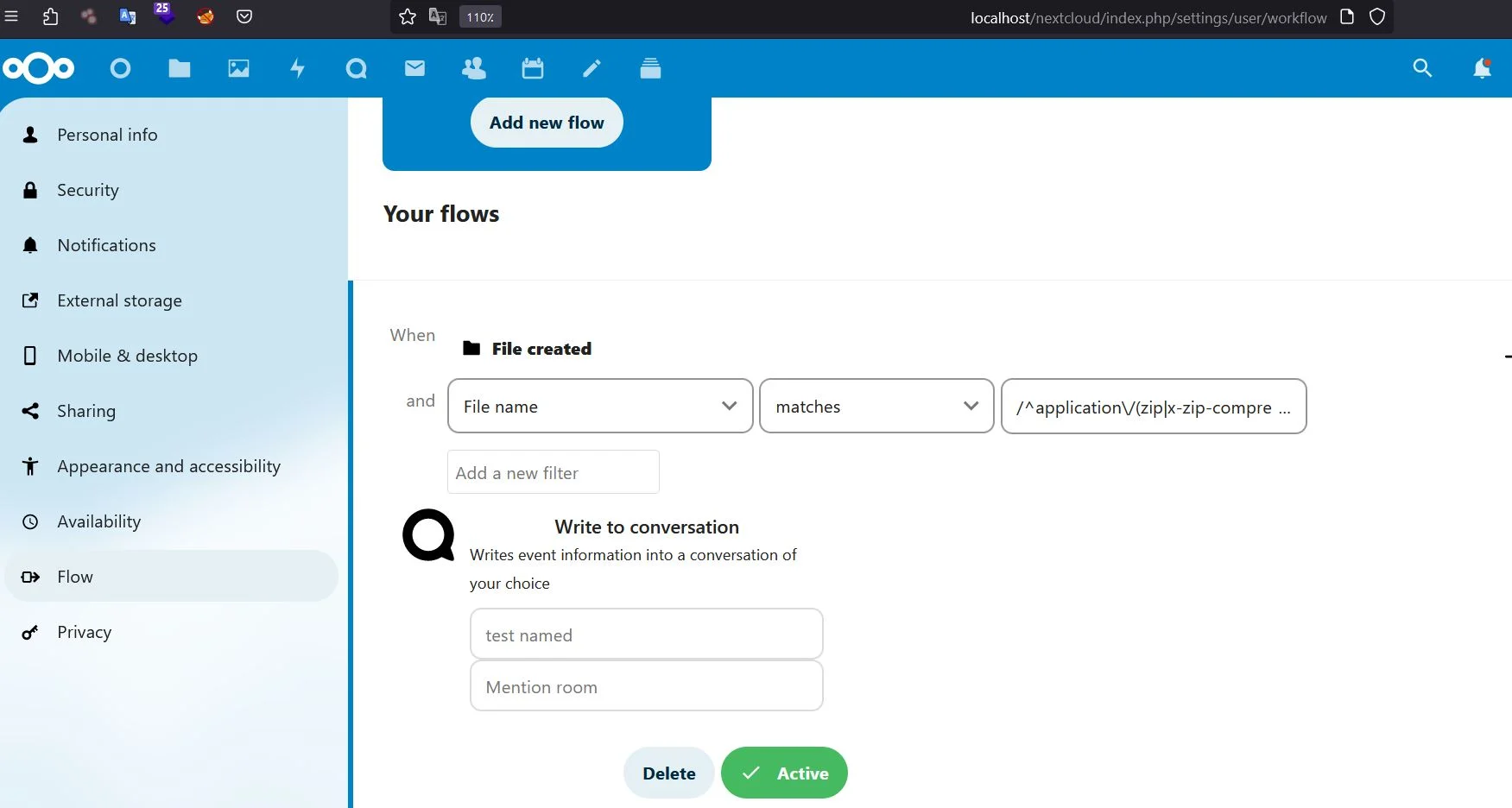
- now click on Delete button, the Password require for confirmation
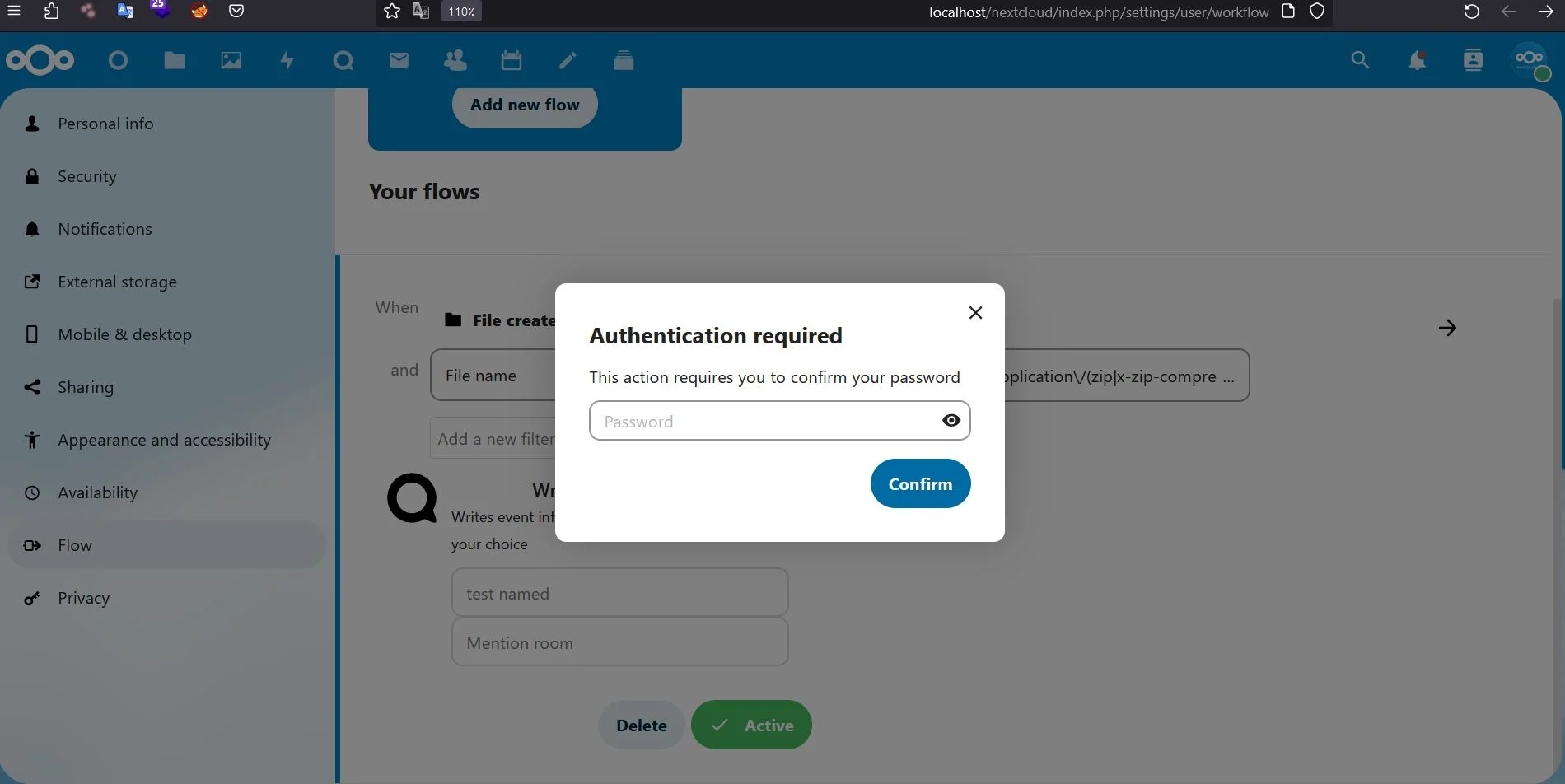
- A Broken Context-dependent access control happen when user can bypass password confirmation by send the folowing request
DELETE /nextcloud/ocs/v2.php/apps/workflowengine/api/v1/workflows/user/3?format=json
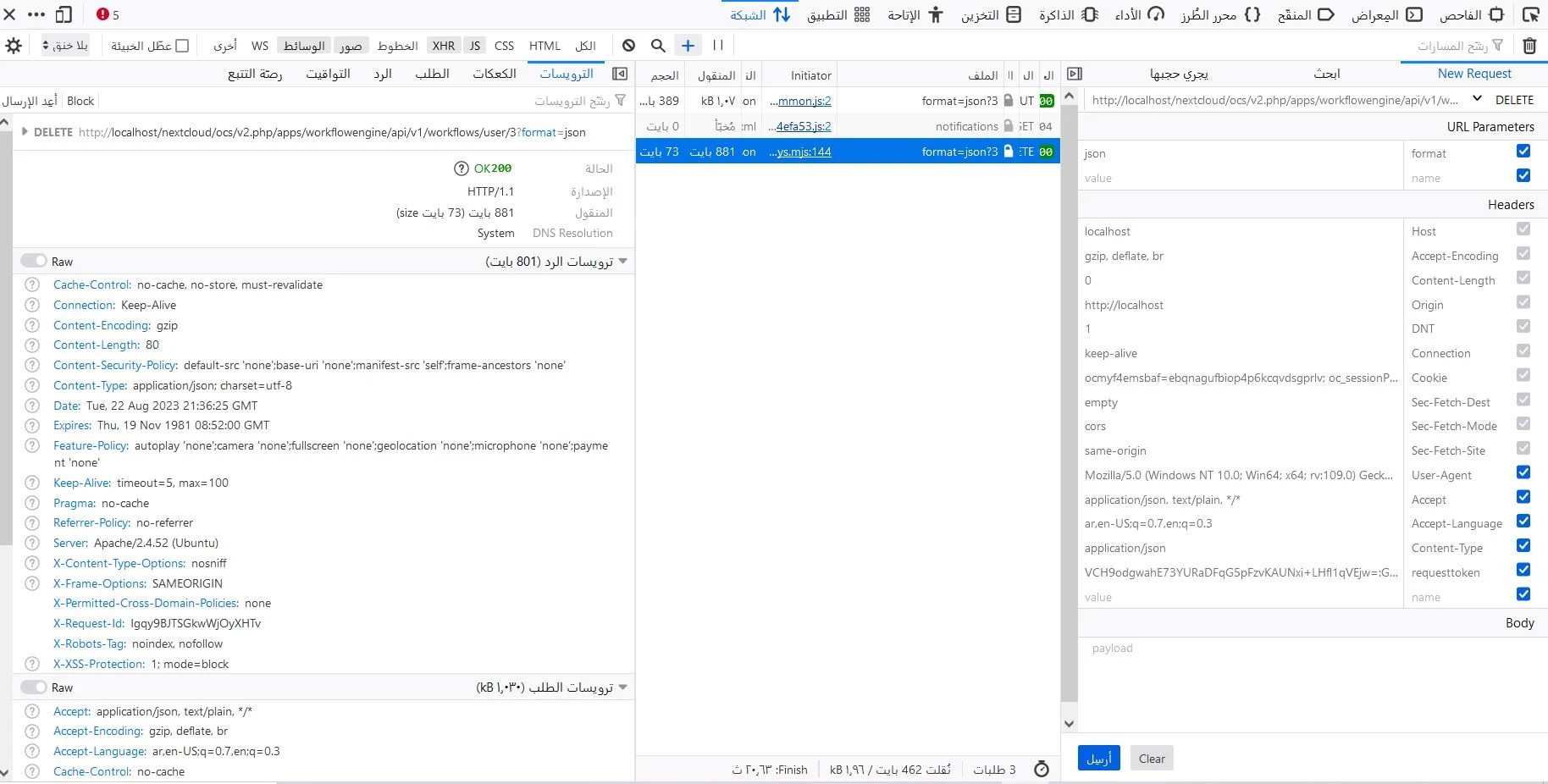
- as you can see, user bypass password confirmation and the workflow succssufilly deleted.
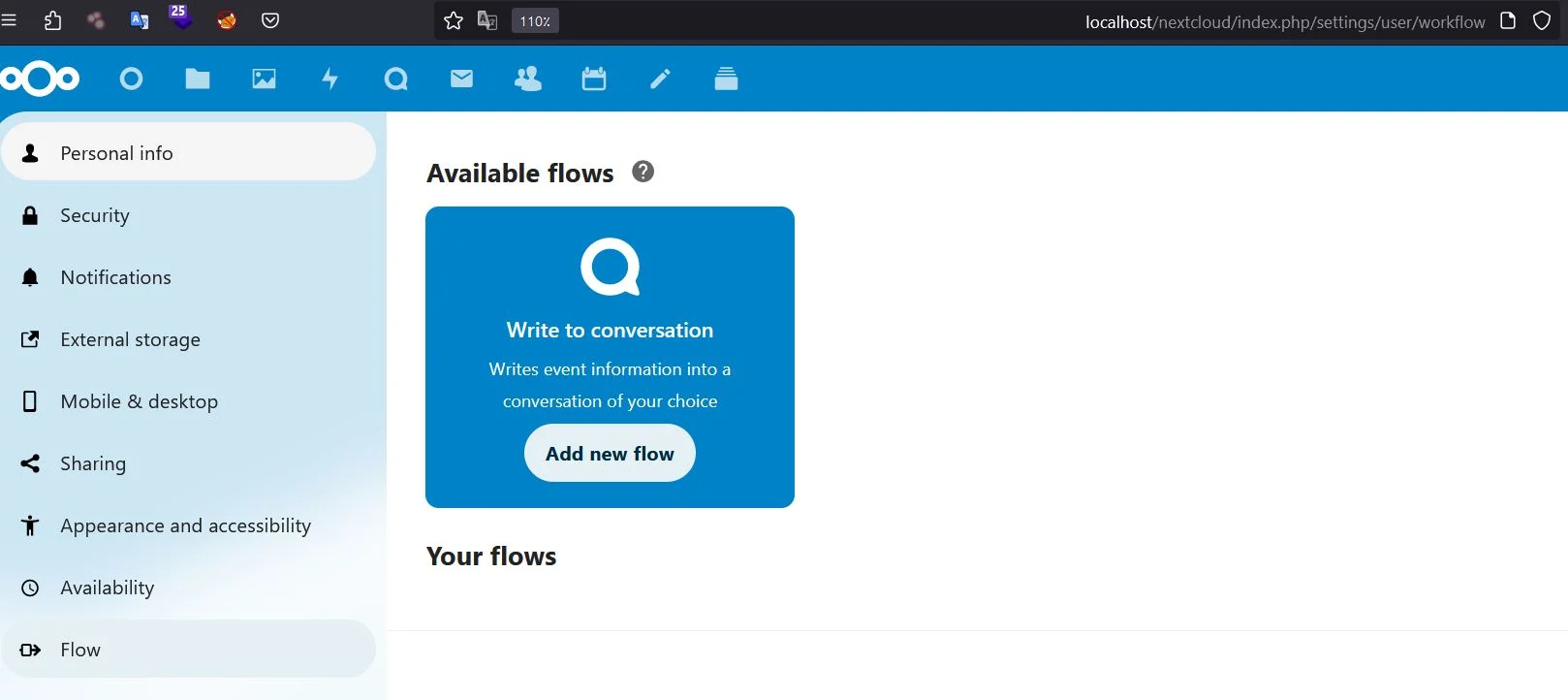
Supporting Material/References:
https://www.geeksforgeeks.org/how-to-prevent-broken-access-control
Impact
bypass password confirmation
delete workflow without password confirmation
Context
Nextcloud is a self-hosted file sync and collaboration platform. Its server component exposes a user settings area, and one of the features there is the workflow engine, which lets a user define automated workflows. The workflow settings page lives at:
/nextcloud/index.php/settings/user/workflow
Deleting a workflow from that page is a sensitive action, so the interface asks the user to confirm their password before the deletion goes through. That password confirmation is a context-dependent access control (CDCA) mechanism: it restricts an action based on the context of the request, in this case an interactive session in which the user has just re-entered their password. The report describes CDCA as a control that restricts access to resources based on the context of the request, and notes that when it is broken an attacker can exploit the flaw to gain unauthorised access to resources, with consequences such as data breaches, theft of credentials and denial of service attacks.
The researcher found that the confirmation could be skipped entirely by calling the underlying delete endpoint directly.
Setup
The report does not describe a specific account setup, role configuration, tooling or server version. The precondition is simply an authenticated user with access to the workflow settings page, since the workflow being deleted belongs to that user's own settings area. The reproduced request targets the workflow with id 3 under the user scope.
Finding it
While testing the Nextcloud server, the researcher looked at what happens when a workflow is deleted from the settings page. The page asks for a password confirmation before performing the deletion. The researcher then checked whether the same deletion could be performed by requesting the delete endpoint directly, without going through the page and therefore without the password step. It could: the direct request deleted the workflow without any confirmation. That mismatch between the protected UI flow and the unprotected API endpoint is the broken context-dependent access control.
Exploitation
Step 1: Create a workflow
Go to the workflow settings page and create a workflow:
/nextcloud/index.php/settings/user/workflow
Step 2: Trigger the delete flow and observe the password prompt
Click the Delete button. The server asks for the password as confirmation before the workflow is removed.
Step 3: Send the delete request directly
The password confirmation is bypassed by sending the following request directly to the workflow engine API:
DELETE /nextcloud/ocs/v2.php/apps/workflowengine/api/v1/workflows/user/3?format=json
The request is sent directly to the workflow engine API for the workflow with id 3. Because the request goes straight to the API rather than through the settings page, the password confirmation step is never enforced.
Step 4: Confirm the workflow is gone
After the request, the workflow is successfully deleted, with no password confirmation having taken place.
Root cause
The password confirmation is enforced in the context of the settings page flow, but the delete endpoint itself does not require that confirmation. The control is therefore tied to one path of interaction rather than to the action it is meant to protect. Any caller who can reach the endpoint directly, with an authenticated session, can perform the deletion without re-entering the password. The report does not include the server-side code, so the exact location of the missing check is not shown; the behaviour is consistent with the confirmation being handled only by the UI-facing flow and not by the API handler that performs the deletion.
Impact
The impact stated in the report is twofold: bypassing the password confirmation, and deleting a workflow without that confirmation. In practice this weakens the re-authentication barrier that is supposed to protect workflow deletion. The report does not go beyond workflow deletion in describing what an attacker could achieve.
The program rated the issue medium severity with a CVSS score of 5.4, classified it as improper access control (generic), and awarded a bounty of 100.00 USD. The report was disclosed on 2024-01-17, and the program points to the security advisory GHSA-3f8p-6qww-2prr.
Fix
The report itself does not describe the code change. The program's summary references the published security advisory at https://github.com/nextcloud/security-advisories/security/advisories/GHSA-3f8p-6qww-2prr, which the program references.. The report does not describe the fix; the program points to the security advisory for it.
Variants to test
- Other workflow engine operations. Try creating, updating or enabling workflows through the same API family and check whether any of them also skip a confirmation the UI enforces. A positive result is a state change that succeeds through the direct request but requires a password in the interface.
- Other scopes in the same endpoint. The reproduced request uses the
userscope; check whether equivalent requests under other scopes behave the same way. A positive result is a deletion that succeeds without confirmation. - Other settings pages with password confirmation. Look for any feature in the user settings that asks for a password before a destructive action, then call the underlying endpoint directly. A positive result is the action completing without the prompt.
- Session scenarios. Test the direct request from a session where the password is not known to the person using it, to see whether the confirmation barrier is genuinely absent rather than cached. A positive result is deletion succeeding in a fresh session with no prior confirmation.
Hunting notes
This class of bug hides wherever a UI adds a re-authentication or confirmation step but the backend endpoint that performs the action does not check for it. During recon, watch for settings pages that prompt for a password before destructive operations, then inspect the network traffic to find the endpoint the page calls. If the endpoint can be invoked directly with the same session and the action completes, the confirmation is only a UI control.
The researcher demonstrated impact with a minimal, repeatable sequence: create a workflow, observe the password prompt in the UI, send the delete request directly, and show the workflow gone. That direct comparison between the protected flow and the unprotected endpoint is what makes the finding easy for a program to validate.
What happened, in plain words
Nextcloud is a piece of software you install on your own server to store files and work on documents together with other people, a bit like running your own private version of a cloud drive. It has a web interface, and inside that interface there is a settings area for each user. One of the features in that area is the workflow engine, which lets a user set up automated workflows. You can create these workflows, and you can delete them again.
Deleting a workflow is treated as a sensitive action. So when you click Delete on the settings page, Nextcloud asks you to type your password once more before it actually removes the workflow. The settings page asks for the password as confirmation before the workflow is deleted.
The researcher found that this password prompt can be skipped. The settings page asks for the password, but the actual deletion is carried out by a separate address on the server, an endpoint. If you send the delete request straight to that endpoint, without going through the page, the workflow is deleted and no password is ever asked for. The protection lives only on the page, not on the action itself.
This kind of flaw is called broken context-dependent access control, or CDCA. The report describes CDCA as a security mechanism that restricts access to resources based on the context of the request, and notes that when it is broken an attacker can exploit the flaw to gain unauthorised access to resources, with consequences such as data breaches, theft of credentials and denial of service attacks. In this case the context is "a person who has just proved they know the password", and the server simply never checks for it on the direct path.
The pieces you need to know
Before walking through the steps, here are the few ideas the report relies on.
- The web page versus the endpoint. When you click a button in a browser, the page usually does not do the work itself. It sends a request to the server, and the server does the work and answers. The page is the shop counter; the endpoint is the back door where the actual delivery happens. Normally you only ever see the counter, but the back door is reachable too if you know its address.
- An API. An API (application programming interface) is a set of addresses on a server that programs talk to, rather than humans clicking buttons. The page in your browser uses the same API behind the scenes. Anything the page can ask the server to do, you can also ask for yourself, if you send the same request.
- A session. When you log in, the server gives your browser a small piece of proof, often stored in something called a cookie, and your browser sends it along with every request. That is how the server knows the request comes from you without asking for your password on every single click. A session is like a wristband you get at an event: show it at the door and you get in without showing your ticket again.
- Re-authentication. Because a wristband can be borrowed or left lying around, sensitive actions sometimes ask you to prove again that it is really you, by re-entering your password. That is the extra prompt in this report.
- Access control. Access control is the set of rules about who is allowed to do what. When those rules are applied in the wrong place, or only in one place, you get a bypass.
The setup
The report does not describe a specific account setup, role configuration, tooling or server version. The only precondition is that you are logged in as a user who can reach the workflow settings page, because the workflow being deleted belongs to that user's own settings area. The reproduced request targets the workflow with id 3 under the user scope.
Finding it
While testing the Nextcloud server, the researcher looked at what happens when a workflow is deleted from the settings page. The page asks for a password confirmation before performing the deletion. The researcher then checked whether the same deletion could be performed by requesting the delete endpoint directly, without going through the page and therefore without the password step. It could: the direct request deleted the workflow without any confirmation. That mismatch between the protected page flow and the unprotected endpoint is the broken context-dependent access control.
Step by step
Step 1: Create a workflow
Go to the workflow settings page and create a workflow:
/nextcloud/index.php/settings/user/workflow
This is the address of the workflow settings page. You open it in a browser like any other page. Creating a workflow first gives you something to delete, so the rest of the test has a target.
Step 2: Click Delete and watch the password prompt
Click the Delete button. The server asks for the password as confirmation before the workflow is removed.
This step matters because it establishes what the normal, intended behaviour looks like. The page is telling you: before this destructive action happens, prove you are still the person who owns this account. The researcher is noting that the page does enforce this, so any path that skips it is a deviation from the intended design.
Step 3: Send the delete request directly
The password confirmation is bypassed by sending the following request directly to the workflow engine API:
DELETE /nextcloud/ocs/v2.php/apps/workflowengine/api/v1/workflows/user/3?format=json
Line by line, in plain words:
DELETEis the type of request. Web requests come in kinds, andDELETEmeans "remove the thing at this address"./user/3identifies the workflow with id3under theuserscope.
Because the request goes straight to the API rather than through the settings page, the password confirmation step is never enforced. The page was the only place that asked for the password; the endpoint that actually performs the deletion does not ask.
Step 4: Confirm the workflow is gone
After the request, the workflow is successfully deleted, with no password confirmation having taken place.
This last step is what turns the observation into proof. Anyone can send a request; the finding is that the request actually changed the state of the server, removing the workflow, while the protection that was supposed to guard that change was absent.
Why it works
The password confirmation is enforced in the context of the settings page flow, but the delete endpoint itself does not require that confirmation. The control is therefore tied to one path of interaction rather than to the action it is meant to protect. Any caller who can reach the endpoint directly, with an authenticated session, can perform the deletion without re-entering the password. The report does not include the server-side code, so the exact location of the missing check is not shown; the behaviour is consistent with the confirmation being handled only by the page-facing flow and not by the API handler that performs the deletion.
A useful comparison: a building might put a guard at the front door who asks for your badge, while the side door into the same room has no guard at all. The rule exists, but it is attached to one entrance instead of to the room.
What it means in practice
The impact stated in the report is twofold: bypassing the password confirmation, and deleting a workflow without that confirmation. In practice this weakens the re-authentication barrier that is supposed to protect workflow deletion. The report does not go beyond workflow deletion in describing what an attacker could achieve.
The program rated the issue medium severity with a CVSS score of 5.4, classified it as improper access control (generic), and awarded a bounty of 100.00 USD. The report was disclosed on 2024-01-17, and the program points to the security advisory GHSA-3f8p-6qww-2prr.
The fix
The report itself does not describe the code change. The program's summary references the published security advisory at https://github.com/nextcloud/security-advisories/security/advisories/GHSA-3f8p-6qww-2prr, which the program references.. The report does not describe the fix; the program points to the security advisory for it. In the building comparison, you move the guard from the front door to the room.
Other places to look
- Other workflow engine operations. Try creating, updating or enabling workflows through the same API family and check whether any of them also skip a confirmation the interface enforces. A positive result is a state change that succeeds through the direct request but requires a password in the interface.
- Other scopes in the same endpoint. The reproduced request uses the
userscope; check whether equivalent requests under other scopes behave the same way. A positive result is a deletion that succeeds without confirmation. - Other settings pages with password confirmation. Look for any feature in the user settings that asks for a password before a destructive action, then call the underlying endpoint directly. A positive result is the action completing without the prompt.
- Session scenarios. Test the direct request from a session where the password is not known to the person using it, to see whether the confirmation barrier is genuinely absent rather than cached. A positive result is deletion succeeding in a fresh session with no prior confirmation.
How to spot this kind of bug
This class of bug hides wherever a page adds a re-authentication or confirmation step but the backend endpoint that performs the action does not check for it. During recon, watch for settings pages that prompt for a password before destructive operations, then inspect the network traffic to find the endpoint the page calls. Every modern browser has a developer tools panel that shows the requests a page makes; that is where the endpoint address appears. If the endpoint can be invoked directly with the same session and the action completes, the confirmation is only a page control.
The researcher demonstrated impact with a minimal, repeatable sequence: create a workflow, observe the password prompt in the interface, send the delete request directly, and show the workflow gone. That direct comparison between the protected flow and the unprotected endpoint is what makes the finding easy for a program to validate.
Glossary
- Nextcloud: self-hosted software for storing files and collaborating on documents, running on a server you control.
- Server: the computer that runs the software and answers requests from browsers.
- Endpoint: a specific address on a server that performs a particular action when a request is sent to it.
- API: a set of addresses and rules that programs use to talk to a server, as opposed to a page a human clicks.
- Request: a message a browser or program sends to a server asking it to do something.
- DELETE: the kind of request that asks the server to remove something.
- Session: the state of being logged in, kept alive by a piece of proof the browser sends with each request.
- Cookie: a small piece of data a browser stores for a site and sends back with later requests, often used to carry session proof.
- Re-authentication: asking a logged-in user to prove their identity again, usually by re-entering the password, before a sensitive action.
- Access control: the rules that decide who is allowed to do what.
- Context-dependent access control (CDCA): access control that depends on the circumstances of the request, such as whether the user has just confirmed their password.
- Bypass: getting past a protection without satisfying it.
- Workflow engine: the Nextcloud feature that lets a user define automated rules.
- Workflow: one such automated rule, which can be created and deleted.
- Scope: the level a setting belongs to, here
user, meaning it belongs to one user rather than a wider group. - JSON: a plain text format for structured data that programs can read easily.
- CVSS: a standard scoring system for the severity of a security issue.
- Bounty: a payment a program gives a researcher for a valid security report.
- Security advisory: a public notice describing a security issue and its fix.
- Recon: the exploratory phase of security testing, where you look around and note how things behave.
- State change: any modification of data on the server, such as creating or deleting something.


