nextcloud.com: Directory listening for 'wp-includes' forders
The web server was misconfigured to allow directory listing for the /wp-includes directory when accessed via the server's IP address, though the domain returned 'Access forbidden'. An attacker could view the contents of that directory, potentially exposing file names and other information useful for further attacks.

- Fixed in under an hour
- Disclosed after under an hour
Hello guys,
Details: The web server is configured to display the list of files contained in this directory. As a result of a misconfiguration - end user / attacker able to see content of the folders with systemically important files
Vulnerable place: /wp-includes directory
when I tried to navigate to this directory via your domain - service responses me 'Access forbidden', but if I will navigate to the same directory via IP address (http://88.198.160.129/) - service will reflects whole entry.
PoC:
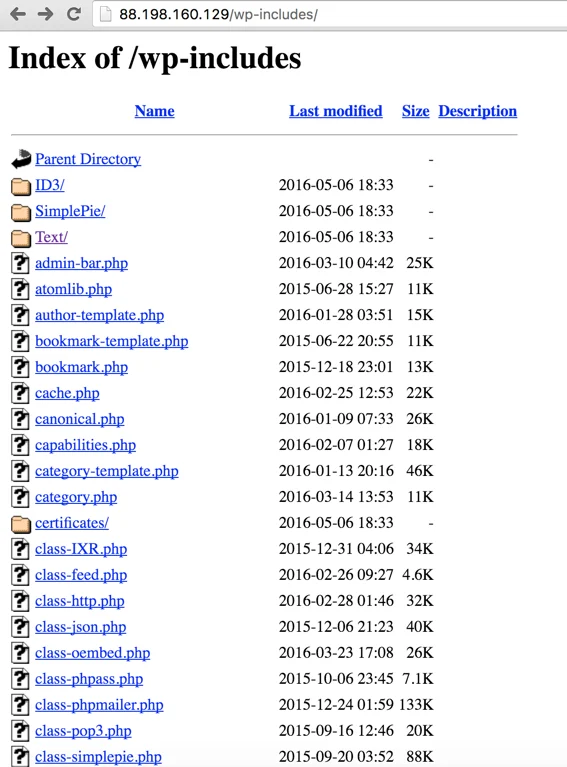
Impact: Exposing the contents of a directory can lead to an attacker gaining access to source code or providing useful information for the attacker to devise exploits, such as creation times of files or any information that may be encoded in file names. The directory listing may also compromise private or confidential data.
Remediation:
- Configure your web server to prevent directory listings for all paths beneath the web root;
- Place into each directory a default file (such as index.htm) that the web server will display
instead of returning a directory listing.
Let me know if you have any question.
Thanks for your attention, Stas
Not written yet. The AI write-up for this report has not been written yet. The Original tab links to the source.
How it worked
Impact
An attacker could gain access to source code or useful information such as file creation times or encoded file names, which may aid in devising exploits or compromise private data.
What the attacker needed
None
The fix
The web server should be configured to prevent directory listings for all paths beneath the web root, and a default file such as index.htm should be placed in each directory.
How it was found
- Navigate to the /wp-includes directory via the domain; the server responds with 'Access forbidden'.
- Navigate to the same directory using the server's IP address instead of the domain.
- The server returns the full directory listing.
Explained by bugbounty.wiki with AI from the original and checked against quotes from it; it can still be wrong. Read the original before relying on a detail.
Not written yet. The AI write-up for this report has not been written yet. The Original tab links to the source.
A directory listing is when a web server shows all the files in a folder instead of a normal web page. Here, the server did this for a folder called /wp-includes when visited by its IP address, even though the normal domain name blocked it. This lets someone see what files exist, which can help them plan other attacks.
What is Info disclosure?
Data the application should keep private (personal data, internal details, other users' records) reaches someone it should not.