SSRF thru File Replace
The file replace feature allowed fetching remote files from localhost addresses, and returned different error messages depending on whether a TCP port was open or closed. An attacker could use this to scan the internal network and enumerate open ports.

- Fixed in 3 months
- Disclosed after 6 months
Hello Team,
Version: 8.2.0
Details: I have found a possibility of Server Side Request Forgery via file 'Replace' functionality. An attacker / malicious user is able to scan local network and able to enumerate open TCP ports. The root of cause of this vulnerability:
- you are allowing to use localhost IPs in order to take a file;
- different errors returning for success and fail requests, e.g. in case if TPC port is opened - server respond is following:
Unknown mime-type: text/html; charset=UTF-8orA valid response status line was not found in the provided string. In case when port is closed:Unable to connect to 127.0.0.1:1 . Error #0: stream_socket_client(): unable to connect to 127.0.0.1:1 (Connection refused)
Steps to reproduce:
- Login at Dashboard by any user who is able (e.g. Admin group);
- Navigate to Files > File Manager page;
- Open Replace for any uploaded file > Add remote files;
- I used following endpoints:
TCP Port 1 (closed)
http://127.0.0.1:1
Unable to connect to 127.0.0.1:1 . Error #0: stream_socket_client(): unable to connect to 127.0.0.1:1 (Connection refused)
TCP Port 80 (open)
http://127.0.0.1:80
Unknown mime-type: text/html; charset=UTF-8
TCP Port 3305 (closed)
http://127.0.0.1:3305
Unable to connect to 127.0.0.1:3305 . Error #0: stream_socket_client(): unable to connect to 127.0.0.1:3305 (Connection refused)
TCP Port 3306 (open)
http://127.0.0.1:3306
A valid response status line was not found in the provided string
PoC:
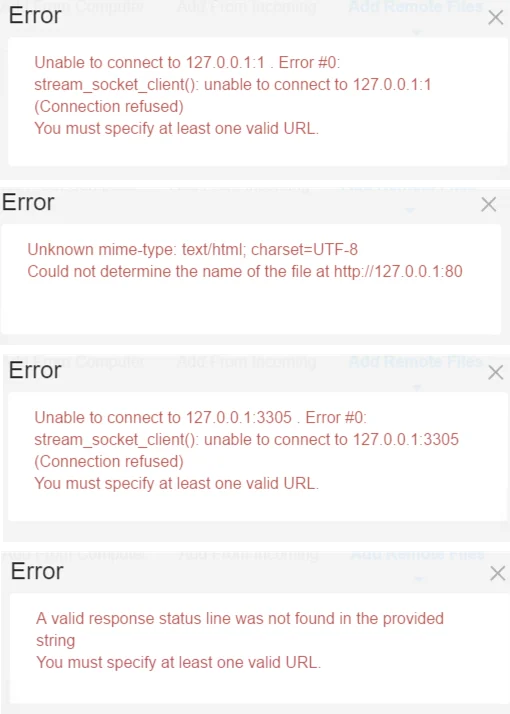
Attack scenario: This feature can be used to launch SSRF attack to map the internal network. For example, this feature can be used to identify the internal open ports
Let me know in case if you have any questions.
Thanks, Stas
Not written yet. The AI write-up for this report has not been written yet. The Original tab links to the source.
How it worked
Root cause
The application allowed localhost IPs in remote file fetching and returned distinguishable error messages for open versus closed ports.
Impact
This could be used to map the internal network and identify open internal ports.
What the attacker needed
A user account with file manager access
How it was found
- Log in to the dashboard with any user who can access the file manager.
- Go to Files > File Manager.
- Open Replace for an uploaded file and choose Add remote files.
- Enter a localhost URL with a specific port and observe the error message to infer whether the port is open.
Explained by bugbounty.wiki with AI from the original and checked against quotes from it; it can still be wrong. Read the original before relying on a detail.
Not written yet. The AI write-up for this report has not been written yet. The Original tab links to the source.
Server-side request forgery (SSRF) is when a server is tricked into making requests to addresses the attacker cannot reach directly, such as internal services. Here the file replace tool accepted localhost URLs and showed different errors for open and closed ports, letting someone map the internal network.
What is SSRF?
The server can be made to fetch an address the attacker chooses, reaching internal services, cloud metadata or other customers' data.