Stored XSS at 'Buy Button' page
A stored cross-site scripting vulnerability existed in the 'Buy Button' page where a product variant title was rendered without proper encoding. An attacker could inject a script that executes when a victim switches between variants, potentially hijacking sessions or performing other malicious actions.

- Triaged in 6 days
- Fixed in 7 days
- Paid in 17 days
- Disclosed after 17 days
Hello guys, would like to mention, first thing that I did when I have faced with Stored XSS at this page - I checked 'Known issues or previously reported vulnerabilities' section in order to ensure that issue is not out-of-scope, but didn't find this place in a list.
Description: Cross-Site Scripting (XSS) attacks are a type of injection, in which malicious scripts are injected into otherwise benign and trusted web sites. XSS attacks occur when an attacker uses a web application to send malicious code, generally in the form of a browser side script, to a different end user. Flaws that allow these attacks to succeed are quite widespread and occur anywhere a web application uses input from a user within the output it generates without validating or encoding it.
Vulnerable place: 'Buy Button' page - Title name (div[@class='cart-permalink__preview-variant-title')
Payload: "><img src=x onerror=alert(1)>
Steps to reproduce:
- Create a new product with [Buy button = ON] visibility;
- Fill out all required fields;
- Add new 'Variants';
- Put [payload] into Option name / value;
- Add another option;
- Leave defined name, and put 2 different options into value field (e.g. 1,2);
- Save all changes;
- Navigate to 'Buy Button' page -> 'Embed a product in email' Select product;
- Select just created product, 'Create an email Buy Button' page is opened with 'SELECT VARIANT' section where you can find 2 variant of a product.
- Switch between them - XSS triggered
PoC:
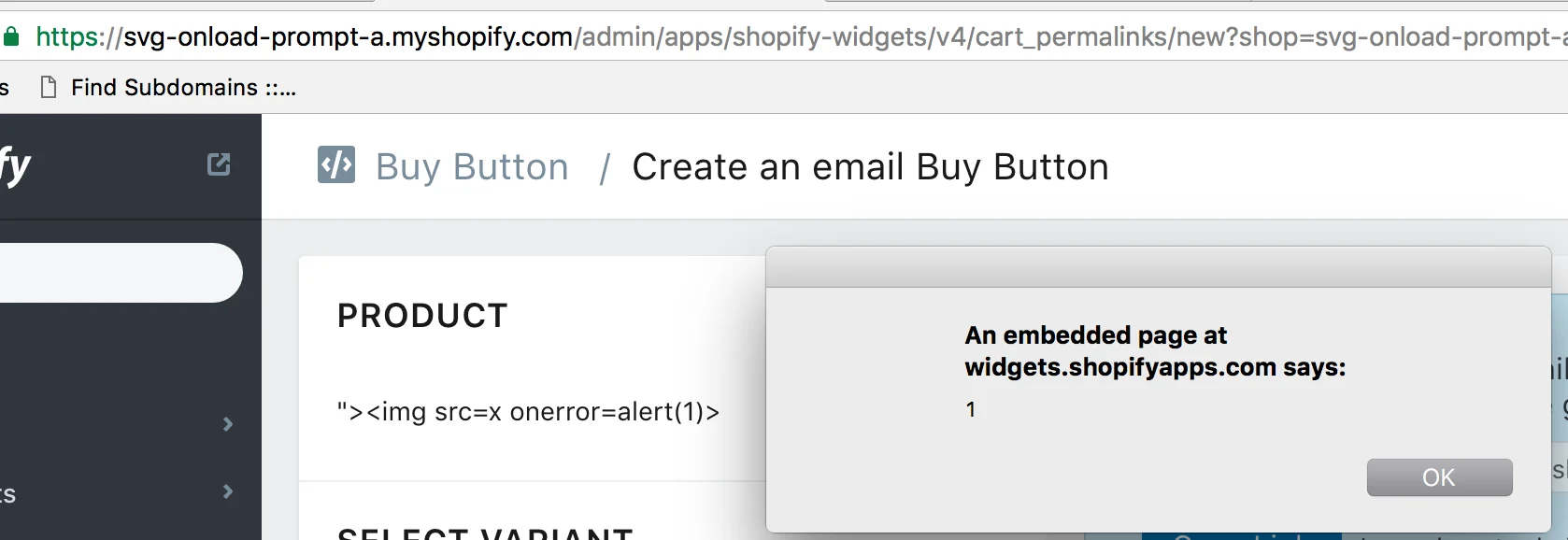
Impact: Attackers can execute scripts in a victim’s browser to hijack user sessions, deface web sites, insert hostile content, redirect users, hijack the user’s browser using malware, etc.
Mitigation: Developers should implement robust input validation and output encoding consistently across the application to defend against XSS and other input validation attacks. All of this input \ output mechanism recommended to implement: encoding \ escaping \ ‘black list’ \ filtering all special characters, e.g.: <, >, ‘, “, etc
Reference: More you can read here. https://www.owasp.org/index.php/Cross-site_Scripting_%28XSS%29
Thanks, Stas
Context
Shopify's Buy Button feature lets a merchant generate embeddable purchase controls for a product, including an option to embed a product in an email. The email flow opens a page with a SELECT VARIANT section listing the product's variants, and the merchant switches between them to preview each one. The preview renders the variant title inside an element with the class cart-permalink__preview-variant-title.
The report describes a stored cross-site scripting issue in that variant title on the Buy Button page. The researcher checked the program's 'Known issues or previously reported vulnerabilities' section first to confirm the location was not out of scope, and did not find it listed.
Setup
The report's setup begins with creating a new product with Buy button visibility enabled. The product must be created with Buy button = ON visibility, and it needs at least one option with a name and value, plus a second option whose value field holds two different values (the report uses 1,2). No tools, versions or specific account roles are mentioned.
Finding it
The researcher's starting point was the variant title rendered on the Buy Button page, in the element identified as:
div[@class='cart-permalink__preview-variant-title'
The title is built from merchant-supplied option names and values, and the payload placed there executes when variants are switched. That is the classic condition for stored XSS: data that a user enters is later written into the HTML of a page served to another user.
Exploitation
The payload used throughout is:
"><img src=x onerror=alert(1)>
The payload is an img element with a broken src whose onerror runs alert(1).
Step 1: Create the product
Create a new product with Buy button = ON visibility and fill out all required fields.
Step 2: Add the first option with the payload
Add a new 'Variants' entry and put the payload into the Option name / value.
Step 3: Add the second option
Add another option, leave the defined name in place, and put two different options into the value field, for example 1,2.
Step 4: Save
Save all changes. The product now has two variants, and the stored option data contains the payload.
Step 5: Open the email Buy Button flow
Navigate to the 'Buy Button' page, choose 'Embed a product in email', and select the product. Selecting the product just created opens the 'Create an email Buy Button' page, which contains a SELECT VARIANT section listing the two variants.
Step 6: Switch variants
Switch between the two variants. The XSS triggers at that point, when switching between the two variants.
The report includes a screenshot as proof of concept.
Root cause
The variant title, assembled from merchant-controlled option names and values, is rendered in the cart-permalink__preview-variant-title element. The report does not include the server-side or client-side code, so the exact rendering path is not shown; .
Impact
The report lists the standard consequences of script execution in a victim's browser: hijacking user sessions, defacing web sites, inserting hostile content, redirecting users, and hijacking the browser using malware. The report does not state which users would view the affected page or what privileges they would hold, so the practical reach depends on who can be induced to open the email Buy Button preview for the crafted product.
Fix
The report recommends robust input validation and output encoding applied consistently across the application, and specifically suggests encoding, escaping, blacklisting and filtering special characters such as <, >, ' and ". The report does not say what Shopify actually changed.
Variants to test
- Put the payload in the option name rather than the value, and in both at once, then check whether the title preview still renders it unencoded.
- Use a second option with more than two values, and switch between every combination, to see whether only some variants reach the vulnerable rendering path.
- Try the same payload in other merchant-supplied fields that appear in the Buy Button preview, such as the product title, and observe whether the same element class is used.
- Test the email Buy Button flow with a product that has a single variant, to see whether the
SELECT VARIANTswitch is required for the trigger or whether the initial render is also vulnerable.
A positive result is the payload executing when the preview is rendered or when variants are switched, with the injected markup visible in the page source around the variant title.
Hunting notes
This bug sits in a preview surface that renders merchant-controlled product data, which is a common place for stored XSS: the data is entered in one part of the application and displayed in another, often through a different rendering path with weaker escaping. During recon, look for preview and embed features that echo product, variant or option names, and check whether the echoed value lands inside an HTML attribute, where a "> prefix is enough to break out. The researcher demonstrated impact with a minimal alert(1) payload and a clear reproduction path from product creation to variant switching.
What happened, in plain words
Shopify is a platform that lets people run online shops. One of its features is the Buy Button: a small piece of code a shop owner can copy and paste into their own website or email so that customers can buy a product without leaving that page. Think of it like a ready-made "Add to cart" widget you can drop anywhere.
One part of the Buy Button feature lets a shop owner embed a product in an email. When the owner does this, Shopify opens a page with a section called SELECT VARIANT that lists the different versions of the product (for example, a T-shirt in size small and size large). The owner can click between these versions to preview each one.
The researcher found that the name shown for each version (the variant title) could carry a payload that ran as code. The payload typed into the product options was treated as part of the page's code rather than as plain text. That let the researcher make the page run a small piece of JavaScript, which is a stored cross-site scripting (XSS) bug.
Before doing anything, the researcher checked the program's 'Known issues or previously reported vulnerabilities' section to make sure this page was not already known and out of scope. It was not listed.
Some words you will need
- HTML is the language web pages are written in. It is made of tags like
<img>(an image) and<div>(a box or section). Tags can carry attributes, which are extra settings written inside the tag, such assrc="picture.png". - JavaScript is the programming language browsers run. It can change the page, read what is on it, and send data elsewhere.
alert(1)is the simplest JavaScript command: it pops up a box with the number 1 in it. - XSS (cross-site scripting) means getting your own JavaScript to run inside someone else's browser while they are viewing a trusted website. The browser cannot tell your script apart from the site's own script, so it trusts it.
- Stored XSS is the kind where the malicious text is saved on the server first (for example, in a product name) and then shown to whoever opens the page later. It is like writing graffiti on a sign that the shop then puts up in its window for every customer to see.
- Encoding (or escaping) means converting characters that have a special meaning in HTML into harmless lookalikes, so the browser shows them as text instead of treating them as code. For example,
<becomes<. - A variant is one specific version of a product, such as a particular size or colour.
- An option is the choice a variant is built from, such as "Size" with the value "Large".
The vulnerable place
The report points at the part of the Buy Button page that shows the variant title. It identifies the element like this:
div[@class='cart-permalink__preview-variant-title'
This is a way of describing a piece of the page: a div (a box) whose class is cart-permalink__preview-variant-title. A class is just a label attached to an element so that styling and scripts can find it. The important point is that the variant title ends up inside this box, and the box is built from text the shop owner typed.
The payload
The text the researcher typed into the product options was:
"><img src=x onerror=alert(1)>
Let us take it apart character by character:
"is a double quote. In HTML, quotes mark where an attribute value starts and ends. If the title is placed inside an attribute, this quote tells the browser "the attribute ends here".>closes the tag that was open. Now the browser thinks the tag is finished and whatever comes next is new content.<img src=x onerror=alert(1)>is a new image tag.src=xpoints at an image calledx, which does not exist, so the image fails to load.onerror=alert(1)is an attribute that says: when this image fails to load, run the JavaScriptalert(1). Because the image always fails, the script always runs.
So the payload does two jobs: it breaks out of the place the title was supposed to sit, and then it adds a new element that runs code.
Step by step: how the researcher triggered it
Step 1: Create the product
Create a new product and switch its visibility setting to Buy button = ON, then fill in all the required fields. The visibility setting is part of the setup described in the report. This is the setup: the researcher needs a product they control so they can put text into it.
Step 2: Add the first option with the payload
Add a new 'Variants' entry and put the payload into the Option name or value. This is where the malicious text gets saved on Shopify's servers. Because it is saved, this is the "stored" part of stored XSS: the text will still be there when the page is opened later, by anyone.
Step 3: Add the second option
Add another option, leave the name that is already defined, and put two different values into the value field, for example 1,2. The report uses 1,2 as an example. This creates two variants to switch between in the SELECT VARIANT section.
Step 4: Save
Save all changes. At this point the product exists with two variants, and the payload is sitting in the stored option data.
Step 5: Open the email Buy Button flow
Go to the 'Buy Button' page, choose 'Embed a product in email', and select the product you just made. Shopify opens a page called 'Create an email Buy Button', which has a SELECT VARIANT section listing the two variants. This is the page that displays the variant title, so this is where the stored text gets shown.
Step 6: Switch between the variants
Click from one variant to the other. When the preview redraws the title for the variant, the payload runs. The browser sees the " and > and treats the rest as a real image tag with an error handler, so alert(1) fires.
The report includes a screenshot as proof of concept.
Why it works
The variant title is put together from the option names and values the shop owner typed. When that title is written into the cart-permalink__preview-variant-title element, the payload is read as HTML instead of as text. The report does not include the code that does this, so the exact path is not shown.
A useful comparison: imagine a form where you write your name, and the shop prints it on a badge that says Hello, NAME. If you write Alice, you get Hello, Alice. If you write Alice"><script>...</script>, and the shop pastes your text in without checking it, the badge now contains a script. Encoding is the shop checking your text and printing the quote marks as visible characters instead of treating them as instructions.
What an attacker could do
The report lists the usual results of running script in a victim's browser: hijacking user sessions, defacing web sites, inserting hostile content, redirecting users, and hijacking the browser using malware. A session is the logged-in state a site keeps for you, usually stored in a cookie, which is a small piece of data the browser sends back with every request. If a script can read that cookie, it can act as the logged-in user. The report does not say which users would open the affected page or what permissions they would have, so how far this reaches in practice depends on who can be persuaded to open the email Buy Button preview for the crafted product.
How to fix it
The report recommends checking input and encoding output consistently across the whole application, and specifically suggests encoding, escaping, blacklisting and filtering special characters such as <, >, ' and ". In plain terms: whenever text that a user typed is put back into a page, convert the dangerous characters so the browser shows them as text. The report does not say what Shopify actually changed.
Other things worth trying
These are follow-up tests in the same area, useful if you want to understand how far the problem goes:
- Put the payload in the option name instead of the value, and in both at once, then check whether the title preview still shows it unencoded.
- Use a second option with more than two values and switch between every combination, to see whether only some variants reach the vulnerable display path.
- Try the same payload in other fields the shop owner controls that appear in the Buy Button preview, such as the product title, and see whether the same element is used.
- Test the email Buy Button flow with a product that has only one variant, to see whether switching is required for the trigger or whether the first display is also vulnerable.
A positive result is the payload running when the preview is drawn or when variants are switched, with the injected markup visible in the page source around the variant title. Page source is the HTML the browser received, which you can view with your browser's developer tools.
Notes for someone learning to hunt
This bug lives in a preview screen that displays product data the shop owner entered. That is a common home for stored XSS: data goes in through one part of the application and comes out in another, often through a different code path with weaker escaping. When you look around a site, pay attention to preview and embed features that echo product, variant or option names, and check whether the echoed value lands inside an HTML attribute, where a "> prefix is enough to break out. The researcher showed the impact with a minimal alert(1) payload and a clear path from creating the product to switching variants.
Glossary
- Attribute: an extra setting written inside an HTML tag, such as
srcoronerror. - Blacklisting: blocking input by listing characters or patterns that are not allowed.
- Class: a label on an HTML element used to find and style it.
- Cookie: a small piece of data a site stores in your browser and receives back with each request, often used to keep you logged in.
- Cross-site scripting (XSS): making your own JavaScript run in someone else's browser while they view a trusted site.
- Encoding (escaping): converting characters with special meaning in HTML into harmless text so the browser displays them instead of running them.
- HTML: the language web pages are written in, made of tags and attributes.
- JavaScript: the programming language browsers run to make pages interactive.
- Option: a choice a product variant is built from, such as size or colour.
- Page source: the HTML the browser received, viewable in developer tools.
- Payload: the text an attacker sends to try to trigger a bug.
- Session: the logged-in state a site keeps for you, usually tied to a cookie.
- Stored XSS: XSS where the malicious text is saved on the server and shown to later visitors.
- Tag: a piece of HTML such as
<img>or<div>that tells the browser what to draw. - Variant: one specific version of a product, such as a particular size or colour.