Easy way to create a new Deck board without permission
A group restriction meant to stop certain users from creating boards could be bypassed by cloning an existing board. A user in a disallowed group could therefore end up with a new board of their own despite the setting.

- Triaged in 13 hours
- Fixed in 8 months
- Paid in 8 months
- Disclosed after 23 months
Summary:
Admins can decide which groups are allowed to create boards. But a user who is part of an unauthorized group can easily create a new board by cloning an existing one and renaming it.
Steps To Reproduce:
- As an admin, create user1, group1 and group2, then assign group1 to user1
- In "Decks" app > "Deck settings", add group2 to the "Limit board creation to some groups" input. It is indicated that
Users outside of those groups will not be able to create their own boards, but will still be able to work on boards that have been shared with them.
- As user1, in "Decks" app, see that the button "+ Add board" is not displayed, which is expected. Sending the request directly will also fail with a 403 error and a message ""Creating boards has been disabled for your account.".
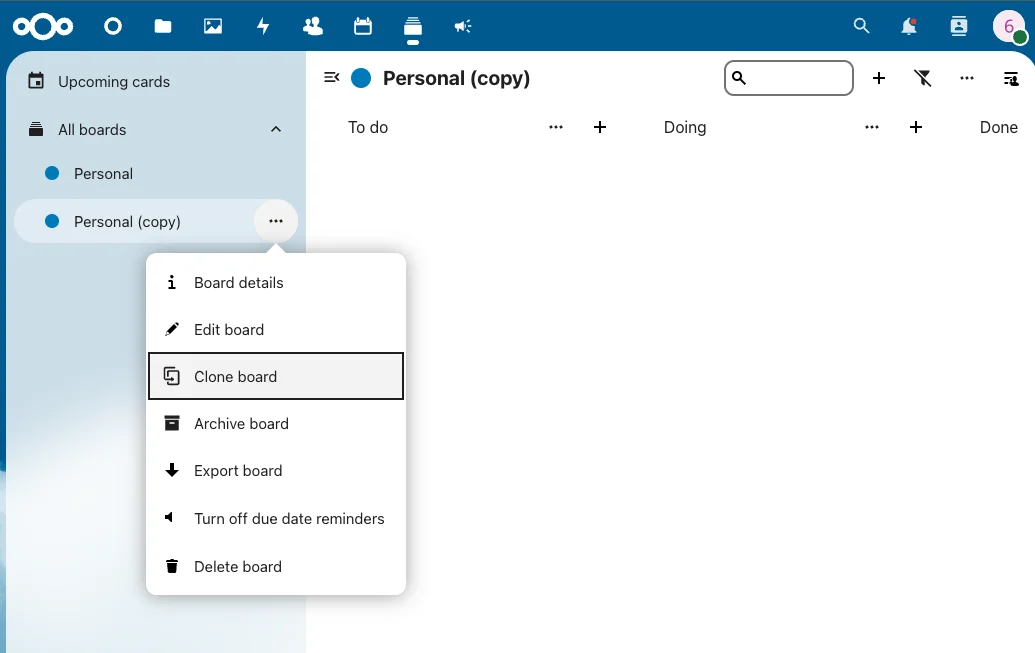
- Now click on the "Personal" board options, and choose "Clone board". A copy of the board will be created. You can rename it, and you just created a new board with all "classic" options available. You could also directly send the request
POST /nextcloud/apps/deck/boards/board_number/clone.
Impact
Creating boards without permission.
Context
Nextcloud is a self-hosted collaboration platform, and Deck is its kanban board app, reachable under the /nextcloud/apps/deck/ path. Deck lets users create boards, share them, and work on boards that others have shared with them. Administrators have a setting that restricts board creation to specific groups, so that users outside those groups can still collaborate on shared boards but cannot create boards of their own.
The report describes a way for a user in a non-authorised group to end up with a brand new board anyway, by cloning an existing board instead of creating one from scratch.
Setup
The researcher works with three objects created by an administrator:
- A user,
user1. - A group,
group1, assigned touser1. - A group,
group2, which is the group allowed to create boards.
The precondition is the admin restriction described in the Deck settings: board creation is limited to group2, and user1 is not a member of it. No specific Nextcloud or Deck version is given in the report.
Finding it
The restriction is enforced in two places that the researcher checks first, and both behave correctly:
- The
+ Add boardbutton is not displayed foruser1. - Sending the board creation request directly fails with a 403 error and the message
Creating boards has been disabled for your account.
So the create path is protected. What the researcher then notices is that the board options menu on an existing board, in this case the Personal board, still offers Clone board. Cloning produces a copy of the board, and that copy is a new board in its own right, with all the classic options available, including renaming. The clone path produces a new board even though the create path is refused.
Exploitation
Step 1: Prepare the groups
As an administrator, create user1, group1 and group2, then assign group1 to user1. This sets up a user who is deliberately outside the group that is allowed to create boards.
Step 2: Restrict board creation
In the Decks app, under Deck settings, add group2 to the Limit board creation to some groups input. The setting itself explains the intended behaviour:
Users outside of those groups will not be able to create their own boards, but will still be able to work on boards that have been shared with them.
Step 3: Confirm the restriction works on the normal path
As user1, open the Decks app. The + Add board button is not displayed, which is expected. Sending the request directly also fails with a 403 error and the message Creating boards has been disabled for your account.
Step 4: Clone an existing board
Click on the Personal board options and choose Clone board. A copy of the board is created. The user can rename it, and now has a new board with all classic options available. The same result can be reached without the interface, by sending the clone request directly:
POST /nextcloud/apps/deck/boards/board_number/clone
Here board_number is the identifier of the board being cloned. The request targets the clone endpoint of an existing board rather than the board creation endpoint, and it succeeds where creation is refused.
The screenshot shows the board options menu with the Clone board entry available to the restricted user.
Root cause
The board creation restriction is enforced on the create path, but cloning an existing board still produces a new board for the restricted user. The check exists and works, as the 403 on direct creation shows, but it is not applied to every code path that results in a new board. The report does not include the server-side code, so the exact location of the missing check is not shown; The report does not include the server-side code, so the exact location of the missing check is not shown.
Impact
A user who is outside the groups allowed to create boards can create boards anyway, by cloning a board they can access and renaming the copy. The restriction that administrators configure is therefore not effective for such users. The report states the impact plainly as creating boards without permission. The clone requires an existing board that the user can reach, such as the Personal board in the reproduction, and the resulting board is a copy of that board.
Fix
The report does not describe a fix or a change made in response.
Variants to test
- Other endpoints that create boards. Look for import, restore, template or duplicate features in the same app and send their requests as a restricted user. A positive result is a new board appearing for a user who gets a 403 on the normal create request.
- Copy operations on other objects. If board creation is restricted, check whether copying a card, list or board through a separate endpoint bypasses the restriction. A positive result is a new object of the restricted type being created.
- Direct API calls. Repeat the interface action as a raw request, as the researcher did with the clone endpoint, to confirm the bypass is server-side and not just a hidden button. A positive result is a successful response where the create endpoint returns 403.
Hunting notes
This kind of bug hides wherever a product enforces a policy on one endpoint but offers a second way to reach the same outcome. Settings that limit creation, sharing or visibility are good places to look, because the restriction is usually implemented in the handler for the primary action and not in every related handler. During recon, note which features are still visible to a restricted account: menus, buttons and options that remain available after a policy is applied are worth testing with a direct request. The researcher demonstrated impact by showing both halves of the behaviour, the 403 on the normal create path and the successful clone, which makes the bypass unambiguous without needing anything beyond a standard user account and an admin-configured restriction.
What happened, in plain words
Nextcloud is a piece of software that organisations install on their own servers so that people can share files and work together. Deck is an app inside Nextcloud that gives you kanban boards: a board is a page with columns and cards, used to track tasks. You can create your own boards, share them with colleagues, and work on boards that other people have shared with you.
Administrators (the people who run the Nextcloud installation) have a setting that says: only members of certain groups may create boards. Everyone else can still work on boards that were shared with them, but they cannot make new ones. A group here is simply a list of user accounts, like a mailing list.
The researcher found that this rule can be sidestepped. A user who is not allowed to create boards can take a board they can already see, use the "Clone board" option to make a copy, rename the copy, and now has a brand new board of their own. Creating a board was refused, but cloning one still produced a new board.
This kind of mistake is called improper access control: the software knows who should be allowed to do something, but it forgets to check that rule on one of the ways of doing it. Think of a building where the front door needs a badge but the side door that leads to the same corridor is left unlocked.
Context
Nextcloud is a self-hosted collaboration platform. "Self-hosted" means the organisation runs it on its own machines rather than using somebody else's service. Deck is its kanban board app, reachable under the /nextcloud/apps/deck/ path. A path is the part of a web address after the site name that tells the server which page or feature you want.
Deck lets users create boards, share them, and work on boards that others have shared with them. Administrators have a setting that restricts board creation to specific groups, so that users outside those groups can still collaborate on shared boards but cannot create boards of their own.
The report describes a way for a user in a non-authorised group to end up with a brand new board anyway, by cloning an existing board instead of creating one from scratch.
Setup
The researcher works with three objects created by an administrator:
- A user,
user1. - A group,
group1, assigned touser1. - A group,
group2, which is the group allowed to create boards.
The precondition is the admin restriction described in the Deck settings: board creation is limited to group2, and user1 is not a member of it. No specific Nextcloud or Deck version is given in the report.
Why set it up this way? To have a clean test: one ordinary user who is deliberately kept out of the privileged group, and one group that is allowed to create boards. If the restriction works, user1 should never end up with a new board. Anything that gives user1 a new board is the bug.
Finding it
The restriction is enforced in two places that the researcher checks first, and both behave correctly:
- The
+ Add boardbutton is not displayed foruser1. - Sending the board creation request directly fails with a 403 error and the message
Creating boards has been disabled for your account.
A 403 error is the standard HTTP status code for "forbidden": the server understood the request but refuses to carry it out. HTTP is the language browsers and servers use to talk to each other, and status codes are short numbers that summarise the answer (200 means fine, 404 means not found, and so on).
Checking both the button and the direct request matters. Hiding a button is only a cosmetic measure: the browser simply does not draw it. A determined user can still send the same request by hand. Here the server itself also refuses, which is the correct behaviour. This is the difference between removing the door handle and actually locking the door.
So the create path is protected. What the researcher then notices is that the board options menu on an existing board, in this case the Personal board, still offers Clone board. Cloning produces a copy of the board, and that copy is a new board in its own right, with all the classic options available, including renaming. The clone path produces a new board even though the create path is refused.
Exploitation
Step 1: Prepare the groups
As an administrator, create user1, group1 and group2, then assign group1 to user1. This sets up a user who is deliberately outside the group that is allowed to create boards.
This step is preparation only. It builds the scenario in which the rule should hold, so that whatever happens next can be judged against it.
Step 2: Restrict board creation
In the Decks app, under Deck settings, add group2 to the Limit board creation to some groups input. The setting itself explains the intended behaviour:
Users outside of those groups will not be able to create their own boards, but will still be able to work on boards that have been shared with them.
This is the administrator's instruction to the software: only group2 may create boards. The sentence quoted from the settings screen is the promise the software makes to the administrator. The rest of the report is about whether that promise is kept everywhere.
Step 3: Confirm the restriction works on the normal path
As user1, open the Decks app. The + Add board button is not displayed, which is expected. Sending the request directly also fails with a 403 error and the message Creating boards has been disabled for your account.
This step is the control in the experiment. Before claiming that a rule can be bypassed, you show that the rule is actually in force on the obvious route. The missing button shows the interface respects the setting; the 403 shows the server does too. Without this step, a successful clone would prove nothing, because maybe board creation was never restricted in the first place.
Step 4: Clone an existing board
Click on the Personal board options and choose Clone board. A copy of the board is created. The user can rename it, and now has a new board with all classic options available. The same result can be reached without the interface, by sending the clone request directly:
POST /nextcloud/apps/deck/boards/board_number/clone
Line by line:
POSTis the HTTP method, the verb of the request. It tells the server "I am sending you something and I want you to act on it", as opposed toGET, which just asks to read a page. Creating or copying something is normally aPOST./nextcloud/apps/deck/boards/board_number/cloneis the path being called. It starts with/nextcloud/apps/deck/, the location of the Deck app, thenboards/, then the identifier of a particular board, thenclone.board_numberis a placeholder, not a literal value. It stands for the identifier of the board being cloned, which the real request would contain. The report does not give an actual number.
This request is an API call: it talks to the server directly, in the format the server expects, instead of going through the buttons of the web page. The web page itself makes exactly this kind of call behind the scenes when you click a button; doing it by hand just skips the page. That is why a hidden button is never a real protection.
The request targets the clone endpoint of an existing board rather than the board creation endpoint, and it succeeds where creation is refused. In other words, the server has two doors that both lead to "a new board exists": the create door, which checks the group, and the clone door, which does not.
The screenshot shows the board options menu with the Clone board entry available to the restricted user.
Root cause
The board creation restriction is enforced on the create path, but cloning an existing board still produces a new board for the restricted user. An endpoint is one specific address on a server that performs one specific action, like one counter in a large office. The check exists and works, as the 403 on direct creation shows, but it is not applied to every code path that results in a new board. A code path is one route through the program's logic that reaches a given outcome; here, "create" and "clone" are two different routes to the same outcome, a new board.
The report does not include the server-side code, so the exact location of the missing check is not shown; The report does not include the server-side code, so the exact location of the missing check is not shown. Authorisation is the part of a program that decides whether this particular user is allowed to do this particular thing. The lesson is that such a decision should be tied to the outcome ("a new board is being made") rather than to one particular way of reaching it.
Impact
A user who is outside the groups allowed to create boards can create boards anyway, by cloning a board they can access and renaming the copy. The restriction that administrators configure is therefore not effective for such users. The report states the impact plainly as creating boards without permission. The clone requires an existing board that the user can reach, such as the Personal board in the reproduction, and the resulting board is a copy of that board.
The clone requires an existing board that the user can reach, such as the Personal board in the reproduction. But the administrator's rule, and the promise shown in the settings screen, are still broken.
Fix
The report does not describe a fix or a change made in response.
Variants to test
- Other endpoints that create boards. Look for import, restore, template or duplicate features in the same app and send their requests as a restricted user. A positive result is a new board appearing for a user who gets a 403 on the normal create request.
- Copy operations on other objects. If board creation is restricted, check whether copying a card, list or board through a separate endpoint bypasses the restriction. A positive result is a new object of the restricted type being created.
- Direct API calls. Repeat the interface action as a raw request, as the researcher did with the clone endpoint, to confirm the bypass is server-side and not just a hidden button. A positive result is a successful response where the create endpoint returns 403.
Hunting notes
This kind of bug hides wherever a product enforces a policy on one endpoint but offers a second way to reach the same outcome. Settings that limit creation, sharing or visibility are good places to look, because the restriction is usually implemented in the handler for the primary action and not in every related handler. A handler is the piece of server code that runs when a particular request arrives.
During recon, note which features are still visible to a restricted account: menus, buttons and options that remain available after a policy is applied are worth testing with a direct request. Recon, short for reconnaissance, is the exploratory phase where you map out what the software offers before trying anything. The researcher demonstrated impact by showing both halves of the behaviour, the 403 on the normal create path and the successful clone, which makes the bypass unambiguous without needing anything beyond a standard user account and an admin-configured restriction.
Glossary
- Nextcloud: a collaboration platform that organisations install and run on their own servers.
- Deck: the kanban board app inside Nextcloud, where boards contain columns and cards.
- Board: a page in Deck used to organise tasks, which can be shared with other users.
- Administrator: a user account with the rights to configure the whole installation, including restrictions on other users.
- Group: a named list of user accounts, used to grant or restrict permissions to several people at once.
- Path: the part of a web address after the site name that identifies the page or feature being requested.
- HTTP: the protocol browsers and servers use to exchange requests and responses.
- HTTP method: the verb of a request, such as
GETto read orPOSTto send and act. - Status code: a number in the server's response summarising the outcome, such as 200 for success or 404 for not found.
- 403 error: the status code meaning "forbidden", where the server refuses to perform the request.
- API: the set of addresses and formats a server accepts so that programs, including the web page itself, can talk to it directly.
- API call: a request sent straight to the server in that format, bypassing the buttons of the web page.
- Endpoint: one specific address on a server that performs one specific action.
- Clone: to make a copy of an existing object, here a board, which results in a new object.
- Code path: one route through a program's logic that leads to a given outcome.
- Handler: the piece of server code that runs when a particular request arrives.
- Authorisation: the part of a program that decides whether a given user is allowed to perform a given action.
- Access control: the general mechanism of deciding who may do what; improper access control means that decision is missing or wrong somewhere.
- Recon: the exploratory phase of mapping out what a piece of software offers before testing it.


