Registered users can change app password permissions for any user
An IDOR vulnerability in Nextcloud's app password permission change function allows an authenticated user to modify filesystem access permissions for other users' app passwords by changing the app password ID in the request. An attacker with a compromised app password lacking filesystem access could grant it filesystem permissions and then access the victim's files.

- Triaged in 25 days
- Fixed in 43 days
- Paid in 56 days
- Disclosed after 56 days
Vulnerable URL
http://[server]/nextcloud/index.php/settings/personal/authtokens/[token ID]
Summary
Nextcloud users can create app-specific passwords, also called authtokens, giving an app limited access to their account. Users can grant or deny access to their files for each app password.
The function to change a password's file access ("filesystem") permissions contains an IDOR vulnerability. An authenticated user can change permissions for other user's app passwords by changing the app password ID number when submitting the vulnerable request.
The vulnerable parameter is in the JSON body sent to the vulnerable URL. Sample request:
PUT /nextcloud/index.php/settings/personal/authtokens/95 HTTP/1.1 Host: 192.168.1.22 User-Agent: Mozilla/5.0 (X11; Ubuntu; Linux x86_64; rv:57.0) Gecko/20100101 Firefox/57.0 Accept: application/json, text/javascript, /; q=0.01 Accept-Language: en-US,en;q=0.5 Accept-Encoding: gzip, deflate Content-Type: application/json requesttoken: vc5TVyC0GjTVwEX/YNUMeJ79CWq4W9G0/F6dJTOKMvE=:i6U7bkv2Tna8lXe2NbN6OdO/QgSKP7X1tR/kV1TsC6Q= OCS-APIREQUEST: true X-Requested-With: XMLHttpRequest Content-Length: 109 Cookie: oc0xkd23iidt=prfrkbtr1t6bdqou018cajubv7; oc_sessionPassphrase=mz4sLu%2BmEY3MNj1ItWaTYM6PsBpJikK34msNsw1zA%2BuUJoM9J2zXY26eF7PDr9Dy9DpafNTaWN8iIBrGmh%2FDghSJASzTIwQhjW4gC%2B%2BTjIDBXm0THC7nixmxvdfIPxNA; nc_sameSiteCookielax=true; nc_sameSiteCookiestrict=true Connection: close
{"id":95,"name":"thisiatest","lastActivity":1513224099,"type":1,"scope":{"filesystem":true},"canDelete":true}
The "id" parameter is the one vulnerable to IDOR.
Reproduction
Pre-requisites: a Nextcloud server with a couple of test users, a browser setup to go through a proxy like Burp. A WebDav client is also helpful; I used cadaver on Ubuntu.
- Go to Burp, click the "Proxy" tab, click the "Intercept" subtab, and click "Intercept is On" to toggle interception off (if it's not already off)
- Login to Nextcloud with a test user
- Create an app password and uncheck "Allow filesystem access"
- Go to Burp, click the "Proxy" tab, click the "HTTP history" subtab, scroll down the list and find the call to the vulnerable URL. Note the value for the authtoken ID. It's the number at the end of the URL and is also the "id" value in the JSON request body
- Logout of Nextcloud
- If you have a webdav client, login with the password. For cadaver, open up a terminal and enter "cadaver http://[server]/remote.php/webdav", login with the app password, and issue the "ls" command. Nothing should appear, since this password lacks permission to the user's files
- Login to Nextcloud as the second user
- Create an app password for this user and uncheck 'Allow filesystem access"
- Go to Burp -> Proxy -> Intercept and toggle interception on
- Go back to the browser and re-check the "Allow filesystem access" box for the app we just created.
- Burp should stall the request for viewing. The request should be to the vulnerable URL; if it isn't, click "Forward" until the vulnerable URL appears
- In the JSON request body, change the value of the "id" parameter to the authtoken ID noted earlier, from the first victim user
- Forward the request (or toggle interception off, either works)
- Go back to the webdav client and issue the "ls" command again. You should now get a directory listing for the victim user. If you don't, exit the webdav client and try logging in again
- If you don't have a webdav client, log out of Nextcloud and log back in as the first user. Go to their Personal settings, scroll down to the authtoken/app specific password and click the 3 dot elipses icon. "Allow filesystem access" should now be checked, indicating our IDOR attack was successful in changing this authtoken's permissions
Screenshots
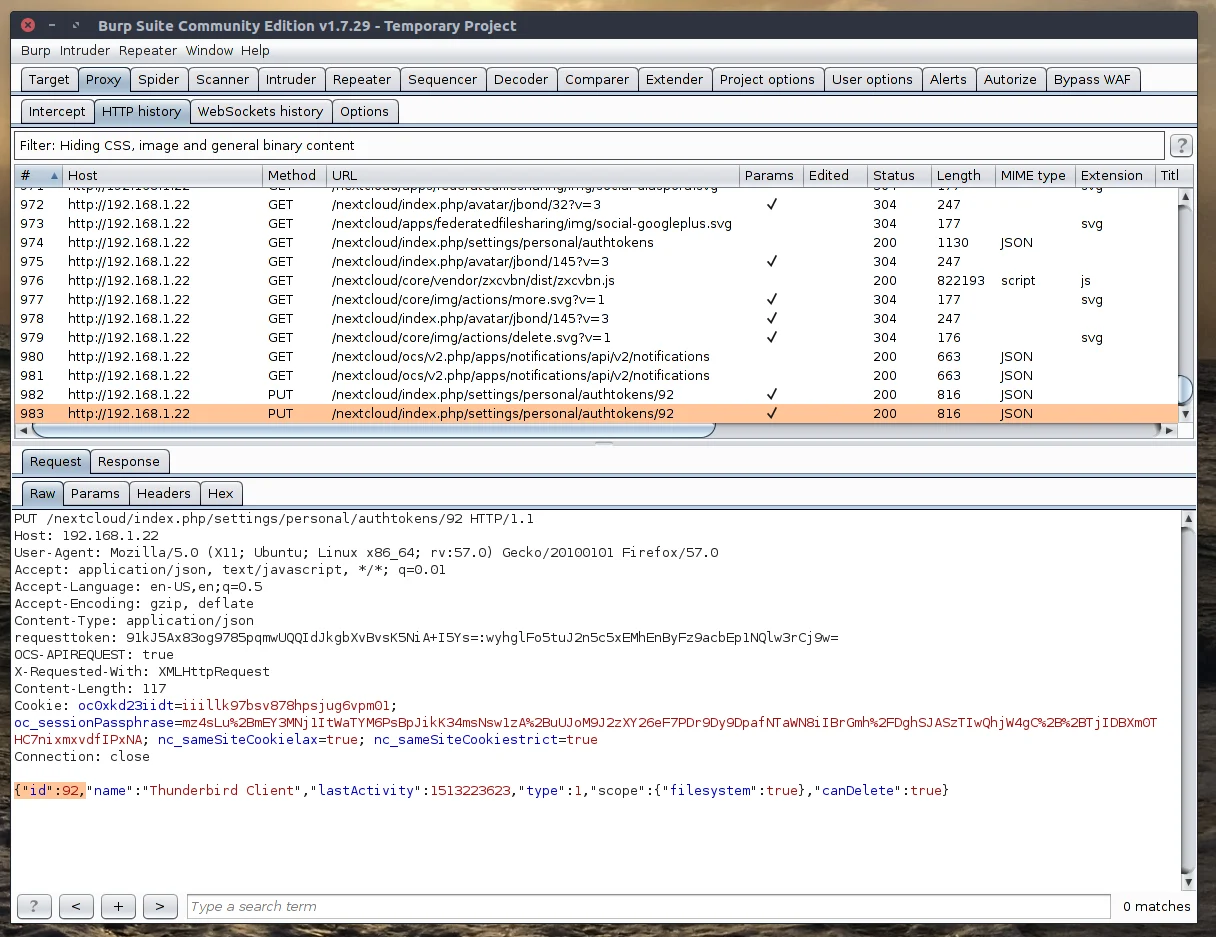
1_request - vulnerable request as seen in Burp.
Impact
Impact/Notes
If an attacker gained access to an app password that did not have file system access, and the attacker had an account on the same Nextcloud server, he or she could grant file system permissions to the compromised app password and then gain access to the victim's files.
A malicious user could write a quick script to loop through app password IDs and revoke file system access. But this would not really affect data confidentiality and would be more of an annoyance for the victims.
While an attacker won't know the app password ID just by compromising it, he or she could use automation to try changing permissions on possible app password IDs. Since the ID seems to start at 1 and increase sequentially, it should be feasible to "flip the switch" on the compromised password in a fairly short time, starting from 1 and working upwards.
Tested on Nextcloud 12.0.3, 12.0.4.
If I can provide any further information please let me know. Thanks!
Attachments
Context
Nextcloud lets users create app-specific passwords, also called authtokens, so that an application can be given limited access to an account. For each app password the user can grant or deny access to their files, a permission the interface calls filesystem access. The setting is changed from the personal settings area, at a URL of the form:
http://[server]/nextcloud/index.php/settings/personal/authtokens/[token ID]
The request that flips the permission is a PUT to that URL, with the app password identifier carried in the JSON body. That identifier is what the report is about.
Setup
The preconditions are modest:
- A Nextcloud server with a couple of test users.
- A browser configured to go through a proxy such as Burp.
- Optionally a WebDAV client. The researcher used cadaver on Ubuntu.
The testing was done against Nextcloud 12.0.3 and 12.0.4.
Finding it
The function that changes a password's filesystem permissions contains an IDOR vulnerability. An authenticated user can change the permissions of another user's app passwords by changing the app password ID number when submitting the request. The vulnerable value is the id field in the JSON body sent to the URL above. A sample request looks like this:
PUT /nextcloud/index.php/settings/personal/authtokens/95 HTTP/1.1
Host: [redacted]
User-Agent: Mozilla/5.0 (X11; Ubuntu; Linux x86_64; rv:57.0) Gecko/20100101 Firefox/57.0
Accept: application/json, text/javascript, */*; q=0.01
Accept-Language: en-US,en;q=0.5
Accept-Encoding: gzip, deflate
Content-Type: application/json
requesttoken: [redacted]
OCS-APIREQUEST: true
X-Requested-With: XMLHttpRequest
Content-Length: 109
Cookie: [redacted]
Connection: close

{"id":95,"name":"thisiatest","lastActivity":1513224099,"type":1,"scope":{"filesystem":true},"canDelete":true}
The id in the body is the value that is vulnerable to IDOR. The same number also appears at the end of the URL path, but it is the body field that the researcher manipulated.
Exploitation
Step 1: Prepare Burp
In Burp, open the Proxy tab, then the Intercept subtab, and make sure interception is off.
Step 2: Log in as the first user
Log in to Nextcloud with a test user.
Step 3: Create a restricted app password
Create an app password and uncheck "Allow filesystem access".
Step 4: Capture the token ID
In Burp, open Proxy, then HTTP history, scroll to the call to the vulnerable URL and note the authtoken ID. It is the number at the end of the URL and is also the id value in the JSON request body.
Step 5: Confirm the restriction
Log out of Nextcloud. With a WebDAV client, log in using the app password. For cadaver, open a terminal and enter:
cadaver http://[server]/remote.php/webdav
Log in with the app password and issue the ls command. Nothing should appear, because this password lacks permission to the user's files.
Step 6: Log in as the second user
Log in to Nextcloud as the second user and create an app password for that user, again unchecking "Allow filesystem access".
Step 7: Intercept the permission change
In Burp, go to Proxy, then Intercept, and toggle interception on. Back in the browser, re-check the "Allow filesystem access" box for the app just created. Burp stalls the request for viewing. The request should be to the vulnerable URL; if it is not, click "Forward" until it appears.
Step 8: Swap the ID
In the JSON request body, change the value of the id parameter to the authtoken ID noted earlier, belonging to the first user. Forward the request, or toggle interception off; either works.
Step 9: Verify the effect
Go back to the WebDAV client and issue ls again. You should now get a directory listing for the victim user. If you do not, exit the WebDAV client and log in again.
If no WebDAV client is available, log out of Nextcloud and log back in as the first user. In their personal settings, scroll down to the authtoken or app-specific password and click the three dot ellipsis icon. "Allow filesystem access" should now be checked, showing that the IDOR attack changed this authtoken's permissions.
The screenshot shows the vulnerable request as seen in Burp.
Root cause
The report shows that the app password identifier in the request body can be swapped for another user's, but it does not describe the server-side code. The request is authenticated and carries a requesttoken header and OCS-APIREQUEST: true. The report does not describe the server-side code, so the exact check that is missing is not shown; likely the handler loads the authtoken by the supplied id and updates it without verifying that the token belongs to the caller.
Impact
If an attacker gained access to an app password that did not have filesystem access, and the attacker had an account on the same Nextcloud server, they could grant filesystem permissions to the compromised app password and then gain access to the victim's files.
A malicious user could also write a quick script to loop through app password IDs and revoke filesystem access. That would not really affect data confidentiality and would be more of an annoyance for the victims.
An attacker will not know the app password ID just by compromising it, but they could use automation to try changing permissions on possible IDs. Since the ID appears to start at 1 and increase sequentially, it should be feasible to flip the switch on the compromised password in a fairly short time, starting from 1 and working upwards.
Fix
The change needed is for the endpoint to verify that the authtoken identified by id belongs to the authenticated user before applying the permission change, and to reject the request otherwise.
Variants to test
- Other per-object settings endpoints in the same personal settings area: change the object ID in the body or path to another user's object and see whether the change is applied. A positive result is the victim's setting changing, confirmed from the victim's own session.
- Endpoints that take the identifier in the JSON body while also carrying it in the URL: try mismatching the two values. A positive result is the server acting on the body value without checking ownership.
- Sequential identifier spaces for app passwords and similar tokens: enumerate IDs from 1 upwards with an authenticated low-privilege account. A positive result is a successful permission change on an ID that does not belong to you.
- Permission changes in both directions: try granting a permission the victim's token lacks, and revoking one it has. A positive result is either change taking effect on the victim's token.
Hunting notes
This kind of bug tends to hide in settings endpoints that act on per-user objects identified by a numeric ID, especially where the same ID appears both in the URL and in a JSON body. During recon, look for requests that update a single object by ID and check whether the response or a second session shows the change applied to an object you do not own. The report describes the impact scenario as an attacker holding a compromised app password without filesystem access, and shows the permission flip through a WebDAV client and through the victim's own settings page. The sequential nature of the IDs made the attack practical without knowing the target ID in advance.
What happened, in plain words
Nextcloud is a piece of software you install on a server to store and share files, a bit like running your own private Google Drive or Dropbox. People log in with a username and password, and then they can upload files, share folders and so on.
Nextcloud also lets you create extra passwords, called app passwords (the software calls them authtokens). The idea is that instead of giving a phone app or a desktop sync client your real login password, you generate a separate password just for that app. Each app password can be limited: you can tick or untick a box that says whether that particular password is allowed to reach your files. The interface calls this permission filesystem access. Think of it like a hotel key card that opens only the gym and not your room: same building, same guest, but a narrower set of doors.
The researcher found that the part of Nextcloud that changes this tick box had a flaw. When you tick or untick the box, your browser sends a small message to the server saying which app password to change, identified by a number. The server applied the change to whichever app password the number pointed at, even another user's. So any logged-in user could send the same message with somebody else's number and change that person's permission instead.
This kind of flaw has a name: IDOR, short for Insecure Direct Object Reference. It means the software lets you refer to something by its raw identifier (here, a number) and does not check that the thing is yours. A simple comparison: a coat check where you hand in ticket number 7 and get a coat, but nobody checks that coat 7 is actually yours. If you can guess or change the number, you can walk off with someone else's coat.
The interesting part is the scenario: if an attacker somehow got hold of a victim's app password that was not allowed to touch files, and the attacker also had their own account on the same Nextcloud server, they could use this flaw to switch file access on for the stolen password and then read the victim's files.
The vulnerable URL
The setting lives in the personal settings area of Nextcloud. The address looks like this:
http://[server]/nextcloud/index.php/settings/personal/authtokens/[token ID]
Line by line:
http://[server]is the address of the Nextcloud server. The square brackets are a placeholder for the real host, which has been removed here./nextcloud/is the folder where Nextcloud is installed on that server./index.phpis the main entry script that Nextcloud uses to route requests./settings/personal/authtokens/is the section of the site that deals with your personal app passwords.[token ID]is the number that identifies one particular app password. This is the number the whole report is about.
When you tick or untick the filesystem box in the browser, the page sends a PUT request to that address. PUT is one of the verbs of HTTP, the language browsers and servers speak. GET is for reading something, POST is for sending something new, and PUT is commonly used for updating an existing thing. So a PUT here means "update this app password".
Setting up the test
The researcher needed very little to reproduce this:
- A Nextcloud server with a couple of test users, so there is a victim account and an attacker account.
- A browser configured to send its traffic through a proxy such as Burp. A proxy is a program that sits between your browser and the server and lets you look at, pause and edit every message that passes. Burp Suite is a popular tool for this in security testing.
- Optionally a WebDAV client. WebDAV is a way of accessing files over the web, the same protocol Nextcloud uses for file sync. A WebDAV client is a program that can log in with a username and password and list or download files, like a file manager over the network. The researcher used cadaver on Ubuntu, a command-line WebDAV client.
The testing was done against Nextcloud 12.0.3 and 12.0.4.
Finding the flaw
The function that changes a password's filesystem permissions contains an IDOR vulnerability. An authenticated user can change the permissions of another user's app passwords by changing the app password ID number when submitting the request. The vulnerable value is the id field in the JSON body sent to the URL above.
JSON is a simple text format for structured data, made of names and values in curly braces, like {"name": "value"}. It is what many web applications use to send data back and forth. The "body" of a request is the part after the headers, where the actual data travels.
A sample request looks like this:
PUT /nextcloud/index.php/settings/personal/authtokens/95 HTTP/1.1
Host: [redacted]
User-Agent: Mozilla/5.0 (X11; Ubuntu; Linux x86_64; rv:57.0) Gecko/20100101 Firefox/57.0
Accept: application/json, text/javascript, */*; q=0.01
Accept-Language: en-US,en;q=0.5
Accept-Encoding: gzip, deflate
Content-Type: application/json
requesttoken: [redacted]
OCS-APIREQUEST: true
X-Requested-With: XMLHttpRequest
Content-Length: 109
Cookie: [redacted]
Connection: close

{"id":95,"name":"thisiatest","lastActivity":1513224099,"type":1,"scope":{"filesystem":true},"canDelete":true}
Line by line:
PUT /nextcloud/index.php/settings/personal/authtokens/95 HTTP/1.1is the request line. It says: update the app password with ID 95, using version 1.1 of HTTP.Host: [redacted]tells the server which site the request is for. This is a local test address.User-Agent: ...identifies the browser that sent the request. Here it is Firefox 57 on Ubuntu.Accept: ...says which response formats the browser is willing to receive.Accept-Language: en-US,en;q=0.5says the browser prefers English.Accept-Encoding: gzip, deflatesays the browser can accept compressed responses.Content-Type: application/jsonsays the body is in JSON format.requesttoken: [redacted]is an anti-CSRF token. CSRF stands for Cross-Site Request Forgery, an attack where a malicious website tricks your browser into sending a request to another site where you are logged in. The token is a random value the server gave your browser earlier, and the server checks it to make sure the request really came from your own session. It has been redacted here because it is a secret tied to a session.OCS-APIREQUEST: trueis a Nextcloud-specific header. OCS is Nextcloud's own API, a defined way for programs to talk to it. An API is simply a set of rules for how one program asks another program to do something, like a menu you order from. This header tells the server the request is an API-style call.X-Requested-With: XMLHttpRequestmarks the request as coming from JavaScript inside the page rather than a normal page load.Content-Length: 109says the body is 109 bytes long.Cookie: [redacted]carries the session cookie. A cookie is a small piece of data the server asks your browser to store and send back with every request, so the server can recognise you. The session cookie is what proves you are logged in. It has been redacted because anyone holding it could act as you.Connection: closetells the server to close the network connection after this response.- The blank line separates headers from the body.
{"id":95,"name":"thisiatest","lastActivity":1513224099,"type":1,"scope":{"filesystem":true},"canDelete":true}is the JSON body.idis the app password number.nameis the label the user gave it.lastActivityis a timestamp of last use.typeis a number describing the kind of token.scopeholds the permissions, and{"filesystem":true}means file access is being switched on.canDeletesays whether the token may be deleted.
The id in the body is the value that is vulnerable to IDOR. The same number also appears at the end of the URL path, but it is the body field that the researcher manipulated.
Exploitation, step by step
Step 1: Prepare Burp
In Burp, open the Proxy tab, then the Intercept subtab, and make sure interception is off. Interception means Burp pauses each request so you can read or edit it before it goes on. Turning it off first lets you browse normally while Burp quietly records everything in the background.
Step 2: Log in as the first user
Log in to Nextcloud with a test user. This user will play the victim.
Step 3: Create a restricted app password
Create an app password and uncheck "Allow filesystem access". This gives us a password that is deliberately not allowed to reach files, so we can later prove that the permission changed.
Step 4: Capture the token ID
In Burp, open Proxy, then HTTP history, scroll to the call to the vulnerable URL and note the authtoken ID. It is the number at the end of the URL and is also the id value in the JSON request body. HTTP history is Burp's log of every request that passed through it. We need this number because it is the victim's app password that we will later try to change from the other account.
Step 5: Confirm the restriction
Log out of Nextcloud. With a WebDAV client, log in using the app password. For cadaver, open a terminal and enter:
cadaver http://[server]/remote.php/webdav
Line by line:
cadaveris the name of the command-line WebDAV client.http://[server]/remote.php/webdavis the WebDAV address on the Nextcloud server.remote.phpis the script that handles remote access, andwebdavis the file access endpoint.
Log in with the app password and issue the ls command. ls means "list", the same as listing the contents of a folder. Nothing should appear, because this password lacks permission to the user's files. This step is the baseline: it shows what "no file access" looks like before we tamper with anything.
Step 6: Log in as the second user
Log in to Nextcloud as the second user and create an app password for that user, again unchecking "Allow filesystem access". This user plays the attacker. We create a token for them because the attack is performed from their own logged-in session.
Step 7: Intercept the permission change
In Burp, go to Proxy, then Intercept, and toggle interception on. Back in the browser, re-check the "Allow filesystem access" box for the app just created. Burp stalls the request for viewing. The request should be to the vulnerable URL; if it is not, click "Forward" until it appears. Forward means "let this paused request continue to the server". We are waiting for the exact request that carries the permission change, because that is the one we want to edit.
Step 8: Swap the ID
In the JSON request body, change the value of the id parameter to the authtoken ID noted earlier, belonging to the first user. Forward the request, or toggle interception off; either works. This is the heart of the attack: the request is still sent from the attacker's own session, with the attacker's own cookie and anti-CSRF token, but the number inside now points at the victim's app password. If the server does not check ownership, it will apply the change to the victim's token.
Step 9: Verify the effect
Go back to the WebDAV client and issue ls again. You should now get a directory listing for the victim user. If you do not, exit the WebDAV client and log in again. A directory listing means the files are now visible, which proves the permission was switched on for a password that was not supposed to have it.
If no WebDAV client is available, log out of Nextcloud and log back in as the first user. In their personal settings, scroll down to the authtoken or app-specific password and click the three dot ellipsis icon. "Allow filesystem access" should now be checked, showing that the IDOR attack changed this authtoken's permissions. This is the same proof seen from the victim's own screen instead of through a file client.
The screenshot shows the vulnerable request as seen in Burp.
Why it works
The report shows that the app password identifier in the request body can be swapped for another user's, but it does not describe the server-side code. The request is authenticated and carries a requesttoken header and OCS-APIREQUEST: true. In plain terms: the server was careful to check that the request came from a real logged-in session, but it never asked "and does this app password belong to that session's user?". The report does not describe the server-side code, so the exact check that is missing is not shown; likely the handler loads the authtoken by the supplied id and updates it without verifying that the token belongs to the caller.
Impact
If an attacker gained access to an app password that did not have filesystem access, and the attacker had an account on the same Nextcloud server, they could grant filesystem permissions to the compromised app password and then gain access to the victim's files. In other words, a stolen but harmless-looking password could be upgraded into a key to the files.
A malicious user could also write a quick script to loop through app password IDs and revoke filesystem access. That would not really affect data confidentiality and would be more of an annoyance for the victims. Confidentiality here means keeping data secret; revoking access does not reveal anything, it just breaks things for the owner.
An attacker will not know the app password ID just by compromising it, but they could use automation to try changing permissions on possible IDs. Since the ID appears to start at 1 and increase sequentially, it should be feasible to flip the switch on the compromised password in a fairly short time, starting from 1 and working upwards. Sequential means the numbers go 1, 2, 3 and so on, so a program can simply try each one in turn.
Fix
The change needed is for the endpoint to verify that the authtoken identified by id belongs to the authenticated user before applying the permission change, and to reject the request otherwise. That is the coat check attendant actually looking at the name on the ticket.
Variants to test
- Other per-object settings endpoints in the same personal settings area: change the object ID in the body or path to another user's object and see whether the change is applied. A positive result is the victim's setting changing, confirmed from the victim's own session.
- Endpoints that take the identifier in the JSON body while also carrying it in the URL: try mismatching the two values. A positive result is the server acting on the body value without checking ownership.
- Sequential identifier spaces for app passwords and similar tokens: enumerate IDs from 1 upwards with an authenticated low-privilege account. A positive result is a successful permission change on an ID that does not belong to you.
- Permission changes in both directions: try granting a permission the victim's token lacks, and revoking one it has. A positive result is either change taking effect on the victim's token.
Hunting notes
This kind of bug tends to hide in settings endpoints that act on per-user objects identified by a numeric ID, especially where the same ID appears both in the URL and in a JSON body. During recon, look for requests that update a single object by ID and check whether the response or a second session shows the change applied to an object you do not own. Recon means the early exploration phase where you map out how a site works. The report describes the impact scenario as an attacker holding a compromised app password without filesystem access, and shows the permission flip through a WebDAV client and through the victim's own settings page. The sequential nature of the IDs made the attack practical without knowing the target ID in advance.
Glossary
- Nextcloud: self-hosted file storage and sharing software, similar in purpose to a private cloud drive.
- App password / authtoken: a separate password generated for one application, with its own limited permissions, so the real login password is not shared.
- Filesystem access: the permission that decides whether an app password may reach the user's files.
- IDOR (Insecure Direct Object Reference): a flaw where software lets you name an object by its raw identifier and does not check that the object belongs to you.
- HTTP: the language browsers and servers use to exchange requests and responses.
- PUT: an HTTP verb used to update an existing thing.
- GET / POST: HTTP verbs for reading and for sending new data, mentioned for comparison.
- Request body: the part of a request after the headers that carries the actual data.
- JSON: a text format for structured data made of names and values in curly braces.
- Header: a line of metadata at the top of a request or response.
- Host: the header naming which site the request is for.
- User-Agent: the header identifying the browser or client that sent the request.
- Cookie: a small piece of data the server asks the browser to store and send back, used to recognise the user.
- Session cookie: the cookie that proves you are logged in; anyone holding it can act as you.
- CSRF (Cross-Site Request Forgery): an attack where a malicious site tricks your browser into sending a request to a site where you are logged in.
- requesttoken: the anti-CSRF value the server checks to confirm a request came from your own session.
- OCS-APIREQUEST: a Nextcloud header marking a request as an API-style call.
- API: a defined set of rules for how one program asks another to do something.
- X-Requested-With: a header marking a request as coming from JavaScript inside the page.
- Content-Type: the header saying what format the body is in.
- Content-Length: the header giving the size of the body in bytes.
- Proxy: a program that sits between browser and server and lets you inspect and edit traffic.
- Burp Suite: a popular proxy tool used in security testing.
- Interception: pausing a request in the proxy so it can be read or edited before it continues.
- HTTP history: the proxy's log of every request that passed through it.
- Forward: letting a paused request continue to the server.
- WebDAV: a way of accessing files over the web, used by Nextcloud for file sync.
- WebDAV client: a program that logs in over WebDAV to list or download files.
- cadaver: a command-line WebDAV client.
- ls: the command to list the contents of a folder.
- Directory listing: the list of files and folders shown when you open a location.
- Sequential ID: an identifier that increases by one each time, such as 1, 2, 3, making it easy to guess.
- Enumeration: trying identifiers one after another to find valid ones.
- Recon: the early exploration phase of mapping out how a site works.
- Confidentiality: keeping data secret from those who should not see it.
- Severity: a rating of how serious a flaw is.
- Bounty: a reward paid for reporting a valid security flaw.



