SSL certificate not validated when registering with a provider
The Nextcloud desktop client did not validate SSL certificates when loading the registration page from nextcloud.com. An attacker in a man-in-the-middle position could present a fake certificate and serve arbitrary content, such as a phishing login page, inside the trusted client window.

- Triaged in 9 days
- Fixed in 8 months
- Paid in 10 months
- Disclosed after 11 months
Description
When running the desktop client for the first time, users can click the "Register with a provider" button to sign up for a Nextcloud account with a Nextcloud cloud provider. Clicking "Register..." opens a web page in a Nextcloud desktop client window with content from https://nextcloud.com/register.
However, the desktop client doesn't appear to validate the SSL certificate for nextcloud.com. An attacker between the user and nextcloud.com could replace the certificate with their own invalid cert and conduct a man in the middle attack. The attacker could control the page content displayed to the user.
This appears to affect Windows and Linux Nextcloud desktop clients. I don't have a Mac so haven't tested the Mac client.
Reproduction
If you have Burp HTTP proxy, set the Nextcloud client to proxy traffic through Burp. Click "Register with a provider"; Burp should receive the request. This demonstrates vulnerability presence because the Nextcloud client should alert on Burp's self signed certificate, but doesn't.
Otherwise, I wrote a quick python script to demonstrate the vulnerability. You will need at least 1 Linux machine to run the script on. You can run Nextcloud desktop on it too or on another device.
- Download the attached nc_desktop_mitm.py, nc_key.pem (private key), and nc_cert.pem (public cert) files to a Linux machine.
- Start the nc_desktop_mitm.py script. The option -k specifies the private key file and -c specifices the public cert file. Sudo is required because we bind to port 443: sudo python3 nc_desktop_mitm.py -k nc_key.pem -c nc_cert.pem
- Note the IP address of the machine running the script.
- Now we need to mimic what an attacker could accomplish through ARP poisoning, DNS spoofing, or by controlling a router between the victim and nextcloud.com. However, MiTM techniques like these are tedious to setup, so we'll cheat... Open the hosts file on the device where you are running Nextcloud desktop.
- Add an entry to point nextcloud.com to the IP of the machine running the script. Save and close the hosts file.
- Open Nextcloud desktop client and click "Register with a provider".
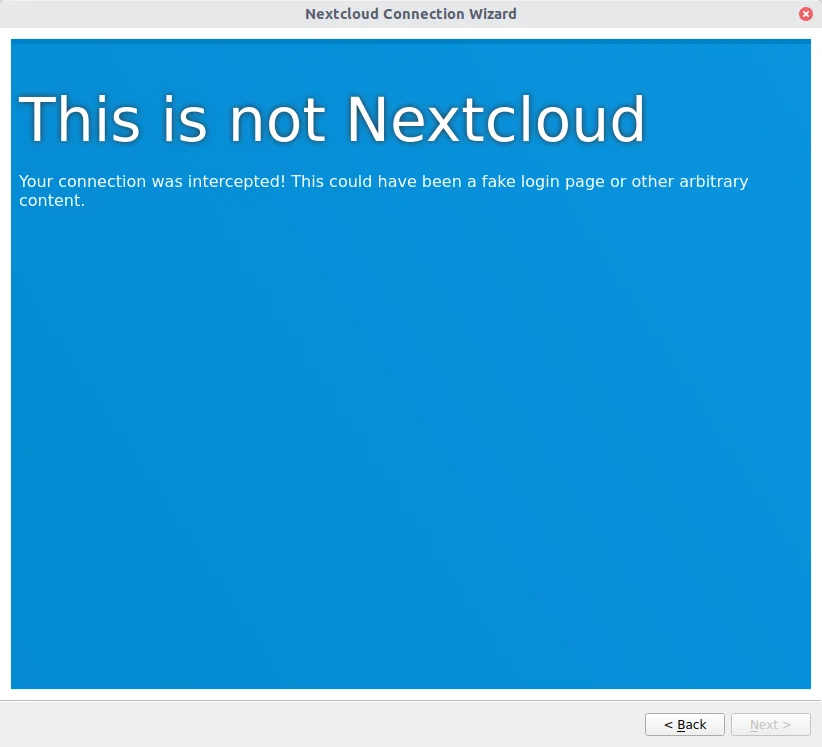
- The Nextcloud client displays my custom proof of concept page, indicating the client trusted the invalid cert.
I've attached a screenshot of what the Nextcloud client should show after clicking "Register with a provider" if the reproduction steps worked.
Tested Nextcloud desktop client version 2.6.4stable (build 20200303) on Ubuntu 18.04 and Windows 10. If I can provide further information please let me know. Thanks!
Impact
An attacker can serve untrusted HTML, Javascript, etc in the trusted context of the desktop client. A typical user is likely inclined to trust what is shown to them in the Nextcloud app compared to a web browser page; they won't even know it's web content necessarily and may assume it's native to the Nextcloud client.
A likely attack vector would be to replace the content with a fake login page and try to get the user to login. If the user clicks "Register with a provider", a window asking them to "Sign in with Google/Facebook/Apple to access your new Nextcloud account!" or similar might net the attacker something useful. Such an attack would probably have a decent success rate given the circumstances.
If an attacker just passively eavesdrops on the user's traffic, near as I can tell the attacker can collect the user's email as it gets POSTed to nextcloud.com during the registration process. A user's email is private, but the usefulness to an attacker seems limited without other associated user information.
Attachments
Not written yet. The AI write-up for this report has not been written yet. The Original tab links to the source.
How it worked
Root cause
Likely the embedded web view used for the registration page was configured to ignore certificate errors, so invalid or self-signed certificates were accepted.
Impact
An attacker could serve untrusted HTML and JavaScript in the trusted context of the desktop client, for example a fake login page, and could passively collect the user's email during registration.
What the attacker needed
Attacker in a man-in-the-middle position; victim uses the desktop client; victim clicks 'Register with a provider'
How it was found
- Set the Nextcloud client to send traffic through a proxy such as Burp.
- Click the 'Register with a provider' button.
- Observe that the proxy receives the request and the client does not warn about the proxy's self-signed certificate.
- Alternatively, run a small Python script on a Linux machine that serves a custom certificate on port 443.
- Point nextcloud.com to that machine's IP address in the hosts file of the device running the client.
- Open the client and click 'Register with a provider'; the custom proof-of-concept page is displayed.
Explained by bugbounty.wiki with AI from the original and checked against quotes from it; it can still be wrong. Read the original before relying on a detail.
Not written yet. The AI write-up for this report has not been written yet. The Original tab links to the source.
When an app connects to a website, it should check that the website's certificate is genuine, like checking a passport. Here the desktop client skipped that check, so someone sitting between the user and the website could pretend to be the website. They could then show a fake login page inside the app, and the user would have no easy way to tell it was not real.
What is Crypto?
Encryption, signatures, randomness or certificate checks that do not protect what they claim to.




