Android content provider exposes password-protected share password hashes
The Nextcloud Android app's exported content provider allows any app on the device to query share password hashes and tokens for password-protected shares. An attacker with a malicious app could extract these hashes for offline cracking, potentially gaining access to protected shares.

- Triaged in under an hour
- Fixed in 8 months
- Paid in 8 months
- Disclosed after 2.6 years
Summary
Nextcloud Android client v1.4.3 has a globally available content provider which exposes the bcrypt password hashes for password protected shared files and folders.
Description
Android apps can use a content provider to handle storage and retrieval of data. Content providers that are exported allow any app on the same device to access their content. The Nextcloud Android app has an exported content provider called com.owncloud.android.providers.FileContentProvider (authority content://org.nextcloud) which holds sensitive information, including the share identifiers (aka tokens) and bcrypt password hashes for the user's password protected shares. An attacker can, through a malicious app on the device, query the provider and extract the share password hashes for offline cracking. This effectively bypasses any brute force share password protections implemented by the Nextcloud server and speeds up the cracking process, increasing the chances of share password recovery. Combined with the share identifier/token, if an attacker successfully cracks a password, he/she has enough information to access the protected share.
Reproduction
Install the Nextcloud Android app on a device and sign in. Ensure some files are shared via password-protected links so you'll have some data to view. :)
From here there are 2 ways to reproduce the issue:
Method 1: Connect an Android device with USB debugging enabled to a computer with the Android Studio or development tools installed. Run the following commands on a command prompt (Windows) or terminal (Linux):
- adb devices //start adb if not already running
- adb shell //get a shell on the target device
- content query --uri content://org.nextcloud/shares //use Android's 'content' program to query the vulnerable provider
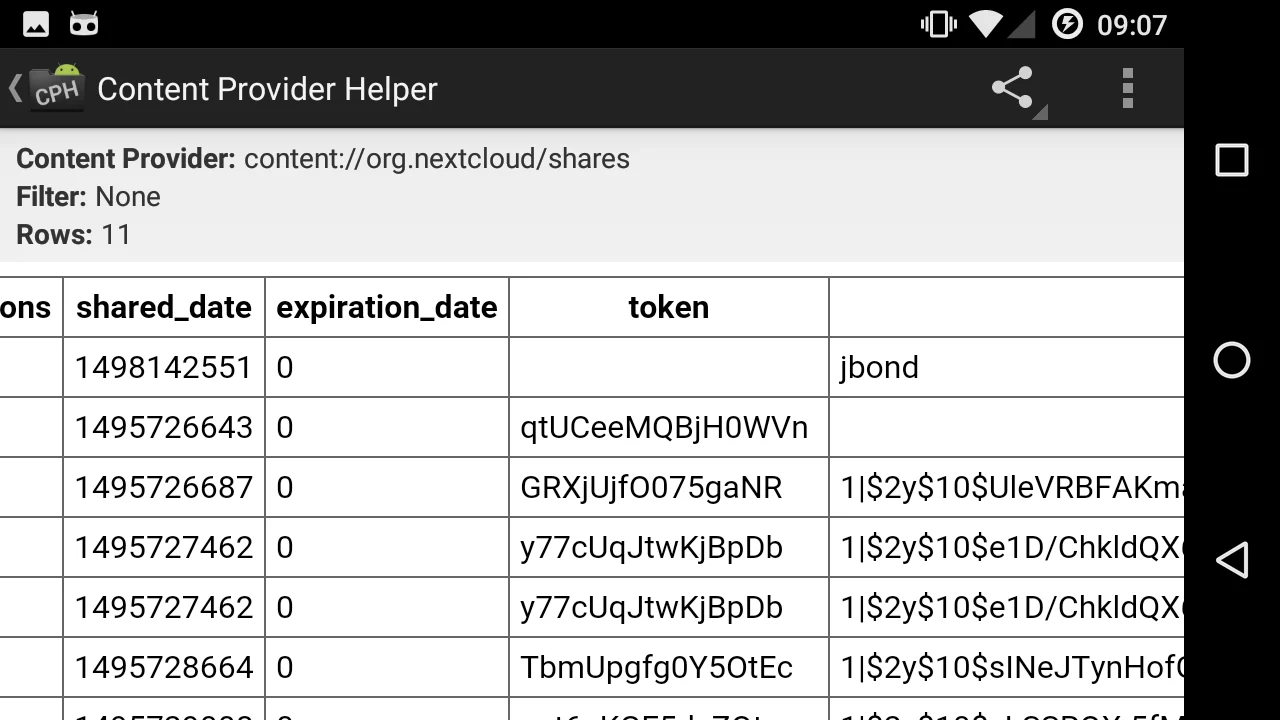
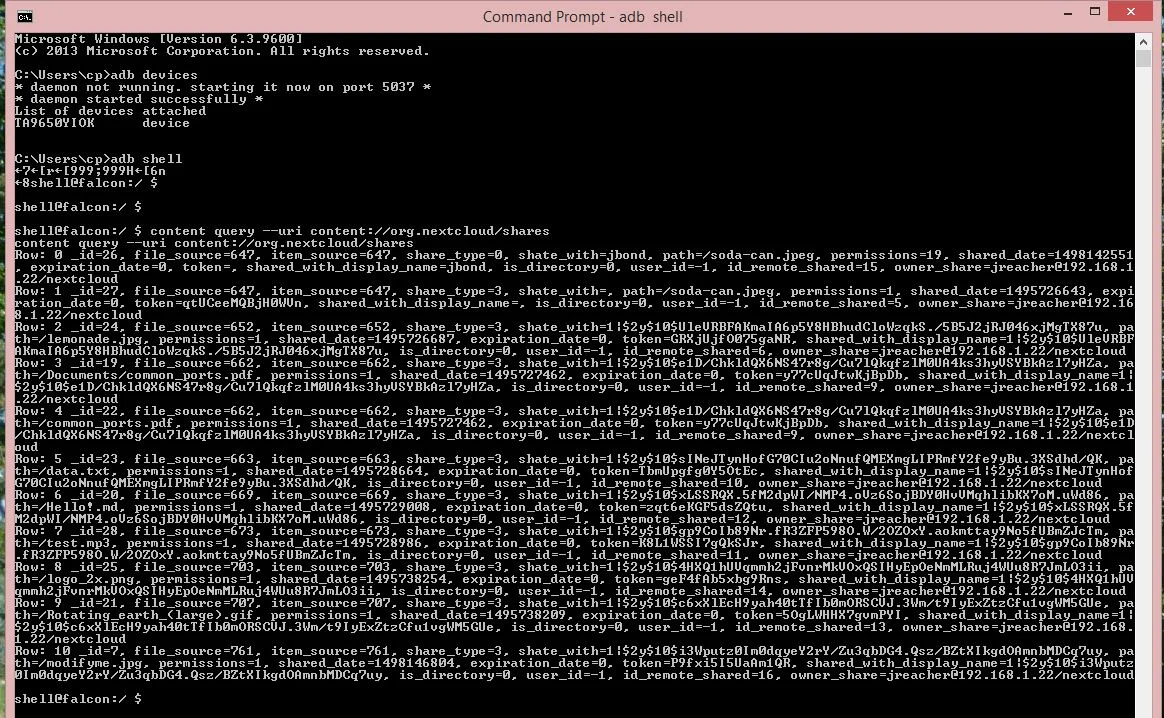
The provider returns data including 1) the password hashes of shares protected with a password (the value of the 'shate_with' field) and 2) the token identifier used to access the share on the Nextcloud server (value of the 'token' field).
Method 2: The following app (among others), Content Provider Helper, allows you to query content providers on the device: https://play.google.com/store/apps/details?id=com.jensdriller.contentproviderhelper
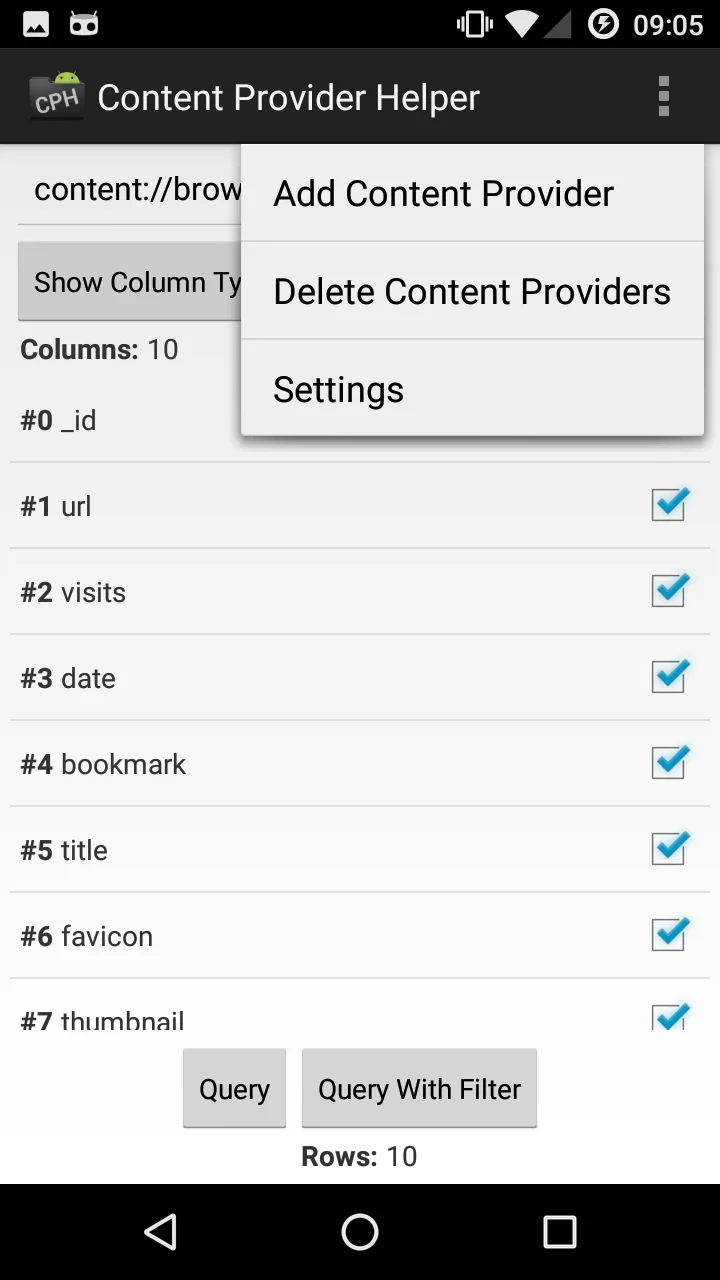
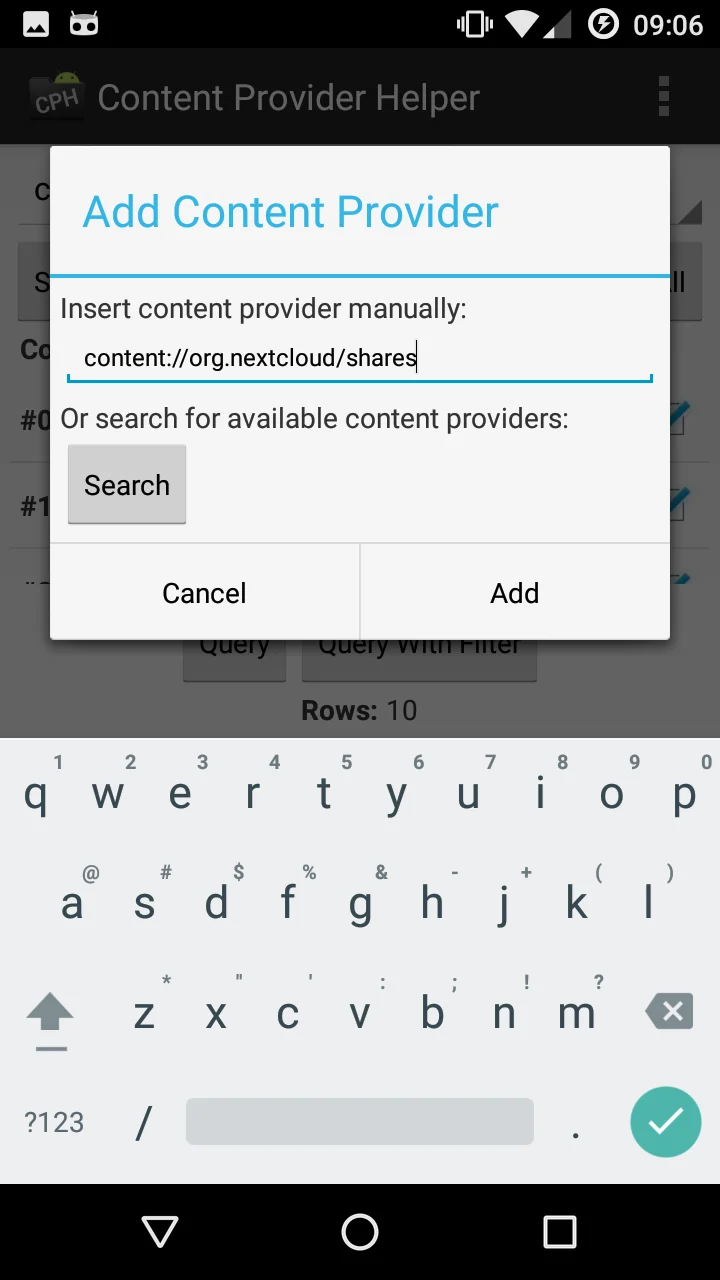
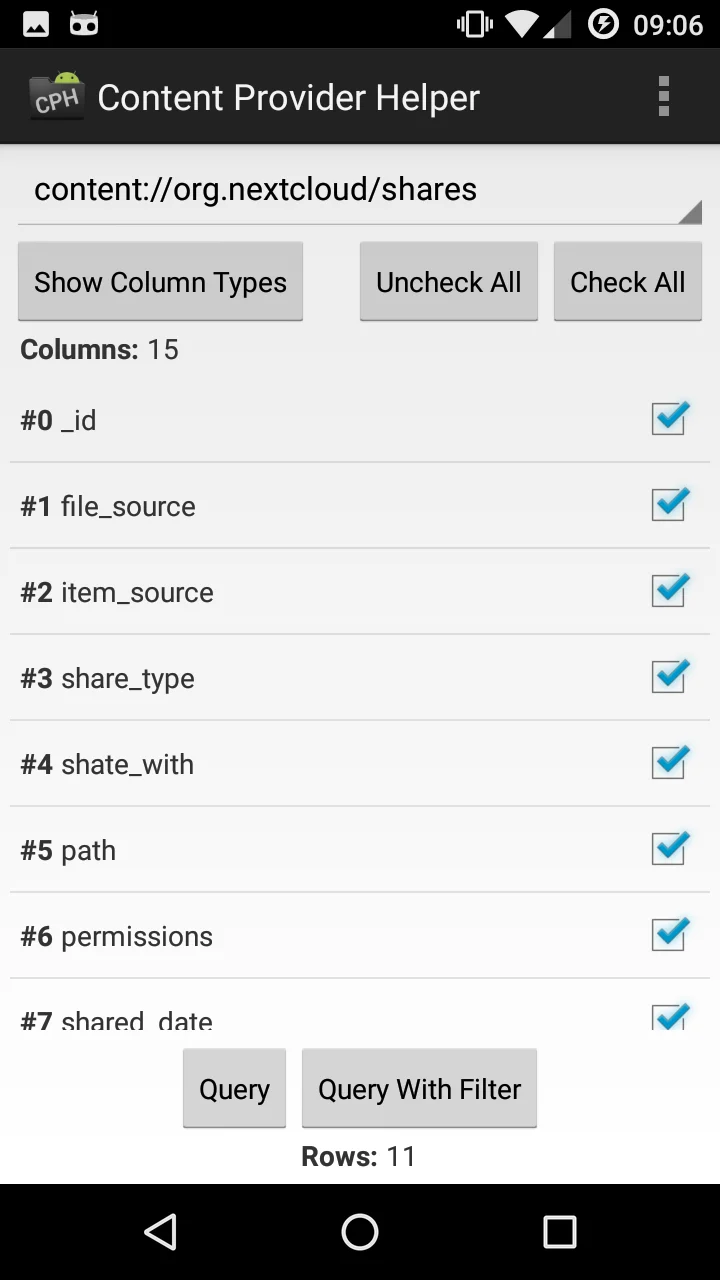
Install and open it, tap the settings button in the upper right, tap 'Add Content Provider', add 'org.nextcloud/shares' (content:// is already prefilled), then tap 'Add'. Tap 'Query' and view the returned data. Since this 3rd party app can view the provider's data, it helps illustrate the fact that any app on the device can also access the provider and it's data.
Other queries return additional information, including file and folder names: content://org.nextcloud/file content://org.nextcloud/dir/[dir ID]
Screenshots
- 1_settings - navigate to add provider in the Content Provider Helper app
- 2_add_provider - adding the vulnerable provider in the helper app
- 3_ready_to_query - provider added, tap Query here
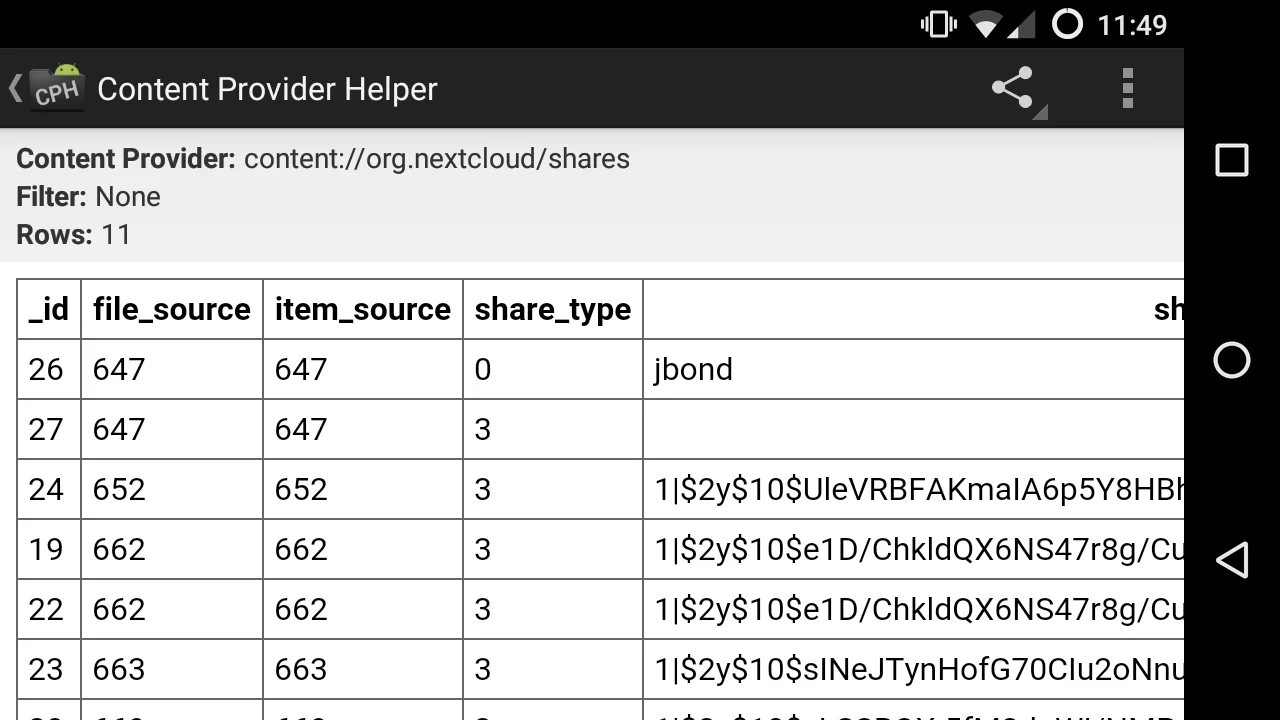
- 4_results - results from the provider. The start of the hashes are visible in the far right column. Only shares that have been password-protected have a hash entry.
- 5_token - view showing the share identifier/token
- 6_cli - retrieving the same information via an adb shell with the 'content' command
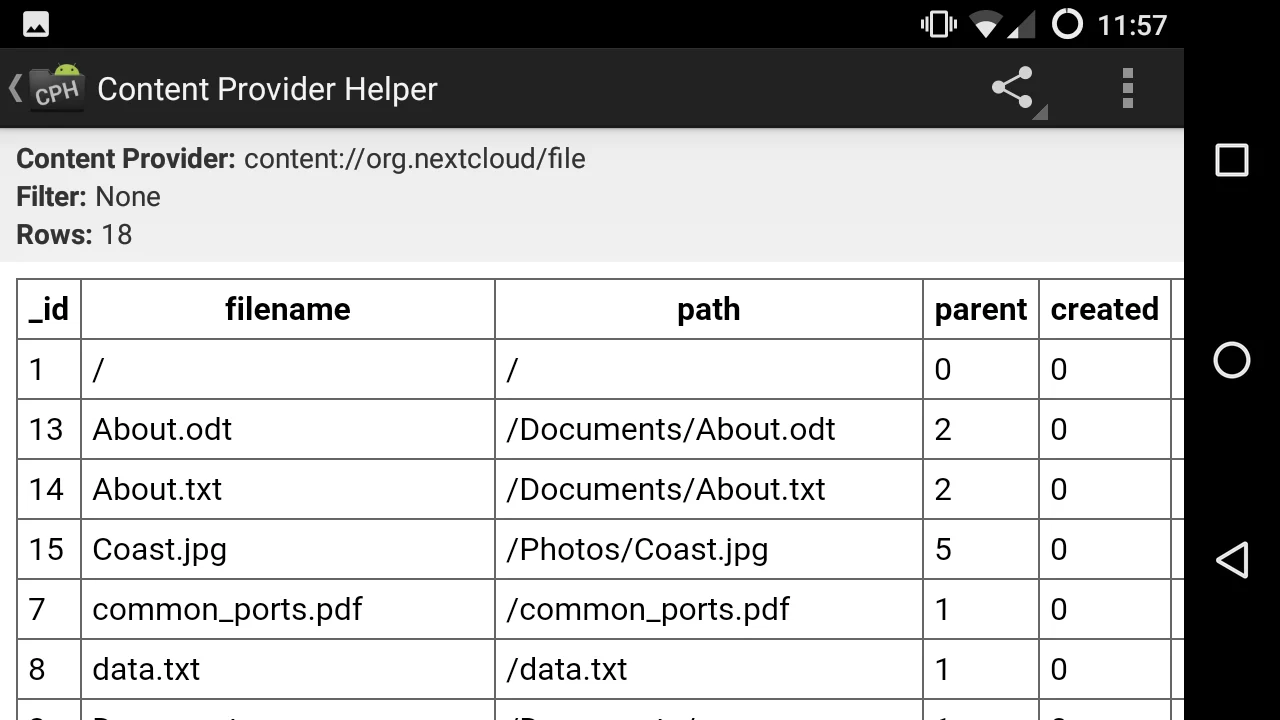
- 7_files - results from querying content://org.nextcloud/file. Filenames are leaked which may or may not be considered sensitive information.
Impact/Notes
This vulnerability allows a malicious app to extract the password protect hashes and send them to an attacker, who can attempt to crack them offline instead of brute-forcing the Nextcloud server. This speeds up the cracking process and increases the chance of password recovery, though password recovery is not guaranteed.
The vulnerability also allows a malicious app to retrieve the names of the user's Nextcloud files synced with the app. File names may or may not be considered sensitive information, not sure if this is noteworthy or not.
The Nextcloud threat model (https://nextcloud.com/security/threat-model/) mentions attacks involving other Android apps as 'minimal risk'. I understand if this vulnerability is considered an acceptable risk but thought it best to let you decide that.
Testing was primarily done on a Motorola Moto G running Android 6.0.1, Nextcloud Android app v1.4.3.
Possible Mitigation
I do not see a valid reason to export the vulnerable content provider and make it accessible to any app on the device. One mitigation solution, therefore, is to mark the content provider as not exported by removing 'exported=true' from the com.owncloud.android.providers.FileContentProvider <provider> declaration in the AndroidManifest.xml file. This would prevent other apps from accessing the provider.
If there is a valid reason to export the provider, do share hashes need to be kept on the device? The Nextcloud server seems to be the one comparing the provided share password with the hash if someone attempts to access it. Not storing the hash in the content provider is another possible fix.
If this vulnerability is considered an acceptable risk, then no action is needed. :)
Attachments
Context
The Nextcloud Android client is the mobile companion to a self-hosted file sync and share service. Among other things it lets a user create password-protected public links to files and folders. The report notes the Nextcloud server appears to be the component that compares a supplied share password with the hash, while the client also held share hashes locally.
On Android, an app can expose data to other apps through a content provider. A provider declared as exported is reachable by any other app installed on the same device, regardless of who wrote it. The Nextcloud client ships a provider called com.owncloud.android.providers.FileContentProvider with the authority content://org.nextcloud, and in version 1.4.3 that provider was exported and held sensitive share data, including share identifiers (tokens) and the bcrypt password hashes of password-protected shares.
The report was filed against the Nextcloud program on HackerOne by netranger, rated low severity, and paid a 75 USD bounty. It was disclosed on 31 January 2020.
Setup
- Target: Nextcloud Android client, package
com.nextcloud.client, version 1.4.3. - Test device: a Motorola Moto G running Android 6.0.1.
- Preconditions: the app installed and signed in, with at least some files shared through password-protected links so the provider has share data to return.
- Tools: either a computer with Android Studio or the Android development tools and USB debugging enabled, or the third-party app Content Provider Helper (
com.jensdriller.contentproviderhelper) installed on the device.
Finding it
The researcher started from the fact that the Nextcloud app declares an exported content provider, com.owncloud.android.providers.FileContentProvider, under the authority content://org.nextcloud. Because the provider is exported, any app on the same device can query it. The data it serves includes the share identifiers (tokens) and the bcrypt password hashes for the user's password-protected shares.
That combination is what makes it interesting. A hash alone is only useful for offline cracking; a token alone gives access to a share whose password is unknown. Together, a cracked password plus the token is enough to open the protected share. The provider also answers queries that return file and folder names, which the researcher flagged as possibly sensitive but was unsure whether it was noteworthy.
Exploitation
The researcher gives two reproduction methods. Both require the app to be installed, signed in, and to have password-protected shares present.
Method 1: adb shell and the content command
Connect the device with USB debugging enabled to a computer with the Android development tools, then run:
adb devices //start adb if not already running
adb shell //get a shell on the target device
content query --uri content://org.nextcloud/shares //use Android's 'content' program to query the vulnerable provider
The report's comments describe the first command as starting adb if not already running, the second as getting a shell on the target device, and the third as querying the vulnerable provider. The provider returns data including the password hashes of shares protected with a password (in the shate_with field, as spelled in the report) and the token identifier used to access the share on the Nextcloud server (the token field).
The screenshot shows the same information being retrieved through an adb shell with the content command.
Method 2: a third-party content provider browser
The researcher used Content Provider Helper, available at https://play.google.com/store/apps/details?id=com.jensdriller.contentproviderhelper, to show that an ordinary app on the device can read the same data. The steps:
- Install and open the app.
- Tap the settings button in the upper right.
- Tap 'Add Content Provider'.
- Add
org.nextcloud/shares(thecontent://prefix is already filled in), then tap 'Add'. - Tap 'Query' and view the returned data.
The results screen shows the provider's output; the start of the hashes is visible in the far right column. Only shares that have been password-protected have a hash entry.
A separate view shows the share identifier, the token.
Because this third-party app can read the provider, any other app on the device can too. That is the point of the demonstration: the helper app is a stand-in for a malicious app.
Other queries
The provider answers further queries that return additional information, including file and folder names:
content://org.nextcloud/file
content://org.nextcloud/dir/[dir ID]
Querying content://org.nextcloud/file leaks filenames, which the researcher notes may or may not be considered sensitive.
Root cause
The provider is exported. In Android terms, a <provider> entry in AndroidManifest.xml that carries exported=true makes the provider reachable by any app on the device, and the Nextcloud client's FileContentProvider was declared that way while serving share tokens, bcrypt password hashes and file names. The report does not describe any permission guarding the provider.
The server-side brute-force protection on share passwords does not help here, because the attack never touches the server: the hashes are cracked offline. The Nextcloud threat model, as cited in the report, treats attacks involving other Android apps as 'minimal risk', which is the design assumption the finding pushes against.
Impact
A malicious app on the device can query the provider and extract the password hashes of password-protected shares, then send them to an attacker who cracks them offline instead of brute-forcing the Nextcloud server. This bypasses the server's brute-force protections, speeds up cracking and increases the chance of password recovery, though recovery is not guaranteed. Combined with the share token, a successfully cracked password gives the attacker enough information to access the protected share.
The same access lets a malicious app retrieve the names of the user's Nextcloud files synced with the app. The researcher was explicit that filenames may or may not be sensitive and was unsure whether that part was noteworthy.
The precondition is a malicious app installed on the same device as the Nextcloud client, with the user signed in and holding password-protected shares.
Fix
The report offers two possible mitigations and leaves the choice open.
- Stop exporting the provider. The researcher saw no valid reason to export it and suggested removing
exported=truefrom thecom.owncloud.android.providers.FileContentProvider<provider>declaration inAndroidManifest.xml, which would prevent other apps from accessing it. - If there is a valid reason to export the provider, question whether share hashes need to be kept on the device at all. The Nextcloud server appears to be the component that compares a supplied share password with the hash, so not storing the hash in the provider is another possible fix.
The report also says that if the issue is considered an acceptable risk, no action is needed. It does not record which fix, if any, was applied.
Variants to test
- Enumerate exported providers in other Android clients of self-hosted or cloud services with
adb shell dumpsys package <package>or a manifest dump, then query each authority withcontent query --uri content://<authority>/<path>. A positive result is any row containing credentials, tokens, hashes or personal data. - Try the obvious path segments on a provider you have found:
shares,file,dir/[id],accounts,users. A positive result is data returned without any permission check. - Install a content provider browser on a test device alongside the target app and repeat the query from a different package. If a third-party app sees the data, so will malware.
- Look for hash material in local storage as well: databases and shared preferences under the app's data directory. A positive result is bcrypt or other password hashes stored where another app or a backup can reach them.
- Check whether the provider is protected by a signature-level permission rather than being fully open. A positive result for the bug is a provider that answers a query from an unrelated app with no permission declared.
Hunting notes
This class of bug hides in the manifest. During recon of an Android app, the first thing to look at is which components are exported: providers, services, receivers and activities. A provider with exported=true and no android:permission is a candidate, and the authority string tells you where to point content query.
The signal is a provider that serves data the app itself needs locally, such as account metadata, share records or cached files, rather than data meant for integration with other apps. If the app stores secrets locally, as with share hashes here, that is where to look.
Showing impact was straightforward because the data speaks for itself: the researcher demonstrated the query from a third-party app, showed the hash column and the token, and explained the offline cracking path that bypasses server-side brute-force protection. The report also acknowledged the program's own threat model and left the risk decision to the maintainers, which is a reasonable way to frame a low-severity finding whose acceptance depends on policy rather than on exploitability alone.
What happened, in plain words
Nextcloud is a service you can run on your own computer or server to store files and share them with other people, a bit like a private version of Google Drive or Dropbox. It has a phone app for Android so you can reach your files from a mobile. One feature of that app lets you share a file or folder through a public link that is protected by a password, so only people who know the password can open it.
The Android app kept some of the information about those protected shares on the phone itself, including the password in a scrambled form called a hash, and a special code called a token that identifies the share. The app stored this in a part of Android called a content provider, which is a way for one app to offer data to other apps on the same phone. The problem was that this particular content provider was set to be open to every other app on the phone, not just to the Nextcloud app. So any app installed on the same phone, including a malicious one, could ask the provider for the data and receive the share tokens and the password hashes.
A hash is a one-way scramble of a password: you cannot turn it back into the password directly, but you can guess passwords, scramble each guess the same way, and see if the result matches. Doing that on your own computer is called offline cracking, and it is much faster than trying passwords one at a time against a live website, because the website can slow you down or lock you out. With the hash and the token together, someone who cracks the password has everything needed to open the protected share.
The researcher who found this reported it to Nextcloud through the bug bounty platform HackerOne. The report was rated low severity and paid a bounty of 75 USD. It was disclosed on 31 January 2020.
The pieces involved
Before the steps make sense, here are the parts of the picture, explained from scratch.
- The product. The Nextcloud Android client is the phone app that talks to a Nextcloud server. The server is where the files really live; the app is a window onto them. The app can also create public share links, and those links can be protected with a password.
- The password check. When someone opens a password-protected share, the password they type has to be checked. On the server side, the password is not stored as plain text; it is stored as a hash, and the server compares the hash of what was typed with the stored hash. The phone app, however, also kept a copy of that hash locally.
- A content provider. On Android, apps are kept separate from each other on purpose, so one app normally cannot read another app's data. A content provider is a doorway an app can build so that other apps can ask it for data. The app decides whether the doorway is open to everyone or locked. A provider marked as exported is open to any app on the device, whoever wrote it.
- The authority. Every content provider has an address, called an authority, written like a web address but starting with
content://. The Nextcloud app's provider is calledcom.owncloud.android.providers.FileContentProviderand its authority iscontent://org.nextcloud. Think of the authority as the street address of the doorway, and the part after it, such as/shares, as which shelf inside you are asking about. - A token. A token here is a short identifier for a particular share, a code the server uses to know which share is being requested. It is not the password, but it is the other half of the key: the token says which door, the password opens it.
- A hash. A hash is the result of feeding a password through a mathematical scramble. The same password always gives the same hash, but you cannot work backwards from the hash to the password. The hashes in this report are bcrypt hashes, a kind designed to be slow to compute, which makes guessing harder but does not make it impossible.
- Offline cracking. If you have a hash, you can guess passwords on your own machine, as fast as your hardware allows, without the server ever seeing your attempts. That is why stealing hashes matters: it takes the server's defences, such as rate limits and lockouts, out of the game.
- adb. Android Debug Bridge, or adb, is a tool that lets a computer talk to an Android phone over a USB cable. It is meant for developers, and it only works if the phone has a setting called USB debugging turned on. With adb you can open a command shell on the phone, as if you were typing on the phone itself.
- The
contentcommand. Android ships a small command-line program calledcontentthat can query content providers from a shell. It is the command-line equivalent of an app asking a provider for data.
Setting up the test
The researcher's setup, as described in the report:
- Target: the Nextcloud Android client, package
com.nextcloud.client, version 1.4.3. - Test device: a Motorola Moto G running Android 6.0.1.
- Preconditions: the app installed and signed in, with at least some files shared through password-protected links, so the provider has share data to return.
- Tools: either a computer with Android Studio or the Android development tools and USB debugging enabled, or the third-party app Content Provider Helper (
com.jensdriller.contentproviderhelper) installed on the phone.
Why each precondition matters: the app has to be signed in because the share data belongs to a signed-in user; at least one password-protected share has to exist because otherwise there is no hash to find; and the tools are simply the two ways the researcher chose to ask the provider a question, one from a computer and one from an app on the phone.
Finding it
The starting observation is simple: the Nextcloud app declares an exported content provider, com.owncloud.android.providers.FileContentProvider, under the authority content://org.nextcloud. Because the provider is exported, any app on the same phone can query it. The data it serves includes the share identifiers (tokens) and the bcrypt password hashes for the user's password-protected shares.
That combination is what makes it interesting. A hash alone is only useful for offline cracking; a token alone gives access to a share whose password is unknown. Together, a cracked password plus the token is enough to open the protected share. The provider also answers queries that return file and folder names, which the researcher flagged as possibly sensitive but was unsure whether it was noteworthy.
Reproducing it
The researcher gives two reproduction methods. Both require the app to be installed, signed in, and to have password-protected shares present.
Method 1: adb shell and the content command
Connect the phone with USB debugging enabled to a computer with the Android development tools, then run these commands in a command prompt on Windows or a terminal on Linux:
adb devices //start adb if not already running
adb shell //get a shell on the target device
content query --uri content://org.nextcloud/shares //use Android's 'content' program to query the vulnerable provider
Line by line, in plain words:
adb devicesasks the adb tool to list the phones it can see. The comment in the report says it starts adb if it is not already running. You run this first to check the cable and the connection work before going further, the same way you would check that a printer is switched on before trying to print.adb shellopens a command shell on the phone itself. From this point the commands you type run on the phone, not on your computer. The comment in the report describes it as getting a shell on the target device.content query --uri content://org.nextcloud/sharesuses Android's built-incontentprogram to ask the provider atcontent://org.nextcloudfor itssharesdata. The comment in the report describes it as querying the vulnerable provider. This is the actual test: if the provider answers, it is open to whoever asked.
The provider returns data including the password hashes of shares protected with a password (in the shate_with field, as spelled in the report) and the token identifier used to access the share on the Nextcloud server (the token field).
The screenshot shows the same information being retrieved through an adb shell with the content command.
Method 2: a third-party content provider browser
The researcher used Content Provider Helper, available at https://play.google.com/store/apps/details?id=com.jensdriller.contentproviderhelper, to show that an ordinary app on the phone can read the same data. The researcher used Content Provider Helper to show that an ordinary app on the phone can read the same data. The steps:
- Install and open the app.
- Tap the settings button in the upper right.
- Tap 'Add Content Provider'.
- Add
org.nextcloud/shares(thecontent://prefix is already filled in), then tap 'Add'. - Tap 'Query' and view the returned data.
The first screenshot shows navigating to the place in the helper app where a provider can be added.
The second shows the vulnerable provider being added in the helper app.
The third shows the provider added, with the Query button ready to be tapped.
The fourth shows the results from the provider. The start of the hashes is visible in the far right column. Only shares that have been password-protected have a hash entry, which makes sense: a share without a password has nothing to hash.
A separate view shows the share identifier, the token.
Because this third-party app can read the provider, any other app on the phone can too. That is the point of the demonstration: the helper app is a stand-in for a malicious app. It is not doing anything clever; it is simply asking the open doorway for what is inside.
Other queries
The provider answers further queries that return additional information, including file and folder names:
content://org.nextcloud/file
content://org.nextcloud/dir/[dir ID]
These two lines are addresses, not commands. The first points at the provider's file data, which lists files. The second points at a folder, where [dir ID] is a placeholder for the identifier of a particular directory; you would replace it with a real number to ask about that folder. The researcher used them to see what else the open doorway would hand over.
Querying content://org.nextcloud/file leaks filenames, which the researcher notes may or may not be considered sensitive.
Why it works
The provider is exported. In Android terms, a <provider> entry in AndroidManifest.xml that carries exported=true makes the provider reachable by any app on the phone, and the Nextcloud client's FileContentProvider was declared that way while serving share tokens, bcrypt password hashes and file names. The report does not describe any permission guarding the provider.
A useful comparison: an exported provider with no permission is like a filing cabinet left in the building lobby with no lock. The building may have a receptionist and a security door for the offices upstairs, but none of that protects the cabinet in the lobby.
The server-side brute-force protection on share passwords does not help here, because the attack never touches the server: the hashes are cracked offline. The Nextcloud threat model, as cited in the report, treats attacks involving other Android apps as 'minimal risk', which is the design assumption the finding pushes against. A threat model is a written list of which attackers a project has decided to worry about and which it has decided not to; this finding sits in the second category, which is why the researcher left the decision to the maintainers.
What an attacker could do with it
A malicious app on the phone can query the provider and extract the password hashes of password-protected shares, then send them to an attacker who cracks them offline instead of brute-forcing the Nextcloud server. This bypasses the server's brute-force protections, speeds up cracking and increases the chance of password recovery, though recovery is not guaranteed. Combined with the share token, a successfully cracked password gives the attacker enough information to access the protected share.
The same access lets a malicious app retrieve the names of the user's Nextcloud files synced with the app. The researcher was explicit that filenames may or may not be sensitive and was unsure whether that part was noteworthy.
The precondition is a malicious app installed on the same phone as the Nextcloud client, with the user signed in and holding password-protected shares.
How it could be fixed
The report offers two possible mitigations and leaves the choice open.
- Stop exporting the provider. The researcher saw no valid reason to export it and suggested removing
exported=truefrom thecom.owncloud.android.providers.FileContentProvider<provider>declaration inAndroidManifest.xml, which would prevent other apps from accessing it. In plain terms: take the filing cabinet out of the lobby and put it behind the office door. - If there is a valid reason to export the provider, question whether share hashes need to be kept on the phone at all. The Nextcloud server appears to be the component that compares a supplied share password with the hash, so not storing the hash in the provider is another possible fix. In plain terms: if the cabinet has to stay in the lobby, do not keep the sensitive papers in it.
The report also says that if the issue is considered an acceptable risk, no action is needed. It does not record which fix, if any, was applied.
Other places to look
These are the follow-up checks the technical write-up lists, explained for someone new to this.
- List the exported providers in other Android apps that talk to self-hosted or cloud services, using
adb shell dumpsys package <package>or a manifest dump, then query each authority withcontent query --uri content://<authority>/<path>. A positive result is any row containing credentials, tokens, hashes or personal data. In plain words: find every open doorway in the app and knock on each one. - Try the obvious path segments on a provider you have found:
shares,file,dir/[id],accounts,users. A positive result is data returned without any permission check. These are the shelf names most likely to hold something interesting. - Install a content provider browser on a test phone alongside the target app and repeat the query from a different package. If a third-party app sees the data, so will malware. This is exactly the trick used in Method 2 above.
- Look for hash material in local storage as well: databases and shared preferences under the app's data directory. A positive result is bcrypt or other password hashes stored where another app or a backup can reach them. The open doorway is not the only place secrets can leak; the app's own drawers can too.
- Check whether the provider is protected by a signature-level permission rather than being fully open. A positive result for the bug is a provider that answers a query from an unrelated app with no permission declared. A signature-level permission is one that only apps signed with the same developer key can hold, which is a real lock rather than an open door.
Notes for anyone hunting this kind of bug
This class of bug hides in the manifest. During recon of an Android app, the first thing to look at is which components are exported: providers, services, receivers and activities. A provider with exported=true and no android:permission is a candidate, and the authority string tells you where to point content query.
The signal is a provider that serves data the app itself needs locally, such as account metadata, share records or cached files, rather than data meant for integration with other apps. If the app stores secrets locally, as with share hashes here, that is where to look.
Showing impact was straightforward because the data speaks for itself: the researcher demonstrated the query from a third-party app, showed the hash column and the token, and explained the offline cracking path that bypasses server-side brute-force protection. The report also acknowledged the program's own threat model and left the risk decision to the maintainers, which is a reasonable way to frame a low-severity finding whose acceptance depends on policy rather than on exploitability alone.
Glossary
- Android: the operating system that runs on most phones that are not iPhones.
- App package: the unique name that identifies an app on Android, such as
com.nextcloud.client. - Content provider: an Android component that lets one app offer data to other apps through a defined address.
- Exported provider: a content provider marked as open to any app on the device, not just its own app.
- Authority: the address of a content provider, written like
content://org.nextcloud. - Token: a short identifier for a particular share, used by the server to know which share is being requested.
- Hash: a one-way mathematical scramble of a value such as a password; the same input always gives the same output, but you cannot reverse it.
- bcrypt: a kind of password hash designed to be slow to compute, which makes guessing passwords harder.
- Offline cracking: guessing passwords against a stolen hash on your own machine, without the server seeing the attempts.
- Brute force: trying many passwords in turn until one works.
- Brute-force protection: server-side measures such as rate limits or lockouts that slow down or block repeated password attempts.
- Threat model: a written list of which attackers a project has decided to defend against and which it has decided not to.
- adb (Android Debug Bridge): a developer tool that lets a computer talk to an Android phone over USB.
- USB debugging: an Android setting that allows adb to connect to the phone.
- Shell: a command-line interface where you type commands and see their output.
contentcommand: Android's built-in command-line program for querying content providers.- AndroidManifest.xml: the file in an Android app that declares its components, including whether a provider is exported.
exported=true: the manifest setting that makes a component reachable by other apps.- Permission (Android): a rule that limits which apps can use a component; a signature-level permission is one only apps signed with the same developer key can hold.
- Severity: a rating of how serious a bug is, here low.
- Bounty: a payment made by a bug bounty program to a researcher who reports a valid bug, here 75 USD.
- HackerOne: a bug bounty platform where researchers report vulnerabilities to organisations.
- Disclosure: the point at which a reported bug is made public.




