Shared file link - password protection bypass under certain conditions
The public preview endpoint for shared files did not check whether a password-protected share had been unlocked, so an unauthenticated attacker who knew the share ID could retrieve a preview image of the shared file. For image shares, the attacker could increase the preview dimensions to recover the entire image without entering the password.

- Triaged in 8 hours
- Fixed in 13 months
- Paid in 12 months
- Disclosed after 16 months
Summary
An unauthenticated remote attacker can bypass password protection on certain shared file types through the file sharing app's publicpreview.php function.
Vulnerable URL
http://[server]/nextcloud/index.php/apps/files_sharing/ajax/publicpreview.php?x=[width]&y=[height]&t=[share ID]
Description
Nextcloud users have the option to protect files shared via a link with a password. Recipients must enter the correct password when trying to view the shared file. However, if the shared file is an image file, an unauthenticated remote attacker can obtain a preview of the file through the vulnerable URL by passing the file's share ID as the value of the 't' parameter. Nextcloud returns a preview of the file without prompting for the unlock password first. If the shared file is an image, an attacker can essentially retrieve the user's image file in it's entirety through the preview function.
Reproduction
- Login to a Nextcloud server, select an image, and share it via a link. Password protect the share with any password.
- Copy the share link/URL. Note the share ID, which is the last part of the URL containing 15 random letters and numbers.
- Log out of Nextcloud, ending your session (not necessary but makes the demonstration more meaningful).
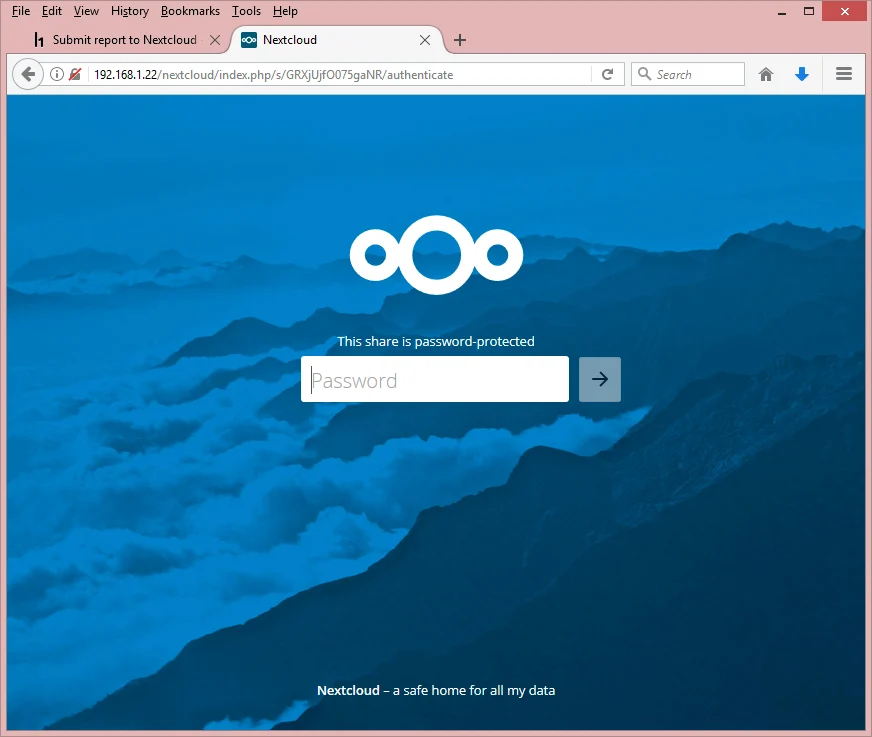
- Verify the share is password protected by visiting the share link and ensuring you are prompted for the share password.
- Paste and visit the following vulnerable URL into your browser. Replace [server] with the hostname or IP address of your Nextcloud server and replace [share ID] with the share ID that was noted in step 2.
http://[server]/nextcloud/index.php/apps/files_sharing/ajax/publicpreview.php?x=200&y=200&t=[share ID]
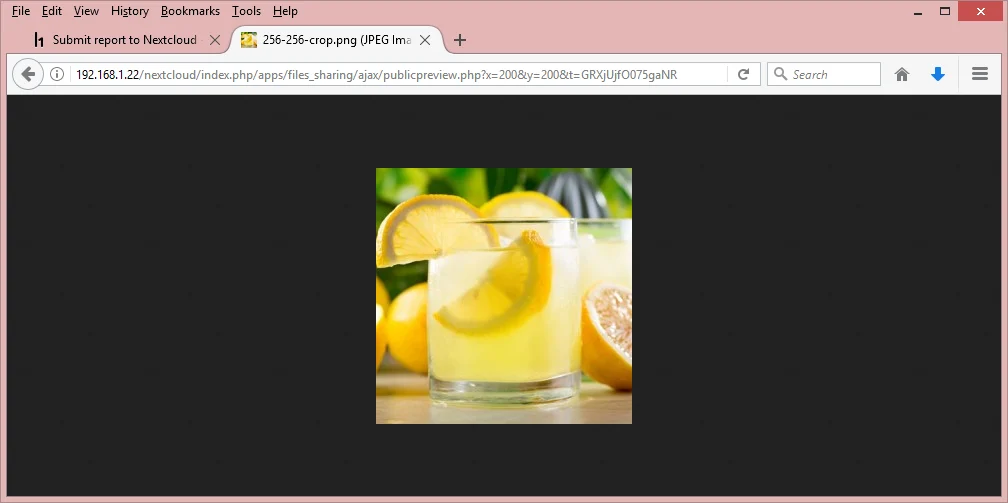
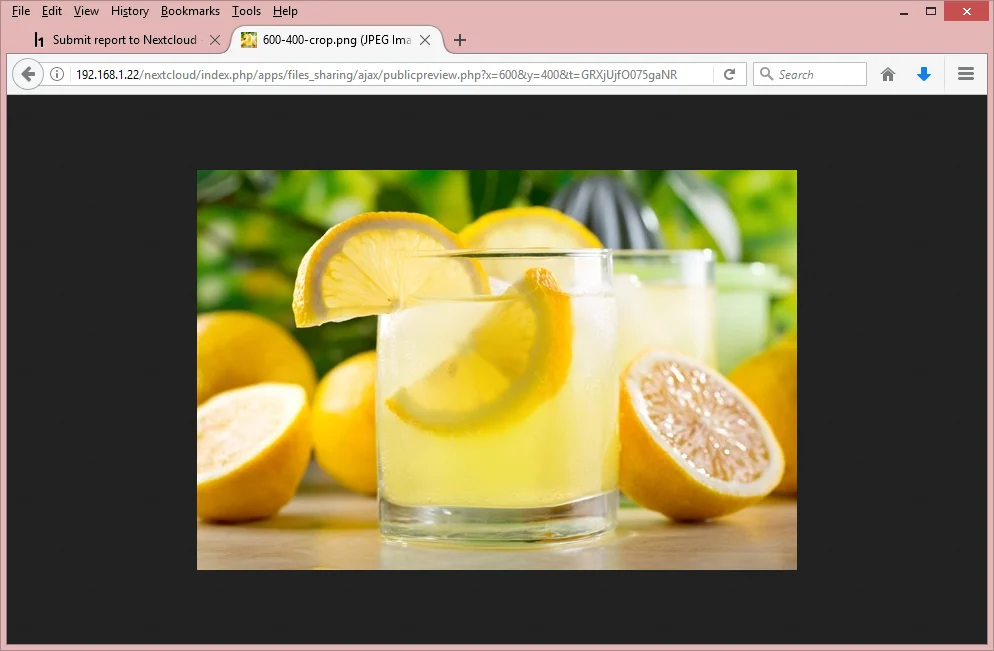
- Nextcloud should return a preview of the shared image, with dimensions equal to the 'x' and 'y' parameters (200 x 200 in this example). If the returned image is too small, you can adjust 'x' and 'y' to get a larger preview and ultimately recover the entirety of the shared image without ever entering the password.
Attachments
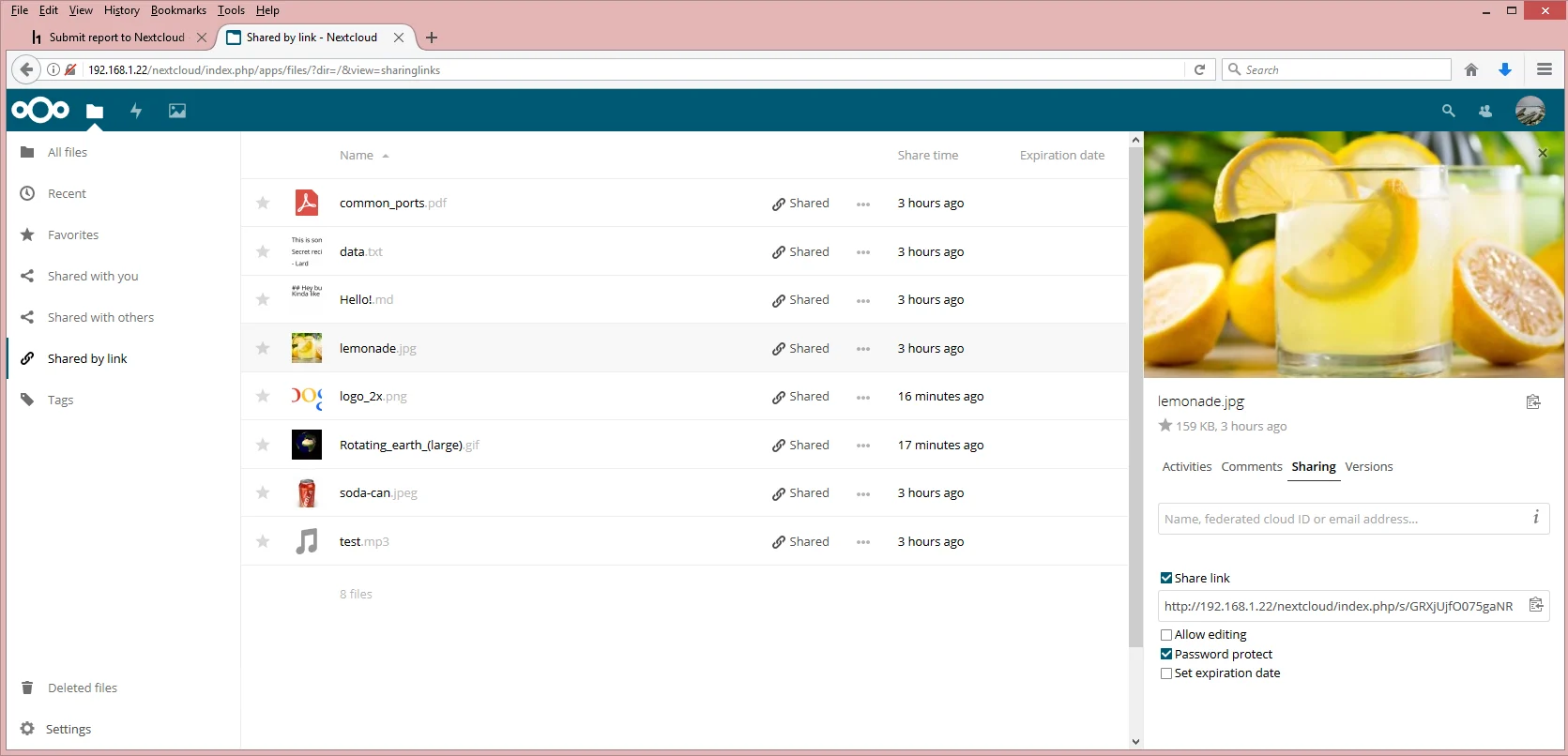
1 share settings.png - demonstrates my test file's share settings. 2 password protected.png - demonstrates visiting the password protected file's link and getting prompted for a password. 3 preview 1.png - demonstrates getting a partial view of the file through the preview function. No password required. 4 preview 2.png - a larger preview (x and y parameters modified). Compared to picture 3 I have recovered more of the image, especially on the left and right edges.
Impact/Notes
Image files are the most susceptible to this attack. Text files and markdown files generate preview images which can also be recovered using this technique; however, their generated preview images contain only a small portion of the overall file. Realistically speaking an attacker can recover limited information from a text file's preview image, usually just a few words total.
Other file types such as MS Office and PDF documents have their preview providers disabled by default. They may be vulnerable to this vulnerability but Nextcloud's security model assumes enabling their preview providers is insecure anyway (https://nextcloud.com/security/threat-model/) so I did not check them.
An attacker does not have to be authenticated to Nextcloud but does need to know the share ID to exploit this vulnerability.
Possible Mitigation
Consider adding a check in the preview handler to only render a preview if the shared file isn't password protected or if the user has already entered the correct password.
Attachments
Context
Nextcloud lets users share files and folders with other people through a link. A share can optionally be protected with a password, in which case a recipient who opens the link is prompted for that password before the file is shown. The sharing app also exposes a preview endpoint, publicpreview.php, which renders a thumbnail of a shared file at a requested size. The report describes how that preview endpoint could be used to obtain the contents of a password-protected image share without ever supplying the password.
The vulnerable URL given in the report is:
http://[server]/nextcloud/index.php/apps/files_sharing/ajax/publicpreview.php?x=[width]&y=[height]&t=[share ID]
Setup
The researcher used a Nextcloud server reachable at [server] under the /nextcloud path. The precondition on the target side is a password-protected link share of a file type whose preview provider is enabled, such as an image. On the attacker side nothing is required beyond the ability to send HTTP requests: the attack is performed unauthenticated, after logging out of the Nextcloud session. The one piece of information the attacker needs is the share ID, which the report describes as the last part of the share URL and as consisting of 15 random letters and numbers.
Finding it
The observation behind the report is that password protection is enforced when a recipient opens the normal share link, but the preview handler is a separate code path. If a shared file is an image, the preview endpoint will render it when given the share ID in the t parameter, and it does so without first asking for the unlock password. Because the preview can be requested at arbitrary dimensions through x and y, the returned image can be made large enough to recover the shared image in its entirety.
Exploitation
Step 1: Create a password-protected image share
Log in to the Nextcloud server, select an image and share it via a link. Protect the share with any password. The share settings used in the test are shown below.
Step 2: Note the share ID
Copy the share link. The share ID is the last part of the URL and consists of 15 random letters and numbers. This value is what the attacker needs, and it is the only secret the exploit depends on besides the server address.
Step 3: End the session
Log out of Nextcloud. The report notes this is not strictly necessary but makes the demonstration more meaningful, since it shows the attack works without authentication.
Step 4: Confirm the password prompt
Visit the share link and confirm that you are prompted for the share password. This establishes that the share really is protected in the normal flow.
Step 5: Request the preview directly
Paste the following URL into the browser, replacing [server] with the hostname or IP address of the Nextcloud server and [share ID] with the value noted in step 2:
http://[server]/nextcloud/index.php/apps/files_sharing/ajax/publicpreview.php?x=200&y=200&t=[share ID]
The x and y parameters set the dimensions of the preview, 200 by 200 in this example, and t carries the share ID. Nextcloud returns a preview of the shared image at those dimensions without any password being entered. The first preview obtained this way is shown below.
Step 6: Increase the preview size
If the returned image is too small, adjust x and y to obtain a larger preview. Repeating this ultimately recovers the entirety of the shared image without ever entering the password. The larger preview below was produced by modifying the x and y parameters; compared with the previous picture, more of the image has been recovered, especially on the left and right edges.
Root cause
The preview handler renders a preview for a share identified by its share ID without checking whether that share is password protected, or whether the requester has already supplied the correct password. Password enforcement exists on the normal share view, but the preview endpoint is a separate path that does not repeat that check. The report's suggested mitigation points at exactly this: the preview handler should only render a preview if the shared file is not password protected, or if the user has already entered the correct password.
Impact
An unauthenticated remote attacker who knows the share ID can retrieve a preview of a password-protected shared image, and by increasing the requested dimensions can recover the image in its entirety. Image files are the most susceptible to the attack. Text and markdown files also generate preview images that can be recovered the same way, but those previews contain only a small portion of the overall file, so realistically an attacker recovers limited information, usually just a few words in total.
Other file types such as MS Office and PDF documents have their preview providers disabled by default. They may be vulnerable, but the researcher did not check them, noting that Nextcloud's security model already treats enabling those preview providers as insecure. The attacker does not need to be authenticated to Nextcloud, but does need to know the share ID.
Fix
The report proposes adding a check in the preview handler so that a preview is only rendered if the shared file is not password protected, or if the user has already entered the correct password. It does not describe a patch that was applied.
Variants to test
- Other preview or thumbnail endpoints that take a share identifier as a parameter. A positive result is a rendered preview of a password-protected share returned without a password prompt.
- Other share-protected file types whose preview providers are enabled. A positive result is any recoverable content from a protected file through the preview path.
- Size parameters on preview endpoints. A positive result is that increasing the requested dimensions yields progressively more of the protected file, as happened here with the
xandyparameters.
Hunting notes
This kind of bug tends to hide wherever a product enforces an access control on one route (the share view) but exposes the same underlying object through a second route (previews, thumbnails, exports) that was written separately. During recon, look for share links and note the identifier format; here it is the last path segment, 15 random letters and numbers. Then look for preview or thumbnail requests made by the application itself and check whether they carry that same identifier. The signal that matters is a protected share whose preview still renders when requested directly, outside the normal share view. The researcher demonstrated impact by logging out first, so the request was clearly unauthenticated, and by showing that enlarging the preview recovered more of the image, which turns a thumbnail leak into full disclosure of the protected file.
What happened, in plain words
Nextcloud is a piece of software that lets people store files on their own server and share them with others, a bit like running your own private version of a cloud drive. When you share a file, you can put a password on the share, so that only people who know the password can open it. The report shows that this password could be skipped for certain shared files, specifically images, by asking Nextcloud for a small preview picture (a thumbnail) of the file through a different door than the normal share page. That other door never asked for the password.
A preview is the small version of an image that a website shows in a list or a gallery so you can see what the file looks like without opening it fully. Nextcloud has a feature that builds these previews for shared files. The researcher found that this preview feature could be called directly, with the identifier of the share, and it would happily produce the picture even though the share was locked with a password. By asking for bigger and bigger previews, the attacker could eventually see the whole image.
The person doing this did not need an account on the Nextcloud server. They only needed to know the share ID, which is the short code that appears at the end of a share link. The report describes this as an information disclosure: private data can be read by someone who should not be able to read it.
The vulnerable address
The report gives one address as the place where the problem lives:
http://[server]/nextcloud/index.php/apps/files_sharing/ajax/publicpreview.php?x=[width]&y=[height]&t=[share ID]
Reading this piece by piece:
http://is the protocol, the language a browser and a web server use to talk to each other.[server]is a placeholder for the address of the Nextcloud machine, either a name like a website address or a numeric address. The square brackets mean "put your own value here"./nextcloudis the folder on that server where Nextcloud is installed. Not every installation uses this folder name; here it is part of the example./index.php/apps/files_sharing/ajax/publicpreview.phpis the path to a specific program on the server. The namepublicpreview.phptells us it is the part of the file sharing app that produces previews for the public, meaning people who are not logged in.- The
?starts the query string, the part of a web address that carries extra instructions. x=[width]andy=[height]are two of those instructions: they say how wide and how tall the preview should be, in pixels.[width]and[height]are placeholders for numbers.t=[share ID]is the third instruction: it tells the server which share the preview is for.[share ID]is a placeholder for the code that identifies the share.
A query string is like the note you hand to a shop assistant along with your order: the address gets you to the right counter, and the note says exactly what you want from it. Here the note says "give me a preview of share number X, this many pixels wide and tall".
Setting up the test
The researcher used a Nextcloud server reachable at [server] under the /nextcloud path. On the server side, what was needed was a password-protected link share of a file whose preview provider is enabled, such as an image. On the attacker side, nothing was needed except the ability to send web requests, which any browser can do. The attack was carried out while logged out, so it clearly worked without an account. The one piece of information the attacker needs is the share ID, which the report describes as the last part of the share URL and as being made of 15 random letters and numbers.
Finding the problem
The idea behind the report is simple once you separate the two doors. When someone opens a normal share link, Nextcloud asks for the password. But the preview feature is a separate program with its own logic, and it did not repeat that check. If the shared file is an image, the preview program will draw it when it is given the share ID in the t parameter, without first asking for the unlock password. And because the size can be chosen freely through x and y, the returned picture can be made large enough to recover the shared image in full.
A useful comparison: imagine a museum with a locked room. The front door has a guard who asks for your ticket. But there is a side window used by staff to check the room, and nobody thought to put a guard there. The window is small, but if you can ask the staff to open it wider, you can see everything inside.
Carrying out the attack
Step 1: Create a password-protected image share
Log in to the Nextcloud server, select an image and share it via a link. Protect the share with any password. This creates the situation being tested: a file that is supposed to be locked. The share settings used in the test are shown below.
This screenshot shows the settings of the test file's share.
Step 2: Note the share ID
Copy the share link. The share ID is the last part of the URL and consists of 15 random letters and numbers. This value is what the attacker needs, and it is the only secret the exploit depends on besides the server address. Think of the share ID as the number on a cloakroom ticket: it identifies your item, and anyone holding the number can ask for it.
Step 3: End the session
Log out of Nextcloud. A session is the state of being logged in: the server remembers who you are, usually by giving your browser a small piece of data called a cookie, which the browser sends back with every request. Logging out throws that cookie away. The report notes this step is not strictly necessary but makes the demonstration more meaningful, because it shows the attack works without being logged in at all.
Step 4: Confirm the password prompt
Visit the share link and confirm that you are prompted for the share password. This establishes that the share really is protected in the normal flow, so any later success is not just a share that was never locked in the first place. It is the control in the experiment: proving the lock works before showing that a window was left open.
This screenshot shows the password prompt that appears when the protected share link is opened normally.
Step 5: Request the preview directly
Paste the following URL into the browser, replacing [server] with the hostname or IP address of the Nextcloud server and [share ID] with the value noted in step 2:
http://[server]/nextcloud/index.php/apps/files_sharing/ajax/publicpreview.php?x=200&y=200&t=[share ID]
Line by line, in plain words:
- The address points at the preview program,
publicpreview.php, rather than at the normal share page. This is the side window instead of the front door. x=200asks for a preview 200 pixels wide.y=200asks for a preview 200 pixels tall.t=[share ID]identifies which share to draw, using the code from step 2.
Nextcloud returns a preview of the shared image at those dimensions without any password being entered. The first preview obtained this way is shown below.
This screenshot shows a partial view of the protected file obtained through the preview function, with no password required.
Step 6: Increase the preview size
If the returned image is too small, adjust x and y to obtain a larger preview. Repeating this ultimately recovers the entirety of the shared image without ever entering the password. The larger preview below was produced by modifying the x and y parameters; compared with the previous picture, more of the image has been recovered, especially on the left and right edges.
This screenshot shows a larger preview after the size parameters were changed, revealing more of the image than before.
Why it works
The preview handler draws a preview for a share identified by its share ID without checking whether that share is password protected, or whether the requester has already supplied the correct password. Password enforcement exists on the normal share view, but the preview endpoint is a separate path that does not repeat that check. The report's suggested mitigation points at exactly this: the preview handler should only render a preview if the shared file is not password protected, or if the user has already entered the correct password.
In security terms, this is a case of an access control being applied in one place and forgotten in another. Access control simply means the rules about who is allowed to see or do what. When the same underlying object, here the shared image, can be reached through two different routes, both routes need the same rule.
What an attacker could get
An unauthenticated remote attacker who knows the share ID can retrieve a preview of a password-protected shared image, and by increasing the requested dimensions can recover the image in its entirety. Unauthenticated means without logging in; remote means over the network rather than sitting at the machine.
Image files are the most susceptible to the attack. Text and markdown files also generate preview images that can be recovered the same way, but those previews contain only a small portion of the overall file, so realistically an attacker recovers limited information, usually just a few words in total.
Other file types such as MS Office and PDF documents have their preview providers disabled by default. A preview provider is the part of the software that knows how to turn a particular file type into a picture. They may be vulnerable, but the researcher did not check them, noting that Nextcloud's security model already treats enabling those preview providers as insecure. The attacker does not need to be authenticated to Nextcloud, but does need to know the share ID.
The fix
The report proposes adding a check in the preview handler so that a preview is only rendered if the shared file is not password protected, or if the user has already entered the correct password. It does not describe a patch that was applied.
Similar things to test
- Other preview or thumbnail endpoints that take a share identifier as a parameter. A positive result is a rendered preview of a password-protected share returned without a password prompt.
- Other share-protected file types whose preview providers are enabled. A positive result is any recoverable content from a protected file through the preview path.
- Size parameters on preview endpoints. A positive result is that increasing the requested dimensions yields progressively more of the protected file, as happened here with the
xandyparameters.
How to look for this yourself
This kind of bug tends to hide wherever a product enforces an access control on one route (the share view) but exposes the same underlying object through a second route (previews, thumbnails, exports) that was written separately. During recon, meaning the early exploration of a target, look for share links and note the identifier format; here it is the last path segment, 15 random letters and numbers. Then look for preview or thumbnail requests made by the application itself and check whether they carry that same identifier. The signal that matters is a protected share whose preview still renders when requested directly, outside the normal share view. The researcher demonstrated impact by logging out first, so the request was clearly unauthenticated, and by showing that enlarging the preview recovered more of the image, which turns a thumbnail leak into full disclosure of the protected file.
Glossary
- Access control: the rules that decide who is allowed to see or do what on a system.
- API: a defined way for one piece of software to ask another for something, like a service counter with a fixed list of requests it accepts.
- Authentication: proving who you are, usually by logging in.
- Cookie: a small piece of data a website stores in your browser and gets back with each request, often used to remember that you are logged in.
- Endpoint: a specific address on a server that accepts requests, one of the doors into the application.
- HTTP: the protocol browsers and web servers use to exchange requests and responses.
- Information disclosure: a weakness where data that should be private can be read by someone who should not have access.
- IP address: the numeric address of a machine on a network.
- Markdown: a simple text format for writing documents with light formatting.
- Parameter: a named value in a request, such as
x,yortin a query string. - Password protection: locking a resource so that it can only be opened after the correct password is supplied.
- Pixel: one dot in a digital image; width and height are measured in pixels.
- Preview: a small or reduced version of a file, shown so you can see roughly what it contains.
- Preview provider: the part of the software that knows how to turn a particular file type into a preview picture.
- Query string: the part of a web address after the
?that carries extra instructions. - Recon: the early exploration of a target to learn how it is built and where to look.
- Remote: carried out over a network rather than from the machine itself.
- Session: the period during which a server remembers that you are logged in.
- Share ID: the code that identifies a particular share, here the last part of the share link, made of 15 random letters and numbers.
- Thumbnail: a small version of an image, used in lists and galleries.
- Unauthenticated: without being logged in or otherwise identified.
- URL: the address of something on the web.
- Vulnerability: a weakness in software that can be used to make it behave in a way its owners did not intend.


