[snekserve] Stored XSS via filenames HTML formatted
The snekserve static file server places directory entry names into its directory listing page without proper validation, so a filename containing HTML markup is rendered as markup. An attacker who can create a file or folder with a crafted name could get script to run in the browser of anyone who views the listing.

- Triaged in 45 hours
- Fixed in 11 months
- Disclosed after 12 months
I would like to report a stored XSS issue in the snekserve module.
It allows to inject HTML/JS code inside the directory listing :)
Module
module name: snekserve
version: 1.0.0
npm page: https://www.npmjs.com/package/snekserve
Module Description
Assuming you would like to serve a static site, single page application or just a static file (no matter if on your device or on the local network), this package is just the right choice for you.
Module Stats
[N/A] downloads in the last day [1] downloads in the last week [~20] downloads in the last month
Vulnerability Description
The filenames aren't checked correctly, leading to stored XSS inside the directory listing :)
Steps To Reproduce:
- Create a PoC file like this:
<!-- malicious.html -->
<script>alert(document.domain)</script>
- Run the following commands:
npm i snekserve -g # Installs the CLI version of the module
mkdir '<iframe src=..\malicious.html>' # Creates the malicious *HTML formatted* folder
snekserve # Starts the server
# Open a browser and go on http://localhost:8080
- Opening the server initialized (on
localhost:8080), you'll see thealert(document.domain)code executed :)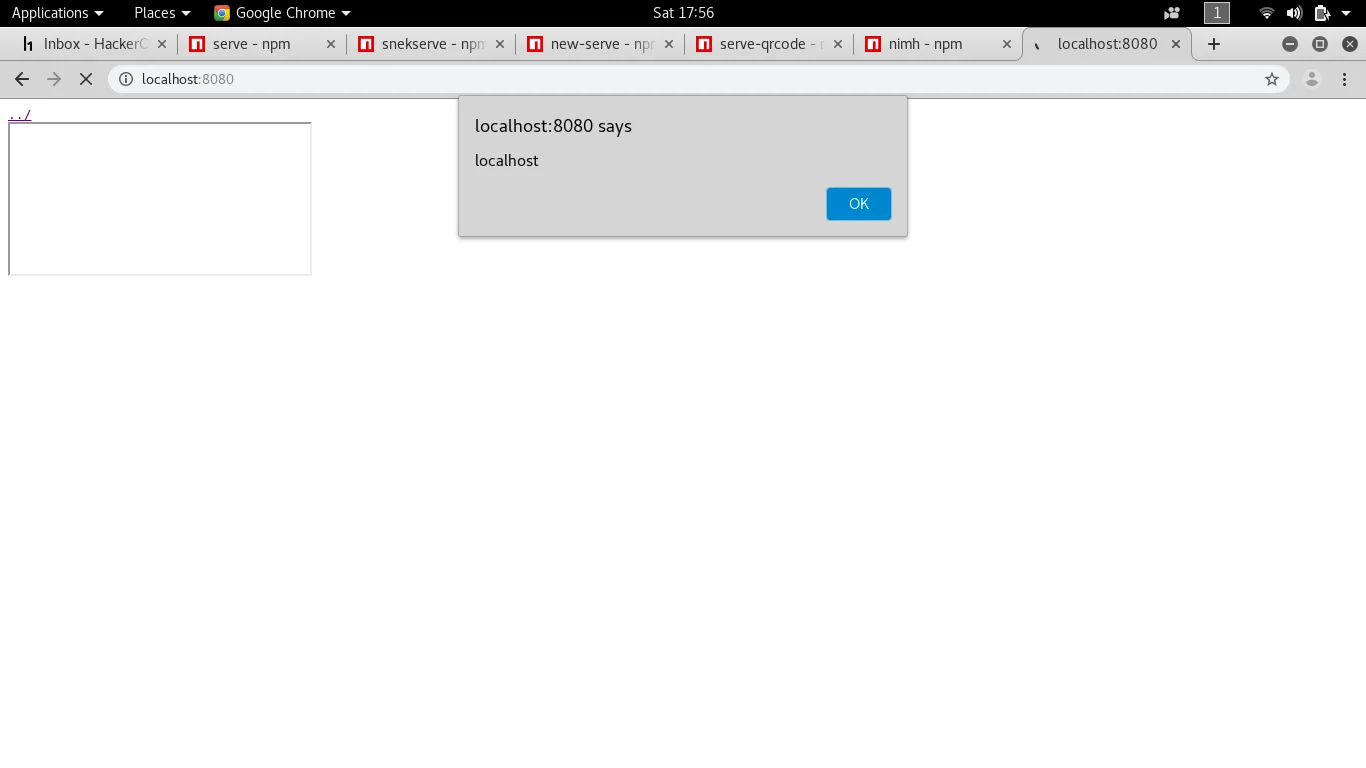
Screenshot_from_2019-09-14_17-56-48.png From the original on HackerOne
Patch
Validate the filenames before put them in the
directory listing
Supporting Material/References:
- [OPERATING SYSTEM VERSION]: Kali Linux
Wrap up
- I contacted the maintainer to let them know: [N]
- I opened an issue in the related repository: [N]
Impact
Stored XSS on snekserve via filename HTML injection
Not written yet. The AI write-up for this report has not been written yet. The Original tab links to the source.
How it worked
Root cause
Likely the directory listing template inserts file and folder names into the HTML without encoding or validating them.
Impact
Script in a file or folder name runs in the browser of anyone viewing the directory listing.
What the attacker needed
Ability to create a file or folder on the server; victim opens the directory listing
How it was found
- Create a file containing script code that will run when loaded.
- Install the snekserve command-line tool globally.
- Create a folder whose name contains HTML markup pointing at the file.
- Start the server and open the local address in a browser.
- Observe the script executing in the directory listing.
Explained by bugbounty.wiki with AI from the original and checked against quotes from it; it can still be wrong. Read the original before relying on a detail.
Not written yet. The AI write-up for this report has not been written yet. The Original tab links to the source.
A static file server shows a list of files in a folder when you open it in a browser. This server put the file names into that page without cleaning them first, so a name that looks like HTML code gets treated as code by the browser. Anyone opening the folder listing then runs that code, which is called stored cross-site scripting because the harmful content is saved as a file name and served later.
What is XSS?
Script an attacker supplies runs in another user's browser, on the target's origin, with that user's session.