[statics-server] XSS via injected iframe in file name when statics-server displays directory index in the browser
The statics-server module does not escape file names when generating a directory index, allowing an attacker to inject an iframe tag via a crafted filename. This iframe can load a malicious HTML file, leading to JavaScript execution in the context of a victim's browser.

- Triaged in 26 days
- Fixed in 54 days
- Disclosed after 54 days
Hi Team,
I would like to report HTML Injection in statics-server module.
It is possible to inject malicious iframe tag via filename and execute arbitray JavaScript code.
Module
module name: statics-server version: 0.0.9 npm page: https://www.npmjs.com/package/statics-server
Module Description
npm install statics-server -g
Go to the folder you want to statics-server
Run the server statics-server
Module Stats
~80-100 downloads/month
Vulnerability
Vulnerability Description
statics-server does not implement any HTML escaping when displays directory index in the browser. Variable v is used in <a href> element without escaping, which allows to embed HTML <iframe> tag with src attribute points to another HTML file in the directory. This file can contain malicious JavaScript code, which will be executed:
// ./node_modules/statics-server/index.js, line 18:

    if(fs.lstatSync(staticPath).isDirectory()){
        var files=fs.readdirSync(staticPath);
        var lis='';
        files.forEach((v,i)=>{
            if(fs.lstatSync(path.resolve(staticPath,v)).isDirectory()){
                lis+=`<li><a href="${req.url}${v}/">${v}/</a></li>`;
            }else {
                lis+=`<li><a href="${req.url}${v}">${v}</a></li>`
            }
        });

        (...)
Steps To Reproduce:
Install statics-server module:
$ npm install statics-server
- create file with the following filename:
"><iframe src="malware_frame.html">
- create
malware_frame.htmlfile with following content:
<html>

<head>
    <meta charset="utf8" />
    <title>Frame embeded with malware :P</title>
</head>

<body>
    <p>iframe element with malicious code</p>
    <script>
        alert('Uh oh, I am bad, bad malware!!!')
    </script>
</body>

</html>
Run statics-server:
$ ./node_modules/statics-server/index.js
服务器已经启动
访问localhost:8080
- in browser, open the following url:
http://localhost:8080
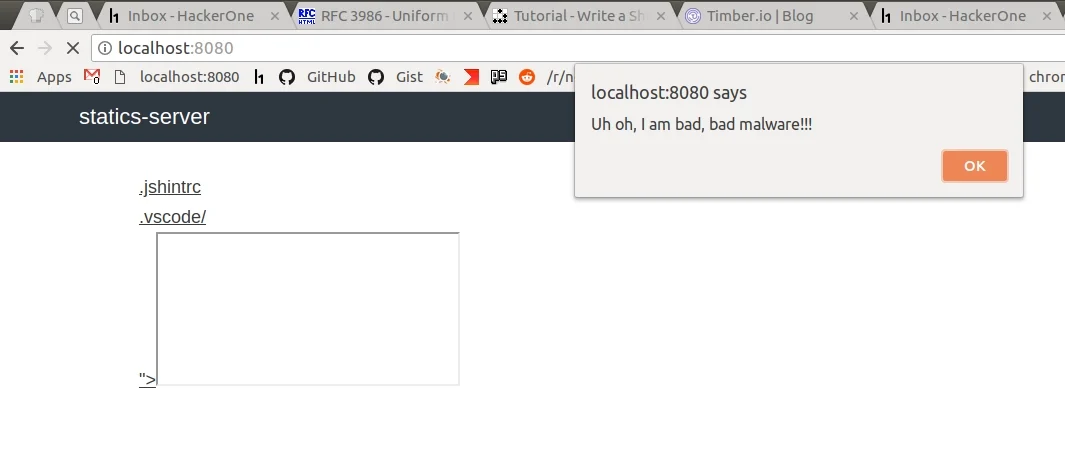
You see JavaScript from malware_frame.html executed immediately:
Patch
v variable in provided code fragment should be escaped before is send back to the browser.
Supporting Material/References:
- Operating system: Ubuntu 16.04
- Node.js 8.11.1
- npm v. 6.0.1
- Chromium 67.0.3388.0 (Developer Build) (64-bit)
Wrap up
- I contacted the maintainer to let him know: [N]
- I opened an issue in the related repository: [N]
Regards,
Rafal 'bl4de' Janicki
Impact
An attacker is able to execute malicious JavaScript in context of other user's browser.
Not written yet. The AI write-up for this report has not been written yet. The Original tab links to the source.
How it worked
Root cause
The server inserts file names into HTML without escaping, so special characters like quotes and angle brackets are interpreted as HTML.
Impact
An attacker could execute malicious JavaScript in the context of another user's browser.
What the attacker needed
Statics-server installed and running; attacker can create files in served directory; victim visits the directory index
The fix
The file name variable should be escaped before being sent back to the browser.
How it was found
- Install the statics-server module.
- Create a file with a name containing an iframe tag.
- Create a malicious HTML file with JavaScript.
- Run the statics-server.
- Open the server URL in a browser to see the JavaScript execute.
Explained by bugbounty.wiki with AI from the original and checked against quotes from it; it can still be wrong. Read the original before relying on a detail.
Not written yet. The AI write-up for this report has not been written yet. The Original tab links to the source.
When you run a simple web server to share files, it lists the files in a folder. This report shows that if a file has a special name containing HTML code, the server puts that name directly into the web page without cleaning it. That lets an attacker run harmful JavaScript when someone views the file list.
What is XSS?
Script an attacker supplies runs in another user's browser, on the target's origin, with that user's session.






