Node Installer Local Privilege Escalation
The Node.js installer on Windows created an installation directory with permissions that allowed any local user to write files, and added that directory to the system PATH. An unprivileged attacker could place a malicious executable or DLL there, which would then be run by a privileged user, leading to privilege escalation.
deepsurface-robert Follow with deepsurface
 Originally disclosed on HackerOne
- Triaged in 8 days
- Fixed in 35 days
- Paid in 40 days
- Disclosed after 35 days
Node is vulnerable to local privilege escalation attacks under certain conditions on Windows platforms. More specifically, improper configuration of permissions in the installation directory allows an attacker to perform two different escalation attacks: PATH and DLL hijacking.
To demonstrate this flaw, we first download the latest version of Node from https://nodejs.org/en/download/. At the time of writing, this was node version 14.17.0.
We follow the standard installation steps, except for the installation directory, which we change to C:\tools. This directory can either be created through the installer GUI, or through mkdir C:\tools.
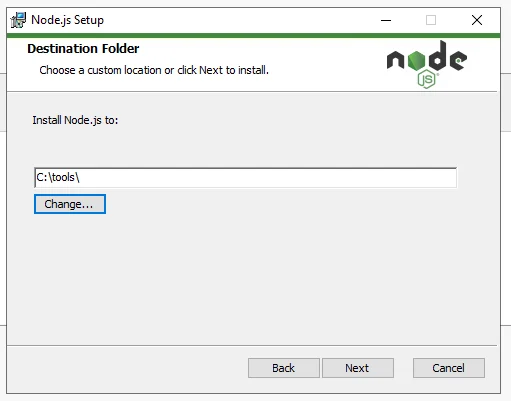
We also select the option in a later step to “automatically install the necessary tools”.
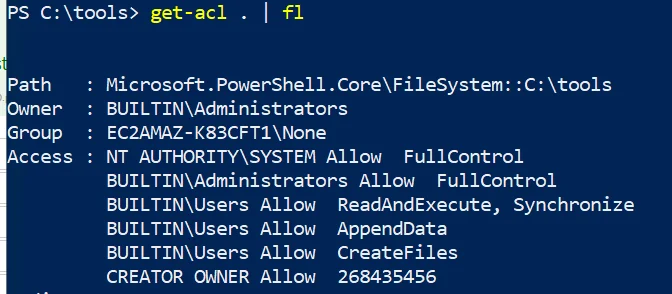
In the screenshot below, note the improper permissions, BUILTIN\Users Allow *, on the installation directory, which are inherited from the drive root. This gives any local user the ability to create arbitrary files in the installation directory.
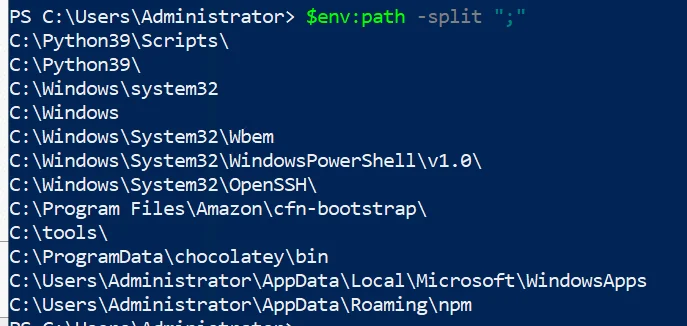
This unprotected directory has also been added to the system PATH variable, allowing an attacker to drop malicious executables in that directory and have them executed by other users in certain circumstances. (Note that you may have to start a new powershell instance to see the PATH change.)
To fully demonstrate the implications of this vulnerability, first create a new unprivileged user. Then, as this user, drop a malicious exe into the C:\tools directory and rename it to npm.exe. For testing purposes, you can simply do cp node.exe npm.exe. Note that the same could be done for npx.
Windows will search for a program with the .exe extension first, meaning that the malicious npm.exe will take precedence over npm.cmd.
Now, as the privileged user, try running npm. This should drop you into the node shell, demonstrating how an attacker could run a malicious executable.
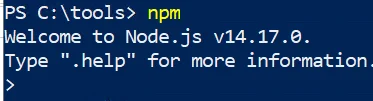
A writable PATH directory would also allow an attacker to hijack the execution of any commands that come later in the path. From the default node installation, this would include chocolatey, a software management tool for Windows. However, such a vulnerability could also affect all programs installed in the future as well.
Aside from the PATH vulnerability, the insecure permissions configured could also allow an attacker to perform a DLL hijacking attack against the node.exe. Using Process Monitor, we can confirm that node attempts to load a number of DLLs from the unprotected folder.

For more information on DLL hijacking attacks, see our blog post.
It is worth noting that a very similar problem was discovered in RabbitMQ and reported by the DeepSurface Security research team. The RabbitMQ team fixed this issue in May 2021. For more information, see: CVE-2021-22117.
Impact
A locally unprivileged attacker could perform a local privilege escalation attack through PATH and DLL hijacking.
Not written yet. The AI write-up for this report has not been written yet. The Original tab links to the source.
How it worked
Root cause
The installer inherited overly permissive access control settings from the drive root, granting write access to all local users on the installation directory, and then added that directory to the system PATH.
Impact
A locally unprivileged attacker could escalate privileges by hijacking the execution of npm or other commands via PATH, or by DLL hijacking against node.exe.
What the attacker needed
Node.js installed on Windows with custom directory; Attacker has local unprivileged access; Privileged user runs a command from the affected directory
How it was found
- Download the Node.js installer and start it.
- Change the installation directory to C:\tools and select the option to automatically install necessary tools.
- Observe that the C:\tools directory has permissions allowing any user to create files, and that it is added to the system PATH.
- Create a new unprivileged user account.
- As that unprivileged user, place a malicious executable named npm.exe into C:\tools.
- As a privileged user, run npm, which executes the malicious npm.exe instead of the legitimate npm.cmd.
Explained by bugbounty.wiki with AI from the original and checked against quotes from it; it can still be wrong. Read the original before relying on a detail.
Not written yet. The AI write-up for this report has not been written yet. The Original tab links to the source.
When you install software, the installer sometimes creates a folder that any user on the computer can write to. If that folder is also in the list of places Windows looks for programs (the PATH), a low-privilege user can put a fake program there. When an administrator later runs a command, Windows might run the fake program instead, giving the attacker the administrator's powers.
What is Access control?
A user can do something their role should not allow: reach an admin function, act on a feature they have not paid for, or skip a permission check. IDOR is the special case where the object belongs to someone else.

