Authenticity token doesnt expire after single use leading to CSRF
The authenticity token used for CSRF protection in a Rails dashboard could be reused many times within the same session instead of being single-use. An attacker could craft a CSRF page that reuses a captured token to add an arbitrary email address to the victim's account.
 Originally disclosed on HackerOne
- Disclosed after 39 days
##Summary Once you said that you ruby framework for making the authenticity-token which acts as a CSRF protection. You also send me this as to help me understand https://medium.com/rubyinside/a-deep-dive-into-csrf-protection-in-rails-19fa0a42c0ef . After finding i found that an authenticity-token can be used many times for a particular session leading to CSRF. ##Steps to produce:
- Login and go to https://dashboard.omise.co/test/subscriptions/new
- Add an email and capture request and send it to repeater for checking
- Again add another email for checking
From here we learnt that on a successfully adding we get https://dashboard.omise.co/test/subscriptions else on a false end we would be redirected to the dashboard!
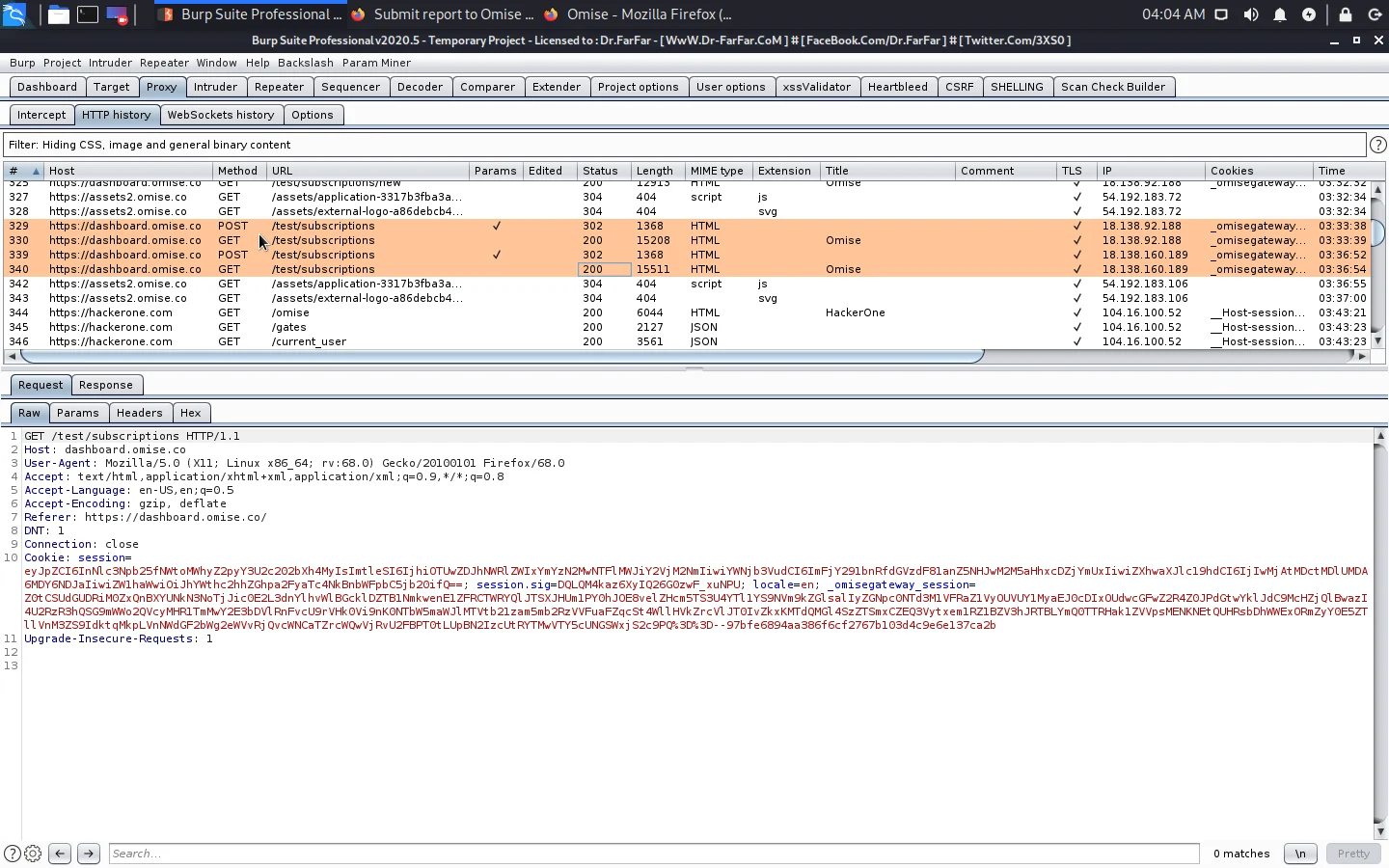
These are successfully added emails thats y we get redirected to subscriptions 4) Make a CSRF of one of the adding request via burpsuite csrf maker ##Request used to make CSRF
POST /test/subscriptions HTTP/1.1
Host: dashboard.omise.co
User-Agent: Mozilla/5.0 (X11; Linux x86_64; rv:68.0) Gecko/20100101 Firefox/68.0
Accept: text/html,application/xhtml+xml,application/xml;q=0.9,*/*;q=0.8
Accept-Language: en-US,en;q=0.5
Accept-Encoding: gzip, deflate
Referer: https://dashboard.omise.co/
Content-Type: application/x-www-form-urlencoded
Content-Length: 309
DNT: 1
Connection: close
Cookie: session=eyJpZCI6InNlc3Npb25fNWtoMWhyZ2pyY3U2c202bXh4MyIsImtleSI6IjhiOTUwZDJhNWRlZWIxYmYzN2MwNTFlMWJiY2VjM2NmIiwiYWNjb3VudCI6ImFjY291bnRfdGVzdF81anZ5NHJwM2M5aHhxcDZjYmUxIiwiZXhwaXJlc19hdCI6IjIwMjAtMDctMDlUMDA6MDY6NDJaIiwiZW1haWwiOiJhYWthc2hhZGhpa2FyaTc4NkBnbWFpbC5jb20ifQ==; session.sig=DQLQM4kaz6XyIQ26G0zwF_xuNPU; locale=en; _omisegateway_session=Y1U0b2kvZ1l5ZkNlczRiN1doZkZWb3dscWlRK0EzcDdUbnVYSnoycHUrbDlzaEdVd1dqUnN5ckNEVTFVZ3BXQWRjdGs4Ukw4ekFDeWRnWnl3SVhDamFVZUtLaUMvYTlWeUEwZTY5dVBacXhtdjRhY0pWZ3pYQ2pVaS9XUkhlUjFjRWhhSzN0eDAyQWtQMnpROGEwd3k3bFZIcXNWTGFJOTlUejZZRnRKV0l0NStCYVNZeEorcWZRMzQvUVNxemJibnpoV09QSk9iZmpGRitzWlFBVUo0YzQwcENlbDFSTkgvaHJMa2xoR3lxYz0tLTk5UDFvWkpIeE12Uk56cUppZHFSN3c9PQ%3D%3D--93951192661dda26d2246d03ede9c3c8ca6cf226
Upgrade-Insecure-Requests: 1

utf8=%E2%9C%93&authenticity_token=UoPkXa4uMwSgxUG1d3a7l5PodACsA9LBagoeTlLNDZWAx1kzUeVH1%2FbeJdeXMr8Z5NYkgEX%2B1kaFci3i%2F%2BV%2Fqg%3D%3D&email_relay%5Baddress%5D=testaccount1%40gmail.com&email_relay%5Bsupported_event_groups%5D%5B%5D=accounting&email_relay%5Bsupported_event_groups%5D%5B%5D=chargebacks&button=
Successfully added an testaccount
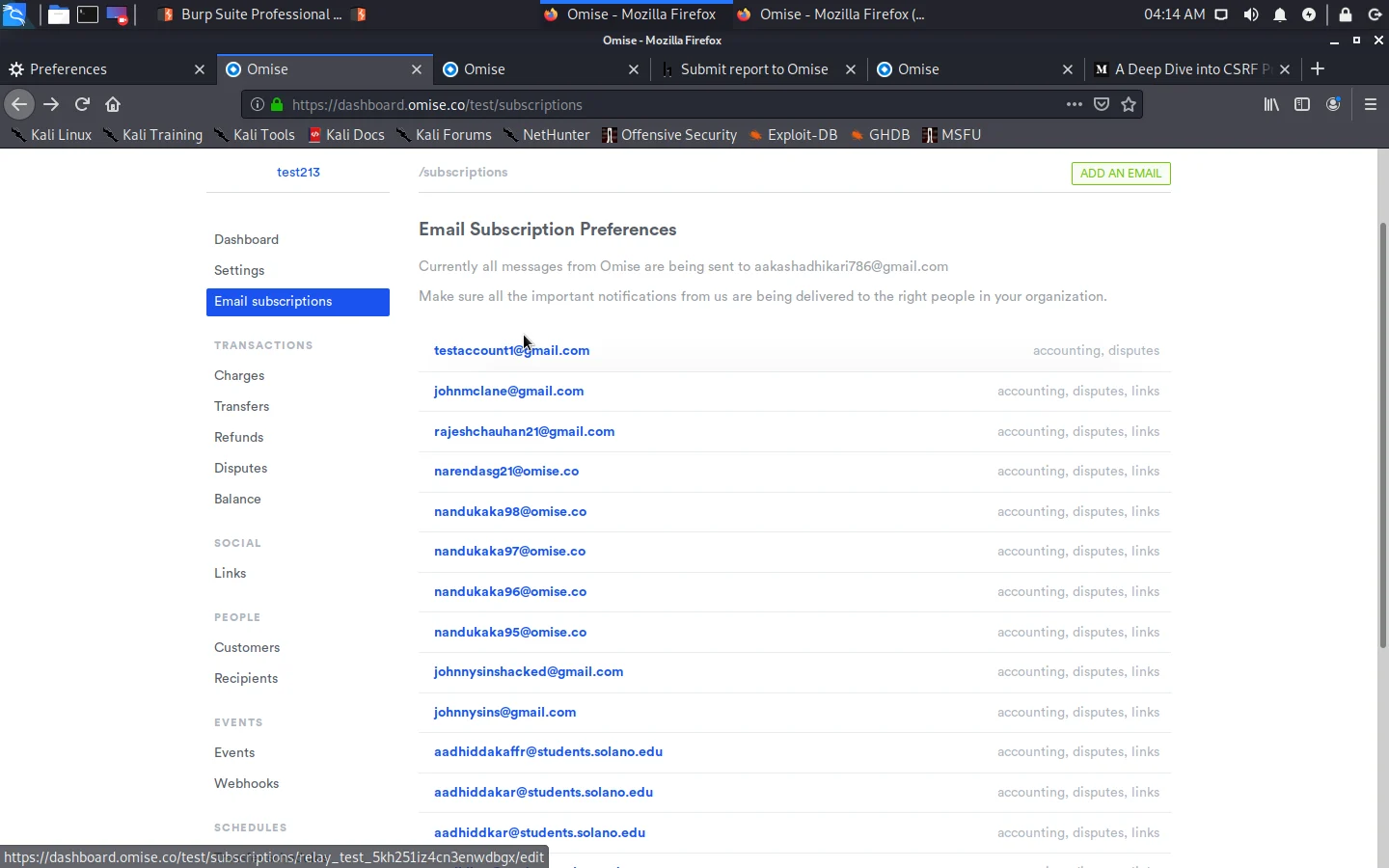
- Edit the email to any email "let us take attacker email" and change it to the CSRF's html file .
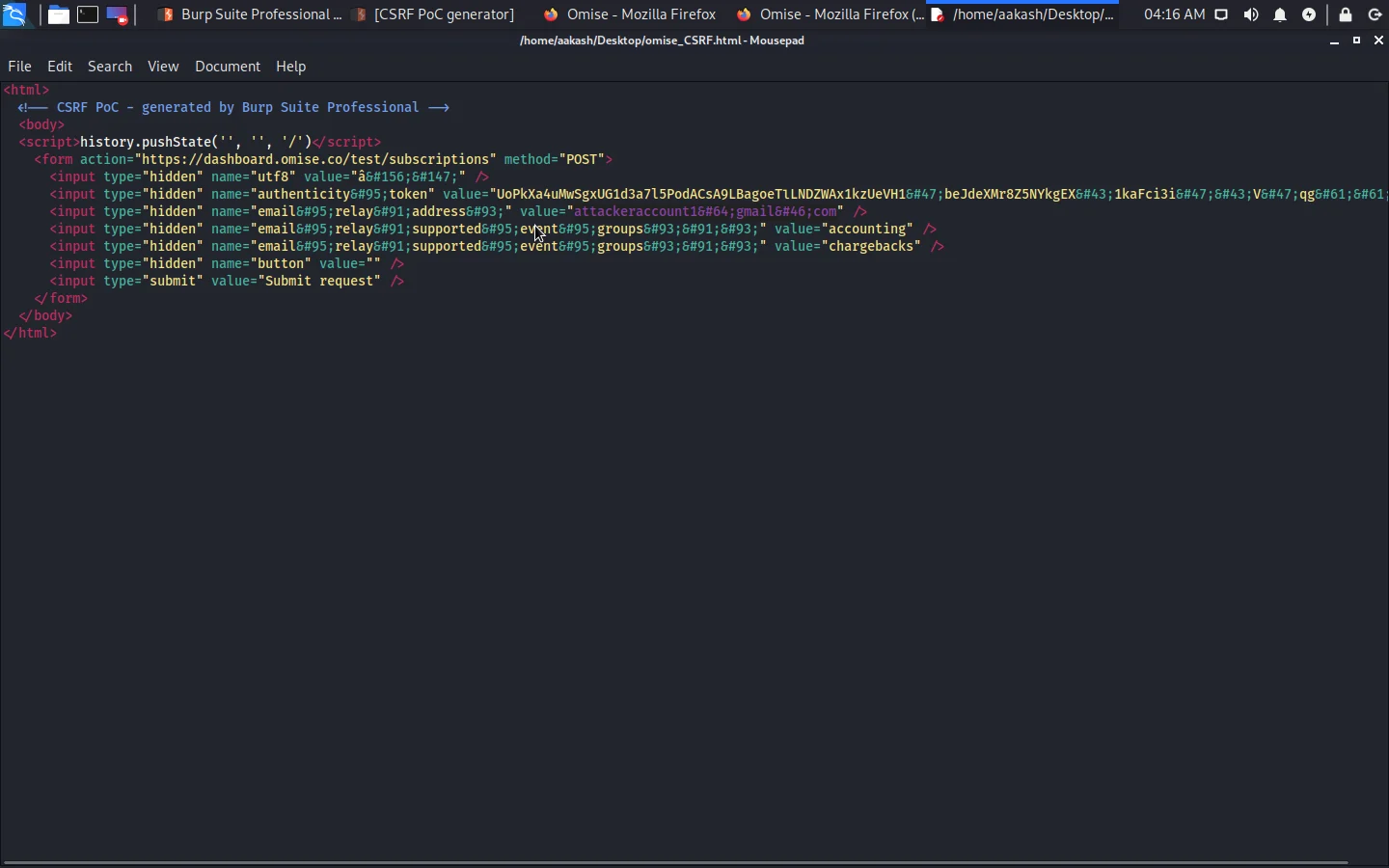
- Save it and click it !
File: omise_CSRF.html
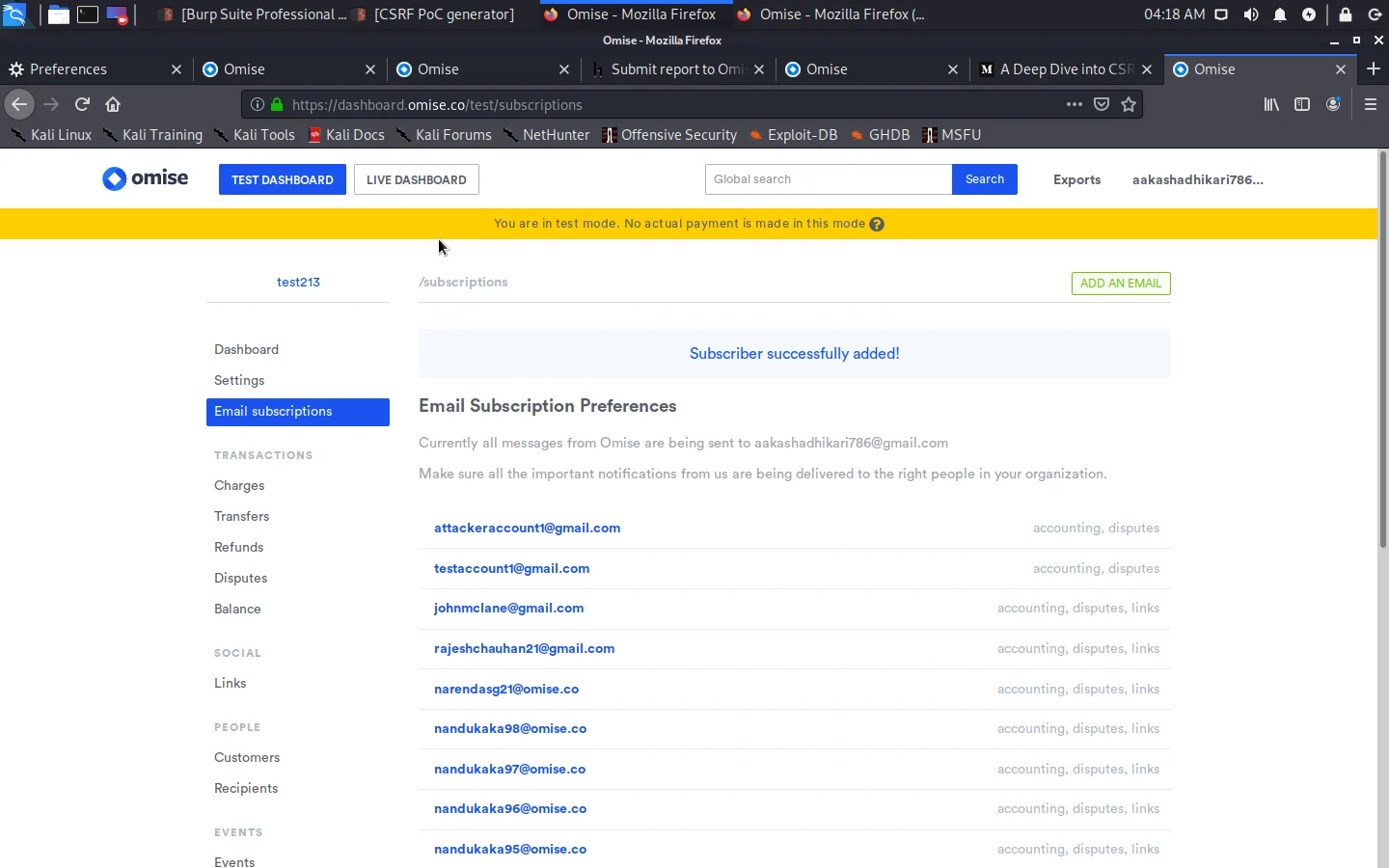
7) Attacker email is added!
##Important
- The authenticity-token for a live session is used and many times! Thus making it a bit of problem
- The authenticity-token expires after logout so if u try it with an expired token you will get redirected to dashboard. Thus indicating CSRF was not successful.
- Please do check the authenticity-token of the request and html file matches.
This also indicate that CSRF token / authenticity token does not properly gets flushed and it can be re-used in that session multiple times Regards, @dark_haxor
Impact
CSRF
Not written yet. The AI write-up for this report has not been written yet. The Original tab links to the source.
How it worked
Root cause
Likely the framework's per-form authenticity token was not invalidated after use, so a captured token stayed valid for the whole session.
Impact
An attacker who obtains a valid token could reuse it within the victim's session to add their own email address, though the token still expires on logout.
What the attacker needed
Victim has an active logged-in session; attacker obtains a valid token; victim opens the crafted HTML file
How it was found
- Log in and open the new subscription page in the dashboard.
- Add an email address, capture the request and send it to the repeater.
- Add another email to confirm the same token still works.
- Build a CSRF HTML page from one of the add-email requests.
- Change the email in the page to the attacker's address and save it.
- Open the file while logged in and the attacker's email is added.
Explained by bugbounty.wiki with AI from the original and checked against quotes from it; it can still be wrong. Read the original before relying on a detail.
Not written yet. The AI write-up for this report has not been written yet. The Original tab links to the source.
Websites use a secret token in forms to make sure a request really came from their own page and not from a malicious site. This report says that token was not thrown away after being used once, so someone who obtained it could reuse it to submit forms on the victim's behalf. That kind of forged request is called CSRF, or cross-site request forgery.
What is CSRF?
Another site makes a signed-in user's browser perform an action they did not intend.