Securing Developer Tools: OneDev Remote Code Execution
OneDev had a webhook SSRF that let authenticated users make the server request internal URLs, and a callback endpoint trusted the X-Forwarded-For header, allowing an attacker to bypass its localhost check and inject environment variables into a Git command to write to a hook script and execute code. A Docker socket misconfiguration also allowed container escape.
 Published on blog.sonarsource.com
OneDev is a self-hosted Git server that comes with a lot of development-oriented features such as CI/CD, code search, and static analysis integration. With almost 10,000 stars on GitHub, it is gaining popularity and becoming an open-source and low-maintenance alternative to GitHub, GitLab, and Bitbucket.
The full write-up lives on its author's site
It belongs to its author, so we link to it rather than copy it. The other two tabs are our own rewrites, checked against it.
Context
OneDev is a self-hosted Git server with development-oriented features such as CI/CD, code search and static analysis integration. It is an open-source alternative to GitHub, GitLab and Bitbucket, and at the time of the research it had almost 10,000 stars on GitHub. Because source code hosting platforms are high-value targets, the researcher looked at OneDev 7.2.9 and found five issues:
- Web Hook Server-Side Request Forgery
- Access Control Bypass leading to Remote Code Execution (CVE-2022-39205)
- Docker Escape (CVE-2022-39206)
- Persistent Cross-Site Scripting (CVE-2022-39207)
- Git Repository Disclosure (CVE-2022-39208)
Most of them require authentication as a regular user; CVE-2022-39208 can be exploited without any authentication at all. The article focuses on three of them, which can be chained: the SSRF, the access control bypass that turns it into remote code execution, and the container escape. The following overview shows how the vulnerabilities can be combined:
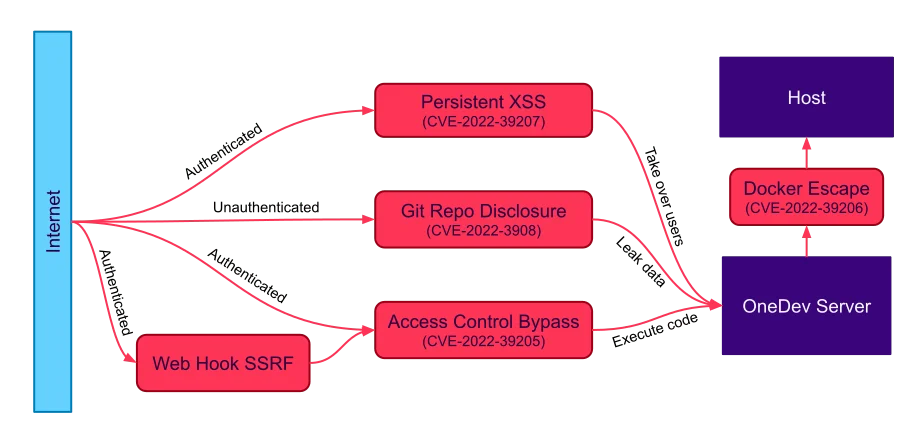
The recommended fix is to update to at least version 7.3.0.
Setup
The vulnerabilities were found in OneDev 7.2.9. The main precondition for the chain is an account as a regular, low-privileged user: the attacker needs access to a project on the OneDev server, because the exploit uses the ability to create and push a branch. The SSRF itself comes from a standard feature, the webhook, which any user who can configure one can use. The container escape applies to deployments that follow OneDev's recommendation of giving the server access to a Docker socket, in particular when the OneDev server itself runs in a Docker container with the host's Docker socket mounted into it.
Finding it
A common feature of source code hosting platforms is webhooks: the user sets a URL and an event type, and the server sends an HTTP request to that URL when events of that type occur, usually with the event data in the body. A typical use case is triggering a deployment on every push to the main branch. This is what the feature looks like in OneDev:
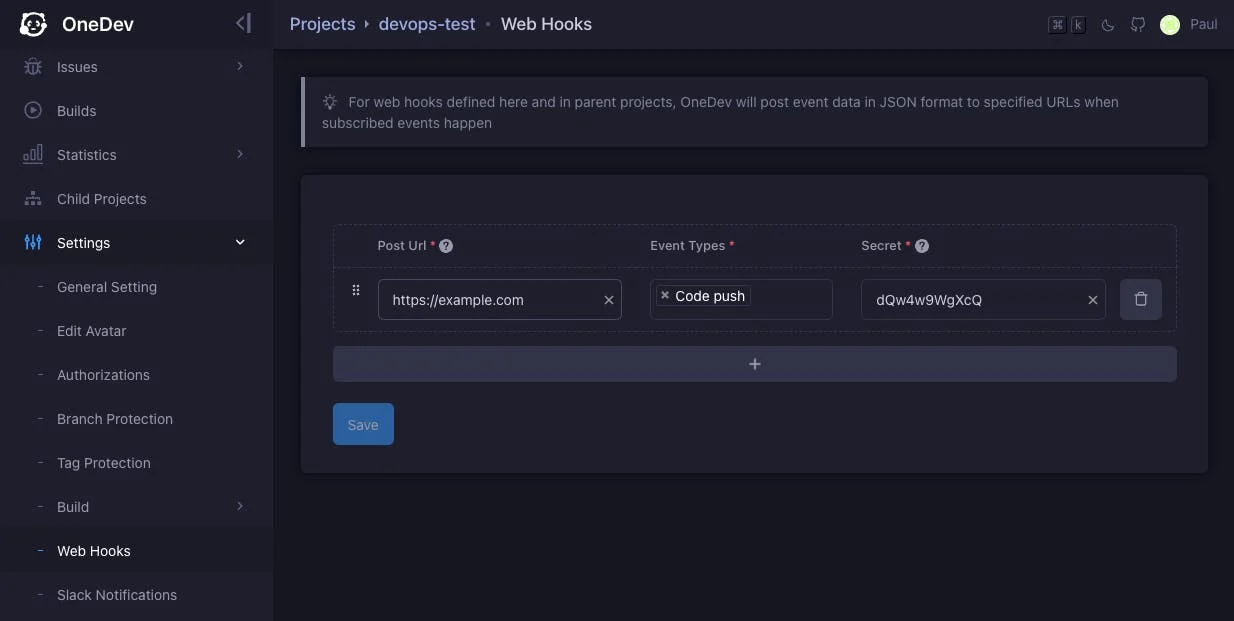
In OneDev, the target URL of a webhook is not restricted at all, apart from having to be a syntactically valid URL. A user can therefore set the webhook URL to an internal IP address and trigger the event, forcing the server to make HTTP requests to internal targets, including the server itself. This is a Server-Side Request Forgery, but a limited one: the user does not control the HTTP method or any HTTP headers, only some parts of the body, and cannot see the HTTP response. The user-controlled input that can reach an internal server is therefore limited to the URL, meaning its path and query parameters.
The OneDev maintainers did not request a CVE for the SSRF because they consider it intended behaviour: OneDev setups are expected to be so diverse that blocking certain IP ranges could break some users. The interesting question was whether this limited SSRF could be used to reach an internal endpoint, bypass its protection and execute code.
Exploitation
Step 1: reach the internal Git hook callback via SSRF
OneDev validates push events with Git commands under the hood, implemented through a callback endpoint that is called whenever a push event happens. The endpoint is only supposed to be called from localhost, and the following check was introduced:
protected void doPost(HttpServletRequest request, HttpServletResponse response) {
    String clientIp = request.getHeader("X-Forwarded-For");
    if (clientIp == null) clientIp = request.getRemoteAddr();

    if (!InetAddress.getByName(clientIp).isLoopbackAddress()) {
        response.sendError(HttpServletResponse.SC_FORBIDDEN,
                "Git hook callbacks can only be accessed from localhost.");
        return;
    }
    // ...
}
The endpoint checks whether the client's IP address is the loopback address, such as [redacted], but it blindly trusts the X-Forwarded-For header when present. That is unsafe unless a properly configured reverse proxy sits in front of the OneDev instance; without one, an attacker can spoof the address by setting the header. Even with a correct reverse proxy, the check can be bypassed with the SSRF: when the server sends the webhook request to itself, the sender's IP address is always the loopback address.
Step 2: pass environment variables into the Git invocation
After the initial check, the callback endpoint reads parameters from the request, including a project ID, a user ID and commit hashes. These are used to check conditions based on the project's settings and the user's permissions, and then a Git command is executed. OneDev invokes that command in a way that prevents command injection and argument injection.
The callback also takes environment variables from the request's query parameters and passes them to the Git command invocation. This is the weak point: the behaviour of programs can be influenced by environment variables.
Step 3: find an environment variable that writes a file
Modern Git versions support setting any config value via environment variables, which would be enough to execute arbitrary commands, using GIT_CONFIG_COUNT, GIT_CONFIG_KEY_* and GIT_CONFIG_VALUE_*. The Git version shipped in OneDev's default Docker container was older, so this was not feasible.
Another technique, LD_PRELOAD, allows specifying a shared library that overrides functions used by a binary, but it requires first uploading such a library to the filesystem, which was not feasible here without an additional vulnerability.
The researcher noticed that OneDev uses Git hooks to validate some Git events and that the hooks were simple shell scripts. These files were writable by the user the OneDev server runs as, so they could be overwritten with malicious commands. Searching the Git documentation for an environment variable that enables writing to an arbitrary file turned up GIT_TRACE_SETUP, which activates verbose debugging output, either to STDERR or to a file named in the variable's value. Its output looks like this:
$ env GIT_TRACE_SETUP=/tmp/trace.txt git status
On branch main
No commits yet
nothing to commit (create/copy files and use "git add" to track)
$ cat /tmp/trace.txt
15:40:18.109099 trace.c:311             setup: git_dir: .git
15:40:18.109933 trace.c:312             setup: git_common_dir: .git
15:40:18.109940 trace.c:313             setup: worktree: /tmp/git-trace
15:40:18.109947 trace.c:314             setup: cwd: /tmp/git-trace
15:40:18.109953 trace.c:315             setup: prefix: (null)
This looked promising but had drawbacks:
- Only some parts of the output can be controlled via other environment variables.
- Git only appends to existing files, it does not overwrite them. This matters because the Git hook scripts all ended with a call to
exiton their last line, ending execution regardless of what follows. - The scripts had no line break at the very end, so commands could be executed in a subshell if they could be injected into the first line of the trace output.
Step 4: control the first line of the trace output
The first line contains the value of git_dir, which can be controlled via the GIT_DIR environment variable. It has to point to a valid Git directory, otherwise the whole command fails and no trace output is written. Non-existing path segments cannot be inserted either, because Linux complains in that case. The attacker therefore needs to create a folder whose name contains a subshell command on the filesystem first, then use a GIT_DIR path that includes this directory and traverses back to a valid Git directory.
Since the attacker already has access to a project on the OneDev server, they can create such a folder by creating and pushing a new branch. Branches are stored in a Git repository as .git/refs/heads/<branchname>. Branch names can include slashes, producing multiple nested directories, but the last segment of a branch name is always a file holding the branch's most recent commit hash. To make the command land in a directory name rather than a file name, the attacker includes at least one slash after the subshell command.
Step 5: append the payload to a hook and trigger it
Putting it together, the attacker creates and pushes such a branch, then uses GIT_DIR and GIT_TRACE_SETUP to append to a Git hook. Afterward the hook script looks like this:
[...]
exit $returnCode15:50:06.391600 trace.c:311             setup: git_dir: .git/refs/heads/$(id>/tmp/pwned)/../../../../../
15:50:06.393284 trace.c:312             setup: git_common_dir: .git/refs/heads/$(id>/tmp/pwned)/../../../../../
15:50:06.393318 trace.c:313             setup: worktree: /private/tmp/git-trace
15:50:06.393336 trace.c:314             setup: cwd: /private/tmp/git-trace
15:50:06.393352 trace.c:315             setup: prefix: (null)
The exit $returnCode line is the original last line of the hook, with no trailing newline, so the appended trace output starts on the same line and the $(id>/tmp/pwned) inside the git_dir value would be executed in a subshell when the hook runs. The ../../../../../ after it walks back from the branch directory to a valid Git directory so that Git accepts the path and writes the trace.
Step 6: escape the container
OneDev recommends starting the server with access to a Docker socket to enable Docker-based CI/CD pipelines. When the OneDev server runs in a Docker container, the recommendation is to mount the host's Docker socket into the OneDev container. This is dangerous: it allows breaking out of the container and executing commands as root on the host, unless Docker runs in rootless mode. OneDev also mounts the host's Docker socket into certain CI/CD pipeline containers, so users with the appropriate permissions can perform a Docker escape simply by defining a malicious CI configuration.
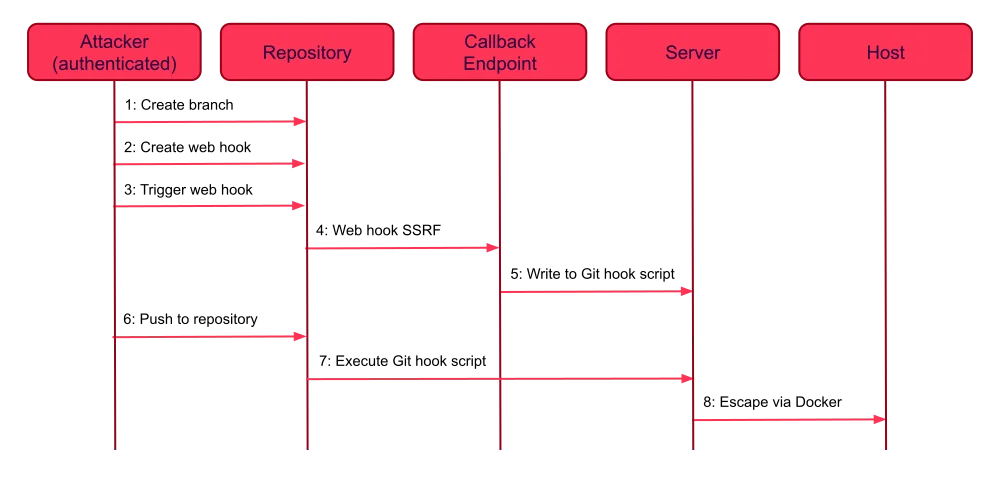
The whole chain is summarised in the following overview:
Root cause
The chain rests on three separate mistakes.
First, the webhook URL is not restricted beyond syntactic validity, so the server can be made to send requests to internal targets, including itself. The maintainers treat this as intended behaviour and did not fix it.
Second, the Git hook callback authenticates the caller by IP address and trusts the X-Forwarded-For header without verifying that a trusted proxy set it. Without a reverse proxy, the header can simply be spoofed; with one, the SSRF makes the request originate from loopback anyway. The endpoint then takes environment variables from the request's query parameters and passes them to the Git invocation. Preventing command and argument injection does not help when the environment itself is attacker-controlled, because environment variables change program behaviour. The GIT_TRACE_SETUP variable turns that into an arbitrary file append, and the missing trailing newline in the hook scripts turns the append into command execution.
Third, the host's Docker socket is exposed in environments where low-privileged users can reach it, through the OneDev container and through CI/CD pipeline containers.
Impact
Attackers could combine the vulnerabilities to execute arbitrary commands on vulnerable OneDev instances, allowing them to steal or manipulate source code and build artifacts and to launch further attacks against internal infrastructure. Most of the vulnerabilities require authentication as a regular user; only CVE-2022-39208 works without authentication. The container escape additionally requires the Docker socket to be exposed as described above and Docker not running in rootless mode.
Because the OneDev maintainers develop the project on the OneDev instance at code.onedev.io, attackers could have hijacked the project's infrastructure to plant malicious code into OneDev itself, compromising users of OneDev without attacking them directly. Such a software supply chain attack is stealthy and has happened before, for example in the Codecov and SolarWinds incidents, and could also happen in the open-source world.
Fix
The SSRF was not fixed. The OneDev team expects deployments to vary widely with no common denominator and considers a one-fits-all blocklist for webhook URLs impossible, so none was implemented. The researcher suggests an admin setting that controls such a blocklist, with a default that blocks requests to all local and private IP ranges. For your own code that makes requests based on user-controlled values, validate each request, especially the protocol, hostname and port, since modifying them can allow attackers to talk to internal services that are otherwise not exposed and usually less secured. Validation has to happen at the right moment to be effective.
For the access control bypass, the maintainers introduced a system of authentication tokens that must be sent with each request and are validated before any actions are performed. This is solid because even an SSRF cannot trigger the endpoint without a valid token. As a rule, never blindly trust HTTP headers such as X-Forwarded-For unless you are sure an attacker cannot set them; making trust in these headers opt-in rather than opt-out reduces the chance of trusting them accidentally.
The container escape was only possible because the host's Docker socket was exposed where low-privileged users could use it. Only trusted users, such as admins, should access the socket, and all parameters in requests to it should be validated. Third-party proxies such as docker-socket-proxy can restrict the Docker interface to a safer subset of requests.
The maintainers fixed the issues except the SSRF, released version 7.3.0 and rebuilt the code.onedev.io instance from scratch to ensure it was not backdoored. The timeline was:
| Date | Action |
|---|---|
| 2022-05-30 | All issues reported to the OneDev maintainers |
| 2022-05-30 | The OneDev maintainers confirm the issues |
| 2022-05-31 | The OneDev maintainers fix the issues (except the SSRF), release 7.3.0 and rebuild code.onedev.io from scratch |
| 2022-09-13 | The CVE IDs are assigned |
Variants to test
- Webhook URL validation. On any platform with webhooks, set the URL to an internal address and trigger the event. A positive result is the server making a request to the internal target, visible through timing, side effects or an out-of-band interaction.
- Header-based IP checks. Look for endpoints restricted to localhost that read
X-Forwarded-Foror similar headers. Send the header with a loopback value from an external address; a positive result is access to the endpoint without a proxy. - Environment variables from request parameters. Find endpoints that pass query parameters into a subprocess environment. A positive result is a change in the subprocess behaviour, for example through
GIT_TRACE_SETUP,GIT_CONFIG_COUNTorLD_PRELOADwhere the prerequisites exist. - Trace output injection. Where a program writes trace output to a file, check whether the first line contains a controllable value and whether the target file lacks a trailing newline. A positive result is command execution when the file is later run as a script.
- Branch names as paths. Push branches whose names contain shell metacharacters and slashes, then check whether the resulting directory names appear in any file the server writes. A positive result is a directory name containing the payload on disk.
- Docker socket exposure. In CI/CD systems, check whether pipeline containers can reach a Docker socket. A positive result is the ability to start a privileged container or mount the host filesystem from within a pipeline.
What happened, in plain words
OneDev is a program you install on your own computer or server to host source code, the files that make up a software project. It is an alternative to GitHub, GitLab and Bitbucket, and it is open source, meaning anyone can read and change its code. At the time of the research it had almost 10,000 stars on GitHub, a star being a way for people to show they like a project. OneDev also does more than store code: it can build and test projects automatically (CI/CD), search through code, and connect to tools that check code quality.
Source code is valuable. If someone can steal it, they learn how a company's products work. If someone can change it, they can slip harmful code into software that other people then download and trust. That is why the researcher decided to look at the services that hold source code, because those are attractive targets for attackers.
The researcher found five problems in OneDev version 7.2.9:
- Web Hook Server-Side Request Forgery
- Access Control Bypass leading to Remote Code Execution (CVE-2022-39205)
- Docker Escape (CVE-2022-39206)
- Persistent Cross-Site Scripting (CVE-2022-39207)
- Git Repository Disclosure (CVE-2022-39208)
A CVE is a public catalogue number given to a known security flaw, so that people can talk about it and track fixes. Most of these problems need the attacker to have an account on the OneDev server, even if it is only a normal, low-privilege account. Only CVE-2022-39208 can be used without logging in at all. The article focuses on three of the five, because they can be combined into a chain: each step makes the next one possible. The overview below shows how they fit together:
The recommendation is to update OneDev to at least version 7.3.0, which contains the fixes.
There is a second reason this mattered. The people who maintain OneDev develop the project on their own OneDev instance at code.onedev.io. If an attacker had taken over that instance, they could have planted malicious code inside OneDev itself. Then everyone who downloaded OneDev would have received the attacker's code without ever being attacked directly. This kind of attack is called a software supply chain attack, and it is hard to notice. It has happened before, for example in the Codecov and SolarWinds incidents, and it can also happen in open-source projects.
The setup needed to follow along
The problems were found in OneDev 7.2.9. To follow the chain, an attacker needs a normal account on the OneDev server, with access to at least one project. That is because one step uses the ability to create and push a branch, which is a named line of development inside a code repository. The first problem, the SSRF, comes from a standard feature called a webhook, which any user who is allowed to configure one can use. The last step, the container escape, only applies to certain installations: those that follow OneDev's own recommendation to give the server access to a Docker socket, especially when OneDev itself runs inside a Docker container with the host's Docker socket mounted into it.
Finding the first problem: webhooks
A webhook is a common feature of code hosting platforms. You give the server a web address (a URL) and choose an event type, such as "someone pushed code". When that event happens, the server sends an automatic HTTP request to your URL, usually with details of the event in the body of the request. A typical use is to trigger a deployment every time someone pushes to the main branch of a repository. This is what the feature looks like in OneDev:
In OneDev, the target URL of a webhook is not restricted at all, apart from having to be a syntactically valid URL, meaning it has to look like a proper address. So a user can set the webhook URL to an internal IP address, an address that only makes sense inside the network where the server lives, and then trigger the event. The server will happily send a request there. This forces the server to make requests to internal targets, including the server itself.
This is called Server-Side Request Forgery, or SSRF. The name describes it exactly: the server is tricked into forging a request on the attacker's behalf. It is a limited version, though. The user does not control the HTTP method (whether it is a GET, a POST and so on), does not control any HTTP headers, controls only some parts of the body, and cannot see the response that comes back. So the only attacker-controlled input that can reach an internal server is the URL itself, meaning its path and its query parameters.
The OneDev maintainers did not request a CVE for the SSRF because they consider it intended behaviour. Their reasoning is that OneDev installations are so diverse that blocking certain IP ranges could break things for some users. The interesting question for the researcher was whether this limited SSRF could be used to reach an internal endpoint, get past its protection, and run code on the server.
Exploitation, step by step
Step 1: reach the internal Git hook callback through the SSRF
OneDev checks push events using Git commands under the hood. Git is the version control program that keeps track of changes to code. This checking is implemented with a callback endpoint: a special internal address that the server calls whenever a push happens. An endpoint is simply a specific address on a server that does a specific job, like a counter at a post office. This endpoint is only supposed to be called from localhost, meaning from the same machine, so the following check was introduced:
protected void doPost(HttpServletRequest request, HttpServletResponse response) {
    String clientIp = request.getHeader("X-Forwarded-For");
    if (clientIp == null) clientIp = request.getRemoteAddr();

    if (!InetAddress.getByName(clientIp).isLoopbackAddress()) {
        response.sendError(HttpServletResponse.SC_FORBIDDEN,
                "Git hook callbacks can only be accessed from localhost.");
        return;
    }
    // ...
}
Line by line, in plain words:
protected void doPost(...)declares the function that runs when a POST request arrives at this endpoint. A POST request is one of the ways a browser or program sends data to a server.String clientIp = request.getHeader("X-Forwarded-For");reads a header calledX-Forwarded-Forfrom the incoming request. A header is extra information attached to a request, like the label on a parcel.X-Forwarded-Foris normally used by proxies to say which client the request originally came from.if (clientIp == null) clientIp = request.getRemoteAddr();says: if that header was not present, use the actual address of the machine that connected.if (!InetAddress.getByName(clientIp).isLoopbackAddress())checks whether the address is the loopback address, such as [redacted], which always means "this same machine".- If it is not the loopback address, the server sends back a 403 Forbidden error with the message "Git hook callbacks can only be accessed from localhost." and stops.
The problem is that the code blindly trusts the X-Forwarded-For header when it is present. That is only safe if a properly configured reverse proxy sits in front of the OneDev instance. A reverse proxy is a server that receives requests first and passes them on, adding the header itself. Without one, an attacker can simply set the header to a loopback value and the check passes. Even with a correct reverse proxy, the check can still be bypassed using the SSRF: when the server sends the webhook request to itself, the sender's address really is the loopback address, so the check is satisfied honestly.
Step 2: pass environment variables into the Git command
After the initial check, the callback endpoint reads parameters from the request, including a project ID, a user ID and commit hashes. A parameter is a value sent along with a request, like the fields on a form. These values are used to check conditions based on the project's settings and the user's permissions, and then a Git command is executed. OneDev runs that command in a way that prevents command injection and argument injection, two classes of bug where an attacker sneaks extra commands or extra options into a program's input.
The callback also takes environment variables from the request's query parameters and passes them to the Git command. Environment variables are named values that a program can read when it starts, like settings written on a sticky note attached to the program. This is the weak point: the behaviour of programs can be influenced by environment variables, so letting an attacker choose them is dangerous even when the command itself is run safely.
Step 3: find an environment variable that writes a file
Modern Git versions support setting any config value through environment variables, which would be enough to run arbitrary commands. This uses GIT_CONFIG_COUNT, GIT_CONFIG_KEY_* and GIT_CONFIG_VALUE_*. But the Git version shipped in OneDev's default Docker container was older, so this route was not available.
Another technique is LD_PRELOAD, which lets you specify a shared library that overrides functions used by a program. A shared library is a file of reusable code that programs load at runtime. This would require first uploading such a library to the filesystem, which was not possible here without an additional vulnerability.
The researcher then noticed that OneDev uses Git hooks to validate some Git events, and that the hooks were simple shell scripts. A Git hook is a small script that Git runs automatically at certain moments, such as before accepting a push. A shell script is a text file of commands that the operating system can run. These files were writable by the user that the OneDev server runs as, so they could be overwritten with malicious commands. Searching the Git documentation for an environment variable that enables writing to an arbitrary file turned up GIT_TRACE_SETUP, which turns on verbose debugging output, either to STDERR (the screen) or to a file named in the variable's value. Its output looks like this:
$ env GIT_TRACE_SETUP=/tmp/trace.txt git status
On branch main
No commits yet
nothing to commit (create/copy files and use "git add" to track)
$ cat /tmp/trace.txt
15:40:18.109099 trace.c:311             setup: git_dir: .git
15:40:18.109933 trace.c:312             setup: git_common_dir: .git
15:40:18.109940 trace.c:313             setup: worktree: /tmp/git-trace
15:40:18.109947 trace.c:314             setup: cwd: /tmp/git-trace
15:40:18.109953 trace.c:315             setup: prefix: (null)
Line by line:
$ env GIT_TRACE_SETUP=/tmp/trace.txt git statusruns thegit statuscommand with the environment variableGIT_TRACE_SETUPset to the file/tmp/trace.txt. The$is just the shell prompt, not something you type.On branch main,No commits yet,nothing to commit...is the normal output ofgit status.$ cat /tmp/trace.txtprints the contents of the trace file that Git wrote.- The five lines starting with timestamps are the debugging output. Each line shows a piece of information Git recorded about its setup, such as
git_dir: .git, which is the folder holding the repository's internal data.
This looked promising but had drawbacks:
- Only some parts of the output can be controlled through other environment variables.
- Git only appends to existing files, it does not overwrite them. This matters because the Git hook scripts all ended with a call to
exiton their last line, which ends the script regardless of what comes after. - The scripts had no line break at the very end, so commands could be executed in a subshell if they could be injected into the first line of the trace output. A subshell is a separate little shell that runs a command and returns its result.
Step 4: control the first line of the trace output
The first line contains the value of git_dir, which can be controlled through the GIT_DIR environment variable. It has to point to a valid Git directory, otherwise the whole command fails and no trace output is written. Non-existing path segments cannot be inserted either, because Linux complains in that case. So the attacker first needs to create a folder whose name contains a subshell command on the filesystem, then use a GIT_DIR path that includes this directory and walks back to a valid Git directory.
Since the attacker already has access to a project on the OneDev server, they can create such a folder by creating and pushing a new branch. Branches are stored in a Git repository as .git/refs/heads/<branchname>. Branch names can include slashes, which produces multiple nested directories, but the last segment of a branch name is always a file holding the branch's most recent commit hash. To make the command land in a directory name rather than a file name, the attacker includes at least one slash after the subshell command.
Step 5: append the payload to a hook and trigger it
Putting it all together, the attacker creates and pushes such a branch, then uses GIT_DIR and GIT_TRACE_SETUP to append to a Git hook. Afterwards the hook script looks like this:
[...]
exit $returnCode15:50:06.391600 trace.c:311             setup: git_dir: .git/refs/heads/$(id>/tmp/pwned)/../../../../../
15:50:06.393284 trace.c:312             setup: git_common_dir: .git/refs/heads/$(id>/tmp/pwned)/../../../../../
15:50:06.393318 trace.c:313             setup: worktree: /private/tmp/git-trace
15:50:06.393336 trace.c:314             setup: cwd: /private/tmp/git-trace
15:50:06.393352 trace.c:315             setup: prefix: (null)
Line by line:
[...]stands for the earlier lines of the hook script, which are not shown.exit $returnCodeis the original last line of the hook, with no newline after it.- The appended trace output starts on that same line, because there was no line break. So the
$(id>/tmp/pwned)inside thegit_dirvalue would be executed in a subshell when the hook runs.$(...)means "run this command and put its output here", andid>/tmp/pwnedruns theidcommand and writes its output to the file/tmp/pwned. - The
../../../../../after it walks back from the branch directory to a valid Git directory, so Git accepts the path and writes the trace.
Step 6: escape the container
OneDev recommends starting the server with access to a Docker socket to enable Docker-based CI/CD pipelines. Docker is a tool that runs programs in containers, which are isolated boxes on a machine. A socket is a special file that programs use to talk to another program, in this case the Docker service. When the OneDev server runs in a Docker container, the recommendation is to mount the host's Docker socket into the OneDev container, meaning make the host's socket visible inside the container. This is dangerous: it allows breaking out of the container and running commands as root, the all-powerful administrator account, on the host, unless Docker runs in rootless mode, a mode where Docker does not have those powers. OneDev also mounts the host's Docker socket into certain CI/CD pipeline containers, so users with the appropriate permissions can perform a Docker escape simply by defining a malicious CI configuration.
The whole chain is summarised in the following overview:
Why it worked
The chain rests on three separate mistakes.
First, the webhook URL is not restricted beyond being syntactically valid, so the server can be made to send requests to internal targets, including itself. The maintainers treat this as intended behaviour and did not fix it.
Second, the Git hook callback authenticates the caller by IP address and trusts the X-Forwarded-For header without checking that a trusted proxy set it. Without a reverse proxy, the header can simply be spoofed; with one, the SSRF makes the request come from loopback anyway. The endpoint then takes environment variables from the request's query parameters and passes them to the Git command. Preventing command and argument injection does not help when the environment itself is attacker-controlled, because environment variables change how a program behaves. The GIT_TRACE_SETUP variable turns that into an arbitrary file append, and the missing trailing newline in the hook scripts turns the append into command execution.
Third, the host's Docker socket is exposed in environments where low-privileged users can reach it, both through the OneDev container and through CI/CD pipeline containers.
What an attacker could have done
Attackers could combine the vulnerabilities to run arbitrary commands on vulnerable OneDev instances. That would let them steal or manipulate source code and build artifacts, and launch further attacks against internal infrastructure. Most of the vulnerabilities need a normal user account; only CVE-2022-39208 works without logging in. The container escape additionally needs the Docker socket to be exposed as described above, and Docker not running in rootless mode.
Because the OneDev maintainers develop the project on the OneDev instance at code.onedev.io, attackers could have hijacked the project's infrastructure to plant malicious code into OneDev itself, compromising users of OneDev without attacking them directly. Such a software supply chain attack is stealthy and has happened before, for example in the Codecov and SolarWinds incidents, and could also happen in the open-source world.
How it was fixed
The SSRF was not fixed. The OneDev team expects installations to vary widely with no common denominator and considers a one-fits-all blocklist for webhook URLs impossible, so none was implemented. The researcher suggests an admin setting that controls such a blocklist, with a default that blocks requests to all local and private IP ranges. For your own code that makes requests based on user-controlled values, validate each request, especially the protocol, hostname and port, since changing them can let attackers talk to internal services that are otherwise not exposed and usually less secured. Validation has to happen at the right moment to be effective.
For the access control bypass, the maintainers introduced a system of authentication tokens that must be sent with each request and are validated before any actions are performed. A token is a secret string that proves who you are, like a ticket you show at the door. This is solid because even an SSRF cannot trigger the endpoint without a valid token. As a rule, never blindly trust HTTP headers such as X-Forwarded-For unless you are sure an attacker cannot set them; making trust in these headers opt-in rather than opt-out reduces the chance of trusting them accidentally.
The container escape was only possible because the host's Docker socket was exposed where low-privileged users could use it. Only trusted users, such as admins, should access the socket, and all parameters in requests to it should be validated. Third-party proxies such as docker-socket-proxy can restrict the Docker interface to a safer subset of requests.
The maintainers fixed the issues except the SSRF, released version 7.3.0 and rebuilt the code.onedev.io instance from scratch to make sure it was not backdoored. The timeline was:
| Date | Action |
|---|---|
| 2022-05-30 | All issues reported to the OneDev maintainers |
| 2022-05-30 | The OneDev maintainers confirm the issues |
| 2022-05-31 | The OneDev maintainers fix the issues (except the SSRF), release 7.3.0 and rebuild code.onedev.io from scratch |
| 2022-09-13 | The CVE IDs are assigned |
Things to try on your own systems
- Webhook URL validation. On any platform with webhooks, set the URL to an internal address and trigger the event. A positive result is the server making a request to the internal target, visible through timing, side effects or an out-of-band interaction.
- Header-based IP checks. Look for endpoints restricted to localhost that read
X-Forwarded-Foror similar headers. Send the header with a loopback value from an external address; a positive result is access to the endpoint without a proxy. - Environment variables from request parameters. Find endpoints that pass query parameters into a subprocess environment. A positive result is a change in the subprocess behaviour, for example through
GIT_TRACE_SETUP,GIT_CONFIG_COUNTorLD_PRELOADwhere the prerequisites exist. - Trace output injection. Where a program writes trace output to a file, check whether the first line contains a controllable value and whether the target file lacks a trailing newline. A positive result is command execution when the file is later run as a script.
- Branch names as paths. Push branches whose names contain shell metacharacters and slashes, then check whether the resulting directory names appear in any file the server writes. A positive result is a directory name containing the payload on disk.
- Docker socket exposure. In CI/CD systems, check whether pipeline containers can reach a Docker socket. A positive result is the ability to start a privileged container or mount the host filesystem from within a pipeline.
Glossary
- API: a defined way for one program to talk to another, like a service counter with set questions and answers.
- Argument injection: a bug where an attacker sneaks extra options into a program's input so it behaves differently.
- Branch: a named line of development inside a code repository.
- Callback endpoint: an internal address on a server that is called automatically when something happens.
- CI/CD: automatic building, testing and deploying of software when code changes.
- Command injection: a bug where an attacker sneaks extra commands into input that a program runs.
- Container: an isolated box on a machine in which a program runs, kept separate from the rest of the system.
- Container escape: breaking out of a container to reach the host machine.
- CVE: a public catalogue number given to a known security flaw.
- Docker: a tool that runs programs in containers.
- Docker socket: a special file that programs use to talk to the Docker service.
- Endpoint: a specific address on a server that does a specific job.
- Environment variable: a named value a program can read when it starts, like a setting on a sticky note.
- Git: the version control program that tracks changes to code.
- Git hook: a small script Git runs automatically at certain moments.
- Header: extra information attached to an HTTP request, like the label on a parcel.
- HTTP request: a message a browser or program sends to a server to ask for something or send data.
- IP address: a number that identifies a machine on a network.
- LD_PRELOAD: an environment variable that lets you load a shared library to override functions used by a program.
- Localhost / loopback address: the address that always means "this same machine", such as 127.0.0.1.
- Open source: software whose code anyone can read and change.
- Parameter: a value sent along with a request, like a field on a form.
- POST request: one of the ways a program sends data to a server.
- Query parameter: a value attached to the end of a URL after a question mark.
- Remote Code Execution (RCE): running your own commands on someone else's server.
- Reverse proxy: a server that receives requests first and passes them on, adding headers itself.
- Root: the all-powerful administrator account on a Linux system.
- Rootless mode: a Docker mode where Docker does not have administrator powers.
- Server-Side Request Forgery (SSRF): tricking a server into making a request on the attacker's behalf.
- Shared library: a file of reusable code that programs load at runtime.
- Shell script: a text file of commands the operating system can run.
- Socket: a special file programs use to talk to another program.
- Software supply chain attack: planting malicious code in software so that everyone who downloads it is affected.
- STDERR: the screen output where a program writes error and debug messages.
- Subshell: a separate little shell that runs a command and returns its result.
- Token: a secret string that proves who you are, like a ticket you show at the door.
- URL: a web address.
- Webhook: a feature where a server sends an automatic request to a URL you choose when an event happens.
- X-Forwarded-For: a header normally used by proxies to say which client a request originally came from.