Code Vulnerabilities Put Proton Mails at Risk
A code flaw in Proton Mail's HTML sanitisation allowed a parser differential to bypass the sanitizer and execute JavaScript in the context of the webmail client. An attacker could steal decrypted emails, impersonate the victim, and potentially steal cryptographic keys.
 Published on sonarsource.com
End-to-end encrypted communication is simply a feel-good thing for most people, but there are also high-risk users such as whistleblowers, journalists, or activists who seriously depend on confidential communication. We're seeing regular in-the-wild campaigns targeting mail servers, for example on Zimbra instances, as…
The full write-up lives on its author's site
It belongs to its author, so we link to it rather than copy it. The other two tabs are our own rewrites, checked against it.
Context
Proton Mail is a privacy-oriented webmail service that offers end-to-end encryption out of the box. Because the encryption happens in the web client, an attacker who can execute JavaScript in the context of the application can read emails in their decrypted form, steal private keys, deanonymise users and impersonate victims. That makes the client-side code, and in particular the handling of incoming email HTML, a high-value target.
Proton Mail renders incoming email HTML through DOMPurify, a state-of-the-art HTML sanitizer, and adds further defences in case the sanitizer fails: an iframe sandbox and a Content Security Policy. The research described here audited that sanitisation logic and the defences around it, and found a chain that got past them.
Setup
The work was a source-code audit of Proton Mail's open-source web client. The researcher looked at the email HTML sanitisation logic, specifically a snippet that runs on already-sanitised data in packages/shared/lib/sanitize/purify.ts. The exploitation model is that an attacker sends emails to a victim, who views them in the Proton Mail web client.
The vulnerabilities were responsibly disclosed to the vendor in June 2022 and fixed shortly after. Proton Mail awarded a $750 USD bug bounty, which the researchers donated to charity.
Finding it
The suspicious code is intended to replace <svg> elements in an email with <proton-svg> ones. It creates a new element, moves all children across, and then replaces the old element. The content and attributes of those elements are not modified, so at first sight the code looks harmless.
The problem is that renaming the element changes the parsing context. HTML contains foreign content, such as MathML and SVG, which looks similar to HTML but follows different parsing rules. The <style> element is a good example: in HTML it contains raw text until the next closing </style> tag, whereas in SVG it contains child elements. A sanitizer that parses with the wrong context in mind will make the wrong decisions.
In Proton Mail's case the sanitizer first sees an SVG element and sanitizes its children with the SVG context in mind. Afterwards the outer <svg> tag is renamed to <proton-svg>. Because that is neither a standard HTML nor a standard SVG tag, it falls back into the HTML context, and the browser parses the result differently from how it was sanitised. That parser differential is the bug.
Exploitation
Step 1: Bypass the sanitizer with a parser differential
The attacker abuses the differential with the following payload:
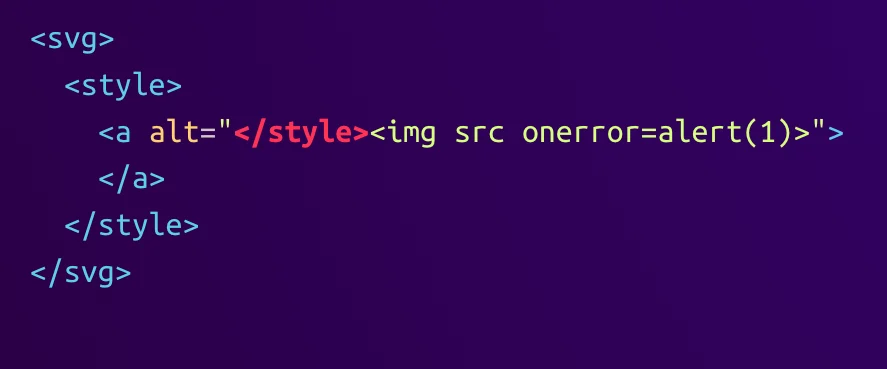
The sanitizer recognises the SVG context and parses the content of the <style> element as an <a> element. The byte sequence </style> is hidden inside the alt attribute of the <a> element and therefore does not close the <style> element. The <img> tag is likewise hidden inside the attribute, so the sanitizer does not remove the onerror event handler.
When the <svg> element is renamed to <proton-svg>, the parsing result changes:
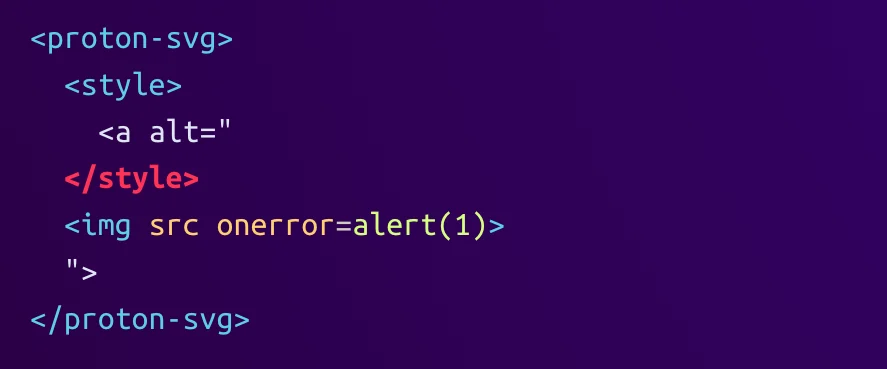
Since <proton-svg> belongs to the HTML context, the parsing rules for <style> change. Its content is now parsed as raw text, and the first occurrence of </style> terminates the element. That exposes the <img> element, whose onerror handler executes during rendering. The sanitizer is bypassed.
On its own this does not yet give arbitrary JavaScript execution. The sanitizer is only the first line of defence.
Step 2: Understand the iframe sandbox
After sanitisation, the email HTML is not inserted into the DOM of the Proton Mail page itself but into the DOM of an <iframe>. This keeps CSS styles in the email from affecting Proton Mail's UI and isolates the iframe content (marked in red) from the rest of the page:
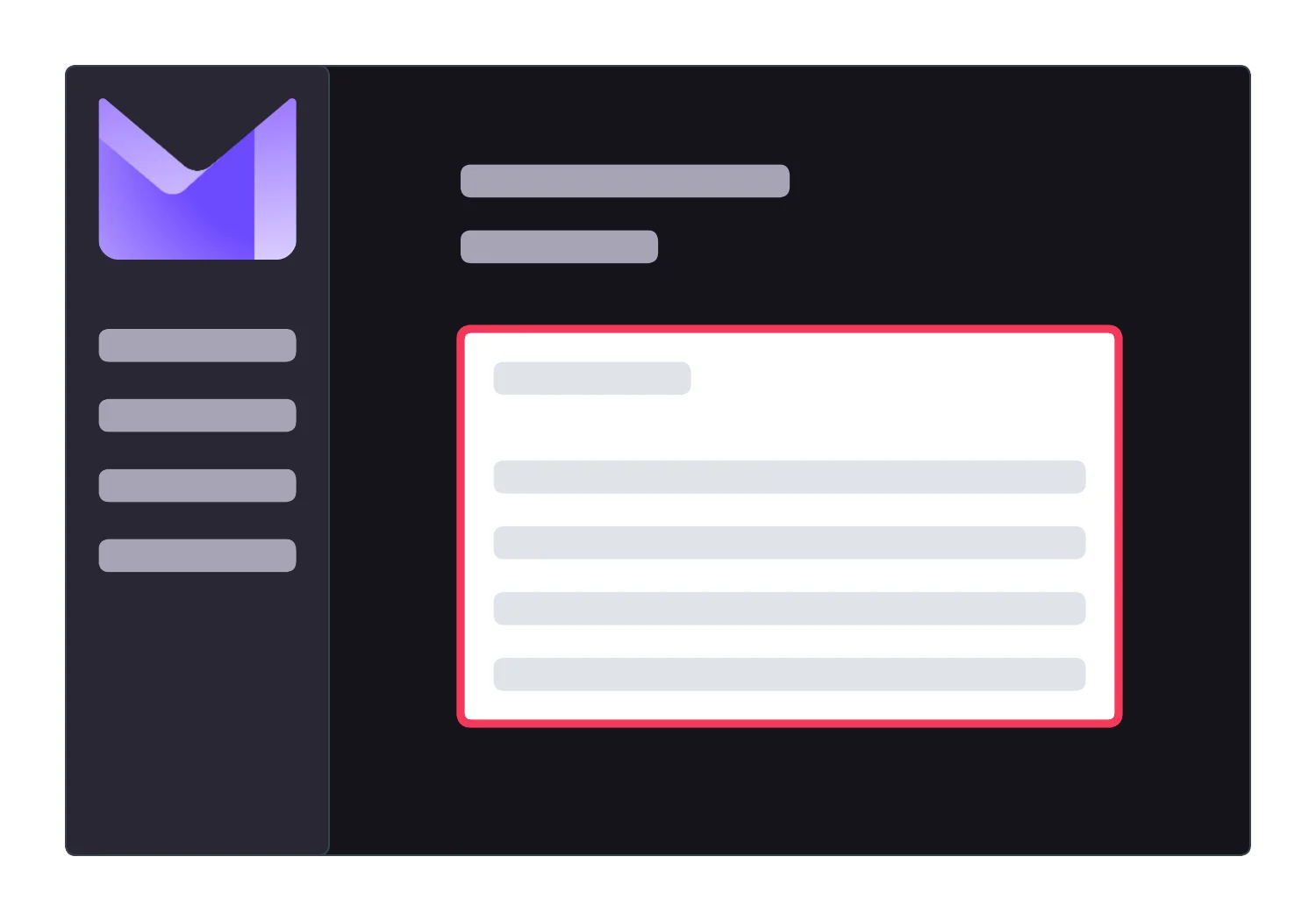
The sandbox attribute restricts what the framed page can do through an allowlist. Proton Mail's iframe sandbox uses these directives:
allow-same-originallow-popupsallow-popups-to-escape-sandbox
allow-same-origin lets the embedding page insert HTML into the iframe, but it also enables the reverse direction. allow-popups lets popups and new tabs open, for example when a user clicks a link. allow-popups-to-escape-sandbox means the newly opened page is not restricted by the iframe sandbox, which would normally be inherited.
There is a fourth directive in one case: when Proton Mail is opened in Safari, allow-scripts is added to the allowlist. In that browser an attacker does not need to bypass the sandbox at all, because they can simply execute JavaScript and access the top frame.
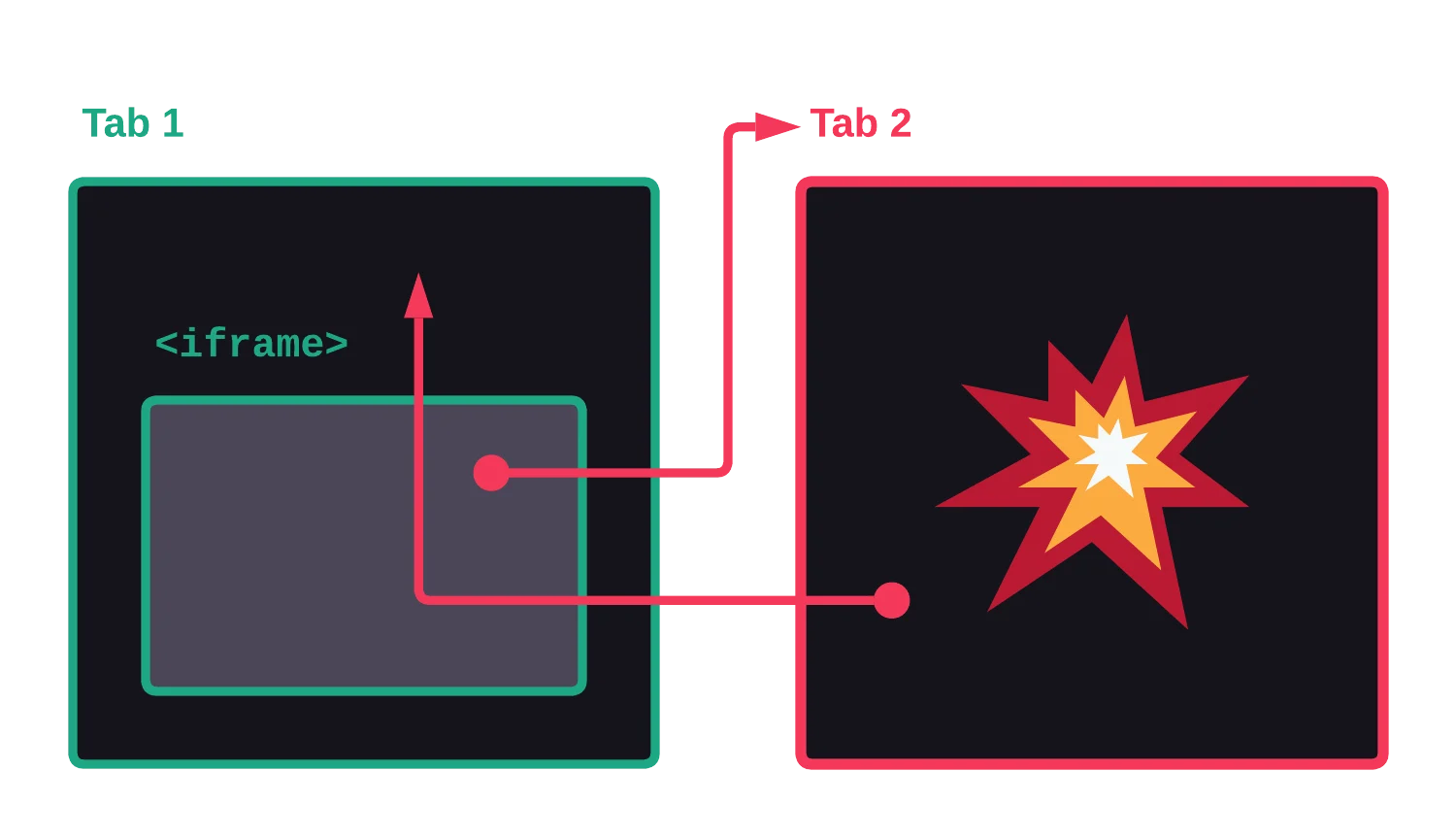
In all other browsers the attacker has to convince the victim to click a link that opens in a new tab, escaping the sandbox and reaching the opener's parent frame:
Step 3: Understand the Content Security Policy
The final defence is Proton Mail's Content Security Policy, which restricts the origins from which resources such as scripts, images and styles can be loaded. The relevant directives are:
default-src 'self'style-src 'unsafe-inline'img-src https:script-src blob:
default-src 'self' is the fallback and only allows resources from the page's own origin unless another directive says otherwise. style-src 'unsafe-inline' and img-src https: allow inline CSS and images loaded over HTTPS, which is normal for HTML email. script-src blob: allows scripts to be loaded from blob: URLs. That is unusual, and it is the key to bypassing the CSP.
A blob URL is a temporary URL that any page can create dynamically. It looks like this:
blob:https://mail.proton.me/8c2a19fa-8dcd-44d1-807c-1c65abef0251
After the blob: scheme comes the origin of the page that created it, and the path is a random UUID. To create one, the page specifies the content type and the content that will be returned when the browser fetches it. Blob URLs can be revoked actively, and they are also revoked when the page is closed or reloaded.
Step 4: Craft an arbitrary blob URL from an inline attachment
Proton Mail uses blob URLs to render inline attachments such as images. Each attachment normally has a Content-ID header that uniquely identifies it within the email, and it can be referenced with cid: URLs, for example in the src attribute of an <img> tag. When an email contains an image tag with a cid: source, Proton Mail finds the attachment with the matching Content-ID, creates a blob URL from the attachment's data and content type, and replaces the image's src with the new blob URL.
The researcher noticed that Proton Mail allows arbitrary content types and content for inline attachments. An attacker can therefore send a JavaScript attachment instead of an image, reference it as an <img> element's source, and trigger the creation of a blob URL that contains JavaScript with the application/javascript content type. This turns the inline image mechanism into a way to craft arbitrary blob URLs and load them as scripts, bypassing the CSP. The remaining challenge is to move the created blob URL from the image tag's src attribute into a script tag's src attribute.
Step 5: Leak the blob URL with CSS
Inline styles and remote images are allowed by the CSP, so they can be used to leak data from the DOM. Earlier work by Pepe Vila and Nathanial Lattimer uses recursive CSS @import statements to leak attribute values and text. That technique, and others like it, do not apply here because the CSP does not allow styles or fonts to be loaded from remote servers.
The value to leak is a blob URL, which allows some simplifying assumptions. The origin is always https://mail.proton.me, so the URL always begins with blob:https://mail.proton.me/. Only the UUID remains, made of hexadecimal characters and dashes, which gives 17 possibilities per character.
The @import technique leaks an attribute value incrementally with the CSS attribute prefix selector. Since remote CSS imports are blocked, that incremental approach is impossible. Creating selectors for every possible attribute value is not feasible either, because there are 2^122 possible values.
A different CSS attribute selector helps: the "contains" operator, which checks whether an attribute value contains a given substring. With it, the leak can work in parallel instead of incrementally.
Splitting the URL into chunks
The value is split into smaller chunks with fewer possible values. Rather than leaking a whole UUID at once, the attacker leaks all 3-character substrings in parallel. All valid 3-character substrings of a UUID are calculated, from 000 through 0-0 up to fff, and a CSS selector is created for each one. When a selector matches, the browser requests a background image from the attacker server with a unique URL.
Here is how a blob URL is split into overlapping 3-character chunks:
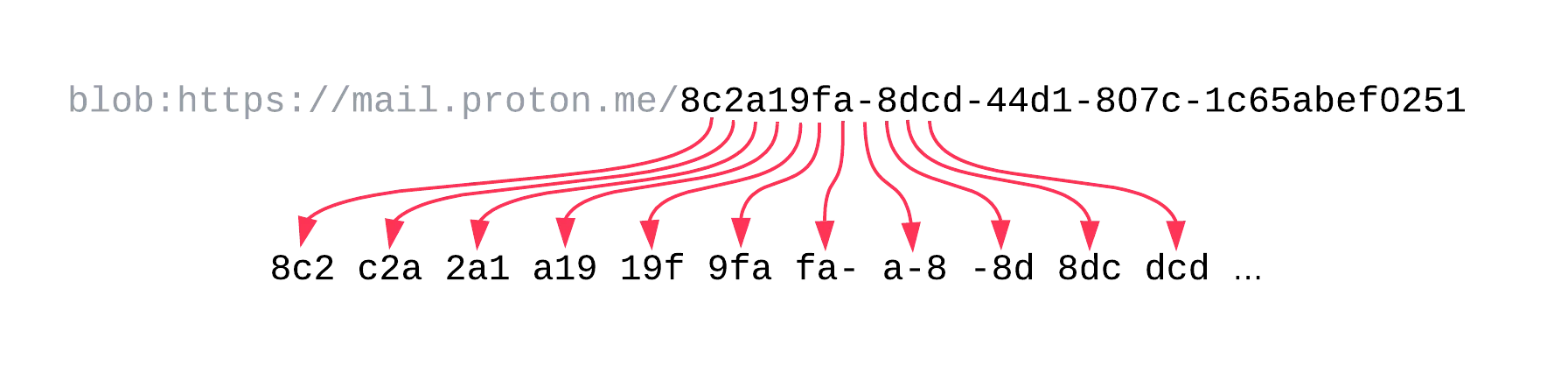
The attacker server then knows all the chunks in the UUID but not their order. It reconstructs the UUID by starting with one chunk and finding an overlapping one. Starting with 8c2, it looks for a chunk beginning with c2 and finds c2a; from there it looks for a chunk beginning with 2a, and so on. The full blob UUID can be reconstructed unless multiple chunks start with the same two characters.
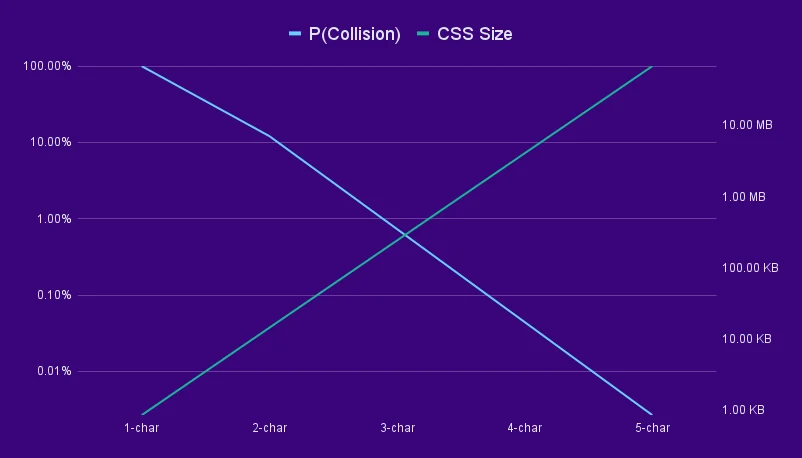
Three characters is the sweet spot between CSS size and collision probability: the CSS is about 100 KB and the chance of a collision is below 1%. With 2-character chunks the CSS would be smaller, but the overlap between chunks is only one character, so the chance of multiple possible successors rises drastically. Longer chunks reduce that chance, but the number of CSS selectors grows exponentially. The trade-off between CSS size and collision probability on logarithmic scales looks like this:
Multiple requests per element with cross-fade()
To implement the leak in CSS, one problem remains: multiple background images cannot be set on the same element, because they override each other. The solution is the cross-fade() CSS function, which takes two images and a percentage and returns an image that overlays both. Its image arguments can be url()s, but they can also be the result of another cross-fade() call, so calls can be nested arbitrarily deep. The browser must request every url() at the bottom of that nesting tree.
In the example, the browser has to load a.jpg and b.jpg before creating the cross-faded result, and it also has to load c.jpg before cross-fading it with the result of the other operation. The final result is a single image that can be assigned as an element's background image.
The final CSS payload to leak a blob URL has two parts. The first consists of all the chunk selectors that match when a specific substring is present in the UUID; each one sets a CSS variable to the URL the browser should fetch to signal the attacker server that the selector matched. The final selector includes all of these CSS variables in a big nested tree of cross-fade() calls. When the browser renders that selector it checks each variable, and for every variable that is set it fetches the referenced URL to build the final crossfaded image. Variables that are not set fall back to none, so nothing is requested for them. The leak in the browser's network tab looks like this:
Step 6: Execute the payload
After the attacker server receives the chunks, it reconstructs the blob URL and sends a second email to the victim. This email contains a <script> tag that uses the blob URL as its src, plus a link that opens the blob URL in a new tab. For victims using Safari the script tag is enough, because no iframe sandbox bypass is needed there. Other victims have to click the link, which opens in a new tab and escapes the iframe sandbox thanks to allow-popups-to-escape-sandbox.
Once the JavaScript payload runs, it can access the top windows where the Proton Mail app is running. From there an attacker can steal all emails in their decrypted form, send emails in the victim's name, and potentially steal the victim's cryptographic keys.
Root cause
The flaw is a mutation of sanitised data. The sanitizer parses the email with the SVG context in mind, but the subsequent renaming of <svg> to <proton-svg> moves the content into the HTML context, where the browser parses it differently. The sanitizer's decisions about the <style> element and the hidden <img> no longer hold, and the onerror handler survives.
The existing defences did not stop the chain. The iframe sandbox was bypassed through allow-popups-to-escape-sandbox (or was irrelevant in Safari, where allow-scripts is added), and the CSP was bypassed because script-src blob: allowed a script loaded from a blob URL that the attacker could craft through inline attachments with arbitrary content types. The CSS leak then recovered the blob URL using only inline styles and HTTPS images, both of which the CSP permits.
Impact
An attacker could steal decrypted emails and impersonate victims, bypassing the end-to-end encryption. The attack requires sending two emails, both of which the victim has to view. In some scenarios viewing the emails is enough, but most scenarios require the victim to click a link in the second email. Beyond reading mail, the attacker could send emails in the victim's name and potentially steal the victim's cryptographic keys.
Fix
Proton Mail fixed the vulnerable behaviour by removing SVG support altogether. That removes the specific vulnerability caused by the element renaming and reduces the attack surface for the future, since foreign content is a major source of sanitizer bypasses; preventing MathML and SVG from being used is a good hardening step.
The report gives three general recommendations:
- Never modify data after sanitising it. This applies to any data that needs sanitisation, not just HTML, and the more complex the data structure, the more dangerous post-sanitisation modification becomes.
- If possible, do not re-parse HTML after sanitising it. With DOMPurify you can opt in to receiving the sanitised DOM tree instead of a string; inserting that tree directly into the page's DOM means the browser will not mutate its contents, leaving less opportunity for mutation XSS.
- Use state-of-the-art sanitizers such as DOMPurify or the upcoming Sanitizer API that will be built into browsers. Obscure or outdated sanitizers are more likely to miss weird quirks.
Variants to test
- Look for code that modifies sanitised HTML after the sanitizer has run, such as renaming or wrapping elements. A positive result is a payload whose parse tree changes between the sanitised form and the final DOM, for example a
<style>element whose content becomes raw text after a rename. - Test foreign content handling: send MathML and SVG payloads and check whether the application renames, strips or re-parses them. A positive result is a sanitizer decision that no longer holds once the browser parses the final markup.
- Review iframe
sandboxallowlists forallow-popups-to-escape-sandboxcombined withallow-popups. A positive result is a link in the framed content that opens a new tab with access to the opener's parent frame. - Review CSP for
script-src blob:or similar blob allowances. A positive result is a way to create a blob URL with attacker-controlled content and a script content type, for example through inline attachments that accept arbitrary content types. - Test whether inline attachments accept arbitrary content types and whether
cid:references create blob URLs from them. A positive result is a blob URL containing attacker-supplied JavaScript. - Check whether CSS attribute selectors with the "contains" operator can trigger requests to an attacker server under the target's CSP. A positive result is a stream of background-image requests that reveals substrings of a secret value.
- Check whether
cross-fade()nesting can force multiple background-image requests from a single element. A positive result is several distinct requests fired by one rendered selector. - Check browser-specific sandbox behaviour, such as Safari receiving
allow-scripts. A positive result is script execution inside the frame without any sandbox escape.
What happened, in plain words
Proton Mail is an email service that encrypts your messages so that, in theory, only you and the person you are writing to can read them. The encryption and decryption happen inside your web browser, in the Proton Mail web page itself. That design has a consequence: if an attacker can make their own code run inside that web page, the attacker sits in the same place your browser does, so they can read your emails after they have been decrypted.
A security research team audited the part of Proton Mail that handles incoming email, the code that decides which parts of an email are safe to display. They found a code flaw that, combined with the existing defences, let an attacker run their own code inside the Proton Mail page. Proton Mail fixed the problems shortly after being told about them, and paid a $750 USD bug bounty, which the researchers gave to charity.
The rest of this article walks through that chain one link at a time, explaining each idea from scratch. Nothing here requires any security background: if you can use a browser, you can follow it.
The setting: why a webmail client is a juicy target
Most email is not end-to-end encrypted. It travels across the internet and sits on servers in a form the provider can read. End-to-end encryption (E2EE) changes that: the message is scrambled on the sender's device and only unscrambled on the recipient's device, so the provider in the middle only ever sees gibberish.
Setting up classic E2EE tools such as PGP or S/MIME is fiddly even for technical people, which is why services like Proton Mail, Skiff and Tutanota build it in and make it work out of the box. That convenience is exactly why the researchers looked at them: the cryptography may be solid, but the encryption happens in the web client, so attacking the client is a way around the cryptography.
Who cares? For most of us, encrypted email is a nice feeling. For whistleblowers, journalists and activists, it is a lifeline. Those are the people an attacker would most like to reach, and mail servers are regularly targeted in real campaigns, for example against Zimbra installations, as tracked by the US Cybersecurity and Infrastructure Security Agency (CISA).
So the question the researchers asked was simple: can we attack the web client directly? If the answer is yes, the attacker gets emails in their decrypted form.
The three layers of defence
Before the bug, it helps to know what Proton Mail does to stop malicious email from doing harm. There are three layers, and the attack had to get past them.
- A sanitizer. Incoming email is HTML, the same language web pages are written in. HTML can carry scripts, event handlers and other things that run code, so displaying a stranger's HTML directly is dangerous. A sanitizer is a program that reads the HTML, throws away anything dangerous, and hands back a cleaned version. Proton Mail uses DOMPurify, a well-regarded open-source sanitizer.
- An iframe sandbox. The cleaned email is not placed directly into the Proton Mail page. It goes inside an
<iframe>, which is a page-within-a-page, and that iframe carries asandboxattribute that limits what the content inside it may do. - A Content Security Policy (CSP). This is a set of rules the server sends to the browser saying which places resources such as scripts, images and styles may be loaded from. If a script comes from somewhere not on the list, the browser refuses to run it.
The research found a way past these defences. The rest of the article is that story: parser differentials, sandbox bypasses and CSS data exfiltration.
Finding it: an innocent-looking rename
While reading the sanitisation code, the researcher noticed a small snippet that runs after the sanitizer has already done its job. The snippet lives in packages/shared/lib/sanitize/purify.ts in Proton Mail's open-source web client. Its purpose is to replace <svg> elements in an email with <proton-svg> ones. It creates a new element, moves all the children across, and swaps the old element out for the new one.
At first sight this looks harmless: the content and the attributes of the elements are not changed, only the tag name. So why would that matter?
To see why, you need to know about foreign content in HTML.
Foreign content: HTML's multilingual neighbourhood
HTML is not the only language a browser understands inside a page. It can also contain MathML (for mathematical formulas) and SVG (for vector graphics). These look a lot like HTML because they all descend from XML, but they follow different parsing rules. A parser is the part of the browser that reads the raw characters of a page and turns them into a tree of elements. Different languages, different rules.
A good example is the <style> element. In HTML, everything between <style> and the next </style> is treated as raw text: the browser does not look for tags inside it. In SVG, <style> instead contains child elements, so the browser does look inside. If a sanitizer reads the email thinking it is in one context and the browser later reads the same characters thinking it is in the other, the two disagree about what the page means. That disagreement is called a parser differential, and it is the seed of the whole bug.
What went wrong in Proton Mail
Here is the sequence:
- The sanitizer sees an
<svg>element and cleans its children with the SVG rules in mind. - Afterwards, the snippet renames the outer
<svg>tag to<proton-svg>. <proton-svg>is not a standard HTML tag and not a standard SVG tag, so the browser treats it as ordinary HTML.- The content that was sanitised under SVG rules is now parsed under HTML rules. The browser and the sanitizer no longer agree.
That is the bug. Everything else is turning it into something an attacker can use.
Exploitation
Step 1: Bypass the sanitizer with a parser differential
The attacker abuses the differential with the following payload:
The payload is an SVG element containing a <style> element. Inside that <style>, the attacker has written what looks like an <a> element with an alt attribute. The trick is that the byte sequence </style> is hidden inside that alt attribute, and an <img> tag with an onerror handler is hidden there too.
What happens next depends on who is reading:
- The sanitizer, thinking in SVG, parses the content of
<style>as an<a>element. The</style>inside the attribute does not close the<style>element, because it is just text inside an attribute. The<img>is likewise hidden inside the attribute, so the sanitizer never sees it as a real image tag and does not remove theonerrorhandler. - The browser, after the rename, thinks in HTML. Now
<style>contains raw text, and the very first</style>it finds ends the element. That exposes the<img>tag, and theonerrorhandler runs while the page renders.
When the <svg> element is renamed to <proton-svg>, the parsing result looks like this:
The picture shows the same characters producing a different tree: the <img> that was hidden is now a real element, and its onerror handler fires. The sanitizer has been bypassed.
On its own, this does not yet give the attacker arbitrary JavaScript. The sanitizer was only the first line of defence, and two more remain.
Step 2: Understand the iframe sandbox
After sanitisation, the email HTML is not inserted into the DOM of the Proton Mail page itself. It goes into the DOM of an <iframe>. The DOM (Document Object Model) is the browser's live tree of the page; inserting HTML into it is what makes elements appear and scripts run.
Putting the email in an iframe has a first benefit: CSS styles in the email cannot affect Proton Mail's own interface. The picture shows the iframe content marked in red, isolated from the rest of the page:
The second benefit is the sandbox attribute. It is an allowlist: the framed page may do only what is listed. Proton Mail's iframe sandbox uses these directives:
allow-same-originallow-popupsallow-popups-to-escape-sandbox
What each one means:
allow-same-originlets the embedding page insert HTML into the iframe, but it also enables the reverse direction: code inside the frame can reach back to the parent page.allow-popupslets popups and new tabs open, for example when a user clicks a link.allow-popups-to-escape-sandboxmeans a newly opened page is not restricted by the iframe sandbox, which would normally be inherited by anything the frame opens.
There is a fourth directive in one case. When Proton Mail is opened in the Safari browser, allow-scripts is added to the allowlist. That means code inside the frame is allowed to run scripts at all, so in Safari an attacker does not need to bypass the sandbox: they can simply execute JavaScript and reach the top frame.
In all other browsers, the attacker has to convince the victim to click a link that opens in a new tab. That new tab escapes the sandbox and can reach the opener's parent frame:
The picture illustrates that path: a click, a new tab, and from there access back into the Proton Mail page.
Step 3: Understand the Content Security Policy
The final defence is Proton Mail's Content Security Policy. A CSP is a list of rules the server sends with the page, telling the browser which origins resources may come from. An origin is the combination of protocol, host and port, for example https://mail.proton.me. If a script, image or style comes from an origin not on the list, the browser refuses to load it.
The relevant directives are:
default-src 'self'style-src 'unsafe-inline'img-src https:script-src blob:
Line by line:
default-src 'self'is the fallback for anything not covered by a more specific rule. It only allows resources from the page's own origin.style-src 'unsafe-inline'allows CSS written directly inside the page, which HTML email needs in order to look right.img-src https:allows images loaded over HTTPS, which is also normal for email.script-src blob:allows scripts to be loaded fromblob:URLs. That is unusual, and it is the key to bypassing the CSP.
A blob URL is a temporary URL that any page can create on the fly. It looks like this:
blob:https://mail.proton.me/8c2a19fa-8dcd-44d1-807c-1c65abef0251
After the blob: scheme comes the origin of the page that created it, and the path is a random UUID (a long random identifier). To create one, the page specifies a content type and the content that will be returned when the browser fetches it. Blob URLs can be revoked on purpose, and they are also revoked when the page is closed or reloaded.
Step 4: Craft an arbitrary blob URL from an inline attachment
Proton Mail uses blob URLs to display inline attachments such as images. Each attachment normally has a Content-ID header that uniquely identifies it within the email, and it can be referenced with cid: URLs, for example in the src attribute of an <img> tag. When an email contains an image tag with a cid: source, Proton Mail finds the attachment with the matching Content-ID, creates a blob URL from the attachment's data and content type, and replaces the image's src with the new blob URL.
The researcher noticed that Proton Mail allows arbitrary content types and content for inline attachments. An attacker can therefore send a JavaScript attachment instead of an image, reference it as an <img> element's source, and trigger the creation of a blob URL that contains JavaScript with the application/javascript content type. The inline image mechanism becomes a way to craft arbitrary blob URLs and load them as scripts, bypassing the CSP.
The only challenge left is to move the created blob URL from the image tag's src attribute into a script tag's src attribute. The attacker cannot read it directly, because the code they control is not yet running in a place where it can read the page. So they have to make the browser tell them the value, one piece at a time.
Step 5: Leak the blob URL with CSS
Inline styles and remote images are allowed by the CSP, so they can be used to leak data from the DOM. Earlier work by Pepe Vila and Nathanial Lattimer uses recursive CSS @import statements to leak attribute values and text. That technique, and others like it, do not apply here because the CSP does not allow styles or fonts to be loaded from remote servers.
The value to leak is a blob URL, which allows some simplifying assumptions. The origin is always https://mail.proton.me, so the URL always begins with blob:https://mail.proton.me/. Only the UUID remains, made of hexadecimal characters and dashes, which gives 17 possibilities per character.
The @import technique leaks an attribute value incrementally with the CSS attribute prefix selector. Since remote CSS imports are blocked, that incremental approach is impossible. Creating selectors for every possible attribute value is not feasible either, because there are 2^122 possible values.
A different CSS attribute selector helps: the "contains" operator, which checks whether an attribute value contains a given substring. With it, the leak can work in parallel instead of incrementally.
Splitting the URL into chunks
The value is split into smaller chunks with fewer possible values. Rather than leaking a whole UUID at once, the attacker leaks all 3-character substrings in parallel. All valid 3-character substrings of a UUID are calculated, from 000 through 0-0 up to fff, and a CSS selector is created for each one. When a selector matches, the browser requests a background image from the attacker server with a unique URL.
Here is how a blob URL is split into overlapping 3-character chunks:
The picture shows the URL broken into overlapping 3-character pieces. The attacker server then knows all the chunks in the UUID but not their order. It reconstructs the UUID by starting with one chunk and finding an overlapping one. Starting with 8c2, it looks for a chunk beginning with c2 and finds c2a; from there it looks for a chunk beginning with 2a, and so on. The full blob UUID can be reconstructed unless multiple chunks start with the same two characters.
Three characters is the sweet spot between CSS size and collision probability: the CSS is about 100 KB and the chance of a collision is below 1%. With 2-character chunks the CSS would be smaller, but the overlap between chunks is only one character, so the chance of multiple possible successors rises drastically. Longer chunks reduce that chance, but the number of CSS selectors grows exponentially. The trade-off between CSS size and collision probability on logarithmic scales looks like this:
The chart shows the trade-off between CSS size and collision probability on logarithmic scales.
Multiple requests per element with cross-fade()
To implement the leak in CSS, one problem remains: multiple background images cannot be set on the same element, because they override each other. The solution is the cross-fade() CSS function, which takes two images and a percentage and returns an image that overlays both. Its image arguments can be url()s, but they can also be the result of another cross-fade() call, so calls can be nested arbitrarily deep. The browser must request every url() at the bottom of that nesting tree.
In the example, the browser has to load a.jpg and b.jpg before creating the cross-faded result, and it also has to load c.jpg before cross-fading it with the result of the other operation. The final result is a single image that can be assigned as an element's background image.
The final CSS payload to leak a blob URL has two parts. The first consists of all the chunk selectors that match when a specific substring is present in the UUID; each one sets a CSS variable to the URL the browser should fetch to signal the attacker server that the selector matched. The final selector includes all of these CSS variables in a big nested tree of cross-fade() calls. When the browser renders that selector it checks each variable, and for every variable that is set it fetches the referenced URL to build the final crossfaded image. Variables that are not set fall back to none, so nothing is requested for them. The leak in the browser's network tab looks like this:
Step 6: Execute the payload
After the attacker server receives the chunks, it reconstructs the blob URL and sends a second email to the victim. This email contains a <script> tag that uses the blob URL as its src, plus a link that opens the blob URL in a new tab. For victims using Safari the script tag is enough, because no iframe sandbox bypass is needed there. Other victims have to click the link, which opens in a new tab and escapes the iframe sandbox thanks to allow-popups-to-escape-sandbox.
Once the JavaScript payload runs, it can access the top windows where the Proton Mail app is running. From there an attacker can steal all emails in their decrypted form, send emails in the victim's name, and potentially steal the victim's cryptographic keys.
Root cause
The flaw is a mutation of sanitised data. The sanitizer parses the email with the SVG context in mind, but the subsequent renaming of <svg> to <proton-svg> moves the content into the HTML context, where the browser parses it differently. The sanitizer's decisions about the <style> element and the hidden <img> no longer hold, and the onerror handler survives.
The existing defences did not stop the chain. The iframe sandbox was bypassed through allow-popups-to-escape-sandbox (or was irrelevant in Safari, where allow-scripts is added), and the CSP was bypassed because script-src blob: allowed a script loaded from a blob URL that the attacker could craft through inline attachments with arbitrary content types. The CSS leak then recovered the blob URL using only inline styles and HTTPS images, both of which the CSP permits.
Impact
An attacker could steal decrypted emails and impersonate victims, bypassing the end-to-end encryption. The attack requires sending two emails, both of which the victim has to view. In some scenarios viewing the emails is enough, but most scenarios require the victim to click a link in the second email. Beyond reading mail, the attacker could send emails in the victim's name and potentially steal the victim's cryptographic keys.
Fix
Proton Mail fixed the vulnerable behaviour by removing SVG support altogether. That removes the specific vulnerability caused by the element renaming and reduces the attack surface for the future, since foreign content is a major source of sanitizer bypasses; preventing MathML and SVG from being used is a good hardening step.
The report gives three general recommendations:
- Never modify data after sanitising it. This applies to any data that needs sanitisation, not just HTML, and the more complex the data structure, the more dangerous post-sanitisation modification becomes.
- If possible, do not re-parse HTML after sanitising it. With DOMPurify you can opt in to receiving the sanitised DOM tree instead of a string; inserting that tree directly into the page's DOM means the browser will not mutate its contents, leaving less opportunity for mutation XSS.
- Use state-of-the-art sanitizers such as DOMPurify or the upcoming Sanitizer API that will be built into browsers. Obscure or outdated sanitizers are more likely to miss weird quirks.
Variants to test
If you are auditing a similar application, these are the things worth checking, in the same spirit as the research above:
- Look for code that modifies sanitised HTML after the sanitizer has run, such as renaming or wrapping elements. A positive result is a payload whose parse tree changes between the sanitised form and the final DOM, for example a
<style>element whose content becomes raw text after a rename. - Test foreign content handling: send MathML and SVG payloads and check whether the application renames, strips or re-parses them. A positive result is a sanitizer decision that no longer holds once the browser parses the final markup.
- Review iframe
sandboxallowlists forallow-popups-to-escape-sandboxcombined withallow-popups. A positive result is a link in the framed content that opens a new tab with access to the opener's parent frame. - Review CSP for
script-src blob:or similar blob allowances. A positive result is a way to create a blob URL with attacker-controlled content and a script content type, for example through inline attachments that accept arbitrary content types. - Test whether inline attachments accept arbitrary content types and whether
cid:references create blob URLs from them. A positive result is a blob URL containing attacker-supplied JavaScript. - Check whether CSS attribute selectors with the "contains" operator can trigger requests to an attacker server under the target's CSP. A positive result is a stream of background-image requests that reveals substrings of a secret value.
- Check whether
cross-fade()nesting can force multiple background-image requests from a single element. A positive result is several distinct requests fired by one rendered selector. - Check browser-specific sandbox behaviour, such as Safari receiving
allow-scripts. A positive result is script execution inside the frame without any sandbox escape.
Glossary
- Blob URL: a temporary URL a page can create on the fly, holding content the page supplies, such as an image or a script.
- Bug bounty: a payment a company makes to a researcher who reports a security problem responsibly.
- CISA: the US Cybersecurity and Infrastructure Security Agency, which tracks real-world attacks.
- Collision (in this context): when two chunks of a secret start with the same characters, making the reconstruction ambiguous.
- Content-ID: a header on an email attachment that uniquely identifies it within the email.
- Content Security Policy (CSP): a set of rules a server sends to the browser saying which origins resources may be loaded from.
cross-fade(): a CSS function that overlays two images and returns the result; it can be nested to force many image loads.- CSS: the language that describes how a page looks, including colours, fonts and background images.
- CSS variable: a named value in CSS that can be set in one place and used in another.
cid:URL: a reference to an attachment by its Content-ID, used for example in an image'ssrc.- DOM (Document Object Model): the browser's live tree of a page; inserting HTML into it is what makes elements appear and scripts run.
- DOMPurify: a widely used open-source HTML sanitizer.
- End-to-end encryption (E2EE): encryption where only the sender's and recipient's devices can read the message, not the provider in between.
- Foreign content: parts of an HTML page written in another language, such as MathML or SVG, which follow different parsing rules.
- HTML: the language web pages and emails are written in.
- HTML sanitizer: a program that removes dangerous parts from HTML before it is displayed.
- Iframe: a page-within-a-page, used to isolate content from the surrounding page.
- Inline attachment: an attachment displayed inside the message body, such as an embedded image.
- JavaScript: the programming language browsers run; running it inside a page gives access to that page's data.
- MathML: a markup language for mathematical formulas that can appear inside HTML.
- Mutation XSS (mXSS): cross-site scripting that appears because the HTML changes between sanitisation and display.
onerrorhandler: an attribute on an element that runs code when the element fails to load, for example an image.- Origin: the combination of protocol, host and port, for example
https://mail.proton.me. - Parser: the part of the browser that turns raw characters into a tree of elements.
- Parser differential: when two parsers, or the same parser in two contexts, disagree about what the same characters mean.
- PGP / S/MIME: classic standards for encrypting and signing email, often fiddly to set up.
- Popup: a new window or tab opened by a page.
- Proton Mail: a privacy-oriented webmail service offering end-to-end encryption out of the box.
- Sandbox attribute: an allowlist on an iframe that limits what the framed page may do.
- Sanitizer API: an upcoming browser feature that will provide sanitisation built in.
- Skiff / Tutanota: other privacy-oriented email services the researchers also audited.
- SVG: a markup language for vector graphics that can appear inside HTML.
- UUID: a long random identifier, here the path part of a blob URL.
- XSS (Cross-Site Scripting): a vulnerability where an attacker gets their own code to run inside someone else's web page.
- Zimbra: an email server product that has been targeted in real-world attacks.