A Long Overdue Write-up: How I got into the Oppo Hall of Fame
The lock screen on an Oppo phone displayed ads and articles that could be interacted with without unlocking the device. By navigating through the ad's menu, an attacker with physical access could open Google apps, browse the internet, and potentially access saved passwords via autofill.
 Published on shibinbshaji.space
I don’t do Bug Bounty programs much, so this section of the website will be as deserted as the roads when we all were in quarantine. If I happen to stumble upon some interesting bug I sit and try to dig deeper.
The full write-up lives on its author's site
It belongs to its author, so we link to it rather than copy it. The other two tabs are our own rewrites, checked against it.
Context
This is a story about a lockscreen on an Oppo phone, not a web application. The feature in question is the lockscreen ads and articles that the device shows while it is locked. Normally that surface should be inert: you can look at it, but you cannot use it to reach the rest of the operating system or the internet. The researcher had previously seen the same class of behaviour on a Redmi device, where tapping around a lockscreen ad led him to the main page of Google and from there to unrestricted browsing. He did not report that one, and by the time he thought about it, someone else had, which cost him a Xiaomi Hall of Fame entry.
A couple of days later a friend, Govind P, got a new Oppo phone. The researcher locked the device, turned the screen on, and found the same lockscreen ads with the same interface.

Setup
No tools were used. The researcher states plainly that no tool was employed to find the vulnerability. The only precondition was physical access to a locked Oppo device belonging to a friend. The testing was done entirely by tapping through the lockscreen UI.
Finding it
He set out to reproduce the steps he had used on the Redmi. Turning the screen on presented him with a lockscreen screen as shown below.
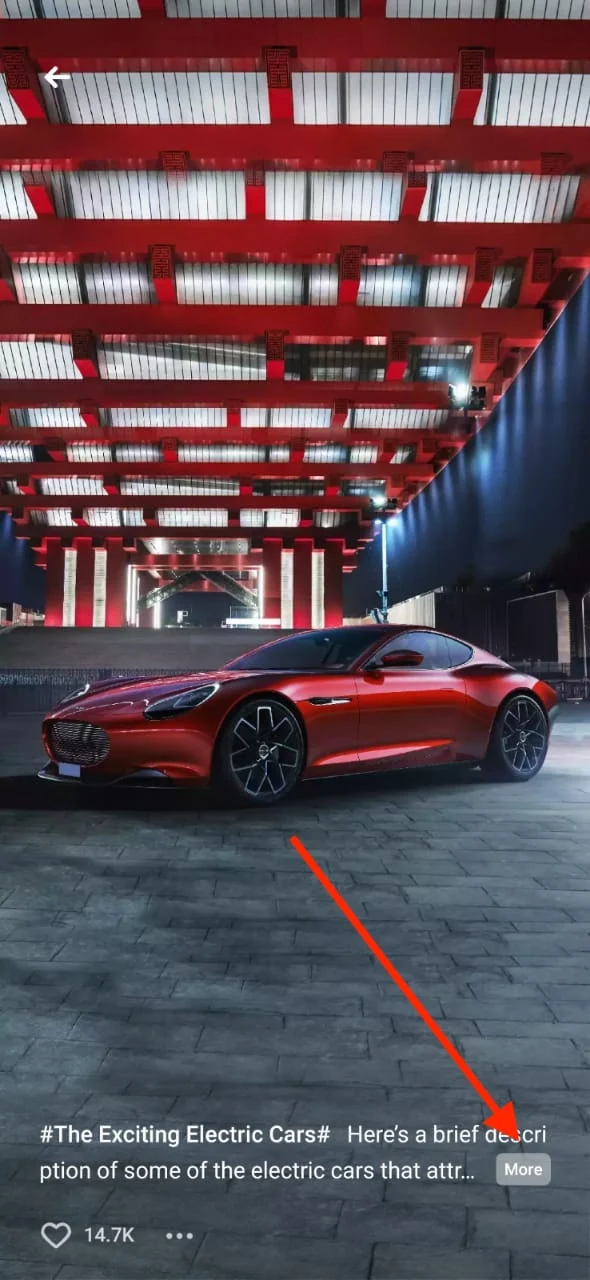
What made this worth pursuing is that the lockscreen was rendering content that contained interactive elements, and those elements were reachable without unlocking the device. The researcher's own conclusion afterwards was that the OS did not check for any authentication of the actions performed while in the lockscreen, and that it likely assumed the surface was safe because it is the lockscreen.
Exploitation
Step 1: open an article from the lockscreen
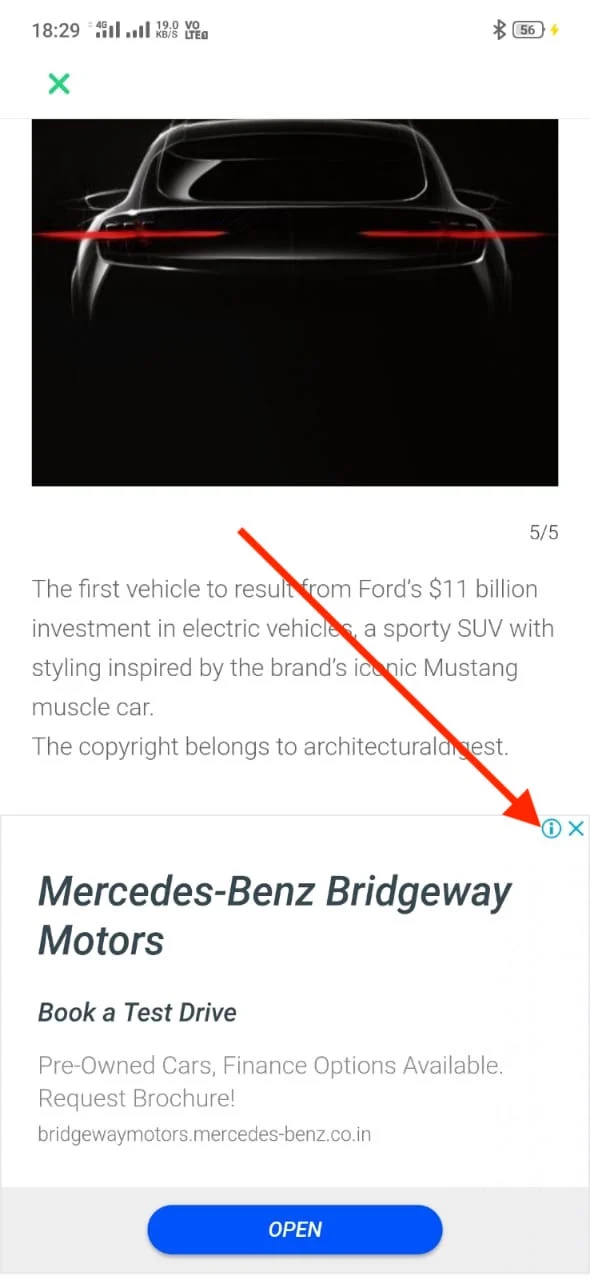
There was a "More" button which allowed him to read the article. Clicking it opened an article, and he scrolled down to see whether it showed an ad. It did, and the ad was a Google Ad.
Step 2: use the ad's info button
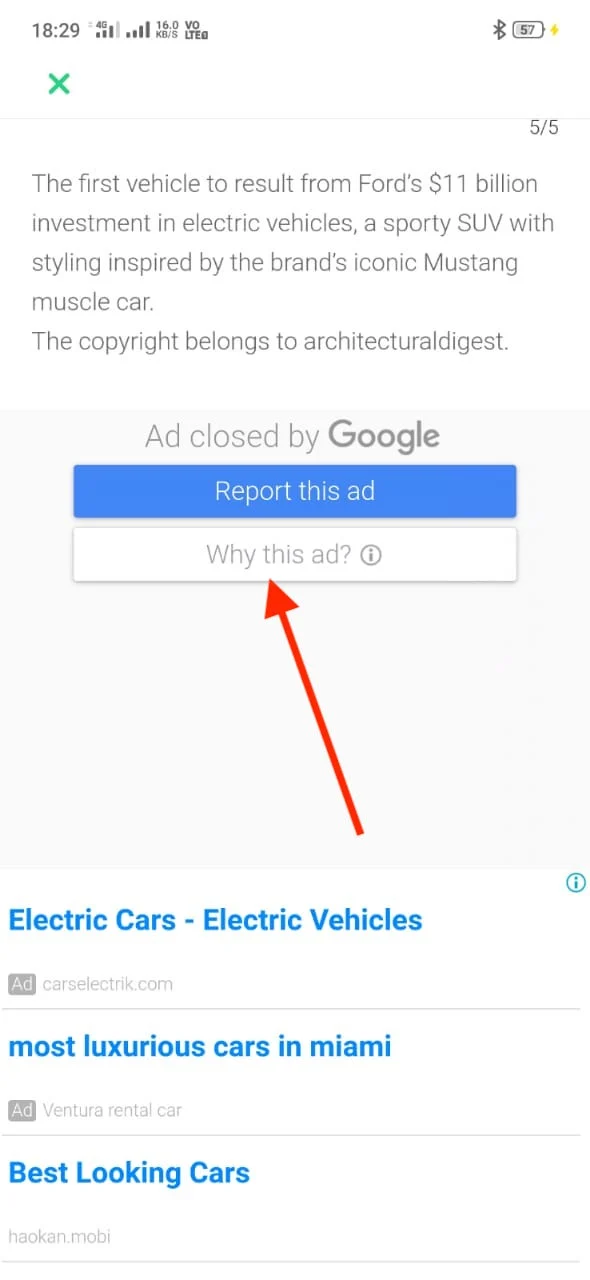
Google ads carry a tiny close button (x) at the top right along with an info button (i). He clicked the info button.

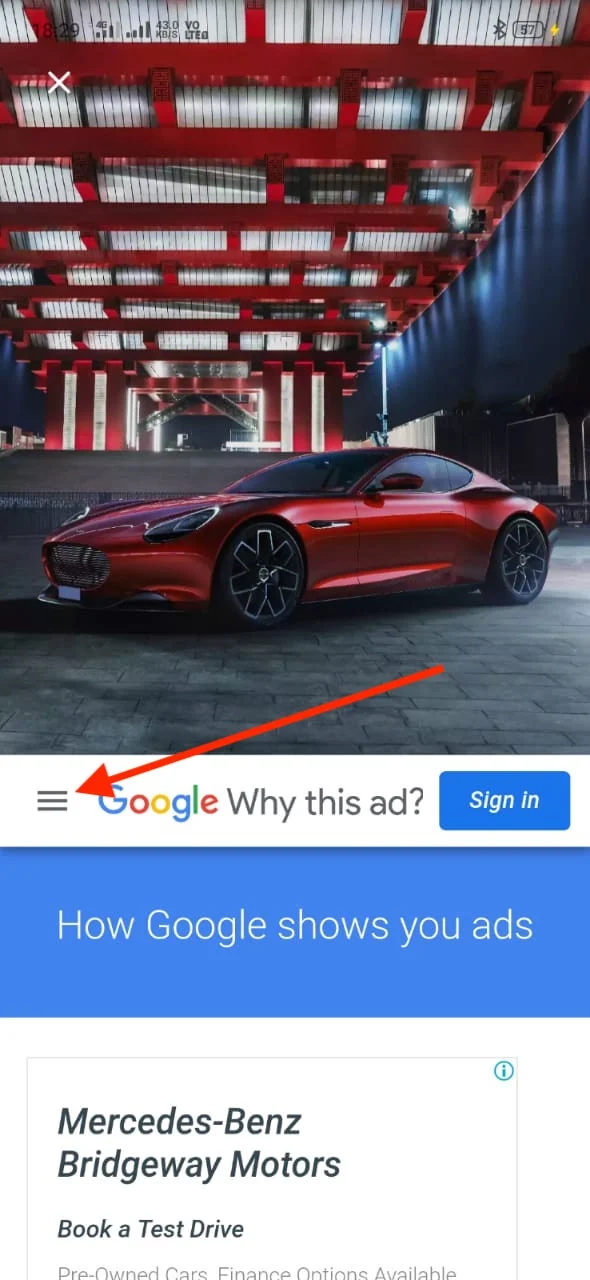
That click minimised the article and showed a menu.
Step 3: open the hamburger menu
He then clicked the hamburger menu icon at the top left, and another menu opened.
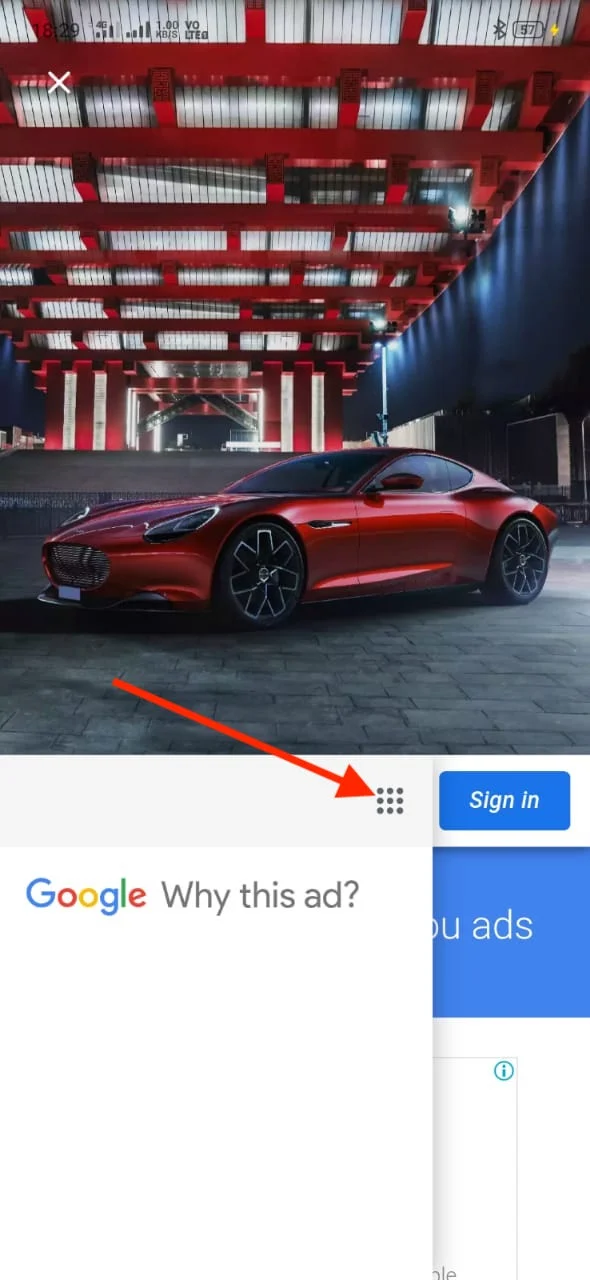
Step 4: open the grid menu and reach the Google apps
He clicked the grid menu icon, and the Google apps appeared.
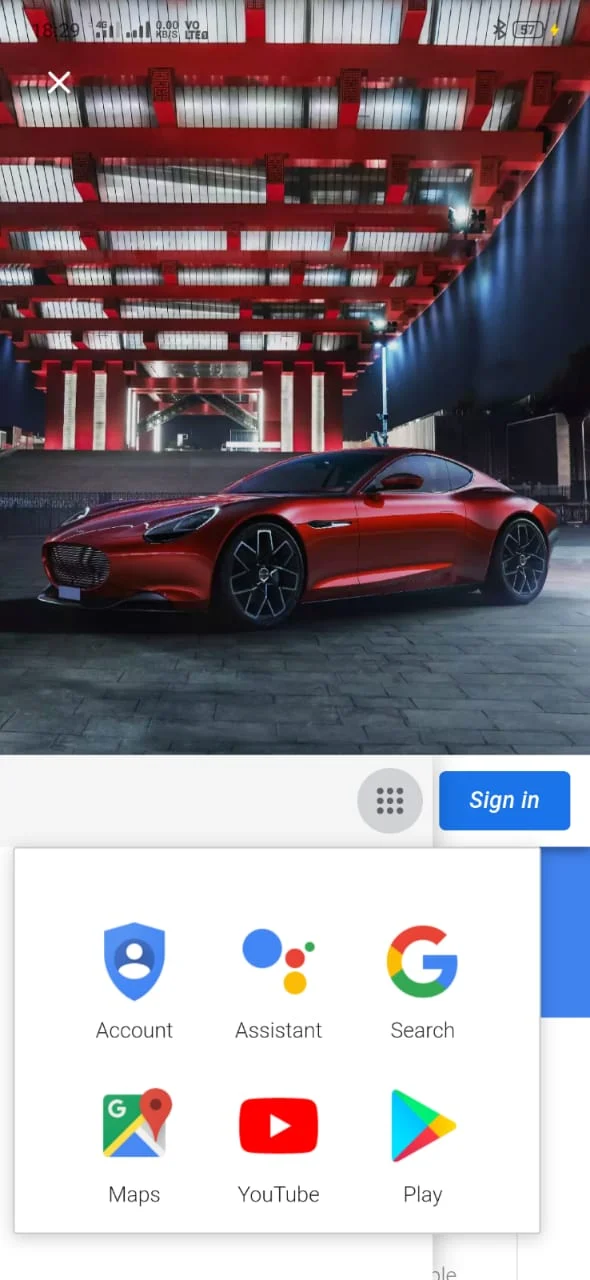
Step 5: browse from the lockscreen
From that list he could take any app. Choosing Google took him directly to Google Search, from which he could search anything and redirect to any website.
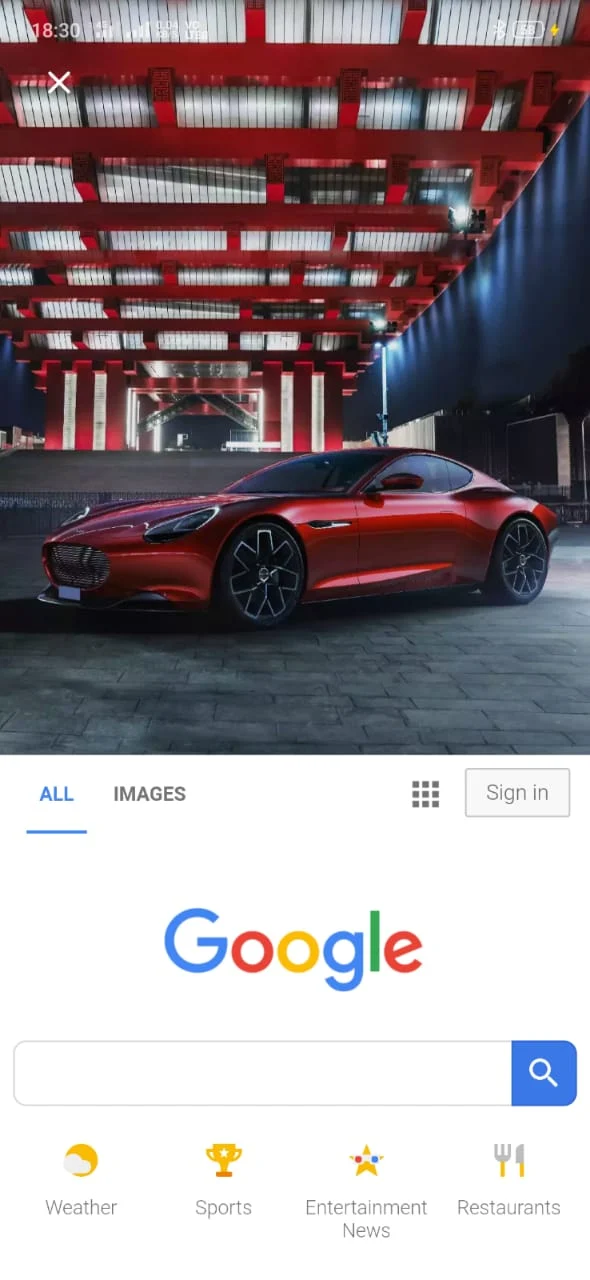
He could even play YouTube videos.
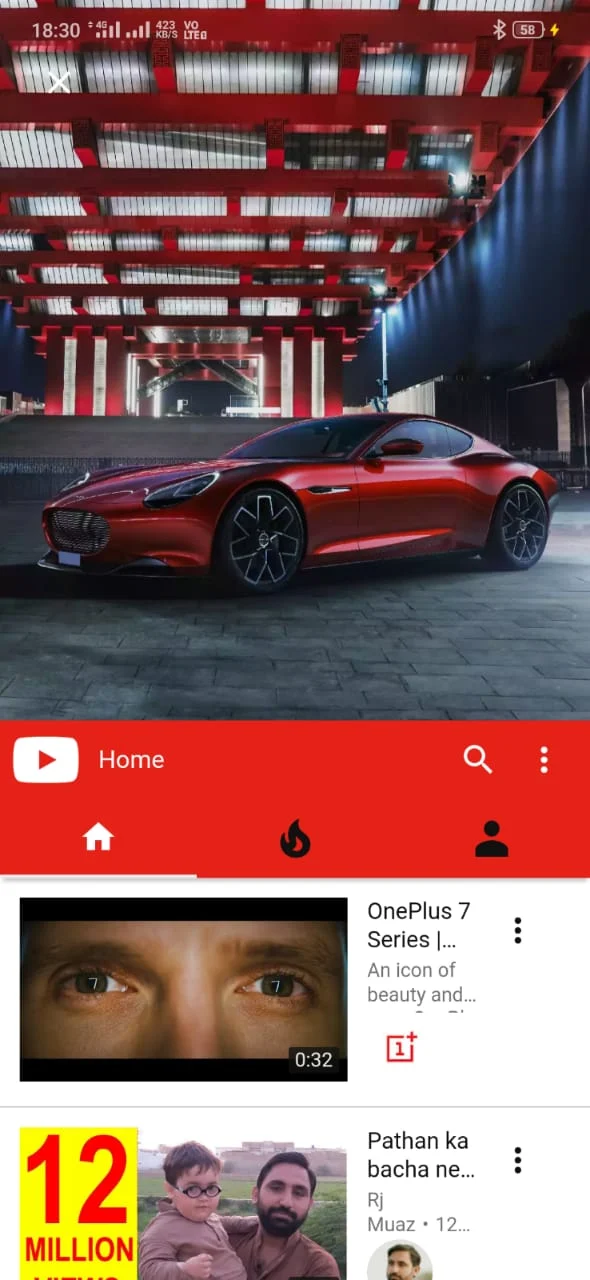
Step 6: reach the Gmail login page and trigger Autofill
The menu that showed the Google apps was scrollable, and scrolling down revealed Gmail. He clicked it and got the Google login page. That looked like a dead end, but when he clicked the 'Username' field, Google's Autofill appeared.
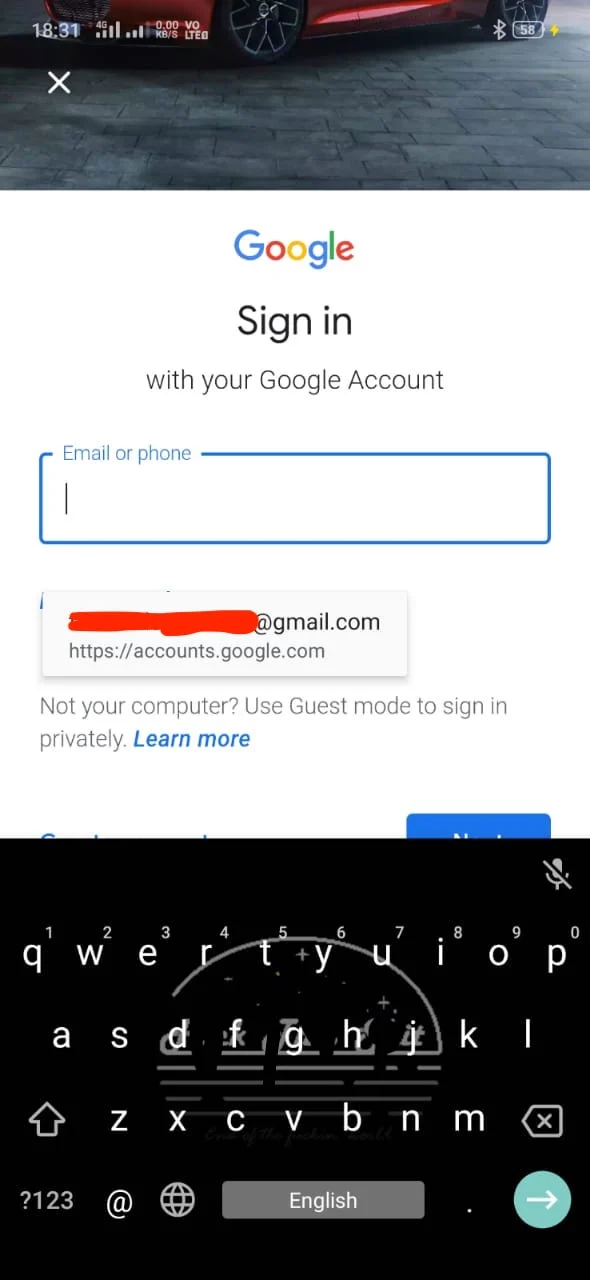
The Autofill data came from the device's built in browser: any passwords saved in that browser could Autofill into this login page. He could not take this further, because the post login page is only shown after the device is unlocked.
Root cause
The researcher's explanation is that the error was in the implementation of a rarely used feature, the lockscreen ads and articles. The OS did not check for any authentication of the actions performed while in the lockscreen. It likely assumed the surface was safe because it is the lockscreen. In other words, the OS did not check for any authentication of the actions performed while in the lockscreen.
Impact
With physical access to a locked Oppo device, a person could reach Google Search, browse to arbitrary websites, play YouTube videos, and open the Gmail login page. Because the login page was connected to the device's built in browser, credentials saved in that browser could Autofill into it. The researcher notes that he could not exploit this further, since the post login page is only shown after unlocking the device. The report does not describe any other data exposure.
Fix
The report does not say what the vendor changed.
Timeline
The researcher reported the bug in April 2019. In May 2019 the issue was confirmed and rewarded with 10,000 INR. The bounty took a long time to get credited.
Variants to test
- Other lockscreen content surfaces: ads, articles, news feeds and notification previews on other Android vendors. A positive result is any tap that lands you in a full browser or app launcher without an unlock prompt.
- Embedded ad SDK controls: the info (i), close (x), hamburger and grid icons inside ads rendered on a locked screen. A positive result is a menu that lists installed apps or opens a browser intent.
- Autofill on login pages reached from a lockscreen: focus a username or password field and see whether the built in browser offers saved credentials. A positive result is a credential suggestion while the device is still locked.
- Deep links and redirects from lockscreen widgets: try to reach arbitrary URLs from any interactive element on the lockscreen. A positive result is navigation to a site of your choosing without unlocking.
What happened, in plain words
This is a story about a phone, not a website. The phone is an Oppo, and the part of it involved is the lockscreen: the screen you see when the device is locked and waiting for a PIN, pattern or fingerprint. Many phones show extra content there, such as news articles or advertisements, so that you have something to look at without unlocking. That content is supposed to be harmless. You can read it, but you should not be able to use it to get anywhere else on the phone or onto the internet.
The researcher had seen this go wrong before. On a Redmi phone belonging to a friend, Muhammad T S, he tapped around a lockscreen ad and ended up on the main page of Google, from which he could browse the web freely, with no restrictions, on someone else's locked device. He did not report it at the time, and by the time he thought about it, someone else had reported it, so he lost the chance of a Hall of Fame entry with Xiaomi.
A couple of days later another friend, Govind P, got a new Oppo phone. The researcher locked it, turned the screen on, and found the same kind of lockscreen ads with the same interface. This time he decided to work out the steps again and report them quickly.
Setup
No tools were used. The researcher says plainly that no tool was employed to find the vulnerability. The only thing needed was physical access to a locked Oppo device belonging to a friend. All the testing was done by tapping through the lockscreen interface with a finger.
That is worth pausing on. Most of the security stories you read involve special software, crafted requests and command lines. This one involves a person holding a phone and tapping buttons that were already on the screen. The lesson is that a feature can be insecure simply because of how it was built, not because someone attacked it with a tool.
Finding it
He set out to repeat the steps he had used on the Redmi. Turning the screen on showed him a lockscreen like the one below.
What made this worth pursuing is that the lockscreen was drawing content that contained things you could tap, and those things could be reached without unlocking the device. The researcher's own conclusion afterwards was that the operating system did not check for any authentication of the actions performed while on the lockscreen, and that it probably assumed the surface was safe because it is the lockscreen.
Authentication here means proving who you are, for example by entering a PIN. The phone did not check for authentication of the actions performed while on the lockscreen.
Exploitation
Step 1: open an article from the lockscreen
There was a "More" button which allowed him to read the article. Clicking it opened an article, and he scrolled down to see whether it showed an ad. It did, and the ad was a Google Ad.
Why this step? Because the article was the doorway. The lockscreen was showing a summary, and the "More" button promised the full text. If the full text came with an advertisement, that advertisement would bring its own buttons, and those buttons are where the interesting behaviour usually hides.
Step 2: use the ad's info button
Google ads carry a tiny close button (x) at the top right along with an info button (i). He clicked the info button.
That click minimised the article and showed a menu.
Why this step? The info button is meant to tell you something about the ad, such as who paid for it. To do that, the ad has to open a small menu of its own. That menu is a piece of software running on top of the lockscreen, and every menu is a chance for the phone to hand control to something it should not.
Step 3: open the hamburger menu
He then clicked the hamburger menu icon at the top left, and another menu opened.
A hamburger menu is the icon made of three short horizontal lines, stacked like a burger in a bun. It is the standard symbol for "more options are in here". Clicking it opened a second menu, which means the first menu had its own navigation, and that navigation was still working while the phone was locked.
Step 4: open the grid menu and reach the Google apps
He clicked the grid menu icon, and the Google apps appeared.
A grid menu is the icon made of small squares, the same symbol phones use for "all your apps". This is the important moment. The lockscreen had handed him a list of applications, which is a part of the phone that should only be reachable after unlocking.
Step 5: browse from the lockscreen
From that list he could take any app. Choosing Google took him directly to Google Search, from which he could search anything and redirect to any website.
He could even play YouTube videos.
Why does this matter? Because a search box is a door to the whole internet. Once you can type a search and follow a result, you are no longer looking at a lockscreen; you are using a browser on a device that its owner believes is locked. The same applies to YouTube: playing a video means the phone has loaded a web page and is running a media player, all without anyone proving they own the device.
Step 6: reach the Gmail login page and trigger Autofill
The menu that showed the Google apps was scrollable, and scrolling down revealed Gmail. He clicked it and got the Google login page. That looked like a dead end, but when he clicked the 'Username' field, Google's Autofill appeared.
Autofill is the feature where a browser remembers a username or password you typed before and offers to fill it in for you. It is convenient, and it is also a small store of secrets sitting inside the browser. The Autofill data here came from the device's built in browser: any passwords saved in that browser could Autofill into this login page.
He could not take this further, because the post login page is only shown after the device is unlocked. In other words, the phone would let the browser suggest a saved password, but it would not let the person actually get past the login screen without unlocking the device first.
Root cause
The researcher's explanation is that the error was in the implementation of a rarely used feature, the lockscreen ads and articles. The operating system did not check for any authentication of the actions performed while on the lockscreen. It probably assumed the surface was safe because it is the lockscreen.
Put another way: the OS did not check for any authentication of the actions performed while on the lockscreen. A useful comparison is a receptionist who is told to hand out leaflets in the waiting room. If the leaflet contains a key to the back office, the receptionist has effectively handed out the key, because nobody checked what was inside the leaflet.
Impact
With physical access to a locked Oppo device, a person could reach Google Search, browse to arbitrary websites, play YouTube videos, and open the Gmail login page. Because the login page was connected to the device's built in browser, credentials saved in that browser could Autofill into it. The researcher notes that he could not exploit this further, since the post login page is only shown after unlocking the device. The report does not describe any other data exposure.
Physical access is the key phrase. This is not a bug that someone on the other side of the world can use against you. It is a bug that matters when a phone is out of its owner's hands: left on a table, lent to a friend, lost, or stolen. In those moments the lockscreen is the only protection, and here it was not doing its job.
Fix
The report does not say what the vendor changed. Gated means simply that the phone should stop and ask for the PIN or fingerprint before continuing.
Timeline
The researcher reported the bug in April 2019. In May 2019 the issue was confirmed and rewarded with 10,000 INR. The bounty took a long time to get credited.
Variants to test
These are the same ideas applied to other phones and other lockscreen features. A variant is a different place where the same mistake might appear.
- Other lockscreen content surfaces: ads, articles, news feeds and notification previews on other Android vendors. A positive result is any tap that lands you in a full browser or app launcher without an unlock prompt.
- Embedded ad SDK controls: the info (i), close (x), hamburger and grid icons inside ads rendered on a locked screen. A positive result is a menu that lists installed apps or opens a browser intent.
- Autofill on login pages reached from a lockscreen: focus a username or password field and see whether the built in browser offers saved credentials. A positive result is a credential suggestion while the device is still locked.
- Deep links and redirects from lockscreen widgets: try to reach arbitrary URLs from any interactive element on the lockscreen. A positive result is navigation to a site of your choosing without unlocking.
An SDK is a bundle of code that app developers reuse, in this case the code that draws and runs advertisements. A deep link is a link that is meant to open a specific app rather than a web page. A widget is a small live box on a screen, such as a weather panel or a news ticker.
Glossary
- Authentication: the process of proving who you are, such as entering a PIN, drawing a pattern or scanning a fingerprint.
- Autofill: a browser feature that remembers saved usernames and passwords and offers to type them into a form for you.
- Bounty: a reward, usually money, paid by a company to someone who reports a security problem to it.
- Browser intent: a request from one piece of software asking the phone to open a web page in a browser.
- Deep link: a link designed to open a particular app at a particular place inside it, rather than opening a web page.
- Grid menu: the icon made of small squares that opens the list of all apps installed on a phone.
- Hamburger menu: the icon made of three stacked horizontal lines that opens a list of options.
- Hall of Fame: a public page where a company lists the people who have reported security problems to it.
- Impact: what an attacker could actually do if the problem were used against someone.
- Lockscreen: the screen shown while a device is locked, which normally requires a PIN, pattern or fingerprint before anything else can be done.
- Operating system (OS): the main software that runs a phone and manages its apps, screen, storage and security.
- Physical access: being able to hold and touch the device, as opposed to reaching it over a network.
- Post login page: the page you see only after successfully signing in to an account.
- Root cause: the underlying reason a problem exists, as opposed to its visible symptoms.
- SDK: a bundle of ready made code that developers include in their apps to add a feature, such as showing advertisements.
- Variant: a different place where the same kind of mistake might also exist.
- Vulnerability: a weakness in software that allows someone to do something the maker did not intend.
- Widget: a small live box on a screen that shows information or controls, such as a news ticker or a weather panel.

