Airship: Persistent XSS via Comment
The comment author name field on a blog post is stored without encoding and later inserted into the page's HTML when a user clicks reply, so a malicious name runs script in the victim's browser. An attacker could then act as the victim, including creating a new administrator account.

- Fixed in 4 months
- Disclosed after 4 months
Affected: Airship 2.0.0 (commit 15bdc0d)
CVSS
Medium 6.1 https://www.first.org/cvss/calculator/3.0#CVSS:3.0/AV:N/AC:L/PR:N/UI:R/S:C/C:L/I:L/A:N
Description
The "name" field of a comment on a blog post is vulnerable to persistent XSS.
When replying to a comment, the comment name is inserted into the DOM without encoding, leading to persistent XSS.
By default, comments are open to anonymous users, although that can be disabled by an administrator.
Mitigating Factors
There are a couple of mitigating factors.
Airship uses a CSP per default, which makes exploitation more difficult. The CSP can be disabled by an administrator though, and there may be attack possibilities even with the default CSP.
The attacked user has to actively click on "reply" for the payload to execute, meaning an attacker has to entice the user to do so.
Finally, the payload is shown in plaintext in the username field, which might make the attacked user suspicious. An attacker can try to hide it by using an overly long or complicated name.
Details
The vulnerability exists in file /static/Hull/comments.js?, specifically these lines where the author name is read out of the DOM and inserted into it again without proper encoding:
window.replyTo = function(commentId, author) {
	$("#reply-to").html(
	    "<div class='blog-comment-label form-column'></div><div class='form-comment-field form-column'>" +
	    "<input type='hidden' name='reply_to' value='" + commentId + "' />" +
	        "Replying to " + author + " (Comment #" + commentId + ")" +
	    "</div>"
	);
};
POC
- Under bridge/admin/settings, check "allow unsafe inline" under javascript.
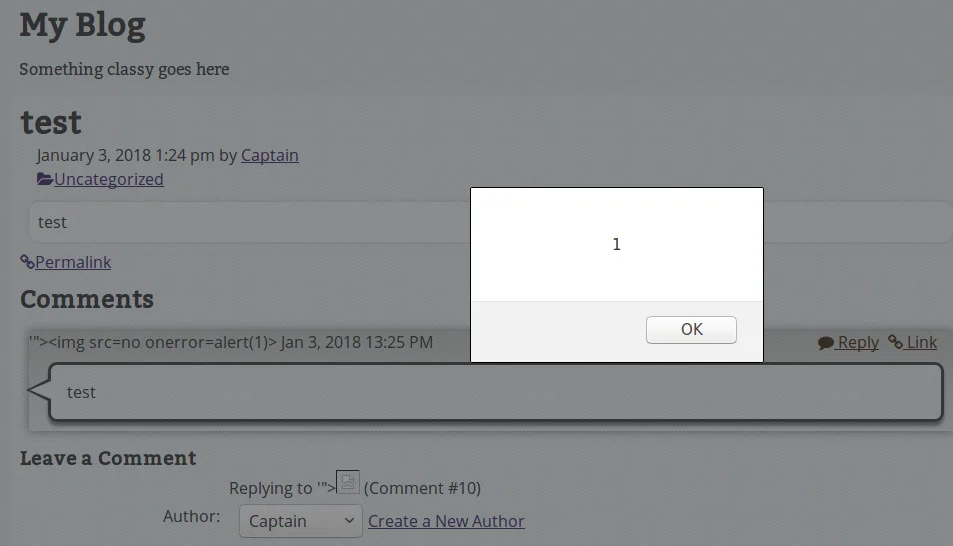
- Leave a comment on a blog post. As name, use: '"><img src=no onerror=alert(1)>
- Click on "Reply". The name will be read out via javascript and inserted into the DOM.
Impact
With a successful exploitation, an attacker can among other perform arbitrary actions in the name of the attacked user, such as adding a new administrator, and thus gain full access to the application.
Attachments
Not written yet. The AI write-up for this report has not been written yet. The Original tab links to the source.
How it worked
Root cause
The author name is read from the DOM and re-inserted into the page via an HTML-building function without encoding, so stored markup is treated as code.
Impact
If exploited, an attacker could perform arbitrary actions as the victim, such as adding a new administrator, though a default CSP makes exploitation harder and the victim must click reply.
What the attacker needed
Anonymous commenting enabled (default); victim clicks reply on the comment; CSP may need disabling or bypassing
How it was found
- An administrator enables unsafe inline JavaScript in the settings.
- Leave a comment on a blog post using a name containing an image tag with an error handler.
- Click reply on that comment so the name is read out and inserted into the page.
Explained by bugbounty.wiki with AI from the original and checked against quotes from it; it can still be wrong. Read the original before relying on a detail.
Not written yet. The AI write-up for this report has not been written yet. The Original tab links to the source.
A blog lets visitors leave comments with a name. The site saves that name and later puts it back into the page as if it were part of the page's code, without treating it as plain text. So a name crafted to look like code runs as code in the browser of anyone who clicks reply, letting the attacker do things as that person.
What is XSS?
Script an attacker supplies runs in another user's browser, on the target's origin, with that user's session.







