Content-type sniffing leads to stored XSS in CMS Airship on Internet Explorer
Internet Explorer's content-type sniffing allowed a file with a ZIP header containing HTML to be executed as HTML, leading to stored XSS. An attacker could upload such a file and trick another user using IE into opening its URL, executing arbitrary script in the victim's browser.
 Originally disclosed on HackerOne
- Fixed in 2 hours
- Disclosed after 2 hours
Description
Internet Explorer has the nasty habit to perform Content-Type sniffing on delivered resources if the content-type is not known to it. Since the software isn't instructing Internet Explorer to disable content-type sniffing this leads to a stored XSS.
In a nutshell, it is possible to trick Internet Explorer in executing arbitrary files. A more in-detail description about Internet Explorers' mimetype handling can be found at https://msdn.microsoft.com/en-us/library/ms775147(v=vs.85).aspx. Let's just phrase it as: The length to what Microsoft goes to guess the file content is insane.
Exploitation
To exploit this in this case we need to:
- Craft the file in a way that Internet Explorer sniffs it's content
- Control the file name delivered to Internet Explorer
This is actually a pretty easy thing to achieve, I've attached (Attachment on the original report: xss.html) which is a file with ZIP header that then contains a malicious HTML payload:
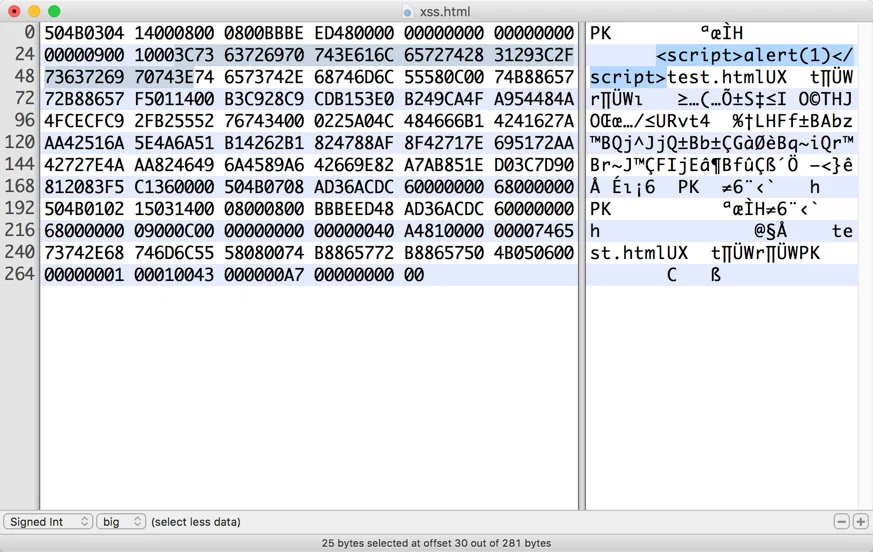
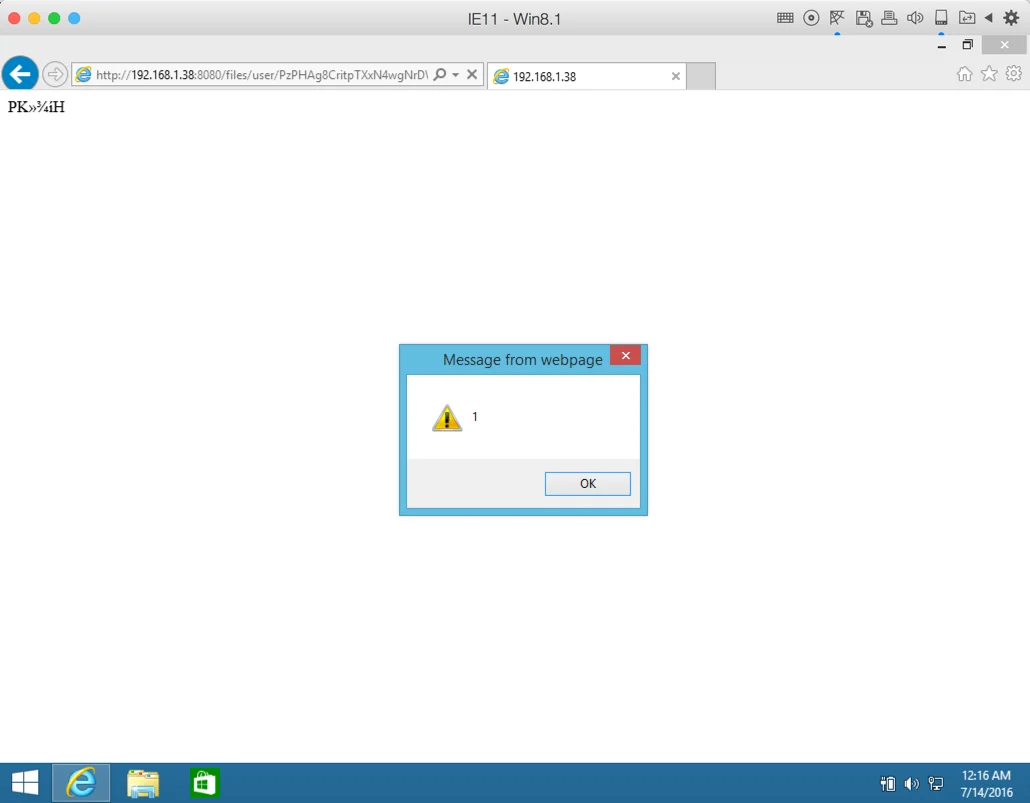
It is now sufficient to upload the file as authenticated user and make another person using Internet Explorer make open the URL to said file. This will even work in IE 11 on Windows 8.1:
Mitigation
The most reliable mitigation would be to use a sandboxed domain for user-uploaded content. So files would only be served from that origin and the Same-Origin-Policy would prevent this problem.
Since this may not be possible in every case to enforce to users, setting the following headers in combination will mitigate content-type sniffing related problems:
X-Content-Type-Options: nosniffX-Download-Options: noopenContent-Disposition: attachment; filename="filename.ext"'
One patch for /src/Cabin/Hull/Landing/PublicFiles.php could look like the following:
From 42bc1760453fbfed004072929d99d9c397ab3f77 Mon Sep 17 00:00:00 2001
From: Lukas Reschke <[email protected]>
Date: Thu, 14 Jul 2016 00:57:26 +0200
Subject: [PATCH] Prevent Mime Sniffing in Internet Explorer

---
 src/Cabin/Hull/Landing/PublicFiles.php | 3 +++
 1 file changed, 3 insertions(+)

diff --git a/src/Cabin/Hull/Landing/PublicFiles.php b/src/Cabin/Hull/Landing/PublicFiles.php
index 9fc9b1b..80ba6fa 100755
--- a/src/Cabin/Hull/Landing/PublicFiles.php
+++ b/src/Cabin/Hull/Landing/PublicFiles.php
@@ -92,6 +92,9 @@ class PublicFiles extends LandingGear
             }

             // Serve the file
+            \header('Content-Disposition: attachment; filename="'.urlencode($fileData['filename']).'"');
+            \header('X-Content-Type-Options: nosniff');
+            \header('X-Download-Options: noopen');
             \header('Content-Type: ' . $fileData['type']);
             $this->airship_lens_object->sendStandardHeaders($fileData['type']);
             \readfile($realPath);
--
2.7.4 (Apple Git-66)
There may be other occurrences in the code that have the same issue. Generally speaking. There is no harm in adding the X-Content-Type-Options: nosniff header globally over the whole web application.
In case you need testing VMs from Microsoft, you can get them from free at http://modern.ie
Not written yet. The AI write-up for this report has not been written yet. The Original tab links to the source.
How it worked
Impact
An attacker could execute arbitrary script in the victim's browser session, but only when the victim uses Internet Explorer.
What the attacker needed
Authenticated user to upload file; victim uses Internet Explorer; victim opens the file URL
How it was found
- Craft a file that Internet Explorer will sniff as HTML.
- Control the file name delivered to Internet Explorer.
- Upload the file as an authenticated user.
- Make another person using Internet Explorer open the URL to the file.
Explained by bugbounty.wiki with AI from the original and checked against quotes from it; it can still be wrong. Read the original before relying on a detail.
Not written yet. The AI write-up for this report has not been written yet. The Original tab links to the source.
Internet Explorer tries to guess what kind of file it is given, even if the server says it is something else. If a file starts with a ZIP header but contains HTML, IE may treat it as a web page and run any scripts inside it. This lets an attacker upload a malicious file and get someone else to open it, running code in that person's browser.
What is XSS?
Script an attacker supplies runs in another user's browser, on the target's origin, with that user's session.





