Possible to enumerate valid files in password protected shares/files drop shares as well as spam folder with files
The document creation endpoint in the richdocuments app did not check whether a share was writable, upload-only or password protected before creating a file. An attacker could therefore probe a protected or file-drop share to learn which file names already exist, and could also create empty files with chosen names to clutter the folder.
 Originally disclosed on HackerOne
- Triaged in 10 hours
- Fixed in 11 months
- Paid in 12 months
- Disclosed after 12 months
Summary:
It is possible possible to enumerate valid files in password protected shares/files drop shares as well as spam the folder with empty files with an attacker controlled file name.
Steps To Reproduce:
- Create a folder and create the file
foo.txtin it - Share the file publicly and mark it as Files Drops and Password Protected (the combination is not necessary, but simplifies the testing)
- As attacker send a request to
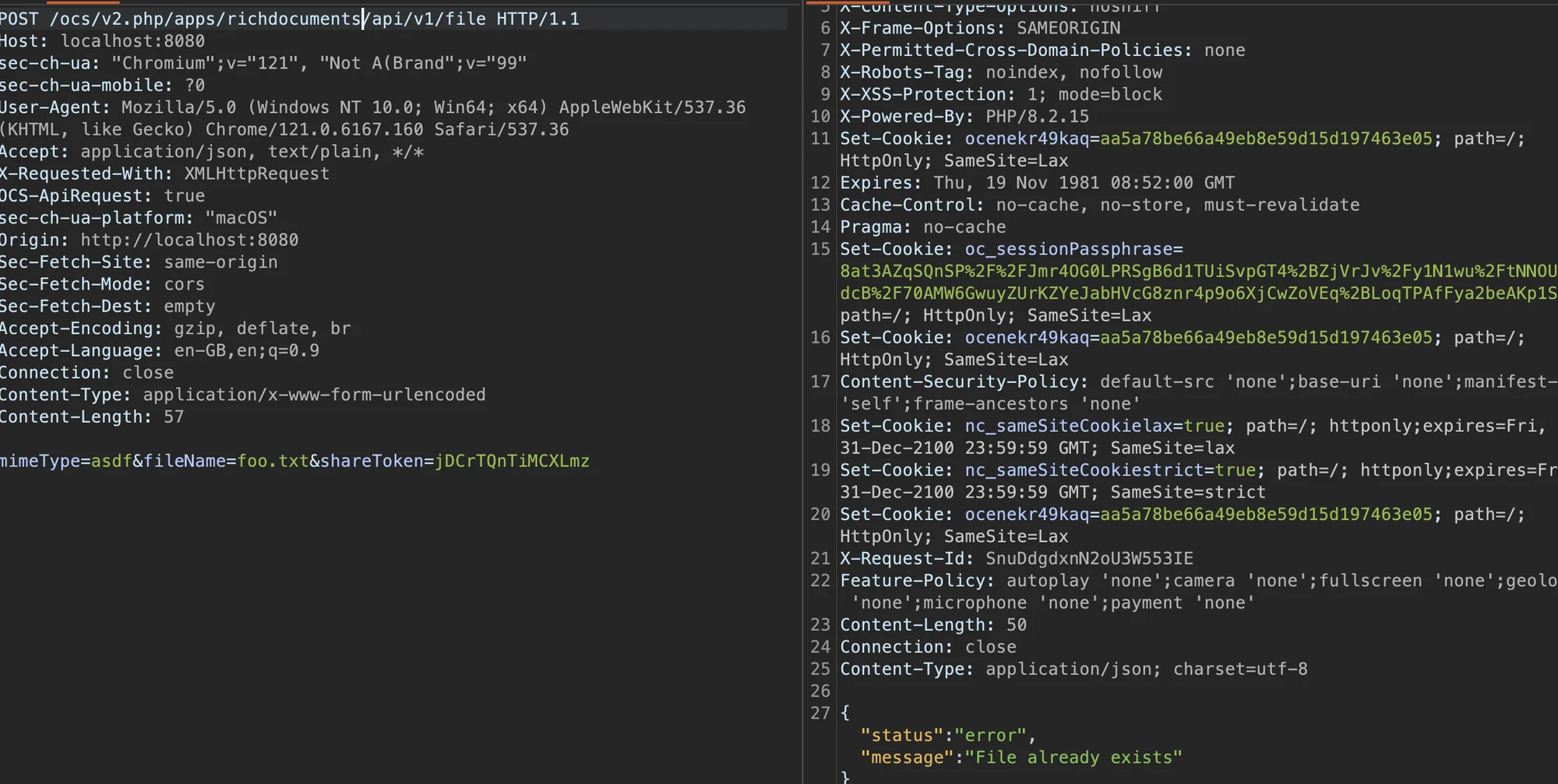
DocumentAPIController#createto enumerate the valid files - As attacker send a request to
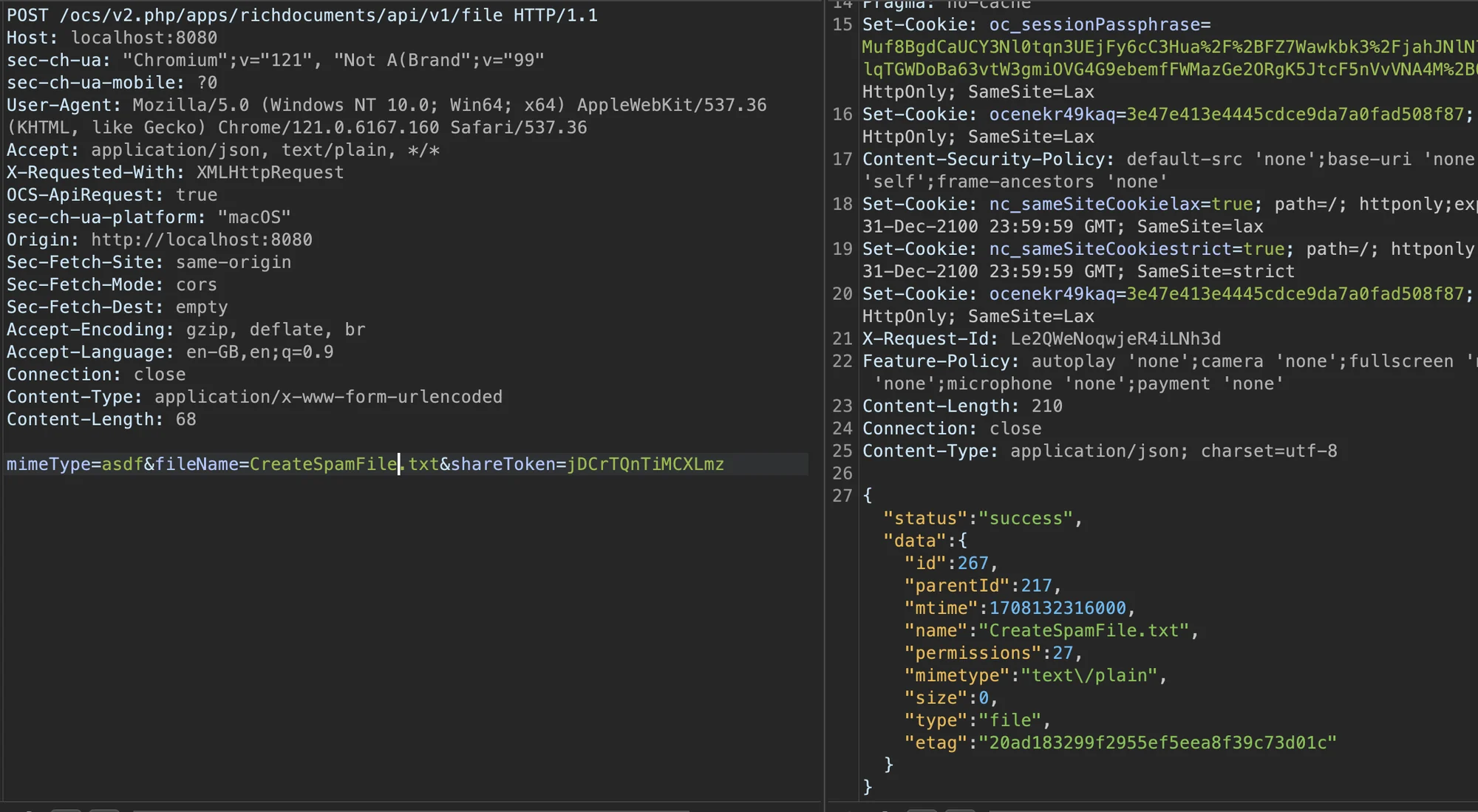
DocumentAPIController#createto spam files
I've attached screenshots of these two behaviours here:
Supporting Material/References:
DocumentAPIController#create is not validating whether the share is writable, upload only or password protected:
	public function create(string $mimeType, string $fileName, string $directoryPath = '/', ?string $shareToken = null, ?int $templateId = null): JSONResponse {
		try {
			if ($shareToken !== null) {
				$share = $this->shareManager->getShareByToken($shareToken);
			}

			$rootFolder = $shareToken !== null ? $share->getNode() : $this->rootFolder->getUserFolder($this->userId);
			$folder = $rootFolder->get($directoryPath);

			if (!($folder instanceof Folder)) {
				throw new Exception('Node is not a folder');
			}
		} catch (Throwable $e) {
			$this->logger->error('Failed to create document', ['exception' => $e]);
			return new JSONResponse([
				'status' => 'error',
				'message' => $this->l10n->t('Cannot create document')
			], Http::STATUS_BAD_REQUEST);
		}

		$basename = $this->l10n->t('New Document.odt');
		switch ($mimeType) {
			case 'application/vnd.oasis.opendocument.spreadsheet':
				$basename = $this->l10n->t('New Spreadsheet.ods');
				break;
			case 'application/vnd.oasis.opendocument.presentation':
				$basename = $this->l10n->t('New Presentation.odp');
				break;
			case 'application/vnd.openxmlformats-officedocument.wordprocessingml.document':
				$basename = $this->l10n->t('New Document.docx');
				break;
			case 'application/vnd.openxmlformats-officedocument.spreadsheetml.sheet':
				$basename = $this->l10n->t('New Spreadsheet.xlsx');
				break;
			case 'application/vnd.openxmlformats-officedocument.presentationml.presentation':
				$basename = $this->l10n->t('New Presentation.pptx');
				break;
			default:
				break;
		}

		if (!$fileName) {
			$fileName = Helper::getNewFileName($folder, $basename);
		}

		if ($folder->nodeExists($fileName)) {
			return new JSONResponse([
				'status' => 'error',
				'message' => $this->l10n->t('File already exists')
			], Http::STATUS_BAD_REQUEST);
		}

		try {
			$file = $folder->newFile($fileName);
			$templateType = $this->templateManager->getTemplateTypeForExtension(pathinfo($fileName, PATHINFO_EXTENSION));

			$empty = $this->templateManager->getEmpty($templateType);
			$templateFile = array_shift($empty);

			if ($templateId) {
				$templateFile = $this->templateManager->get($templateId);
			}

			$file->putContent($this->templateManager->getEmptyFileContent($file->getExtension()));
			if ($this->templateManager->isSupportedTemplateSource($templateFile->getExtension())) {
				// Only use TemplateSource if supported filetype
				$this->templateManager->setTemplateSource($file->getId(), $templateFile->getId());
			}
		} catch (Exception $e) {
			$this->logger->error('Failed to create file from template', ['exception' => $e]);
			return new JSONResponse([
				'status' => 'error',
				'message' => $this->l10n->t('Not allowed to create document')
			], Http::STATUS_BAD_REQUEST);
		}
		return new JSONResponse([
			'status' => 'success',
			'data' => \OCA\Files\Helper::formatFileInfo($file->getFileInfo())
		]);
}
Impact
It is possible possible to enumerate valid files in password protected shares/files drop shares as well as spam the folder with empty files with an attacker controlled file name.
Context
Nextcloud is a self-hosted file sync and share platform. The richdocuments app integrates Collabora Online so that users can create and edit office documents from the web interface. Part of that app is DocumentAPIController, whose create action is what the web UI calls when a user clicks to create a new document, spreadsheet or presentation. The action takes a MIME type, a file name, a directory path, an optional share token and an optional template ID, and it creates an empty file from a template inside the target folder.
The report is about that creation endpoint being reachable through a public share link, including a password protected share and a file drop share, without the endpoint checking whether the caller is allowed to write there.
Setup
The reproduction uses a folder containing a file foo.txt, shared publicly as a file drop and protected with a password. The report notes that the combination of file drop and password protection is not necessary to trigger the behaviour, but it simplifies testing. No specific version, account roles or tooling are given.
Finding it
DocumentAPIController#create resolves the share and uses the shared node as the root folder, but does not validate whether the share is writable, upload only or password protected. There is no check that the share is writable, no check that it is upload only, and no check that it is password protected. The code checks that the resolved path is a folder, and later whether a file with that name already exists.
	public function create(string $mimeType, string $fileName, string $directoryPath = '/', ?string $shareToken = null, ?int $templateId = null): JSONResponse {
		try {
			if ($shareToken !== null) {
				$share = $this->shareManager->getShareByToken($shareToken);
			}

			$rootFolder = $shareToken !== null ? $share->getNode() : $this->rootFolder->getUserFolder($this->userId);
			$folder = $rootFolder->get($directoryPath);

			if (!($folder instanceof Folder)) {
				throw new Exception('Node is not a folder');
			}
		} catch (Throwable $e) {
			$this->logger->error('Failed to create document', ['exception' => $e]);
			return new JSONResponse([
				'status' => 'error',
				'message' => $this->l10n->t('Cannot create document')
			], Http::STATUS_BAD_REQUEST);
		}
Because the share token alone is enough to reach the folder, the endpoint can be used as an oracle: it tells the caller whether a given file name already exists in the shared folder, and it lets the caller create new files there.
Exploitation
Step 1: prepare a share
Create a folder and put the file foo.txt in it. Share the file publicly, mark it as a file drop and protect it with a password. The report states that this combination is not required, but it makes the test easier.
Step 2: enumerate valid files
As an attacker, send a request to DocumentAPIController#create with a candidate file name. The endpoint checks $folder->nodeExists($fileName) and answers differently depending on the result. The screenshot below shows the enumeration behaviour:
When the name already exists, the response is the error branch:
		if ($folder->nodeExists($fileName)) {
			return new JSONResponse([
				'status' => 'error',
				'message' => $this->l10n->t('File already exists')
			], Http::STATUS_BAD_REQUEST);
		}
A name that does not exist takes the creation path instead, so the difference between the two answers reveals whether a file is present in the share. The report does not include the raw HTTP request or the exact response bodies, only the code paths and the screenshots.
Step 3: spam the folder
As an attacker, send further requests to the same action with attacker controlled file names. Each one creates an empty file in the shared folder. The screenshot below shows the resulting spam:
The creation path builds the file from a template:
		try {
			$file = $folder->newFile($fileName);
			$templateType = $this->templateManager->getTemplateTypeForExtension(pathinfo($fileName, PATHINFO_EXTENSION));

			$empty = $this->templateManager->getEmpty($templateType);
			$templateFile = array_shift($empty);

			if ($templateId) {
				$templateFile = $this->templateManager->get($templateId);
			}

			$file->putContent($this->templateManager->getEmptyFileContent($file->getExtension()));
			if ($this->templateManager->isSupportedTemplateSource($templateFile->getExtension())) {
				// Only use TemplateSource if supported filetype
				$this->templateManager->setTemplateSource($file->getId(), $templateFile->getId());
			}
		} catch (Exception $e) {
			$this->logger->error('Failed to create file from template', ['exception' => $e]);
			return new JSONResponse([
				'status' => 'error',
				'message' => $this->l10n->t('Not allowed to create document')
			], Http::STATUS_BAD_REQUEST);
		}
		return new JSONResponse([
			'status' => 'success',
			'data' => \OCA\Files\Helper::formatFileInfo($file->getFileInfo())
		]);
When no file name is supplied, the endpoint picks one itself with Helper::getNewFileName($folder, $basename), where the basename depends on the MIME type, for example New Document.odt, New Spreadsheet.ods, New Presentation.odp, New Document.docx, New Spreadsheet.xlsx or New Presentation.pptx. A successful creation returns status: success together with the formatted file info.
Root cause
The create action resolves the share from the token and uses its node as the root folder, but it never asks the share manager whether the share permits the requested operation. A writable check, an upload-only check and a password check are all missing. The endpoint therefore treats any valid share token as authorisation to create files, and the existence check inside the same action doubles as a file enumeration oracle. The report does not describe any other defence that would have stopped this.
Impact
An attacker who knows a share token can enumerate which files exist in a password protected share or a file drop share, and can fill the folder with empty files whose names the attacker controls. The report describes the impact in exactly these terms and does not claim access to file contents or anything beyond enumeration and spam.
Fix
The report does not describe a fix or a patch.
Variants to test
- Other endpoints in the same controller or app that accept a
shareTokenand resolve the share node. A positive result is any action that returns data or performs a write without checking the share's permissions or password state. - File drop shares on other file sharing products, where an upload-only link is expected to accept content but not reveal what is already there. A positive result is a response that differs between an existing and a non-existing name.
- Password protected shares where the token is known but the password has not been supplied. A positive result is any response that depends on the folder contents rather than on an authentication failure.
- Name collision behaviour on creation endpoints. A positive result is a distinct error message such as
File already existsthat confirms the presence of a file.
Hunting notes
This kind of bug tends to hide in endpoints that take a share token as a parameter and then operate on the share's node directly, especially in integrations and apps that were written for the logged-in user flow and later extended to public shares. During recon, look for API routes in sharing related apps that accept a token, and compare how they behave with a writable share, an upload-only share and a password protected share. The signal is a response that changes with the state of the folder rather than with the state of the caller's authorisation. The report includes two screenshots, one of the enumeration behaviour and one of the spam behaviour.
What happened, in plain words
Nextcloud is a piece of software you install on your own server to store and share files, a bit like running your own private version of Google Drive or Dropbox. It has an add-on app called richdocuments that connects Nextcloud to Collabora Online, an online office suite, so that people can create and edit documents, spreadsheets and presentations straight from the web page.
When you click "new document" in that web interface, your browser does not create the file itself. It sends a message to the server asking it to do the job. That message goes to a specific piece of server code, an endpoint, called DocumentAPIController#create. An endpoint is simply a named address on a server that accepts a request and does something in response, like a service counter in a shop: you hand over a form, the clerk behind the counter reads it and acts on it.
The problem in this report is that this particular counter will happily create files for anyone who presents a valid share token, even when the share is supposed to be password protected, or is a file drop (a link where visitors are meant to be able to upload things but not see what is already there). The counter never checks whether the person asking is actually allowed to write. Worse, the same counter answers differently depending on whether a file with a given name already exists, so an attacker can use it as a yes/no question machine to discover which files are in the folder. And because it creates files on request, an attacker can also fill the folder with junk files whose names they choose.
That is two problems in one: information disclosure (learning which files exist) and spam (filling the folder with empty files whose names the attacker chooses).
The pieces involved
Before the steps make sense, here are the moving parts, explained from scratch.
- Nextcloud: the file storage and sharing product. You run it yourself, and people log in through a browser.
richdocuments: an app (a plugin) for Nextcloud. It is the bridge to Collabora Online, the online editor.DocumentAPIController: a class, meaning a bundle of related server code. In web frameworks, a controller is the part that receives an incoming request and decides what to do with it. Think of it as the clerk at the counter.createaction: one specific job that the controller can do, namely create a new empty document from a template inside a folder.- MIME type: a label that says what kind of file something is, for example a word processing document versus a spreadsheet. Browsers and servers use these labels to know how to handle a file.
- Share token: a long random-looking string that acts as the key to a public share link. Anyone who has the link has the token. It is like the code on a self-storage locker: possession of the code is treated as permission to open the locker. It is not the same as a password, although a share can additionally be password protected.
- File drop share: a public link where visitors can put files into a folder but are not supposed to see what is already inside. Think of a suggestion box: you can drop a note in, but you cannot read the other notes.
- Password protected share: a public link that asks for a password before it shows anything.
- Oracle: in security, any feature that answers a question for you. If a server replies "file already exists" versus "created successfully", it is telling you whether a file is there, even if it never meant to.
- Endpoint: a specific address on the server that accepts requests, as described above.
The setup
The test folder contained a file called foo.txt, and that folder was shared publicly, marked as a file drop, and protected with a password.
The report is explicit that you do not need the file drop plus password combination to trigger the behaviour. It is used because it makes the test easier to set up and to see. No particular version number, user role or tooling is mentioned.
Finding it
DocumentAPIController#create does not validate whether the share is writable, upload only or password protected. When the request includes a shareToken, the code looks up the share and uses the shared folder as the place to work in. But it never asks whether that share is writable, whether it is upload only, or whether it is password protected. It checks that the path it resolved really is a folder, and later whether a file with that name already exists.
Here is the relevant part of the code, exactly as it appears in the report:
	public function create(string $mimeType, string $fileName, string $directoryPath = '/', ?string $shareToken = null, ?int $templateId = null): JSONResponse {
		try {
			if ($shareToken !== null) {
				$share = $this->shareManager->getShareByToken($shareToken);
			}

			$rootFolder = $shareToken !== null ? $share->getNode() : $this->rootFolder->getUserFolder($this->userId);
			$folder = $rootFolder->get($directoryPath);

			if (!($folder instanceof Folder)) {
				throw new Exception('Node is not a folder');
			}
		} catch (Throwable $e) {
			$this->logger->error('Failed to create document', ['exception' => $e]);
			return new JSONResponse([
				'status' => 'error',
				'message' => $this->l10n->t('Cannot create document')
			], Http::STATUS_BAD_REQUEST);
		}
Line by line, in plain words:
public function create(...)declares the action and lists what it accepts: a MIME type, a file name, a directory path (defaulting to the top level/), an optional share token, and an optional template ID. The?before a type means the value may be absent.try {starts a block where errors are caught rather than crashing the server.if ($shareToken !== null) {asks: did the caller supply a share token?$share = $this->shareManager->getShareByToken($shareToken);if so, look up the share that belongs to that token. This is the moment the token is turned into a real share object.$rootFolder = $shareToken !== null ? $share->getNode() : $this->rootFolder->getUserFolder($this->userId);chooses the starting folder. If a token was given, use the folder behind the share. If not, use the logged-in user's own folder. Notice that nothing here checks the share's permissions or password state.$folder = $rootFolder->get($directoryPath);walks down to the requested subfolder.if (!($folder instanceof Folder)) {checks that what we ended up with is actually a folder and not, say, a single file.throw new Exception('Node is not a folder');if it is not a folder, raise an error.- The
catchblock logs the problem and returns a JSON response withstatus: errorand the messageCannot create document, with HTTP status 400 (a general "bad request" code).
Because the token alone is enough to reach the folder, the endpoint works as an oracle. It tells the caller whether a given file name already exists, and it lets the caller create new files there.
Exploitation
Step 1: prepare a share
Create a folder, put the file foo.txt inside it, share the folder publicly, mark it as a file drop, and set a password. The report repeats that this combination is not required, but it makes the test easier.
Step 2: enumerate valid files
Now act as the attacker. Send a request to DocumentAPIController#create with a candidate file name. The endpoint runs a check, $folder->nodeExists($fileName), and answers differently depending on whether that name is already taken. The screenshot below shows the enumeration behaviour:
When the name already exists, the code takes the error branch:
		if ($folder->nodeExists($fileName)) {
			return new JSONResponse([
				'status' => 'error',
				'message' => $this->l10n->t('File already exists')
			], Http::STATUS_BAD_REQUEST);
		}
What this does:
if ($folder->nodeExists($fileName)) {asks the folder whether a file with that name is already there.- If yes, it returns a JSON response (JSON is a simple text format for structured data, the kind of thing a browser can read and display).
'status' => 'error'marks the answer as a failure.'message' => $this->l10n->t('File already exists')supplies the human readable text, translated into the user's language by thel10nhelper.Http::STATUS_BAD_REQUESTsends HTTP status 400, the standard "bad request" code.
A name that does not exist skips this branch and goes down the creation path instead. So the difference between the two answers reveals whether a file is present in the share. The report does not include the raw HTTP request or the exact response bodies, only the code paths and the screenshots.
Step 3: spam the folder
Next, send further requests to the same action with file names of your choosing. Each one creates an empty file in the shared folder. The screenshot below shows the resulting spam:
The creation path builds the file from a template:
		try {
			$file = $folder->newFile($fileName);
			$templateType = $this->templateManager->getTemplateTypeForExtension(pathinfo($fileName, PATHINFO_EXTENSION));

			$empty = $this->templateManager->getEmpty($templateType);
			$templateFile = array_shift($empty);

			if ($templateId) {
				$templateFile = $this->templateManager->get($templateId);
			}

			$file->putContent($this->templateManager->getEmptyFileContent($file->getExtension()));
			if ($this->templateManager->isSupportedTemplateSource($templateFile->getExtension())) {
				// Only use TemplateSource if supported filetype
				$this->templateManager->setTemplateSource($file->getId(), $templateFile->getId());
			}
		} catch (Exception $e) {
			$this->logger->error('Failed to create file from template', ['exception' => $e]);
			return new JSONResponse([
				'status' => 'error',
				'message' => $this->l10n->t('Not allowed to create document')
			], Http::STATUS_BAD_REQUEST);
		}
		return new JSONResponse([
			'status' => 'success',
			'data' => \OCA\Files\Helper::formatFileInfo($file->getFileInfo())
		]);
Line by line:
try {starts another error-catching block, this time around the actual file creation.$file = $folder->newFile($fileName);creates a new file with the requested name inside the folder.$templateType = ...works out which kind of template fits, based on the file extension (the part after the dot, such as.odt).$empty = $this->templateManager->getEmpty($templateType);fetches the list of empty templates for that type.$templateFile = array_shift($empty);takes the first one from the list.if ($templateId) {checks whether the caller asked for a specific template.$templateFile = $this->templateManager->get($templateId);if so, use that one instead.$file->putContent(...)writes the empty template content into the new file.if ($this->templateManager->isSupportedTemplateSource(...))checks whether this file type can be linked to a template source.$this->templateManager->setTemplateSource(...)records that link, so the editor knows which template the file came from.- The
catchblock logs the failure and returnsstatus: errorwith the messageNot allowed to create documentand HTTP 400. - The final
returnsendsstatus: successtogether with formatted information about the new file, so the browser can display it.
When no file name is supplied, the endpoint picks one itself with Helper::getNewFileName($folder, $basename), where the basename depends on the MIME type. The report lists these examples: New Document.odt, New Spreadsheet.ods, New Presentation.odp, New Document.docx, New Spreadsheet.xlsx and New Presentation.pptx. A successful creation returns status: success together with the formatted file info.
Root cause
The create action looks up the share from the token and uses its folder as the working root, but it never asks the share manager whether the share permits the requested operation. A writable check, an upload-only check and a password check are all missing. The endpoint therefore treats any valid share token as permission to create files, and the existence check inside the same action doubles as a file enumeration oracle. The report does not describe any other defence that would have stopped this.
Impact
An attacker who knows a share token can find out which files exist in a password protected share or a file drop share, and can fill the folder with empty files whose names the attacker controls. The report describes the impact in exactly these terms and does not claim access to file contents or anything beyond enumeration and spam.
Fix
The report does not describe a fix or a patch.
Variants to test
- Other endpoints in the same controller or app that accept a
shareTokenand resolve the share folder. A positive result is any action that returns data or performs a write without checking the share's permissions or password state. - File drop shares on other file sharing products, where an upload-only link is expected to accept content but not reveal what is already there. A positive result is a response that differs between an existing and a non-existing name.
- Password protected shares where the token is known but the password has not been supplied. A positive result is any response that depends on the folder contents rather than on an authentication failure.
- Name collision behaviour on creation endpoints. A positive result is a distinct error message such as
File already existsthat confirms the presence of a file.
Hunting notes
This kind of bug tends to hide in endpoints that take a share token as a parameter and then operate on the share's folder directly, especially in integrations and apps that were written for the logged-in user flow and later extended to public shares. During recon, look for API routes in sharing related apps that accept a token, and compare how they behave with a writable share, an upload-only share and a password protected share. The signal is a response that changes with the state of the folder rather than with the state of the caller's authorisation. The report includes two screenshots, one of the enumeration behaviour and one of the spam behaviour.
Glossary
- API: a defined set of addresses and rules that one piece of software uses to talk to another, like a menu of requests a server will accept.
- Controller: the part of a web application that receives an incoming request and decides what to do with it.
- Denial of service: any action that makes a service unusable or degraded for its intended users, here by filling a folder with junk.
- Endpoint: a specific address on a server that accepts requests and performs an action.
- File drop share: a public link that lets visitors upload files into a folder without letting them see what is already there.
- File extension: the part of a file name after the final dot, such as
.odt, which hints at the file type. - HTTP status code: a number a server sends back to say how a request went, for example 400 for a bad request.
- Information disclosure: a vulnerability where a system reveals information to someone who should not have it.
- JSON: a plain text format for structured data, made of names and values, easy for programs and browsers to read.
- JSONResponse: a response object in the code that sends data back to the browser in JSON format.
- MIME type: a standard label for the kind of content a file holds, such as a word processing document or a spreadsheet.
- Nextcloud: self-hosted software for storing and sharing files, run on your own server.
- Oracle: any feature that answers a question for an attacker, here by replying differently depending on whether a file exists.
- Password protected share: a public link that requires a password before it shows anything.
richdocuments: the Nextcloud app that connects Nextcloud to Collabora Online for editing office documents in the browser.- Share token: a random string that acts as the key to a public share link; whoever has it can reach the share.
- Template: a pre-made starting file, often empty, used as the basis for a new document.
- Vulnerability class: a broad category of security bug, such as information disclosure, used to group similar issues.
- Writable share: a share that permits changes, such as creating or editing files, rather than only reading them.