How I made to Paypal Bug Bounty $750
An open redirect vulnerability existed on the Xoom dashboard because the application accepted a user-controlled 'redirect' parameter and redirected to any external domain. An attacker could craft a link that sends users to a malicious site, which could be used for phishing or to steal campaign ID tokens.

This blog is all about how I made to PayPal Bounty $750 with simple bug as Open Redirect Vulnerability. After deciding my target as PayPal, I read their responsibility disclosure program carefully and went through its scope.
The full write-up lives on its author's site
It belongs to its author, so we link to it rather than copy it. The other two tabs are our own rewrites, checked against it.
Context
PayPal acquired Xoom, and Xoom's domains were listed in scope of PayPal's responsible disclosure programme. The researcher chose PayPal as a target, read the programme's disclosure policy carefully and reviewed its scope before starting. Because Xoom was in scope, the researcher decided to work on Xoom domains.
The vulnerability was found on the Xoom dashboard, specifically on the referral host refer.xoom.com. The feature involved is a redirect: the application takes a user-controllable value from the URL and uses it as the destination of a redirection. Normally such a parameter should only send users to a page within the application, but here it accepted an arbitrary external domain.
Open redirection vulnerabilities arise when an application incorporates user-controllable data into the target of a redirection in an unsafe way. An attacker can construct a URL within the application that causes a redirection to an arbitrary external domain. That behaviour can be leveraged to facilitate phishing attacks against users of the application, to perform XSS attacks and to steal tokens.
Setup
The report does not describe any accounts, roles, tool versions or other preconditions. The only preparation described is reading PayPal's responsible disclosure programme and its scope, and performing reconnaissance to gather information and subdomains of Xoom. The researcher also had a website of their own, used both as the external redirect destination and to host logging code.
Finding it
The first and obvious step was reconnaissance: gathering all the valuable information and subdomains of the Xoom target. This led to the Xoom dashboard and to the referral host.
The vulnerable URL is:
https://refer.xoom.com
The vulnerable parameter is redirect. What struck the researcher most was that wherever the redirect= parameter was used in the target domain, the website redirected. In simpler words, wherever the application had a redirect= parameter in the GET method, the redirect occurred.
Exploitation
Step 1: Navigate to pages with sensitive parameters
The researcher opened refer.xoom.com and navigated to pages that contain sensitive details in parameters, since those pages could be used both for the open redirect and for token stealing.
Step 2: Append the redirect parameter
The researcher randomly appended the URL with the following value:
&redirect=https://www.pethuraj.in
This led to a redirection to the supplied external domain. The researcher tried this on all the pages of the Xoom dashboard and it worked.
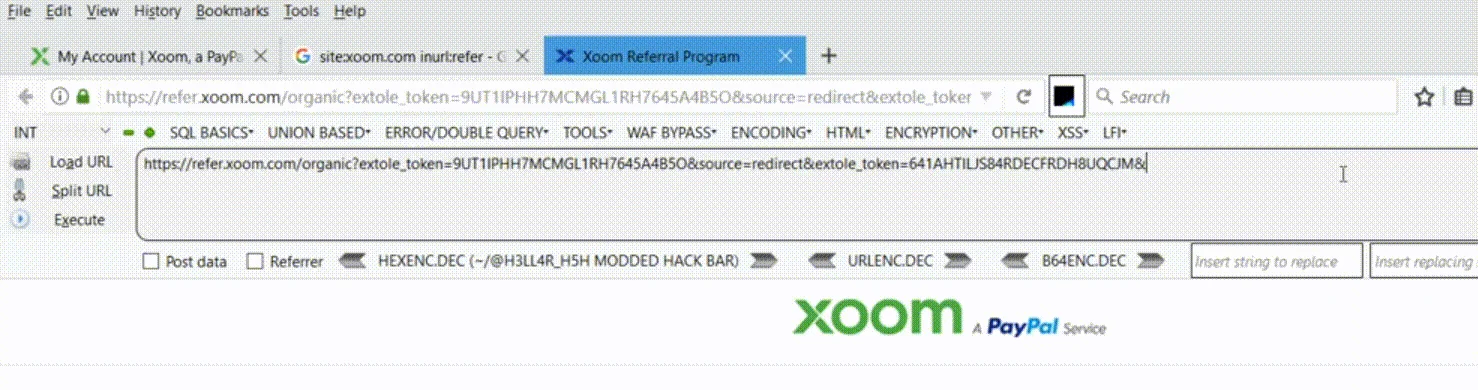
The screenshot shows the redirect in action after the &redirect= value was appended to the URL.
Step 3: Steal the campaign id tokens
Apart from the open redirect, the researcher was able to steal the tokens (campaign id) of the target website. For this, the researcher set up PHP code on their own website which automatically logged all incoming requests, then filtered the campaign id out separately.
Root cause
The report does not analyse the server-side code. What it establishes is behavioural: any page on the Xoom dashboard that accepted a redirect= parameter in a GET request would redirect to whatever external URL was supplied in that parameter, redirecting to whatever external URL was supplied in that parameter.. The report does not say which defence, if any, was present and failed.
Impact
This can be used to facilitate phishing attacks against users of the application, to perform XSS attacks and to steal tokens. In this case the researcher was able to steal campaign id tokens, logging incoming requests on their own site and filtering the campaign id out.
Fix
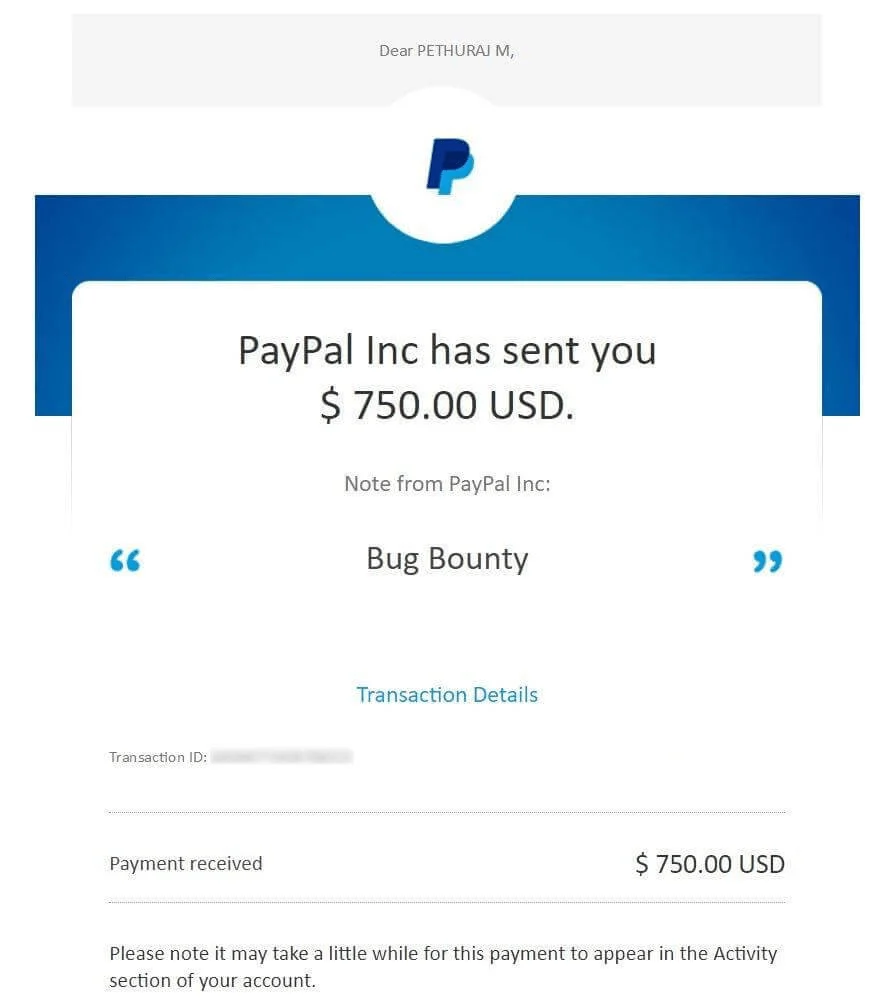
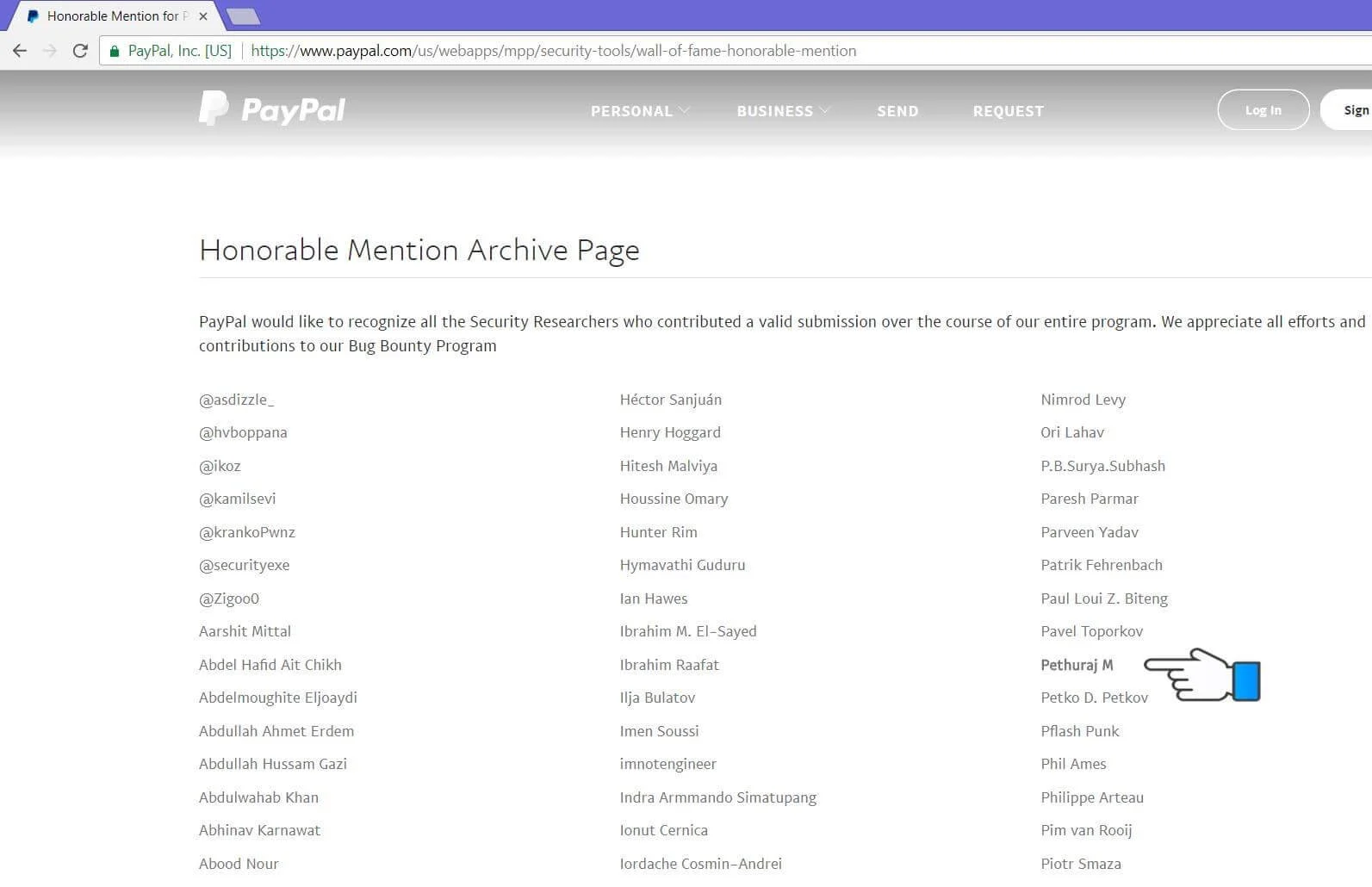
It states only that the bug was reported to PayPal immediately, that the PayPal team acknowledged it, and that the researcher received a bounty and acknowledgement on PayPal's Wall of Fame page.
The write-up dates from 2017, and the Honorable Mention page referenced above is broken at the time of the note.
Variants to test
- Append a
redirect=parameter with an external URL to every page of a dashboard that accepts GET parameters, as the researcher did here. A positive result is a response that sends the browser to the supplied external domain. - Point the redirect at a host you control that logs incoming requests, and check whether sensitive values such as campaign ids arrive in the query string or headers. A positive result is captured tokens in your logs.
- Test the same parameter on other hosts in the same programme scope, since the researcher found the redirect worked on all pages of the dashboard. A positive result is the same unconditional redirect on a host you had not yet tested.
What happened, in plain words
A security researcher found a simple mistake on a PayPal-owned website. The website had a feature that could send visitors to any other website the visitor asked for, including a website controlled by an attacker. That kind of mistake is called an open redirect. Using it, the researcher also managed to capture a piece of data called a campaign id from the site. PayPal accepted the report and paid a bounty of 750 US dollars.
This article walks through the same story for someone who has never done security testing before. You only need a browser and a computer to follow the ideas. Every technical word is explained the first time it appears, and there is a glossary at the end.
Background: what PayPal, Xoom and a disclosure programme are
PayPal is a well-known online payments company. Xoom is a money transfer service that PayPal acquired, which means PayPal bought the company and now owns it. When a company owns another, the websites of the bought company often belong to the same security programme.
A responsible disclosure programme (also called a bug bounty programme) is a set of rules a company publishes. It tells independent researchers which of its systems they are allowed to test, what they must not do, and what reward they can expect if they find a real problem. The list of allowed systems is called the scope. Testing something outside the scope is not allowed and can get a researcher into trouble.
The researcher chose PayPal as a target, read the programme's disclosure policy carefully and reviewed its scope before starting. Because Xoom was in scope, the researcher decided to work on Xoom domains. This order matters: reading the rules first is what keeps the work legal and welcome.
The vulnerability: open redirect
An open redirect happens when a website takes a value from the address bar (the URL) and uses it to decide where to send the visitor next, without checking that the destination is safe. Normally such a value should only point to a page inside the same website. Here it accepted any external domain.
A simple everyday comparison: imagine a receptionist who is told "send this visitor to room 12". A careful receptionist checks that room 12 exists in this building. A careless one will send the visitor to any address written on the note, even a building across town that the visitor has never heard of. The open redirect is the careless receptionist.
The report explains the risk in its own words: open redirection vulnerabilities arise when an application incorporates user-controllable data into the target of a redirection in an unsafe way. An attacker can construct a URL within the application that causes a redirection to an arbitrary external domain. That behaviour can be leveraged to facilitate phishing attacks against users of the application, to perform XSS attacks and to steal tokens.
Three terms in that paragraph need unpacking:
- Phishing is a trick where an attacker sends a link that looks like it belongs to a trusted company but leads somewhere else, usually a fake login page that captures the password. An open redirect makes the link look even more trustworthy, because the first part of the address really is the real company's website.
- XSS (cross-site scripting) is a class of bug where an attacker gets their own code to run inside a trusted website in a visitor's browser. The report mentions it as a possible consequence of open redirects; it does not show an XSS in this case.
- A token is a short piece of data that a website uses to recognise something, for example a session or a marketing campaign. If an attacker can read a token, they may be able to act as the user or track activity they should not see. Here the token in question is a campaign id, which identifies a marketing campaign.
Preparation: reconnaissance
The first and obvious step was reconnaissance, often shortened to recon. Recon means collecting information about a target before testing it: what websites and subdomains exist, what technologies they use, what pages they expose. A subdomain is a name that sits under a main domain, for example refer.xoom.com sits under xoom.com. Companies often have many subdomains, and each one can be a separate application with its own bugs.
The report does not describe any accounts, roles, tool versions or other preconditions. The only preparation described is reading PayPal's responsible disclosure programme and its scope, and performing reconnaissance to gather information and subdomains of Xoom. The researcher also had a website of their own, used both as the external redirect destination and to host logging code.
Finding it
The reconnaissance led to the Xoom dashboard and to the referral host. A dashboard is the logged-in area of a website where a user manages their account. The referral host is the part of the site that handles referral links, which are links a user shares so that new customers can sign up and the original user gets credit.
The vulnerable URL is:
https://refer.xoom.com
This is simply the address of the referral site. The https:// part means the connection is encrypted, and refer.xoom.com is the host name.
The vulnerable parameter is redirect. A parameter is a named value attached to the end of a URL, after a question mark. In https://example.com/page?colour=blue, the parameter name is colour and its value is blue. Parameters are how a website passes small pieces of information from one page to the next. When a form is submitted with the GET method, the values appear in the URL itself, which is why they are visible in the address bar. The report notes that wherever the application had a redirect= parameter in the GET method, the redirect occurred.
What struck the researcher most was that wherever the redirect= parameter was used in the target domain, the website redirected. In simpler words, the behaviour was not limited to one special page: it appeared across the dashboard.
Exploitation
Step 1: Navigate to pages with sensitive parameters
The researcher opened refer.xoom.com and navigated to pages that contain sensitive details in parameters. The reason for choosing those pages is that they could be used both for the open redirect and for token stealing: a page that already carries interesting values in its URL is the most useful place to test whether those values can be sent somewhere else.
Step 2: Append the redirect parameter
The researcher randomly appended the URL with the following value:
&redirect=https://www.pethuraj.in
Line by line, in plain words:
&is the character that separates one parameter from the next in a URL. It tells the browser "another parameter starts here".redirect=is the name of the parameter the site listens to. The equals sign assigns the value that follows.https://www.pethuraj.inis the destination the researcher supplied. It is a website the researcher controls, not a page of Xoom.
So the whole fragment means: "and also set the redirect parameter to my own website". If the site is careless, it will take that value and send the visitor there.
This led to a redirection to the supplied external domain. The researcher tried this on all the pages of the Xoom dashboard and it worked. Trying every page matters because a single working page is enough to prove the bug, but .
The screenshot shows the redirect in action after the &redirect= value was appended to the URL.
Step 3: Steal the campaign id tokens
Apart from the open redirect, the researcher was able to steal the tokens (campaign id) of the target website. For this, the researcher set up PHP code on their own website which automatically logged all incoming requests, then filtered the campaign id out separately.
A few terms here:
- PHP is a programming language commonly used for websites. Code written in PHP can run on a web server and react to requests.
- A request is what a browser sends to a server when it asks for a page or a resource. A log is a file where a server records each request it receives.
- Filtering means picking out the values you care about from a larger pile of data, in this case the campaign id.
The idea is straightforward: if the redirect sends visitors to a site the researcher controls, that site can record what arrives. Any sensitive value that travels along with the redirect ends up in the researcher's log.
Root cause
The report does not analyse the server-side code. What it establishes is behavioural: any page on the Xoom dashboard that accepted a redirect= parameter in a GET request would redirect to whatever external URL was supplied in that parameter, redirecting to whatever external URL was supplied in that parameter.. Validation means checking a value against rules before using it, for example checking that a redirect target belongs to the same site.
Impact
This can be used to facilitate phishing attacks against users of the application, to perform XSS attacks and to steal tokens. In this case the researcher was able to steal campaign id tokens, logging incoming requests on their own site and filtering the campaign id out.
Fix
It states only that the bug was reported to PayPal immediately, that the PayPal team acknowledged it, and that the researcher received a bounty and acknowledgement on PayPal's Wall of Fame page. A bounty is the money a company pays for a valid report. A Wall of Fame is a public page where a company thanks researchers who reported problems.
The write-up dates from 2017, and the Honorable Mention page referenced above is broken at the time of the note.
Variants to test
These are the same ideas applied in slightly different ways, useful if you want to practise on a target you are authorised to test:
- Append a
redirect=parameter with an external URL to every page of a dashboard that accepts GET parameters, as the researcher did here. A positive result is a response that sends the browser to the supplied external domain. - Point the redirect at a host you control that logs incoming requests, and check whether sensitive values such as campaign ids arrive in the query string or headers. The query string is the part of a URL after the question mark; headers are extra lines of information a browser and server exchange alongside the request. A positive result is captured tokens in your logs.
- Test the same parameter on other hosts in the same programme scope, since the researcher found the redirect worked on all pages of the dashboard. A positive result is the same unconditional redirect on a host you had not yet tested.
Glossary
- Bounty: money a company pays a researcher for a valid, responsibly reported security problem.
- Campaign id: a value that identifies a marketing campaign, used here as the token the researcher captured.
- Dashboard: the logged-in area of a website where a user manages their account.
- Disclosure programme: a company's published rules for reporting security problems, including which systems may be tested.
- Filtering: picking specific values out of a larger set of data.
- GET method: a way for a browser to ask a server for a page, with any parameters placed in the URL itself.
- Headers: extra lines of information sent alongside a request or response between browser and server.
- Host: the part of a URL that names the server, for example
refer.xoom.com. - Log: a file where a server records the requests it receives.
- Open redirect: a bug where a site sends visitors to any external address supplied in a URL parameter, without checking it.
- Parameter: a named value attached to a URL after a question mark, such as
redirect=.... - Phishing: a trick that sends a link looking like a trusted company's site to a fake page, usually to steal a password.
- PHP: a programming language commonly used to build websites.
- Query string: the part of a URL after the question mark that carries parameters.
- Reconnaissance (recon): collecting information about a target before testing it.
- Request: what a browser sends to a server when it asks for a page or resource.
- Responsible disclosure: reporting a security problem privately to the company so it can be fixed before it is made public.
- Scope: the list of systems a programme allows researchers to test.
- Subdomain: a name under a main domain, such as
refer.xoom.comunderxoom.com. - Token: a short piece of data a site uses to recognise a session or campaign; if leaked, it can be misused.
- URL: the address of a page or resource on the web.
- Validation: checking a value against rules before using it.
- Wall of Fame: a public page where a company thanks researchers who reported problems.
- XSS (cross-site scripting): a bug where an attacker's code runs inside a trusted website in a visitor's browser.