BBC Bug Bounty Write-up | XSS Vulnerability
A hidden parameter in a login form reflected an XSS payload, but only via an accesskey event handler that required a specific key combination. An attacker could execute script in the victim's browser if the victim pressed the key combination.

This is a write-up about the XSS Vulnerability which I found on the BBC website.
The full write-up lives on its author's site
It belongs to its author, so we link to it rather than copy it. The other two tabs are our own rewrites, checked against it.
I came across the BBC Bug Bounty program and decided to give it a try. This is a write-up about the reflected XSS vulnerability I found on a BBC website.
Context
I picked http://www.worldservicepartners.bbc.co.uk/ as my target. The domain is unavailable now, as BBC terminated it recently.
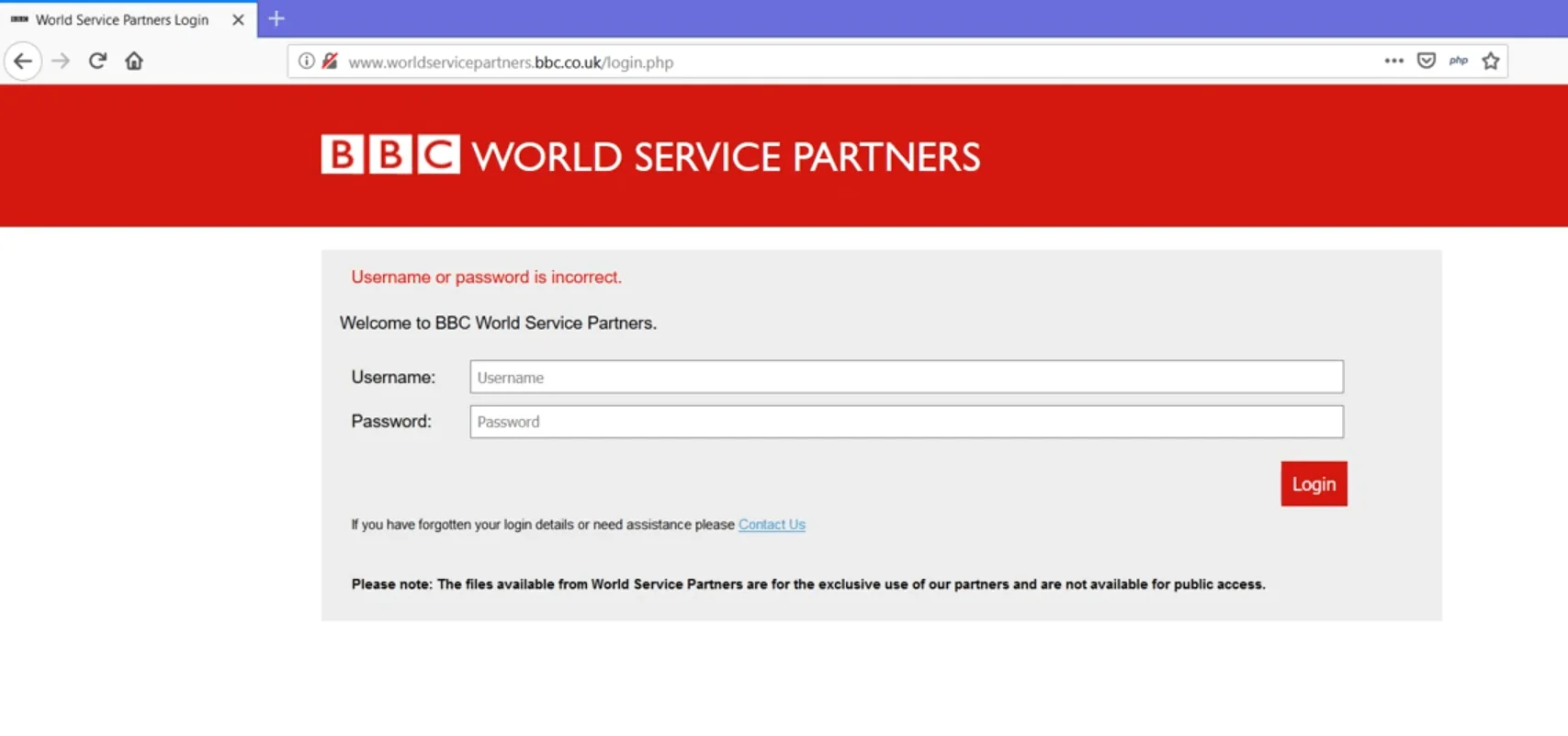
On visiting the domain, there was a login page, but there was no registration or signup feature to utilise the login form. The only user-facing functionality was the login panel itself.
Setup
The only tool mentioned in the report is Burp Suite, used to intercept the login request. No accounts, roles or versions are described.
Finding it
As there were no other input fields besides the login panel, I used some tools to find parameters, but had no luck. I could not find any input parameters.
So I decided to play around with the login form and tried SQLi and other input-related vulnerabilities. Firing up Burp and intercepting the login request revealed a couple of hidden parameters alongside the username and password input fields:
username=123&password=456&dest=xgysk&iframe=
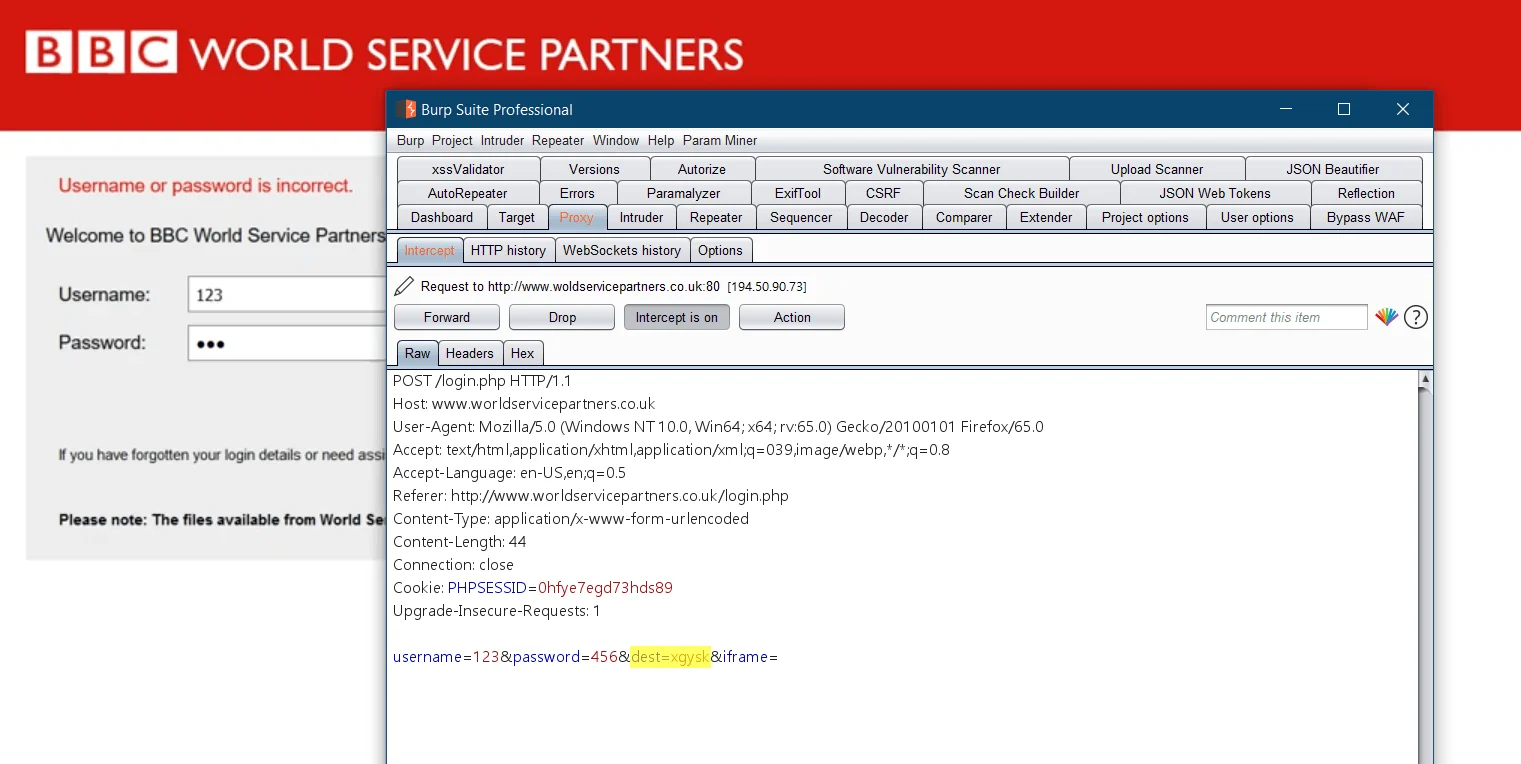
Notice the hidden parameters dest and iframe in the request. I tried possible attack vectors for SQLi, XSS and other input validation vulnerabilities against them.
Exploitation
Step 1: Establish what the browser will execute
I noted that the traditional XSS payloads did not trigger an XSS. So I used JavaScript event handlers, which perform an action based on certain events such as onmouseover, onmouseclick, and so on.
Using event handlers requires user interaction such as a mouse click or key press. I understood that the browser was ignoring the JavaScript events such as onclick and onmouseover. The execution of XSS was therefore limited to access keys, using the following payload:
“accesskey=”x”onclick=”alert(document.domain)”//
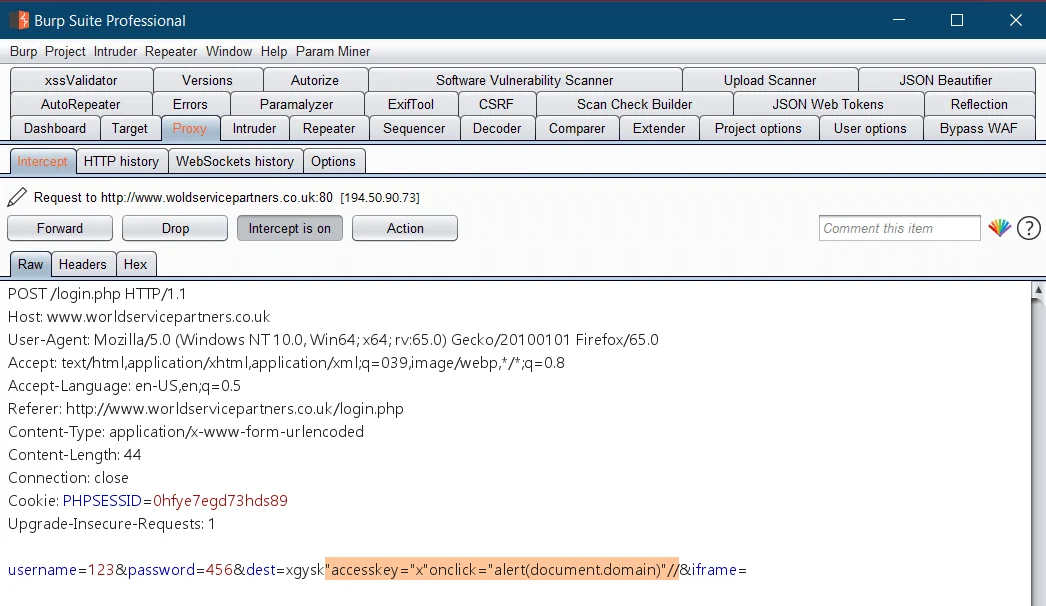
Notice the parameter dest= containing the specially crafted XSS payload.
Step 2: Trigger the payload
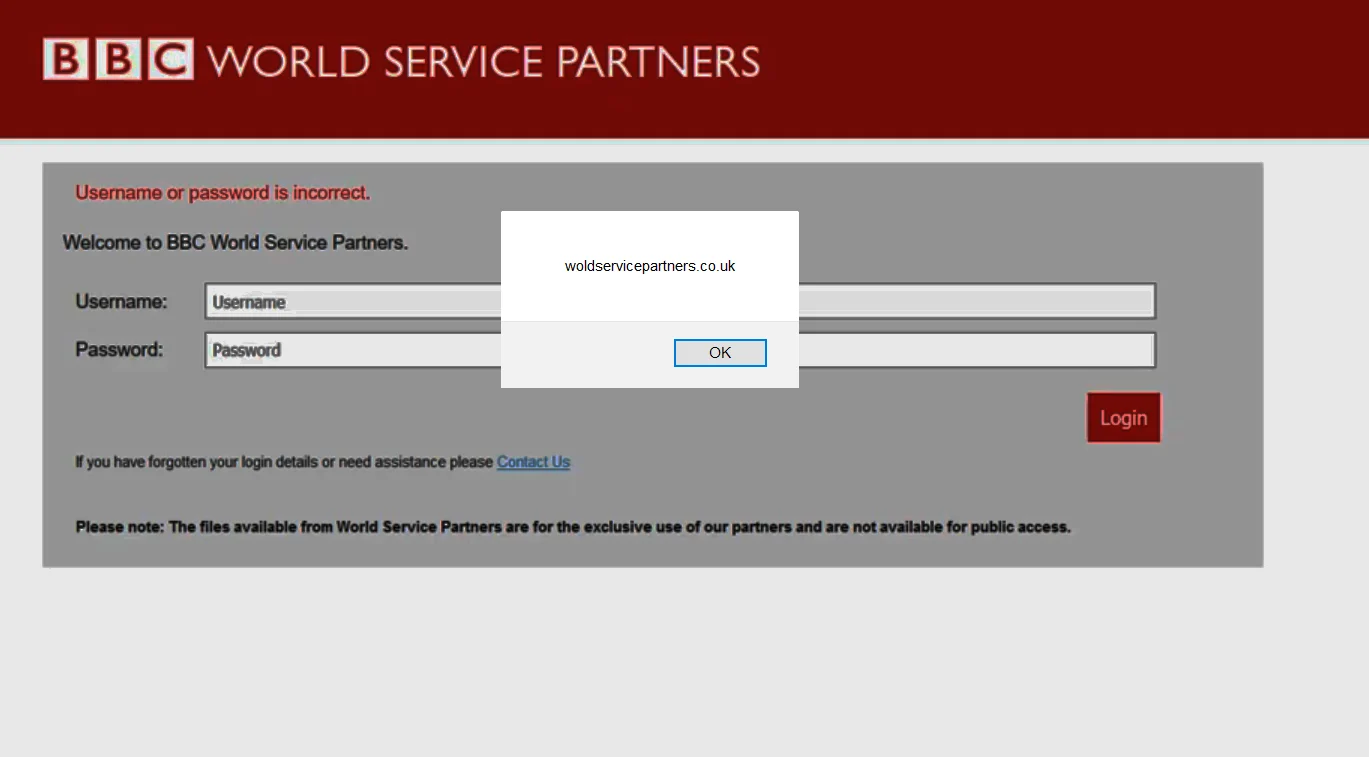
When the request is made, the page loads normally. To trigger the XSS, the following key combinations are needed to get the alert box:
(Press ALT+SHIFT+X on Windows) or (CTRL+ALT+X on OS X)
Root cause
The report does not describe the server-side code. What it shows is that the specially crafted payload was placed in the hidden dest parameter and the page loaded normally. The browser's refusal to fire onclick and onmouseover in the ordinary way did not help, because the accesskey attribute gives the element a keyboard shortcut that activates the handler.
Impact
The payload in dest executes JavaScript in the browser once the documented key combination is pressed. The report does not go further than demonstrating alert(document.domain); it does not describe session theft or any other concrete consequence. Exploitation depends on the victim performing the key press, since the handler only fires through the access key.
Fix
Variants to test
- Intercept any login or redirect form and look for hidden parameters such as
dest,redirect,returnoriframe. A positive result is a parameter whose value reappears in the response body. - Submit a benign marker value in each hidden parameter and search the response for it. A positive result is the marker appearing unencoded inside an HTML attribute.
- Where ordinary event handlers are blocked, try
accesskeywithonclickas shown here. A positive result is the page loading normally and the handler firing on the documented key combination. - Try the same reflection points with SQLi and other input validation payloads, as was done here. A positive result is a database error, a changed response, or a delay.
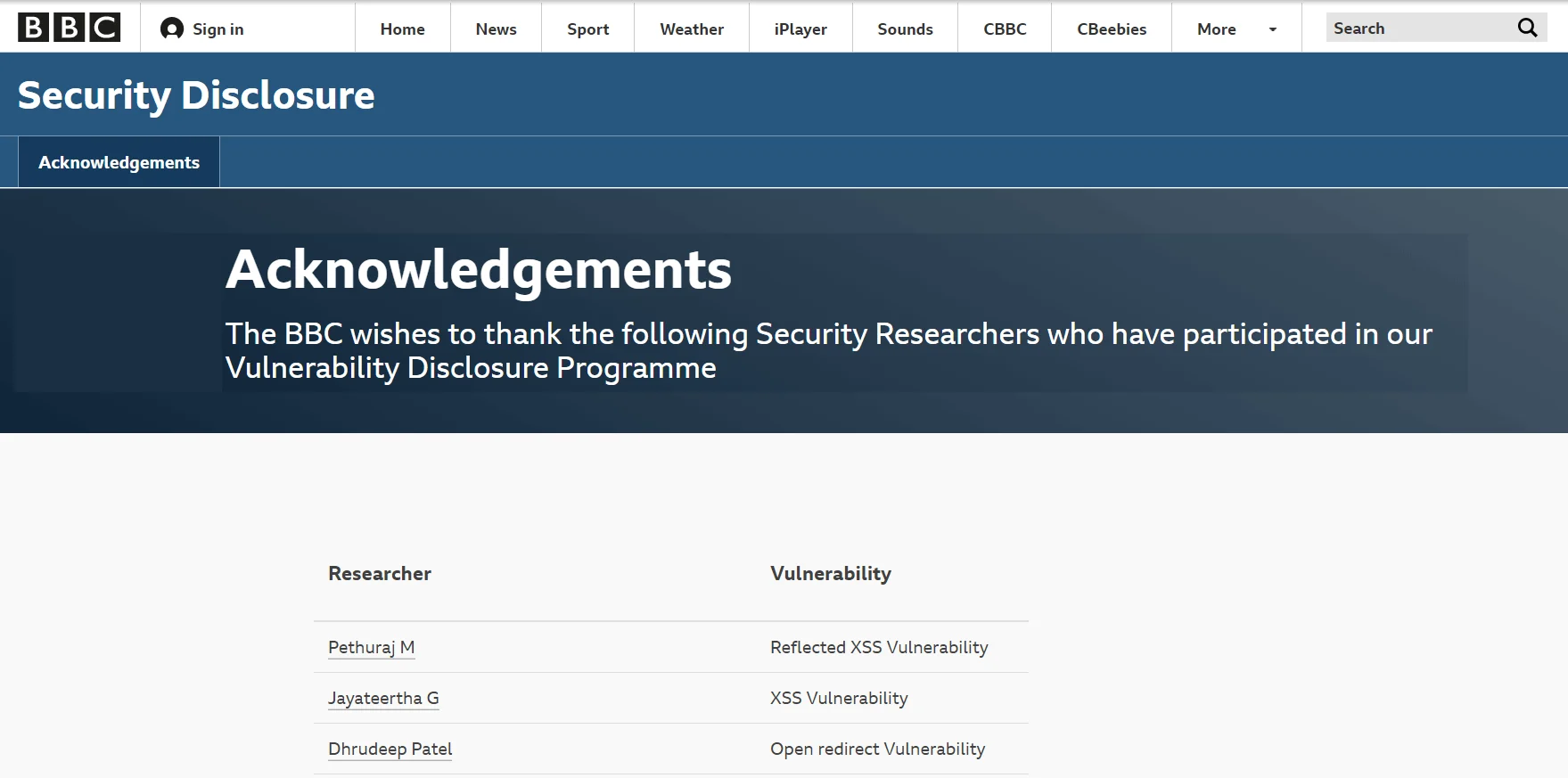
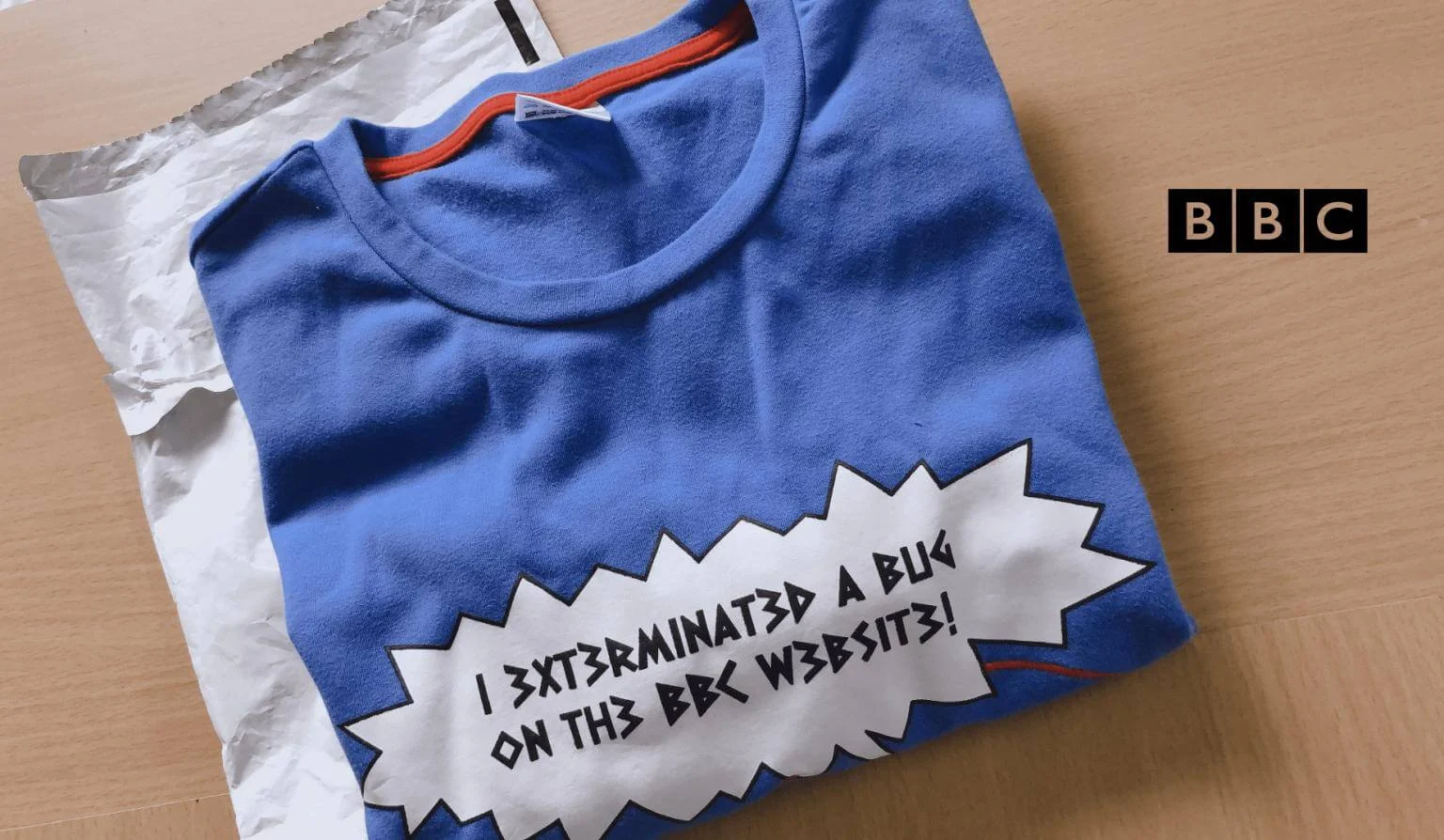
After reporting this issue to the BBC Security Team, I was honoured on their Hall of Fame page and presented with a BBC T-Shirt.
Here is the T-shirt from BBC.
To find all my acknowledgements, Hall of Fames and bug bounty journey, visit https://www.pethuraj.in.
Get in touch with me:
You may like
How to use Burp Suite Like a PRO? PART, 2
Ready to level up your Burp Suite skills? In part 2, I've compiled some awesome tips and tricks to help ...
How to use Burp Suite Like a PRO? PART, 1
This blog series is an advanced tutorial of the popular web application security and penetration testing tool Burp Suite, to help ...
What happened, in plain words
I found a security hole on a BBC website and reported it. The hole is called a reflected XSS vulnerability. In everyday terms: a web page took a piece of text that I supplied in a request and pasted it straight back into the page without cleaning it, so I could sneak a small instruction into the page that the visitor's browser would later run. I reported it to the BBC security team, they added me to their Hall of Fame page, and they sent me a T-shirt.
This article walks through the whole thing slowly, assuming you have never done security testing before. You only need to know how to use a browser and a computer.
Some background first
A few ideas come up again and again below, so here they are before we start.
- A web request is the message your browser sends to a website when you click a link or submit a form. It is like posting a form to an office: you fill in boxes, the office receives them and decides what to do.
- A parameter is one of those boxes. In a request it looks like
name=value, and several are joined with&. For exampleusername=123&password=456means the box calledusernameholds123and the box calledpasswordholds456. - A hidden parameter is a box that is in the form but not shown on screen. Websites use them to carry extra information the user is not meant to edit, such as where to send you after you log in.
- XSS (cross-site scripting) means getting your own instructions, written in a language browsers understand (JavaScript), into someone else's web page so that the browser runs them. It is like slipping an extra line into a printed notice so that whoever reads it does something the author never intended.
- Reflected XSS is the specific kind where the text you sent in a request is echoed straight back into the page you receive. Nothing is stored on the server; the page simply repeats what you gave it.
- A bug bounty program is a scheme where a company invites outside people to look for security problems in its systems and report them, often with a reward or public thanks.
- Burp Suite is a program that sits between your browser and a website. It lets you see and edit the requests your browser sends before they reach the site. Think of it as a transparent envelope you can open, read and rewrite before posting it.
- SQLi (SQL injection) is a different kind of attack where you try to sneak database commands into a form field, hoping the site builds a database query carelessly. It is unrelated to XSS but is often tried at the same time.
The target
I came across the BBC bug bounty program and decided to give it a try. I picked http://www.worldservicepartners.bbc.co.uk/ as my target. That domain is unavailable now, because BBC terminated it recently.
On visiting the domain, there was a login page, but there was no registration or signup feature to utilise the login form. In other words, the only thing a visitor could do was type a username and password into a form, and there was no way to create an account.
The screenshot shows the login page as it appeared at the time.
That matters for how the testing went. Normally, when you test a login form, you create your own account so you have valid credentials to log in with. Here there was no signup, so there was no way to create an account.
The tools
The only tool mentioned in the report is Burp Suite, used to intercept the login request. Intercepting means catching the request on its way out, so you can read it and change it before it reaches the server. No accounts, roles or software versions are described.
Finding it
As there were no other input fields besides the login panel, I used some tools to find parameters, but had no luck. I could not find any input parameters. The idea behind that step is simple: every box a website accepts text in is a possible place to inject something, so you first want a map of all the boxes. Here the map came up empty beyond the login form itself.
So I decided to play around with the login form and tried SQLi and other input-related vulnerabilities. Firing up Burp and intercepting the login request revealed a couple of hidden parameters alongside the username and password input fields:
username=123&password=456&dest=xgysk&iframe=
Line by line, in plain words:
username=123is the username box, filled with a made-up value.password=456is the password box, also filled with a made-up value.dest=xgyskis a hidden box calleddest, short for destination. It holds a short random-looking value. Sites often use a parameter like this to remember where to send you after login.iframe=is another hidden box, callediframe, and it is empty here.
The important part is that these two extra boxes were not visible on the page. They were only visible once the request was intercepted. Notice the hidden parameters dest and iframe in the request. I tried possible attack vectors for SQLi, XSS and other input validation vulnerabilities against them. An attack vector here just means a particular kind of malicious input you try in a box to see how the site reacts.
Exploitation
Step 1: Work out what the browser will actually run
I noted that the traditional XSS payloads did not trigger an XSS. A traditional payload is the classic trick of putting a whole script tag into a box and hoping the page runs it. It did not work here.
So I used JavaScript event handlers, which perform an action based on certain events such as onmouseover, onmouseclick, and so on. An event handler is an instruction attached to a piece of the page that says "when this happens, do that". onmouseover means "when the mouse pointer moves over this", onclick means "when this is clicked". It is like a sticky note on a door saying "when someone knocks, open it".
Using event handlers requires user interaction such as a mouse click or key press. That is a limitation: the victim has to do something. I understood that the browser was ignoring the JavaScript events such as onclick and onmouseover. The execution of XSS was therefore limited to access keys, using the following payload:
“accesskey=”x”onclick=”alert(document.domain)”//
What each part means:
accesskeyis a standard HTML attribute that gives an element a keyboard shortcut. If an element hasaccesskey="x", the browser lets the user activate that element by pressing a particular key combination together withx.onclick="alert(document.domain)"is the event handler: when the element is activated, run the JavaScriptalert(document.domain).alertopens a small pop-up box in the browser.document.domainis the address of the current page, so the pop-up would show the site's domain name. Showing the domain is a common, harmless way to prove that code really ran on the target site.//at the end is a comment marker in JavaScript, used here to swallow whatever markup follows so it does not break the injected code.
Notice the parameter dest= containing the specially crafted XSS payload. In other words, the value I put into the hidden dest box was this accesskey and onclick pair, and the page came back with it included.
Step 2: Trigger the payload
When the request is made, the page loads normally. Nothing visible happens at first, which is expected: the handler only fires when the element is activated. To trigger the XSS, the following key combinations are needed to get the alert box:
(Press ALT+SHIFT+X on Windows) or (CTRL+ALT+X on OS X)
In plain words: on Windows, hold Alt and Shift and press X; on a Mac, hold Control and Alt and press X. That combination is how the browser activates an element marked with accesskey="x", which in turn fires the onclick handler and shows the pop-up.
The screenshot shows the result: the page with the alert box appearing.
Why it worked
The report does not describe the server-side code, so I cannot tell you exactly what the site did internally. What it shows is that the specially crafted payload was placed in the hidden dest parameter and the page loaded normally. "Neutralised" means cleaned up so that special characters lose their special meaning; for example, turning a quote into a harmless code for a quote so the browser does not treat it as the end of an attribute.
The browser's refusal to fire onclick and onmouseover in the ordinary way did not help, because the accesskey attribute gives the element a keyboard shortcut that activates the handler. Output encoding is the cleaning step just described. A content security policy is a set of rules a site can send to the browser saying which scripts are allowed to run; a strict one would have blocked the injected handler.
What the impact is
The payload in dest executes JavaScript in the browser once the documented key combination is pressed. In everyday terms: the attacker sends a link, the victim opens it, the page looks normal, and only when the victim presses the key combination does the hidden instruction run.
The report does not go further than demonstrating alert(document.domain); it does not describe session theft or any other concrete consequence. Exploitation depends on the victim performing the key press, since the handler only fires through the access key.
How to fix it
In plain words: when the site puts a value back into the page, it should treat it as text to display, never as instructions for the browser.
Things worth trying on other sites
- Intercept any login or redirect form and look for hidden parameters such as
dest,redirect,returnoriframe. A positive result is a parameter whose value reappears in the response body. The response body is the page the server sends back. - Submit a benign marker value in each hidden parameter and search the response for it. A positive result is the marker appearing unencoded inside an HTML attribute. A marker is just a distinctive word you can search for, like a name tag.
- Where ordinary event handlers are blocked, try
accesskeywithonclickas shown here. A positive result is the page loading normally and the handler firing on the documented key combination. - Try the same reflection points with SQLi and other input validation payloads, as was done here. A positive result is a database error, a changed response, or a delay.
The outcome
After reporting this issue to the BBC Security Team, I was honoured on their Hall of Fame page and presented with a BBC T-Shirt.
Here is the T-shirt from BBC.
To find all my acknowledgements, Hall of Fames and bug bounty journey, visit https://www.pethuraj.in.
Get in touch with me:
https://twitter.com/Pethuraj https://www.linkedin.com/in/pethu/
You may like
How to use Burp Suite Like a PRO? PART, 2
Ready to level up your Burp Suite skills? In part 2, I've compiled some awesome tips and tricks to help ...
How to use Burp Suite Like a PRO? PART, 1
This blog series is an advanced tutorial of the popular web application security and penetration testing tool Burp Suite, to help ...
Glossary
- Access key: an HTML attribute that gives an element a keyboard shortcut, so the user can activate it with a key combination instead of a mouse.
- Alert: a small pop-up box a browser can show from JavaScript, often used to prove that code ran.
- Attack vector: a particular kind of malicious input you try in a box to see how a site reacts.
- Bug bounty program: a scheme where a company invites outside people to find and report security problems, often with a reward or public thanks.
- Burp Suite: a program that sits between your browser and a website so you can read and edit requests before they are sent.
- Content security policy: rules a site sends to the browser saying which scripts are allowed to run.
- Cross-site scripting (XSS): getting your own JavaScript into someone else's web page so the browser runs it.
- Event handler: an instruction attached to part of a page that runs when something happens, such as a click or a key press.
- Hidden parameter: a form box that is sent with the request but not shown on screen.
- HTML attribute: an extra setting written inside an HTML tag, such as
accesskeyoronclick. - Intercept: catch a request on its way out so you can read or change it before it reaches the server.
- JavaScript: the language browsers use to make pages interactive and to run instructions.
- Output encoding: cleaning a value before putting it back into a page so special characters are treated as plain text, not as instructions.
- Parameter: one box of data in a request, written as
name=value. - Payload: the specific piece of malicious input you send.
- Reflected XSS: XSS where the text you sent in a request is echoed straight back into the page you receive, without being stored on the server.
- Request: the message your browser sends to a website when you click a link or submit a form.
- Response body: the page content the server sends back.
- SQL injection (SQLi): sneaking database commands into a form field, hoping the site builds a database query carelessly.
- Web request: see request.