How I earned $800 for Host Header Injection Vulnerability
The password reset endpoint reflected the attacker-controlled Host header into the reset link sent by email, so an attacker could make the link point to a site they control and steal the victim's reset token. The author says this allowed account takeover.

HTTP response header injection vulnerabilities arise when user-supplied data is reflected into a response header in an unsafe way.
The full write-up lives on its author's site
It belongs to its author, so we link to it rather than copy it. The other two tabs are our own rewrites, checked against it.
Context
Host header injection is a class of vulnerability that arises when an application trusts the value of the Host request header and uses it in a security-sensitive way. The Host header tells the web server which site or application should handle the incoming request, and in a normal deployment it is set by the browser to the domain the user typed. When an application reflects that value into a response header, a link, or an email without validation, an attacker who can control the header can influence what the application produces.
The report lists the risks this class of bug can introduce:
- password reset poisoning or invite feature poisoning
- cache poisoning
- access to other internal hosts or applications
- XSS
The target here was a private program on the Bugcrowd platform. The feature involved was the password reset endpoint, which normally takes an email address, generates a reset token, and emails the user a link containing that token. The researcher's goal was to poison the reset link so that the token would be delivered to a host the attacker controls.
Setup
The researcher was testing a private Bugcrowd program and tested for issues such as XSS and CSRF. The tool used to intercept and modify traffic was Burp Suite. No account details, roles, versions or other preconditions are given in the report beyond access to the password reset page and the ability to intercept requests.
Finding it
While testing, the researcher noticed that the application accepted an arbitrary Host header. That is, the value of the header was not validated against the expected domain. Because the password reset flow generates a link that is sent to the user, the researcher decided to test for cache poisoning on the password reset endpoint.
The reasoning is straightforward: if the site works with an arbitrary Host header, the client can set it to anything, and if the application then uses that value inside the generated reset link, the link will point wherever the attacker chose.
Exploitation
The attack scenario, as described in the report, works like this:
- The attacker sends a reset password request for another user, modifying the
Hostheader in the request to a malicious site. - The user receives an email to reset the password, clicks the link, and proceeds with the malicious link.
- The attacker obtains a valid password reset token for that user.
Step 1: Open the password reset page
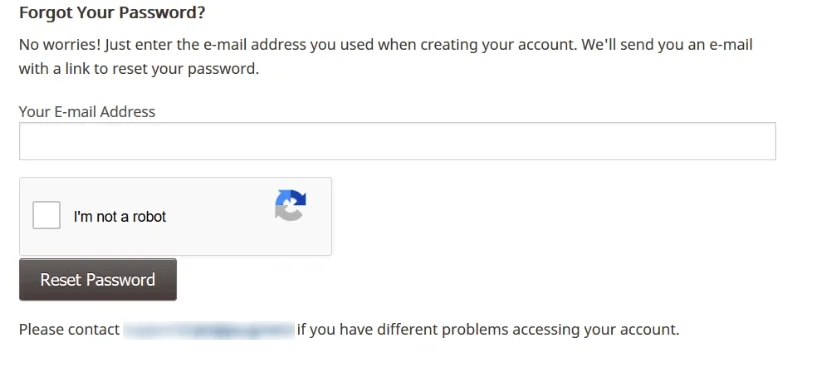
The password reset page looks like this.
Step 2: Submit the victim's email and intercept
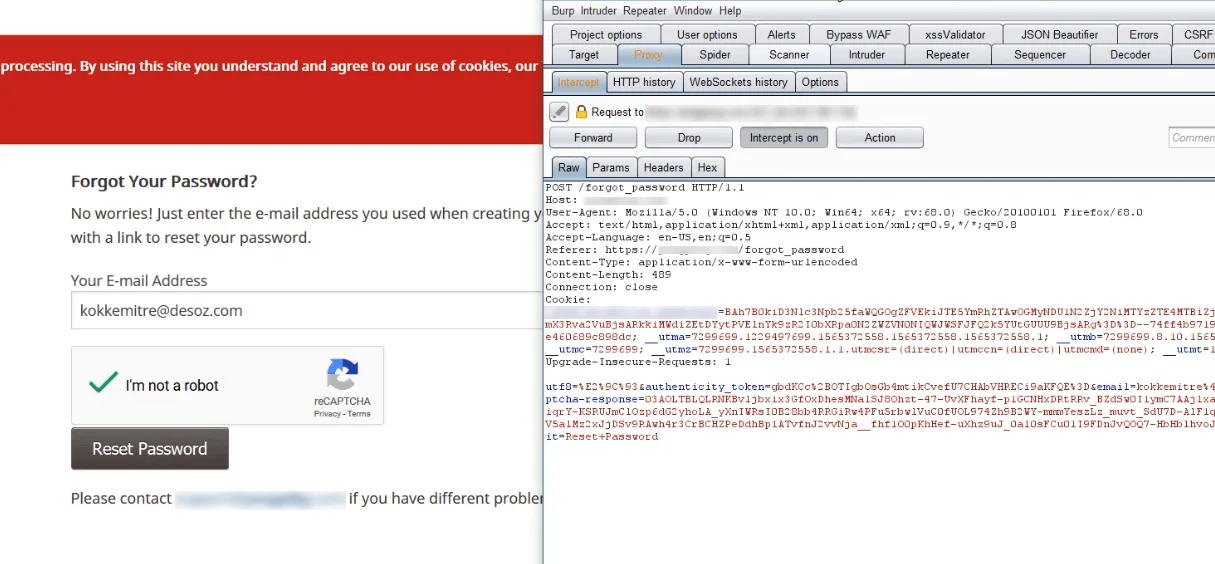
Type the email address to reset the password, start Burp Suite to intercept the traffic, and click Reset Password.
Step 3: Change the Host header
In Burp Suite, capture the request and change the Host parameter in the HTTP request header from the original URL to any site you wish. The researcher used google.com as the example. The report does not reproduce the raw request, so the exact request line and headers are not shown here.
When the request is forwarded and passed, the attack triggers. An email containing the password reset link is sent to the user.

Step 4: Observe the poisoned link
The received password reset link contains the poisoned host, as shown below.
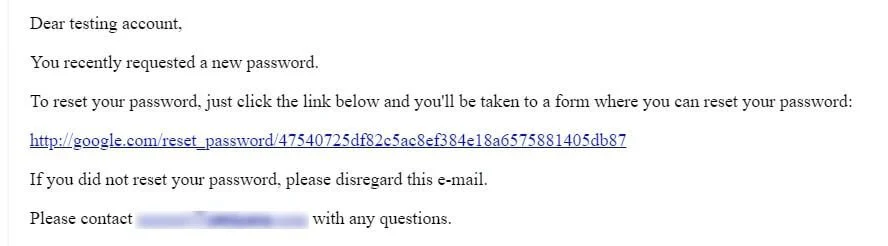
This allowed the researcher to steal the user's password reset token.
Root cause
The application accepted an arbitrary Host header and used that value when constructing the password reset link sent to the user. Because the header was not validated against the expected domain, the generated link pointed at the attacker's chosen host. The generated link pointed at the attacker's chosen host, and the report states this allowed the researcher to steal the user's password reset token. The report does not describe any server-side validation, allow-list, or other defence that was present or bypassed; the implication is that none was in place for this endpoint.
Impact
An attacker who can send a reset password request with a modified Host header can cause the reset email to contain a link pointing to a host of the attacker's choosing. When the victim clicks the link, the reset token is delivered to the attacker, who can then use it to take over the account. The report states that this allowed the researcher to steal the user's password reset token. The impact depends on the victim clicking the poisoned link; the report does not discuss other conditions.
Fix
The report does not state what fix was applied. Based on the root cause, the application should not trust the Host header when building links; it should use a configured, validated base URL, or validate the Host header against an allow-list of expected domains before using it.
Variants to test
The same pattern can appear wherever an application builds a link from request data. Concrete things to try on other targets:
- Password reset and invite emails: submit a reset or invite request with a modified
Hostheader and check whether the resulting email link uses the attacker-supplied host. A positive result is a link in the email pointing to the host you set. - Cache poisoning: send a request with a modified
Hostheader to a cacheable endpoint and check whether the poisoned response is served to other users. A positive result is another user receiving a response containing your host value. - Internal host access: set the
Hostheader to an internal hostname and observe whether the application routes to or reveals internal services. A positive result is a response from an internal host or a change in behaviour. - XSS via header reflection: check whether the
Hostvalue is reflected into a response header or page in an unsafe way. A positive result is script execution or an injected header in the response. - Other headers used for link generation: test
X-Forwarded-Host,X-Forwarded-For, and similar headers where the application may use them to build URLs. A positive result is a link or redirect that uses the value you supplied.
Each of these should be tested only within the scope of an authorised program.
What happened, in plain words
A security researcher found a bug on a website that let him steal another user's password reset token. The bug was in the "forgot my password" feature. When you forget your password, a website usually sends you an email with a special link. That link contains a long random code (a token) that proves you are the real owner of the account. If an attacker can make the website put the attacker's own web address into that link, then the victim's email will contain a link pointing at the attacker's site. The link in the email points at the attacker's site, and the report states this allowed the researcher to steal the user's password reset token.
That is what happened here. The researcher changed one small piece of information in the request, called the Host header, and the website built the password reset link using the attacker's value instead of its own domain. The researcher reported it through a bug bounty platform called Bugcrowd, on a private program, and was paid $800.
This article walks through the same steps the researcher took, explaining every term from scratch. The tool used to change the request is Burp Suite, which is explained below.
Background: what a Host header is
Every time you open a website, your browser sends a request to a server. That request is made of lines of text. One of those lines is the Host header. It tells the server which website you are asking for. Think of it like the address you write on an envelope: the postal service needs it to know where to deliver the letter. In a normal setup, your browser fills in the Host header automatically with the domain you typed, for example www.example.com.
The problem starts when a website trusts whatever value is in that header. If the server uses the Host value to build something important, such as a link in an email, an attacker who can change the header can influence what the website produces.
This class of bug is called host header injection. The report also mentions a related idea, HTTP response header injection: that happens when user-supplied data ends up inside a response header in an unsafe way. Both are about data going somewhere it should not.
The report lists the kinds of damage this class of bug can cause:
- password reset poisoning or invite feature poisoning
- cache poisoning
- access to other internal hosts or applications
- XSS
A quick word on each, because they come up again later:
- Password reset poisoning: making the reset link point somewhere the attacker controls, so the secret token leaks.
- Invite feature poisoning: the same trick, but on an invitation email instead of a password reset email.
- Cache poisoning: a cache is a temporary store that keeps a copy of a page so it can be served faster to the next visitor. If an attacker can get a bad copy into the cache, other users receive the bad copy too.
- Access to internal hosts: internal hosts are machines inside a company's network that are not meant to be reachable from the internet. Sometimes changing the
Hostheader makes the server talk to one of them. - XSS (cross-site scripting): injecting script code into a page so that it runs in another user's browser.
The target and the feature
The researcher was testing a private program on Bugcrowd. A bug bounty program is an arrangement where a company invites researchers to test its systems and pays for valid reports. A private program means only invited researchers can take part; it is not open to the public.
The feature involved was the password reset endpoint. An endpoint is a specific address on a server that does one job, like a counter in a shop that handles one kind of request. The password reset endpoint takes an email address, creates a reset token, and emails the user a link containing that token.
A token here is a long random string that acts like a temporary key. It is not your password; it is a one-time proof that whoever holds it is allowed to set a new password. If someone else gets hold of it before you use it, they can set the password instead of you.
The researcher's goal was to poison the reset link so that the token would be delivered to a host the attacker controls.
Setup
The researcher started by testing the application for common issues such as XSS and CSRF. CSRF (cross-site request forgery) is a trick where a malicious site makes your browser send a request to another site where you are already logged in, without you meaning to.
The tool used to intercept and modify traffic was Burp Suite. Burp Suite is a program that sits between your browser and the website, like a post office clerk who opens every letter, lets you read and rewrite it, and then sends it on. It is widely used by security testers.
The report does not give account details, roles, software versions or other preconditions beyond being able to reach the password reset page and intercept requests.
Finding it
While testing, the researcher noticed that the application accepted an arbitrary Host header. In plain words: the server did not check that the Host value matched its own domain. You could put anything there and the server would still process the request.
Because the password reset flow generates a link that is sent to the user, the researcher decided to test whether the Host header was used when building that link. If it was, the link could be poisoned, so the researcher decided to test for cache poisoning on the password reset endpoint.
The reasoning is simple: if the site works with an arbitrary Host header, the client can set it to anything, and if the application then uses that value inside the generated reset link, the link will point wherever the attacker chose.
Exploitation
The attack scenario, as described in the report, works like this:
- The attacker sends a reset password request for another user, modifying the
Hostheader in the request to a malicious site. - The user receives an email to reset the password, clicks the link, and proceeds with the malicious link.
- The attacker obtains a valid password reset token for that user.
Below is each step in detail.
Step 1: Open the password reset page
The password reset page looks like this.
The page is the ordinary "forgot password" form. There is nothing unusual about it from the outside; the bug is in how the server handles the request behind it.
Step 2: Submit the victim's email and intercept
Type the email address to reset the password, start Burp Suite to intercept the traffic, and click Reset Password.
Why this step: the researcher needs to see the exact request the browser sends when the form is submitted. By turning on interception in Burp Suite, the request is paused before it reaches the server, so it can be read and changed. Without this, the browser would send the request straight through and there would be no chance to edit it.
Step 3: Change the Host header
In Burp Suite, capture the request and change the Host parameter in the HTTP request header from the original URL to any site you wish. The researcher used google.com as the example.
The report does not reproduce the raw request, so the exact request line and headers are not shown here. What matters is the single change: the Host line, which normally names the target site, is replaced with a domain of the attacker's choosing.
When the request is forwarded and passed, the attack triggers. An email containing the password reset link is sent to the user.
Why this step: the researcher is testing whether the server uses the Host value when it builds the reset link. If the server ignores the header and uses its own configured domain, the email will contain a normal link and there is no bug. If the server copies the header value into the link, the email will contain a link pointing at the attacker's domain. The screenshot shows the request with the Host header changed to a malicious site before it is forwarded.
Step 4: Observe the poisoned link
The received password reset link contains the poisoned host, as shown below.
Why this step: this is the proof. The email arrives at the victim's inbox, and the link inside it points at the host the attacker set, not at the real website. The token is part of that link. The token is part of that link, and the report states this allowed the researcher to steal the user's password reset token.
This allowed the researcher to steal the user's password reset token.
Root cause
The application accepted an arbitrary Host header and used that value when constructing the password reset link sent to the user. Because the header was not validated against the expected domain, the generated link pointed at the attacker's chosen host. The generated link pointed at the attacker's chosen host, and the report states this allowed the researcher to steal the user's password reset token.
The report does not describe any server-side validation, allow-list, or other defence that was present or bypassed. The implication is that none was in place for this endpoint. An allow-list is a list of values that are explicitly permitted; anything not on the list is rejected. If the server had checked the Host header against a list containing only its own domain, the attack would have failed.
Impact
An attacker who can send a reset password request with a modified Host header can cause the reset email to contain a link pointing to a host of the attacker's choosing. When the victim clicks the link, the reset token is delivered to the attacker, who can then use it to take over the account. The report states that this allowed the researcher to steal the user's password reset token.
The impact depends on the victim clicking the poisoned link. The report does not discuss other conditions.
Fix
Based on the root cause, the application should not trust the Host header when building links. It should use a configured, validated base URL, or validate the Host header against an allow-list of expected domains before using it.
Variants to test
The same pattern can appear wherever an application builds a link from request data. Concrete things to try on other targets:
- Password reset and invite emails: submit a reset or invite request with a modified
Hostheader and check whether the resulting email link uses the attacker-supplied host. A positive result is a link in the email pointing to the host you set. - Cache poisoning: send a request with a modified
Hostheader to a cacheable endpoint and check whether the poisoned response is served to other users. A positive result is another user receiving a response containing your host value. - Internal host access: set the
Hostheader to an internal hostname and observe whether the application routes to or reveals internal services. A positive result is a response from an internal host or a change in behaviour. - XSS via header reflection: check whether the
Hostvalue is reflected into a response header or page in an unsafe way. A positive result is script execution or an injected header in the response. - Other headers used for link generation: test
X-Forwarded-Host,X-Forwarded-For, and similar headers where the application may use them to build URLs. A positive result is a link or redirect that uses the value you supplied.
Each of these should be tested only within the scope of an authorised program. Testing outside the scope of a program is not allowed and can be illegal.
Glossary
- Host header: a line in an HTTP request that tells the server which website the browser is asking for.
- HTTP request: the message a browser (or tool) sends to a server to ask for a page or to submit data.
- HTTP response: the message a server sends back to the browser.
- Header: a labelled line of extra information attached to a request or response, such as
Host. - Host header injection: a bug where an application trusts the
Hostheader value and uses it in a way that lets an attacker influence the result. - HTTP response header injection: a bug where user-supplied data is reflected into a response header in an unsafe way.
- Endpoint: a specific address on a server that handles one kind of request, such as the password reset form.
- Password reset endpoint: the part of a website that takes an email address and sends a reset link.
- Token: a long random string that acts as a temporary key, proving the holder is allowed to do something such as set a new password.
- Password reset poisoning: making a password reset link point at a host the attacker controls, so the token leaks to the attacker.
- Invite feature poisoning: the same trick applied to invitation emails.
- Cache: a temporary store that keeps copies of responses so they can be served faster to later visitors.
- Cache poisoning: getting a bad copy into a cache so other users receive it.
- Internal host: a machine inside a company's network that is not meant to be reachable from the internet.
- XSS (cross-site scripting): injecting script code into a page so it runs in another user's browser.
- CSRF (cross-site request forgery): a trick where a malicious site makes your browser send a request to another site where you are logged in, without you meaning to.
- Bug bounty program: an arrangement where a company invites researchers to test its systems and pays for valid reports.
- Private program: a bug bounty program open only to invited researchers.
- Bugcrowd: a platform that hosts bug bounty programs.
- Burp Suite: a tool that sits between your browser and a website, letting you read and change requests before they are sent.
- Intercept: to pause a request in a tool so it can be inspected and modified before it reaches the server.
- Allow-list: a list of values that are explicitly permitted; anything not on the list is rejected.
- Base URL: the fixed address an application should use when building links, instead of trusting a value from the request.