BMW Bug Bounty – Account Verification Bypass writeup
The account verification process used a four-digit OTP that could be brute-forced because there was no rate limiting or lockout. An attacker could try all 10,000 combinations and bypass phone verification to complete registration with an arbitrary email address.

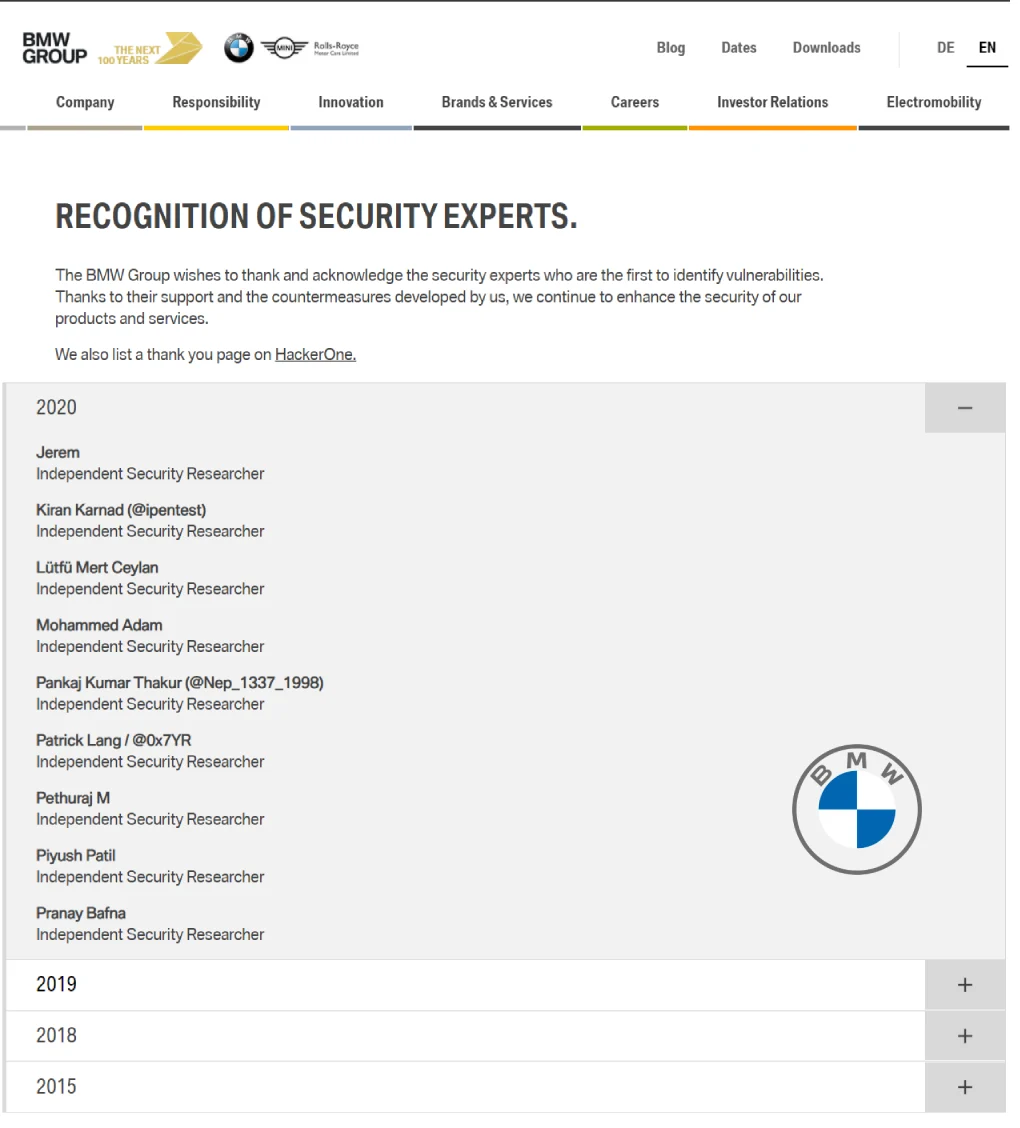
It all started with the BMW Security Experts Acknowledgment page, missing my name and I decided to give it a try.
The full write-up lives on its author's site
It belongs to its author, so we link to it rather than copy it. The other two tabs are our own rewrites, checked against it.
Context
The target was the BMW Singapore site, https://accessbybmw.com.sg/, chosen from the domains covered by BMW's bug bounty policy. The application offers a range of functionality, including account registration and login. Registration is gated on a mobile number: to create an account you must supply a Singapore mobile number and then confirm it with an OTP sent by SMS. The whole flow exists to prove that the person registering controls that phone number before the account is created.
The researcher's motivation was simple: the BMW Security Experts Acknowledgment page did not list his name, and he decided to try to earn a place on it.
Setup
No special accounts or roles were needed. The preconditions were:
- A Singapore mobile number that can receive SMS. The researcher used a disposable number from one of the many services that provide numbers for receiving SMS during account creation.
- Burp Suite, with the proxy intercepting the registration traffic and the Intruder module used for the OTP guessing.
- Nothing else: the attack runs entirely against the public registration flow.
Finding it
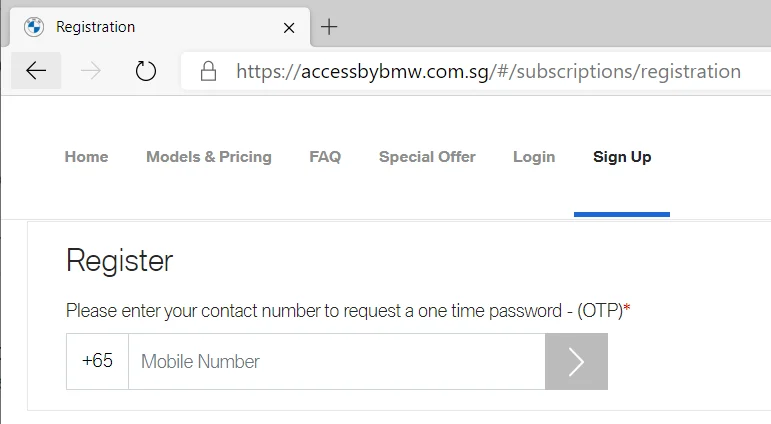
After picking the domain and doing recon, the researcher went through the registration page. The application asked for a Singapore mobile number, so he entered a disposable number that could receive the SMS.
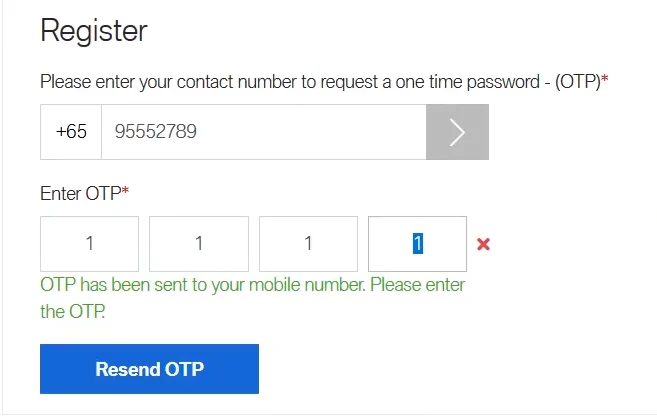
With the number submitted, the application sent an OTP by SMS. He entered the mobile number and started to brute force the OTP, and understood that the OTP is four digits long with only numerals. That gives a keyspace of 10,000 values, from 0000 to 9999, which is small enough to enumerate exhaustively if the server does not stop you.
Exploitation
Step 1: capture the OTP submission
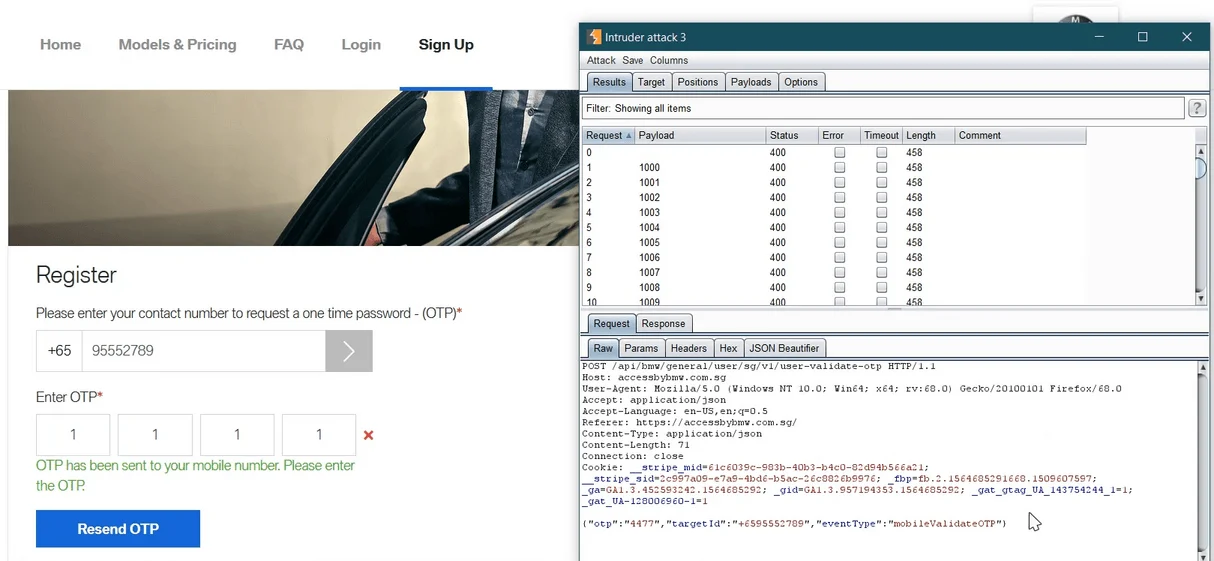
The OTP submission request was captured in Burp Suite and sent to Intruder. The payload type was set to four-digit numbers, with the payload ranging from 0000 to 9999. In other words, the entire keyspace was tried against the verification endpoint.
Step 2: tell a wrong OTP from a right one
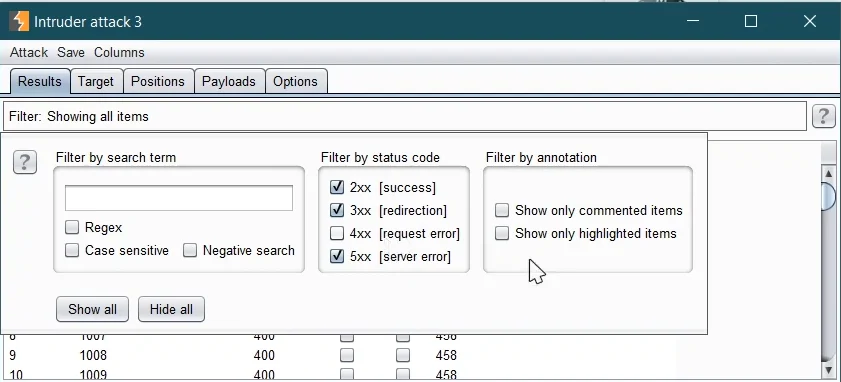
Watching the Intruder results, the researcher observed that a wrong OTP comes back with HTTP status 400. That makes the response trivially distinguishable: the correct code is the one that does not return a 4xx status. He applied an Intruder filter to hide responses containing the 4xx series of status codes.
Step 3: pick out the accepted OTP
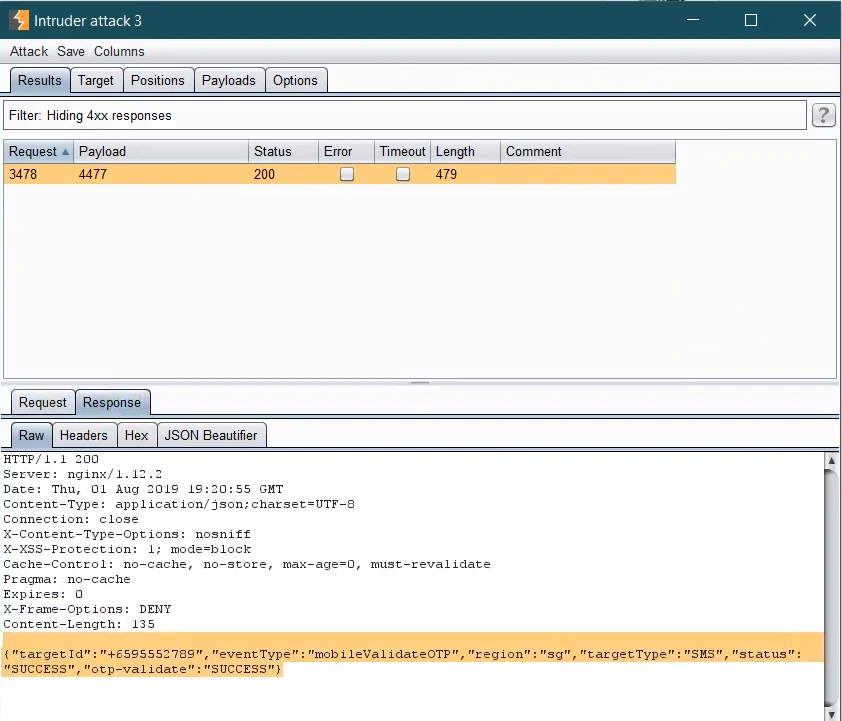
With the filter in place, a request stood out in the Intruder tab, returning status 200. Inspecting that response showed the OTP had been accepted.
Step 4: confirm in the browser
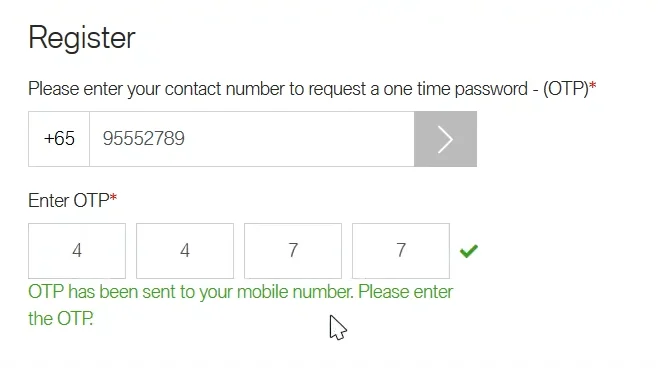
He entered the OTP in the browser and it was accepted.
Step 5: finish registration
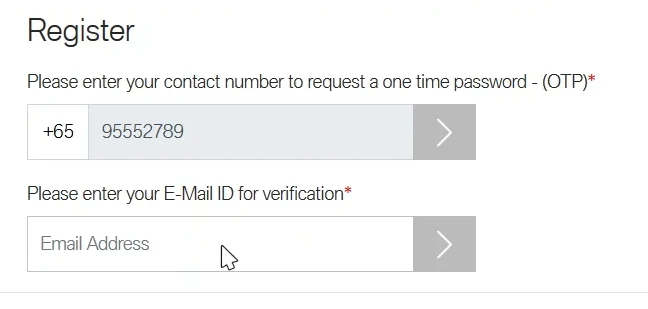
With the number verified, the flow advanced to the next step, which asks for an email address to continue the registration process. The account verification had been bypassed: the flow advanced to the email step using a disposable number and a guessed code.
Root cause
The verification endpoint did not throttle the OTP attempts during this run. Nothing in the flow, as exercised here, throttled or locked the account after repeated wrong codes, so the OTP could be brute forced in a single Intruder run. A four-digit numeric OTP is only 10,000 possibilities; without a rate limit, attempt cap or lockout, that is a brute-forceable secret rather than a second factor.
The weakness is therefore a combination of a short, low-entropy OTP and the absence of rate limiting on its verification, which the researcher classifies as OTP bypass, brute force and lack of rate limiting. The report does not describe any server-side change that was made, so the exact defensive gap in the code is not documented; the observable behaviour is that wrong codes simply returned 400 and the correct one returned 200, with no sign of a counter or block interfering with the run.
Impact
An attacker can complete account registration and pass the mobile verification step without controlling the phone number, by guessing the OTP. In this case the number was a disposable one chosen by the researcher, but the same technique applies to any number whose OTP can be guessed within the attempt budget the server allows. The immediate consequence shown here is bypassing account verification and proceeding to the email step of registration. The report does not go further into what an account created this way can access.
Fix
The report does not state what BMW changed. Based on the weakness, the fix would be server-side rate limiting and an attempt cap on OTP verification, with the code invalidated or the session locked after a small number of failures, plus expiry of OTPs after a short time. A longer or alphanumeric OTP would raise the cost of enumeration, but the missing throttle is the core issue.
Variants to test
- Other numeric OTP lengths. Try the same enumeration on flows that issue 4, 5 or 6 digit codes. A positive result is a
200(or any non-error) response among the guesses while the rest return an error status. - Response-code oracles. Look for any difference between a wrong and a right code: status code, response length, body text, redirect, or timing. A positive result is a stable, filterable difference that isolates the correct value.
- Rate-limit resets. If a limit exists, test whether it is per session, per IP or per phone number, and whether clearing cookies, changing the session token or rotating source addresses resets the counter. A positive result is the ability to keep guessing past the intended cap.
- OTP reuse and expiry. Check whether an accepted OTP can be replayed, and whether an old OTP still works after a new one is requested. A positive result is a previously used or superseded code being accepted.
- Response manipulation. Try altering the client-side handling of the verification response, for example forcing a success state in the browser, to see whether the server independently enforces verification before the next registration step. A positive result is reaching the email step without a server-accepted OTP.
For reporting the flaw, the researcher appears on BMW's Security Experts Acknowledgment page, which can be found at https://www.bmwgroup.com/en/Security.html.
What happened, in plain words
A security researcher wanted his name on BMW's Security Experts Acknowledgment page, a public list of people who have reported security problems to BMW. His name was not on it, so he decided to try to find a bug and earn a place there.
He picked a BMW website in Singapore, https://accessbybmw.com.sg/, because BMW's bug bounty policy covers it. A bug bounty is a programme where a company invites people to look for security weaknesses in its systems and rewards them for reporting what they find, instead of punishing them. He started by exploring the site, a phase usually called reconnaissance (recon): clicking through pages, noting what features exist and how they behave.
The site had a registration and login page. To create an account, you had to give a Singapore mobile number, and the site then sent a short code by text message (SMS). You type that code back into the site to prove the phone number is really yours. This kind of one-time code is called an OTP, short for one-time password. The whole point of the step is to prove you control the phone number before the account is created.
The researcher found that the site did not stop his repeated guesses at that code during the run. The code was only four digits long, so there were just 10,000 possible values, from 0000 to 9999. He tried them automatically, found the right one, and reached the email step of registration using a phone number he did not own. That is the bug: the account verification step could be bypassed.
Background you need
A few ideas come up repeatedly, so here they are from scratch.
Website and web application. A website is a set of pages your browser downloads and displays. A web application is a site that also does work for you: it stores data, checks who you are, and changes what it shows based on what you do. The BMW Singapore site is a web application because it lets you register, log in and manage an account.
Request and response. When you click a button or submit a form, your browser sends a message to the site's server (the computer that runs the site). That message is a request. The server sends back a reply, the response. Think of it as posting a form to an office and getting a letter back saying whether it was accepted.
HTTP status code. Every response carries a three-digit number that summarises what happened. 200 means success, the request was understood and handled. 400 means bad request, the server rejected what you sent. Codes starting with 4 (the 4xx series) generally mean the request was refused or was wrong. This distinction matters later: a wrong OTP produced a 400, and the right one produced a 200.
OTP (one-time password). A short code, usually sent by SMS or email, that you must enter to prove you control a phone number or mailbox. It is meant to be used once and then thrown away. Its security depends on two things: how many possible codes there are, and how many guesses an attacker is allowed to make.
Brute force. Trying every possible value until one works. If a lock has 10,000 combinations and you can try them all as fast as you like, the lock is not really protecting anything. Brute force is only practical when the number of possibilities is small and nothing slows you down.
Rate limiting. A defence where a server counts how many attempts you make in a period and refuses further tries after a limit. Without it, an attacker can make thousands of guesses per minute. With it, guessing becomes slow and impractical. The absence of rate limiting is the core weakness in this story.
Burp Suite. A tool used by security testers that sits between your browser and the website. It records every request and response so you can read them, change them, and repeat them. It has a component called the proxy, which intercepts traffic, and a component called Intruder, which sends the same request many times with one part changed each time. That is exactly what you need to try 10,000 OTP guesses.
Payload. In Intruder, the payload is the list of values to try. Here the payload was every four-digit number from 0000 to 9999.
Disposable phone number. A number from a service that lets anyone receive SMS online, often for free, without owning a real SIM card. People use them to receive one-time codes without giving out their own number. The researcher used one so that he could receive the OTP SMS during registration.
Keyspace. The total set of possible values a secret can take. A four-digit numeric code has a keyspace of 10,000. A six-digit code has 1,000,000. The smaller the keyspace, the easier it is to brute force.
Setting up
No special accounts or permissions were needed. The researcher needed three things:
- A Singapore mobile number that can receive SMS. He used a disposable number from one of the many services that provide numbers for receiving SMS during account creation.
- Burp Suite, set up so that the registration traffic passed through it, with Intruder available for the OTP guessing.
- Nothing else. The attack runs entirely against the public registration flow, the same pages any ordinary visitor can reach.
Finding the weakness
After choosing the domain and doing reconnaissance, he went through the registration page. The application asked for a Singapore mobile number, so he entered a disposable number that could receive the SMS.
With the number submitted, the application sent an OTP by SMS. He entered the mobile number and started to brute force the OTP, and worked out that it is four digits long and contains only numerals. That gives a keyspace of 10,000 values, from 0000 to 9999. That is small enough to try every single one, provided the server does not stop you.
Why probe by hand first? Because automating is only worth it once you know the shape of the secret. If the code had been six digits with letters, the same approach would have needed far more attempts. Knowing it was four digits told him the whole job was 10,000 tries, which a tool can do quickly.
Exploiting it
Step 1: capture the OTP submission
The OTP submission request was captured in Burp Suite and sent to Intruder. The payload type was set to four-digit numbers, with the payload ranging from 0000 to 9999. In other words, the entire keyspace was tried against the verification endpoint.
What this means in plain terms: when you type the code into the site and press submit, your browser sends a request containing that code. Burp Suite caught that request. The researcher then told Intruder to resend the same request over and over, replacing only the code each time, walking through every value from 0000 up to 9999. The verification endpoint is simply the address on the server that checks the code. Sending all 10,000 possibilities to it is the brute force.
Step 2: tell a wrong OTP from a right one
Watching the Intruder results, the researcher observed that a wrong OTP comes back with HTTP status 400. That makes the response easy to tell apart: the correct code is the one that does not return a 4xx status. He applied an Intruder filter to hide responses containing the 4xx series of status codes.
Why filter? Intruder produces thousands of rows, one per attempt. Almost all of them are failures, and reading them by eye is hopeless. By hiding every row whose status code starts with 4, only the interesting rows remain visible. The filter is not an attack in itself; it is a way of finding the needle in the haystack.
Step 3: pick out the accepted OTP
With the filter in place, a request stood out in the Intruder tab, returning status 200. Inspecting that response showed the OTP had been accepted.
A 200 among thousands of 400s is the signal: that is the one guess the server treated as correct. The researcher could read the code straight out of that row.
Step 4: confirm in the browser
He entered the OTP in the browser and it was accepted there too, so the result was not an artefact of the tooling.
This confirmation step matters. Tools can mislead you: a filter might hide the wrong rows, or a response might look successful when it is not. Typing the code into the real site and seeing it accepted proves the finding is genuine.
Step 5: finish registration
With the number verified, the flow advanced to the next step, which asks for an email address to continue the registration process. The account verification had been bypassed: the flow advanced to the email step using a disposable number and a guessed code.
In other words, the site believed the researcher owned that phone number, because he had supplied the correct code. But he had not received the code; he had guessed it. The check that was supposed to prove ownership proved nothing.
Why it worked
The verification endpoint did not throttle the OTP attempts during this run. Nothing in the flow, as exercised here, slowed down or locked the account after repeated wrong codes, so the OTP could be brute forced in a single Intruder run. A four-digit numeric OTP is only 10,000 possibilities; without a rate limit, an attempt cap or a lockout, that is a brute-forceable secret rather than a second factor.
A second factor is an extra proof of identity beyond a password, such as a code sent to your phone. It only adds security if an attacker cannot simply guess it. Here the code was short and low in entropy (few possible values), and nothing limited how often it could be tried. The researcher classifies the weakness as OTP bypass, brute force and lack of rate limiting. The report does not describe any server-side change that was made, so the exact defensive gap in the code is not documented. What was observed is that wrong codes returned 400 and the correct one returned 200, with no sign of a counter or block interfering with the run.
What an attacker could do with it
An attacker can complete account registration and pass the mobile verification step without controlling the phone number, by guessing the OTP. In this case the number was a disposable one chosen by the researcher, but the same technique applies to any number whose OTP can be guessed within the attempt budget the server allows. The immediate consequence shown here is bypassing account verification and proceeding to the email step of registration. The report does not go further into what an account created this way can access.
How it should be fixed
The report does not state what BMW changed. Based on the weakness, the fix would be server-side rate limiting and an attempt cap on OTP verification, with the code invalidated or the session locked after a small number of failures, plus expiry of OTPs after a short time. A longer or alphanumeric OTP would raise the cost of enumeration, but the missing throttle is the core issue.
Other things worth testing
These are variations on the same idea, useful if you meet a similar flow elsewhere.
- Other numeric OTP lengths. Try the same enumeration on flows that issue 4, 5 or 6 digit codes. A positive result is a
200(or any non-error) response among the guesses while the rest return an error status. - Response-code oracles. Look for any difference between a wrong and a right code: status code, response length, body text, redirect, or timing. A positive result is a stable, filterable difference that isolates the correct value.
- Rate-limit resets. If a limit exists, test whether it is per session, per IP or per phone number, and whether clearing cookies, changing the session token or rotating source addresses resets the counter. A positive result is the ability to keep guessing past the intended cap.
- OTP reuse and expiry. Check whether an accepted OTP can be replayed, and whether an old OTP still works after a new one is requested. A positive result is a previously used or superseded code being accepted.
- Response manipulation. Try altering the client-side handling of the verification response, for example forcing a success state in the browser, to see whether the server independently enforces verification before the next registration step. A positive result is reaching the email step without a server-accepted OTP.
The outcome
For reporting the flaw, the researcher appears on BMW's Security Experts Acknowledgment page, which can be found at https://www.bmwgroup.com/en/Security.html.
Glossary
- Bug bounty: a programme where a company invites people to find and report security weaknesses in its systems, often with a reward, instead of taking legal action against them.
- Reconnaissance (recon): the exploratory phase of testing, where you click through a site and note its features and behaviour before trying anything.
- Web application: a website that stores data and performs work for you, such as registration and login, rather than only showing static pages.
- Server: the computer that runs a website and answers requests from browsers.
- Request: the message your browser sends to a server when you submit a form or click a button.
- Response: the server's reply to a request.
- HTTP status code: a three-digit number in every response summarising the outcome, such as
200for success or400for a rejected request. - 4xx series: status codes starting with 4, generally meaning the request was refused or malformed.
- OTP (one-time password): a short code, often sent by SMS, used once to prove you control a phone number or mailbox.
- SMS: text messaging on mobile phones.
- Brute force: trying every possible value of a secret until one works.
- Keyspace: the total set of possible values a secret can take; a four-digit numeric code has 10,000.
- Entropy: a measure of how unpredictable a secret is; more possible values means higher entropy and harder guessing.
- Rate limiting: a server defence that counts attempts and refuses further tries after a limit.
- Attempt cap: a maximum number of tries allowed before the code or session is invalidated.
- Lockout: blocking an account or session after too many failed attempts.
- Second factor: an extra proof of identity beyond a password, such as a code sent to your phone.
- Burp Suite: a tool that sits between your browser and a website, recording and letting you modify requests and responses.
- Proxy: the part of Burp Suite that intercepts traffic between browser and site.
- Intruder: the Burp Suite component that resends one request many times with a chosen part changed each time.
- Payload: in Intruder, the list of values to substitute into the request on each attempt.
- Endpoint: the specific address on a server that handles a particular action, such as checking an OTP.
- Filter: in Intruder, a rule that hides rows of results so only interesting ones remain visible.
- Disposable phone number: a number from a service that lets anyone receive SMS online, often without owning a SIM card.
- Account verification bypass: completing a step meant to prove you own something, such as a phone number, without actually owning it.
- Session: the server's record of your ongoing interaction with the site, usually tied to a cookie or token.
- Cookie: a small piece of data your browser stores for a site and sends back with each request, often used to identify your session.
- Token: a value used to identify or authorise a session or action, similar in role to a cookie.
- Oracle: any observable difference in a server's response that reveals information about a secret, such as a different status code for a right versus wrong guess.