How i hacked BBC mail servers

Today I’ll write about a kind of vulnerabilities a lot of hunters forget to search or test it and some of them didn’t know how to exploit it!
The full write-up lives on its author's site
It belongs to its author, so we link to it rather than copy it. The other two tabs are our own rewrites, checked against it.
Context
This is a write-up about a chained finding against the BBC: an information disclosure in an admin API that exposed mail user records, followed by an open mail relay / SMTP access issue on BBC mail servers. The researcher describes the class as "Mail Servers takeovers AKA SMTP Servers Broken Access", noting it goes by several names. The two weaknesses were reported separately and both were eventually accepted, and the researcher became a BBC Hall Of Famer.
Setup
The work was done from a VPS. The researcher notes that some hosts and ports, including SMTP port 25, were not reachable from his home network, and that port scanning should also be done from a VPS for the same reason.
Tools used, as named in the report:
- Shodan, for certificate and service discovery.
- A custom automation script called
subdomainer, run on the VPS. dirsearch, for content discovery on subdomains.rustscan, for port scanning.telnet, for the SMTP conversation.
No accounts, credentials or roles are described. The admin API was reachable without authorisation, which is the point of the finding.
Finding it
Recon started from the BBC's certificates. The researcher lists the SSL names he found:
- BBC Studios Distribution Limited
- BBC Studios Limited
- BBC Worldwide
- BBC Worldwide Ltd
His approach was to use every SSL name and extract domains from it, via reverse WHOIS or other techniques. He then looked for a certificate covering most of the domains, to avoid wasting time searching each certificate separately, and separately checked certificates with few domains to find rare or uncommon domains, on the reasoning that vulnerabilities tend to sit there.
He then searched Shodan with the dork:
org:"BBC"
This returns hosts and domains related to an organisation named BBC. The result surfaced a certificate he had not seen before:
- British Broadcasting Corporation
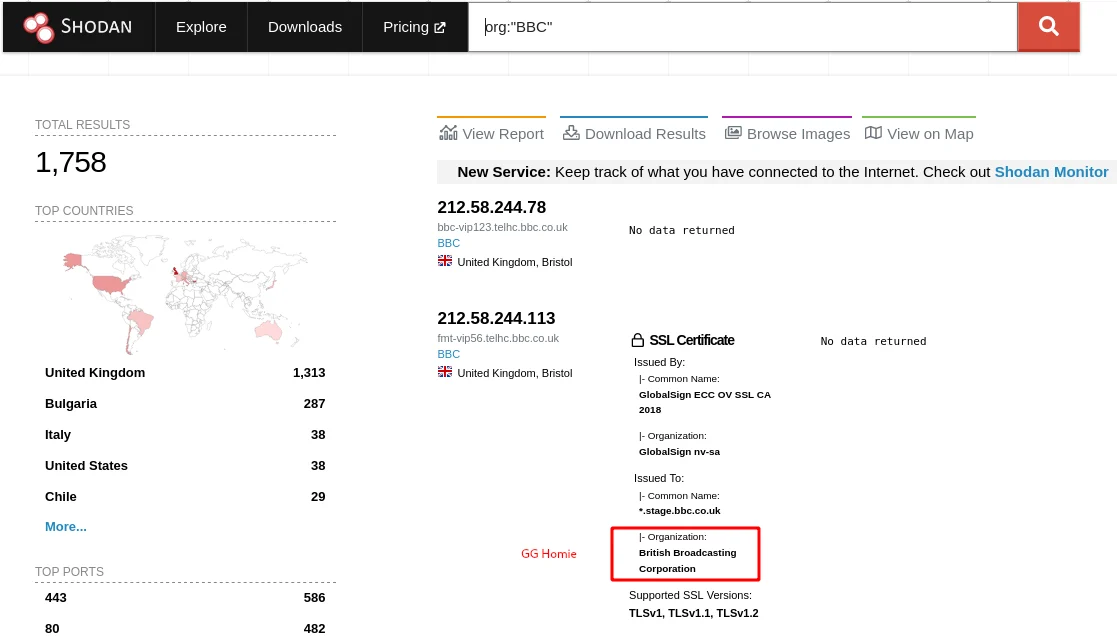
With the new certificate in hand he moved to the main UK domain, bbc.co.uk, and ran his subdomain script in the background on the VPS:
nohup subdomainer -d true -g <github_token> -l domains.txt&
The nohup and trailing & keep the process running after the SSH session closes, blocking the hangup signal. The GitHub token is a secret and is redacted here.
The next day he reviewed the subdomains, focusing on bbc.co.uk. His methodology is to fuzz the attractive subdomains first with dirsearch, then the rest. For wordlists he uses a fixed order:
- Common files wordlist.
- Detect the web app technology, then use a wordlist for it.
- Detect the web app server, then use the wordlist for that server.
- Finally the raft wordlists.
One subdomain redirected to another host with a login page:
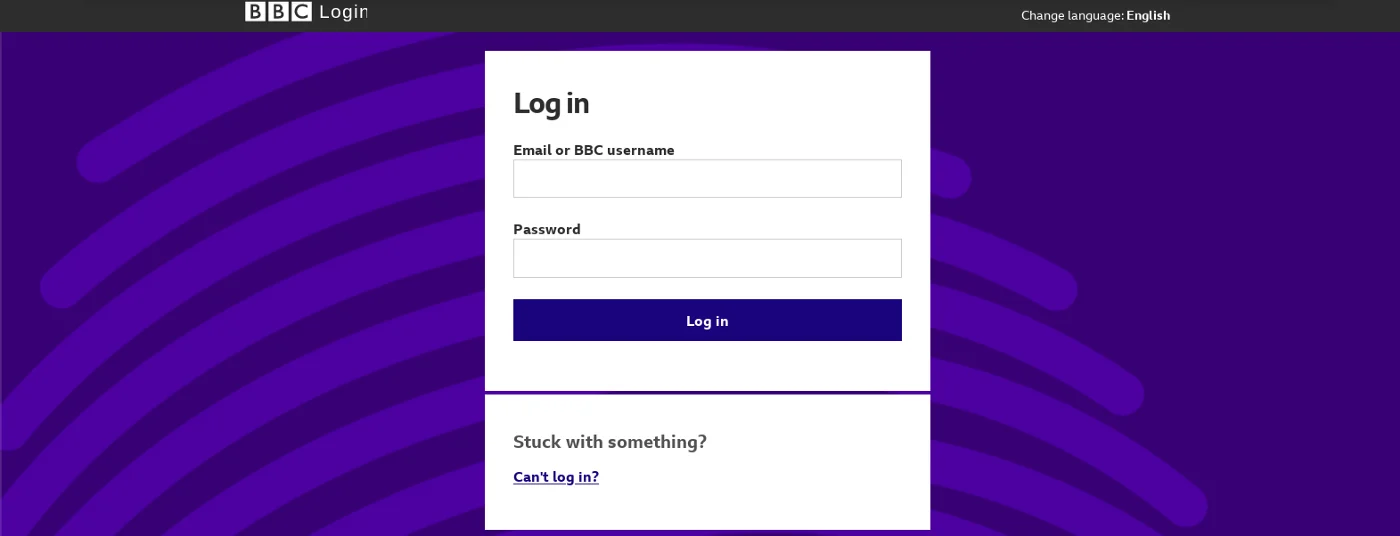
That redirect convinced him the subdomain held sensitive information. Running the common files wordlist found an /api/ path. For API paths he uses a second fuzzing technique:
- Common API endpoints wordlists.
- The "api seen in wild" wordlist.
- GraphQL endpoint wordlists.
- Searching for actions and objects in the endpoint.
Exploitation
Step 1: enumerate the API
Requesting the API endpoint returned a listing of the endpoints it exposes:
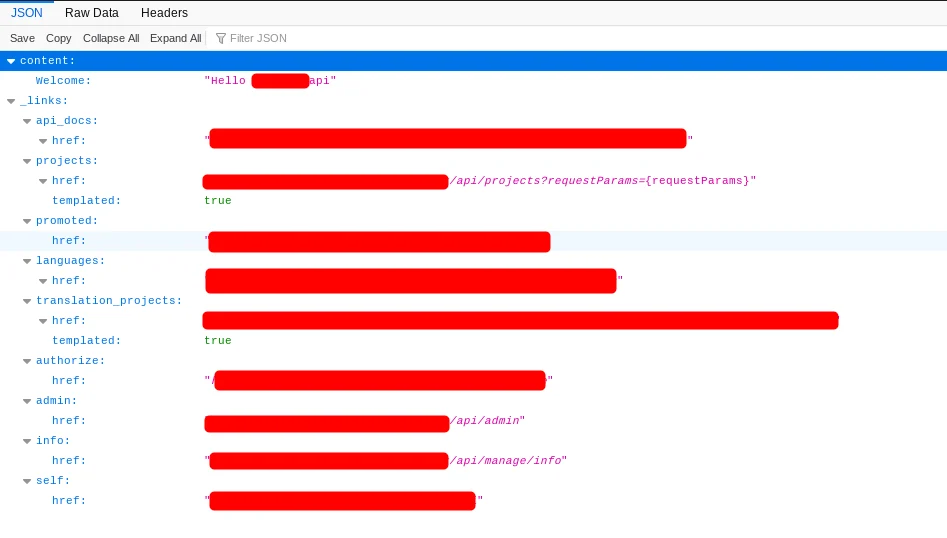
Step 2: reach the admin API
He requested the /admin/ endpoint and got a response:
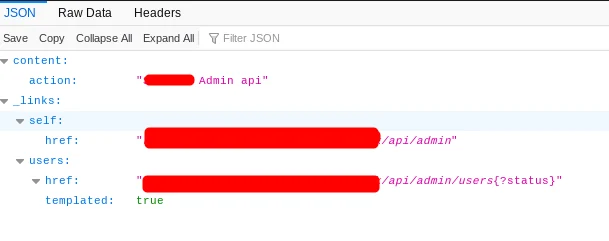
This admin API should not be accessible by default. On its own it is an unauthorised access to the admin API without impact, so he went further.
Step 3: dump user records
He requested /admin/users to reach sensitive information:
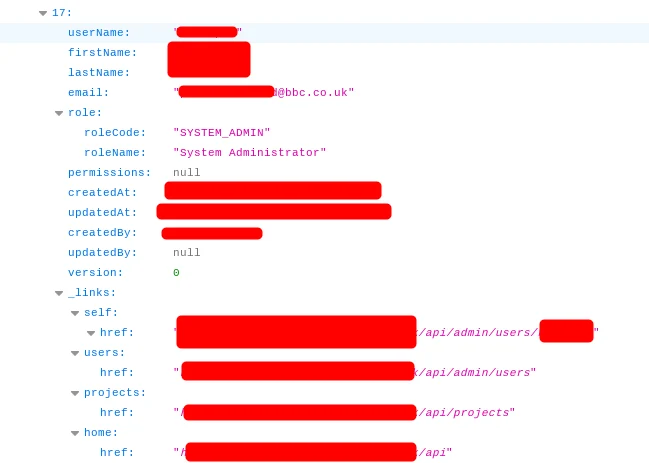
The response contained many email addresses together with permissions and information about the mail users. He searched through the results until he found the System_Admin information. He reported this as Broken Access Control or unauthorised access to the admin endpoint. The first time, the report was not accepted, or the team did not clearly understand it, and they said they would look into it more deeply.
Step 4: pivot to the mail servers
With a list of real mail users, he went back to Shodan. Using the common BBC certificates gave few or no results, so he used the certificate Shodan had originally surfaced, British Broadcasting Corporation, with a more precise dork:
ssl:"British Broadcasting Corporation" port:25,587 "Hello"
The parts of the dork:
ssl:restricts results to hosts presenting that certificate.port:restricts results to the listed ports."Hello"matches only SMTP connections where the greeting exchange happened. Shodan sends an EHLO (Hello) request when it connects to an SMTP server to check that it can run commands, so the word appearing in the response means the EHLO was really sent.25is the SMTP port and587is the encrypted SMTP submission port. The researcher compares the difference to that between ports 80 and 443.
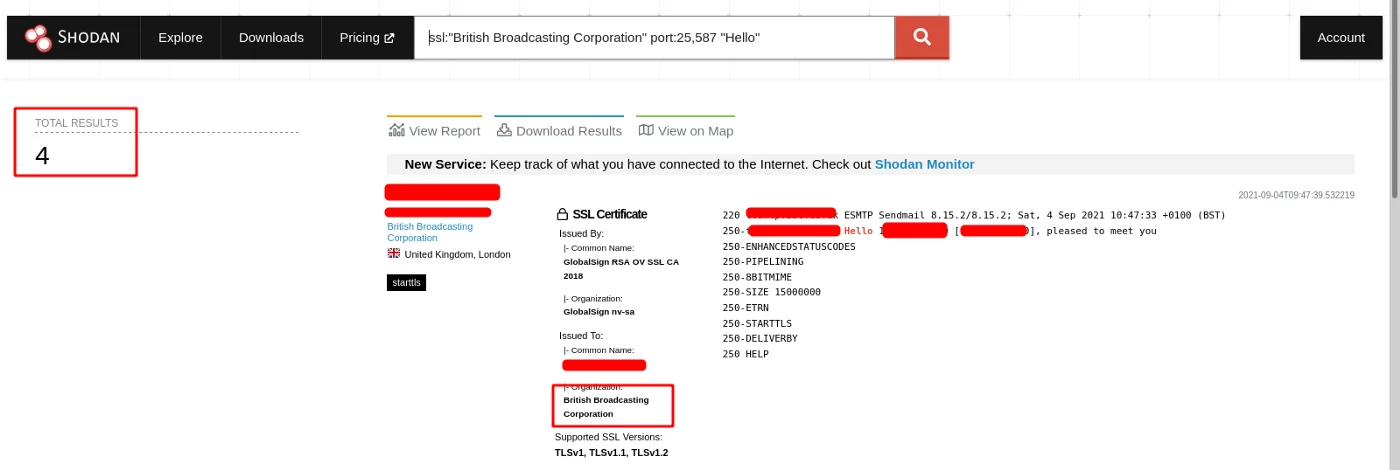
He deliberately redacted the results, explaining that the information could cause problems if used the wrong way, and that he wanted the report to be as private as possible.
Step 5: confirm the port is really open
Connecting to port 25 from his home network failed. Because Shodan sometimes caches responses and the port may since have been closed, he port scanned to check. rustscan gave no response for that port:
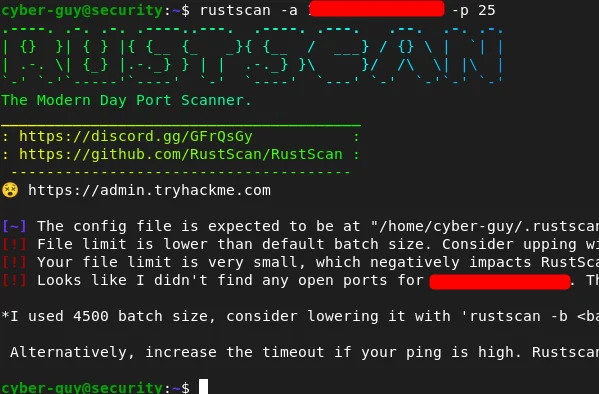
His tip: some home countries restrict access to hosts and ports like this, so use a VPS, including for port scanning. From the VPS the port scan returned a result:
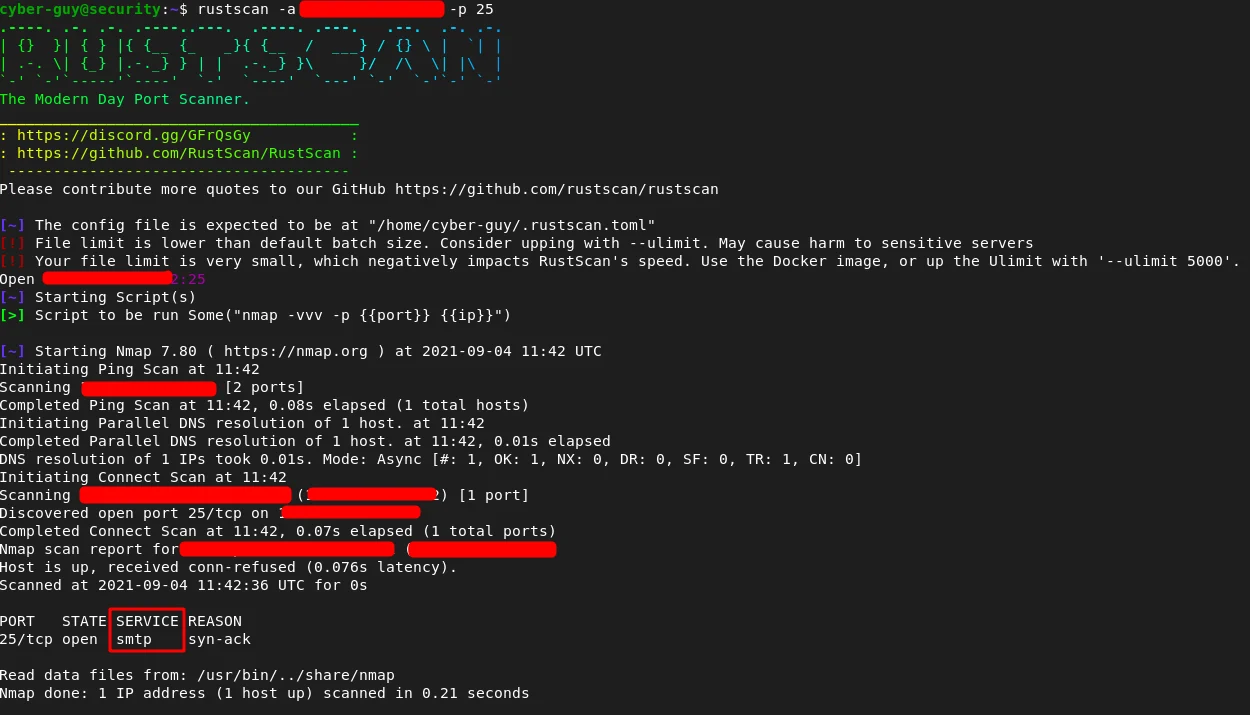
Step 6: connect and send EHLO
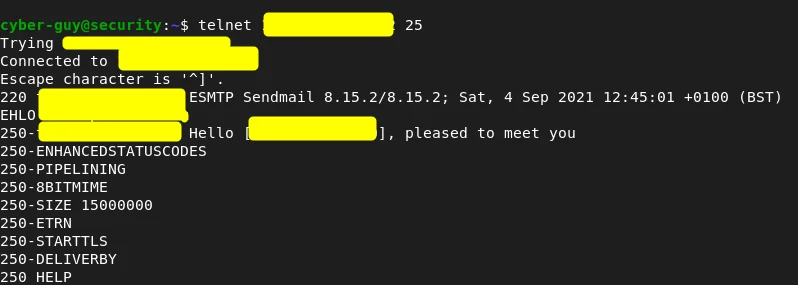
He connected with telnet. The command as written in the report is:
telent <port> <SMTP por>
The report shows the connection succeeding and the EHLO request being issued with:
EHLO <host>
Step 7: pick sender and recipient from the leaked users
He went back to /api/admin/users and chose two addresses from the leaked records:
- [redacted]
- [redacted]
Two addresses are needed because one is the sender and one is the recipient. The SMTP workflow he describes is:
- Specify the sender.
- Specify the recipient.
- Know the syntax for sending data.
- Specify the subject.
- Specify the body.
- Send the mail.
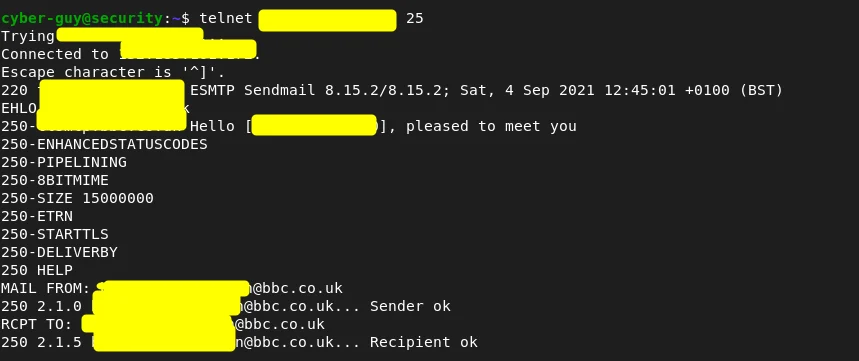
Step 8: set the envelope
MAIL FROM: [redacted]
RCPT TO: [redacted]
The server accepted both the sender and the recipient:
Step 9: send the message body
The data phase starts with:
DATA
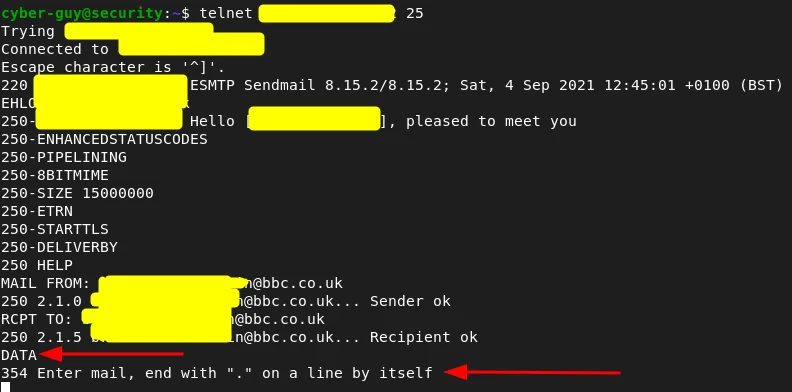
The syntax is to supply all the mail requirements (sender, recipient, subject, body), then a line containing a single . to end the mail and send it. He continued with:
Subject: re-test from Cyber Guy

This is a re-test from Cyber Guy
.
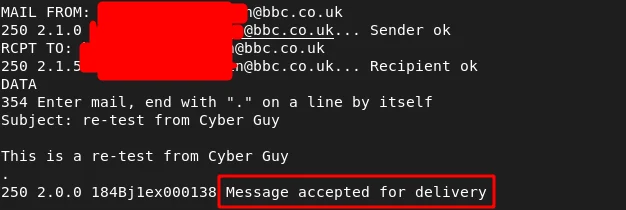
With this he states he was able to compromise over 4 BBC mail servers, and more besides. The report says he compromised "over 4 or 4" BBC mail servers, and more besides.
Step 10: reports accepted
The first report, on the sensitive admin endpoint, and the second, on the mail server takeover, were both accepted, and he became a BBC Hall Of Famer.
Root cause
Two separate issues combine here.
The admin API was reachable without authorisation, and its /admin/users resource returned mail user records including permissions and the System_Admin entry. The report does not describe the server-side check that was missing.
The mail servers accepted SMTP envelope commands and message data from an external connection on port 25, with sender and recipient addresses taken from the leaked user list. The demonstrated flow used BBC addresses on both sides.
Impact
An attacker without authorisation could read the admin API's user listing, including email addresses, permissions and the System_Admin record. With valid internal addresses in hand, the attacker could connect to exposed SMTP servers and submit mail with a BBC sender and a BBC recipient, which the researcher describes as compromising over four mail servers.
Fix
- Require authentication and an authorisation check on the admin API and on
/admin/users, and stop returning permission and admin records to unauthenticated callers. - Restrict SMTP access on ports 25 and 587 so that only authorised clients can set envelope senders and submit mail, and do not accept unauthenticated submission from the internet.
Variants to test
- Certificate pivoting: search certificate transparency and Shodan for organisation certificates you have not seen in the target's main scope, then enumerate hosts under them. A positive result is a host or service in scope that the primary domain list missed.
- API root disclosure: request
/api/and look for a listing of endpoints. A positive result is a machine-readable list of routes, especially admin routes. - Admin route without auth: request
/admin/and then resource paths such as/admin/userswith no session. A positive result is a response containing user records rather than a login page. - SMTP exposure: dork for the organisation's certificate with
port:25,587 "Hello", then confirm from a VPS with a port scan and a telnetEHLO. A positive result is a successful EHLO reply. - Envelope acceptance: after EHLO, send
MAIL FROMandRCPT TOwith addresses from the target's domain. A positive result is acceptance of both, followed by acceptance ofDATAand the terminating.. - Network position: repeat any connection test from both a home network and a VPS, since local restrictions can hide an open port.
What happened, in plain words
A security researcher found two problems at the BBC and reported them separately. Both were eventually accepted, and he was added to the BBC Hall Of Fame, a public list of people who have reported valid security issues.
The first problem was an admin page on a BBC website that could be opened without authorisation. That page listed information about the BBC's mail users, including their email addresses and what permissions they had. Think of it like a staff room door that is supposed to be locked but is actually standing open: nothing is broken, but anyone walking past can look inside.
The second problem was on the BBC's mail servers, the computers that send and receive email. Using the email addresses he had just found, the researcher was able to connect to those servers directly and hand them a message to send, without logging in at all. He describes this as a "Mail Server takeover" and notes that the same kind of issue goes by several names, such as "SMTP Servers Broken Access".
The two problems chained together: the first gave him real addresses, and the second let him use those addresses on the mail servers.
The tools, and why they were used
Everything was done from a VPS, which stands for Virtual Private Server: a computer you rent in a data centre that you control remotely. The researcher explains why this matters. From his home network, some hosts and ports, including the mail port 25, simply would not connect. He advises doing port scanning from a VPS for the same reason.
The tools he names:
- Shodan: a search engine for internet-connected devices and services, rather than for web pages. You type a query and it shows you servers that match.
- subdomainer: his own automation script, run on the VPS, for finding subdomains.
- dirsearch: a tool that tries a long list of common file and folder names against a website to see which ones exist.
- rustscan: a tool that checks which network ports on a machine are open.
- telnet: a very old, very simple program for connecting to a network service and typing commands at it by hand.
No accounts, passwords or user roles are described anywhere in the report. The admin API was reachable without authorisation, which is exactly the point of the finding.
Step 1: finding the BBC's domains through certificates
A certificate (SSL certificate) is the digital document a website presents so your browser can prove it is really talking to the right server, and so the traffic can be encrypted. Certificates list the domain names they are valid for, which makes them a useful map of an organisation's internet presence.
The researcher started by collecting the BBC's certificates. He lists these certificate names:
- BBC Studios Distribution Limited
- BBC Studios Limited
- BBC Worldwide
- BBC Worldwide Ltd
His method was to take every certificate name and extract domains from it, using reverse WHOIS (a lookup that goes from a registration record back to the domains attached to it) or other techniques. He then did two things:
- He looked for a certificate that covered most of the domains, so he would not waste time searching each certificate separately.
- He also checked certificates with only a few domains, to find rare or uncommon domains, on the reasoning that vulnerabilities tend to sit in the less-travelled corners.
Step 2: searching Shodan for the organisation
He then had an idea: what if he searched Shodan for any certificate he had not seen yet? He typed this query:
org:"BBC"
Line by line: org: is a Shodan filter that limits results to hosts and domains belonging to an organisation with the given name. "BBC" is the organisation name, in quotes so Shodan treats it as one exact phrase. The whole query therefore asks Shodan for anything it has indexed that is related to an organisation called BBC.
This surfaced a certificate he had not seen before:
- British Broadcasting Corporation
The screenshot shows the Shodan results after running that query.
Step 3: enumerating subdomains
A subdomain is a name that sits under a main domain. If bbc.co.uk is the main domain, then something like mail.bbc.co.uk would be a subdomain. Organisations often have many, and each one is a separate service that may behave differently.
With the new certificate in hand, he moved to the main UK domain, bbc.co.uk, and started his subdomain script in the background on the VPS:
nohup subdomainer -d true -g <github_token> -l domains.txt&
Line by line: nohup means "no hangup": it keeps the program running even after you close your remote session. subdomainer is the name of his script. -d true is an option he passes to it. -g <github_token> supplies a GitHub token, which is a secret credential and is redacted here. -l domains.txt tells the script to read its list of domains from a file called domains.txt. The & at the end puts the whole thing in the background so he can close the connection. Together, nohup and & mean the scan keeps going overnight while he sleeps.
The next day he reviewed the subdomains, focusing on bbc.co.uk. His working method is to test the most interesting subdomains first with dirsearch, then the rest. For wordlists (the lists of names that dirsearch tries) he uses a fixed order:
- A wordlist of common files.
- Detect what technology the web app is built with, then use a wordlist suited to it.
- Detect what web server software is running, then use the wordlist for that server.
- Finally, the raft wordlists (a well-known collection of wordlists).
One subdomain redirected him to another host that showed a login page:
That redirect, and the login page, convinced him the subdomain held sensitive information. Running the common files wordlist found an /api/ path.
Step 4: what an API is, and how he fuzzed it
An API (Application Programming Interface) is the part of a website that programs talk to, rather than people. When you load a normal web page, your browser gets back something designed to be looked at. When a program talks to an API, it gets back raw data, often in a format called JSON, which is just structured text with names and values. Think of a restaurant: the dining room is the website you see, and the kitchen door where orders are passed through is the API.
For API paths he uses a second fuzzing technique. Fuzzing means trying many candidate names automatically and watching which ones respond. His order:
- Common API endpoint wordlists.
- The "api seen in wild" wordlist (a list of API paths people have observed on real sites).
- GraphQL endpoint wordlists (GraphQL is another style of API).
- Searching for actions and objects inside the endpoint.
Step 5: listing the API's endpoints
Requesting the API endpoint returned a listing of the endpoints it exposes:
The screenshot shows that listing. In plain terms, the API answered with a menu of its own routes, which is like a building's reception desk handing you a floor plan without asking who you are.
Step 6: reaching the admin area
He requested the /admin/ endpoint and got a response:
An admin area is the part of a system meant for staff who manage it, and it should normally require a login. This one did not. On its own, though, seeing an admin page is an unauthorised access without much impact, so he went further.
Step 7: dumping the user records
He requested /admin/users to reach sensitive information:
The response contained many email addresses together with permissions and information about the mail users. He searched through the results until he found the System_Admin information. He reported this as Broken Access Control, which simply means the system failed to check whether the person asking was allowed to see the data, or as unauthorised access to the admin endpoint.
The first time, the report was not accepted, or the team did not clearly understand it, and they said they would look into it more deeply.
Step 8: pivoting to the mail servers
Now he had a list of real mail users. He went back to Shodan. Searching with the common BBC certificates gave few or no results, so he used the certificate Shodan had originally surfaced, British Broadcasting Corporation, with a more precise query:
ssl:"British Broadcasting Corporation" port:25,587 "Hello"
Line by line:
ssl:restricts results to hosts presenting that particular certificate.port:restricts results to the ports listed after it."Hello"matches only SMTP connections where the greeting exchange actually happened. Shodan sends an EHLO (Hello) request when it connects to a mail server, to check that it can run commands, so the word appearing in the response means the EHLO was really sent.25is the standard SMTP port, the one mail servers use to talk to each other.587is the encrypted SMTP submission port, the one mail programs use to hand over mail for sending.
He compares the difference between these two ports to the difference between ports 80 and 443, which is the difference between plain web traffic and encrypted web traffic.
He deliberately hid the results in the screenshot, explaining that the information could cause problems if used the wrong way, and that he wanted the report to be as private as possible.
Step 9: checking the port is really open
Connecting to port 25 from his home network failed. Shodan sometimes shows cached results, meaning old information it stored earlier, and the port may since have been closed, so he scanned it himself to check. rustscan gave no response for that port:
His tip: some home countries restrict access to hosts and ports like this, so use a VPS, including for port scanning. From the VPS the port scan returned a result:
Step 10: connecting and saying hello
He connected with telnet. The command as written in the report is:
telent <port> <SMTP por>
This is the command exactly as it appears in the report, including the spelling. The idea is to give telnet the port and the mail server address so it opens a raw connection you can type into.
The report shows the connection succeeding and the EHLO request being issued with:
EHLO <host>
EHLO is the command a mail program sends first, to introduce itself and ask the server which features it supports. <host> is a placeholder for the name you introduce yourself with.
Step 11: choosing a sender and a recipient
He went back to /api/admin/users and chose two addresses from the leaked records:
- [redacted]
- [redacted]
Two addresses are needed because one is the sender and one is the recipient. The mail workflow he describes is:
- Specify the sender.
- Specify the recipient.
- Know the syntax for sending data.
- Specify the subject.
- Specify the body.
- Send the mail.
Step 12: setting the envelope
MAIL FROM: [redacted]
RCPT TO: [redacted]
Line by line: MAIL FROM: tells the server who the message is from, like writing your return address on an envelope. RCPT TO: tells the server who should receive it, like writing the destination address. These two lines are the envelope, separate from the message inside. The server accepted both:
Step 13: sending the message body
The data phase starts with:
DATA
DATA tells the server that everything you type next is the content of the message, until you signal the end. The syntax is to supply all the mail requirements (sender, recipient, subject, body), then a line containing a single . to end the mail and send it. He continued with:
Subject: re-test from Cyber Guy

This is a re-test from Cyber Guy
.
Line by line: Subject: sets the subject line, the bit you see in an inbox. The blank line separates the headers from the body. This is a re-test from Cyber Guy is the body text. The single . on its own line is the signal that the message is finished and should be sent.
With this he states he was able to compromise over 4 BBC mail servers, and more besides. The report says he compromised "over 4 or 4" BBC mail servers, and more besides.
Step 14: both reports accepted
The first report, on the sensitive admin endpoint, and the second, on the mail server takeover, were both accepted, and he became a BBC Hall Of Famer.
Why this worked
Two separate issues combined here.
The admin API was reachable without authorisation, meaning without being allowed in, and its /admin/users resource returned mail user records including permissions and the System_Admin entry. The report does not describe which server-side check was missing.
The mail servers accepted SMTP envelope commands and message data from an external connection on port 25, with sender and recipient addresses taken from the leaked user list. The demonstrated flow used BBC addresses on both sides.
What an attacker could do
An attacker without authorisation could read the admin API's user listing, including email addresses, permissions and the System_Admin record. With valid internal addresses in hand, the attacker could connect to exposed mail servers and submit mail with a BBC sender and a BBC recipient, which the researcher describes as compromising over four mail servers.
How to fix it
- Require authentication and an authorisation check on the admin API and on
/admin/users, and stop returning permission and admin records to unauthenticated callers. - Restrict SMTP access on ports 25 and 587 so that only authorised clients can set envelope senders and submit mail, and do not accept unauthenticated submission from the internet.
Things worth trying on your own targets
- Certificate pivoting: search certificate transparency logs and Shodan for organisation certificates you have not seen in the target's main scope, then enumerate hosts under them. A positive result is a host or service in scope that the primary domain list missed.
- API root disclosure: request
/api/and look for a listing of endpoints. A positive result is a machine-readable list of routes, especially admin routes. - Admin route without auth: request
/admin/and then resource paths such as/admin/userswith no session. A positive result is a response containing user records rather than a login page. - SMTP exposure: dork for the organisation's certificate with
port:25,587 "Hello", then confirm from a VPS with a port scan and a telnetEHLO. A positive result is a successful EHLO reply. - Envelope acceptance: after EHLO, send
MAIL FROMandRCPT TOwith addresses from the target's domain. A positive result is acceptance of both, followed by acceptance ofDATAand the terminating.. - Network position: repeat any connection test from both a home network and a VPS, since local restrictions can hide an open port.
Glossary
- API: the part of a website that programs talk to, returning raw data rather than pages designed to be looked at.
- Admin area: the part of a system meant for staff who manage it, normally behind a login.
- Authentication: proving who you are, usually with a password or a token.
- Authorisation: the check that a person who has proved who they are is allowed to do or see a particular thing.
- Broken Access Control: a flaw where the system fails to check whether the caller is allowed to access something.
- Certificate (SSL certificate): the digital document a server presents to prove its identity and enable encryption; it lists the domains it covers.
- Certificate transparency: public logs of issued certificates, useful for discovering an organisation's domains.
- DMARC: an email policy that tells receiving servers what to do with mail that fails authentication checks.
- DKIM: an email authentication method that signs messages so tampering can be detected.
- Domain: the main name of a site, such as
bbc.co.uk. - Dork: a carefully built search query, here for Shodan, used to find specific exposed services.
- EHLO: the SMTP command a mail program sends first to introduce itself and ask which features the server supports.
- Envelope: the sender and recipient addresses given to the mail server, separate from the message content.
- Fuzzing: automatically trying many candidate names or inputs and watching which ones respond.
- GraphQL: a style of API where the client asks for exactly the fields it wants.
- JSON: a plain-text format for structured data, made of names and values.
- Open mail relay: a mail server that accepts and forwards mail from people who are not authorised to use it.
- Port: a numbered channel on a computer that a particular service listens on; 25 is SMTP, 587 is encrypted SMTP submission, 80 is plain web and 443 is encrypted web.
- Reverse WHOIS: a lookup that starts from a registration record and finds the domains attached to it.
- Shodan: a search engine for internet-connected devices and services rather than web pages.
- SMTP: the protocol mail servers use to send and receive email.
- SPF: an email authentication method that lists which servers are allowed to send mail for a domain.
- Subdomain: a name under a main domain, such as
mail.bbc.co.ukunderbbc.co.uk. - Telnet: a simple program for opening a raw connection to a network service and typing commands by hand.
- VPS: a Virtual Private Server, a computer you rent in a data centre and control remotely.
- Wordlist: a file of candidate names that a tool tries one by one.