XSS Reflected at https://sketch.pixiv.net/ Via `next_url`
A reflected cross-site scripting vulnerability existed on the sketch.pixiv.net success page because the next_url parameter accepted a javascript: URL. An attacker could craft a link that executes arbitrary script in a victim's browser.
 Originally disclosed on HackerOne
- Triaged in 2 days
- Fixed in 14 days
- Paid in 2 days
- Disclosed after 15 days
Hi,
I Found XSS Reflected at https://sketch.pixiv.net/ Via Success URL
##Follow Me :)
##Steps :
- Open the URL below:
https://sketch.pixiv.net/resign_request/success?next_url=javascript%3Aalert%2F**%2F(document.domain)
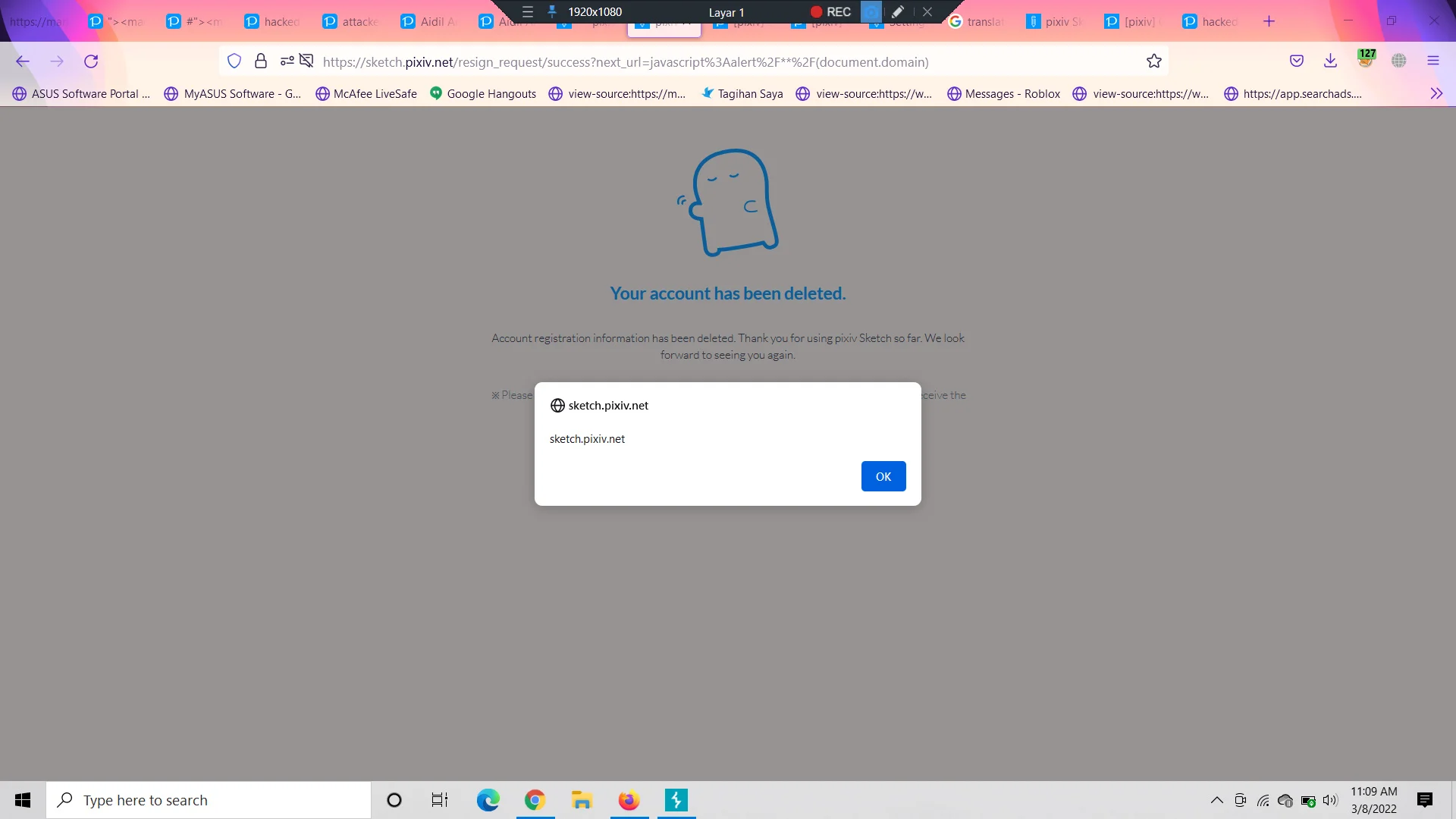
- Pop ups appear :)
Impact
If an attacker can control a script that is executed in the victim's browser, then they can typically fully compromise that user. Amongst other things, the attacker can: Perform any action within the application that the user can perform
Attachments
What the report shows
The target is the Sketch service at sketch.pixiv.net, part of the pixiv program on HackerOne. The researcher reported a reflected cross-site scripting issue reached through a success page under resign_request, where a next_url parameter is taken from the query string and used as a redirect destination.
The reproduction is a single step. The researcher opened the following URL:
https://sketch.pixiv.net/resign_request/success?next_url=javascript%3Aalert%2F**%2F(document.domain)
The next_url value is URL-encoded. Decoded, it is javascript:alert/**/(document.domain). The /**/ sequence is a JavaScript comment placed between the function name and the opening parenthesis, a common trick to break up the alert( pattern that naive filters look for while keeping the code valid.
When the page loaded, the browser executed the script and an alert box appeared showing the document domain. The researcher summarised this as "Pop ups appear".
The report includes a screenshot as an attachment.
The report records a medium severity with a CVSS score of 6.4, classified as reflected cross-site scripting. It was disclosed on 23 March 2022. The report does not describe a fix, and it does not state whether a bounty was paid.
Root cause
The report does not describe the underlying cause. A value beginning with javascript: is then treated as script rather than as a URL to navigate to, and the browser executes it in the page's origin.
Redirect parameters are a classic place for this mistake because developers think of them as navigation, not as code. The parameter is expected to hold an http or https URL, but nothing in the code enforces that assumption.
Impact
The report frames the impact in general terms: if an attacker can control a script that executes in the victim's browser, they can typically fully compromise that user, and among other things perform any action within the application that the user can perform. The report gives only general impact wording and does not discuss session access.
The report does not discuss any additional preconditions, such as whether the endpoint requires an authenticated session or whether any cookie flags limit what the script can reach.
How this kind of bug works
Reflected XSS happens when data from a request is written into a response, or consumed by client-side code, in a context where it is interpreted as executable content. In the redirect variant, the vulnerable sink is navigation: code takes a user-supplied string and hands it to the browser as a destination. Browsers accept several schemes in navigation contexts, and javascript: is one of them. When such a URL is assigned to location, the browser evaluates the remainder as script in the context of the current document.
The /**/ comment splits the alert( pattern while keeping the code valid. The robust defence is not pattern matching but scheme allow-listing: parse the value as a URL, accept only http and https, and reject everything else. Relative paths should be resolved against a fixed base rather than trusted as given. Where a redirect target must be preserved, storing it server-side and referencing it by an opaque key removes the injection point entirely.
Content Security Policy can reduce the damage of this class of bug, but it is a mitigation, not a fix, and a policy that permits inline script or broad script sources will not stop it.
How to test for it
- Map every parameter that looks like a destination: names such as
next,next_url,return,redirect,url,continue,callbackanddest. Look at login, logout, registration, password reset and success or error pages, which commonly redirect afterwards. - Send a harmless external URL first and confirm the parameter actually drives navigation. This establishes the sink before you try to abuse it.
- Replace the value with a
javascript:scheme payload and observe whether script executes. Use a distinctive marker, such as a value that changes the page title or triggers a dialog, so a positive result is unambiguous. - If the obvious payload is blocked, try encoding variations and comment insertion between the function name and the parenthesis, as in the report. Also test scheme casing and leading whitespace or control characters, which some filters miss.
- Check whether the value is reflected into HTML, into an attribute, or consumed only by client-side JavaScript. The context determines which payload shape is relevant.
A positive result is script executing in the target origin, visible as a dialog, a DOM change or a callback to a host you control. Common false positives include a payload that is reflected but HTML-encoded, a redirect that only accepts the value after server-side validation, and a javascript: string that appears in the response body but is never passed to a navigation sink. Confirm execution in a real browser rather than relying on the response body alone.
How it is fixed
Allow-list the scheme of any redirect target, accepting only http and https, and reject or ignore anything else. Resolve relative paths against a fixed base URL. Where possible, avoid putting the destination in the request at all: keep it server-side and pass an identifier. Add a Content Security Policy as defence in depth, and review other endpoints that share the same redirect helper, since the same sink is often reused across several pages.
Hunting notes
Redirect parameters cluster around authentication flows: post-login landing pages, logout confirmations, email verification, password reset completion and any "success" page that forwards the user onward. These pages are often built quickly and treat the destination as a convenience rather than as untrusted input.
Recon signals worth watching are parameters whose values look like URLs or paths, client-side code that reads query parameters and assigns them to location, and single-page applications that route through a shared redirect helper. Grepping JavaScript bundles for location.href, location.assign and location.replace next to query-string parsing is a quick way to find candidate sinks.
To make a report land, show execution in the target origin with a clear, non-destructive proof, explain which user actions the script could perform while authenticated, and state the delivery precondition honestly. A short, reproducible URL and a screenshot of the script running are usually enough.
What happened, in plain words
This report is about a website called Sketch, at sketch.pixiv.net, which is part of the pixiv family of services. The researcher found a security bug on one of its pages and reported it through HackerOne, a platform where people report bugs to companies.
The bug is a reflected cross-site scripting (XSS) issue. In plain terms: the page took a piece of text from the address bar and treated it as a set of instructions for the browser to run, instead of treating it as harmless text. That let the researcher make the browser show a pop-up box.
A quick comparison: imagine a receptionist who is told "send the next visitor to room 5". If someone says "send the next visitor to room 5, and also set off the fire alarm", a good receptionist ignores the extra instruction. A vulnerable page is a receptionist who does exactly what the extra words say.
The page involved is a success page under resign_request. The report does not explain what resign_request does beyond that; it is a page you land on after some action succeeds. That page accepts a parameter called next_url, which is meant to say where to send you next. A parameter is a named value attached to a web address after a question mark, like a note pinned to a door telling you where to go.
The one step that reproduced it
The researcher opened this address in a browser:
https://sketch.pixiv.net/resign_request/success?next_url=javascript%3Aalert%2F**%2F(document.domain)
Let us take it apart, because every part matters:
https://sketch.pixiv.net/resign_request/successis the page itself. This is the part that decides what the page does.?starts the list of parameters.next_url=is the parameter name. The page reads this value and uses it as a destination.javascript%3Aalert%2F**%2F(document.domain)is the value. The%3Aand%2Fare URL encoding: a way of writing characters that are awkward in a web address.%3Ameans a colon (:) and%2Fmeans a slash (/). Decoded, the value is:
Now the decoded value makes sense as a trick:
javascript:is a special prefix that tells a browser "what follows is code to run", not a normal web address. Browsers accept it in places where they expect a destination.alert(...)is a built-in browser command that opens a small pop-up box with a message./**/is a JavaScript comment, text the browser ignores. Here it sits between the wordalertand the opening bracket. Why? Because many simple filters look for the exact patternalert(and block it. Splitting it with a comment keeps the code working while dodging that check. This is a small but important lesson: blocking a specific word is a weak defence.document.domainis a built-in value that holds the site's own name. Using it as the message proves the code is running as part ofsketch.pixiv.netitself, not somewhere unrelated.
When the page loaded, the browser ran the code and a pop-up appeared showing the site's domain. The researcher described this simply as "Pop ups appear".
The report includes a screenshot as an attachment.
The report records a medium severity and a CVSS score of 6.4. CVSS is a standard scoring system for how serious a bug is; 6.4 sits in the middle of the scale. The report was disclosed on 23 March 2022. It does not describe a fix, and it does not say whether a bounty was paid.
Why it matters
The report explains the impact in general terms: if an attacker can control code that runs in a victim's browser, they can usually fully compromise that user, and among other things perform any action within the application that the user can perform.
That last part is the key. When you log in to a site, the site gives your browser a cookie, a small piece of stored data that acts like a wristband at an event: show it and the site knows who you are. The report gives only general impact wording and does not discuss session access. The report does not discuss whether the page requires you to be logged in, or any other conditions for the attack.
In general, how this kind of bug works
Reflected XSS happens when something a visitor sends in a request comes back in the response, or is used by the page's own code, in a place where it is treated as instructions rather than text. The word reflected means the value bounces straight back from your request; it is not stored on the server for later visitors.
This particular flavour is the redirect variant. A redirect is simply the site telling your browser "go to this other address instead". A normal destination starts with http or https. A javascript: destination is code, and the browser will run it in the context of the current page.
Why do developers make this mistake? Because they think of the parameter as navigation, not as code. They expect a web address and never enforce that expectation.
How to test for it
- Look for parameters whose names suggest a destination:
next,next_url,return,redirect,url,continue,callback,dest. Check login, logout, registration, password reset, and success or error pages, since these often forward you somewhere afterwards. - First send a harmless external web address and confirm the page really does navigate there. This proves the parameter actually controls where you go before you try anything clever.
- Then replace the value with a
javascript:payload and see whether code runs. Use something obvious, like a pop-up or a change to the page title, so a positive result is unmistakable. - If the obvious payload is blocked, try encoding variations and inserting a comment between the function name and the bracket, as in this report. Also try different capitalisation of the scheme and leading spaces or control characters, which some filters miss.
- Note where the value ends up: inside the page's HTML, inside an attribute, or only read by the page's own JavaScript. The location decides which payload shape makes sense.
A positive result is code running as part of the target site, visible as a pop-up, a change to the page, or a request to a server you control. Common false positives are a payload that is reflected but safely encoded as text, a redirect that validates the value on the server, and a javascript: string that appears in the page but is never actually used as a destination. Always confirm in a real browser rather than trusting the page source alone.
How it is fixed
The robust fix is not to search for bad words but to allow only good ones: parse the value as a web address, accept only http and https, and reject everything else. Relative paths should be resolved against a fixed base address rather than trusted as given. Where possible, avoid putting the destination in the request at all: keep it on the server and pass a meaningless identifier instead, which removes the injection point entirely.
A Content Security Policy (CSP) is a set of rules a site sends to the browser saying which scripts may run. It can reduce the damage from this class of bug, but it is a mitigation, not a fix, and a policy that allows inline scripts or broad script sources will not stop it.
Where to look when hunting
Redirect parameters cluster around login flows: pages you land on after logging in, logging out, verifying an email, resetting a password, or any "success" page that forwards you onward. These pages are often built quickly, and the destination is treated as a convenience rather than as untrusted input. Useful signals are parameters whose values look like addresses or paths, page code that reads values from the address bar and assigns them to location, and single-page apps that share one redirect helper. Searching the site's JavaScript files for location.href, location.assign and location.replace near address-bar parsing is a quick way to find candidates.
To make a report land, show the code running as part of the target site with a clear, harmless proof. A short, reproducible address and a screenshot of the code running are usually enough.
Glossary
- XSS (cross-site scripting): a bug where a site lets an attacker's text be treated as code by a visitor's browser.
- Reflected XSS: XSS where the malicious value comes back from the same request rather than being stored on the server.
- Parameter: a named value attached to a web address after a question mark, such as
next_url=.... - Query string: the part of a web address after the
?, holding the parameters. - URL encoding: writing awkward characters as
%plus a code, such as%3Afor a colon. javascript:scheme: a prefix telling the browser that what follows is code to run, not a web address to visit.- Comment (
/**/): text a browser ignores; here used to split a blocked pattern while keeping the code valid. alert(): a built-in browser command that opens a pop-up box with a message.document.domain: a built-in value holding the current site's name.- Origin: the combination of scheme, host and port that a page belongs to; code running in one origin is treated as part of that site.
- Cookie: small data a site stores in your browser so it can recognise you, like a wristband at an event.
- Session: your logged-in state on a site, usually carried by a cookie.
- Redirect: the site telling your browser to go to a different address.
- Sink: the place in code where a value is used in a way that can execute it, such as assigning it to
location. - CVSS: a standard scoring system for the severity of a security bug.
- Content Security Policy (CSP): rules a site sends to the browser limiting which scripts may run.
- False positive: a test result that looks like a bug but is not actually exploitable.
- DOM: the browser's in-memory model of the page, which scripts can read and change.






