XSS reflected on [https://www.pixiv.net]
A reflected cross-site scripting flaw was found in the URL path and search bar of the pixiv website when viewed in Chrome on iOS. An attacker could run script in a victim's browser and steal their cookies.

- Triaged in 11 hours
- Fixed in 36 days
- Paid in 20 days
- Disclosed after 12 months
Summary:
I found a xss reflected on https://www.pixiv.com URL and in the search bottom from Chrome IOS 13.1
Steps To Reproduce:
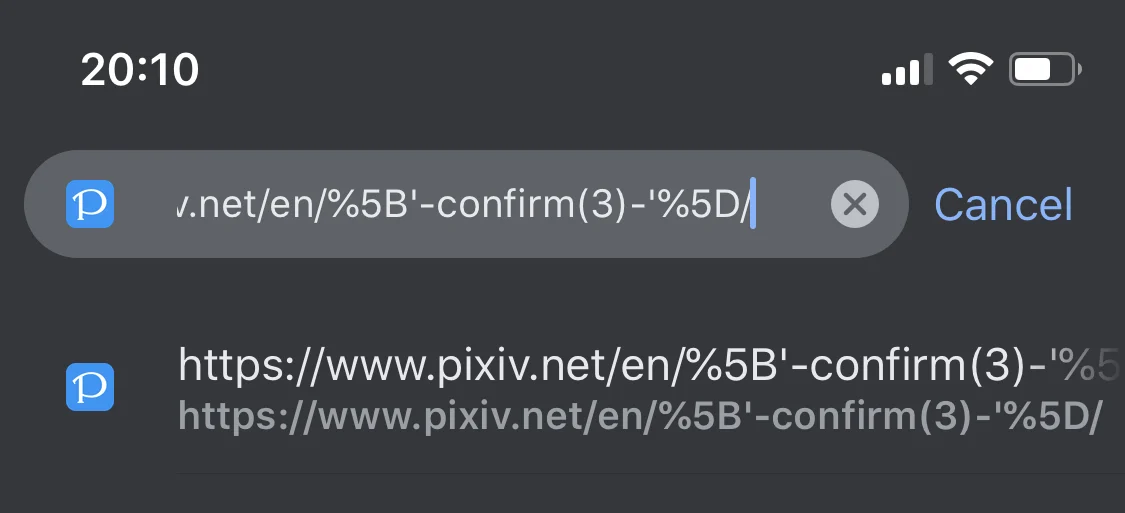
- In the URL https://www.pixiv.net/en/%5B'-alert(document.cookie)-'%5D Add Payload ['-confirm(3)-']
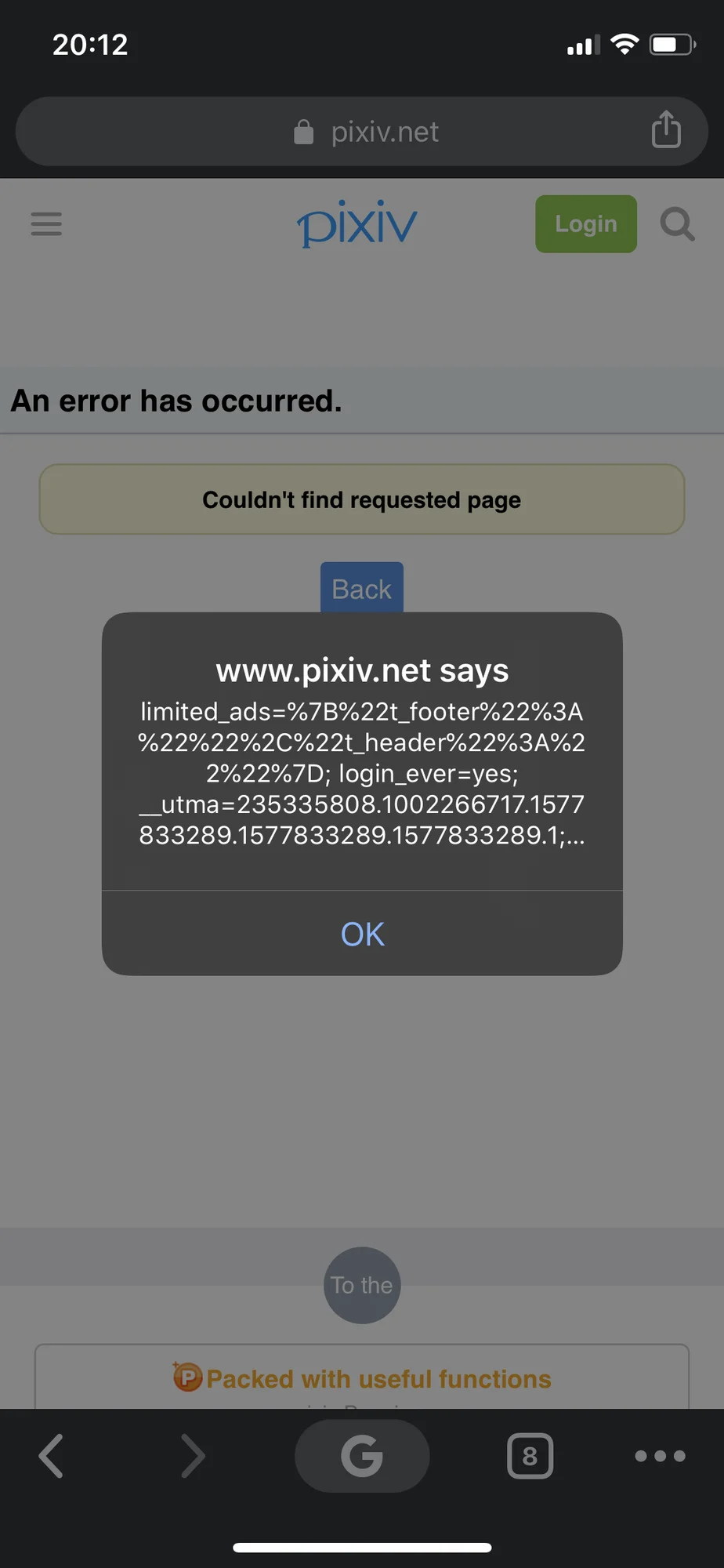
- In the URL https://www.pixiv.net/en/%5B'-alert(document.cookie)-'%5D Add ['-alert(document.cookie)-']
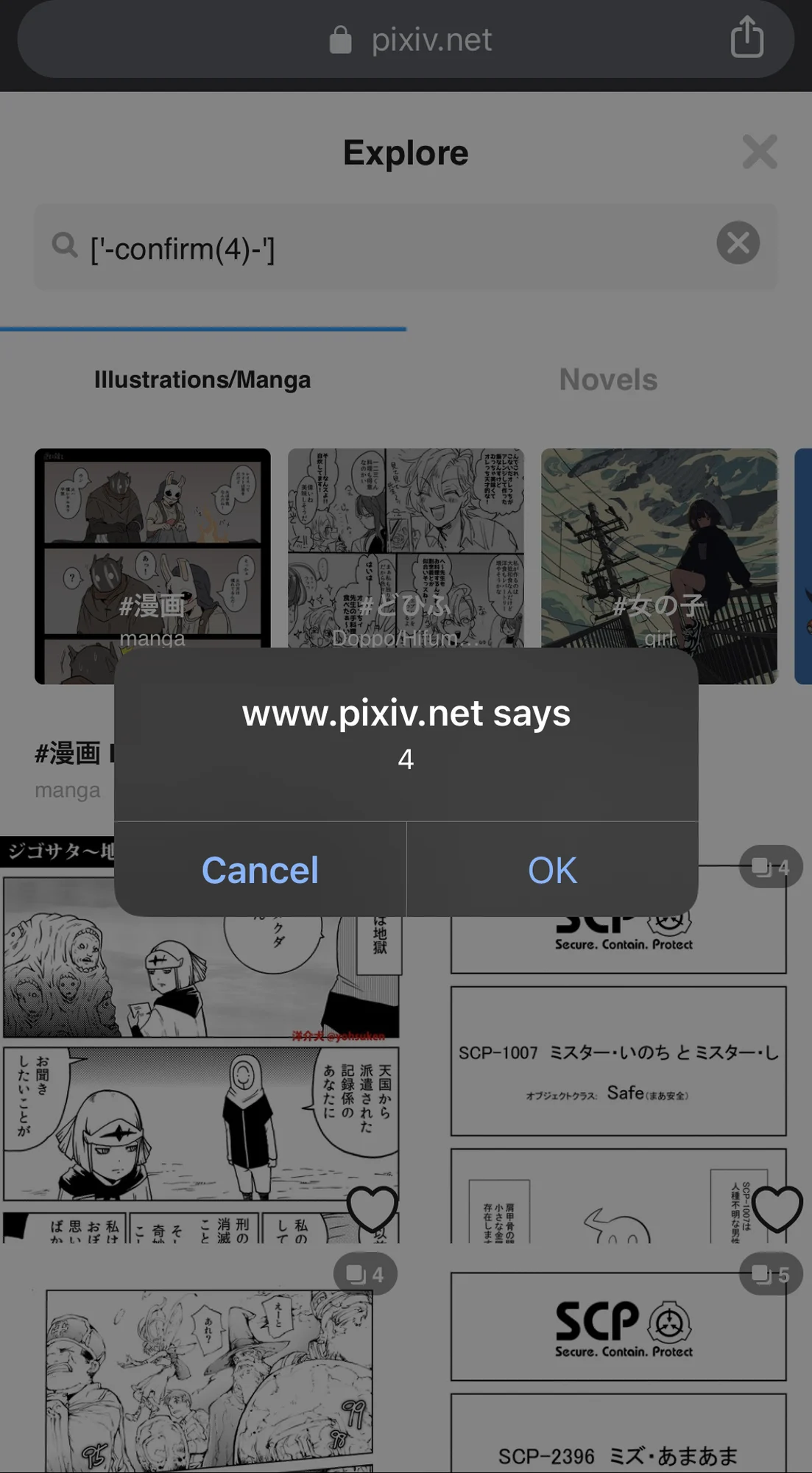
- In the Search Bar Add ['-confirm(3)-'] and the URL is https://www.pixiv.net/en/tags/%5B'-confirm(3)-'%5D#discover
Impact
Steal Cookie
Attachments
What the report shows
The target is pixiv at www.pixiv.net, and the report describes a reflected XSS reached through a URL path and through the search bar. The researcher reported a reflected cross-site scripting issue, reproduced from Chrome on iOS 13.1. The report was rated medium severity and paid a bounty of 500.00 USD; it was disclosed on 2020-12-17.
The reproduction steps are short and are reproduced here exactly as written:
- In the URL https://www.pixiv.net/en/%5B'-alert(document.cookie)-'%5D Add Payload ['-confirm(3)-']
- In the URL https://www.pixiv.net/en/%5B'-alert(document.cookie)-'%5D Add ['-alert(document.cookie)-']
- In the Search Bar Add ['-confirm(3)-'] and the URL is https://www.pixiv.net/en/tags/%5B'-confirm(3)-'%5D#discover
The payloads used are:
['-confirm(3)-']
['-alert(document.cookie)-']
The first two steps start from a URL whose path segment is the percent-encoded form of ['-alert(document.cookie)-'] and add a payload. The third step enters the payload directly into the search bar, which produces a tag URL of the form https://www.pixiv.net/en/tags/%5B'-confirm(3)-'%5D#discover. The report does not describe the server response, the exact context in which the payload was reflected, or which of the steps produced the executing script; it presents the payloads and the URLs as the reproduction.
The stated impact is cookie theft. The report does not include a fix description or a timeline beyond the disclosure date.
The attachments are screenshots of the reproduction:
Root cause
The report describes a reflected XSS reached through the URL path and the search bar, but does not state the cause. The exact sink (HTML body, attribute, or a JavaScript string inside an inline script) is not stated.
Impact
The report lists the impact as cookie theft. Whether the session cookie is reachable from JavaScript depends on cookie flags such as HttpOnly, which the report does not discuss. A reflected XSS in a search feature is typically delivered by link, so it requires the victim to follow the crafted URL.
How this kind of bug works
Reflected XSS occurs when an application takes input from the current request (path, query string, form field, fragment read by client-side code) and writes it into the HTML response without context-appropriate encoding. The browser parses the response as markup, so characters that the application treats as data are treated as structure: a quote can close an attribute, a < can open a tag, and a </script> can end an inline script block. When the injected text lands inside an existing JavaScript string, breaking out of the string and the surrounding statement is enough to run arbitrary code.
The class exists because output encoding is context-dependent: HTML text, attribute values, URL attributes, JavaScript string literals and CSS all need different escaping. Frameworks that auto-escape templates remove most of this risk, but manual string concatenation, innerHTML-style DOM writes, and server-side rendering of request data into inline scripts reintroduce it. Defences are output encoding at the sink, a restrictive Content Security Policy, and HttpOnly on session cookies to limit the value of a successful injection.
How to test for it
- Identify every place where request data is echoed into the response: search terms, error messages, 404 pages, language or locale path segments, redirect targets, and values read from the URL fragment by client-side code.
- Send a benign marker first (a unique alphanumeric string) and locate it in the response body. Note the exact context: between tags, inside an attribute, inside a
<script>block, inside a JSON blob. - Choose a payload for that context. For HTML text, a tag with an event handler; for an attribute, break out of the quotes; for a JavaScript string, close the string and the statement. The payloads in this report use bracket and quote characters around a function call.
- Confirm execution in a real browser, not just by string matching in the response. A reflected payload that is correctly encoded will appear as text and will not run.
- Test both the raw and percent-encoded forms of the characters, and test the same input through the UI (search bar) as well as directly in the URL, since client-side routing may handle them differently.
Common false positives: the payload appears in the response but is HTML-encoded; the payload is reflected only inside a JSON response served with a non-HTML content type; the payload executes only after the tester manually modifies the DOM; or the reflection is in a header that browsers do not render. A positive result is script execution in the page's origin, demonstrated with a harmless call such as an alert or a DOM change.
How it is fixed
Apply context-aware output encoding to every reflected value, using the templating engine's escaping rather than manual concatenation. Where values must be placed in inline scripts, serialise them as JSON and avoid string interpolation. Set a Content Security Policy that disallows inline script and restricts script sources, and mark session cookies HttpOnly and Secure so that script cannot read them. Validate or reject unexpected characters in path segments where the value has a known format.
Hunting notes
Search and tag pages are productive because they echo user input by design, and path-based routing often bypasses query-string filters. Look at localised paths, pagination parameters, and any value that appears in a page title or breadcrumb. Client-side rendered applications are worth extra attention: the fragment is never sent to the server, so server-side filters never see it, and DOM sinks such as innerHTML may receive it directly.
Recon signals include reflected markers in error pages, frameworks that render templates server-side with request data, and endpoints that return HTML for values that look like identifiers. To make a report accepted, show the full request and response context, a screenshot or recording of execution in a current browser, and a clear statement of what an attacker gains, such as reading a non-HttpOnly cookie or performing an action as the victim. Keep the payload minimal and avoid actions that affect other users.
What happened, in plain words
pixiv is a website where people share and browse artwork. One of its main features is search: you type a word into a search box, or you open a link that already contains a search term, and the site shows you matching results. To do that, the site takes whatever you typed and puts it back into the page it sends you, so you can see what you searched for.
A security researcher reported a reflected cross-site scripting issue on pixiv. That is the bug class called reflected cross-site scripting, or XSS. "Reflected" means the malicious input bounces straight back from the server in the same response, rather than being stored on the site for later visitors.
The researcher reproduced it in Chrome on iOS 13.1, on www.pixiv.net. The report was rated medium severity and paid a bounty of 500.00 USD. It was disclosed on 2020-12-17.
The reproduction steps
The report gives three short steps, reproduced here exactly as written:
- In the URL https://www.pixiv.net/en/%5B'-alert(document.cookie)-'%5D Add Payload ['-confirm(3)-']
- In the URL https://www.pixiv.net/en/%5B'-alert(document.cookie)-'%5D Add ['-alert(document.cookie)-']
- In the Search Bar Add ['-confirm(3)-'] and the URL is https://www.pixiv.net/en/tags/%5B'-confirm(3)-'%5D#discover
The two payloads used are:
['-confirm(3)-']
['-alert(document.cookie)-']
What each part means
A URL is the address of a page. The part after the domain, here /en/, is the path, and %5B is simply the percent-encoded form of the [ character. Browsers and servers encode characters this way so that addresses stay valid. So the starting URL in steps 1 and 2 contains a bracketed payload in its path, and a payload is added.
alert(document.cookie) is a classic harmless test. document.cookie is the browser's way of reading the cookies that belong to the current site, and alert pops up a box showing that text. If the box appears, it would show that the page ran the researcher's code and that the code could read the cookies. confirm(3) does the same kind of thing: it shows a small dialog with an OK and a Cancel button. It is used as a second, slightly different proof that script is executing.
Step 3 is different because the payload goes into the search bar itself, the normal way a visitor uses the site. The site then builds a tag URL of the form https://www.pixiv.net/en/tags/%5B'-confirm(3)-'%5D#discover. The #discover part is the fragment, the piece at the end of a URL that the browser keeps for itself and does not send to the server.
The steps show input through a URL path and through the ordinary search box. The report does not say which step caused the script to run.
The stated impact is cookie theft. The report does not describe the server's response, the exact place in the page where the payload appeared, or which step actually caused the script to run. It presents the payloads and the URLs as the reproduction.
The screenshots
The attachments are screenshots of the reproduction:
In general, how this kind of bug works
A web page is text that the browser reads and turns into something you can see. Some of that text is content, such as the words of a search result, and some is structure, such as the markers that say "this is a link" or "this is a script". The browser decides which is which by looking at characters. A quote can end an attribute, a < can start a tag, and a </script> can end a block of script.
Reflected XSS happens when a site copies something from your request into the page without marking it clearly as content. The browser then reads your characters as structure. A simple comparison: imagine a form where you write your name and a clerk copies it word for word onto an official letter. If you write "and please send the money to me", the clerk copies that too, and the letter now says something the office never intended. Encoding is the clerk's rule of writing your name inside quotation marks so it can only ever be read as a name.
Encoding has to match the place where the value lands. Text between tags, a value inside an attribute, a string inside a script block and a style rule all need different escaping. Modern frameworks escape automatically, but hand-built pages that glue strings together, or that write values into the page with JavaScript, can miss it.
How to test for it
- Find every place where something you send comes back in the page: search terms, error messages, missing-page messages, language codes in the path, redirect targets, and values read from the fragment by JavaScript.
- Send a harmless unique word first and find it in the response. Note exactly where it sits: between tags, inside an attribute, inside a script block.
- Pick a payload that fits that spot. The payloads in this report use brackets and quotes around a function call.
- Confirm it in a real browser. A payload that is correctly encoded shows up as text and does nothing.
- Try both the raw and the percent-encoded characters, and try the same input through the search box as well as directly in the URL, because the two routes can be handled differently.
Watch for false alarms: the payload appears but is encoded, it only appears in a JSON response, it only runs after you edit the page by hand, or it lands in a header the browser does not display. A real finding is script running on the site's own origin, shown with something harmless such as a dialog or a visible change to the page.
How it is fixed
Encode every reflected value for the context it lands in, using the template engine's escaping instead of joining strings by hand. Where a value must go inside a script, serialise it as JSON rather than pasting it into a string. Add a Content Security Policy that blocks inline script and limits where script can load from. Mark session cookies HttpOnly and Secure so script cannot read them and they are only sent over encrypted connections. Where a path segment has a known format, reject unexpected characters.
Where to look
Search and tag pages are productive because they echo your input by design, and path-based routing often slips past filters written for query strings. Check localised paths, page-number parameters, and anything that appears in the page title or breadcrumb. Pages built mostly in the browser deserve extra attention: the fragment is never sent to the server, so server-side filters never see it, and JavaScript that writes values into the page may receive it directly.
To get a report accepted, show the full request and response, a screenshot or recording of the script running in a current browser, and a clear statement of what an attacker gains, such as reading a cookie that is not HttpOnly or acting as the victim. Keep the payload minimal and do not affect other users.
Glossary
- XSS (cross-site scripting): a bug where a site lets input from a visitor be treated as code by the browser.
- Reflected XSS: the malicious input comes back in the same response to the same request, usually via a crafted link.
- Payload: the piece of input crafted to trigger the bug, here a bracketed function call.
- URL: the address of a page, made of a domain, a path, sometimes a query string and a fragment.
- Path: the part of a URL after the domain, such as
/en/. - Fragment: the part of a URL after
#, kept by the browser and not sent to the server. - Percent-encoding: writing a character as
%plus a code, for example%5Bfor[, so addresses stay valid. - Cookie: a small piece of data a site stores in your browser, often used to keep you logged in.
document.cookie: the browser feature that lets page script read the site's cookies.alert/confirm: browser dialog functions, used here as harmless proof that script ran.- Output encoding: converting a value so the browser reads it as text, not as page structure.
- Context: the place a value lands in the page (text, attribute, script), which decides the right encoding.
- Content Security Policy: a header that tells the browser which scripts a page may run.
HttpOnly: a cookie flag that stops page script from reading that cookie.Secure: a cookie flag that sends the cookie only over encrypted connections.- Origin: the combination of scheme, domain and port that a page belongs to; script runs with the origin's privileges.
- Bounty: a payment a company makes for a valid security report.




