How I found a GoldMine but got No Gold
A staging Nacos instance allowed unauthenticated creation of new users, which gave access to the management panel and exposed 59 configuration files containing database, object storage and blob storage credentials. The author used a leaked blob storage token to access transaction data across all stores worldwide.
 Published on medium.com
In the last 2 months, I have been testing a private program with a Big Scope. It includes multiple Domains and Brands.
The full write-up lives on its author's site
It belongs to its author, so we link to it rather than copy it. The other two tabs are our own rewrites, checked against it.
Context
This write-up covers a private bug bounty program with a large scope, spanning multiple domains and brands. The researcher had been testing it for the previous two months and notes that a big scope is rewarding because developers are constantly shipping new things and leaving holes behind. The company in question was divided into divisions by country, and each country division had its own teams, which widens the attack surface further.
The feature at the centre of the report is a Nacos instance. Nacos, in the researcher's own quoted description, provides dynamic service discovery, service configuration, service metadata and traffic management, and is the infrastructure that supports a service-centred modern application architecture with a microservices or cloud-native approach. In other words, it is the place where a microservice platform keeps its configuration, which is exactly why access to its management panel is interesting: configuration files are where credentials live.
Setup
The report does not describe any accounts, roles or credentials obtained before the test. The work started from subdomain enumeration against the in-scope domains, followed by content discovery with ffuf. The only version detail given is that the behaviour relied upon applies to Nacos version <= 2.0. No specific Nacos build, operating system or deployment topology is stated.
Finding it
The researcher's starting point is reconnaissance, framed with the line that the first rule of war and business is to know your enemy.

Understanding the company's development structure matters: divisions by country and separate teams per country mean more entry points. Subdomain enumeration on the redacted target produced many subdomains. One stood out:
https://crm-stg.REDACTED.com
What drew attention was the default page served on that host.
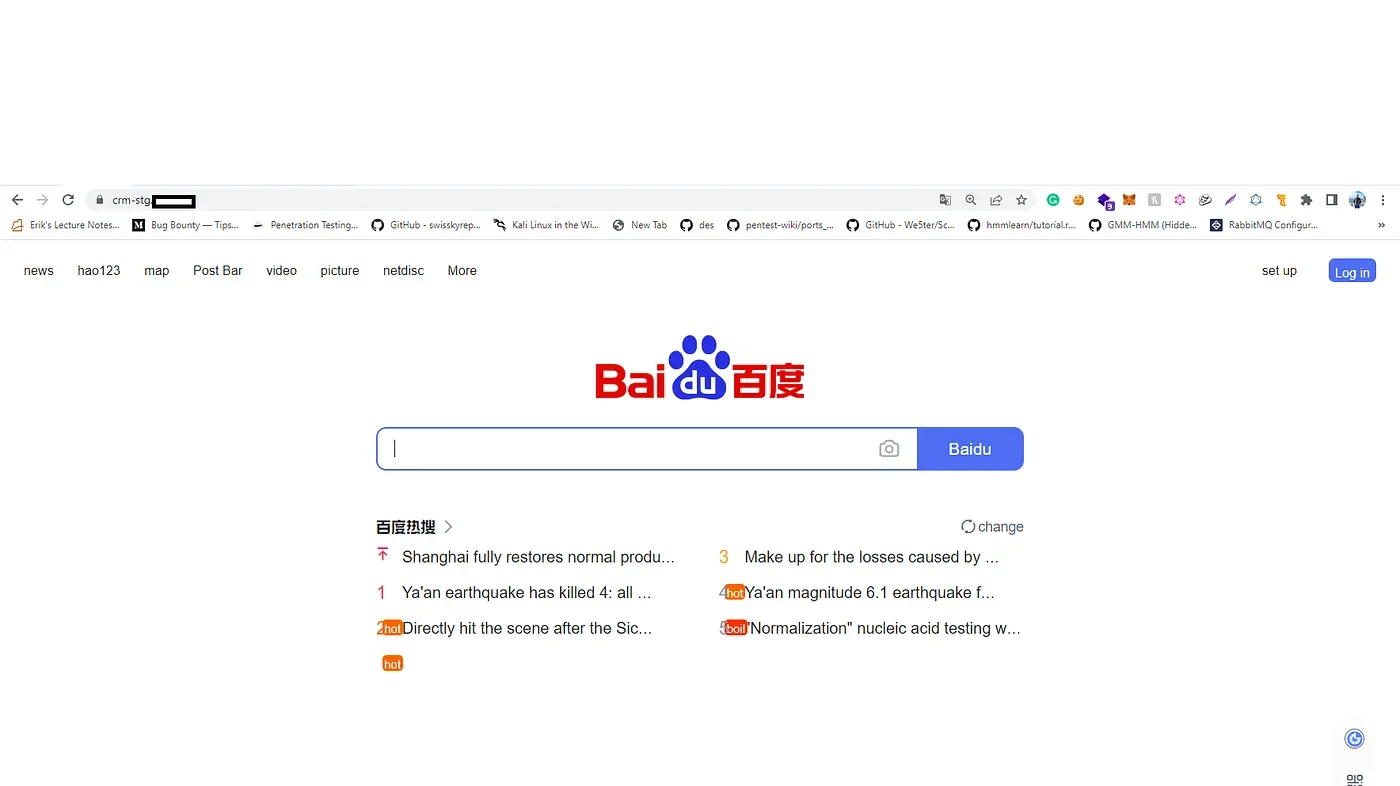
The oddity was a Baidu search engine appearing as the default page. That prompted a run of ffuf against the domain, which surfaced an interesting endpoint:
https://crm-stg.REDACTED.com/nacos
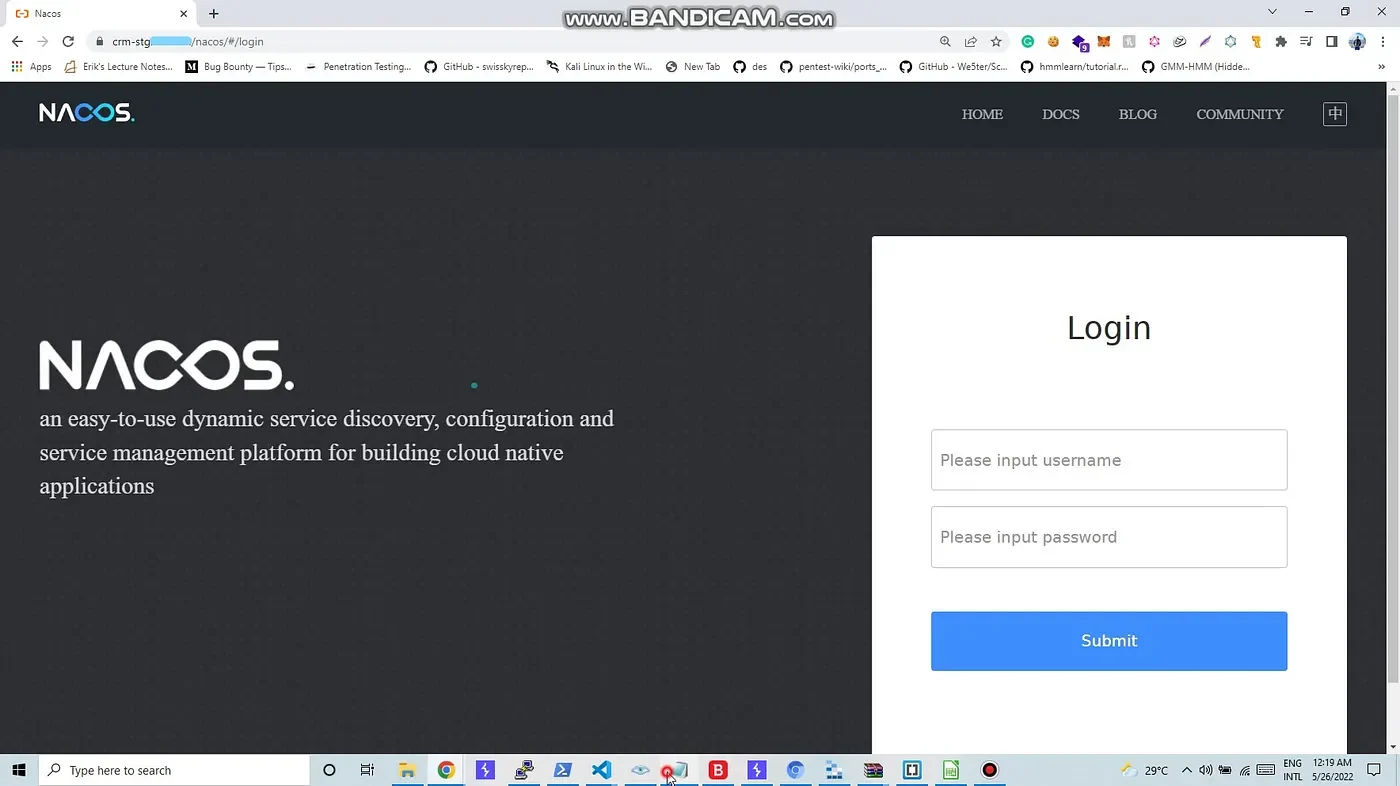
That endpoint presented a Nacos login page. The researcher had not encountered Nacos before, so a quick search followed, yielding the description quoted above. The description itself is what made the finding promising: if the management panel could be reached, configuration files might be disclosed.
Exploitation
Step 1: research the known weakness
While searching for exploits related to Nacos, the researcher found a blog post at https://unsafe.sh/go-56947.html. From it: in Nacos version <= 2.0, an attacker can view the accounts registered on the instance, although the passwords are stored encrypted. The request used to list accounts was:
curl -XGET -H ‘User-agent: Nacos-Server’ ‘https://crm-stg.redacted.com/nacos/v1/auth/users?pageNo=1&pageSize=900'
The request carries pageNo and pageSize parameters and a User-agent: Nacos-Server header. The report does not show the response body from this request; it only states that viewing accounts was possible and that passwords are encrypted.
Step 2: register a user without authorisation
The same weakness allowed registering new users on the platform. The request was:
curl -XPOST ‘https://crm-stg.REDACTED.com/nacos/v1/auth/users?username=testing&[redacted]' -H ‘User-Agent: Nacos-Server’
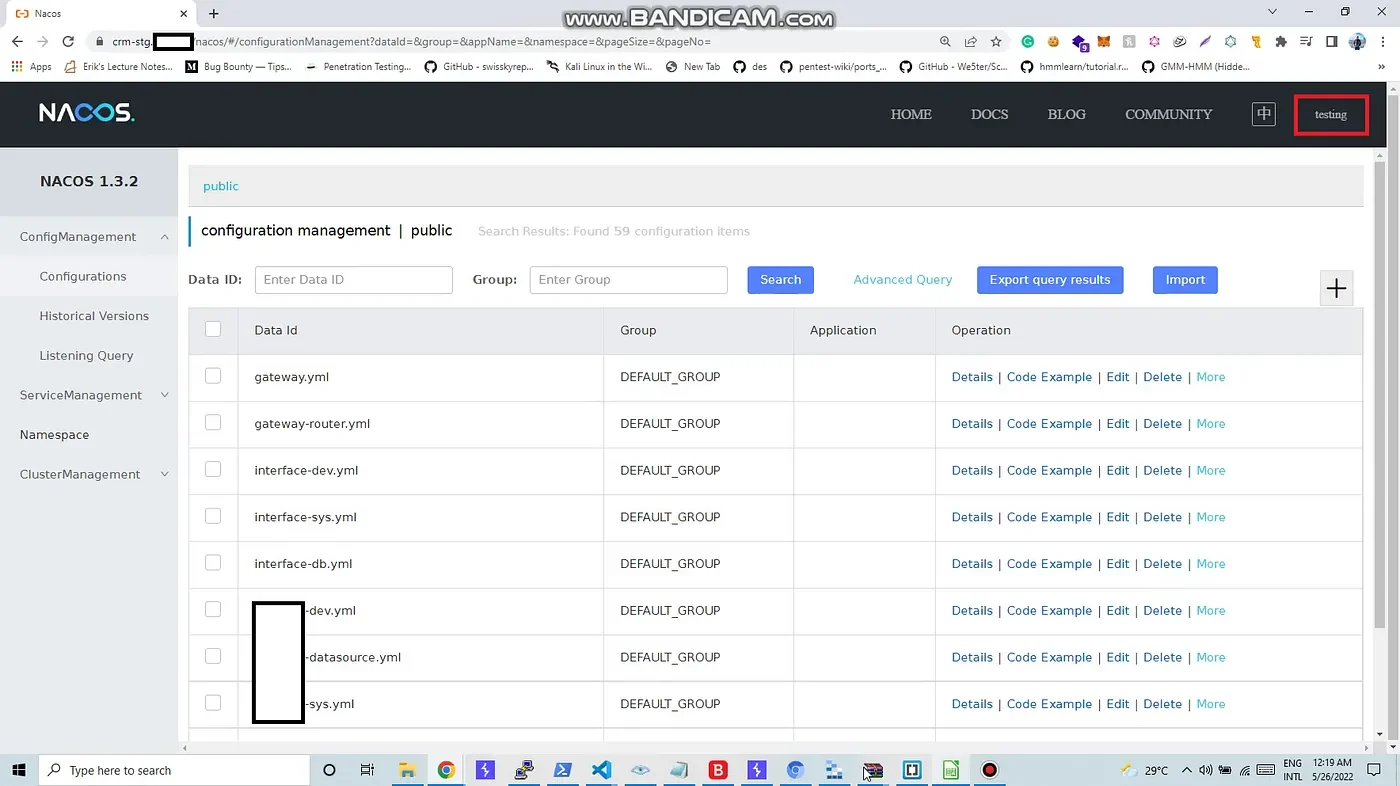
This is a POST to the user-creation endpoint with the new account's username and password supplied as query parameters, again carrying the User-agent: Nacos-Server header. Through it the researcher registered a user called testing and gained access to the Nacos panel.
Step 3: harvest the configuration
Inside the panel the researcher found what they describe as a goldmine: a total of 59 configuration files. These disclosed database credentials, OSS bucket keys, Blob Storage SAS tokens and many more secret keys.
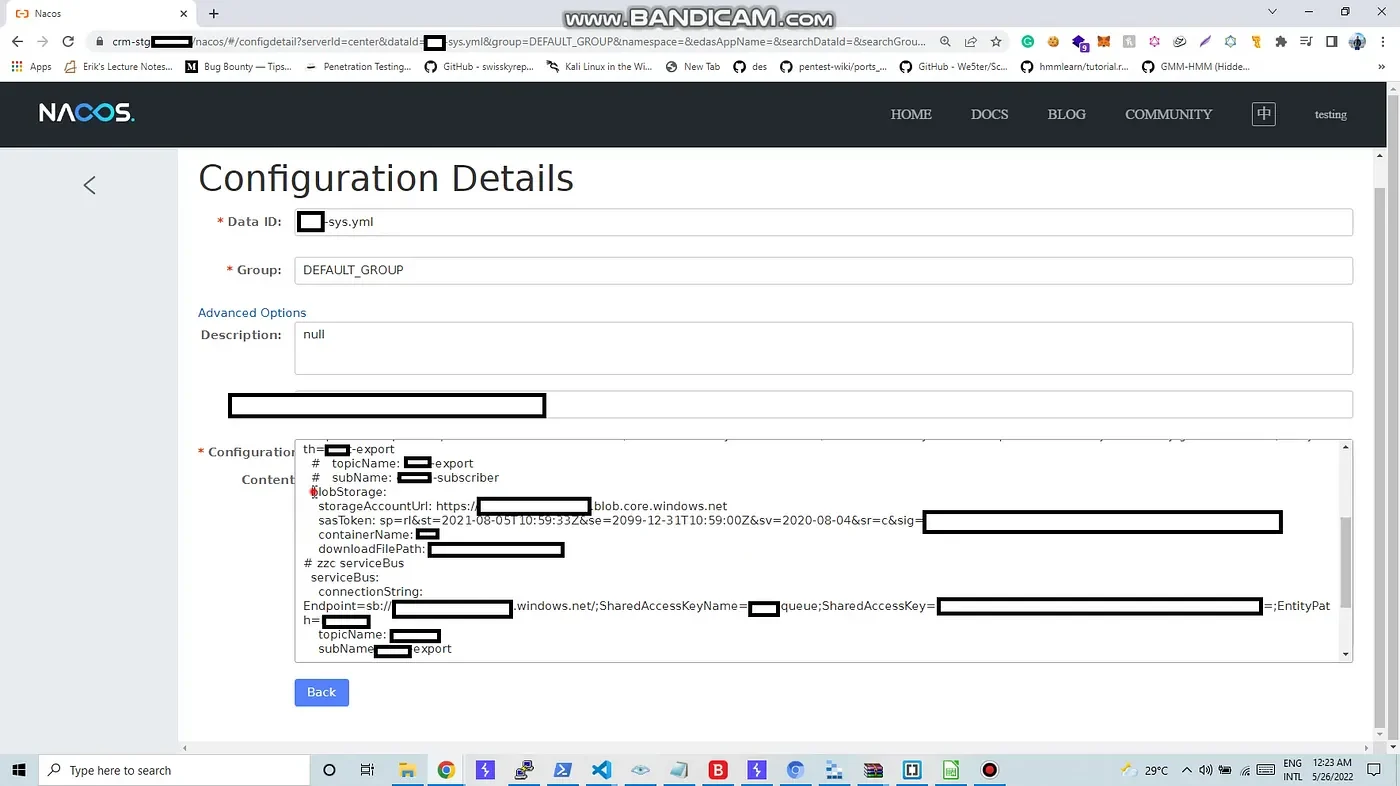
One example is given, a Blob Storage SAS token that gave access to all the transactions done across all the stores of the company worldwide.
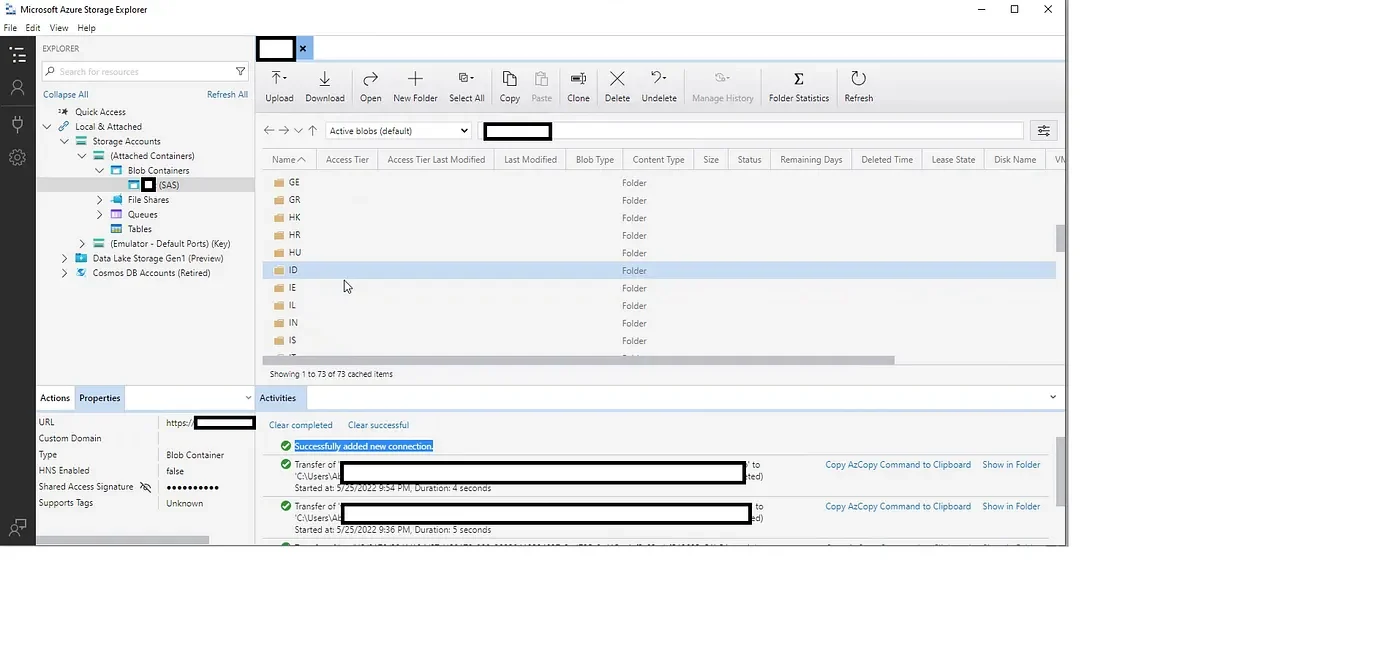
The second screenshot is captioned Azure Storage Explorer.
Root cause
The underlying mistake is an unauthenticated, or insufficiently authenticated, user-management API on the Nacos instance. The blog the researcher found states the behaviour applies to Nacos version <= 2.0. Because the panel holds the platform's configuration, the second half of the problem is that those configuration files contained live credentials for databases, object storage and other services, so a single access-control gap cascaded into broad data access.
Impact
An unauthenticated attacker who can reach the Nacos endpoint can register a user and obtain access to the management panel. From there, the 59 configuration files exposed database credentials, OSS bucket keys, Blob Storage SAS tokens and other secrets. With the Blob Storage SAS token shown as an example, the researcher could reach all transactions across all of the company's stores worldwide.
Fix
Variants to test
- Look for Nacos consoles on staging and CRM style hostnames found during subdomain enumeration. A positive result is a host serving the Nacos login page at
/nacos. - Try listing users with a large page size and the server user agent:
A positive result is a JSON list of accounts coming back without a valid session. 3. Try creating an account the same way:
A positive result is a success response followed by a working login to the panel. 4. Once inside a panel, enumerate the configuration list and read every entry for connection strings, access keys and SAS tokens. A positive result is any credential that authenticates against a live backend service. 5. Run content discovery against hosts with unusual default pages, as the Baidu default page did here, to find management endpoints that are not linked from the site.
Result
The researcher closes with the reminder that in bug bounties you should always be prepared for the unexpected.

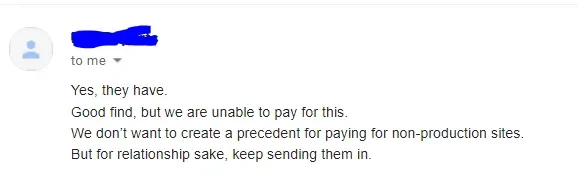
The company's reply is shown below. The issue was rated P1, but no reward was paid, which the researcher found disappointing, though the testing itself was enjoyable.
What happened, in plain words
A security researcher spent about two months testing a private bug bounty program: a company pays people to look for weaknesses in its systems and report them. This program had a very large scope, meaning many domains (website addresses) and many brands were fair game. Large scopes are rewarding because developers keep shipping new features, and new features often leave gaps behind.
The company was organised into divisions by country, and each country division had its own teams. More teams and more divisions mean more systems, and more systems mean more places to look for mistakes.
The researcher found a Nacos instance. Nacos is a piece of software that a company uses to keep the settings (configuration) for its many small programs, called microservices, in one place. Think of it as the shared filing cabinet where a large kitchen keeps all its recipes and supplier contracts. If an outsider can open that cabinet, they can read every recipe and every supplier password inside it.
The weakness was that this Nacos instance allowed an attacker to create new users with admin privileges. With that new account the researcher logged into the Nacos management panel, the web interface where the settings are shown and edited. Inside were 59 configuration files. Those files contained real credentials: database passwords, OSS bucket keys, Blob Storage SAS tokens and more. A credential is simply a secret that proves who you are, like a key to a door. One of those secrets, a Blob Storage SAS token, gave access to all the transactions done across all the stores of the company worldwide.
The researcher reported it. The company rated the issue P1, its highest priority level, but paid no reward. The researcher was disappointed but said the testing itself was fun.
Background
A bug bounty program is an arrangement where a company invites outside researchers to test its systems and report problems, usually with a reward for good findings. A private program means only invited researchers can take part. Scope is the list of what is allowed to be tested. Here the scope was big: multiple domains and brands.
Two months of testing in a large scope is described as fun and rewarding, because developers are constantly developing things and many bugs and holes are left by them. Every new feature is a new surface for mistakes.
The vulnerability, explained
The issue was a vulnerable Nacos instance. Vulnerable here means it had a known weakness that could be abused. That weakness allowed an attacker to create new users with admin privileges, meaning the new accounts had the highest level of power. That led to access to the Nacos management panel, the control screen for the software.
The panel then disclosed what the researcher calls a goldmine of backend credentials: database credentials, OSS bucket credentials, Blob Storage credentials and more. Backend means the parts of a system users never see, such as databases and storage. Credentials are the usernames, passwords, keys and tokens that unlock those parts.
Testing
The researcher opens with a line about reconnaissance: knowing your enemy first. Reconnaissance (recon) means gathering information about the target before attacking anything: what hosts exist, what software runs on them, what looks unusual.
Understanding the company's development structure matters. The researcher observed that the company was divided into divisions based on countries, and then different teams for those countries. Each division and team is another possible entry point, so this opens more attacking areas.
Finding the host
As the standard procedure, the researcher ran subdomain enumeration on the target. A subdomain is a prefix added to a main domain: if the company owns example.com, then shop.example.com and crm.example.com are subdomains. Enumerating them means finding as many as possible, because each one is a separate system that may be configured differently. Many subdomains were found. One caught attention:
https://crm-stg.REDACTED.com
The hostname contains crm and stg; the report does not interpret them. The reason this host stood out was its default page, the page a web server shows when no specific site has been set up for that address.
What was odd: a Baidu search engine was appearing as the default page. Baidu is a Chinese search engine. A search engine page on a company CRM host is out of place.
Finding the endpoint
Because of that oddity, the researcher ran ffuf on the domain. ffuf is a tool that tries a long list of common paths against a website and reports which ones exist, a bit like trying every key on a keyring in a lock to see which one turns. The interesting endpoint found was:
https://crm-stg.REDACTED.com/nacos
An endpoint is a specific address on a server that does something, rather than just showing a page. Here /nacos is the path where the Nacos web interface lives.
The screenshot shows the Nacos login page. The researcher had not encountered Nacos before, so a quick search followed. The quoted description says Nacos provides dynamic service discovery, service configuration, service metadata and traffic management, and makes it easier and faster to build, deliver and manage a microservices platform. In plain terms: it is the infrastructure that supports a service-centred modern application architecture with a microservices or cloud-native approach.
That description is what made the finding interesting. If the management panel could be reached, configuration files might be disclosed. Configuration files are where programs keep their settings, and settings very often include passwords and keys.
Step 1: research the known weakness
While searching for exploits related to Nacos, the researcher found a blog post at https://unsafe.sh/go-56947.html. An exploit is a concrete technique for abusing a weakness. From that blog: in Nacos version <= 2.0, an attacker can view the accounts registered on the instance, although the passwords are stored encrypted. Encrypted means scrambled so they cannot be read directly.
The request used to list accounts was:
curl -XGET -H ‘User-agent: Nacos-Server’ ‘https://crm-stg.redacted.com/nacos/v1/auth/users?pageNo=1&pageSize=900'
Line by line:
curlis a command-line tool for sending web requests, the same kind your browser sends, but from a terminal.-XGETsays use the GET method. A method is the verb of a web request: GET means give me something, POST means here is something new, create it.-H ‘User-agent: Nacos-Server’adds a header. Headers are extra labels attached to a request, like the return address and handling notes on an envelope.User-agentnormally says which browser you are. Here it is set toNacos-Server.- The URL points at
/nacos/v1/auth/users, the endpoint that lists user accounts. pageNo=1&pageSize=900are query parameters, values appended to the URL after a question mark.pageNois which page of results,pageSizeis how many results per page. A largepageSizepulls many accounts at once.
The report does not show the response body from this request. It only states that viewing accounts was possible and that passwords are encrypted.
Step 2: register a user without authorisation
The same weakness allowed registering new users on the platform. The request was:
curl -XPOST ‘https://crm-stg.REDACTED.com/nacos/v1/auth/users?username=testing&[redacted]' -H ‘User-Agent: Nacos-Server’
Line by line:
curlagain sends the request.-XPOSTuses the POST method, the verb for creating something.- The URL is the same user endpoint, but now with `username=testing&[redacted] as query parameters: the new account's name and password are supplied directly in the address.
-H ‘User-Agent: Nacos-Server’again sets the user agent toNacos-Server.
Through this the researcher registered a user called testing and gained access to the Nacos panel. The researcher registered a user called testing and gained access to the Nacos panel.
Step 3: harvest the configuration
Inside the panel the researcher found what they describe as a goldmine: a total of 59 configuration files. These disclosed database credentials, OSS bucket keys, Blob Storage SAS tokens and many more secret keys.
Some terms first. A database is where a company stores its structured data. OSS is object storage, a service for storing files. Blob Storage is Microsoft Azure's object storage. A SAS token (shared access signature) is a long string that acts like a temporary key to a storage account: whoever holds it can read or write the data it covers, without needing a username or password. A key is similar: a secret string that unlocks a service.
One example is given: a Blob Storage SAS token that gave access to all the transactions done across all the stores of the company worldwide.
The screenshot shows the disclosed Blob SAS token.
The second screenshot shows the token being used in Azure Storage Explorer, a desktop program for browsing Azure storage. The second screenshot is captioned Azure Storage Explorer.
Root cause
The underlying mistake is an unauthenticated, or insufficiently authenticated, user-management API on the Nacos instance. An API is the set of addresses a program offers so other programs can talk to it; unauthenticated means it does not properly check who is calling. The report does not explain why the User-agent: Nacos-Server header allowed the requests.
The blog the researcher found states the behaviour applies to Nacos version <= 2.0. Because the panel holds the platform's configuration, the second half of the problem is that those configuration files contained live credentials for databases, object storage and other services. One access-control gap therefore cascaded into broad data access.
Impact
An unauthenticated attacker who can reach the Nacos endpoint can register a user and obtain access to the management panel. From there, the 59 configuration files exposed database credentials, OSS bucket keys, Blob Storage SAS tokens and other secrets. With the Blob Storage SAS token shown as an example, the researcher could reach all transactions across all of the company's stores worldwide.
Fix
Rotating a credential means replacing it with a new one and invalidating the old, because disclosure of a SAS token or database password cannot be undone by patching alone: once someone has copied the key, fixing the lock does not take the copy back.
Variants to test
- Look for Nacos consoles on staging and CRM style hostnames found during subdomain enumeration. A positive result is a host serving the Nacos login page at
/nacos. - Try listing users with a large page size and the server user agent:
A positive result is a JSON list of accounts coming back without a valid session. JSON is a common text format for data exchanged between programs; a session is the state of being logged in. 3. Try creating an account the same way:
A positive result is a success response followed by a working login to the panel. 4. Once inside a panel, enumerate the configuration list and read every entry for connection strings, access keys and SAS tokens. A connection string is the bundle of address and credentials a program uses to reach a database. A positive result is any credential that authenticates against a live backend service. 5. Run content discovery against hosts with unusual default pages, as the Baidu default page did here, to find management endpoints that are not linked from the site.
Result
The researcher closes with the reminder that in bug bounties you should always be prepared for the unexpected.
The company's reply is shown below. The issue was rated P1, but no reward was paid, which the researcher found disappointing, though the testing itself was enjoyable.
Glossary
- Bug bounty program: an arrangement where a company invites outside researchers to test its systems and report problems, usually with a reward.
- Private program: a bug bounty program open only to invited researchers.
- Scope: the list of domains, brands and systems a researcher is allowed to test.
- Reconnaissance (recon): gathering information about a target before testing, such as which hosts and software exist.
- Subdomain: a prefix added to a main domain, like
crmincrm.example.com, usually a separate system. - Subdomain enumeration: finding as many subdomains of a target as possible.
- Default page: the page a web server shows when no specific site is configured for that address.
- Endpoint: a specific address on a server that performs an action or returns data.
- ffuf: a tool that tries a list of common paths against a website and reports which exist.
- Nacos: software that stores configuration and service information for a microservices platform, with a web management panel.
- Microservices: a way of building software as many small programs that talk to each other.
- Cloud-native: software designed to run on cloud infrastructure.
- Configuration file: a file holding a program's settings, often including credentials.
- Exploit: a concrete technique for abusing a weakness.
- Encrypted: scrambled so it cannot be read directly.
- curl: a command-line tool for sending web requests.
- HTTP method: the verb of a request, such as GET (fetch) or POST (create).
- Header: an extra label attached to a web request, such as
User-agent. - User-agent: a header normally naming the browser, which can be set to something else.
- Query parameter: a value appended to a URL after a question mark, such as
pageSize=900. - API: the set of addresses a program offers so other programs can talk to it.
- Unauthenticated: not properly checking who is making a request.
- Admin privileges: the highest level of permission on a system.
- Management panel: the web interface where a system is configured and inspected.
- Backend: the parts of a system users never see, such as databases and storage.
- Credential: a secret that proves identity, such as a password, key or token.
- Database: where a company stores structured data.
- OSS: object storage, a service for storing files.
- Blob Storage: Microsoft Azure's object storage service.
- SAS token: a shared access signature, a long string acting as a key to a storage account.
- Azure Storage Explorer: a desktop program for browsing Azure storage.
- JSON: a common text format for data exchanged between programs.
- Session: the state of being logged in.
- Connection string: the bundle of address and credentials a program uses to reach a database.
- Rotate a credential: replace a secret with a new one and invalidate the old.
- P1: a high priority rating for a reported issue.
- Attack surface: all the places an attacker could try to get in.