Administrator access to staging.railto.com
The staging admin panel accepted the easily guessed credentials admin/password, giving full administrative access. An attacker could add or remove content on the staging site.
 Originally disclosed on HackerOne
- Triaged in 2 days
- Fixed in 31 days
- Disclosed after 31 days
Summary:
Hey team,
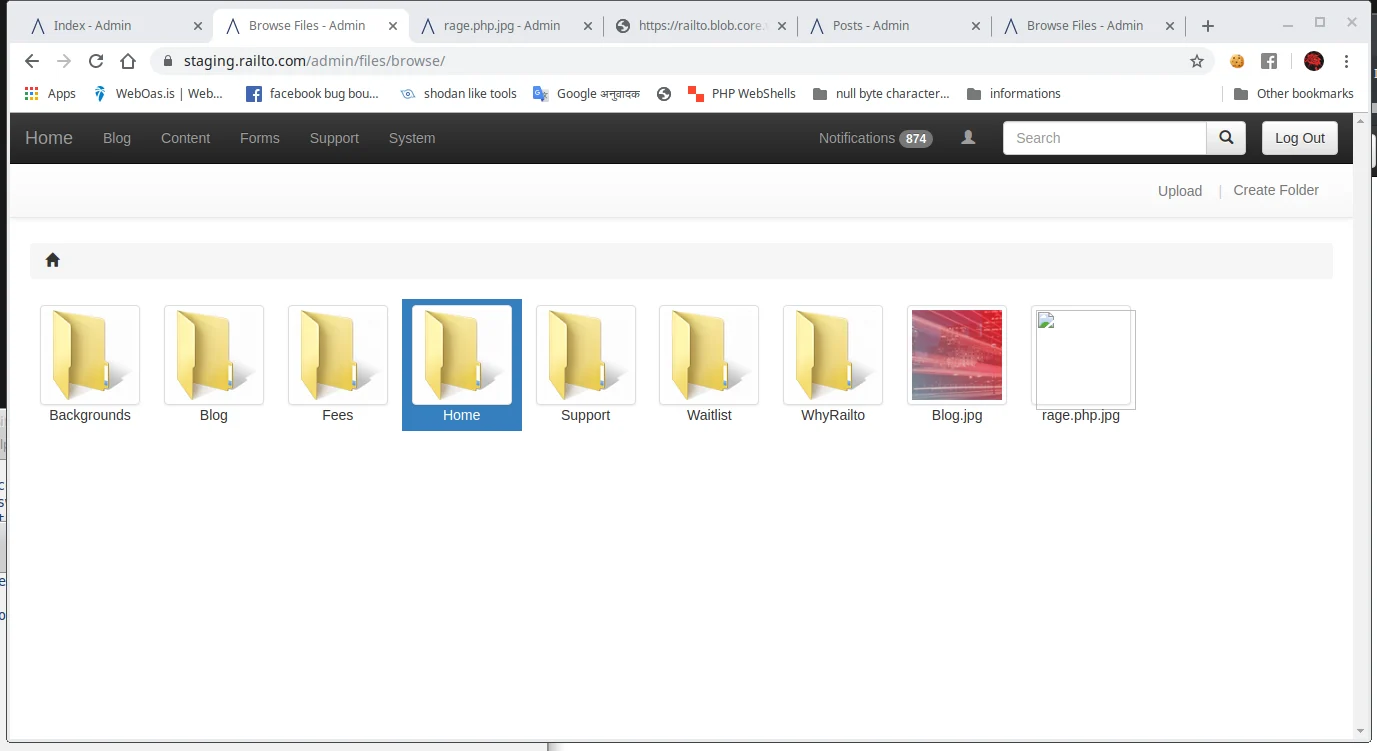
While doing some recon for railto sub-domains. i came across a most critical bug which lets me complete access of https://staging.railto.com. i can add anything and removing anythings as i got the ADMIN level privilege.
##Steps
- Go to https://staging.railto.com/admin url.
- Set username as admin and password as password to login the admin page. Since password is too easy to guess, i was like what... after finding this bug.
- If unauthorized people has got this bug then he could use it in a bad way.
I didn't want to move forward because i am not an admin of this page and i dont want you guys in trouble. If it is not enough then i will provide a detail poc
Impact
Admin of the page is simple enough.
Attachments
What the report shows
The target is the staging host staging.railto.com, part of the *.railto.com scope of the Railto LLC program on HackerOne. The researcher, dhakal_bibek, found the host during subdomain reconnaissance and reported that the administrative area of the staging site could be entered with default credentials, giving full administrative access to the application.
The steps in the report are short:
- Go to the admin URL:
https://staging.railto.com/admin
- Log in with the username
adminand the passwordpassword:
The researcher notes that the password was trivial to guess. The report states that with this access anything could be added or removed, because the session carried admin-level privilege. It also says that the researcher stopped there rather than exploring further, because the account did not belong to them and they did not want to cause trouble for the team, and offered a more detailed proof of concept if needed.
The report was rated high severity with a CVSS score of 8.8 and disclosed on 3 October 2019. The report does not describe a fix, and it does not state a bounty amount.
The only attachment is a screenshot:
Root cause
The report points to a single, likely cause: the administrative account was protected by an easily guessed credential pair. Staging environments are often stood up quickly from templates or copied from production with placeholder accounts, and are then forgotten. Because the login itself worked as designed, the weakness is in configuration and credential management rather than in application code: a privileged account with a weak, predictable password, on a host that should probably not have been publicly reachable at all.
Impact
The researcher reports full administrative control of the staging application: the ability to add and remove content at will. In the report's own framing, anyone who found the same credentials could use that access in a harmful way. The report does not demonstrate what data or integrations the staging instance held, so the wider impact, for example whether staging shared production data, credentials or third-party services, is not established here.
How this kind of bug works
Default and weak credentials are an authentication failure, not an injection or logic flaw. The application correctly checks the password it was given; the problem is that the password is one an attacker will try first. Two conditions make it exploitable: the service is reachable by the attacker, and the account exists with a guessable secret. Staging, development and internal-tooling hosts frequently satisfy both, because they are deployed with less scrutiny than production and are sometimes indexed or linked from other hosts.
Automated scanners try small lists of common pairs (admin/admin, admin/password, administrator/administrator, and similar) against login forms. Because the space of default credentials is tiny, a single successful guess yields the same result as a brute-force attack, without the noise. Defences are straightforward: unique strong credentials for every account, no shared or template accounts, multi-factor authentication on administrative panels, network-level restriction of non-production hosts, and monitoring for repeated failed logins followed by a success.
How to test for it
This is a manual, low-noise test that fits naturally into reconnaissance.
- Enumerate subdomains and note hosts whose names suggest non-production use:
staging,dev,test,uat,qa,demo,internal,admin. Resolve them and check which respond. - For each host, look for login and admin paths. Common ones include
/admin,/login,/administrator,/wp-admin,/manage. Directory and content discovery helps, but keep request rates low. - Identify the authentication mechanism: a form post, HTTP Basic authentication, or an API token endpoint. Note the field names and any CSRF token the form requires.
- Try a very small set of default pairs, one attempt per pair, on accounts that clearly exist by convention (
admin,administrator,root). Stop at the first success. Do not run large wordlists against a live target without explicit permission. - A positive result is a response that sets a session cookie or redirects to an authenticated page, followed by a page that shows administrative functions. Confirm the privilege level by loading an admin-only page, and stop there.
Common false positives: a login that returns a generic error page with HTTP 200 for every attempt; a redirect to a dashboard that is actually a public landing page; a staging host that is protected by HTTP Basic authentication at the proxy but whose application login is separate; and cached responses that make a failed login look successful. Always verify with a fresh session and a second request to an authenticated endpoint.
How it is fixed
The standard fixes are:
- Replace default and template credentials with unique, strong passwords before any environment is exposed, and rotate any credential that may have been shared.
- Require multi-factor authentication for administrative accounts.
- Put non-production environments behind network restrictions: VPN, IP allowlisting, or HTTP Basic authentication at the edge, so the application login is not the only barrier.
- Remove or disable unused administrative accounts, and avoid predictable usernames where the platform allows it.
- Add alerting on failed login bursts and on successful logins from unexpected sources.
Hunting notes
This class of finding hides on the edges of scope: staging and development hosts, admin panels of internal tools, and appliances or dashboards deployed with vendor defaults. Recon signals worth watching are subdomain names that imply non-production use, hosts that respond differently from production, login pages with no rate limiting, and pages that reveal the product or framework version so you can check its documented default accounts.
State clearly that you stopped at confirmation and did not modify data. If the program's scope excludes staging or lists it as out of scope, check before testing; many programs treat non-production hosts as lower impact unless you can show that they hold production data or credentials, which is the argument that turns a default login into a high-severity finding.
What happened, in plain words
A security researcher was looking around the internet for parts of a company's website that are not the main public site. This activity is called reconnaissance: gathering information about a target before testing it, much like walking around a building to note which doors and windows exist before trying any of them. During that search the researcher found a host called staging.railto.com, which belongs to the Railto LLC program on HackerOne.
A "staging" site is a practice copy of a real website. Companies use it to try out changes before putting them live, the way a theatre uses a rehearsal stage before opening night. Because it is only a rehearsal, it is often set up quickly and then forgotten, and sometimes it is left reachable from the internet by anyone.
The researcher found that the administrative area of this staging site could be entered with a username and password that anyone would try first. The report's steps are short:
- Go to the admin URL:
https://staging.railto.com/admin
- Log in with the username
adminand the passwordpassword:
That second step is the whole bug. The username admin is the obvious name for an administrator account, and password is the first word many people would guess. The researcher notes that the password was trivial to guess. The login page itself worked exactly as designed: it checked the password, the password was correct, and it let the person in. Nothing in the application was broken. The problem was that the correct password was one everybody knows.
Once inside, the researcher had administrator-level privilege, meaning the account was allowed to do everything an owner of the site can do. The report says that with this access anything could be added or removed. The researcher then stopped. They explain that the account did not belong to them and they did not want to cause trouble for the team, and they offered a more detailed proof of concept if the company wanted one. Stopping at the point of confirmation, rather than changing data, is the careful approach: it proves the door opens without walking through the building.
The report was rated high severity with a CVSS score of 8.8 and disclosed on 3 October 2019. CVSS is a standard scoring system for the seriousness of a security weakness, where a higher number means more risk. The report does not describe a fix and does not state a bounty amount.
The only attachment is a screenshot:
In general, how this kind of bug works
This is an authentication failure. Authentication is the process of proving who you are, usually with a username and a password, the same way a bank asks for your card and your PIN before it lets you near your money. A default or weak credential is a username and password pair that ships with a product or gets set up carelessly, and that an attacker will try before anything else.
Two conditions make it exploitable: the service can be reached by the attacker, and an account exists whose secret is easy to guess. Staging, development and internal-tooling hosts often satisfy both, because they are deployed with less scrutiny than the live site and are sometimes linked from other hosts or found by scanning.
Automated scanners try small lists of common pairs, such as admin/admin or admin/password, against login forms. The list of default credentials is tiny, so a single successful guess gives the same result as a long brute-force attack, which is trying many passwords in sequence, but without the noise of thousands of failed attempts.
How to test for it
This is a manual, low-noise test that fits naturally into reconnaissance.
- Find subdomains, which are the named sections of a domain such as
staging.railto.comunderrailto.com, and note hosts whose names suggest non-production use:staging,dev,test,uat,qa,demo,internal,admin. Check which of them respond. - For each host, look for login and admin paths. Common ones include
/admin,/login,/administrator,/wp-admin,/manage. Directory and content discovery helps, but keep request rates low. - Identify how the site asks for credentials: a form post, HTTP Basic authentication (where the browser itself pops up a small username and password box), or an API token endpoint. Note the field names and any CSRF token the form requires. A CSRF token is a hidden value the form includes so the server can tell a genuine submission from one forged by another site.
- Try a very small set of default pairs, one attempt per pair, on accounts that clearly exist by convention (
admin,administrator,root). Stop at the first success. Do not run large wordlists against a live target without explicit permission. - A positive result is a response that sets a session cookie or redirects to an authenticated page, followed by a page that shows administrative functions. A session cookie is a small piece of data the server gives your browser after login so it can recognise you on the next request, like a wristband at an event. Confirm the privilege level by loading an admin-only page, and stop there.
Common false positives: a login that returns a generic error page with HTTP 200 for every attempt; a redirect to a dashboard that is actually a public landing page; a staging host protected by HTTP Basic authentication at the proxy but whose application login is separate; and cached responses that make a failed login look successful. Always verify with a fresh session and a second request to an authenticated endpoint.
How it is fixed
The standard fixes are:
- Replace default and template credentials with unique, strong passwords before any environment is exposed, and rotate any credential that may have been shared.
- Require multi-factor authentication for administrative accounts, meaning a second proof such as a code from a phone on top of the password.
- Put non-production environments behind network restrictions: VPN, IP allowlisting, or HTTP Basic authentication at the edge, so the application login is not the only barrier.
- Remove or disable unused administrative accounts, and avoid predictable usernames where the platform allows it.
- Add alerting on failed login bursts and on successful logins from unexpected sources.
Hunting notes
This class of finding hides on the edges of scope: staging and development hosts, admin panels of internal tools, and appliances or dashboards deployed with vendor defaults. Recon signals worth watching are subdomain names that imply non-production use, hosts that respond differently from production, login pages with no rate limiting, and pages that reveal the product or framework version so you can check its documented default accounts.
State clearly that you stopped at confirmation and did not modify data. If the program's scope excludes staging or lists it as out of scope, check before testing; many programs treat non-production hosts as lower impact unless you can show that they hold production data or credentials, which is the argument that turns a default login into a high-severity finding.
Glossary
- Reconnaissance: gathering information about a target before testing it.
- Staging: a practice copy of a website used to try changes before they go live.
- Subdomain: a named section of a domain, such as
staging.railto.comunderrailto.com. - Admin panel: the part of a site where an administrator manages content and settings.
- Authentication: the process of proving who you are, usually with a username and password.
- Default credentials: a username and password pair that ships with a product or is set up carelessly.
- Privilege: the level of permission an account has, such as being allowed to add or remove anything.
- Brute-force attack: trying many passwords in sequence until one works.
- HTTP Basic authentication: a login method where the browser itself asks for a username and password.
- CSRF token: a hidden value in a form that lets the server tell a genuine submission from a forged one.
- Session cookie: a small piece of data the server gives your browser after login so it can recognise you on later requests.
- HTTP 200: the status code a server returns when a request succeeded.
- False positive: a result that looks like a finding but is not one.
- VPN: a private network connection that restricts who can reach a service.
- IP allowlisting: only letting requests from a list of approved network addresses through.
- Multi-factor authentication: requiring a second proof, such as a phone code, on top of the password.
- CVSS: a standard scoring system for the seriousness of a security weakness, where a higher number means more risk.
- Proof of concept: a small demonstration that a weakness is real.