How I earn $500 from Razer open S3 bucket
Two Amazon S3 buckets used by Razer were configured to allow public write access, so an attacker could upload and delete files in them. The buckets were found through a file upload response and by inspecting an Android app's shared preferences.
 Published on medium.com
Hii Hunters ! Hope you all are hunting good.
The full write-up lives on its author's site
It belongs to its author, so we link to it rather than copy it. The other two tabs are our own rewrites, checked against it.
Context
Razer runs a bug bounty programme on HackerOne, and this write-up covers a report that was submitted there and rewarded with $500. The target is the domain https://api.razer.com, which offers a file upload functionality. When a file is uploaded, the response tells the client where the picture was stored, and that location turned out to be an Amazon S3 bucket. The second part of the story concerns the Razer Android app, whose internal files referenced another S3 bucket.
The author frames the piece around S3 buckets in general, so a short recap is useful. An Amazon S3 bucket is public cloud storage (Simple Storage Service). Every bucket has a unique name. Buckets are commonly used to host websites, to store personal files, and by applications to store user profile pictures, JavaScript files and similar assets. The well-known S3 subdomain takeover works because a domain that points at a bucket which no longer exists can be claimed by anyone, who then controls what the website renders. Bucket exposure is not limited to that scenario.
Setup
The only tool the author names is the AWS CLI, used to inspect how a bucket is configured and to interact with it. The report does not give a CLI version. No account, role or special precondition is described for the web part: the starting point is simply the upload feature on https://api.razer.com. For the Android part, the author notes that almost all programmes do not accept issues that require root access and a physical device, which is why many hunters do not look at internal files. The bucket was found in the app's share_prefs directory.
Finding it
The author describes three main access control configurations for an S3 bucket:
- The bucket cannot be accessed publicly.
- People can only see what the bucket contains (the keys). Sensitive files should always be looked for in this type of bucket.
- All access is given publicly, so anyone can upload to and delete from the bucket.
On https://api.razer.com the first attempt was to upload malicious files hoping for RCE. That was implemented properly. What stood out was the upload response: it showed the picture's location, where the picture was uploaded, and that location was an S3 bucket. That response detail is what turned a dead end into a lead.
Exploitation
Step 1: Test the bucket named in the upload response
With the bucket name taken from the response, the author opened a terminal and ran:
#aws s3 cp test.txt s3://rzimageupload
This uses the AWS CLI to copy a local file, test.txt, into the bucket rzimageupload. The result was that files could be uploaded and deleted from the bucket, which corresponds to the third configuration above: all access is public.
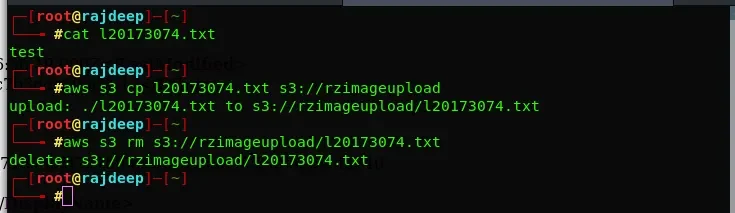
The image accompanies the upload of test.txt to the bucket. The author reported it.
Step 2: Look inside the Android app
The next day the author was testing the Razer Android app. Working through the app's internal files, in the share_prefs directory, a bucket was found:
kaizo-s3-public.s3-ap-southeast-1.amazonaws.com
This bucket was also open, and it was mentioned in the previous report.
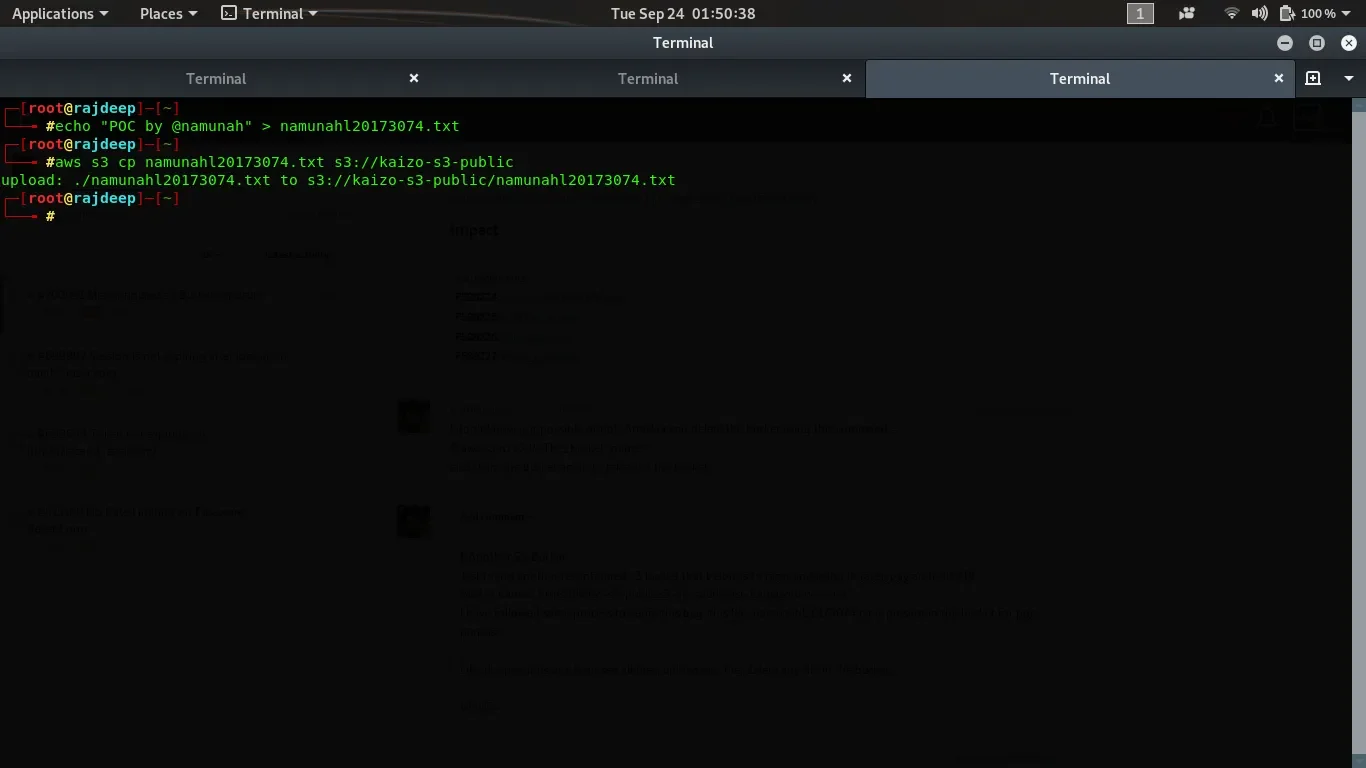
The image shows the kaizo-s3-public bucket found in the share_prefs directory.
The HackerOne report is at https://hackerone.com/reports/700051. It was triaged and the bounty was $500.
Root cause
The bucket accepted uploads and deletions from anyone, which corresponds to the third configuration the author lists: all access given publicly. The upload feature on api.razer.com was hardened against malicious file uploads, but the storage it wrote to was left writable by the public, so the protection at the application layer did not extend to the bucket itself. For the Android app, the bucket name was exposed in the app's shared preferences, and that bucket was open as well. The report does not describe the exact policy document or console settings behind either bucket.
Impact
An attacker who learns the bucket name, here from the upload response and from the app's internal files, can upload and delete files in the bucket. The bucket is the storage location named in the upload response. The author does not go further than that: no specific user data, account or downstream system is named as affected.
Fix
Variants to test
- Upload a file through any feature that stores to object storage and read the response for the storage location. A positive result is a bucket hostname in the response that you can then test with the AWS CLI.
- Run the same
aws s3 cpagainst the bucket name you recover. A positive result is a successful upload, and a delete that also succeeds confirms full public access. - Pull the Android app's shared preferences and other internal files and grep for bucket hostnames. A positive result is a bucket name in
share_prefsthat turns out to be open. - For buckets that only allow listing, enumerate the keys and look for sensitive files, as the author recommends for the second configuration.
What happened, in plain words
A security researcher found that a file upload feature on a Razer website was storing the uploaded pictures in an Amazon cloud storage folder (called a bucket) that anyone on the internet could write to and delete from. He proved it by uploading a small text file with a command-line tool, then reported it. Razer paid him $500. The next day, while looking inside the files of the Razer Android app, he found a second bucket name, and that bucket was open in the same way.
This article walks through the same steps for someone who has never done security testing. You only need a browser and a computer to follow the story. The commands are shown exactly as the researcher ran them, and each one is explained in plain words.
Background: what is an S3 bucket?
Amazon S3 stands for Simple Storage Service. Think of it as a huge public locker room on the internet: each locker (a bucket) has a unique name, and inside it you put files (called objects). Websites and apps use buckets to store things like profile pictures, JavaScript files and other assets, because it saves them from running their own file servers.
Every bucket name is unique across all of Amazon, so if you know a bucket's name you can address it directly. The researcher mentions a well-known trick called S3 subdomain takeover: if a website points at a bucket that no longer exists, anyone can create a bucket with that name and control what the website shows. But that is only one way a bucket can go wrong, and this story is about a different one.
How developers leave buckets vulnerable
The researcher lists three main ways a bucket can be configured:
- The bucket cannot be accessed publicly at all. Only the owner's systems can read or write it.
- People can see what the bucket contains (the list of file names, called keys) but cannot change anything. In this case you should always look through the list for sensitive files.
- Everything is public: anyone can upload files and delete files. This is the dangerous one, and it is what he found.
To check which configuration a bucket uses, he used the AWS CLI. The AWS CLI is Amazon's official command-line tool: a program you install on your computer that lets you talk to Amazon's cloud services by typing commands instead of clicking around a website.
How the open bucket was found on Razer
The researcher was testing https://api.razer.com. An API (Application Programming Interface) is the part of a website that programs talk to, rather than people. When you use a mobile app or a web page and it loads data, it is usually asking an API behind the scenes. This particular API had a file upload feature: you send it a picture and it stores it somewhere.
His first idea was to upload malicious files, hoping to get RCE. RCE stands for Remote Code Execution: a bug where an attacker can make the server run their own code, which is about as bad as it gets. That attempt failed because the upload was implemented properly.
But something else stood out. When he uploaded a file, the response (the message the server sends back) showed the picture's location, that is, where the picture had been stored. That location was an S3 bucket. This is the key moment: the server was politely telling him the name of its storage locker.
With the bucket name in hand, he opened a terminal (the text window where you type commands) and ran:
#aws s3 cp test.txt s3://rzimageupload
Line by line:
awsis the AWS CLI program.s3says which Amazon service to talk to, here the storage service.cpmeans copy, the same idea as the copy command on your computer.test.txtis a small local file he created, used as a harmless test.s3://rzimageuploadis the destination: the bucket namedrzimageupload, taken from the upload response.- The leading
#is just the shell prompt symbol as it appeared in the write-up; it is not part of the command.
If the bucket were properly locked down, this command would be refused. Instead it worked: he could upload files and delete files from the bucket. That matches configuration 3 above, full public access.
The image accompanies the upload of test.txt to the bucket. He reported it.
The bucket found inside the Android app
The next day he was testing the Razer Android app. He notes that almost all bug bounty programmes refuse reports that require root access (a way of unlocking full control of a phone) and a physical device, which is why many hunters never look at the app's internal files. He did look, and in a directory called share_prefs he found this bucket name:
kaizo-s3-public.s3-ap-southeast-1.amazonaws.com
share_prefs is where Android apps keep small settings files on the phone. The bucket name was sitting in one of them. This bucket was open as well, so he mentioned it in the same report.
The image shows the kaizo-s3-public bucket found in the share_prefs directory.
The report on HackerOne (the bug bounty platform where companies receive vulnerability reports) is at https://hackerone.com/reports/700051. It was triaged, meaning the company confirmed it was a real issue, and the bounty was $500.
Why this happened
The mistake is in the bucket's permissions: the bucket allowed the public to upload and delete files. The upload feature on api.razer.com was protected against malicious files, but the storage it wrote to was left open to anyone. So the protection at the front door did not extend to the warehouse behind it. For the Android app, the bucket name was exposed in the app's settings files, and that bucket was open too. The report does not describe the exact permission settings behind either bucket.
What an attacker could do
Anyone who learns the bucket name, here from the upload response and from the app's internal files, can upload and delete files in the bucket. The bucket is the storage location named in the upload response. The researcher does not go further than that: no specific user data, account or other system is named as affected. The Android bucket is described as open in the same way, and the report does not say what it stores.
How to fix it
Things to try yourself
- Upload a file through any feature that stores to cloud storage and read the response for the storage location. A positive result is a bucket hostname in the response that you can then test with the AWS CLI.
- Run the same
aws s3 cpagainst the bucket name you recover. A positive result is a successful upload, and a delete that also succeeds confirms full public access. - Pull the Android app's shared preferences and other internal files and search them for bucket hostnames. A positive result is a bucket name in
share_prefsthat turns out to be open. - For buckets that only allow listing, go through the file names and look for sensitive files, as the researcher recommends for the second configuration.
Glossary
- API: the part of a website or service that programs talk to, rather than people; apps and web pages use it to send and receive data.
- AWS: Amazon Web Services, Amazon's collection of cloud services.
- AWS CLI: Amazon's command-line tool for talking to AWS services by typing commands.
- Bucket: a named storage container in Amazon S3, like a locker with a unique name.
- Bug bounty programme: a scheme where a company pays researchers for reporting security problems in its products.
- Bounty: the money paid for a valid report.
- HackerOne: a platform where companies receive and manage vulnerability reports.
- Key: the name of a file inside an S3 bucket.
- Object: a file stored in an S3 bucket.
- RCE (Remote Code Execution): a bug that lets an attacker make a server run their own code.
- Root access: full, unrestricted control of a device such as an Android phone.
- S3 (Simple Storage Service): Amazon's cloud storage service.
- S3 subdomain takeover: claiming a bucket name that a website still points at but that no longer exists, so you control what the site shows.
- share_prefs: the directory on an Android phone where an app keeps its small settings files.
- Terminal: the text window on a computer where you type commands.
- Triaged: confirmed by the company as a real, valid issue.
- Upload response: the message a server sends back after you send it a file.