An attacker can submit a Pentest Opportunity and change the status of the opportunity from submitted to in_review or reviewed
GraphQL mutations allowed a client to create a pentest opportunity and change its status from submitted to in_review or reviewed without reviewer intervention. An attacker could bypass the intended review process and self-approve their own pentest opportunity.
 Originally disclosed on HackerOne
- Triaged in 36 days
- Fixed in 5 months
- Paid in 36 days
- Disclosed after 6 months
Summary by the researcher
A quick summary of this report -
I found 3 interesting graphQL mutations while going through the introspection query result. Namely -
createPentestOpportunity, reviewPentestOpportunity and reviewCompletePentestOpportunity
The first mutation - createPentestOpportunity allowed me to only create a Pentest Opportunity for sandbox programs which was not allowed from the UI. The only impact it had was the team was receiving notifications for dummy pentests created by me.
The 2nd mutation - reviewPentestOpportunity changed the status of the opportunity from submitted to in_review. This was an action that the reviewer is suppose to perform and not the client. After creating an Opportunity with the help of the 1st mutation, the status is shown as submitted.
The 3rd mutation( I didn't include this in the main report and later provided it in the comments as an update) - reviewCompletePentestOpportunity - This mutation allowed the client to complete the review process of their own Pentest Opportunity by themselves i.e status of the opportunity could be changed from submitted to reviewed directly without the reviewer's intervention.
Please note that this report was accepted for the 2nd and 3rd mutations and not for the 1st mutation. It is intended for the clients to create Pentest Opportunities.
The report
#Summary:
I tried my best to look for any visible feature or functionality through which I can create a pentest opportunity in my demo organization but didn't find any. Also looking into hackerone pentests on the internet I only got html forms to send my details and someone from the support team reaches out to me. However through a graphql mutation - createPentestOpportunity I was able to create pentest opportunities in my demo org(and assuming this is true for other customers also having non-demo orgs without going through the proper flow ) and as soon as it is sent for review a derived pentest is also created.
#Steps To Reproduce
- Create a demo organization in hackerone.
- Send this request using your cookies & csrf-token and the
organization_id:
POST /graphql HTTP/1.1
Host: hackerone.com
Cookie: <COOKIES>
User-Agent: Mozilla/5.0 (Windows NT 10.0; Win64; x64; rv:109.0) Gecko/20100101 Firefox/114.0
Accept: */*
Accept-Language: en-US,en;q=0.5
Accept-Encoding: gzip, deflate
Referer: https://hackerone.com/bugs?subject=user&report_id=2036649&view=open&substates%5B%5D=new&substates%5B%5D=needs-more-info&substates%5B%5D=pending-program-review&substates%5B%5D=triaged&substates%5B%5D=pre-submission&substates%5B%5D=retesting&reported_to_team=&text_query=&program_states%5B%5D=2&program_states%5B%5D=3&program_states%5B%5D=4&program_states%5B%5D=5&sort_type=latest_activity&sort_direction=descending&limit=25&page=1
Content-Type: application/json
X-Csrf-Token: <CSRF-TOKEN>
X-Product-Area: other
X-Product-Feature: other
X-Datadog-Origin: rum
X-Datadog-Parent-Id: 7607766352867302438
X-Datadog-Sampling-Priority: 1
X-Datadog-Trace-Id: 5479493917599437707
Content-Length: 452
Origin: https://hackerone.com
Sec-Fetch-Dest: empty
Sec-Fetch-Mode: cors
Sec-Fetch-Site: same-origin
Te: trailers
Connection: close

{"query": "mutation {\r\n  createPentestOpportunity(\r\n    input: {\r\n      company_name: \"My Company\"\r\n      customer_email: \"[email protected]\"\r\n      organization_id: <ORG-ID>\r\n      name: \"My Pentest\"\r\n    }\r\n  ) {\r\n    clientMutationId\r\n    pentest_opportunity {\r\n      id\r\n      token\r\n    }\r\n    errors {\r\n      edges{node{message}}\r\n      total_count\r\n    }\r\n    was_successful\r\n  }\r\n}\r\n"}
You can find the organization_id by searching for that field name in your burp history. It is the _id field's value -
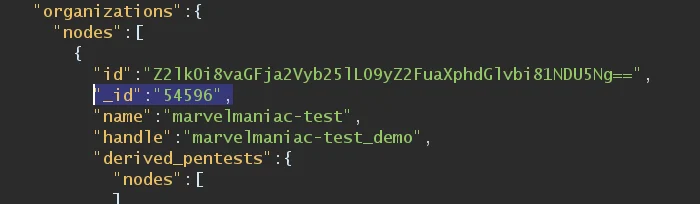
- The pentest opportunity is successfully created. In the response you'll find the ID and the token of the opportunity.
- Send this request to send your opportunity for review:
POST /graphql HTTP/1.1
Host: hackerone.com
Cookie: <COOKIES>
User-Agent: Mozilla/5.0 (Windows NT 10.0; Win64; x64; rv:109.0) Gecko/20100101 Firefox/114.0
Accept: */*
Accept-Language: en-US,en;q=0.5
Accept-Encoding: gzip, deflate
Referer: https://hackerone.com/opportunities/all
Content-Type: application/json
X-Csrf-Token: <CSRF-TOKEN>
X-Product-Area: other
Content-Type: application/json
X-Product-Feature: other
X-Datadog-Origin: rum
X-Datadog-Parent-Id: 7607766352867302438
X-Datadog-Sampling-Priority: 1
X-Datadog-Trace-Id: 5479493917599437707
Content-Length: 305
Origin: https://hackerone.com
Sec-Fetch-Dest: empty
Sec-Fetch-Mode: cors
Sec-Fetch-Site: same-origin
Te: trailers
Connection: close

{"query": "mutation {\r\n  reviewPentestOpportunity(\r\n    input: {\r\n       pentest_opportunity_id: \"<ID-FROM-STEP-3>\"  }) {\r\n    clientMutationId\r\n    errors {\r\n      total_count\r\n      edges{node{message}}\r\n    }\r\n    was_successful\r\n  }\r\n}\r\n"}
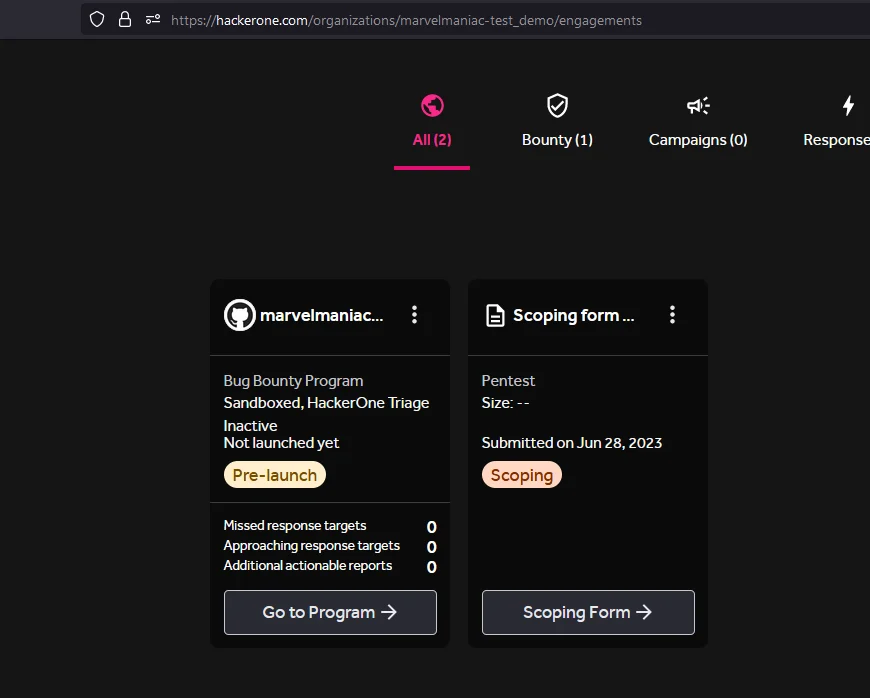
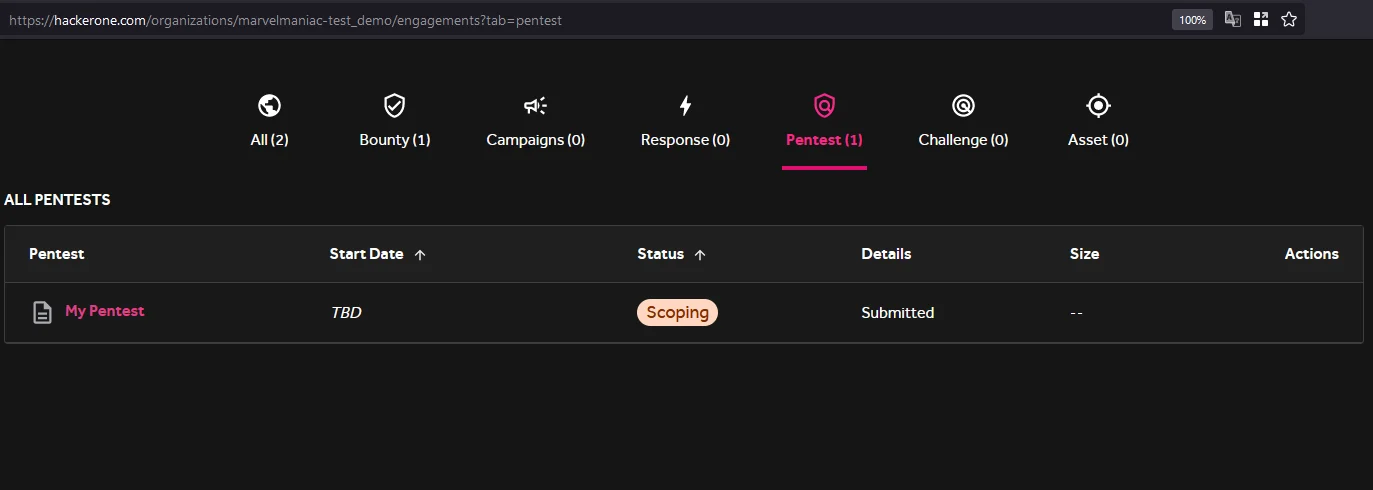
The opportunity is successfully sent for review. 5. Now come to your browser, open your demo organization's engagements. There you will find a pentest opportunity in pending review form(ignore the errors for now since it was create purely from burp and that too for testing, many arguments are skipped for convenience) 6. Go to pentest tab under engagements, you'll also find a derived pentest there under review(currently I'm looking at what I can do with it from my end)
Impact
Users/Customers can create pentest engagements without going through the proper flow and send it for review to the h1 pentest team.
Not written yet. The AI write-up for this report has not been written yet. The Original tab links to the source.
How it worked
Root cause
Likely missing authorization checks on GraphQL mutations that should be restricted to reviewers, allowing clients to perform review actions on their own opportunities.
Impact
Customers could create pentest engagements without going through the proper flow and send them for review, and could also self-approve their own opportunities, bypassing the intended review process.
What the attacker needed
A HackerOne account; a demo organization; valid session cookies and CSRF token
The fix
The report was accepted for the second and third mutations, but the text does not state what fix was applied.
How it was found
- Create a demo organization in HackerOne.
- Send a GraphQL mutation to create a pentest opportunity using your cookies, CSRF token, and organization ID.
- The pentest opportunity is created and the response contains its ID and token.
- Send a GraphQL mutation to review the pentest opportunity using the ID from step 3.
- The opportunity is successfully sent for review.
- In the browser, the demo organization's engagements show the pentest opportunity in pending review and a derived pentest under review.
Explained by bugbounty.wiki with AI from the original and checked against quotes from it; it can still be wrong. Read the original before relying on a detail.
Not written yet. The AI write-up for this report has not been written yet. The Original tab links to the source.
The website has hidden actions (called mutations) that are normally only used by staff to review pentest requests. A regular user could call these actions directly and approve their own request, skipping the review step.
What is Access control?
A user can do something their role should not allow: reach an admin function, act on a feature they have not paid for, or skip a permission check. IDOR is the special case where the object belongs to someone else.



