[Bypass #645264] Report title disclosure despite the program settings for email notification is set to "No Content"
The email notification setting 'No Content' was not fully enforced: invitation emails for collaborators still included the report title. An attacker who is invited as a collaborator could see the report title even when the program intended to hide it.

- Triaged in 11 days
- Fixed in 30 days
- Paid in 16 days
- Disclosed after 32 days
Hi Team,
Summary:
There is newly disclosed resolved report Program Email Nofication settings ignored when being added as an external contributor, However i found that the fix is incomplete.
I have found that email invitation for a collaborator (bounty splitting) still disclosing the Report title in email when the notification comes from Manage Collaborator invitation.
Steps To Reproduce
Assumes that Manage Collaborator (bounty splitting) is enabled to the program
- As a program admin, navigate to Program Settings > Click Program >Click Email Notifications
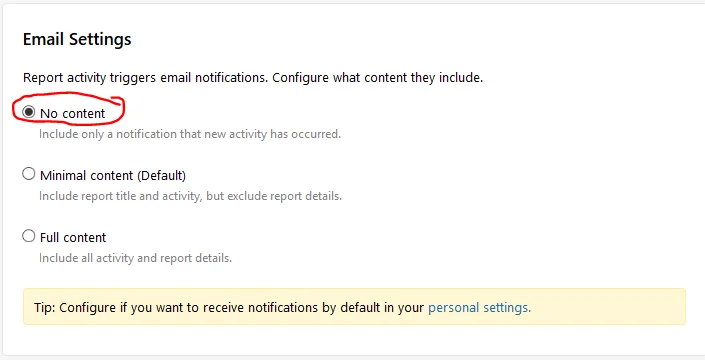
- In email notification settings, select No Content
- Go to any report in your program and invite any hacker to the report to become a Collaborator.
- Hacker can also invite Collaborator.
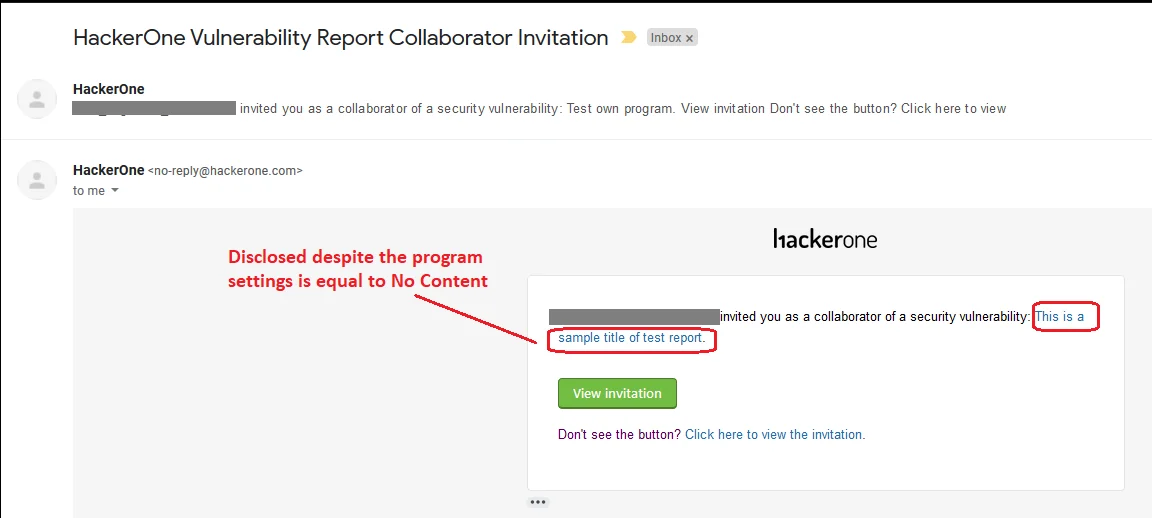
- Check the invited hackers email, they will see the report title in the collaboration invitation email.
PoC screenshot below:
Impact
Sensitive information disclosing bypassing the program settings.
Regards Japz
Context
HackerOne programs can configure how much detail the platform puts into notification emails. One of the available settings is No Content, which is meant to keep sensitive material, such as the report title, out of those emails. The researcher had already seen a resolved report, Program Email Nofication settings ignored when being added as an external contributor, describing a case where that setting was ignored. Reading that report, the researcher concluded the fix was incomplete and went looking for another path that still leaked the title.
The path they found is the Manage Collaborator feature, also called bounty splitting. When a program enables it, a report can be shared with other hackers as collaborators, and those collaborators can in turn invite further collaborators. Each invitation is delivered by email. The researcher found that the invitation email sent from this flow still contains the report title, even when the program has selected No Content for email notifications.
Setup
The only precondition stated in the report is that Manage Collaborator (bounty splitting) must be enabled for the program. The researcher works from the position of a program admin, who can change the program's email notification settings and invite hackers to a report. A second party is needed to receive the invitation: any hacker invited to the report as a collaborator, who can also invite further collaborators. No specific tools, versions or accounts are named beyond that.
Finding it
The starting point was the earlier, already resolved report about the email notification setting being ignored when someone is added as an external contributor. The researcher treated that fix as partial and asked where else the platform sends an email that references a report. The collaborator invitation flow is a natural candidate: it is triggered from inside a report, it is sent to someone who is not yet a participant, and it has to tell the recipient something about what they are being invited to. Testing that flow showed the report title is included in the message, which contradicts the No Content setting the program admin had chosen.
Exploitation
Step 1: Open the email notification settings
As a program admin, navigate to Program Settings > Click Program > Click Email Notifications.
Step 2: Select No Content
In the email notification settings, select No Content. This is the configuration the rest of the flow is supposed to respect.
Step 3: Invite a hacker as a collaborator
Go to any report in the program and invite any hacker to the report to become a Collaborator.
Step 4: Let the collaborator invite others
A hacker who has been added can also invite further Collaborators, so the leak is not limited to invitations sent by the program admin.
Step 5: Read the invitation email
Check the invited hacker's email. The collaboration invitation email shows the report title.
The two screenshots below document the configuration and the resulting email. The first shows the program settings, and the second shows the leaked title in the invitation.
Root cause
The report does not describe the implementation, so the exact mistake is not stated. What the behaviour shows is that the collaborator invitation email is composed without consulting the program's email notification setting, or through a code path that does not apply it. The earlier fix addressed the external contributor invitation, but the collaborator (bounty splitting) invitation is a separate flow and was left sending the title. The existing defence, the No Content setting, therefore did not cover every email that references a report.
Impact
The impact is disclosure of sensitive information, in the researcher's words, bypassing the program settings. The report title reaches the inbox of every invited collaborator, including collaborators invited by other collaborators, even though the program admin asked for no content in notification emails. The report does not go further into which kinds of titles would be sensitive or who else might see the mail; the exposure is limited to the title and to recipients who have been invited to the report.
Fix
The report does not say what was changed. The behaviour it describes implies that the collaborator invitation email should honour the same No Content setting as the other notification emails, so that the title is omitted whenever the program has selected that option.
Variants to test
- Invite a collaborator from a report on a program with No Content selected and inspect the full email, including headers and any preview text, for the title or other report fields.
- Repeat the invitation as a collaborator rather than as the program admin, to check whether the second-level invitation uses the same template and the same settings.
- Compare the other notification settings against the same email, to see whether any setting other than No Content is also ignored on this path.
- Check other emails that reference a report, such as mentions or assignment notifications, for the same omission.
A positive result is any invitation or notification email that contains the report title, or another field the chosen setting is meant to suppress, after the setting has been saved.
Hunting notes
This kind of bug hides wherever a product sends email about an object whose visibility is configurable. The signal is a settings page that offers a reduced-content option: every template that references the object becomes a candidate, and templates added later, or reached through a different feature such as collaborator management, are the ones most likely to miss the check.
What happened, in plain words
HackerOne is a website where companies (called programs) run bug bounty programmes: people report security problems to them and can be paid for it. Each program has a settings page, and one of those settings controls how much detail HackerOne puts into the notification emails it sends out. One option is called No Content, and its whole purpose is to keep sensitive material, such as the title of a bug report, out of those emails.
An earlier report, Program Email Nofication settings ignored when being added as an external contributor, had already shown that this setting was ignored in one situation: when someone was added to a report as an external contributor. That report was resolved and disclosed. The researcher who wrote this report read it and decided the fix only covered one path, not all of them. So they went looking for another place where HackerOne sends an email that mentions a report, and found one: the Manage Collaborator feature, also called bounty splitting.
When a program turns that feature on, a report can be shared with other hackers as collaborators, and those collaborators can invite further collaborators. Every invitation goes out by email. The researcher found that this invitation email still contains the report title, even when the program has chosen No Content for its notification emails. That is the bug: a setting the program admin deliberately turned on is being bypassed by one particular email.
Background you need first
A few ideas come up again and again below, so here they are from zero.
- Program: a company's presence on HackerOne. It has its own reports, its own hackers and its own settings.
- Program admin: the person who manages a program. They are the one who can change settings and invite people to reports.
- Report: a single bug submission. It has a title, a description and a conversation. The title is often the most revealing part, because it usually names the affected feature and the kind of problem.
- Notification email: an email the platform sends automatically when something happens, for example when you are added to a report. Think of it like a parcel delivery note: it tells you something arrived, and it may describe what is inside.
- No Content setting: an option on the settings page that says, in effect, "send the notification, but do not put the sensitive details in it". The recipient learns that something happened, but not what it was about. It is like a sealed envelope instead of a postcard.
- Collaborator (bounty splitting): a hacker who is added to someone else's report so that they share in the work and in any reward. The feature that allows this is called Manage Collaborator, and it is also known as bounty splitting because the bounty can be split between the people on the report.
- Bypass: a way around a protection. The protection here is the No Content setting; the bypass is an email that ignores it.
- Sensitive information disclosure: the security term for a system revealing data to someone who should not have it, or in more detail than intended. Here the data is a report title, and the person receiving it is an invited collaborator.
- PoC (proof of concept): evidence that the bug is real, usually a screenshot or a recording. The two images below are the PoC for this report.
The setup
The report states one precondition: Manage Collaborator (bounty splitting) must be enabled for the program. Without that feature switched on, there is no collaborator invitation and therefore no email to test.
The researcher acts as a program admin, because that role can change the program's email notification settings and invite hackers to a report. A second person is needed to receive the invitation: any hacker invited to the report as a collaborator. That collaborator can also invite further collaborators, which matters later. No specific tools, software versions or named accounts are mentioned beyond that.
How the researcher found it
The starting point was the earlier, already resolved report about the email notification setting being ignored when someone is added as an external contributor. The researcher treated that fix as partial and asked a simple question: where else does the platform send an email that refers to a report?
The collaborator invitation flow is an obvious candidate, for three reasons:
- It is triggered from inside a report, so the email naturally has a report to talk about.
- It is sent to someone who is not yet a participant, so the email has to explain what they are being invited to.
- It is a different feature from the external contributor flow that was already fixed, so it may have been missed.
Testing that flow showed the report title is included in the message, which contradicts the No Content setting the program admin had chosen. In other words, the earlier fix closed one door and left another one open.
Reproducing it, step by step
Step 1: Open the email notification settings
As a program admin, navigate to Program Settings > Click Program > Click Email Notifications.
This is just the normal settings page in the browser. The researcher starts here because the whole bug is about a setting, so the first thing to do is look at the setting and change it deliberately. Doing it yourself, rather than assuming a default, means you know exactly which option is active when the email is sent.
Step 2: Select No Content
In the email notification settings, select No Content. This is the configuration the rest of the flow is supposed to respect.
Choosing this option is the heart of the test. It is the program admin saying "notify people, but keep the details out". Everything that happens afterwards is checked against that promise. If any email still carries the title, the promise has been broken.
Step 3: Invite a hacker as a collaborator
Go to any report in the program and invite any hacker to the report to become a Collaborator.
This is the action that triggers the email under test. The researcher uses a normal, documented feature in the normal way, which is what makes the result meaningful: no unusual tricks are needed to reach the leak.
Step 4: Let the collaborator invite others
A hacker who has been added can also invite further Collaborators, so the leak is not limited to invitations sent by the program admin.
This step matters because it widens the problem. If only the admin's invitations leaked, the exposure would be narrow. Because collaborators can invite more collaborators, the same email template, and therefore the same leak, can be triggered by people who are not admins at all.
Step 5: Read the invitation email
Check the invited hacker's email. The collaboration invitation email shows the report title.
This is the observation that proves the bug. The recipient opens their inbox and sees the title of a report they were only supposed to be told about in outline.
The two screenshots below document the configuration and the resulting email. The first shows the program settings, and the second shows the leaked title in the invitation.
Why it happens
The report does not describe the implementation, so the exact mistake in the code is not stated. What the behaviour shows is that the collaborator invitation email is put together without consulting the program's email notification setting, or through a code path that does not apply it.
The earlier fix addressed the external contributor invitation. The collaborator (bounty splitting) invitation is a separate flow, and it was left sending the title. The existing defence, the No Content setting, therefore did not cover every email that references a report. A useful comparison is a building with several exits where only one door got a lock: the lock works, but it does not protect the other doors.
Impact
The impact is disclosure of sensitive information, in the researcher's words, bypassing the program settings. The report title reaches the inbox of every invited collaborator, including collaborators invited by other collaborators, even though the program admin asked for no content in notification emails.
The report does not go further into which kinds of titles would be sensitive or who else might see the mail. The exposure is limited to the title and to recipients who have been invited to the report.
Fix
The report does not say what was changed. The behaviour it describes implies that the collaborator invitation email should honour the same No Content setting as the other notification emails, so that the title is omitted whenever the program has selected that option.
Variants to test
If you want to look for the same kind of gap yourself, these are the follow-up checks suggested by the write-up:
- Invite a collaborator from a report on a program with No Content selected and inspect the full email, including headers and any preview text, for the title or other report fields.
- Repeat the invitation as a collaborator rather than as the program admin, to check whether the second-level invitation uses the same template and the same settings.
- Compare the other notification settings against the same email, to see whether any setting other than No Content is also ignored on this path.
- Check other emails that reference a report, such as mentions or assignment notifications, for the same omission.
A positive result is any invitation or notification email that contains the report title, or another field the chosen setting is meant to suppress, after the setting has been saved.
Hunting notes
This kind of bug hides wherever a product sends email about an object whose visibility is configurable. The signal is a settings page that offers a reduced-content option: every template that references the object becomes a candidate, and templates added later, or reached through a different feature such as collaborator management, are the ones most likely to miss the check.
Glossary
- Program: a company's presence on HackerOne, with its own reports, hackers and settings.
- Program admin: the person who manages a program and can change its settings and invite people to reports.
- Report: a single bug submission, with a title, a description and a conversation.
- Report title: the short name of a report, often revealing the affected feature and the kind of problem.
- Notification email: an email the platform sends automatically when something happens, such as being added to a report.
- No Content: a notification setting that keeps sensitive details, such as the report title, out of notification emails.
- Collaborator: a hacker added to someone else's report so that they share in the work and any reward.
- Manage Collaborator: the feature, also called bounty splitting, that lets people add collaborators to a report.
- Bounty splitting: another name for the collaborator feature, because the bounty can be shared between the people on the report.
- External contributor: a person added to a report from outside the program, the situation covered by the earlier, already fixed report.
- Bypass: a way around a protection, here an email that ignores the No Content setting.
- Sensitive information disclosure: a system revealing data to someone who should not have it, or in more detail than intended.
- PoC (proof of concept): evidence that a bug is real, usually a screenshot or a recording.



