Changing the 2FA secret key and backup codes without knowing the 2FA OTP
The 2FA update endpoint accepted a new TOTP secret and backup codes without verifying the current 2FA OTP. An attacker with the victim's password and session could replace the 2FA secret and backup codes, locking the victim out.
 Originally disclosed on HackerOne
- Triaged in 10 hours
- Fixed in 33 days
- Disclosed after 38 days
Summary:
After the setup of 2FA, disabling or editing it should require the 2FA OTP. But it can be bypassed.
Steps To Reproduce:
- Sign in to a new HackerOne account.
- Setup 2FA; and
- Try to disable it without knowing the OTP.
You can't, you need to know the Authentication Code or Backup Code.
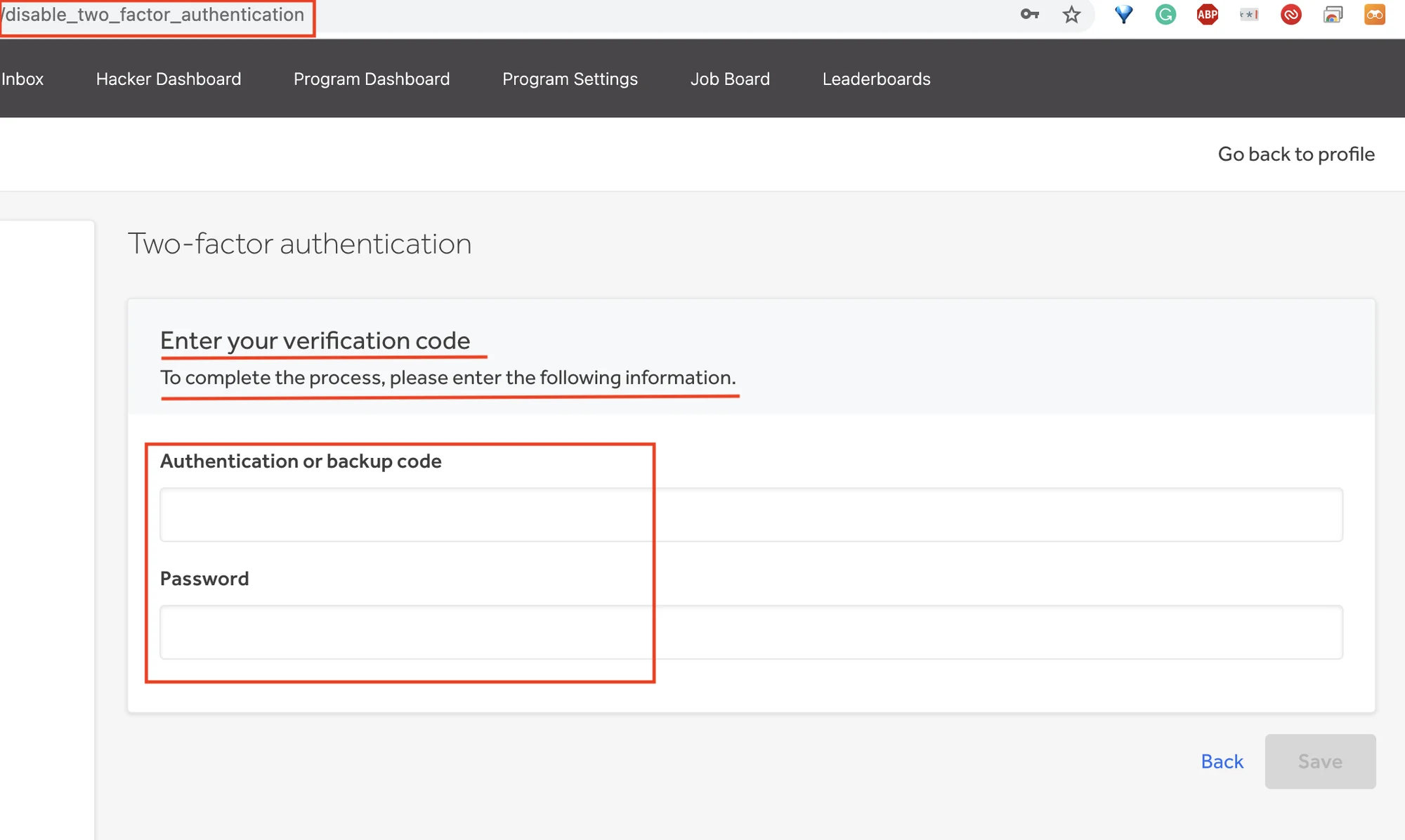
Let's bypass it:
- Open Google Authenticator and create a new account using
██████as the setup key; - Sign in to your HackerOne account;
- Replay the HTTP Request below (update
X-Auth-Token,password, andotp_codeusing the OTP generated on Google Authenticator):
POST /graphql HTTP/1.1
Host: hackerone.com
content-type: application/json
X-Auth-Token: ******************************
Content-Length: 1221

{"operationName":"UpdateTwoFactorAuthenticationCredentials","variables":{"password":"******************************","otp_code":"******************************","signature":"f3a55d33972b3ac5433dc1ea3f36bed8b6813bf9","backup_codes":["b144ab9f9bc17195","09cc146d7a382931","95bd3133a5bab481","b54d2a14acc7ff0b","46f36d0d72096963"],"totp_secret":"███████","backup_code":"b144ab9f9bc17195"},"query":"mutation UpdateTwoFactorAuthenticationCredentials($password: String!, $otp_code: String!, $backup_code: String!, $totp_secret: String!, $backup_codes: [String]!, $signature: String!) {\n  updateTwoFactorAuthenticationCredentials(input: {password: $password, otp_code: $otp_code, backup_code: $backup_code, totp_secret: $totp_secret, backup_codes: $backup_codes, signature: $signature}) {\n    was_successful\n    errors(first: 100) {\n      edges {\n        node {\n          id\n          type\n          field\n          message\n          __typename\n        }\n        __typename\n      }\n      __typename\n    }\n    me {\n      id\n      remaining_otp_backup_code_count\n      totp_supported\n      totp_enabled\n      remaining_otp_backup_code_count\n      account_recovery_phone_number\n      __typename\n    }\n    __typename\n  }\n}\n"}
The 2FA secret key and backup codes will be changed. You didn't need to know the old 2FA OTP to make the changes.
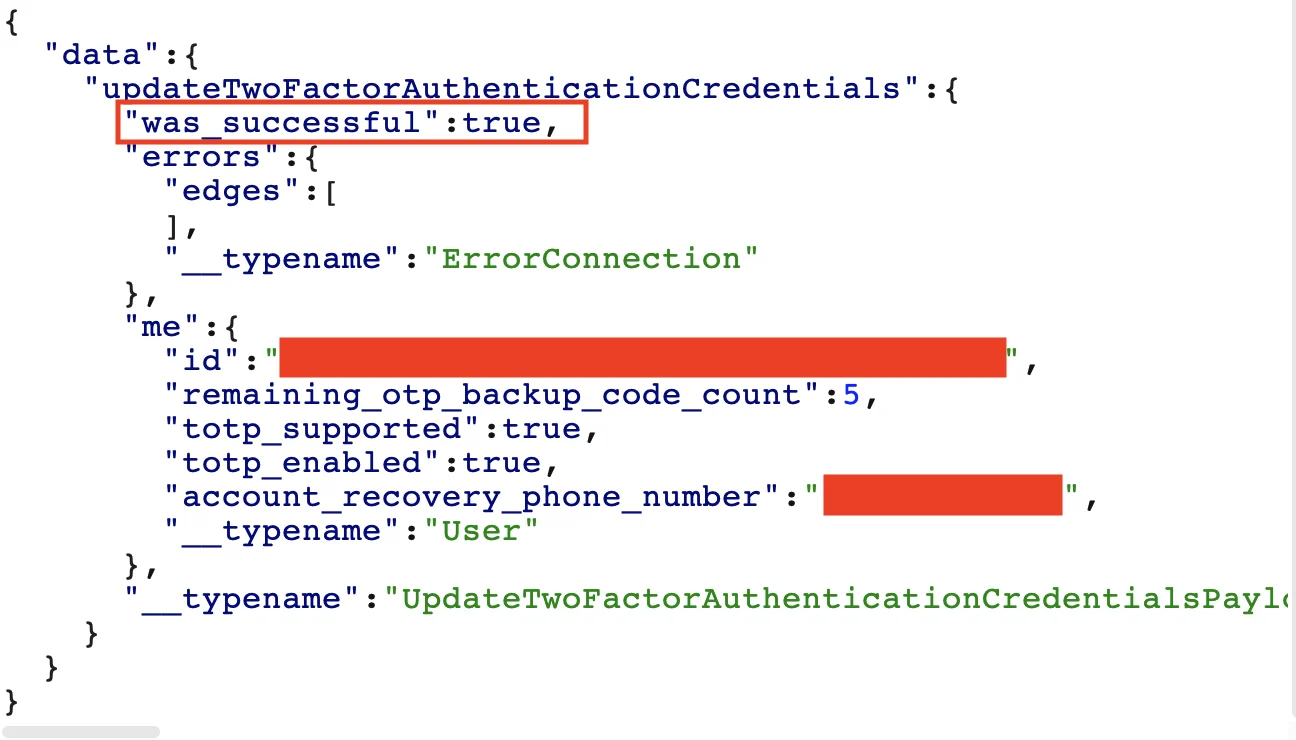
- Sign out and try to sign in again.
Now you need to use the new 2FA OTP, the old one doesn't work anymore.
Recommendation:
Don't allow changes on 2FA configuration without confirming that the user knows the 2FA OTP.
Impact
An attacker can change the 2FA secret key and backup codes without knowing the 2FA OTP of the victim.
Context
HackerOne exposes a GraphQL endpoint at http://hackerone.com/graphql. One of the operations it serves is UpdateTwoFactorAuthenticationCredentials, which changes the two-factor authentication configuration of the signed-in account: the TOTP secret key and the set of backup codes.
The expected behaviour, as described in the report, is that once 2FA is set up, disabling or editing it requires the 2FA OTP. The interface enforces this: to disable 2FA you must supply the Authentication Code or a Backup Code.
Setup
No special tooling is needed beyond a browser, an intercepting proxy to replay requests, and Google Authenticator. The researcher works against a new HackerOne account with 2FA already configured. To replay the request, three values must be supplied fresh each time: the X-Auth-Token of the session, the account password, and an otp_code generated by Google Authenticator.
Finding it
The GraphQL mutation accepts the new 2FA material (totp_secret and backup_codes) as input parameters. If the server trusts those parameters without verifying that the caller knows the current OTP, the check is only a UI convention. The test was therefore to send the mutation directly, with a valid session and password but with an OTP generated from a secret the researcher controls, rather than the victim's current one.
Exploitation
Step 1: Prepare a controlled authenticator entry
Open Google Authenticator and create a new account using ██████ as the setup key. This secret is the one the attacker will install on the account, so the OTP sent in the request is generated from it.
Step 2: Sign in to the target account
Sign in to the HackerOne account whose 2FA configuration is to be replaced.
Step 3: Replay the mutation
Send the following request, updating X-Auth-Token, password and otp_code with the session token, the account password and the OTP generated by Google Authenticator from the attacker's secret:
POST /graphql HTTP/1.1
Host: hackerone.com
content-type: application/json
X-Auth-Token: ******************************
Content-Length: 1221

{"operationName":"UpdateTwoFactorAuthenticationCredentials","variables":{"password":"******************************","otp_code":"******************************","signature":"[redacted]","backup_codes":["b144ab9f9bc17195","09cc146d7a382931","95bd3133a5bab481","b54d2a14acc7ff0b","46f36d0d72096963"],"totp_secret":"███████","backup_code":"b144ab9f9bc17195"},"query":"mutation UpdateTwoFactorAuthenticationCredentials($password: String!, $otp_code: String!, $backup_code: String!, $totp_secret: String!, $backup_codes: [String]!, $signature: String!) {\n  updateTwoFactorAuthenticationCredentials(input: {password: $password, otp_code: $otp_code, backup_code: $backup_code, totp_secret: $totp_secret, backup_codes: $backup_codes, signature: $signature}) {\n    was_successful\n    errors(first: 100) {\n      edges {\n        node {\n          id\n          type\n          field\n          message\n          __typename\n        }\n        __typename\n      }\n      __typename\n    }\n    me {\n      id\n      remaining_otp_backup_code_count\n      totp_supported\n      totp_enabled\n      remaining_otp_backup_code_count\n      account_recovery_phone_number\n      __typename\n    }\n    __typename\n  }\n}\n"}
The important parts of the body:
operationNameandqueryselect theUpdateTwoFactorAuthenticationCredentialsmutation and declare its variables.passwordis the account password, supplied as a normal credential.otp_codeis the OTP generated from the attacker's own secret, not the victim's current one.totp_secretis the new secret key to install on the account.backup_codesis the new list of backup codes to install.backup_codeis one of the new backup codes.signatureis a value included in the request as shown.- The selection set asks for
was_successful, any errors, and the resultingmeobject withtotp_enabled,totp_supported,remaining_otp_backup_code_countandaccount_recovery_phone_number.
The 2FA secret key and backup codes are changed. The old 2FA OTP was never needed to make the change.
Step 4: Confirm the takeover of the second factor
Sign out and try to sign in again. The new 2FA OTP is now required; the old one no longer works.
Root cause
The mutation accepts the new totp_secret and backup_codes as client-supplied input and applies them without proving that the caller knows the current OTP. The otp_code parameter is present, but the request succeeds with an OTP derived from the attacker's own secret, so the value is not being checked against the secret currently stored for the account. The UI-level requirement to enter the Authentication Code or Backup Code is therefore not backed by a server-side check on this operation. The weakness is classified as modification of assumed-immutable data: the 2FA secret and backup codes are treated as replaceable input rather than as protected state.
Impact
An attacker can change the 2FA secret key and backup codes without knowing the 2FA OTP of the victim. Once the mutation succeeds, the attacker controls the second factor and the old OTP no longer works. The report rates this as medium severity with a CVSS score of 4.6.
Fix
Do not allow changes to the 2FA configuration without confirming that the user knows the 2FA OTP. In practice the server must confirm that the user knows the current 2FA OTP before applying a new totp_secret or new backup_codes.
Variants to test
- Send the same mutation with an
otp_codegenerated from a secret you created yourself. A positive result is a successful response that changes the stored secret, confirmed by the old OTP failing at sign-in. - Omit
otp_codeor send an empty value while still supplyingtotp_secretandbackup_codes. A positive result iswas_successfultrue with the new configuration applied. - Reuse a previously valid OTP after it should have expired. A positive result is acceptance of a stale code.
- Supply only
backup_codeswithouttotp_secret, or the reverse, to see whether one path skips the OTP check while the other enforces it. - Look for sibling mutations that modify security settings (password, recovery phone number, email) and check whether each one re-verifies the current factor or accepts client-supplied replacement values.
Hunting notes
This class of bug hides in GraphQL mutations that take security-sensitive state as input variables: secrets, backup codes, recovery contacts, MFA toggles. The signal during recon is a mutation whose variables include both a verification value (otp_code, backup_code) and the new value to be stored (totp_secret, backup_codes); if the verification value is not bound to the account's current secret, the check can be satisfied with an attacker-generated code. The researcher demonstrated impact by completing the full loop: replaying the mutation, then signing out and back in to show that only the new OTP works and the old one is rejected. That end-to-end proof, rather than the request alone, is what establishes that the second factor was actually replaced.
What happened, in plain words
HackerOne is a website where companies run bug bounty programmes and security researchers report vulnerabilities to them. Every account on it can be protected with two-factor authentication, usually shortened to 2FA. With 2FA turned on, signing in takes two things: your password, and a short number that changes every 30 seconds, produced by an app on your phone such as Google Authenticator. That short number is called a one-time password, or OTP.
The idea of 2FA is that a stolen password alone is not enough. An attacker would also need the phone that generates the OTP. So the security of the whole account rests on the OTP really being required at every sensitive moment, not just at sign-in.
This report is about one of those sensitive moments: changing the 2FA settings themselves. Once 2FA is set up, the website asks for an OTP or a backup code before it lets you disable or edit 2FA. The researcher found that this question is only asked by the page you see in the browser. The server behind the page accepts a request that changes the 2FA secret key and the backup codes without ever checking that the person sending it knows the current OTP. The researcher proved it by sending such a request directly and then signing out and back in: only the new OTP worked, the old one was rejected. In other words, the second factor had been replaced.
Background you need first
What an API is
When you click a button on a website, your browser does not magically change anything on the company's computers. It sends a message to a server, and the server does the work and sends an answer back. An API (application programming interface) is the set of those messages that a server agrees to understand. A useful comparison is a restaurant: the menu is the API. You can only order dishes that are on the menu, and the kitchen decides what happens for each one. The browser is the customer, the server is the kitchen.
What GraphQL is
GraphQL is one particular style of API. Instead of many separate addresses for many separate actions, there is usually a single address that accepts a description of what you want. That description is written in a small query language, and the server answers with exactly the fields you asked for. HackerOne exposes such an endpoint at http://hackerone.com/graphql. An endpoint is simply the address a message is sent to.
In GraphQL, an operation that only reads data is called a query, and an operation that changes something is called a mutation. The mutation in this report is named UpdateTwoFactorAuthenticationCredentials, and as the name suggests it updates the credentials used for two-factor authentication: the secret key behind the OTP and the list of backup codes.
What a token is
After you sign in, the website needs a way to recognise you on every following request, because the web's underlying protocol, HTTP, has no memory of its own. It does this with a token: a long random string that your browser sends along with each request, and that the server can look up to see who you are. A session cookie is one common form of this. HackerOne uses a header called X-Auth-Token for the same purpose. Think of it as the wristband you get at an event: it proves you already showed your ticket at the door, so you do not have to show it again at every room.
What the 2FA secret key and backup codes are
The OTP is not random. It is calculated from a secret key that was generated when you set up 2FA and that is shared between your authenticator app and the server. Both sides run the same calculation on the same secret and the current time, and both arrive at the same six digits. If someone replaces that secret key with one of their own, their app and the server will agree on codes, and your app will not.
Backup codes are a fallback: a list of one-time codes you can use if you lose the phone. They are just as powerful as the OTP, so they deserve the same protection.
What the vulnerability class means
The report classifies the weakness as modification of assumed-immutable data. Immutable means "cannot be changed". The 2FA secret and backup codes are data that a user should only be able to change after proving they still hold the current second factor. The server, however, treated them as ordinary input that anyone with a valid session could replace. The assumption that this data is fixed unless properly authorised turned out to be wrong.
The normal behaviour
After 2FA is set up, disabling or editing it should require the 2FA OTP. The interface enforces this: to disable 2FA you must supply the Authentication Code or a Backup Code.
That is the correct behaviour: disabling 2FA without knowing the OTP is not possible through the page. It is not possible through the page: the form demands the code.
Setting up the test
No special tooling is needed beyond a browser, a tool that can capture and resend HTTP requests (often called an intercepting proxy), and Google Authenticator. The researcher worked against a new HackerOne account with 2FA already configured.
To resend the request, three values must be supplied fresh each time:
- The
X-Auth-Tokenof the session, which identifies the signed-in account. - The account
password. - An
otp_codegenerated by Google Authenticator.
The third one is the interesting part, and the next section explains why.
Finding it
The page asks for the OTP, but the GraphQL mutation behind it accepts the new 2FA material, the totp_secret and the backup_codes, as input parameters. In plain terms: the form on the page collects the code, but the message that actually reaches the server also carries the new secret and the new backup codes, and the server has to decide whether to trust them.
If the server trusts those parameters without checking that the caller knows the current OTP, then the check is only a convention of the user interface. A convention is not a lock: anyone who can send the message directly, skipping the page, skips the check too. The test was therefore to send the mutation directly, with a valid session and the correct password, but with an OTP generated from a secret the researcher controls rather than the account's current one.
Exploitation
Step 1: Prepare a controlled authenticator entry
Open Google Authenticator and create a new account using ██████ as the setup key. This secret is the one the attacker will install on the account, so the OTP sent in the request is generated from it. The point of this step is to have a code that is valid for the attacker's secret, so that if the server accepts it, we know the server is not comparing it with the secret currently stored for the account.
Step 2: Sign in to the target account
Sign in to the HackerOne account whose 2FA configuration is to be replaced. This provides the session token and the password that the request will carry.
Step 3: Replay the mutation
Send the following request, updating X-Auth-Token, password and otp_code with the session token, the account password and the OTP generated by Google Authenticator from the attacker's secret:
POST /graphql HTTP/1.1
Host: hackerone.com
content-type: application/json
X-Auth-Token: ******************************
Content-Length: 1221

{"operationName":"UpdateTwoFactorAuthenticationCredentials","variables":{"password":"******************************","otp_code":"******************************","signature":"[redacted]","backup_codes":["b144ab9f9bc17195","09cc146d7a382931","95bd3133a5bab481","b54d2a14acc7ff0b","46f36d0d72096963"],"totp_secret":"███████","backup_code":"b144ab9f9bc17195"},"query":"mutation UpdateTwoFactorAuthenticationCredentials($password: String!, $otp_code: String!, $backup_code: String!, $totp_secret: String!, $backup_codes: [String]!, $signature: String!) {\n  updateTwoFactorAuthenticationCredentials(input: {password: $password, otp_code: $otp_code, backup_code: $backup_code, totp_secret: $totp_secret, backup_codes: $backup_codes, signature: $signature}) {\n    was_successful\n    errors(first: 100) {\n      edges {\n        node {\n          id\n          type\n          field\n          message\n          __typename\n        }\n        __typename\n      }\n      __typename\n    }\n    me {\n      id\n      remaining_otp_backup_code_count\n      totp_supported\n      totp_enabled\n      remaining_otp_backup_code_count\n      account_recovery_phone_number\n      __typename\n    }\n    __typename\n  }\n}\n"}
Line by line, in plain words:
POST /graphql HTTP/1.1is the first line of an HTTP request.POSTis the method used when you are sending data that will change something on the server./graphqlis the path of the endpoint, andHTTP/1.1is the version of the protocol being spoken.Host: hackerone.comtells the server which website the request is for. One server can host many sites, so it needs to know which one you mean.content-type: application/jsonannounces the format of the body that follows. JSON is a text format for structured data, built from names and values in curly braces.X-Auth-Token: ******************************is the session token, the wristband that says who is making the request. The asterisks stand in for the real value, which is secret.Content-Length: 1221states how many bytes long the body is, so the server knows where it ends.- The blank line separates the headers from the body. Everything after it is the message itself.
- The body is one JSON object.
operationNamenames the GraphQL operation being called,UpdateTwoFactorAuthenticationCredentials. variablesholds the values that will be plugged into the operation.passwordis the account password, supplied as a normal credential.otp_codeis the OTP generated from the attacker's own secret, not the account's current one. This is the heart of the test.totp_secretis the new secret key to install on the account. TOTP stands for time-based one-time password, the standard kind of code that changes every 30 seconds.backup_codesis the new list of backup codes to install, andbackup_codeis one of those new codes.signatureis a value included in the request as shown.queryis the GraphQL operation itself, written in the query language. It declares the variables it needs, with types such asString!(a piece of text that must be present) and[String]!(a list of such texts), and then callsupdateTwoFactorAuthenticationCredentialswith them.- Inside the operation, the selection set says what the server should send back:
was_successful, anyerrors(with theirid,type,fieldandmessage), and the resultingmeobject withtotp_enabled,totp_supported,remaining_otp_backup_code_countandaccount_recovery_phone_number. Asking for these fields is how the researcher reads the result of the change.
The 2FA secret key and backup codes are changed. The old 2FA OTP was never needed to make the change.
Step 4: Confirm the takeover of the second factor
Sign out and try to sign in again. The new 2FA OTP is now required; the old one no longer works. This last step matters because it turns a suspicious response into proof: the second factor really was replaced, not merely reported as replaced.
Why it works
The mutation accepts the new totp_secret and backup_codes as input supplied by the client and applies them without proving that the caller knows the current OTP. The otp_code parameter is present, but the request succeeds with an OTP derived from the attacker's own secret, so the value is not being checked against the secret currently stored for the account. The requirement to enter the Authentication Code or Backup Code exists only in the page, and is not backed by a check on the server for this operation.
A comparison: a nightclub bouncer who checks your ID at the door but leaves the back door open has not really checked anything. The form is the front door; the mutation is the back door.
Impact
An attacker can change the 2FA secret key and backup codes without knowing the 2FA OTP of the victim. Once the mutation succeeds, the attacker controls the second factor, and the old OTP no longer works. The report rates this as medium severity with a CVSS score of 4.6. CVSS is a standard scoring system that turns the characteristics of a vulnerability into a number, so that different reports can be compared.
The fix
Do not allow changes to the 2FA configuration without confirming that the user knows the 2FA OTP. In practice, the server must confirm that the user knows the current 2FA OTP before applying a new totp_secret or new backup_codes.
Other things worth trying
These are variations on the same idea, useful when testing a similar feature elsewhere:
- Send the same mutation with an
otp_codegenerated from a secret you created yourself. A positive result is a successful response that changes the stored secret, confirmed by the old OTP failing at sign-in. - Omit
otp_codeor send an empty value while still supplyingtotp_secretandbackup_codes. A positive result iswas_successfultrue with the new configuration applied. - Reuse a previously valid OTP after it should have expired. A positive result is acceptance of a stale code.
- Supply only
backup_codeswithouttotp_secret, or the reverse, to see whether one path skips the OTP check while the other enforces it. - Look for sibling mutations that modify security settings (password, recovery phone number, email) and check whether each one re-verifies the current factor or accepts replacement values supplied by the client.
How to look for this kind of bug
This class of bug hides in GraphQL mutations that take security-sensitive state as input variables: secrets, backup codes, recovery contacts, MFA toggles. The signal during reconnaissance is a mutation whose variables include both a verification value (otp_code, backup_code) and the new value to be stored (totp_secret, backup_codes). If the verification value is not tied to the account's current secret, the check can be satisfied with a code the attacker generated. The researcher demonstrated impact by completing the full loop: replaying the mutation, then signing out and back in to show that only the new OTP works and the old one is rejected. That end-to-end proof, rather than the request alone, is what establishes that the second factor was actually replaced.
Glossary
- 2FA (two-factor authentication): a sign-in method that requires two different things, typically a password and a changing code from a phone app.
- API: the set of messages a server agrees to understand, like a menu in a restaurant.
- Authentication Code: the label the HackerOne page uses for the OTP you type when changing 2FA settings.
- Backup code: a one-time code from a pre-generated list, used when the phone with the authenticator app is unavailable.
- Client: the program making a request, usually the browser; the opposite of the server.
- Content-Length: an HTTP header stating the size of the request body in bytes.
- Content-type: an HTTP header stating the format of the body, such as JSON.
- Cookie: a small piece of data a website stores in your browser and receives back on later requests, often used to recognise a signed-in session.
- CVSS: a standard scoring system that expresses the severity of a vulnerability as a number.
- Endpoint: the address a request is sent to, such as
/graphqlon a given host. - GraphQL: a style of API with a single endpoint that accepts a description of the data you want, written in a small query language.
- Header: a line of metadata at the start of an HTTP request or response, such as
HostorX-Auth-Token. - HTTP: the protocol browsers and servers use to exchange requests and responses.
- Immutable: cannot be changed. Modification of assumed-immutable data means changing data that was assumed to be protected from change.
- Intercepting proxy: a tool that sits between browser and server so you can capture a request and send it again, possibly modified.
- JSON: a text format for structured data, built from names and values in curly braces.
- Mutation: in GraphQL, an operation that changes data on the server, as opposed to a query that only reads it.
- OTP (one-time password): a short code that is valid once, or for a short time, used as a second factor.
- Password: the secret you type to sign in, the first factor.
- Query: in GraphQL, an operation that reads data; also the text describing what to read.
- Replay: to send a captured request again, unchanged or with some values updated.
- Selection set: the part of a GraphQL operation listing which fields the server should return.
- Server: the computer that receives requests and does the work; the opposite of the client.
- Session: the period during which a server recognises you as signed in, usually tracked by a token or cookie.
- Severity: a rating of how serious a vulnerability is, here medium.
- Signature: a value included in the request as shown in the report.
- TOTP (time-based one-time password): the standard kind of OTP that changes every 30 seconds, calculated from a shared secret and the current time.
- TOTP secret: the shared secret key from which TOTP codes are calculated; whoever holds it can generate valid codes.
- Token: a long random string that proves who you are on a request, like a wristband at an event.
- User interface (UI): the part of a website you see and interact with, as opposed to the server behind it.
- Variables: in GraphQL, the named values plugged into an operation when it is sent.
- Vulnerability: a weakness in a system that allows someone to do something they should not be able to do.
- X-Auth-Token: the HTTP header HackerOne uses to carry the session token.


