Edit Auto Response Messages
A permission check treated a report submitter like a team member, so the reporter could edit the team's automatic response comment until the edit window closed. An attacker could change the contents of that auto-response to something else.

- Triaged in 1 hour
- Fixed in 10 hours
- Paid in 10 hours
- Disclosed after 10 hours
Summary by the program
Given
- a team with an autoresponse comment set up
- a user submitting a report to said team
Then
- the submitter was able to edit the team's auto-response comment until the edit period timed out.
This was due to the way that permission checks were handled when the commenter was a User versus a Team. This was a recent regression due to a change introduced on 03/11/2016.
The report
Not completely sure if this is by design due to encountering it for the first time.
When a company has auto response turned on, the reporter can change the contents of the message without any problems.
The reporter should not be able to change the contents of the companies auto response in any way due to the fact that they should not have privileges to that feature.
PoC: Users can abuse this by changing the contents of the auto response to something else.
Attachments
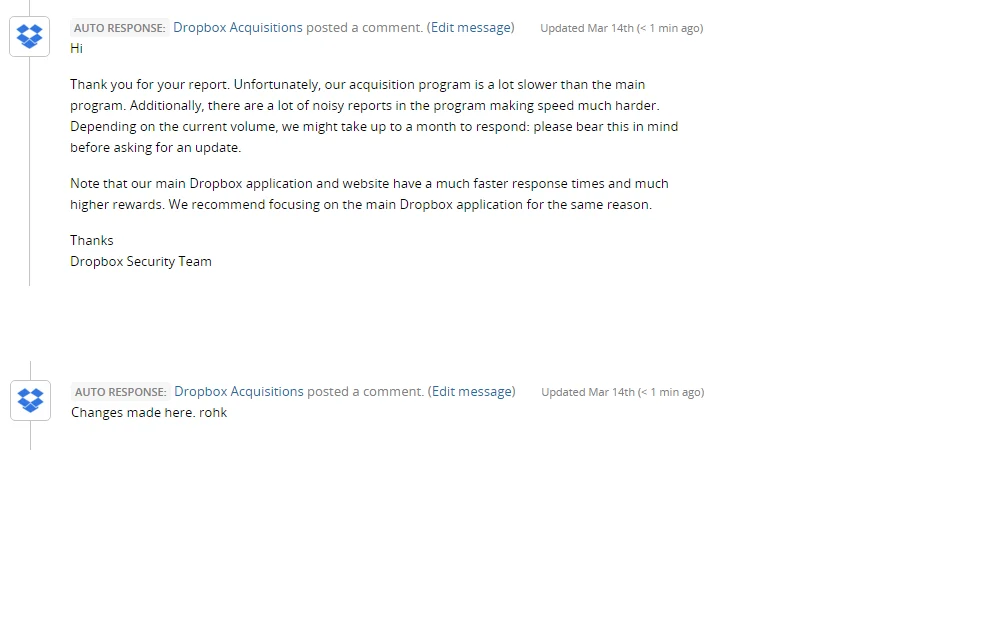
Context
HackerOne is a bug bounty platform. Teams on the platform can configure an auto-response comment, a message that is posted automatically on reports submitted to them. The feature exists so that a team can acknowledge a new report immediately, for example with triage expectations or scope reminders, without a human writing the first reply.
The report concerns who is allowed to edit that comment after it has been posted. The program's own summary frames the issue as a permission-check problem: the checks behaved differently depending on whether the commenter was a User or a Team.
Setup
The preconditions are stated directly in the program's summary:
- A team with an auto-response comment set up.
- A user submitting a report to that team.
No specific accounts, tools or versions are described in the report beyond this. The researcher notes that they were not completely sure whether the behaviour was by design, because they were encountering it for the first time.
Finding it
When a company has auto response turned on, the reporter can change the contents of the message without any problems. The researcher's position is that the reporter should not be able to change the contents of the company's auto-response in any way, because they should not have privileges to that feature.
The report does not include the individual HTTP requests or responses used to make the edit. What it does show is the result: the auto-response comment as it appears on the report, with the edit control available to the reporter.
The screenshot, titled changes.png, is attached to the report as evidence of the behaviour. The report text does not describe the screenshot further.
Exploitation
Step 1: Submit a report to a team with auto-response enabled
The user submits a report to a team that has an auto-response comment configured. The auto-response is posted on the report as a comment.
Step 2: Edit the auto-response comment
The reporter uses the comment edit function on the auto-response comment and changes its contents. The report gives no request, payload or parameter for this step; the only artefact is the screenshot above.
Step 3: Keep editing until the edit window closes
The program's summary states that the submitter was able to edit the team's auto-response comment until the edit period timed out. The edit capability therefore persisted for the normal comment edit window rather than being refused outright.
Root cause
The program's summary attributes the bug to the way permission checks were handled when the commenter was a User versus a Team.
The summary also states that this was a recent regression due to a change introduced on 03/11/2016. The report does not identify the specific code change or the check that was altered.
Impact
A user who submits a report to a team with auto-response enabled can alter the contents of that team's auto-response comment. The effect lasts until the edit period times out. The report does not describe any further consequence, such as effects on other reports or other users, and does not state whether the modified text is visible to anyone beyond the report thread.
The program rated the issue as a violation of secure design principles and awarded a bounty of 1000.00 USD. The report was disclosed on 2016-03-15.
Fix
The report does not describe the fix that was applied. What it does establish is the intended behaviour: a reporter must not be able to change the contents of a team's auto-response in any way, because they do not hold privileges for that feature. Any correction needs the edit permission check to treat a User commenter consistently, so that ownership of the comment by a Team is enforced regardless of how the commenter principal is represented.
Variants to test
- Other auto-generated comments on a report, such as triage bot messages or system notices. A positive result is an edit control appearing for a user who did not create the comment.
- Other comment types authored by a team but displayed in a context where a user is the actor. A positive result is the user being able to modify or delete the team's text.
- Role-boundary checks after any change to how commenter identity is represented. A positive result is a permission decision that differs between a user principal and a team principal for the same action.
Hunting notes
This bug sits at the boundary between two principal types, user and team, on an object (a comment) that is created automatically rather than by the person viewing it. Features that generate content on a user's behalf are good places to look, because the generated object may inherit permissions from the wrong side of that boundary.
A useful signal during recon is any recent change to how commenter identity or ownership is stored, since the program attributes this regression to a change made shortly before the report. The researcher demonstrated impact with a screenshot attached to the report and the statement that the edit persisted until the edit window closed.
What happened, in plain words
HackerOne is a website where security researchers report bugs to companies, and companies pay for the useful ones. Each company on the site has a page, called a team, and that team can set up an automatic reply. When someone sends in a bug report, the site posts a comment on that report straight away, written by the team. It is like an out-of-office email that fires the moment a message arrives, so the sender knows a human has not read it yet but the report has landed.
That automatic comment belongs to the team. Only the team should be able to change its wording. The researcher found that the person who had just submitted the report, an ordinary user with no special rights on that team, could edit the team's automatic comment. The reporter could edit the team's automatic comment. The user could keep changing the text until the normal editing window for comments closed.
The program's own summary explains the cause: the code that decides who may edit a comment checked permissions differently depending on whether the person doing the editing was a User or a Team. The summary calls this a recent regression, meaning something that used to work correctly and was broken by a change made on 03/11/2016. The researcher was not completely sure at first whether the behaviour was intended, because it was the first time they had come across it.
The pieces you need to know
A few ideas come up again and again, so here they are from scratch.
- Team: a company's account on HackerOne. It owns reports sent to it and the comments it writes on them.
- User: an ordinary account, here the person who submits a report. A user has no rights over a team's settings or its comments.
- Auto-response comment: a comment the platform posts automatically on every new report sent to a team. It is written by the team, not by the reporter, even though it appears in the reporter's report thread.
- Permission check: the part of the software that asks "is this person allowed to do this?" before carrying out an action such as editing a comment. Think of a bouncer at a door checking a guest list: the action only happens if the name is on the list.
- Principal: the identity the software uses when it makes a permission decision. Here there are two kinds, a User and a Team, and the bug is that the same action was judged differently depending on which kind was asking.
- Regression: a bug introduced by a change to software that previously behaved correctly. The program dates this one to 03/11/2016.
- Edit window: comments can only be edited for a limited time after they are posted. Once that time passes, the edit option disappears. The report calls the end of this period the edit period timing out.
- Violation of secure design principles: the category the program used for this issue. In plain terms, the design allowed an action that should never have been possible, rather than a single coding slip in one place.
Setting up the situation
The program's summary lists two preconditions, and nothing more is needed:
- A team with an auto-response comment set up.
- A user submitting a report to that team.
No particular accounts, tools or software versions are described. The point of listing the preconditions is that this is not an exotic setup: any team using the feature and any reporter sending them a report creates the situation.
Finding it
The researcher's description is short. When a company has auto response turned on, the reporter can change the contents of the message without any problems. The researcher's view is that the reporter should not be able to change the contents of the company's auto-response in any way, because they should not have privileges to that feature.
That last sentence is the whole argument. The auto-response is the team's text, produced by a feature the reporter has no rights over, so the reporter editing it is wrong by definition, whatever the mechanism.
The report does not include the individual HTTP requests or responses used to make the edit. What it does show is the result: the auto-response comment as it appears on the report, with the edit control available to the reporter.
The screenshot, titled changes.png, is attached as evidence of the behaviour. The report text does not describe the screenshot further.
Walking through the exploitation
Step 1: Submit a report to a team with auto-response enabled
The user sends a report to a team that has an auto-response comment configured. The platform posts the auto-response on the report as a comment. This step is ordinary use of the site; the user is doing nothing unusual. It is included because it is what creates the object that later gets edited: without a report, there is no auto-response comment to touch.
Step 2: Edit the auto-response comment
The reporter uses the comment edit function on the auto-response comment and changes its contents. The report gives no request, payload or parameter for this step; the only artefact is the screenshot above. The reason to try this is simple: the comment appears in the reporter's own report thread, so the edit control is visible and clickable, and the question is whether the server behind it actually checks who owns the comment.
Step 3: Keep editing until the edit window closes
The program's summary states that the submitter was able to edit the team's auto-response comment until the edit period timed out. This matters because it shows the permission was not refused outright. The edit capability lasted until the edit period timed out, rather than being refused outright.
Why it happened
The program's summary attributes the bug to the way permission checks were handled when the commenter was a User versus a Team.
The summary also states that this was a recent regression due to a change introduced on 03/11/2016. The report does not identify the specific code change or the check that was altered.
What it means in practice
A user who submits a report to a team with auto-response enabled can alter the contents of that team's auto-response comment, and the change lasts until the edit period times out. The report does not describe any further consequence, such as effects on other reports or other users, and does not state whether the modified text is visible to anyone beyond the report thread.
The program rated the issue as a violation of secure design principles and awarded a bounty of 1000.00 USD. The report was disclosed on 2016-03-15.
How it should be fixed
The report does not describe the fix that was applied. What it does establish is the intended behaviour: a reporter must not be able to change the contents of a team's auto-response in any way, because they do not hold privileges for that feature. Any correction needs the edit permission check to treat a User commenter consistently, so that ownership of the comment by a Team is enforced regardless of how the commenter principal is represented.
Other places to look
- Other auto-generated comments on a report, such as triage bot messages or system notices. A positive result is an edit control appearing for a user who did not create the comment.
- Other comment types authored by a team but displayed in a context where a user is the actor. A positive result is the user being able to modify or delete the team's text.
- Role-boundary checks after any change to how commenter identity is represented. A positive result is a permission decision that differs between a user principal and a team principal for the same action.
Notes for anyone hunting something similar
This bug sits at the boundary between two principal types, user and team, on an object, a comment, that is created automatically rather than by the person viewing it. Features that generate content on a user's behalf are good places to look, because the generated object may inherit permissions from the wrong side of that boundary.
A useful signal during recon is any recent change to how commenter identity or ownership is stored, since the program attributes this regression to a change made shortly before the report. The researcher demonstrated impact with a screenshot attached to the report and the statement that the edit persisted until the edit window closed.
Glossary
- HackerOne: a bug bounty platform where researchers report security bugs to companies and companies pay for useful reports.
- Team: a company's account on the platform, which owns reports sent to it and the comments it writes.
- User: an ordinary account, here the person who submits a report, with no rights over a team's settings or comments.
- Auto-response comment: a comment posted automatically on every new report sent to a team, written by the team.
- Permission check: the code that decides whether a person is allowed to perform an action before the action happens.
- Principal: the identity the software uses when making a permission decision, such as a User or a Team.
- Edit window: the limited time after posting during which a comment can still be edited.
- Edit period timing out: the moment that window closes and editing is no longer possible.
- Violation of secure design principles: a category for issues where the design itself allows something that should never be possible.
- Bounty: the money a program pays for a valid report.
- Disclosure: the date a report is made public on the platform.
- Recon: the exploratory phase of looking at a target to find features and changes worth testing.


