IE 11 Self-XSS on Jira Integration Preview Base Link
The Jira integration preview page accepted a Base URL that was actually a JavaScript URI, and the preview response placed it into a link. In Internet Explorer 11, clicking that link ran the script in the hackerone.com context.

- Fixed in 3 days
- Paid in 17 days
- Disclosed after 17 days
I wasn't sure if you would accept this report due to it being Self-XSS, but I figured it might be useful information because it breaks one of the flows used to validate URLs.
Steps
- Launch IE 11
- Log into a HackerOne account that has admin on a program.
- Go to the Automation -> Integrations -> Jira page, e.g.
- https://hackerone.com/buer_haus/integrations
- -> https://hackerone.com/buer_haus/integrations/jira/edit
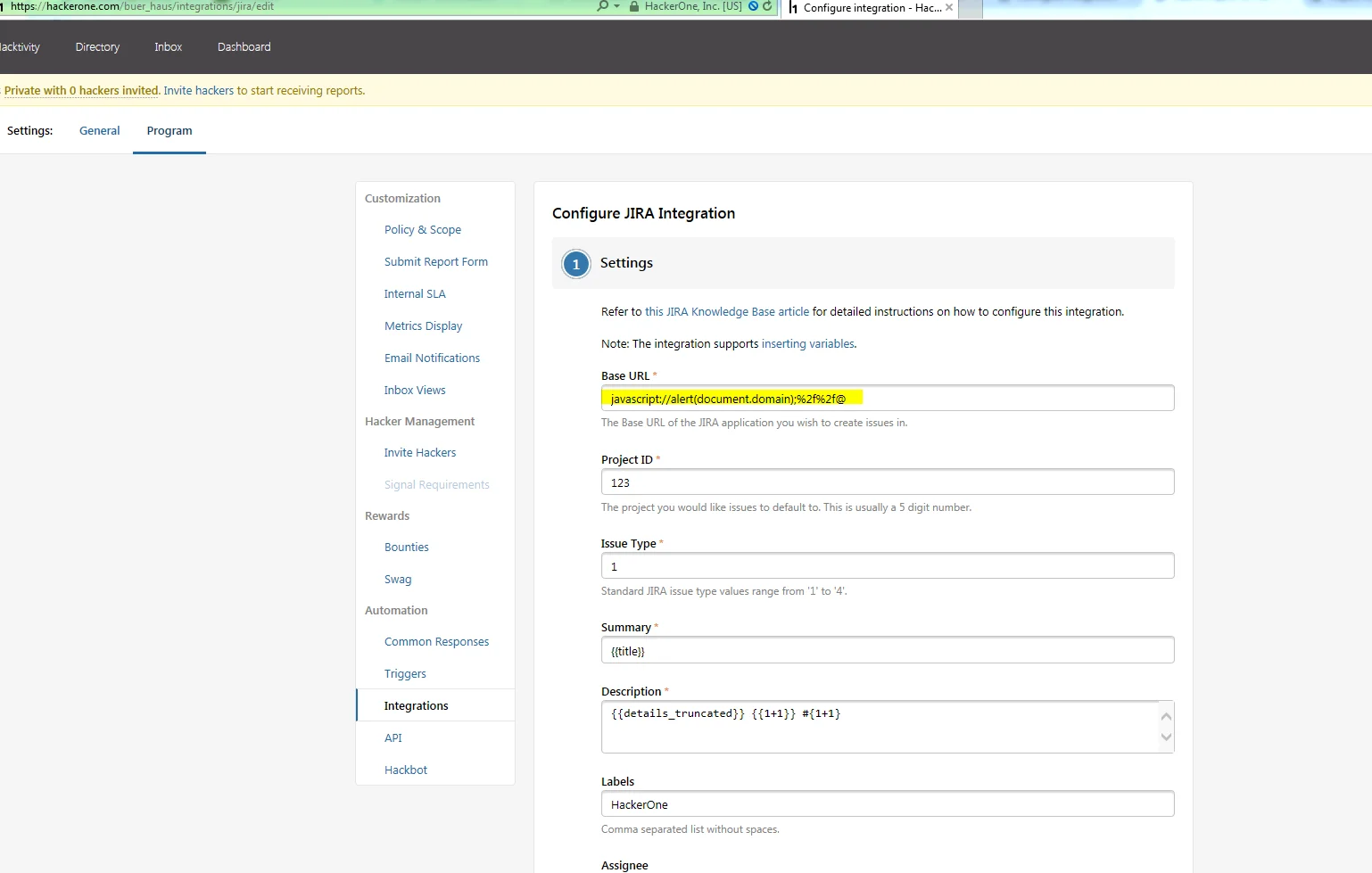
- Set the Base URL input to the following:
javascript://alert(document.domain);%2f%2f@
- Fill in the rest of the required inputs with any data.
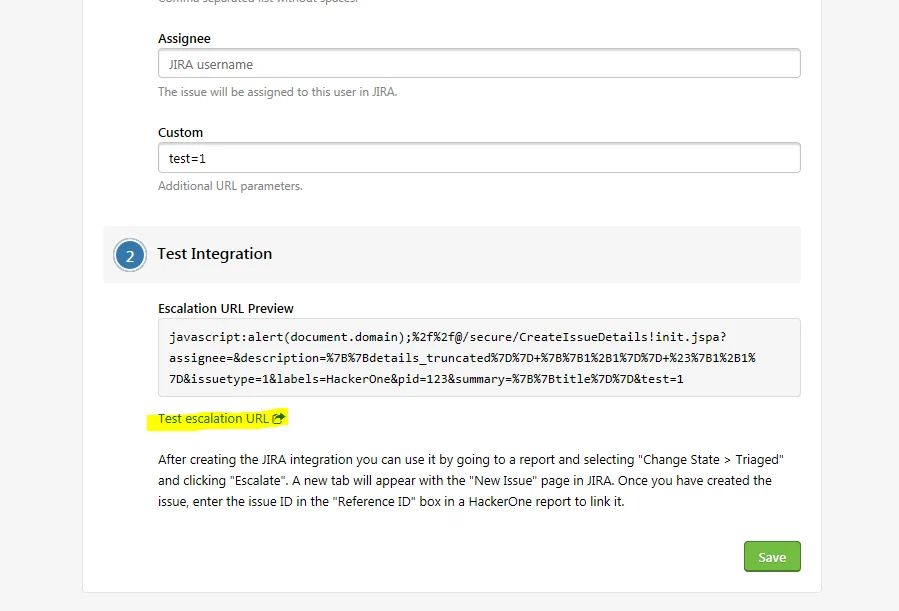
- After the AJAX request is sent to Preview, you'll have generated a
Test escalation URLlink under Section 2 Test Integration.
- Click the
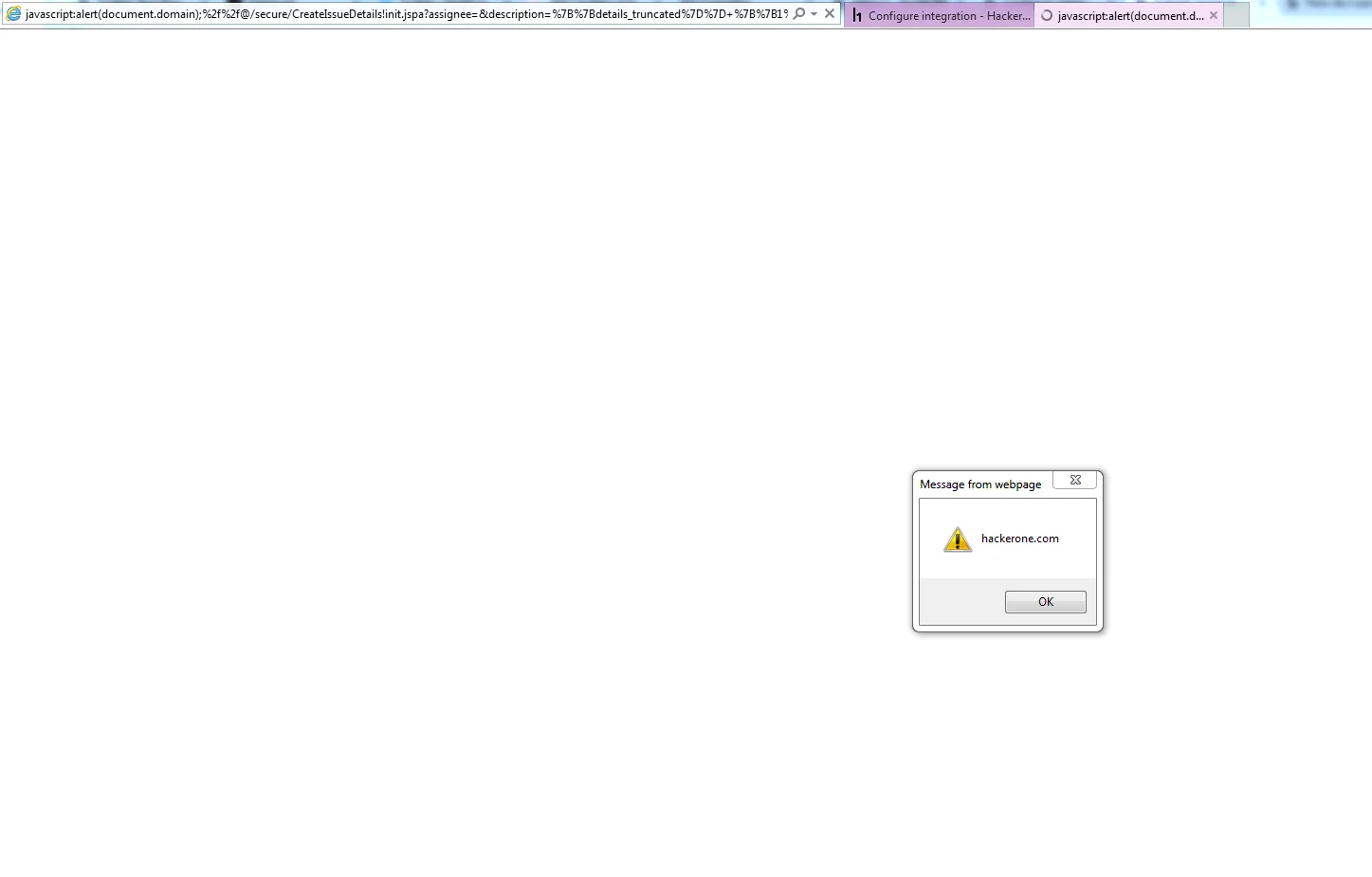
Test escalation URLlink. - ---> You executed a JavaScript alert in a new window displaying the context as hackerone.com
Info
There's a Cross-Site Scripting vulnerability on the program Configure JIRA Integration page. When the user puts a URL into the Base URL input, it sends an AJAX request to /jira_integrations/preview and returns with a JSON response containing a URL in example_escalation_url. This JSON value gets placed into an <a href> element on the page. It's possible to break the URL validation in a way that it returns with a JavaScript data URI so that it executes JavaScript when a user clicks on the link.
This is relatively low impact because of the following:
- The JavaScript link text is shown in a preview right above the URL. It's pretty obvious it's a JavaScript link at that point.
- It breaks the URL validation on the POST preview and not on the actual PUT request to save the URL to the integration page. Maybe there's a way around this, but I couldn't find a way. This makes it a Self-XSS and not Stored.
- Even if you could get it Stored, it's protected by CSRF so you can't attack other programs. You would have to invite people to your program or attack other users already in your program.
- The HackerOne CSP rules prevent script-src at
self. That means this will only execute in browsers that don't support CSP such as IE 11.
Request/Response
URL https://hackerone.com/buer_haus/jira_integrations/preview POST
pid=123&issue_type=1&base_url=javascript://alert(1)%3B@&summary={{title}}&description={{details_truncated}}+{{1+1}}+#{1+1}&labels=HackerOne&assignee=&custom=test=1
Response:
{"preview":{"example_escalation_url":"javascript:alert(1);@/secure/CreateIssueDetails!init.jspa?assignee=\u0026description=%7B%7Bdetails_truncated%7D%7D+%7B%7B1+1%7D%7D+%23%7B1+1%7D\u0026issuetype=1\u0026labels=HackerOne\u0026pid=123\u0026summary=%7B%7Btitle%7D%7D\u0026test=1"}}
Source
<a href="javascript:alert(document.domain);%2f%2f@/secure/CreateIssueDetails!init.jspa?assignee=&description=%7B%7Bdetails_truncated%7D%7D+%7B%7B1%2B1%7D%7D+%23%7B1%2B1%7D&issuetype=1&labels=HackerOne&pid=123&summary=%7B%7Btitle%7D%7D&test=1" target="_blank"><!-- react-text: 82 -->Test escalation URL<!-- /react-text --><!-- react-text: 83 --> <!-- /react-text --><i class="icon-external-link"></i></a>
Context
The target is HackerOne's own program configuration feature for Jira integrations. A program administrator can connect a Jira instance to a program so that escalations create Jira issues. The configuration page lives under a program's Automation section, at a path like https://hackerone.com/buer_haus/integrations, which leads to https://hackerone.com/buer_haus/integrations/jira/edit.
One part of that page is a Preview function. When the administrator enters a Base URL and the other required fields, the page sends an AJAX request to /jira_integrations/preview. The server responds with JSON that includes an example_escalation_url, and the page renders that value into an <a href> element labelled Test escalation URL under Section 2, Test Integration. The link is meant to show the administrator what the generated escalation URL will look like.
The researcher opens the report by noting uncertainty about whether a Self-XSS would be accepted, but argues it is useful because it breaks one of the flows used to validate URLs.
Setup
- Browser: Internet Explorer 11. This matters because the payload only executes in browsers without CSP support, and the researcher states that HackerOne's CSP rules prevent
script-srcatself. - Account: a HackerOne account with admin rights on a program.
- No other tooling is described.
Finding it
The researcher looked at how the Base URL input is handled. The value is sent to the preview endpoint, and the returned example_escalation_url is placed into an anchor's href. The URL validation could be broken so that the endpoint returns a javascript: URI, which the browser executes when the link is clicked.
Exploitation
Step 1: Launch IE 11
The browser choice is a precondition, not an incidental detail: the payload depends on a browser that does not enforce the site's CSP.
Step 2: Log in as a program admin
Use a HackerOne account that has admin on a program.
Step 3: Open the Jira integration page
Navigate to the Automation, Integrations, Jira page, for example:
https://hackerone.com/buer_haus/integrations
-> https://hackerone.com/buer_haus/integrations/jira/edit
Step 4: Set the Base URL
Enter the following into the Base URL input:
javascript://alert(document.domain);%2f%2f@
The screenshot shows the Base URL field holding this value. The value is a javascript: scheme followed by //, the script alert(document.domain);, and %2f%2f@.
Step 5: Fill in the remaining required inputs
Any data will do for the other required fields.
Step 6: Trigger the preview
After the AJAX request is sent to Preview, a Test escalation URL link is generated under Section 2, Test Integration.
The screenshot shows the generated link on the page.
Step 7: Click the link
Click the Test escalation URL link.
Step 8: Observe execution
A JavaScript alert executes in a new window, displaying the context as hackerone.com.
The screenshot shows the alert with hackerone.com as its content.
The request and response
The preview request is a POST to:
https://hackerone.com/buer_haus/jira_integrations/preview
with this body:
pid=123&issue_type=1&base_url=javascript://alert(1)%3B@&summary={{title}}&description={{details_truncated}}+{{1+1}}+#{1+1}&labels=HackerOne&assignee=&custom=test=1
Here base_url carries the payload, with the semicolon encoded as %3B. The other parameters are the ordinary integration fields: pid, issue_type, summary, description, labels, assignee and custom.
The response is:
{"preview":{"example_escalation_url":"javascript:alert(1);@/secure/CreateIssueDetails!init.jspa?assignee=\u0026description=%7B%7Bdetails_truncated%7D%7D+%7B%7B1+1%7D%7D+%23%7B1+1%7D\u0026issuetype=1\u0026labels=HackerOne\u0026pid=123\u0026summary=%7B%7Btitle%7D%7D\u0026test=1"}}
The server has accepted the javascript: scheme and built the escalation URL on top of it, appending the Jira path and query parameters. The & characters in the JSON are escaped as \u0026.
The rendered markup is:
<a href="javascript:alert(document.domain);%2f%2f@/secure/CreateIssueDetails!init.jspa?assignee=&description=%7B%7Bdetails_truncated%7D%7D+%7B%7B1%2B1%7D%7D+%23%7B1%2B1%7D&issuetype=1&labels=HackerOne&pid=123&summary=%7B%7Btitle%7D%7D&test=1" target="_blank"><!-- react-text: 82 -->Test escalation URL<!-- /react-text --><!-- react-text: 83 --> <!-- /react-text --><i class="icon-external-link"></i></a>
The href begins with javascript:alert(document.domain);, and the %2f%2f@ plus the appended Jira path follow as part of the same value. Clicking the link runs the script in the context of hackerone.com.
Root cause
The preview endpoint validates the Base URL loosely enough that a javascript: scheme is accepted, and the resulting example_escalation_url is written directly into an anchor's href. The endpoint returns a javascript: URI in example_escalation_url, which is placed into the anchor's href.
The existing defences did not stop it for these reasons:
- The site's CSP rules prevent
script-srcatself, so the payload only executes in browsers that do not support CSP, such as IE 11. - The validation that is broken is on the POST preview request, not on the PUT request that saves the URL to the integration page. The researcher could not find a way around this, which keeps the issue Self-XSS rather than Stored.
- Even if the value could be stored, the save is protected by CSRF, so an attacker cannot use it against other programs. They would have to invite people to their own program or attack users already in it.
Impact
The researcher rates the impact as relatively low, for the reasons above. The JavaScript link text is shown in a preview right above the URL, so it is fairly obvious that it is a JavaScript link. Execution requires the victim to be using a browser without CSP support, and the victim must click the link themselves. Because the payload is not stored, an attacker cannot deliver it to another user through the saved integration; they would need the target to be in their own program, or to already be a member of it.
Fix
The report does not describe a fix or a change made in response. What it implies is that the preview endpoint should reject non-HTTP(S) schemes in base_url so that example_escalation_url can never be a javascript: URI, and that the rendered href should be constrained to the same schemes.
Variants to test
- Try other schemes in a URL field that is echoed into a link:
javascript:,data:,vbscript:. A positive result is the preview or saved value starting with that scheme in the renderedhref. - Try the
//comment and@authority trick with different trailing characters, such as%2f%2f@,//@, or a bare@, to see which forms survive validation. A positive result is the endpoint returning the scheme intact with the appended path. - Test the save path (the PUT request) with the same payloads to see whether validation differs between preview and save. A positive result is a stored value that renders as a
javascript:link for other users. - Test in browsers without CSP support, such as IE 11, and in browsers with CSP to confirm the difference. A positive result is execution in the former and a CSP block in the latter.
Hunting notes
This kind of bug hides in preview and test features: any place where a user-supplied URL is validated, transformed server-side, returned in JSON, and then rendered into an href or src. The signal during recon is a request that returns a URL-shaped value in its response, especially one built from a field the user controls. The researcher demonstrated the alert with document.domain as hackerone.com and set out the limits: Self-XSS, preview only, CSRF-protected save, and CSP-dependent browser support.
What happened, in plain words
HackerOne is a website where companies run bug bounty programmes: people report security problems to them and can be paid for it. Each company's page on HackerOne is called a program. Program owners can connect outside tools to their program, and one of those tools is Jira, a service teams use to track tasks and bugs. The idea is that when something is escalated inside a program, a matching task (an issue) is created in Jira automatically.
To set this up, the program owner fills in a form on HackerOne. One field on that form is the Base URL, the web address of their Jira installation. The page also has a Preview function: before saving anything, the owner can ask HackerOne to show what the generated Jira link will look like. The page sends the form to the server in the background and places the returned URL into a link labelled Test escalation URL.
The researcher found that this preview accepted a value that was not a normal web address at all, but a small piece of JavaScript disguised as one. When the resulting link was clicked in Internet Explorer 11, the browser ran that JavaScript and the alert displayed hackerone.com. This class of bug is called Cross-Site Scripting, or XSS: getting your own code to run inside someone else's website, in the browser of whoever is looking at it.
There is an important twist. The trick only worked on the preview, not on the request that actually saves the setting, and the person who has to click the link is the same administrator who typed the value in. A bug that only lets you attack yourself is called Self-XSS, and it is usually considered low impact. The researcher says up front that they were not sure the report would be accepted for that reason, but submitted it because it breaks one of the checks used to validate URLs.
The pieces involved
Before the steps, a few ideas that the rest of the article relies on.
- A URL (web address) has a scheme at the front, the part before
://.https://means a normal encrypted web page.javascript:is also a scheme, and browsers treat it specially: instead of fetching a page, they run whatever follows as code. That is the whole basis of this bug. - An AJAX request is a request a web page makes to a server in the background, without reloading the page. When you press Preview, the page quietly sends your form to the server and slots the answer in.
- JSON is a plain text format for data, made of names and values in curly braces, easy for programs to read. The preview endpoint answers in JSON.
- An endpoint is a specific address on a server that accepts a particular kind of request, for example
/jira_integrations/preview. - An
<a href>element is the HTML for a link. Thehrefattribute holds the address the browser goes to when the link is clicked. If that address starts withjavascript:, the browser runs code instead of navigating. - CSP (Content Security Policy) is a set of rules a website sends to the browser saying which sources of code are allowed to run. HackerOne's rules, as the researcher describes them, block inline script from the site itself (
script-srcatself). Browsers that understand CSP obey the rules; Internet Explorer 11 does not support CSP, so it ignores them. - CSRF protection (Cross-Site Request Forgery) is a defence that makes sure a state-changing request really came from the site's own pages and not from another website tricking your browser. It matters later, because it stops an attacker from saving the malicious value into someone else's program.
- Self-XSS versus Stored XSS: Self-XSS only fires when the victim types or clicks the payload themselves. Stored XSS is saved on the server and fires for other people who later view the page. Stored is far more serious.
The target and the feature
The target is HackerOne's own configuration feature for Jira integrations. A program administrator connects a Jira instance to a program so that escalations create Jira issues. The configuration page sits under a program's Automation section, at a path like https://hackerone.com/buer_haus/integrations, which leads on to https://hackerone.com/buer_haus/integrations/jira/edit.
One part of that page is the Preview function. When the administrator enters a Base URL and the other required fields, the page sends an AJAX request to /jira_integrations/preview. The server replies with JSON containing an example_escalation_url, and the page puts that value into an <a href> element labelled Test escalation URL, under Section 2, Test Integration. The link exists to show the administrator what the generated escalation URL will look like.
Setting up
- Browser: Internet Explorer 11. This is not incidental. The payload only runs in browsers without CSP support, and the researcher states that HackerOne's CSP rules prevent
script-srcatself. - Account: a HackerOne account with admin rights on a program.
- No other tooling is described.
Finding it
The researcher looked at how the Base URL input is handled. The value is sent to the preview endpoint, and the returned example_escalation_url is placed into a link's href. The suspicion was that the URL validation could be broken so that the endpoint returns a javascript: address, which the browser would run when the link is clicked.
Exploitation, step by step
Step 1: Launch IE 11
The browser choice is a precondition, not a detail. The payload depends on a browser that does not enforce the site's CSP. In a modern browser the same link would be blocked by the policy.
Step 2: Log in as a program admin
Use a HackerOne account that has admin on a program. The integration page is only reachable with those rights, so this is simply the door into the feature.
Step 3: Open the Jira integration page
Navigate to the Automation, Integrations, Jira page, for example:
https://hackerone.com/buer_haus/integrations
-> https://hackerone.com/buer_haus/integrations/jira/edit
The first address is the program's integrations overview; the arrow shows the next hop, the Jira edit page where the form lives.
Step 4: Set the Base URL
Enter the following into the Base URL input:
javascript://alert(document.domain);%2f%2f@
The screenshot shows the Base URL field holding this value. Reading it piece by piece:
javascript:is the scheme. A browser seeing this at the start of a link runs what follows as code rather than loading a page.//follows the scheme in the payload.alert(document.domain);is the script itself.alertopens a pop-up box;document.domainis the current site's domain name, so the box proves which site the code is running on.%2f%2f@follows the script in the payload;%2fis the encoded form of a forward slash.
Step 5: Fill in the remaining required inputs
Any data will do for the other required fields. They only need to be present so the form can be submitted.
Step 6: Trigger the preview
After the AJAX request is sent to Preview, a Test escalation URL link is generated under Section 2, Test Integration.
The screenshot shows the generated link on the page. This is the moment the server has accepted the value and handed back a link built on top of it.
Step 7: Click the link
Click the Test escalation URL link. Clicking the link is the trigger for the script.
Step 8: Observe execution
A JavaScript alert runs in a new window, displaying the context as hackerone.com.
The screenshot shows the alert with hackerone.com as its content. The alert displayed hackerone.com as its content.
The request and response
The preview request is a POST to:
https://hackerone.com/buer_haus/jira_integrations/preview
with this body:
pid=123&issue_type=1&base_url=javascript://alert(1)%3B@&summary={{title}}&description={{details_truncated}}+{{1+1}}+#{1+1}&labels=HackerOne&assignee=&custom=test=1
A POST body is a list of name and value pairs joined by &, the same format you see in a URL after a question mark. Going through it:
base_url=javascript://alert(1)%3B@is the payload field. Here the script is the simpleralert(1), and the semicolon is encoded as%3B. The//comment marker and the trailing@are still there.
The other parameters are the ordinary integration fields: pid, issue_type, summary, description, labels, assignee and custom. Only base_url carries the attack.
The response is:
{"preview":{"example_escalation_url":"javascript:alert(1);@/secure/CreateIssueDetails!init.jspa?assignee=\u0026description=%7B%7Bdetails_truncated%7D%7D+%7B%7B1+1%7D%7D+%23%7B1+1%7D\u0026issuetype=1\u0026labels=HackerOne\u0026pid=123\u0026summary=%7B%7Btitle%7D%7D\u0026test=1"}}
This is JSON: an object named preview holding one field, example_escalation_url. Its value starts with javascript:alert(1);@ and then continues with a Jira path, /secure/CreateIssueDetails!init.jspa, and a query string of parameters. In other words, the server accepted the javascript: scheme and built the escalation URL on top of it, appending the Jira path and query parameters. The & characters that separate those parameters are escaped as \u0026, which is JSON's way of writing an ampersand safely inside a string. The %7B%7B and %7D%7D sequences are the encoded forms of {{ and }}.
The rendered markup is:
<a href="javascript:alert(document.domain);%2f%2f@/secure/CreateIssueDetails!init.jspa?assignee=&description=%7B%7Bdetails_truncated%7D%7D+%7B%7B1%2B1%7D%7D+%23%7B1%2B1%7D&issuetype=1&labels=HackerOne&pid=123&summary=%7B%7Btitle%7D%7D&test=1" target="_blank"><!-- react-text: 82 -->Test escalation URL<!-- /react-text --><!-- react-text: 83 --> <!-- /react-text --><i class="icon-external-link"></i></a>
This is the HTML the page ends up with. The href begins with javascript:alert(document.domain);, and the %2f%2f@ plus the appended Jira path follow as part of the same value. Clicking the link runs the script in the context of hackerone.com.
Why it works
The preview endpoint validates the Base URL loosely enough that a javascript: scheme is accepted, and the resulting example_escalation_url is written directly into a link's href. The endpoint returns a javascript: URI in example_escalation_url, which is placed into the link's href.
The existing defences did not stop it, for these reasons:
- The site's CSP rules prevent
script-srcatself, so the payload only runs in browsers that do not support CSP, such as IE 11. - The validation that is broken is on the POST preview request, not on the PUT request that saves the URL to the integration page. The researcher could not find a way around this, which keeps the issue Self-XSS rather than Stored.
- Even if the value could be stored, the save is protected by CSRF, so an attacker cannot use it against other programs. They would have to invite people to their own program or attack users already in it.
Impact
The researcher rates the impact as relatively low, for the reasons above. The JavaScript link text is shown in a preview right above the URL, so it is fairly obvious that it is a JavaScript link. Execution requires the victim to be using a browser without CSP support, and the victim must click the link themselves. Because the payload is not stored, an attacker cannot deliver it to another user through the saved integration; they would need the target to be in their own program, or to already be a member of it.
Fix
The report does not describe a fix or a change made in response. What it implies is that the preview endpoint should reject non-HTTP(S) schemes in base_url so that example_escalation_url can never be a javascript: address, and that the rendered href should be constrained to the same schemes.
Variants to test
- Try other schemes in a URL field that is echoed into a link:
javascript:,data:,vbscript:. A positive result is the preview or saved value starting with that scheme in the renderedhref. - Try the
//comment and@authority trick with different trailing characters, such as%2f%2f@,//@, or a bare@, to see which forms survive validation. A positive result is the endpoint returning the scheme intact with the appended path. - Test the save path (the PUT request) with the same payloads to see whether validation differs between preview and save. A positive result is a stored value that renders as a
javascript:link for other users. - Test in browsers without CSP support, such as IE 11, and in browsers with CSP to confirm the difference. A positive result is execution in the former and a CSP block in the latter.
Hunting notes
This kind of bug hides in preview and test features: any place where a user-supplied URL is validated, transformed server-side, returned in JSON, and then rendered into an href or src. The signal during recon is a request that returns a URL-shaped value in its response, especially one built from a field the user controls. The researcher demonstrated the alert with document.domain as hackerone.com and set out the limits: Self-XSS, preview only, CSRF-protected save, and CSP-dependent browser support.
Glossary
- AJAX request: a request a web page sends to a server in the background, without reloading the page.
- Alert: a browser pop-up box that displays a message; often used in security testing to prove that code ran.
- Base URL: the field on the Jira integration form that holds the web address of the Jira installation.
- Bug bounty programme: a scheme where a company invites people to report security problems in its systems, sometimes for a reward.
- CSP (Content Security Policy): rules a website sends to the browser saying which sources of code may run.
- CSRF (Cross-Site Request Forgery): an attack where another website makes your browser send a request you did not intend; CSRF protection blocks such requests.
document.domain: a property in the browser that holds the domain name of the current page.- Endpoint: a specific address on a server that accepts a particular kind of request.
- Escalation: in HackerOne, the act of raising a report to the program's own tracking system, here creating a Jira issue.
example_escalation_url: the JSON field in the preview response that holds the sample escalation link.href: the attribute of an HTML link that holds the address the browser goes to when it is clicked.- HTML: the language web pages are written in.
- Internet Explorer 11: an old Microsoft browser that does not support CSP.
- JavaScript: the programming language browsers run to make pages interactive.
javascript:scheme: a URL scheme that makes the browser run the text after it as code instead of loading a page.- Jira: a service teams use to track tasks and bugs.
- JSON: a plain text format for data, made of names and values in curly braces.
- POST / PUT: two kinds of HTTP request; POST here sends the preview form, PUT is used to save the setting.
- Preview: the feature that shows what the generated escalation URL will look like before saving.
- Program: a company's page on HackerOne where its bug bounty runs.
- Query string: the part of a URL after a question mark, made of name and value pairs joined by
&. - Scheme: the first part of a URL, before
://, such ashttpsorjavascript. - Self-XSS: XSS that only fires when the victim enters or clicks the payload themselves.
- Stored XSS: XSS where the payload is saved on the server and fires for other people who later view the page.
- Template placeholder: text such as
{{title}}that is replaced with real data when the final message is built. - URL encoding: writing special characters as
%plus a code, such as%2ffor/and%3Bfor;. - XSS (Cross-Site Scripting): getting your own code to run inside someone else's website, in the browser of whoever is viewing it.