Arbitrary Local-File Read from Admin - Restore From Backup due to Symlinks
An admin could upload a crafted backup archive containing a symbolic link, and after restoring it, read any file the application user could access, including files outside the application directory. This allowed reading local files such as the system password file.

- Fixed in under an hour
- Paid in under an hour
- Disclosed after 60 days
As an Admin user on Discourse there is a feature to create, upload, and restore backups. Generating a backup creates a tar file consisting of the database as a SQL file and uploaded files from /public/upload/*. Having the ability to upload these tar files and restore from them, you can add any file that you wish.
Manually modifying the tar archive and adding a symlink, you are able to read any arbitrary file that the user has permission to including files outside of the Discourse application directory.
Steps
- Load http://try.discourse.org
- Login as an Admin user.
- Go to the Backups page:
- Create a new backup including files.
- Extract the backup files to a folder on your server.
- Create a symlink to
/etc/passwdIn the /uploads/ folder of the backup, e.g./uploads/default/original/1X/[file].jpg.
- example:
ln -s /etc/passwd /home/symlink/files/uploads/default/original/1X/7ad2e8f5fe02890f20503044b604e29e6f3718fd.png
- Create a .tar.gz from the extracted files.
- Upload the newly crafted tar to the server.
- Enable
Restore from Backupsin settings if it's not enabled. - Restore from the backup that uploaded.
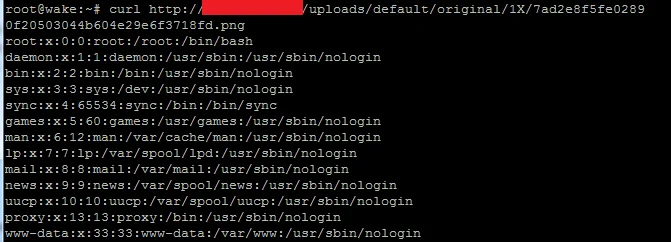
- Go to the uploaded file in your browser after it uploads, e.g.
- ---> You were able to read file contents of
/etc/passwddue to the symlink being extracted from the tar.
Attachments
Not written yet. The AI write-up for this report has not been written yet. The Original tab links to the source.
How it worked
Root cause
Likely the backup restore process extracted symbolic links from the uploaded archive without validating or blocking them, allowing the link to point outside the intended upload directory.
What the attacker needed
Admin account; backup restore feature enabled
How it was found
- Log in as an admin user and go to the backups page.
- Create a new backup that includes files.
- Extract the backup files to a folder on your server.
- Create a symbolic link to a sensitive file inside the uploads folder of the backup.
- Repackage the extracted files into a tar archive and upload it.
- Enable restore from backups if needed, restore the uploaded backup, then visit the uploaded file's URL to read the linked file.
Explained by bugbounty.wiki with AI from the original and checked against quotes from it; it can still be wrong. Read the original before relying on a detail.
Not written yet. The AI write-up for this report has not been written yet. The Original tab links to the source.
A backup is a packaged copy of a website's data. The site let an administrator upload a backup to restore it, but it did not check for special shortcut files called symbolic links inside the package. Those shortcuts can point to sensitive files on the server, so the site ended up serving those files to the browser.
What is Path traversal?
Input that builds a file path escapes the intended folder, reading or writing files the application should never touch.