IE only: stored Cross-Site Scripting (XSS) vulnerability through Program Asset identifier
A stored cross-site scripting vulnerability existed in the program asset identifier field, allowing an attacker to inject a script that would execute when the asset was rendered in various parts of the application. However, the report notes that the exploit was blocked by Content Security Policy (CSP).

- Paid in 2 days
- Disclosed after 3 days
Hai, I've found a stored xss vulnerability via assets but unfortunately its been blocked by CSP.
Steps to reproduce:-
- Add a asset like "><img src=x onerror=prompt``>
{
i) Go to program --> scope --> Add asset --> select 'Others' and give "><img src=x onerror=prompt``>
ii) Check your console now.
}
2) Then, Go to the created program. (You can check with this https://hackerone.com/script_src_x_img_src_x_onerror)
3) Click the created asset. [xss will be fired now(1)]
4) Then submit a report.
5) Whenever the asset is rendering, xss is firing actually(2).
6) Then, open the submitted report. (xss will be firing here too[3])
7) Then click 'edit' in assets, (xss will be firing here too(4))
Impact
Script can be executing for all.
Attachments
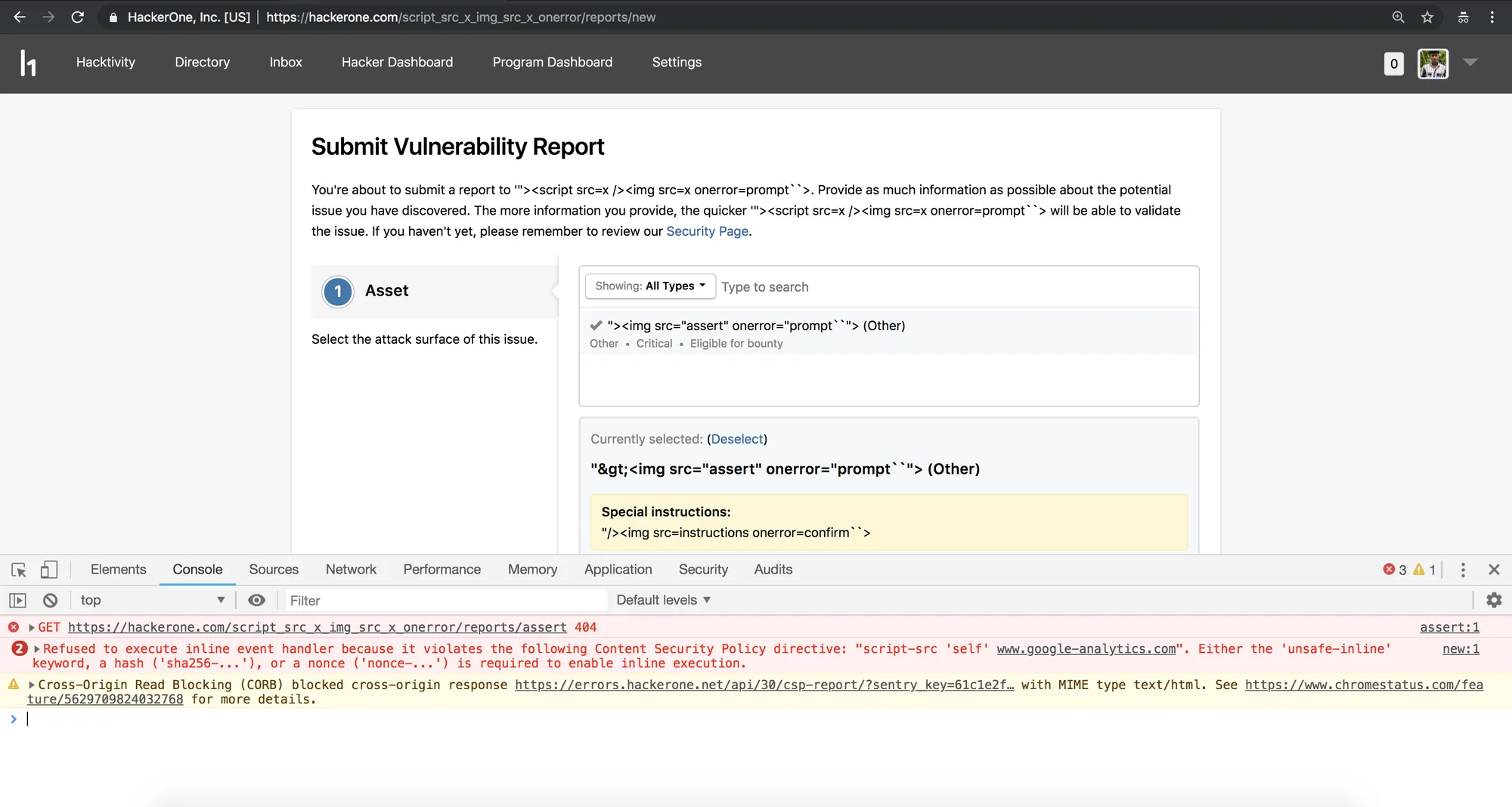
What the report shows
The target is HackerOne's program asset feature. Assets are the in-scope identifiers a program lists for its researchers, and the researcher found that the asset name is stored and later rendered without encoding, giving stored cross-site scripting. The report notes that the payload was blocked by CSP.
The payload used throughout is:
"><img src=x onerror=prompt``>
The reproduction steps are:
- Add an asset with the payload above. Go to program, then scope, then Add asset, select 'Others' and enter the payload. The report says to check the console at this point.
- Go to the created program. The report gives this URL as an example:
https://hackerone.com/script_src_x_img_src_x_onerror. - Click the created asset. The report marks this as the first place the XSS fires.
- Submit a report.
- Whenever the asset is rendering, the XSS fires, marked as the second occurrence.
- Open the submitted report. The XSS fires here too, marked as the third occurrence.
- Click 'edit' in assets. The XSS fires here as well, marked as the fourth occurrence.
The report's impact statement is short: "Script can be executing for all." The title scopes the issue to Internet Explorer only. The screenshot attached to the report is shown below.
The report was rated medium severity with a CVSS score of 4.8, classified as stored cross-site scripting, and paid a bounty of 2,500 USD. It was disclosed on 27 November 2018. The report does not describe a fix.
Root cause
The payload appears to be inserted into HTML in several views (the program page, the asset listing, the submitted report and the asset edit form) without context-aware output encoding. The payload begins with a double quote, which suggests the value is placed inside an HTML attribute and the quote breaks out of it, after which the img element with an onerror handler is parsed as markup. The report does not state which attribute or template is involved.
Impact
The report's impact statement is short: "Script can be executing for all." The report does not enumerate specific actions, data or accounts affected.
How this kind of bug works
Stored XSS happens when untrusted input is persisted by the application and later written into an HTML document without encoding appropriate to where it lands. The browser cannot tell application data from application markup, so any characters that terminate the current context (a quote inside an attribute, a closing tag inside an element, a </script> inside a script block) let the attacker introduce new elements and event handlers. Event handlers such as onerror execute when the browser fails to load the referenced resource, which is why a non-existent src is a convenient trigger.
Defences work at three layers. Output encoding must match the context: HTML entity encoding for element text, attribute encoding including quotes for attribute values, JavaScript encoding inside script blocks, and URL encoding inside URL attributes. Server-side sanitisation with an allow-list parser can strip dangerous markup where rich text is genuinely required. Content Security Policy is a mitigation, not a fix: a strict policy without unsafe-inline blocks inline handlers and inline scripts, which is what happened here, but it does not remove the stored payload and any policy gap or sink that permits inline script re-enables execution.
How to test for it
- Identify every field that is stored and later displayed: names, titles, descriptions, labels, identifiers, tags, custom fields, and anything shown in listings, detail pages, reports, exports or edit forms.
- Submit a benign marker first, for example a unique string, and find every place it is rendered. Note the surrounding HTML context: attribute value, element text, script block, URL, or JSON embedded in the page.
- Send a context-appropriate probe. For an attribute context, a value that closes the quote and adds an element with an event handler; for element text, a tag that would be visible if unencoded; for script contexts, a string that would break out of the literal. Keep probes harmless, for example a handler that calls
promptor writes a marker into the DOM. - Revisit every rendering location, including secondary views such as admin panels, moderation queues, report pages and edit forms, because encoding is often applied in one template and missed in another.
- Check the response body rather than only the rendered page: if the probe appears unencoded in the HTML source, the sink is vulnerable even if a CSP currently blocks execution. Record the CSP header and test in more than one browser, since parsing differences can change the outcome.
A positive result is the probe appearing unencoded in a context where it forms valid markup, with the handler executing when the page loads. Common false positives are payloads that appear encoded in the source but look alarming in a DOM inspector, reflections that only occur in the immediate response and are never stored, and blocked executions where CSP prevents the handler from running: those are still worth reporting as a stored injection, but the impact statement must be honest about the mitigation.
How it is fixed
Apply context-aware output encoding at every sink where the stored value is rendered, including secondary and administrative views. Where the field should not contain markup at all, validate and reject or normalise dangerous characters on input as a defence in depth, but never rely on input filtering alone. Use a well-maintained sanitiser with an allow-list if limited formatting must be supported. Keep a strict CSP as an additional layer, and add regression tests that render the stored value in each template and assert that it is encoded.
Hunting notes
Stored XSS tends to hide in fields that are rendered in many places: asset and scope identifiers, project and program names, tags, custom fields, display names, and anything copied into reports, notifications, exports or audit logs. The more templates a value touches, the more likely one of them misses encoding. Recon signals include features that let users define labels or identifiers, admin views that display user-supplied names, and applications with a CSP that suggests the team has already met injection issues. When reporting, show each distinct rendering context with its own screenshot, state clearly whether execution was achieved or blocked, and describe the realistic impact on a victim's session rather than only the payload.
What happened, in plain words
HackerOne is a platform where companies list the software they want tested and researchers report bugs. Each company (a "program") publishes a list of "assets": the websites, apps or other things that are in scope for testing. The researcher found that a payload entered as an asset name was later shown back on several pages. That let a small piece of HTML and JavaScript be stored and run in the browser of anyone who viewed those pages. This kind of bug is called stored cross-site scripting, or stored XSS.
The report says the payload was blocked by CSP. CSP (Content Security Policy) is a set of rules a website sends to the browser saying which scripts are allowed to run. It is a safety net, not a repair.
The payload used throughout is:
"><img src=x onerror=prompt``>
Line by line:
"closes an HTML attribute that the page had already opened. Imagine a form field that the page writes asvalue="..."; the quote ends the value early.>closes the HTML tag that contained that attribute.<img src=x onerror=prompt``>starts a new image element.src=xpoints to an image that does not exist, so the browser fails to load it.onerroris an event handler: code that runs when that failure happens.prompt``opens a small dialog box in the browser. The backticks are just characters in the payload; the report does not explain why they are there.
The reproduction steps are:
- Add an asset with the payload above. Go to program, then scope, then Add asset, select 'Others' and enter the payload. The report says to check the console at this point. The console is the browser's built-in log where errors and messages appear; checking it shows whether the browser tried to run something.
- Go to the created program. The report gives this URL as an example:
https://hackerone.com/script_src_x_img_src_x_onerror. - Click the created asset. The report marks this as the first place the XSS fires.
- Submit a report.
- Whenever the asset is rendering, the XSS fires, marked as the second occurrence. "Rendering" means the browser drawing the page on screen.
- Open the submitted report. The XSS fires here too, marked as the third occurrence.
- Click 'edit' in assets. The XSS fires here as well, marked as the fourth occurrence.
The point of steps 2 to 7 is that the payload fires in several different places. Each place is a separate chance for the platform to forget to make the value safe. The report's impact statement is short: "Script can be executing for all." The title scopes the issue to Internet Explorer only. The screenshot attached to the report is shown below.
The report was rated medium severity with a CVSS score of 4.8, classified as stored cross-site scripting, and paid a bounty of 2,500 USD. It was disclosed on 27 November 2018. The report does not describe a fix.
In general, how this kind of bug works
Stored XSS happens when a website saves text supplied by a user and later puts that text into a web page without encoding it. Encoding means turning characters that have a special meaning in HTML into harmless versions, for example turning < into <. Without encoding, the browser cannot tell the difference between text the website meant as data and text the attacker meant as instructions. A useful comparison is a comment box: if someone writes "<b>hello</b>" and the site shows it in bold, the site treated the comment as formatting instructions rather than as plain text.
The payload starts with a double quote because the value is probably placed inside an HTML attribute. The quote breaks out of the attribute, and the rest of the payload becomes new markup. The onerror handler runs when the browser fails to load the image, which is why a non-existent src is a convenient trigger.
The report's impact statement is short: "Script can be executing for all." A session is the period during which a website remembers who you are, usually with a cookie, a small piece of data the browser stores and sends back with each request. The report does not enumerate specific actions, data or accounts affected.
Defences work at three layers. Output encoding must match the context: HTML entity encoding for element text, attribute encoding including quotes for attribute values, JavaScript encoding inside script blocks, and URL encoding inside URL attributes. Server-side sanitisation with an allow-list parser can strip dangerous markup where rich text is genuinely required. Content Security Policy is a mitigation, not a fix: a strict policy without unsafe-inline blocks inline handlers and inline scripts, which is what happened here, but it does not remove the stored payload and any policy gap or sink that permits inline script re-enables execution. A sink is the place in the code where data is finally written into the page.
To test for it, start by identifying every field that is stored and later displayed: names, titles, descriptions, labels, identifiers, tags, custom fields, and anything shown in listings, detail pages, reports, exports or edit forms. Submit a benign marker first, for example a unique string, and find every place it is rendered. Note the surrounding HTML context: attribute value, element text, script block, URL, or JSON embedded in the page. Then send a context-appropriate probe. For an attribute context, a value that closes the quote and adds an element with an event handler; for element text, a tag that would be visible if unencoded; for script contexts, a string that would break out of the literal. Keep probes harmless, for example a handler that calls prompt or writes a marker into the DOM. Revisit every rendering location, including secondary views such as admin panels, moderation queues, report pages and edit forms, because encoding is often applied in one template and missed in another. Check the response body rather than only the rendered page: if the probe appears unencoded in the HTML source, the sink is vulnerable even if a CSP currently blocks execution. Record the CSP header and test in more than one browser, since parsing differences can change the outcome.
A positive result is the probe appearing unencoded in a context where it forms valid markup, with the handler executing when the page loads. Common false positives are payloads that appear encoded in the source but look alarming in a DOM inspector, reflections that only occur in the immediate response and are never stored, and blocked executions where CSP prevents the handler from running: those are still worth reporting as a stored injection, but the impact statement must be honest about the mitigation.
To fix it, apply context-aware output encoding at every sink where the stored value is rendered, including secondary and administrative views. Where the field should not contain markup at all, validate and reject or normalise dangerous characters on input as a defence in depth, but never rely on input filtering alone. Use a well-maintained sanitiser with an allow-list if limited formatting must be supported. Keep a strict CSP as an additional layer, and add regression tests that render the stored value in each template and assert that it is encoded.
Stored XSS tends to hide in fields that are rendered in many places: asset and scope identifiers, project and program names, tags, custom fields, display names, and anything copied into reports, notifications, exports or audit logs. The more templates a value touches, the more likely one of them misses encoding. Recon signals include features that let users define labels or identifiers, admin views that display user-supplied names, and applications with a CSP that suggests the team has already met injection issues. When reporting, show each distinct rendering context with its own screenshot, state clearly whether execution was achieved or blocked, and describe the realistic impact on a victim's session rather than only the payload.
Glossary
- Stored XSS: a vulnerability where malicious text is saved by a website and later shown to other users without being made safe, so it can run as code in their browsers.
- Payload: the piece of text or code an attacker sends to trigger a vulnerability.
- CSP (Content Security Policy): rules a website sends to the browser saying which scripts and other resources are allowed to load and run.
- Attribute: a setting inside an HTML tag, such as
srcorvalue, written asname="value". - Event handler: code attached to an element that runs when something happens, such as an image failing to load (
onerror). - Console: the browser's built-in log where errors and messages appear.
- Rendering: the process of the browser drawing a page on screen from HTML and other resources.
- Encoding: converting characters that have special meaning in HTML into harmless versions, for example
<into<. - Sanitisation: cleaning input by removing or neutralising dangerous parts, often with an allow-list of permitted tags.
- Allow-list: a list of things that are permitted, with everything else rejected by default.
- Session: the period during which a website remembers who you are, usually tracked with a cookie.
- Cookie: a small piece of data a website stores in the browser and the browser sends back with later requests.
- Sink: the place in code where data is finally written into a page or other output.
- DOM inspector: a browser tool that shows the current structure of a page after the browser has processed it.
- False positive: a test result that looks like a vulnerability but is not one.
- CVSS: a standard scoring system for the severity of a vulnerability, from 0 to 10.
- Bounty: a payment made to a researcher for reporting a valid vulnerability.



