Lack of input sanitization in Marketo form leads to execution of HTML in lead emails
A sales contact form appeared not to sanitise lead fields, as HTML image tags entered in name, company and message fields triggered requests to the reporter's server after a delay; the reporter was unsure whether the company site or Marketo was responsible.

- Triaged in 51 days
- Fixed in 6 months
- Paid in 2 months
- Disclosed after 6 months
Hi, There is SSRF vulnerability due to img tag injection in "Contact HackerOne Sales" form. Since vulnerability triggers after 18-20 minutes so I am not sure which site it affects. It might affect hackerone or marketo. So I thought it would be better to report it first on hackerone.
POC
- Navigate to https://www.hackerone.com/product/features.
- Click on "Get Started".
- Fill FirstName, LastName, Company and Message by <img src=https://yourserver.com/f onerror=alert(1)>, <img src=https://yourserver.com/l onerror=alert(1)>, <img src=https://yourserver.com/c onerror=alert(1)> and <img src=https://yourserver.com/m onerror=alert(1)>.
- Fill the remaining details and submit the form.
- Wait 18-20 minutes and check server logs.
In this case ssrf triggers many times. Please check the screenshots.
Thanks
Attachments
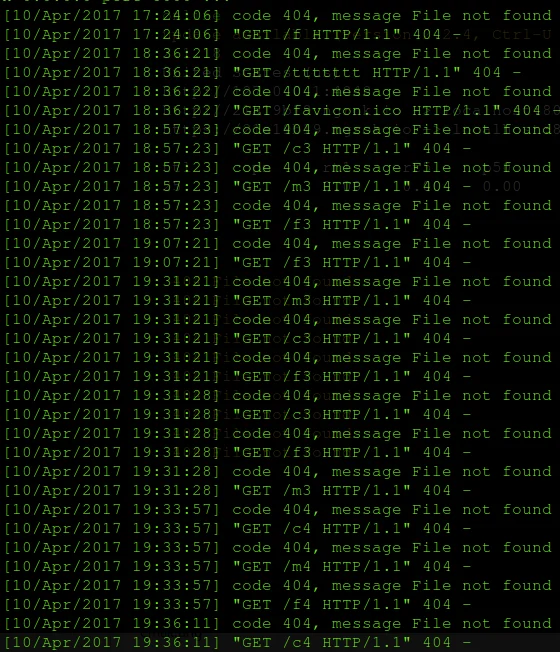
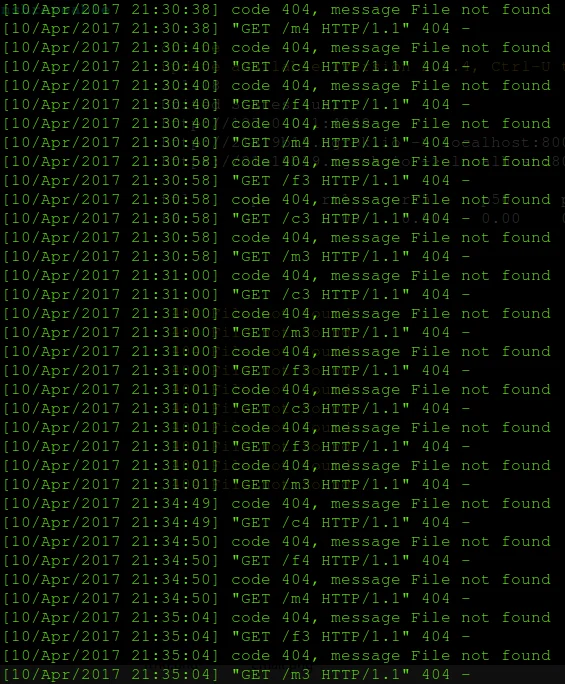
What the report shows
The researcher reported a Server-Side Request Forgery (SSRF) issue in the "Contact HackerOne Sales" form, reached through the HackerOne product features page. The researcher noted the vulnerability triggers 18 to 20 minutes after submission and was not sure whether it affected HackerOne or Marketo. so it was not clear whether the affected system was HackerOne or Marketo. Because of that uncertainty the report was filed against HackerOne first.
The steps given in the report are:
- Navigate to https://www.hackerone.com/product/features.
- Click on "Get Started".
- Fill FirstName, LastName, Company and Message by
<img src=https://yourserver.com/f onerror=alert(1)>,<img src=https://yourserver.com/l onerror=alert(1)>,<img src=https://yourserver.com/c onerror=alert(1)>and<img src=https://yourserver.com/m onerror=alert(1)>. - Fill the remaining details and submit the form.
- Wait 18-20 minutes and check server logs.
The payloads, exactly as written in the report:
<img src=https://yourserver.com/f onerror=alert(1)>
<img src=https://yourserver.com/l onerror=alert(1)>
<img src=https://yourserver.com/c onerror=alert(1)>
<img src=https://yourserver.com/m onerror=alert(1)>
The researcher placed one payload in each of the four fields (first name, last name, company and message). The point of the src attribute is that it points at a server the researcher controls, so that any system which later renders the submitted values will fetch the URL and leave a record in that server's logs. The onerror handler is the HTML execution part of the title: if the value is rendered as HTML in an email or page, the broken image fires the handler.
The report states that the SSRF triggered many times. Two screenshots were attached as evidence.
The report does not give a severity rating, a CVSS score, a fix or a disclosure timeline. The platform record shows a bounty of 500.00 USD and a disclosure date of 3 October 2017, and classifies the weakness as Server-Side Request Forgery (SSRF).
Root cause
The report does not state a root cause; it shows that HTML in the form fields was not neutralised. Because the values are not sanitised, an <img> tag survives into that output, and whatever renders it (a mail client, a browser, or a server-side HTML processor) resolves the external src URL. The SSRF is the server-side fetch of that URL; the onerror handler is the HTML injection side of the same missing sanitisation.
Impact
The report's own framing is limited: the researcher demonstrated that requests to an attacker-controlled host are made from the form data, and that HTML in the fields is not neutralised. The hedges matter. The researcher was not sure which system performed the fetch, and the trigger was delayed by 18 to 20 minutes, which is consistent with asynchronous processing such as email delivery or a background lead workflow. In the general case, an SSRF in a lead-processing pipeline can be used to probe internal networks and reach services that are not exposed to the internet, and HTML injection into lead emails can be used for phishing or tracking. How far either went here is not established by the report.
How this kind of bug works
SSRF happens when an application takes a URL or host from user-controlled input and makes a request to it from the server side, without restricting where that request may go. The attacker supplies a destination, the server resolves and connects to it, and the attacker learns from the result (a response, a timing difference, or a hit in their own logs) whether the request succeeded. The classic targets are internal-only HTTP services, cloud instance metadata endpoints, and internal DNS names.
In this case the mechanism is indirect. The user input is not a URL field; it is ordinary text in a form. The URL appears inside an HTML attribute, and the fetch happens when a downstream component renders that HTML. That component may be a browser opening an email, or a server-side renderer that loads images. The bug class therefore overlaps with stored HTML injection: the missing output encoding is what lets the URL reach a context where it is fetched.
Defences work at two layers. On input, validate and length-limit fields, and reject or encode markup. On output, apply context-appropriate encoding so that submitted text is always treated as text, never as markup. For any feature that genuinely fetches user-supplied URLs, use an allowlist of schemes and hosts, block private and link-local address ranges after DNS resolution, disable redirects or re-validate them, and isolate the fetcher from sensitive network segments.
How to test for it
- Identify features where user input is likely to be rendered elsewhere: contact and lead forms, support tickets, profile fields, comments, and anything that feeds an email notification or a CRM.
- Set up a listener you control that logs every request, including the path and query string.
- Submit unique URLs per field, so that a hit tells you which field was rendered. Use distinct paths for each field, as the researcher did here.
- Submit both a plain URL and an HTML tag containing a URL, to distinguish a fetch of a link from rendering of markup.
- Wait. Asynchronous pipelines can delay the fetch by minutes; the report's 18 to 20 minutes is a reminder not to conclude too early.
- Check the listener logs for requests, and check whether the request came from the target's infrastructure rather than your own browser.
A positive result is a request arriving at your listener that you did not trigger from your own client, ideally with a source that matches the target's hosting or mail infrastructure. Common false positives: your own browser or mail client loading the image when you view a confirmation page or email; a link scanner or antivirus fetching URLs in transit; email clients that proxy images through their own servers; and cached previews. Correlate the timing with your submission and use unique paths to rule these out. Also test whether internal addresses are reachable, but only within the program's rules, and never against systems you are not authorised to touch.
How it is fixed
Encode all user-supplied values on output, so that <, > and quotes are escaped in HTML contexts and markup cannot be introduced. Validate and length-limit form fields on the server side, rejecting values that do not match the expected format. If the application must fetch URLs from user input, restrict schemes to HTTP and HTTPS, resolve the hostname and reject private, loopback and link-local addresses, re-check after redirects, and run the fetcher with least privilege. For email pipelines, render lead data as plain text or through a templating engine with auto-escaping enabled.
Hunting notes
This bug class hides where input crosses a boundary between systems: web forms feeding a CRM or marketing platform, ticketing systems that email agents, and any integration where one vendor renders another vendor's data. Recon signals include third-party form endpoints in page source, marketing automation domains, and confirmation flows that mention email notifications. When you find a candidate, use per-field unique URLs, wait long enough for asynchronous processing, and keep logs that show the request arrived without your involvement. To make the report land, show the exact fields, the exact payloads, the timing, and the evidence that the request originated server-side; state clearly which system you believe is responsible and where your certainty ends.
What happened, in plain words
A security researcher found a problem in the "Contact HackerOne Sales" form, the web form you reach from the HackerOne product features page. The researcher was not sure whether the form is handled by HackerOne or by Marketo, a marketing platform that companies use to collect details about people who fill in forms (called "leads").
The researcher showed that HTML typed into the fields was not neutralised. If you type HTML (the language web pages are written in) into a field, that HTML survives and is treated as real markup instead of plain text.
The researcher used this to make the system fetch a web address of their choosing. That is called Server-Side Request Forgery (SSRF): the server, not your browser, makes the request. The researcher was careful to say the effect appears 18 to 20 minutes after submission, so it was not clear whether HackerOne or Marketo was doing the fetching. Because of that uncertainty, the report was filed against HackerOne first.
The steps in the report are:
- Navigate to https://www.hackerone.com/product/features.
- Click on "Get Started".
- Fill FirstName, LastName, Company and Message by
<img src=https://yourserver.com/f onerror=alert(1)>,<img src=https://yourserver.com/l onerror=alert(1)>,<img src=https://yourserver.com/c onerror=alert(1)>and<img src=https://yourserver.com/m onerror=alert(1)>. - Fill the remaining details and submit the form.
- Wait 18-20 minutes and check server logs.
The four payloads, exactly as written in the report:
<img src=https://yourserver.com/f onerror=alert(1)>
<img src=https://yourserver.com/l onerror=alert(1)>
<img src=https://yourserver.com/c onerror=alert(1)>
<img src=https://yourserver.com/m onerror=alert(1)>
Here is what each part does. <img> is the HTML tag for an image. src=https://yourserver.com/f tells the browser (or any program that renders the HTML) where to download the image from; yourserver.com stands for a server the researcher controls. onerror=alert(1) is a small piece of JavaScript that runs if the image fails to load. Since there is no real image at that address, the load fails and the handler fires. The alert(1) is just a harmless pop-up used to prove code ran.
Why four different addresses? Each field gets its own path: /f for first name, /l for last name, /c for company and /m for message. When a request arrives at the researcher's server, the path in the log tells them which field was rendered. That is the whole trick: the researcher is not attacking anything directly, they are leaving a trail that shows their text was turned into live HTML somewhere downstream.
The report says the SSRF triggered many times. Two screenshots were attached as evidence.
The report does not give a severity rating, a CVSS score, a fix or a timeline. The platform record shows a bounty of 500.00 USD, a disclosure date of 3 October 2017, and classifies the weakness as Server-Side Request Forgery (SSRF).
Why it happens
The root cause is missing input sanitisation. Sanitising means cleaning user input so that special characters cannot change the meaning of the page. Here, the values typed into the lead fields are stored and later inserted into HTML output without being escaped. Escaping means turning a character like < into a harmless code such as <, so it displays as text rather than starting a tag.
Because nothing is escaped, the <img> tag survives into whatever renders the submitted values. Whatever renders that output, a mail client, a browser, or a server-side HTML processor, then tries to load the external src URL. The server-side fetch is the SSRF; the onerror handler is the HTML injection side of the same missing sanitisation.
What it could mean
The report is modest about impact. It shows that requests to a server the researcher controls are made from the submitted form data, and that HTML in the fields is not neutralised. The researcher was not sure which system performed the fetch, and the 18 to 20 minute delay fits asynchronous processing, such as an email being queued and delivered later. The report does not show access to internal services, cloud metadata, or any data beyond the researcher's own server logs.
In general, an SSRF in a lead-processing pipeline can be used to probe internal networks and reach services that are not exposed to the internet, and HTML injection into lead emails can be used for phishing or tracking. How far either went here is not established by the report.
In general, how this kind of bug works
SSRF happens when an application takes a URL or hostname from user-controlled input and makes a request to it from the server side, without restricting where that request may go. The attacker supplies a destination, the server connects to it, and the attacker learns from the result (a response, a timing difference, or a hit in their own logs) whether the request succeeded. Classic targets are internal-only web services, cloud instance metadata endpoints, and internal DNS names.
Here the mechanism is indirect. The input is not a URL field; it is ordinary text in a form. The URL sits inside an HTML attribute, and the fetch happens when a downstream component renders that HTML. That component may be a browser opening an email, or a server-side renderer that loads images. The bug therefore overlaps with stored HTML injection: the missing output encoding is what lets the URL reach a place where it gets fetched.
Defences work at two layers. On input, validate and length-limit fields, and reject or encode markup. On output, apply context-appropriate encoding so submitted text is always treated as text, never as markup. For any feature that genuinely fetches user-supplied URLs, use an allowlist of schemes and hosts, block private and link-local address ranges after DNS resolution, disable redirects or re-validate them, and isolate the fetcher from sensitive network segments.
In general, how to test for it
- Identify features where user input is likely to be rendered elsewhere: contact and lead forms, support tickets, profile fields, comments, and anything that feeds an email notification or a CRM.
- Set up a listener you control that logs every request, including the path and query string.
- Submit unique URLs per field, so that a hit tells you which field was rendered. Use distinct paths for each field, as the researcher did here.
- Submit both a plain URL and an HTML tag containing a URL, to tell a fetch of a link apart from rendering of markup.
- Wait. Asynchronous pipelines can delay the fetch by minutes; the report's 18 to 20 minutes is a reminder not to conclude too early.
- Check the listener logs for requests, and check whether the request came from the target's infrastructure rather than your own browser.
A positive result is a request arriving at your listener that you did not trigger from your own client, ideally with a source that matches the target's hosting or mail infrastructure. Common false positives: your own browser or mail client loading the image when you view a confirmation page or email; a link scanner or antivirus fetching URLs in transit; email clients that proxy images through their own servers; and cached previews. Correlate the timing with your submission and use unique paths to rule these out. Also test whether internal addresses are reachable, but only within the program's rules, and never against systems you are not authorised to touch.
In general, how it is fixed
Encode all user-supplied values on output, so that <, > and quotes are escaped in HTML contexts and markup cannot be introduced. Validate and length-limit form fields on the server side, rejecting values that do not match the expected format. If the application must fetch URLs from user input, restrict schemes to HTTP and HTTPS, resolve the hostname and reject private, loopback and link-local addresses, re-check after redirects, and run the fetcher with least privilege. For email pipelines, render lead data as plain text or through a templating engine with auto-escaping enabled.
In general, where to look
This bug class hides where input crosses a boundary between systems: web forms feeding a CRM or marketing platform, ticketing systems that email agents, and any integration where one vendor renders another vendor's data. Recon signals include third-party form endpoints in page source, marketing automation domains, and confirmation flows that mention email notifications. When you find a candidate, use per-field unique URLs, wait long enough for asynchronous processing, and keep logs that show the request arrived without your involvement. To make the report land, show the exact fields, the exact payloads, the timing, and the evidence that the request originated server-side; state clearly which system you believe is responsible and where your certainty ends.
Glossary
- SSRF (Server-Side Request Forgery): a bug where an application is tricked into making a request to a destination chosen by the attacker, from the server side.
- HTML: the language used to describe the structure of web pages, made of tags such as
<img>. - HTML injection: getting HTML markup into a place where it is rendered as markup instead of shown as text.
- Sanitisation: cleaning user input so special characters cannot change how a page or email behaves.
- Escaping / encoding: converting characters like
<into harmless codes so they display as text. - Payload: the specific piece of input an attacker sends to trigger a bug.
- Tag: an HTML instruction such as
<img>that tells the renderer what to display. - Attribute: a setting inside a tag, such as
srcoronerror. src: the attribute that says where an image should be loaded from.onerror: an attribute holding JavaScript that runs when an image fails to load.- JavaScript: the programming language that runs inside web pages and can make them interactive.
- Marketo: a marketing automation platform that companies use to collect and manage leads from web forms.
- Lead: a person who has shown interest in a product, usually recorded from a form submission.
- CRM: customer relationship management software, used to store details about customers and prospects.
- Asynchronous processing: work done later in the background rather than immediately, such as queued email delivery.
- Server logs: records kept by a web server of every request it receives.
- Listener: a server you control that records incoming requests, used to detect when someone else fetches your URL.
- False positive: a result that looks like a bug but has an innocent explanation.
- Allowlist: a list of things that are explicitly permitted, with everything else rejected.
- Loopback / link-local / private address: network addresses reserved for internal use, not reachable from the public internet.
- Least privilege: giving a component only the access it needs to do its job, nothing more.
- CVSS: a standard scoring system for rating the severity of a vulnerability.
- Bounty: a payment made by a company to a researcher who reports a valid security issue.