Logic error with notifications: user that has left team continues to receive notifications and can not 'clean' this area on account
A user who had left a team continued to receive notifications about bug updates for reports they no longer had access to. The user also appeared as still having access to the report from another account's view.

- Triaged in 44 hours
- Fixed in 9 days
- Paid in 10 days
- Disclosed after 10 days
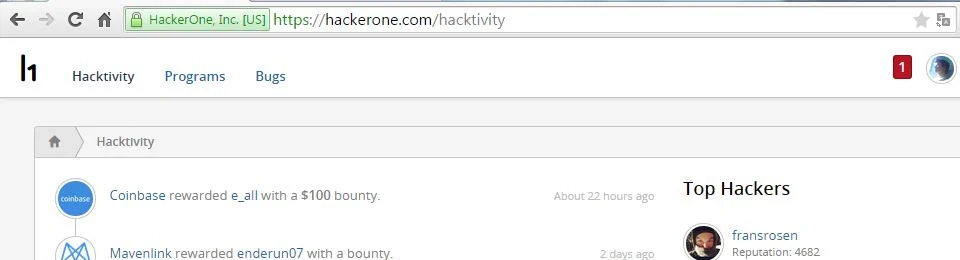
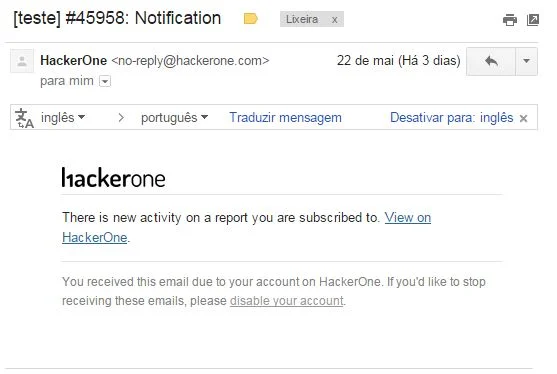
Hello Hackerone team. I realized that I still get notifications of updates to bugs when it was part of a team but I'm not currently access. This causes me to keep getting emails about this report.
Please see the attached images.
If necessary can create a video with POC
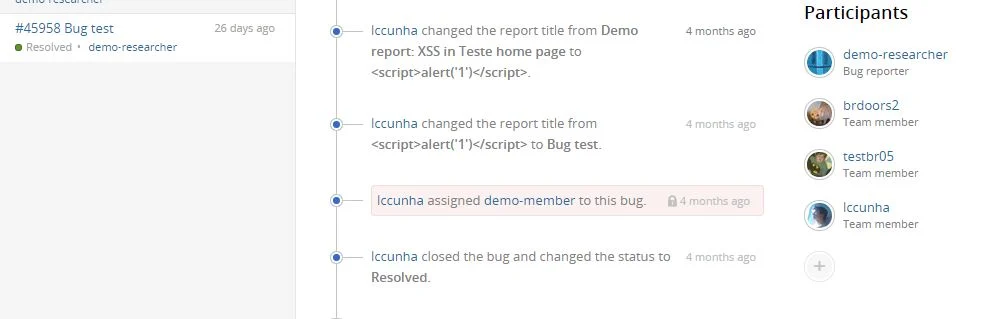
Note: the image 5 illustrates that even though I had already left the team'm still seen as part of accessing the report from another account (a current member of the team).
Attachments

What the report shows
The report concerns HackerOne itself, specifically the notification behaviour tied to team membership on reports. The researcher found that after leaving a team, they continued to receive notifications about updates to bugs that had belonged to that team, even though they were no longer part of it. The notifications arrived by email, so the flow of information about the report continued after the researcher's access had ended.
The researcher described the situation plainly: they still received notifications of updates to bugs when the bug had been part of a team they were no longer part of, and they could not clean this area on their account. The report does not describe the exact steps taken to leave the team or the exact notification settings in place at the time.
A second observation is recorded in the note accompanying the attachments. Image 5 shows that, from another account belonging to a current member of the team, the researcher who had already left was still displayed as part of the access to the report. In other words, the membership change had not been reflected consistently: the departed user still appeared in the report's access view even though they were no longer a member.
The researcher offered to record a video proof of concept if needed. The report does not include any request, response, header, parameter or version detail, and it does not describe a fix. The disclosed record lists the weakness as a violation of secure design principles, a bounty of 500.00 USD, and disclosure on 2015-06-04. No severity or CVSS score is given.
Root cause
The likely cause is that notification subscriptions and the report's access list are stored or evaluated separately from team membership. When a user leaves a team, the membership record changes, but the notification subscription and the access entry on individual reports are not reconciled with that change. The result is a stale reference: the user is no longer authorised, yet the system still treats them as a recipient and, as image 5 suggests, still lists them among those with access.
This is a state synchronisation problem rather than an injection or authentication bypass. The authorisation check on the report itself may well be correct, while the notification pipeline and the access display kept the old relationship alive.
Impact
The impact is continued disclosure of report activity to a person who should no longer see it. The researcher kept receiving emails about updates to the bugs after leaving the team. The report's own framing is limited to receiving emails and being unable to clean the area on the account; it does not claim that the former member could open the full report or read attachments. The access-list inconsistency shown in image 5 also means other members see an inaccurate picture of who can access the report.
How this kind of bug works
Multi-tenant platforms model access through relationships: a user belongs to a team, a team owns a report, and the report has participants. Notifications are usually generated by a separate subsystem that resolves recipients from stored subscriptions, watchers or follower records. If removal from a team only deletes the membership row and does not cascade to subscriptions, watchers and per-object participant lists, the old relationships persist. The same happens when a user is removed from a single report rather than the whole team, or when a team is deleted while its reports remain.
The bug class is an authorisation lifecycle failure: access is granted correctly but not fully revoked. Defences are straightforward in principle. Membership changes should trigger a reconciliation that removes the user from notification subscriptions and participant lists, or notification delivery should re-check current authorisation at send time rather than trusting a stored subscription. Access lists shown in the interface should be derived from the same source of truth as the authorisation check, so the two cannot diverge.
How to test for it
- Create two accounts and a team or organisation on the target, with one account as owner and the other as a member.
- Have the member interact with an object, for example by commenting on or watching a report, so that a notification subscription is created.
- Remove the member from the team, or remove them from the specific object if per-object participants exist.
- Trigger an update to the object from the owner account and observe whether the removed account still receives an email or in-app notification.
- Log in as the removed account and check whether the object still appears in notification lists, watch lists or activity feeds, and whether any settings page lets the user unsubscribe.
- From the owner account, open the object's access or participant view and check whether the removed user is still listed.
A positive result is a notification delivered to an account that is no longer a member, or a stale entry in an access list. Common false positives include notifications that were queued before the removal and delivered afterwards, digest emails generated from cached data, and cases where the removed user retained access through a second team or a direct participant entry that was never revoked. Repeat the test after a delay and with a fresh object to separate queued delivery from a persistent subscription. Also test the reverse direction: adding a user to a team and checking whether they receive notifications for objects they should now see.
How it is fixed
Removal from a team or from an object should revoke every derived relationship in the same transaction or through a reliable background job: notification subscriptions, watch and follower records, participant lists and any cached recipient sets. As a defence in depth, the notification sender should verify that each recipient is still authorised for the object at delivery time and drop the message otherwise. Access views in the interface should be computed from the authoritative membership data rather than from a denormalised copy. Periodic reconciliation jobs help catch records that slipped through, and account settings should let a user clear stale subscriptions.
Hunting notes
This class of bug hides wherever membership and notification state are modelled separately: team and organisation management, per-project roles, shared dashboards, comment subscriptions, mention notifications and audit feeds. Recon signals include features that let users watch, follow or subscribe to objects, invitation and removal flows, and any settings page that lists notification preferences per team. Multi-tenant SaaS products with role hierarchies are the richest ground.
To make the report land, show the full lifecycle: the subscription being created, the removal, the update that triggers delivery, and the received notification alongside proof that the account is no longer a member. Include the stale access-list view if one exists, since it demonstrates the inconsistency directly. Keep the demonstration on your own accounts and avoid capturing another user's data in screenshots.
What happened, in plain words
HackerOne is a platform where security researchers report bugs to companies. Each company runs a programme, and the people who work on it form a team. Reports (the bug write-ups) belong to that team, and team members get notifications when something changes on a report, for example a new comment or a status update.
The researcher in this report was a member of a team and then left it. Leaving a team should mean you stop seeing that team's reports and stop hearing about them. That did not happen. The researcher kept receiving email notifications about updates to bugs that had belonged to the team, even though they were no longer part of it. They also found they could not clear this leftover state from their own account settings.
The report does not describe the exact steps taken to leave the team, nor the notification settings that were in place at the time.
A second problem is recorded in the note that goes with the screenshots. Image 5 shows that, when a current member of the team looked at the report, the researcher who had already left was still displayed as part of the access to that report. So the membership change had not been applied everywhere: the departed user still appeared in the report's access view even though they were no longer a member.
The researcher offered to record a video proof of concept if one was needed. The report contains no request, response, header, parameter or version detail, and it does not describe a fix. The disclosed record lists the weakness as a violation of secure design principles, a bounty of 500.00 USD, and disclosure on 2015-06-04. No severity or CVSS score is given.
Why it happens
The likely cause is that two things are stored separately from team membership: the list of people who receive notifications, and the list of people with access to each report. When someone leaves a team, the membership record changes, but the notification subscription and the per-report access entry are not updated to match. The result is a stale reference: the person is no longer authorised, yet the system still treats them as a recipient and, as image 5 suggests, still lists them among those with access.
This is a state synchronisation problem, not an injection or an authentication bypass. The access check on the report itself may well be correct, while the notification pipeline and the access display kept the old relationship alive.
What the impact is
Report activity keeps reaching a person who should no longer see it. The researcher kept receiving emails about updates to the bugs after leaving the team. The report itself only claims that emails kept arriving and that the area could not be cleaned from the account; it does not claim the former member could open the full report or read attachments. The access-list inconsistency in image 5 also means other members see an inaccurate picture of who can access the report.
In general, how this kind of bug works
Multi-tenant platforms model access through relationships: a user belongs to a team, a team owns a report, and the report has participants. Think of a shared office: you are given a key to a room as part of a group, and a separate mailing list sends you post about that room. If you leave the group and hand back the key but nobody takes you off the mailing list, post keeps arriving even though the door no longer opens for you.
Notifications are usually generated by a separate subsystem that works out recipients from stored subscriptions, watchers or follower records. If removal from a team only deletes the membership row and does not cascade to subscriptions, watchers and per-object participant lists, the old relationships persist. The same happens when a user is removed from a single report rather than the whole team, or when a team is deleted while its reports remain.
The bug class is an authorisation lifecycle failure: access is granted correctly but not fully revoked. Defences are straightforward in principle. Membership changes should trigger a reconciliation that removes the user from notification subscriptions and participant lists, or notification delivery should re-check current authorisation at send time rather than trusting a stored subscription. Access lists shown in the interface should be derived from the same source of truth as the authorisation check, so the two cannot diverge.
In general, how to test for it
- Create two accounts and a team or organisation on the target, with one account as owner and the other as a member.
- Have the member interact with an object, for example by commenting on or watching a report, so that a notification subscription is created.
- Remove the member from the team, or from the specific object if per-object participants exist.
- Trigger an update to the object from the owner account and observe whether the removed account still receives an email or in-app notification.
- Log in as the removed account and check whether the object still appears in notification lists, watch lists or activity feeds, and whether any settings page lets the user unsubscribe.
- From the owner account, open the object's access or participant view and check whether the removed user is still listed.
A positive result is a notification delivered to an account that is no longer a member, or a stale entry in an access list. Common false positives include notifications that were queued before the removal and delivered afterwards, digest emails generated from cached data, and cases where the removed user kept access through a second team or a direct participant entry that was never revoked. Repeat the test after a delay and with a fresh object to separate queued delivery from a persistent subscription. Also test the reverse direction: add a user to a team and check whether they receive notifications for objects they should now see.
In general, how it is fixed
Removal from a team or from an object should revoke every derived relationship in the same transaction or through a reliable background job: notification subscriptions, watch and follower records, participant lists and any cached recipient sets. As a defence in depth, the notification sender should verify that each recipient is still authorised for the object at delivery time and drop the message otherwise. Access views in the interface should be computed from the authoritative membership data rather than from a denormalised copy. Periodic reconciliation jobs help catch records that slipped through, and account settings should let a user clear stale subscriptions.
In general, where to look
This class of bug hides wherever membership and notification state are modelled separately: team and organisation management, per-project roles, shared dashboards, comment subscriptions, mention notifications and audit feeds. Signals worth watching for include features that let users watch, follow or subscribe to objects, invitation and removal flows, and any settings page that lists notification preferences per team. Multi-tenant SaaS products with role hierarchies are the richest ground.
To make the report land, show the full lifecycle: the subscription being created, the removal, the update that triggers delivery, and the received notification alongside proof that the account is no longer a member. Include the stale access-list view if one exists, since it demonstrates the inconsistency directly. Keep the demonstration on your own accounts and avoid capturing another user's data in screenshots.
Glossary
- Bug bounty: a programme that pays people for reporting security problems to a company.
- Report: a written description of a security bug submitted to a programme.
- Team: the group of people on a programme who can see and work on its reports.
- Notification: an automatic message, by email or inside the site, telling you something changed.
- Subscription: a stored record saying you want to be notified about a particular object.
- Watcher / follower: a user who has asked to be kept informed about an object.
- Participant list: the list of users recorded as having access to a specific report.
- Access view: the screen that shows who can access a report.
- Authorisation: the check that decides whether a user is allowed to do or see something.
- Authentication: proving who you are, usually by logging in.
- Revocation: taking away access that was previously granted.
- Stale reference: an old record that still points to a relationship that no longer exists.
- State synchronisation: keeping two or more stored copies of the same fact consistent with each other.
- Multi-tenant: a platform where many separate organisations share the same system, each with its own users and data.
- Cascade: automatically applying a change, such as a removal, to all related records.
- Defence in depth: adding a second, independent check so one mistake does not open a hole.
- Reconciliation job: a background task that compares records and corrects mismatches.
- Denormalised copy: a duplicate of data kept for convenience, which can drift from the original.
- Proof of concept (POC): a demonstration that shows a bug really works.
- CVSS: a standard scoring system for the severity of a vulnerability.
- Secure design principles: the general rules for building systems so that access and data handling stay safe by design.

