Names not completely redacted despite "Redact the names of the involved users" is selected
The PDF export feature's 'Redact the names of the involved users' option failed to redact the names of team members who only performed disclosure-related activities (such as agreeing to go public) without leaving any comments. An attacker could export a report as PDF with redaction enabled and still see those team members' names, leading to unintended information disclosure.
japz Follow with megatron_h1
 Originally disclosed on HackerOne
- Triaged in 4 days
- Fixed in 5 days
- Paid in 5 days
- Disclosed after 5 days
Summary by the program
In the Export PDF function using a limited rollout function (as of writing), @japz found an edge case with the Redact Usernames functionality that names ending with a . would not get properly redacted. We accepted and fixed this edge case.
The report
Summary:
Hi @security @zerotea,
Hope you are doing well.
Today I have found a special edge case where the names are still visible despite "Redact the names of the involved users" is selected on export as .pdf report. This is similar to the resolved reports #2109009 and #2054222.
But this time, looks like the root cause is coming from a team member that triggers the agreed on going public and report became public activity on the report but did not leave any single comment on the report, I have found that when the involve user (names) of a team member that did not put any comments but he is the one who agreed to disclose this report, then his name will be visible on the report despite the "Redact the names of the involved users" is selected
Please note that just observed that today because of this disclosed report today from @linkedin:
Disclosed Rerport: Improper access control on Linkedin Page
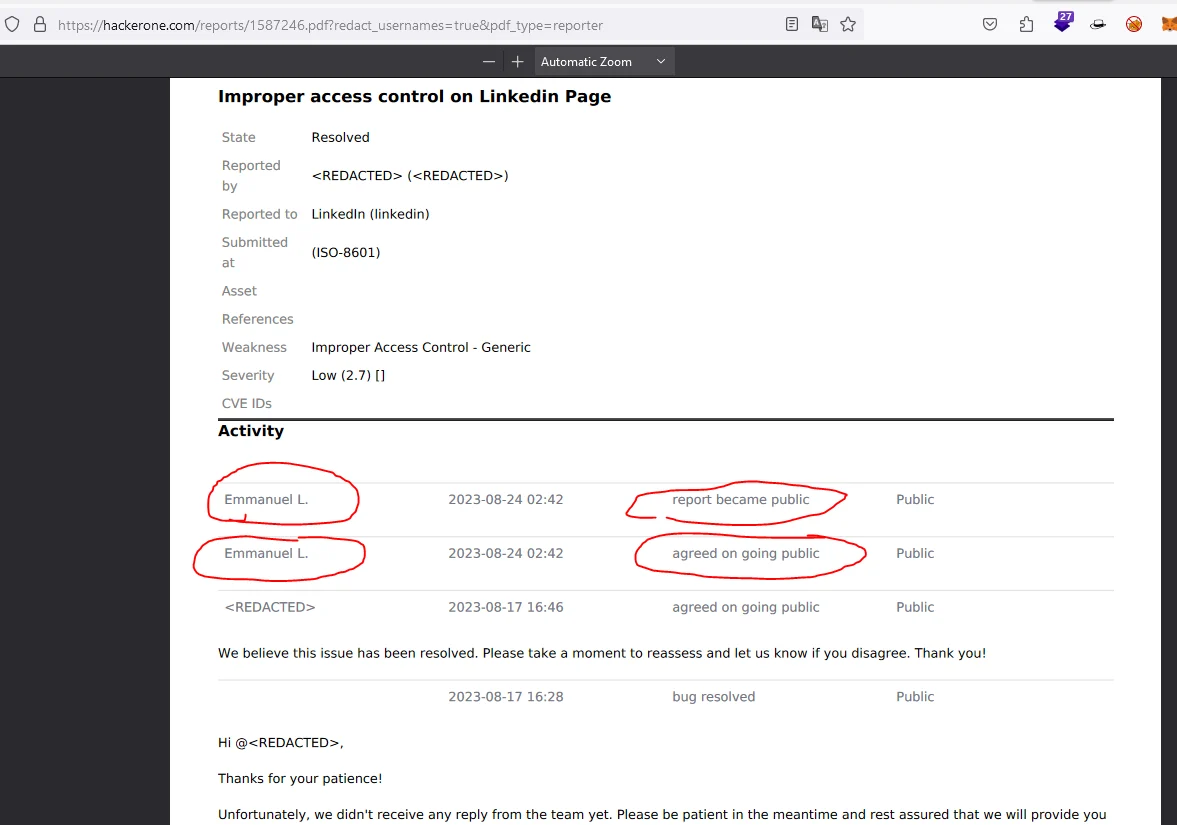
While reading that report, i tried to export that as .pdf and I selected the option Redact the names of the involved users, then I saw that the name of the team member who agreed to disclose report report is still visible on the activity.
Name: Emmanuel L.
Steps To Reproduce
- Go to this disclosed report from LinkedIn: https://hackerone.com/reports/1587246
- Export the report as .pdf , make sure to select the
Redact the names of the involved users - Check the report output and you will see below acitivity
Emmanuel L. 2023-08-24 02:42 report became public Public
Emmanuel L. 2023-08-24 02:42 agreed on going public Public
For easier step to reproduce, you can just visit this https://hackerone.com/reports/1587246.pdf?redact_usernames=true&pdf_type=reporter
Impact
Disclosing the supposed to be redacted data, sensitive information disclosure.
Let me know if you have any question
Regards, @japz
Context
HackerOne's report pages can be exported as a PDF. The export offers an option labelled Redact the names of the involved users, which is meant to strip the names of everyone involved in a report from the generated document. The feature was, at the time of the report, on a limited rollout.
The program summarised the edge case as a name ending with a . not being properly redacted. The program accepted the issue, fixed the edge case, and paid a bounty of 500.00 USD. The report was disclosed on 2023-08-29 and is rated low severity (CVSS 3.4), classified as Information Disclosure.
Setup
No special accounts, tools or versions are needed. The only precondition is access to a disclosed report whose activity includes a team member who agreed to make the report public, and the ability to export that report as a PDF with the redaction option selected. The researcher used a report from LinkedIn that had been disclosed that day.
Finding it
The researcher was reading a newly disclosed report and exported it as a PDF with Redact the names of the involved users selected. In the output, the name of the team member who had agreed to disclose the report was still visible in the activity section.
The name shown was:
Emmanuel L.
The researcher noted that this is similar to two previously resolved reports, #2109009 and #2054222, but that the root cause here looked different. In this case the leaked name belonged to a team member who triggered the agreed on going public and report became public activity on the report without leaving a single comment on it. When an involved team member has not posted any comment but is the one who agreed to disclose the report, their name stays visible in the activity despite the redaction option being selected.
Exploitation
Step 1: Open the disclosed report
Go to the disclosed report from LinkedIn:
https://hackerone.com/reports/1587246
Step 2: Export as PDF with redaction enabled
Export the report as a PDF and make sure the Redact the names of the involved users option is selected.
Step 3: Inspect the activity in the output
The generated PDF still contains the following activity lines, with the team member's name in clear:
Emmanuel L. 2023-08-24 02:42 report became public Public
Emmanuel L. 2023-08-24 02:42 agreed on going public Public
The researcher also gave a shorter reproduction path: visiting the PDF export URL directly with the redaction parameter set.
https://hackerone.com/reports/1587246.pdf?redact_usernames=true&pdf_type=reporter
The researcher gave this URL as a shorter reproduction path. The resulting document shows the same activity entries with the name visible.
The screenshot shows the exported PDF output where the activity entries for the team member remain visible despite the redaction option.
Root cause
The redaction logic misses names that end with a .. The researcher's observation ties the leak to a specific activity pattern: a team member who agreed to make the report public and thereby generated the agreed on going public and report became public activity, without posting any comment on the report. In that combination the name is not redacted in the PDF export.
The report does not describe the implementation, so the exact reason the trailing period defeats the redaction is not stated.
Impact
Data that is supposed to be redacted is disclosed in the exported document: the name of an involved team member remains visible. The researcher characterises this as sensitive information disclosure.
Fix
The program accepted the report and fixed the edge case. The report does not describe the change that was made.
Variants to test
- Export reports where involved users have names ending in other punctuation (for example a trailing period in an initial) and check whether the activity section still shows them.
- Export reports where a team member performed a state-changing activity (agreed to disclose, made the report public) without commenting, and compare the activity section against the redacted expectation.
- Compare the PDF produced through the UI export with the one produced by requesting the export URL with
redact_usernames=truedirectly, to see whether both paths apply the same redaction. - Check other export formats and views for the same activity entries, to see whether the redaction gap is specific to the PDF path.
A positive result in any of these is a redacted export that still contains the name of an involved user in the activity section.
Hunting notes
This kind of bug hides in privacy features that post-process rendered text: redaction, anonymisation and export options. The signal is a feature that promises to remove identifiers from generated documents, combined with user-controlled display names that can contain punctuation. Testing is cheap: take a public artefact that exercises the feature, toggle the privacy option, and read the output carefully, including activity and metadata sections rather than just the main body. The researcher demonstrated impact by pointing at a live disclosed report, giving the export URL with the redaction parameter, and quoting the leaked activity lines.
What happened, in plain words
HackerOne is a website where security researchers report bugs to companies. Each bug report lives on its own page, and anyone can read a report once it has been made public. HackerOne also lets you download a report as a PDF file, the same kind of document you might get from a printer or a word processor.
When you export a report as a PDF, there is an option you can tick that says Redact the names of the involved users. "Redact" means to hide or blank out information, the way a government might black out a name in a released document. So this option is a privacy feature: it is supposed to remove the names of everyone involved in the report from the PDF, so that the person who downloads it does not see who said or did what.
The researcher found a gap in that privacy feature. In one specific situation, a name was still printed in full in the PDF even though the redaction option was ticked. The name that leaked was Emmanuel L., a team member. The situation was this: that team member had not written any comment on the report, but had been the one to agree that the report could be made public. That action shows up in the report's activity log, and the name attached to it was not hidden.
The program that runs HackerOne accepted the report, fixed the gap, and paid a bounty of 500.00 USD. The report was made public on 2023-08-29 and is rated low severity, with a CVSS score of 3.4. CVSS is a standard scoring system for how serious a security flaw is; 3.4 is on the low end. The flaw is classified as Information Disclosure, which simply means information that should have stayed hidden became visible.
The background you need
A few ideas come up again and again below, so here they are from scratch.
A report page. On HackerOne, each bug report is a web page. It has the description written by the researcher, the comments people leave, and an "activity" section. The activity section is like a logbook or a receipt: it records events in order, such as "this person commented", "this person changed the status", or "this report became public". Each line in the logbook has a name, a date and a time next to it.
Exporting as PDF. A PDF is a fixed-layout document format. When you export a web page as a PDF, the website takes the content of the page and builds a document from it. Any option you tick at export time, such as redaction, has to be applied while that document is being built.
Redaction. Think of redaction like using a black marker on a photocopy before handing it to someone. The original page still has the name; the copy you hand over should not. If the marker misses a spot, the name shows through. That is exactly the kind of miss described here.
Information Disclosure. This is the name for a whole family of bugs where something that was meant to be private becomes readable by someone who should not see it. It does not have to be a password; a name that a privacy setting promised to hide counts too.
Edge case. An edge case is a situation at the boundary of what a feature was designed for, which the designers did not think about. A name ending in a full stop, like an initial such as L., is a good example: most names do not end with a dot, so a feature that strips names out of text may not handle that dot correctly.
A URL parameter. When you see a web address with a ? in it, everything after the ? is a set of parameters: little labelled values passed to the website. For example, in ?redact_usernames=true, the label is redact_usernames and the value is true. It is a way of telling the website what you want without clicking through menus. You can type such a URL straight into your browser's address bar.
Setting up
There is nothing to install and no special account is needed. The only things required are:
- A web browser.
- A report that has already been made public, whose activity log includes a team member who agreed to make it public.
- The ability to export that report as a PDF with the redaction option ticked.
The researcher used a report from LinkedIn that had been disclosed that day. "Disclosed" means the report was made public on purpose, so anyone can read it.
Finding it
The researcher was reading a newly disclosed report and exported it as a PDF with Redact the names of the involved users selected. In the resulting document, the name of the team member who had agreed to disclose the report was still visible in the activity section.
The name shown was:
Emmanuel L.
This is a plain piece of text, not code. It is the name exactly as it appeared in the exported PDF, with the initial and the full stop at the end. The point of quoting it is to show that the name was printed in clear.
The researcher noted that this looked similar to two earlier reports, #2109009 and #2054222, which had already been resolved. But the cause here seemed different. In this case the leaked name belonged to a team member who had triggered the agreed on going public and report became public activity on the report, without leaving a single comment on it. In other words: when an involved team member has posted no comment at all, but is the person who agreed to make the report public, their name stays visible in the activity log even though the redaction option was ticked.
Reproducing it step by step
Step 1: Open the disclosed report
Go to the disclosed report from LinkedIn:
https://hackerone.com/reports/1587246
This is a web address. https:// means the connection is encrypted. hackerone.com is the website. /reports/1587246 points at one specific report, number 1587246. You can paste this into your browser's address bar and press Enter, just like any other link. The reason for starting here is that this is a real, public report whose activity log happens to contain the exact situation that triggers the bug.
Step 2: Export as PDF with redaction enabled
Export the report as a PDF and make sure the Redact the names of the involved users option is selected. This is the whole test: you are asking the website to produce a document with the names removed, and you want to see whether it actually does that.
Step 3: Inspect the activity in the output
The generated PDF still contains the following activity lines, with the team member's name in clear:
Emmanuel L. 2023-08-24 02:42 report became public Public
Emmanuel L. 2023-08-24 02:42 agreed on going public Public
These two lines are copied from the PDF. Read them left to right: the name Emmanuel L., then the date 2023-08-24 and the time 02:42, then a description of what happened (report became public and agreed on going public), and finally the word Public, which is the visibility of that activity entry. The important part is the very first thing on each line: the name. It should have been replaced or blanked out, and it was not.
The researcher also gave a shorter reproduction path: visiting the PDF export URL directly, with the redaction parameter set.
https://hackerone.com/reports/1587246.pdf?redact_usernames=true&pdf_type=reporter
This address does the same job as clicking through the export menu, but in one go. Break it down:
https://hackerone.com/reports/1587246.pdfasks the website for the PDF version of report 1587246. The.pdfat the end tells the server which format you want.?starts the list of parameters.redact_usernames=trueis the instruction to hide the names.redact_usernamesis the setting name andtruemeans "yes, do it".&separates one parameter from the next.
The resulting document shows the same activity entries with the name visible. The reason for offering this shortcut is that it removes any doubt about which options were ticked in a menu: the request itself states plainly that redaction was asked for.
The screenshot shows the exported PDF output where the activity entries for the team member remain visible despite the redaction option.
Why it happens
The redaction logic misses names that end with a .. The researcher's observation ties the leak to a specific pattern of activity: a team member who agreed to make the report public, and so generated the agreed on going public and report became public activity, without posting any comment on the report. In that combination the name is not redacted in the PDF export.
The report does not describe how the feature is built, so the exact reason the trailing full stop defeats the redaction is not stated. Think of it like a search-and-replace in a word processor: if you search for "Emmanuel L" without the dot, a document containing "Emmanuel L." will not be found, and nothing gets replaced.
Impact
Data that is supposed to be redacted is disclosed in the exported document: the name of an involved team member remains visible. The researcher describes this as sensitive information disclosure.
The fix
The program accepted the report and fixed the edge case. The report does not describe the change that was made.
Other things worth testing
If you want to explore the same area yourself, these are variations on the same basic test. Each one is a small change to the same basic test: export with redaction on, then read the output carefully.
- Export reports where involved users have names ending in other punctuation (for example a trailing full stop in an initial) and check whether the activity section still shows them.
- Export reports where a team member performed a state-changing activity (agreed to disclose, made the report public) without commenting, and compare the activity section against what you would expect after redaction.
- Compare the PDF produced through the export menu in the browser with the one produced by requesting the export URL with
redact_usernames=truedirectly, to see whether both paths apply the same redaction. - Check other export formats and views for the same activity entries, to see whether the redaction gap is specific to the PDF path.
A positive result in any of these is a redacted export that still contains the name of an involved user in the activity section.
Where bugs like this hide
This kind of bug hides in privacy features that post-process text after it has been rendered: redaction, anonymisation and export options. The signal is a feature that promises to remove identifiers from generated documents, combined with display names that users control and that can contain punctuation. Testing is cheap: take a public artefact that exercises the feature, toggle the privacy option, and read the output carefully, including activity and metadata sections rather than just the main body. The researcher demonstrated impact by pointing at a live disclosed report, giving the export URL with the redaction parameter, and quoting the leaked activity lines.
Glossary
- Bounty: a payment made by a company to a researcher who reports a valid security bug.
- CVSS: a standard scoring system that rates the severity of a security flaw, usually from 0 to 10.
- Disclosed report: a bug report that has been made public on purpose, so anyone can read it.
- Edge case: an unusual situation at the boundary of what a feature was designed for, which the designers did not consider.
- Export: producing a file, such as a PDF, from the content of a web page.
- Information Disclosure: a class of bug where information meant to be private becomes visible to someone who should not see it.
- Parameter: a labelled value attached to a web address after a
?, used to tell the website what you want. - PDF: a fixed-layout document format that looks the same wherever it is opened.
- Redaction: hiding or blanking out parts of a document, such as names, before it is shared.
- Root cause: the underlying reason a bug happens, as opposed to its visible symptom.
- Severity: how serious a bug is judged to be, often expressed with a CVSS score.
- State-changing activity: an action in a report's logbook that changes something, such as agreeing to make a report public.
- URL: the address of a page or file on the web, typed into a browser's address bar.
- Variant: a slightly different version of the same test, used to find related bugs.



