Non-secure requests are not automatically upgraded to HTTPS
Non-secure HTTP requests to hackerone.com were not automatically redirected to HTTPS, and the login form could be submitted over plain HTTP. An attacker on the same network could intercept credentials or inject scripts when the victim uses a browser without HSTS preload.

- Triaged in 18 hours
- Fixed in 7 days
- Paid in 8 days
- Disclosed after 9 days
Non-secure requests to hackerone.com (e.g. http://hackerone.com) are not automatically upgraded to HTTPS. This is not something you would notice when you use the latest version of modern web browsers such as Google Chrome or Firefox, because hackerone.com is HSTS preloaded. When a domain is preloaded, non-secure requests for these domains are internally upgraded to HTTPS. However, there are still browsers that either haven't implemented HSTS preload lists, or don't have hackerone.com on their HSTS preload lists (yet).
Take for example Safari on iOS, which doesn't have hackerone.com in its HSTS preload list. When you open http://hackerone.com in Safari and head over to the 'Sign in' page you will see that the connection is not upgraded to HTTPS. Moreover, if you enter your username and password, and hit 'Sign in', the form is sent in the clear over a non-secure connection.
Since non-secure requests aren't upgraded to HTTPS, the user will never receive instructions (via the Strict-Transport-Security header) to set the HSTS "cookie" for 'hackerone.com. Which means a secure connection is not enforce until the first time the requests a resource over HTTPS, because that response will include the Strict-Transport-Security` header.
Steps to reproduce
cURL
- Send a
HEADrequest tohttp://hackerone.com:curl -I http://hackerone.com. - You will see that the server does not instruct the client to upgrade the connection to HTTPS. The server responds with a 200 OK status code instead of 301 status code with the response header
Locationset tohttps://hackerone.com.
Firefox
- Clear the
Site Preferences: ClickHistory-->Clear Recent History..., selectEverything, tickSite Preferences, and hitClear Now. This is to ensure Firefox forgets about an HSTS settings forhackerone.com. - Turn off the use of the HSTS preload list. Set
network.stricttransportsecurity.preloadlisttofalseon theabout:configpage. - Open
http://hackerone.com. - You will see that the non-secure connection is not upgraded to HTTPS.
- Also note that when you click
Sign inin the top-right corner, enter your email address and password, and hit the greenSign inbutton that your credentials are sent in the clear to the non-secure endpoint http://hackerone.com/sessions.
Exploitability and impact
Granted, it is kind of hard to exploit this vulnerability, because, first of all, it requires an attacker to be in a privileged network (he/she needs to be able to see what's going over the wire). Then the attacker would need to trick the victim into opening http://hackerone.com in a browser that doesn't have hackerone.com HSTS preloaded and which doesn't have any HSTS cookies for hackerone.com from a previous secure visit to hackerone.com. When all these conditions are met, an attacker could for example steal the victim's HackerOne credentials, or inject some malicious scripts into any page. This is possible because the connection is never upgraded, and the site allows forms such as the login form to be posted to a non-secure endpoint (see the screenshot attached to this report).
Mitigation
Non-secure connections need to be upgraded to HTTPS as soon as possible using a permanent redirect. But since the website allowed me to send my username and password in the clear over a non-secure connection, I was also thinking that you would probably want to prevent forms from being posted to non-secure origins. One possibility is to enforce the client to only send AJAX requests to secure origins using the Content Security Policy connect-src directive.
Attachments
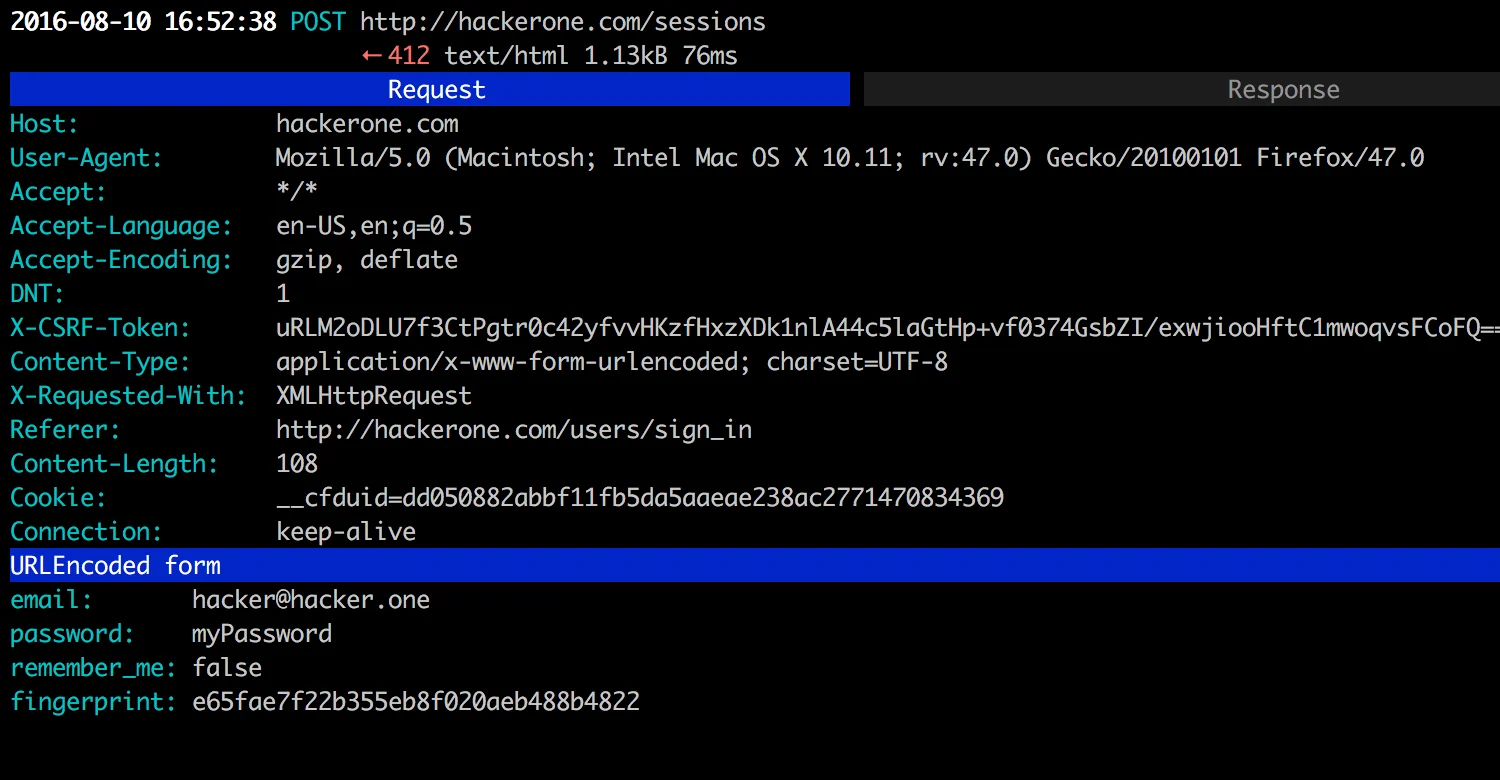
Context
HackerOne runs its main site at hackerone.com. Like most security-conscious sites, it serves the application over HTTPS and relies on HTTP Strict Transport Security (HSTS) to keep users on the secure scheme. The domain is on the HSTS preload list, which means browsers that ship that list treat every request to hackerone.com as HTTPS internally, even when the user types http:// or follows a plain http:// link.
The behaviour under test is what happens to a non-secure request to hackerone.com when the browser does not apply the preload list. The expectation for a site that wants to enforce HTTPS is that the server answers such a request with a permanent redirect to the HTTPS URL, so the user never interacts with the site over cleartext. The report shows that this redirect was missing.
Setup
The testing used a command-line HTTP client and a browser whose HSTS preload behaviour could be controlled. Two clients were used:
curl, to inspect the raw response headers for a plain HTTP request.- Firefox, with the HSTS preload list disabled and any stored HSTS state for the domain cleared, to reproduce what a browser without
hackerone.comin its preload list would do.
The researcher also refers to Safari on iOS as a real-world browser that did not have hackerone.com in its HSTS preload list at the time.
Finding it
The starting observation is simple: a non-secure request to hackerone.com, for example http://hackerone.com, is not automatically upgraded to HTTPS. On up-to-date Chrome or Firefox this is invisible, because hackerone.com is HSTS preloaded: the browser upgrades the request internally before it leaves the machine. The problem only surfaces on browsers that have not implemented HSTS preload lists, or that do not yet carry hackerone.com in their list.
Safari on iOS was such a browser. Opening http://hackerone.com there and navigating to the 'Sign in' page showed that the connection was not upgraded to HTTPS. Entering a username and password and pressing 'Sign in' sent the form in the clear over a non-secure connection.
There is a second-order effect. Because the initial non-secure request is never redirected, the user never receives the Strict-Transport-Security response header on that first visit, so the HSTS "cookie" for hackerone.com is never set. A secure connection is therefore not enforced until the first time the user requests a resource over HTTPS, since that response is the one that carries the Strict-Transport-Security header.
Exploitation
Step 1: check the response to a plain HTTP request with cURL
Send a HEAD request to the HTTP origin:
curl -I http://hackerone.com
The server does not instruct the client to upgrade the connection to HTTPS. It answers with a 200 OK status code instead of a 301 status code carrying a Location header set to https://hackerone.com. In other words, the cleartext request is served as-is rather than redirected to the secure origin.
Step 2: clear stored HSTS state in Firefox
In Firefox, open History --> Clear Recent History..., select Everything, tick Site Preferences, and click Clear Now. This makes Firefox forget any HSTS settings it holds for hackerone.com, so the test is not masked by a previously stored HSTS entry.
Step 3: disable the HSTS preload list in Firefox
On the about:config page, set network.stricttransportsecurity.preloadlist to false. This stops Firefox from applying its built-in preload list, reproducing the behaviour of a browser that does not have hackerone.com preloaded.
Step 4: open the site over HTTP
Navigate to http://hackerone.com. The non-secure connection is not upgraded to HTTPS.
Step 5: submit the login form over the non-secure connection
Click Sign in in the top-right corner, enter an email address and password, and press the green Sign in button. The credentials are sent in the clear to the non-secure endpoint http://hackerone.com/sessions.
The report includes an attached screenshot:
Root cause
The site did not redirect non-secure requests to HTTPS. A request to http://hackerone.com was answered with 200 OK rather than a permanent redirect to the HTTPS URL, so a browser that does not apply the HSTS preload list would keep talking to the site in cleartext. Because the first response was not a redirect and did not carry Strict-Transport-Security, the HSTS policy was never installed on that first visit, and enforcement only began after the user happened to make an HTTPS request.
The existing defence, HSTS preloading, only covers browsers that implement and ship the preload list. It does nothing for browsers that lack the list or lack hackerone.com in it, and it does nothing for the very first request in a browser with no stored HSTS state. On top of that, the site accepted form submissions, including the login form, to a non-secure endpoint, so credentials could be posted over cleartext whenever the page itself was loaded over HTTP.
Impact
The researcher is explicit that this is hard to exploit. It requires an attacker in a privileged network position, able to see what goes over the wire. The attacker must also trick the victim into opening http://hackerone.com in a browser that does not have hackerone.com HSTS preloaded and that holds no HSTS cookie for hackerone.com from an earlier secure visit.
When all of those conditions are met, an attacker could, for example, steal the victim's HackerOne credentials, or inject malicious scripts into any page. Both are possible because the connection is never upgraded and because the site allows forms such as the login form to be posted to a non-secure endpoint.
Fix
Non-secure connections should be upgraded to HTTPS as soon as possible using a permanent redirect. Separately, since the site allowed a username and password to be sent in the clear over a non-secure connection, forms should be prevented from being posted to non-secure origins. One suggested option is to enforce, through the Content Security Policy connect-src directive, that the client only sends AJAX requests to secure origins.
Variants to test
- Plain HTTP request to the apex and to common subdomains. Send
curl -I http://targetand the same for subdomains that serve the application. A positive result is a200 OK(or any non-redirect) instead of a301withLocation: https://.... - Login and other credential-bearing forms over HTTP. Load the sign-in page over
http://in a browser with the HSTS preload list disabled and stored HSTS state cleared, then submit. A positive result is the form action pointing at anhttp://endpoint and the credentials leaving the browser in cleartext. - First-visit HSTS installation. In a clean browser profile with preloading disabled, request the site over HTTP and inspect the response headers. A positive result is the absence of
Strict-Transport-Securityon that first response, meaning no HSTS policy is installed until an HTTPS request happens. - Browsers without the preload entry. Repeat the check in a browser or platform known not to carry the domain in its preload list. A positive result is the same lack of upgrade and the same cleartext form submission.
- CSP
connect-srccoverage. Inspect the Content Security Policy of pages that make requests to the origin. A positive result, from a defensive standpoint, is aconnect-srcthat restricts requests to secure origins; its absence leaves the AJAX path open to the same downgrade.
What happened, in plain words
When you type a web address into your browser, you can start it with http:// or https://. The difference matters: http:// sends everything, including anything you type into a form, across the network as readable text. https:// scrambles that traffic so that anyone watching the network cannot read it. Most serious websites therefore want every visitor on https://, and the usual way to make that happen is for the server to answer any http:// request with a redirect, a polite instruction that says "go to the secure version instead".
HackerOne's main site, hackerone.com, did not do that. If you asked for http://hackerone.com, the server simply served the page over the insecure connection. On a modern copy of Chrome or Firefox you would never notice, because those browsers carry a built-in list of sites that must always use HTTPS, and hackerone.com is on that list. The browser quietly upgrades the request before it even leaves your computer. But not every browser has that list, or has this site on it. On those browsers the insecure page really was served, and the login form on it really did send your email address and password in the clear.
The researcher who found this, koenrh, showed the problem with a command-line tool and with a browser configured to behave like one without the built-in list.
Background: the ideas you need
Before the steps make sense, here are the pieces involved.
HTTP and HTTPS. HTTP is the language browsers and web servers use to talk. HTTPS is the same language wrapped in encryption. With HTTP, anyone positioned on the network between you and the server (the Wi-Fi operator, someone on the same café network, an internet provider) can read the traffic. With HTTPS they see only scrambled data.
Redirect. A redirect is a server's way of saying "not here, go there". It comes back as a status code, a three-digit number at the start of the response. 200 OK means "here is the page you asked for". 301 means "this has moved permanently", and it comes with a Location header telling the browser the new address. A site that wants to force HTTPS answers every http:// request with a 301 pointing at the https:// version.
Headers. Every response from a server carries headers: small labelled lines of metadata sent before the page itself. Location is one. Strict-Transport-Security is another, and it is central here.
HSTS (HTTP Strict Transport Security). This is a rule a server can send to a browser saying "for the next while, never talk to me over plain HTTP; always use HTTPS". The browser stores that rule, and from then on upgrades requests to that site automatically. People sometimes call the stored rule an HSTS "cookie", though it is not a cookie in the usual sense. The rule only gets stored when the browser receives a response that carries the Strict-Transport-Security header, and that can only happen over a connection where the browser actually reaches the server.
HSTS preload list. Waiting for a first visit to install the HSTS rule leaves a gap: that very first visit is unprotected. To close the gap, browser makers ship a list of domains baked into the browser itself, so the rule is in place before the first request. hackerone.com is on that list. The catch is that the list only helps in browsers that have it and that include this particular domain.
cURL. A command-line program for making web requests and printing the raw response. It is useful because it shows you exactly what the server sends, without a browser's extra behaviour getting in the way.
HEAD request. A request that asks the server for the response headers only, not the page body. It is a quick way to inspect status codes and headers.
about:config. A hidden settings page in Firefox where you can change internal preferences that have no normal menu entry.
Content Security Policy (CSP). A set of rules a site can send to the browser limiting what the page is allowed to do, for example which addresses it may contact. One of those rules is called connect-src.
AJAX. Requests a page makes in the background, without reloading, to fetch or send data. CSP's connect-src directive controls where those background requests may go.
The finding
A request to http://hackerone.com was not automatically upgraded to HTTPS. On current Chrome or Firefox this is invisible, because hackerone.com is HSTS preloaded and the browser upgrades the request internally. The problem appears in browsers that have not implemented HSTS preload lists, or that do not have hackerone.com on their list.
Safari on iOS was one such browser at the time. Opening http://hackerone.com there and going to the 'Sign in' page showed that the connection was not upgraded. Typing a username and password and pressing 'Sign in' sent the form in the clear over the insecure connection.
There is a knock-on effect. Because the first insecure request is never redirected, the browser never receives the Strict-Transport-Security header on that visit, so the HSTS rule for hackerone.com is never stored. A secure connection is only enforced once the user happens to request something over HTTPS, because that is the response that carries the header.
Reproducing it
Step 1: look at the raw response with cURL
Send a HEAD request to the insecure address:
curl -I http://hackerone.com
Line by line: curl is the program; -I tells it to send a HEAD request and print only the response headers; http://hackerone.com is the address being asked, deliberately with http:// rather than https://. The point of this step is to see what the server says to a plain, unencrypted request, with no browser cleverness in the way.
The server does not tell the client to switch to HTTPS. It answers with 200 OK instead of a 301 with a Location header set to https://hackerone.com. In plain terms, the server hands over the page over the insecure connection rather than sending the visitor to the secure one.
Step 2: make Firefox forget any stored HSTS rule
In Firefox, open History --> Clear Recent History..., select Everything, tick Site Preferences, and click Clear Now. This step exists because Firefox may already have stored an HSTS rule for hackerone.com from an earlier visit. If it had, the browser would upgrade the request on its own and hide the problem. Clearing site preferences removes that stored rule so the test starts from a clean state.
Step 3: switch off the built-in preload list
On the about:config page, set network.stricttransportsecurity.preloadlist to false. This stops Firefox from applying its built-in list of always-HTTPS domains. The aim is to make Firefox behave like a browser that does not have hackerone.com preloaded, which is exactly the situation of the affected users.
Step 4: open the site over HTTP
Go to http://hackerone.com. The insecure connection is not upgraded to HTTPS. This confirms in a browser what cURL showed: no redirect, no upgrade.
Step 5: submit the login form over the insecure connection
Click Sign in in the top-right corner, enter an email address and password, and press the green Sign in button. The credentials are sent in the clear to the insecure address http://hackerone.com/sessions. This is the step that turns a missing redirect into a real risk: the password leaves the browser readable by anyone watching the network.
The report includes an attached screenshot:
Why it happened
The site did not redirect insecure requests to HTTPS. A request to http://hackerone.com got 200 OK rather than a permanent redirect to the HTTPS address, so a browser without the preload list kept talking to the site in the clear. Because that first response was neither a redirect nor carried Strict-Transport-Security, the HSTS rule was never installed on the first visit, and enforcement only began after the user happened to make an HTTPS request.
The existing defence, HSTS preloading, only covers browsers that implement the list and carry this domain on it. It does nothing for browsers without the list, nothing for browsers without this domain on it, and nothing for the very first request in a browser with no stored HSTS rule. On top of that, the site accepted form submissions, including the login form, to an insecure address, so credentials could be posted in the clear whenever the page itself was loaded over HTTP.
How bad it is
The researcher is explicit that this is hard to exploit. It needs an attacker in a privileged network position, someone able to see what goes over the wire. The attacker must also trick the victim into opening http://hackerone.com in a browser that does not have hackerone.com HSTS preloaded and that holds no HSTS rule for hackerone.com from an earlier secure visit.
When all of those conditions are met, an attacker could, for example, steal the victim's HackerOne credentials, or inject malicious scripts into any page. Both are possible because the connection is never upgraded and because the site allows forms such as the login form to be posted to an insecure address.
The fix
Insecure connections should be upgraded to HTTPS as soon as possible using a permanent redirect. Separately, since the site allowed a username and password to be sent in the clear over an insecure connection, forms should be prevented from being posted to insecure origins. One suggested option is to enforce, through the Content Security Policy connect-src directive, that the client only sends AJAX requests to secure origins.
Similar things to check on other sites
- Plain HTTP requests to the main domain and to common subdomains. Send
curl -I http://targetand the same for subdomains that serve the application. A positive result is a200 OK(or any non-redirect) instead of a301withLocation: https://.... - Login and other credential-bearing forms over HTTP. Load the sign-in page over
http://in a browser with the HSTS preload list disabled and stored HSTS state cleared, then submit. A positive result is the form action pointing at anhttp://address and the credentials leaving the browser in cleartext. - First-visit HSTS installation. In a clean browser profile with preloading disabled, request the site over HTTP and inspect the response headers. A positive result is the absence of
Strict-Transport-Securityon that first response, meaning no HSTS rule is installed until an HTTPS request happens. - Browsers without the preload entry. Repeat the check in a browser or platform known not to carry the domain on its preload list. A positive result is the same lack of upgrade and the same cleartext form submission.
- CSP
connect-srccoverage. Inspect the Content Security Policy of pages that make requests to the origin. A positive result, from a defensive standpoint, is aconnect-srcthat restricts requests to secure origins; its absence leaves the AJAX path open to the same downgrade.
Glossary
- HTTP: the language browsers and web servers use to exchange pages and data, without encryption.
- HTTPS: the same language wrapped in encryption, so network observers cannot read it.
- Redirect: a server response telling the browser to go to a different address instead.
- Status code: the three-digit number at the start of a server response, such as
200or301. 200 OK: the status code meaning the requested page is being served.301: the status code meaning the resource has moved permanently, usually paired with aLocationheader.- Header: a labelled line of metadata sent with a request or response, such as
LocationorStrict-Transport-Security. Locationheader: the header in a redirect that gives the new address.Strict-Transport-Security: the response header that tells a browser to use HTTPS for a site from then on.- HSTS (HTTP Strict Transport Security): the rule, stored by the browser, that a site must only be reached over HTTPS.
- HSTS "cookie": informal name for the stored HSTS rule; not a real cookie.
- HSTS preload list: a list of always-HTTPS domains built into a browser, so the rule applies before the first visit.
HEADrequest: a request for the response headers only, without the page body.about:config: Firefox's hidden settings page for internal preferences.- Cleartext / in the clear: data sent unencrypted, readable by anyone on the network path.
- Endpoint: a specific address on a server that accepts requests, such as
http://hackerone.com/sessions. - Credentials: the username or email address and password used to sign in.
- Content Security Policy (CSP): rules a site sends to the browser limiting what the page may do.
connect-src: the CSP directive controlling which addresses a page may contact with background requests.- AJAX: background requests a page makes without reloading.
- Privileged network position: being placed on the network path between victim and server, able to observe traffic.
- Script injection: inserting malicious code into a page so it runs in the victim's browser.